Page 129 of 400
2. Push and hold the desired HomeLink® button until
the indicator light begins to flash after 20 seconds.Do
not release the button.
3.Without releasing the buttonproceed with
“Canadian/Gate Operator Programming” step 2 and
follow all remaining steps.
Using HomeLink®
To operate, push and release the programmed
HomeLink® button. Activation will now occur for the
programmed device (i.e., garage door opener, gate opera-
tor, security system, entry door lock, home/office light-
ing, etc.,). The hand-held transmitter of the device may
also be used at any time.
Security
It is advised to erase all channels before you sell or turn
in your vehicle.
To do this, push and hold the two outside buttons for 20
seconds until the red indicator flashes. Note that all
channels will be erased. Individual channels cannot be
erased.
The HomeLink® Universal Transceiver is disabled when
the Vehicle Security Alarm is active.
Troubleshooting Tips
If you are having trouble programming HomeLink®,
here are some of the most common solutions:
•Replace the battery in the original hand-held transmit-
ter.
•Push the LEARN button on the Garage Door Opener
to complete the training for a Rolling Code.
•Did you unplug the device for programming and
remember to plug it back in?
3
UNDERSTANDING THE FEATURES OF YOUR VEHICLE 127
Page 141 of 400
UNDERSTANDING YOUR INSTRUMENT PANEL
CONTENTS
!INSTRUMENT PANEL FEATURES..........142
!INSTRUMENT CLUSTER.................143
!INSTRUMENT CLUSTER DESCRIPTIONS.....144
!DRIVER INFORMATION DISPLAY (DID).....156
▫DID Display.........................158
▫Driver Information Display (DID) Messages . . .161
▫DID Yellow Telltales....................162
▫DID Red Telltales......................163
▫DID Green Telltales....................165
▫Driver Information Display (DID) Selectable
Menu Items..........................165
!Uconnect® SETTINGS....................174
▫Buttons On the Faceplate................175
▫Buttons On The Touchscreen..............175
▫Customer Programmable Features/Personal
Settings — Uconnect® 8.4 System Settings . . . .175
▫SRT Performance Pages.................189
!Uconnect® RADIOS — IF EQUIPPED........193
!iPod®/USB/MP3 CONTROL — IF EQUIPPED . .194
4
Page 159 of 400
The system allows the driver to select information by
pushing the following buttons mounted on the steering
wheel:
•UP Arrow Button
Push and release the UP arrow button to scroll
upward through the main menu and sub-
menus (Fuel Economy, Trip A, Trip B, Audio,
Stored Messages, Screen Set Up).
•DOWN Arrow Button
Push and release the DOWN arrow button to
scroll downward through the main menu and
submenus (Fuel Economy, Trip A, Trip B, Au-
dio, Stored Messages, Screen Set Up).
•RIGHT Arrow Button
Push and release the RIGHT arrow button to
access/select the information screens or sub-
menu screens of a main menu item. Push and
hold the RIGHT arrow button for two seconds
to reset displayed/selected features that can be reset.
DID Steering Wheels Controls
4
UNDERSTANDING YOUR INSTRUMENT PANEL 157
Page 167 of 400
DID Green Telltales
•Electronic Speed Control SET
This telltale will illuminate green when the
electronic speed control is SET. Refer to “Elec-
tronic Speed Control” in “Understanding The
Features Of Your Vehicle” for further
information.
Driver Information Display (DID) Selectable Menu
Items
Push and release the UP or DOWN arrow buttons until
the desired Selectable Menu icon is highlighted in the
DID.
Tachometer
Push and release the UP or DOWN arrow
button until the Tachometer icon is highlighted
in the DID. Push and release the RIGHT arrow
button to change the display between full
tachometer or digital speedometer.
MPH To km/h
Push and release the UP or DOWN arrow
button until the MPH to km/h icon is high-
lighted in the DID. Push and release the OK
button to change the display between MPH
or km/h.
4
UNDERSTANDING YOUR INSTRUMENT PANEL 165
Page 176 of 400
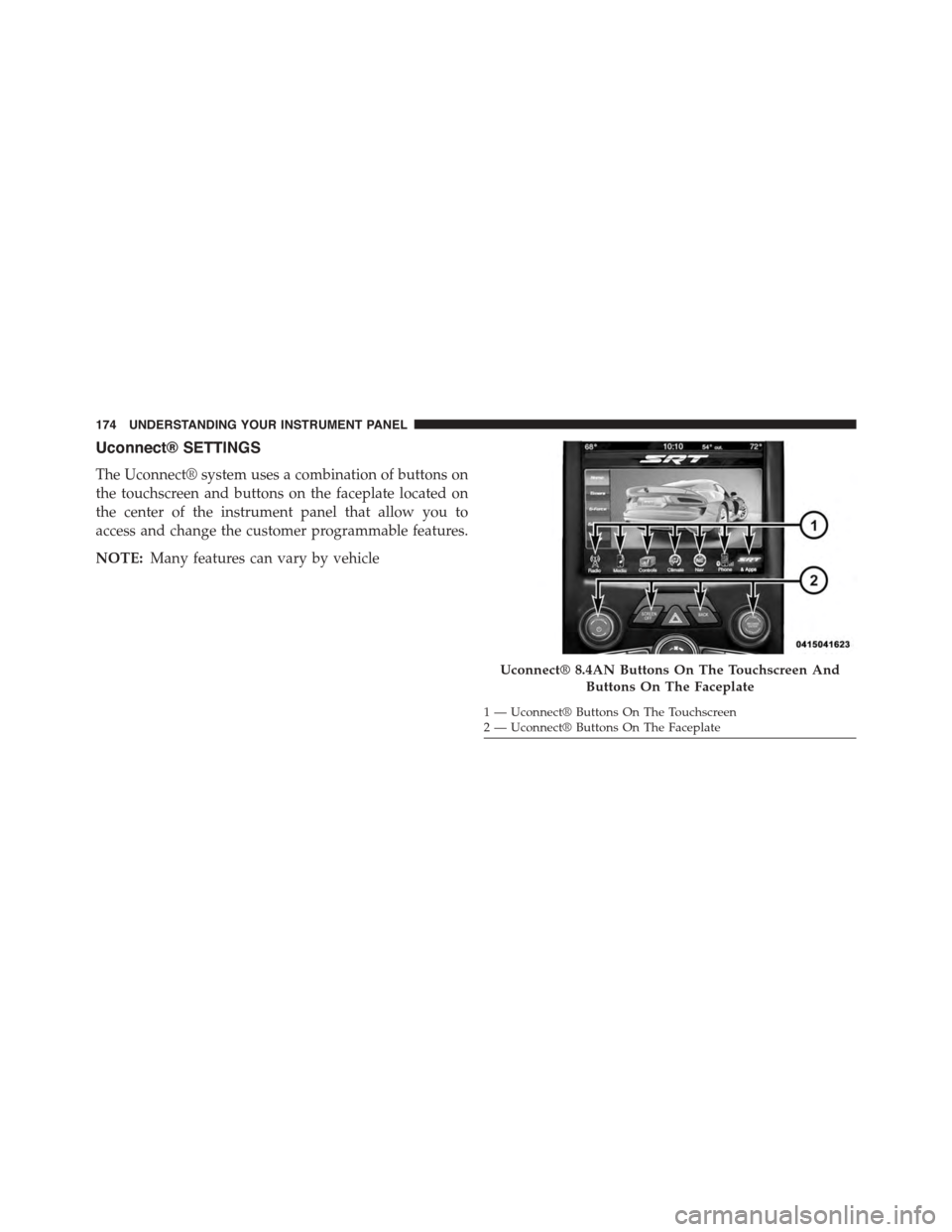
Uconnect® SETTINGS
The Uconnect® system uses a combination of buttons on
the touchscreen and buttons on the faceplate located on
the center of the instrument panel that allow you to
access and change the customer programmable features.
NOTE:Many features can vary by vehicle
Uconnect® 8.4AN Buttons On The Touchscreen And
Buttons On The Faceplate
1—Uconnect®ButtonsOnTheTouchscreen2—Uconnect®ButtonsOnTheFaceplate
174 UNDERSTANDING YOUR INSTRUMENT PANEL
Page 177 of 400

Buttons On the Faceplate
Buttons on the faceplate are located below the Uconnect®
system in the center of the instrument panel. In addition,
there is a Scroll/Enter control knob located on the right
side of the Climate Controls in the center of the instru-
ment panel. Turn the control knob to scroll through
menus and change settings (i.e., 30, 60, 90), push the
center of the control knob one or more times to select or
change a setting (i.e., ON, OFF).
Buttons On The Touchscreen
Buttons on the touchscreen are accessible on the
Uconnect® display.
Customer Programmable Features/Personal
Settings — Uconnect® 8.4 System Settings
Press the “SRT & Apps” button on the touchscreen, then
press the “Settings” button on the touchscreen to display
the menu setting screen. In this mode the Uconnect®
system allows you to access programmable features that
may be equipped such as Display, Voice, Clock, Safety &
Driving Assistance, Lights, Doors & Locks, Engine Off
Options, Audio, Phone/Bluetooth®, SiriusXM Setup, Re-
store Settings, Clear Personal Data, and System Informa-
tion.
NOTE:Only one category may be selected at a time.
To adjust the setting of a programmable feature, press the
desired setting option. Once in the desired setting option,
press and release the preferred setting until a check-mark
appears next to the setting, showing that the setting has
been selected.
Once the setting is complete, press the Back Arrow
button on the touchscreen to return to the previous menu
or press the X button on the touchscreen to close out of
the settings screen. Pressing the Up or Down Arrow
button on the right side of the screen will allow you to
toggle up or down through the list of available settings.
4
UNDERSTANDING YOUR INSTRUMENT PANEL 175
Page 178 of 400

Display
After pressing the Display button on the touchscreen the
following settings will be available.
•Display Mode
This feature will allow you to select one of the auto
display settings. To change Mode status, press and re-
lease the Auto or Manual button on the touchscreen.
Then press the arrow back button on the touchscreen, or
push the back button on the faceplate.
•Display Brightness With Headlights ON
This feature will allow you to select the display bright-
ness when the headlights are on. Adjust the brightness
with the “+” and “–” setting buttons on the touchscreen,
then press the arrow back button on the touchscreen, or
push the back button on the faceplate.
NOTE:The usage of the Parade Mode feature will cause
the radio to activate the “Display Brightness With Head-
lights OFF” control even though the headlights are on.
•Display Brightness With Headlights OFF
This feature will allow you to select the display bright-
ness when the headlights are off. Adjust the brightness
with the “+” and “–” setting buttons on the touchscreen,
then press the arrow back button on the touchscreen, or
push the back button on the faceplate.
•Set Theme — If Equipped
This feature will allow you to choose a theme for the
display screen. The theme will change the background
color, highlight color, and button color of the display
screen.
•Set Language
This feature will allow you to select one of the languages
for all display nomenclature, including the trip functions
176 UNDERSTANDING YOUR INSTRUMENT PANEL
Page 181 of 400

that setting has been selected. Press the back arrow
button on the touchscreen to return to the previous
menu, or push the back button on the faceplate.
•Set Time Hours
This feature will allow you to adjust the hours. The “Sync
with GPS Time” button on the touchscreen must be
unchecked. To make your selection, press the “+” or “–”
buttons on the touchscreen to adjust the hours up or
down. Press the back arrow button on the touchscreen to
return to the previous menu or press the” X” button on
the touchscreen to close out of the settings screen.
•Set Time Minutes
This feature will allow you to adjust the minutes. The
“Sync with GPS Time” button on the touchscreen must be
unchecked. To make your selection, press the “+” or “–”
buttons on the touchscreen to adjust the minutes up or
down. Press the back arrow button on the touchscreen to
return to the previous menu or press the “X” button on
the touchscreen to close out of the settings screen.
•Time Format
This feature will allow you to select the time format
display setting. Press the “Time Format” button on the
touchscreen until a check-mark appears next to the 12hrs
or 24hrs setting, showing that setting has been selected.
Press the back arrow button on the touchscreen to return
to the previous menu, or push the back button on the
faceplate.
Clock
After pressing the “Clock” button on the touchscreen the
following settings will be available:
•Sync Time With GPS
This feature will allow the radio to sync time with a GPS
signal. To change the Sync Time setting, press the “Sync
4
UNDERSTANDING YOUR INSTRUMENT PANEL 179