Page 310 of 648
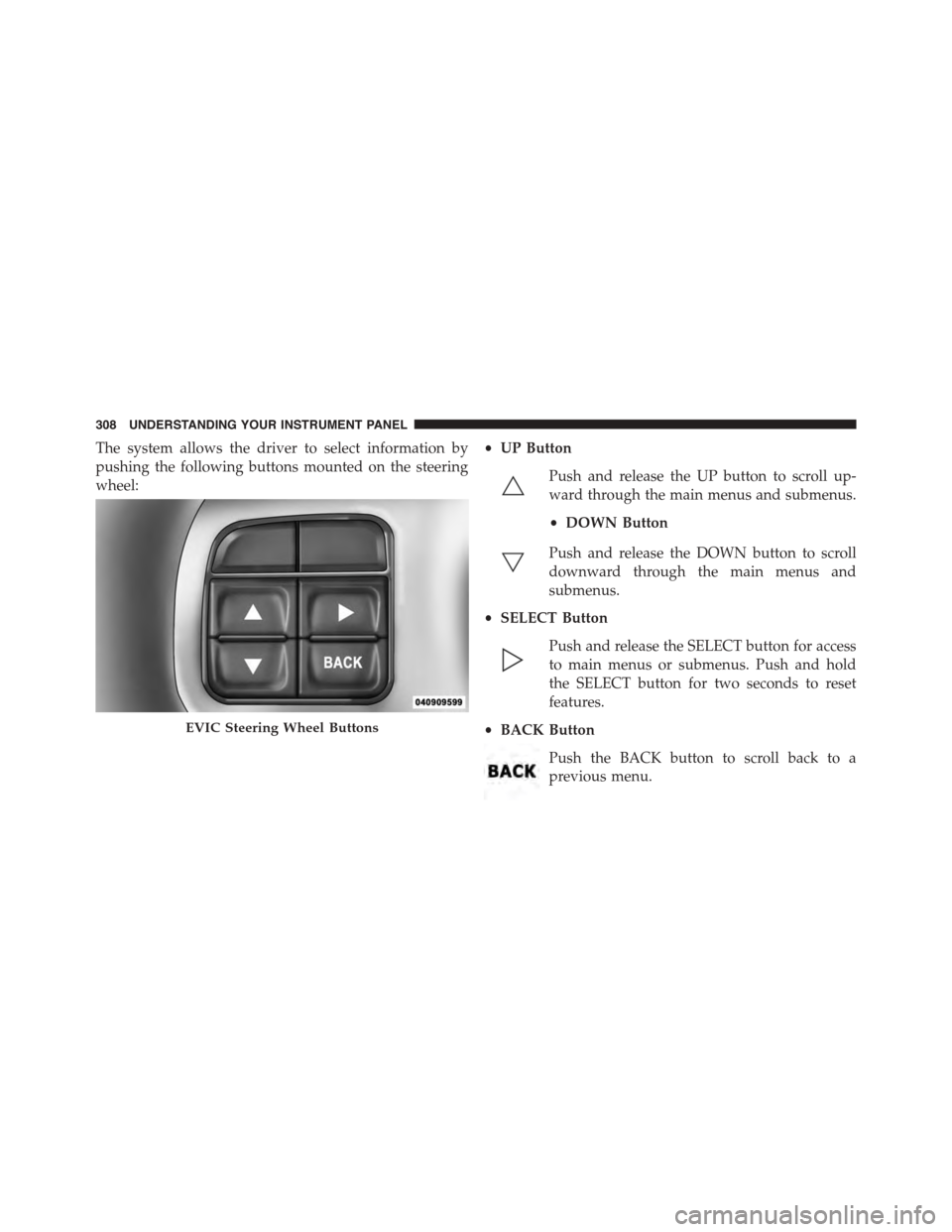
The system allows the driver to select information by
pushing the following buttons mounted on the steering
wheel:
•UP Button
Push and release the UP button to scroll up-
ward through the main menus and submenus.
•DOWN Button
Push and release the DOWN button to scroll
downward through the main menus and
submenus.
•SELECT Button
Push and release the SELECT button for access
to main menus or submenus. Push and hold
the SELECT button for two seconds to reset
features.
•BACK Button
Push the BACK button to scroll back to a
previous menu.
EVIC Steering Wheel Buttons
308 UNDERSTANDING YOUR INSTRUMENT PANEL
Page 312 of 648

•Unstored Messages Until RUN
These messages deal primarily with the Remote Start
feature. This message type is displayed until the ignition
is in the RUN state. Examples of this message type are
#Remote Start Aborted - Door Ajar#and#Push Brake
Pedal and Push Button to Start#.
•Five Second Unstored Messages
When the appropriate conditions occur, this type of mes-
sage takes control of the main display area for five seconds
and then returns to the previous screen. Examples of this
message type are#Memory System Unavailable - Not in
Park#and#Automatic High Beams On#.
The Reconfigurable Telltales section is divided into the
white telltales area on the right, amber telltales in the
middle, and red telltales on the left.
When the appropriate conditions exist, the EVIC displays
the following messages:
•Remote start aborted — Door ajar
•Remote start aborted — Hood ajar
•Remote start aborted — L/Gate ajar
•Remote start aborted — Fuel low
•Remote start disabled — Start Vehicle to Reset
•Remote start active — Push Start Button
•Vehicle Not in Park
•Key Left Vehicle
•Key Not Detected
•Push Brake Pedal and Push Button to Start
•Service Keyless System
310 UNDERSTANDING YOUR INSTRUMENT PANEL
Page 318 of 648

Unless reset, this message will continue to display each
time you cycle the ignition to the ON/RUN position. To
turn off the message temporarily, push and release the
MENU button. To reset the oil change indicator system
(after performing the scheduled maintenance), perform
the following procedure:
1. Without pushing the brake pedal, push the ENGINE
START/STOP button and cycle the ignition to the
ON/RUN position (do not start the engine.)
2. Fully depress the accelerator pedal, slowly, three times
within 10 seconds.
3. Without pushing the brake pedal, push the ENGINE
START/STOP button once to return the ignition to the
OFF/LOCK position.
NOTE:If the indicator message illuminates when you
start the vehicle, the oil change indicator system did not
reset. If necessary, repeat this procedure.
Fuel Economy
Push and release the UP or DOWN button until “Fuel
Economy” displays highlighted in the EVIC and push the
SELECT button. The following Fuel Economy functions
will display in the EVIC:
•Average Fuel Economy
•Distance To Empty (DTE)
•Miles Per Gallon (MPG)
Average Fuel Economy
Shows the average fuel economy since the last reset.
When the fuel economy is reset, the display will read
“RESET” or show dashes for two seconds. Then, the
history information will be erased, and the averaging will
continue from the last fuel average reading before the
reset.
316 UNDERSTANDING YOUR INSTRUMENT PANEL
Page 319 of 648

Distance To Empty (DTE)
Shows the estimated distance that can be traveled with
the fuel remaining in the tank. This estimated distance is
determined by a weighted average of the instantaneous
and average fuel economy, according to the current fuel
tank level. DTE cannot be reset through the RIGHT arrow
button.
NOTE:Significant changes in driving style or vehicle
loading will greatly affect the actual drivable distance of
the vehicle, regardless of the DTE displayed value.
When the DTE value is less than 30 miles (48 km)
estimated driving distance, the DTE display will change
to a “LOW FUEL” message. This display will continue
until the vehicle runs out of fuel. Adding a significant
amount of fuel to the vehicle will turn off the “LOW
FUEL” message and a new DTE value will display.
Miles Per Gallon (MPG)
This display shows the instantaneous MPG in bar graph
form while driving. This will monitor the gas mileage in
real-time as you drive and can be used to modify driving
habits in order to increase fuel economy.
Fuel Economy
4
UNDERSTANDING YOUR INSTRUMENT PANEL 317
Page 320 of 648

Vehicle Speed
Push and release the UP or DOWN button until “Vehicle
Speed” displays highlighted in the EVIC. Push the SE-
LECT button to display the current speed in mph or
km/h. Pushing the SELECT button a second time will
toggle the unit of measure between mph or km/h.
NOTE:Changing the unit of measure in the Vehicle
Speed menu will not change the unit of measure in the
EVIC.
Trip Info
Push and release the UP or DOWN button until “Trip
Info” displays highlighted in the EVIC and push the
SELECT button. Pushing the SELECT button with#Trip
Info#highlighted will cause the EVIC display to show
Trip A, Trip B, and Elapsed Time all in one display. If you
want to reset one of the three functions you use the UP or
DOWN buttons to highlight (select) the feature that you
want to reset. Pushing the SELECT button will cause the
selected feature to reset individually. The three features
can only be reset individually. The following Trip func-
tions display in the EVIC:
•Trip A
•Trip B
•Elapsed Time
The Trip Functions mode displays the following informa-
tion:
Trip A
Shows the total distance traveled for Trip A since the last
reset.
Trip B
Shows the total distance traveled for Trip B since the last
reset.
318 UNDERSTANDING YOUR INSTRUMENT PANEL
Page 321 of 648

Elapsed Time
Shows the total elapsed time of travel since the last reset.
Elapsed time will increment when the ignition is in the
ON/RUN position.
To Reset The Display
Reset will only occur while a resettable function is being
displayed. Push and release the SELECT button once to
clear the resettable function.
Tire PSI
Push and release the UP or DOWN button until “Tire
PSI:” displays highlighted in the EVIC. Push the SELECT
button to view a graphic of the vehicle with a tire
pressure value at each corner of the graphic.
Vehicle Info (Customer Information Features)
Push and release the UP or DOWN button until “Vehicle
Info” displays in the EVIC and push the SELECT button.
Push the UP and DOWN button to scroll through the
available information displays.
•Coolant Temp
Displays the actual coolant temperature.
•Oil Temperature
Displays the actual oil temperature.
•Oil Pressure
Displays the actual oil pressure.
•Trans Temperature
Displays the actual transmission temperature.
•Engine Hours
Displays the number of hours of engine operation.
4
UNDERSTANDING YOUR INSTRUMENT PANEL 319
Page 333 of 648

•Calibration
Press the “Calibration” button on the touchscreen to
change this setting. This compass is self-calibrating,
which eliminates the need to manually reset the compass.
When the vehicle is new, the compass may appear erratic
and the EVIC will display CAL until the compass is
calibrated. You may also calibrate the compass by press-
ing the “ON” button on the touchscreen and completing
one or more 360-degree turns (in an area free from large
metal or metallic objects) until the CAL indicator dis-
played in the EVIC turns off. The compass will now
function normally.
NOTE:A good calibration requires a level surface and an
environment free from large metallic objects such as
buildings, bridges, underground cables, railroad tracks,
etc.
Audio
•Equalizer
Press the “Equalizer” button on the touchscreen to
change this display. When in this display, you may adjust
the Bass, Mid and Treble settings. Adjust the settings with
the “+” and “–” setting buttons on the touchscreen or by
selecting any point on the scale between the “+” and “–”
buttons on the touchscreen. Then press the back arrow
button on the touchscreen.
NOTE:Bass/Mid/Treble allow you to simply slide your
finger up or down to change the setting as well as press
directly on the desired setting.
•Balance/Fade
Press the “Balance/Fade” button on the touchscreen to
change this display. When in this display, you may adjust
the Balance and Fade settings.
4
UNDERSTANDING YOUR INSTRUMENT PANEL 331
Page 347 of 648
•Perform Compass Calibration
Press the “Calibration” button on the touchscreen to
change this setting. This compass is self-calibrating,
which eliminates the need to manually reset the compass.
When the vehicle is new, the compass may appear erratic
and it may need to be calibrated. You may also calibrate
the compass by pressing the “ON” button on the touch-
screen and completing one or more 360-degree turns (in
an area free from large metal or metallic objects) until the
CAL indicator displayed in the EVIC turns off. The
compass will now function normally.
Audio
After pressing the Audio button on the touchscreen the
following settings will be available.
•Balance/Fade
When in this display you may adjust the Balance and
Fade settings.
•Equalizer
When in this display you may adjust the Bass, Mid and
Treble settings. Adjust the settings with the “+” and “–”
setting buttons on the touchscreen or by selecting any
Compass Variance Map
4
UNDERSTANDING YOUR INSTRUMENT PANEL 345