Page 383 of 703

device, or push the VR button and say#Shuffle ON#or
#Shuffle Off.#If theRNDicon is showing on the radio
display, then the shuffle mode is ON.
List Or Browse Mode
During Play mode, pushing any of the buttons described
below, will bring up List mode. List mode enables
scrolling through the list of menus and tracks on the
audio device.
TUNEcontrol knob: TheTUNEcontrol knob functions in
a similar manner as the scroll wheel on the audio device
or external USB device.
•Turning it clockwise (forward) and counterclockwise
(backward) scrolls through the lists, displaying the
track detail on the radio display. Once the track to be
played is highlighted on the radio display, push the
TUNEcontrol knob to select and start playing the
track. Turning theTUNEcontrol knob fast will scroll
through the list faster. During fast scroll, a slight delay
in updating the information on the radio display may
be noticeable.
During all List modes, the iPod® displays all lists in
“wrap-around” mode. So if the track is at the bottom of
the list, just turn the wheel backward (counterclockwise)
to get to the track faster.
In List mode, the radioPRESETbuttons are used as
shortcuts to the following lists on the iPod® or external
USB device:
•Preset 1 – Playlists
•Preset 2 – Artists
•Preset 3 – Albums
•Preset 4 – Genres
•Preset 5 – Audiobooks
•Preset 6 – Podcasts
4
UNDERSTANDING YOUR INSTRUMENT PANEL 381
Page 384 of 703
Pushing a PRESET button will display the current list on
the top line and the first item in that list on the second
line.
To exit List mode without selecting a track, push the
samePRESETbutton again to go back toPlay mode.
LISTbutton: TheLISTbutton will display the top level
menu of the iPod® or external USB device.
•Turn theTUNEcontrol knob to list the top-menu item
to be selected and push theTUNEcontrol knob. This
will display the next sub-menu list item on the audio
device, then follow the same steps to go to the desired
track in that list. Not all iPod® or external USB device
sub-menu levels are available on this system.
MUSIC TYPEbutton: TheMUSIC TYPEbutton is
another shortcut button to the genre listing on your audio
device.
CAUTION!
•Leaving the iPod® or external USB device (or any
supported device) anywhere in the vehicle in ex-
treme heat or cold can alter the operation or dam-
age the device. Follow the device manufacturer ’s
guidelines.
•Placing items on the iPod® or external USB device,
or connections to the iPod® or external USB device
in the vehicle, can cause damage to the device
and/or to the connectors.
WARNING!
Do not plug in or remove the iPod® or external USB
device while driving. Failure to follow this warning
could result in an accident.
382 UNDERSTANDING YOUR INSTRUMENT PANEL
Page 389 of 703
When connecting an external source to the AUX input, be
sure to follow the standard color coding for the VES™
jacks:
NOTE:Certain high-end video games, such as Playsta-
tion3 and XBox360 will exceed the power limit of the
vehicle’s Power Inverter. Refer to the Power Inverter
section in your vehicle’s Owner’s Manual for more
information.
Using The Remote Control
1. Press the MODE button on the Remote Control.
2. While looking at the video screen, highlight VES™
AUX 1, by either pressing Up/Down/Left/Right but-
tons or by repeatedly pressing the MODE button, then
press ENTER on the Remote Control.
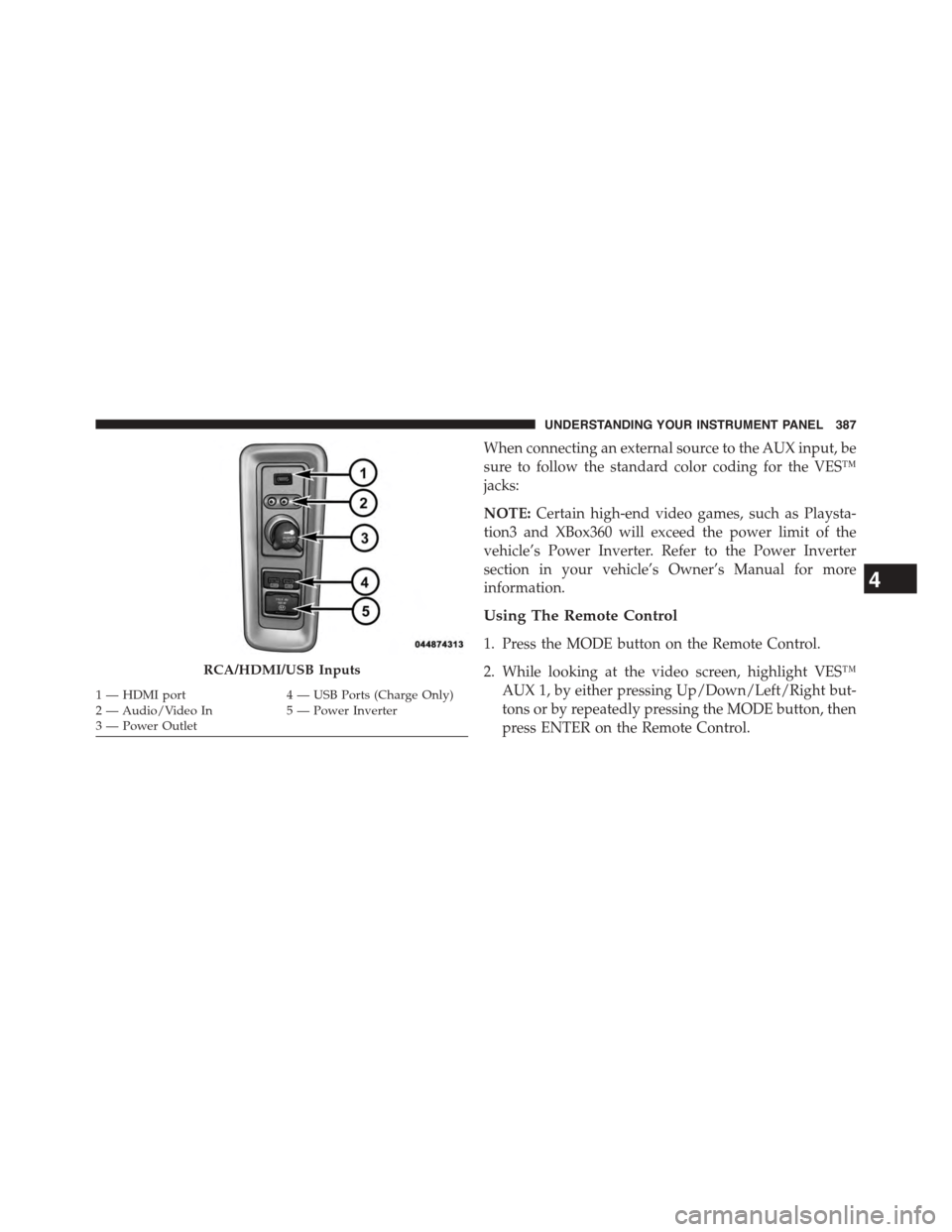
RCA/HDMI/USB Inputs
1—HDMIport4—USBPorts(ChargeOnly)2—Audio/VideoIn5—PowerInverter3—PowerOutlet
4
UNDERSTANDING YOUR INSTRUMENT PANEL 387
Page 690 of 703

Passing..............................229
Replacing.............................652
Time Delay............................223
Washers..............................223
Head Restraints..........................193
Heated Mirrors...........................137
Heater.................................433
Heater, Engine Block.......................462
High Beam/Low Beam Select (Dimmer) Switch . . . .228
Hill Start Assist...........................492
Hitches
Trailer Towing.........................548
HomeLink® (Garage Door Opener)............256
Hood Release............................220
Hook, Coat..............................285
Ignition.................................14
Key . . . . . . . . . . . . . . . . . . . . . . . . . . . . . . . . . .12
Ignition Key Removal.......................14
Illuminated Entry..........................20
Immobilizer (Sentry Key)....................15
Information Center, Vehicle..................325
Inside Rearview Mirror.....................133
Instrument Cluster........................309
Instrument Panel and Controls................308
Instrument Panel Cover.....................638
Instrument Panel Lens Cleaning...............640
Integrated Power Module (Fuses)..............642
Interior Appearance Care....................638
Interior Lights...........................225
Intermittent Wipers (Delay Wipers).............230
Introduction..............................4
iPod®/USB/MP3 Control
Bluetooth® Streaming Audio...............182
Jack Location............................576
Jack Operation...........................575
688 INDEX