Page 211 of 429
Call Controls
The touchscreen allows you to control the following call
features:
•Answer
•End
•Ignore
•Hold/unhold
•Mute/unmute
•Transfer the call to/from the phone
•Swap two active calls
•Join two active calls together
Touch-Tone Number Entry
1. Press the “Phone” button on the touchscreen.
2. Press the “Dial” button on the touchscreen.
3. The Touch-Tone screen will be displayed.
4. Use the numbered buttons on the touchscreens to
enter the number and press “Call.”
To send a touch-tone using Voice Recognition (VR), push
the Voice Commandbutton on your steering
wheel while in a call and say “Send 1234#” or you can
say “Send Voicemail Password” if Voicemail password
is stored in your mobile phonebook.
210 Uconnect® 8.4A — If Equipped
Page 212 of 429
Recent Calls
You may browse up to 31 of the most recent of each of the
following call types:
•All Calls
•Incoming Calls
•Outgoing Calls
•Missed Calls
These can be accessed by pressing the “recent calls”
button on the Phone main screen.
You can also push thebutton on your steering wheel
and say “Show my incoming calls” from any screen
and the Incoming calls will be displayed.
NOTE:Incoming can also be replaced with “Outgoing,”
“Recent” or “Missed.”
Answer Or Ignore An Incoming Call — No Call
Currently In Progress
When you receive a call on your mobile phone, the
Uconnect® Phone will interrupt the vehicle audio sys-
tem. Push the Phonebutton on the steering wheel to
accept the call. You can also press the “answer” button
on the touchscreen or press the caller ID box.
Answer Or Ignore An Incoming Call — Call
Currently In Progress
If a call is currently in progress and you have another
incoming call, you will hear the same network tones for
call waiting that you normally hear when using your
mobile phone. Push the Phonebutton on the steering
wheel, or press the “answer” button on the touch-
screen, or caller ID box, to place the current call on
hold and answer the incoming call.
3
Uconnect® 8.4A — If Equipped 211
Page 217 of 429
Phone And Network Status Indicators
Uconnect® Phone will provide notification to inform you
of your phone and network status when you are attempt-
ing to make a phone call using Uconnect® Phone. The
status is given for network signal strength and phone
battery strength.
Dialing Using The Mobile Phone Keypad
WARNING!
Driving while distracted can result in loss of vehicle
control, accident and injury. It is strongly recom-
mended that you use extreme caution when using
any device or feature that may take your focus off the
road or your hands off the steering wheel. Your
primary responsibility is the safe operation of your
(Continued)
WARNING!(Continued)
vehicle. We recommend against the use of any hand-
held device while driving, encourage the use of
voice-operated systems when possible and that you
become aware of applicable laws that may affect the
use of electronic devices while driving.
You can dial a phone number with your mobile phone
keypad and still use the Uconnect® Phone (while dialing
via the mobile phone keypad, the user must exercise
caution and take precautionary safety measures). By
dialing a number with your connected Bluetooth® mo-
bile phone, the audio will be played through your
vehicle’s audio system. The Uconnect® Phone will work
the same as if you dial the number using voice a
command.
216 Uconnect® 8.4A — If Equipped
Page 292 of 429
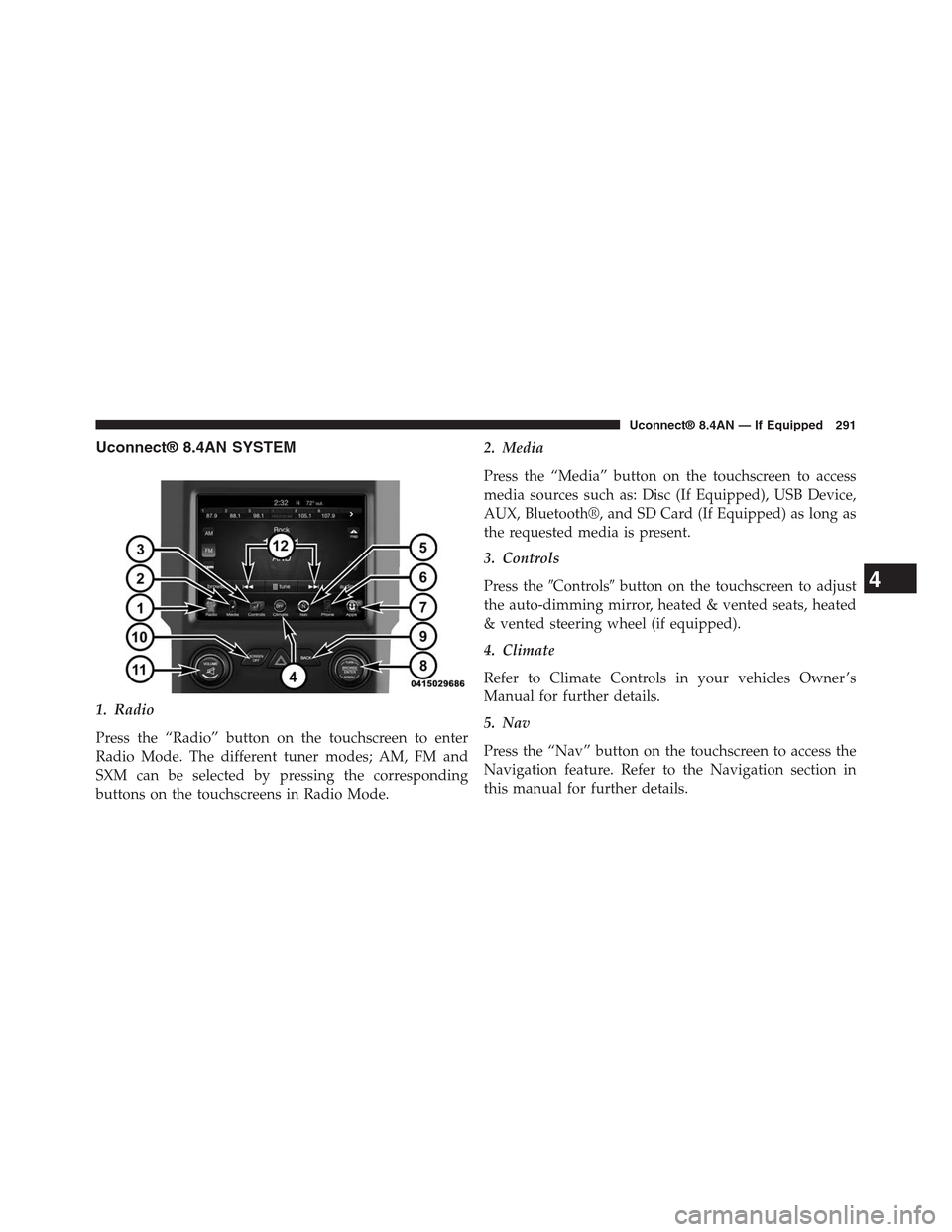
Uconnect® 8.4AN SYSTEM
1. Radio
Press the “Radio” button on the touchscreen to enter
Radio Mode. The different tuner modes; AM, FM and
SXM can be selected by pressing the corresponding
buttons on the touchscreens in Radio Mode.
2. Media
Press the “Media” button on the touchscreen to access
media sources such as: Disc (If Equipped), USB Device,
AUX, Bluetooth®, and SD Card (If Equipped) as long as
the requested media is present.
3. Controls
Press the#Controls#button on the touchscreen to adjust
the auto-dimming mirror, heated & vented seats, heated
& vented steering wheel (if equipped).
4. Climate
Refer to Climate Controls in your vehicles Owner ’s
Manual for further details.
5. Nav
Press the “Nav” button on the touchscreen to access the
Navigation feature. Refer to the Navigation section in
this manual for further details.
4
Uconnect® 8.4AN — If Equipped 291
Page 295 of 429

Seek And Direct Tune Functions
The Seek Up and Down functions are activated by
pressing the double arrow buttons on the touchscreen to
the right and left of the radio station display, or by
pressing the left “Steering Wheel Audio Control” (if
equipped) up or down.
Seek Up
Press and release the “Seek Up”button on the
touchscreen to tune the radio to the next listenable
station or channel. During a Seek Up function, if the
radio reaches the starting station after passing through
the entire band two times, the radio will stop at the
station where it began.
Fast Seek Up
Press and hold the “Seek Up”button on the touch-
screen to advance the radio through the available
stations or channels at a faster rate, the radio stops at
the next available station or channel when the button
on the touchscreen is released.
Seek Down
Press and release the “Seek Down”button on the
touchscreen to tune the radio to the next listenable
station or channel. During a Seek Down function, if
the radio reaches the starting station after passing
through the entire band two times, the radio will stop
at the station where it began.
Fast Seek Down
Press and hold the “Seek Down”button on the
touchscreen to advance the radio through the avail-
able stations or channel at a faster rate, the radio stops
at the next available station or channel when the
button on the touchscreen is released.
294 Uconnect® 8.4AN — If Equipped
Page 317 of 429
WARNING!
ALWAYS drive safely and obey all applicable
laws. You should only use Uconnect® features
when it is safe to do so. Failure to do so may result
in an accident involving serious injury or death.
The Uconnect® Phone is driven through your
Bluetooth® “Hands-Free Profile” mobile phone.
Uconnect® features Bluetooth® technology - the global
standard that enables different electronic devices to con-
nect to each other without wires or a docking station, so
Uconnect® Phone works no matter where you stow your
mobile phone (be it your purse, pocket, or briefcase), as
long as your phone is turned on and has been paired to
the vehicle’s Uconnect® Phone. The Uconnect® Phone
allows up to ten mobile phones or audio devices to be
linked to the system. Only one linked (or paired) mobile
phone and one audio device can be used with the system
at a time.
Uconnect® Phone Button
The Uconnect® Phonebutton on your steering
wheel is used to get into the phone mode
and make calls, show recent, incoming, out-
going calls, view phonebook etc., When you
press the button you will hear a BEEP. The
beep is your signal to give a command.
Uconnect® Voice Command Button
The Uconnect® Voice Commandbutton on your
steering wheel is only used for “barge in”
and when you are already in a call and you
want to send Tones or make another call.
Thebutton on your steering wheel is also used to
access the Voice Commands for the Uconnect® Voice
Command features if your vehicle is equipped. Please
see the Uconnect® Voice Command section for direc-
tion on how to use thebutton.
316 Uconnect® 8.4AN — If Equipped
Page 318 of 429
The Uconnect® Phone is fully integrated with the vehi-
cle’s audio system. The volume of the Uconnect® Phone
can be adjusted either from the radio volume control
knob or from the steering wheel radio control (right
switch), if so equipped.
Operation
Voice commands can be used to operate the Uconnect®
Phone and to navigate through the Uconnect® Phone
menu structure. Voice commands are required after most
Uconnect® Phone prompts. There are two general meth-
ods for how Voice Command works:
1. Say compound commands like “Call John Smith mo-
bile.”
2. Say the individual commands and allow the system to
guide you to complete the task.
You will be prompted for a specific command and then
guided through the available options.
•Prior to giving a voice command, one must wait for the
beep, which follows the “Listen” prompt or another
prompt.
•For certain operations, compound commands can be
used. For example, instead of saying “Call” and then
“John Smith” and then “mobile”, the following com-
pound command can be said: “Call John Smith
mobile.”
•For each feature explanation in this section, only the
compound command form of the voice command is
given. You can also break the commands into parts and
say each part of the command when you are asked for
it. For example, you can use the compound command
form voice command “Search for John Smith,” or you
can break the compound command form into two
voice commands: “Search Contact” and when asked
“John Smith.” Please remember, the Uconnect® Phone
4
Uconnect® 8.4AN — If Equipped 317
Page 319 of 429

works best when you talk in a normal conversational
tone, as if speaking to someone sitting a few feet/
meters away from you.
Natural Speech
Your Uconnect® Phone Voice system uses a Natural
Language Voice Recognition (VR) engine.
Natural speech allows the user to speak commands in
phrases or complete sentences. The system filters out
certain non-word utterances and sounds such as “ah”
and “eh.” The system handles fill-in words such as “I
would like to.”
The system handles multiple inputs in the same phrase
or sentence such as “make a phone call” and “to Kelly
Smith.” For multiple inputs in the same phrase or sen-
tence, the system identifies the topic or context and
provides the associated follow-up prompt such as “Who
do you want to call?” in the case where a phone call was
requested but the specific name was not recognized.
The system utilizes continuous dialog; when the system
requires more information from the user it will ask a
question to which the user can respond without pushing
the “Voice Command”button on your steering
wheel.
Help Command
If you need assistance at any prompt, or if you want to
know your options at any prompt, say “Help” following
the beep.
To activate the Uconnect® Phone from idle, simply push
the Phonebutton on your steering wheel and say a
command or say “help.” All Uconnect® Phone ses-
sions begin with a push of the Phonebutton on the
radio control head.
318 Uconnect® 8.4AN — If Equipped