2015 Citroen C4 service
[x] Cancel search: servicePage 377 of 494
05
375
C4-2_en_Chap13c_RD5_ed01-2015
C4-2_en_Chap13c_RD5_ed01-2015
USING THE TELEPHONE
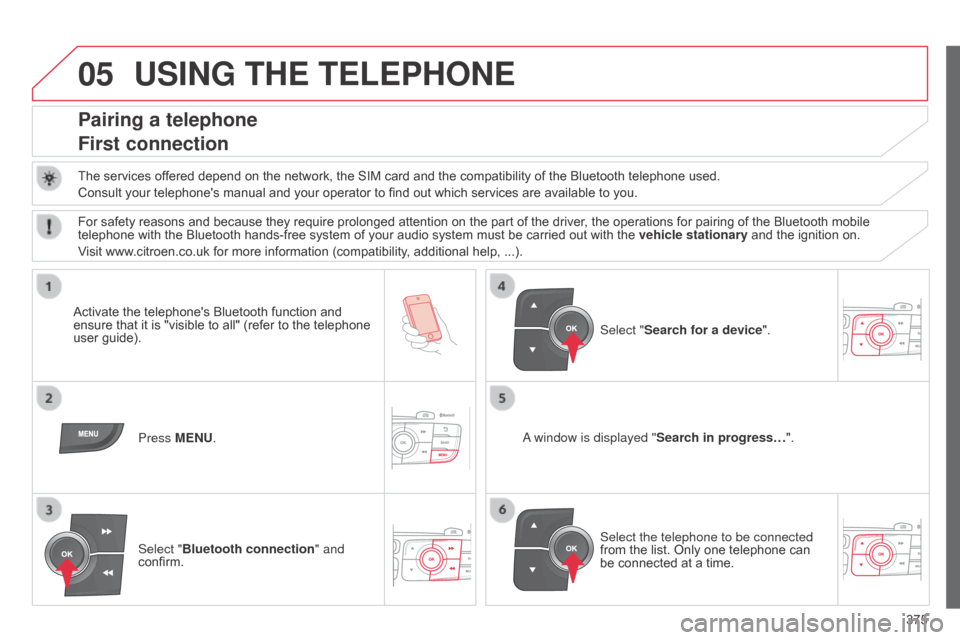
Pairing a telephone
First connection
The services offered depend on the network, the SIM card and the compatibility of the Bluetooth telephone used.
Consult your telephone's manual and your operator to find out which services are available to you.
Activate
the telephone's Bluetooth function and
ensure
that
it
is
"visible
to
all"
(refer
to
the
telephone
user
guide). Press MENU.
a window is displayed " Search in progress…
".
Select the telephone to be connected
from
the list. Only one telephone can
be
connected at a time.
Select "Search for a device".
For
safety reasons and because they require prolonged attention on the part of the driver, the operations for pairing of the Bluetooth mobile
telephone
with the Bluetooth hands-free system of your audio system must be carried out with the
vehicle stationary
and the ignition on.
Visit
www.citroen.co.uk for more information (compatibility, additional help, ...).
Select "Bluetooth connection " and
confirm.
Page 392 of 494

390
C4-2_en_Chap13c_RD5_ed01-2015
C4-2_en_Chap13c_RD5_ed01-2015
FREqUENTLY ASKED q UESTIONS
qUESTION ANSWER SOLUTION
The
CD is ejected
automatically
or is not
played
by the player. The C
d is inserted upside down, is unplayable, does not contain any
audio
data or contains an audio format which the player cannot play.
The
CD is protected by an anti-pirating protection system which is not
recognised
by the audio equipment. -
Check
that the CD is inserted in the player the
right
way up.
-
Check
the condition of the CD: the CD cannot
be
played if it is too damaged.
-
Check
the content in the case of a recorded
CD:
consult the advice in the "Audio" section.
-
The
audio equipment's CD player does not
play
DVDs.
-
Due
to their quality level, certain writeable
CDs
will not be played by the audio system.
The C
d player sound is
poor. The
CD used is scratched or of poor quality.Insert
good quality CDs and store them in suitable
conditions.
The
audio settings (bass, treble, ambience) are unsuitable.Set
the treble or bass level to 0, without selecting
an
ambience.
I
am
unable to connect
my
Bluetooth telephone. It is possible that
b luetooth is switched off on the telephone or that the
telephone
has not been made not visible.-
Check
that your telephone has Bluetooth
switched
on.
-
Check
in the telephone's settings that it is
"V
isible to all".
The
Bluetooth telephone is not compatible with the system.You
can check the compatibility of your telephone
on
www.citroen.co.uk (services)
The
b
luetooth connection
is
cut. The
battery of the peripheral may not be sufficiently charged.Recharge
the battery of the peripheral device.
Page 398 of 494

396
C4-2_en_Chap14_index-alpha_ed01-2015
C4-2_en_Chap14_index-alpha_ed01-2015
Paint colour code .........................................28 6
Panoramic glass
sunroof
................
......................................... 78
Parcel shelf, rear
................................... 11
4 ,
11
7
Parking
brake
........................................1
77, 220
Parking
brake, electric
............................1
8, 170
Parking
lam
ps
.............................................. 12
2
Parking
sensors, front
..................................20
6
Parking
sensors, rear................................... 205
Particle filter
.......................................... 21
8,
21
9
Passenger
c
ompartment
f
ilter
........
..................................................... 219
Personalisation
...............................
...............36
Player,
CD MP3
............................ 3
06, 369, 370
Port,
USB
..................................... 1
03, 306, 371
Priming
the fuel system
................................2
11
Protecting
children
................. 1
35 -149, 157, 159
Puncture
................
....................................... 229Quickly
detachable towball
..........................
2
67
P
Navigation ...............................
......................312 N
umber plate lamps ..................................... 25
0
oil
filter
...............
...........................................
219
oi
l level
................................................... 29, 215
Opening the bonnet
......................................
2
12
Opening the boot
..............................
. 59, 72, 73
Opening the doors
...............................
.... 59, 71
Opening the panoramic
sunroof blind
................................................ 78ope
ration indicator
lamps
..............................
........................
16 -28
N
Main beam .............................. ......118, 242, 245
Maintenance .............................. ....................10
Map
reading lamps
...................................... 13
3
Markings,
id
entification
................................ 28
6
Massage
function
...............................
...........94
Mat
.......
......................................................... 11 0
Memorising
a speed
.................................... 19
9
Menu
....................................2
94, 296, 298, 312,
314,
316, 332, 342, 344
Menu,
main
..............................
....................362
Menus (Touch
screen tablet)
.................................29
0
Mirror, rear view
........................................... 10
0
Mirrors, door ..................................... 98,
99, 196
Misfuel prevention
...............................
.........210
Motorway function (direction
i
ndicators)
.................................. 15
0
Mountings
for ISOFIX
seats
...............
........................................... 14 4
MP3
CD
................
........................ 306, 369, 370 Radio
...............
..................................... 300, 363
Radio
pr
e-equipment
...................................2
72
R
dS ................
...................................... 303, 364
Rear
s
creen
(
demisting)
.................................90
R
echarging the battery
........................ 2
58, 259
Reduction of electrical load
......................... 26
0
Regeneration
of the particle
emissions
f
ilter
............................................2
19
Reinitialising
the electric
windows
....................................................... 76
R
einitialising the remote
control
.................................................... 5
8, 63
Remote
control
..........................................53
-64
Removable
screen (snow shield).................262
Removing
a wheel
..............................
.........237
Removing
the mat
...............................
..........11 0
Repair
kit, puncture
......................................2
29
Replacing
bu
lbs
..............................
......242-250
Replacing
f
uses
..............................
......251-255
Replacing
the air filter
...................................2
19
Replacing
the oil filter
...................................2
19
Replacing
t
he
p
assenger
c
ompartment filter
......................................2
19
Replacing
wiper blades.........................131, 261
Resetting
the service indicator
......................32
R
esetting the trip recorder
.............................33
R
ev counter
................................................1
2-15
R
Oil change .....................................................215
Oil consumption ............................................ 2
15
O
QM
alphabetical index
Page 399 of 494

397
C4-2_en_Chap14_index-alpha_ed01-2015
C4-2_en_Chap14_index-alpha_ed01-2015
Reversing lamps .......................................... 24 8
Risk areas (update) ...................................... 3
21
Roof bars
...................................................... 2
62
Roof blind
...............................
........................78
Routine
checks
.................................... 2
19, 220
Running
out of fuel (Diesel)
..........................2
11Ski
flap .............................. ............................112
Snow chains .................................................. 2
41
Spare wheel
...............................
..................235
Speakers
(
fitting)
..........................................2
72
Speed
l
imiter
...............................
......... 199, 201
Speedometer
..............................
...............12-14
Spotlamps,
si
de
....................................1
24, 247
Starting
the engine
......................................16
3
Starting
using another battery
.....................2
57
Steering
mounted controls................... 293, 361
Stop & Start
........................................5
2, 85, 89,
192,
208, 212, 219, 256
Storage
................
.. 101, 102, 104, 107, 108, 113
Storage
c
ompartments
................................10
4
Storage
d
rawer
..............................
...............111
Storage
n
et
....................................................11
3
Storing
driving
positions ....................................................... 95
Stowing
r
ings
..............................
..................113
Sun visor
...................................................... 10
2
Switching
off
the
eng
ine
...............................
...................163
Synchronising
the remote
control
.................................................... 5
8, 63
Synthesiser, voice
........................................ 3
31
System
se
ttings
............................................339
T
able of weights
....................................2
77, 281
Tables
of engines
...............................
.. 275, 279
Safety for children
..................1
35 -149, 157, 159
Screen
menu map
........2
94, 296, 298, 312, 314,
316,
332, 342, 344, 385 -387
Screen,
m
onochrome
...................... 3
7, 39, 385
Screen,
m
ultifunction
(
with audio equipment)
.................. 3
7, 39, 362
Screenwash, front
........................................ 13
0
SCR
(Selective Catalytic
Reduction)
................................................. 2
21
Seat
adjustment
...............................
........ 91, 92
Seat belts
..............................1
41, 154, 156, 157
Seats, electric
................................................ 92
S
eats, rear
...................................................... 96
S
erial number, vehicle
.................................28
6
Service indicator
............................................ 3
0
Service
warning
lamp
...............
.............................................. 19
Servicing
...............................
.........................10
Setting
the clock
.......................... 3
4, 38, 43, 48
Sidelamps
.................... 1
18, 122, 242, 246, 248
Side repeater
..............................
.................247
S
T
Tables of fuses .............................................. 2 51
Tank, AdBlue® additive ........................ 2 21, 226
Tank,
fuel
............................... ....................... 210
Technical data
....................................... 2
75 -286
Telephone
.....................................3
46 -349, 351
Temperature
control for
heated seats
................................................ 93
T
emporary
puncture repair kit
.....................2
29
Ticket
holder
................................................ 10
1
TMC
(Traffic
info)
......................................... 32
6
To o l s
................
............................................. 234
To r c h
..............................
............................... 115
Total distance recorder
.................................. 33
T
ouch screen .................................... 44- 48,
289
Touch screen tablet ( M e nu s)
...............................
................. 44, 290
To w b a r
................
.......................................... 265
Towbar
with
quickly detachable
towball
...............................
......................... 267
Towed loads
......................................... 2
75, 279
Towing
another vehicle
................................ 26
4
Traction
control (ASR)
................................. 15
2
Traffic
information (TA)
........................ 3
27, 364
Traffic
information (TMC)
............................. 32
6
Tr a i l e r
...............
............................................ 265
Trajectory
control systems
........................... 15
2
Trip
computer
............................................ 4
9-52
Trip distance recorder
.................................... 33
T
yre pressures
..............................
...............286
Ty r e s
..............................................................
.10
Tyre under-inflation detection
...............
..................................... 19 0
.
alphabetical index
Page 405 of 494
2
Multifunction screens1
C4-2-add_en_Chap02_ecran-multifonction_ed01-2015
Touch screen tablet
General operation
Principles
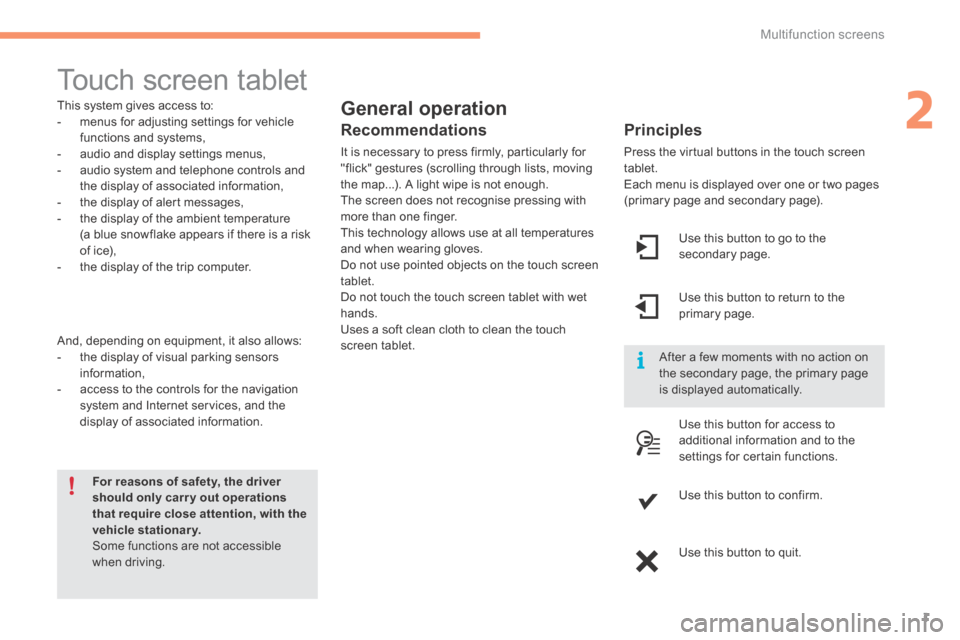
Press the virtual buttons in the touch screen tablet. Each menu is displayed over one or two pages (primary page and secondary page).
For reasons of safety, the driver should only carr y out operations that require close attention, with the vehicle stationary. Some functions are not accessible when driving.
This system gives access to: - menus for adjusting settings for vehicle functions and systems, - audio and display settings menus, - audio system and telephone controls and the display of associated information, - the display of alert messages, - the display of the ambient temperature
(a blue snowflake appears if there is a risk of ice), - the display of the trip computer.
And, depending on equipment, it also allows: - the display of visual parking sensors information, - access to the controls for the navigation system and Internet services, and the display of associated information.
Recommendations
It is necessary to press firmly, particularly for "flick" gestures (scrolling through lists, moving the map...). A light wipe is not enough. The screen does not recognise pressing with more than one finger.
This technology allows use at all temperatures and when wearing gloves. Do not use pointed objects on the touch screen tablet. Do not touch the touch screen tablet with wet hands. Uses a soft clean cloth to clean the touch screen tablet.
Use this button to go to the secondary page.
After a few moments with no action on the secondary page, the primary page is displayed automatically.
Use this button to return to the primary page.
Use this button for access to
additional information and to the settings for certain functions.
Use this button to confirm.
Use this button to quit.
Page 406 of 494

Multifunction screens
2
C4-2-add_en_Chap02_ecran-multifonction_ed01-2015
Menus
Press one of the buttons on the control panel for direct access to a particular menu.
Driving. Gives access to the trip computer and, depending on version, allows settings to be adjusted for certain functions. See the corresponding section.
Navigation . Depending on trim level or country of sale, navigation can be not available, an option or standard. See the "Audio and telematics" section.
Radio Media . See the "Audio and telematics" section.
Telephone . See the "Audio and telematics" section.
Internet . The connected services are accessible using the Bluetooth, Wi-Fi or MirrorLink™ connections. See the "Audio and telematics" section.
Settings . Allows configuration of the display and the system.
1. Volume / mute. See the "Audio and telematics" section.
Page 422 of 494

Audio and Telematics
18
C4-2-add_en_Chap13a_BTA_ed01-2015
Emergency or assistance call
If an impact is detected by the airbag control unit, and independently of the deployment of any airbags, an emergency call is made automatically.
Localised Emergency Call
In an emergency, press this button for more than 2 seconds. Flashing of the green LED and a voice message confirm that the call has been made to the
"Localised Emergency Call" * centre.
Pressing this button again immediately cancels the call. The green LED goes off. Pressing this button (at any time) for more than 8 seconds cancels the call.
The green LED remains on (without flashing) when communication is established. It goes off at the end of the call.
This call is dealt with by the "Localised Emergency Call", which receives locating information from the vehicle and can send a detailed alert to the appropriate emergency services. In countries in which a centre is not operational, or when the locating service has been expressly declined, the call is dealt with directly by the emergency services (112) without the vehicle location.
* These services are subject to conditions and availability. Consult a CITROËN dealer.
If you benefit from the CITROËNConnect Box offer with the SOS and assistance pack included, there are additional services available to you in your MyCITROËN personal space, via the CITROËN Internet website in your country, accessible on www.citroen.com.
Page 423 of 494

.
Audio and Telematics 19
C4-2-add_en_Chap13a_BTA_ed01-2015
Localised Assistance Call
If you purchased your vehicle outside the CITROËN dealer network, we invite you to have a dealer check the configuration of these services and, if desired, modified to suit your wishes. In a multi-lingual country, configuration is possible in the official national language of your choice.
For technical reasons, particularly to improve the quality of Telematic services to customers, the manufacturer reserves the right to carry out updates
to the vehicle's on-board telematic system.
Press this button for more than 2 seconds to request assistance if the vehicle breaks down. A voice message confirms that the call has been started * .
Pressing this button again immediately cancels the request. The cancellation is confirmed by a voice message.
Operation of the system
When the ignition is switched on, the green LED comes on for 3 seconds indicating that the system is operating correctly.
If the orange LED is on continuously: the backup battery must be replaced. In either case, contact a CITROËN dealer.
If the orange LED flashes: there is a system fault.