Page 18 of 326

16
Passenger's
front airbag fixed.
The control switch, located in the
glove
box, is set to the OFF p osition.
The
passenger's front airbag is
d
eactivated.
You can install the child seat
rear ward
facing, unless there is an
a
irbag fault (Airbag warning lamp on).Set the control to the "ON"
position to activate the
passenger's front airbag.
In this case, do not fit a child seat in the rear ward
facing
position.
Dynamic
stability control
(DSC/ASR) fixed.
The button is pressed and the
indicator
lamp comes on.
The
DSC/ASR is deactivated.
DSC:
dynamic stability control.
ASR:
anti-slip regulation.Press
the button to activate the DSC/ASR. Its
i
ndicator lamp goes off.
The
DSC/ASR system is activated automatically when
t
he vehicle is started.
If
deactivated, the system is reactivated automatically
f
rom around 30 mph (50 km/h).
For
more information on DSC/ASR, refer to the
c
orresponding
s
ection.
Warning / indicator lamp
StateCause Action / Observations
Deactivation indicator lamps
If one of the following indicator lamps comes on, this confirms that the corresponding system has been switched off intentionally.
T his is may be accompanied by an audible signal and the display of a message.
Monitoring
Page 34 of 326
32
ButtonCorresponding function Comments
Diagnostic List
of current alerts, servicing information.
Vehicle settings Access
to other functions with settings that can be adjusted. The functions are grouped
t
ogether under three tabs:
-
"Driving assistance "
●
"
Automatic rear wiper in reverse": activation/deactivation of rear wiper linked to reverse
g
e a r.
S
ee the " Visibility" section.
-
"Lighting "
●
"
Guide-me-home lighting": activation/deactivation and duration of the automatic guide-
me-home
l
ighting.
S
ee the " Visibility" section.
-
"Vehicle access "
●
"
Unlock boot only": activation/deactivation of selective boot unlocking.
S
ee the "Access" section.
Monitoring
Page 42 of 326

40
C4-cactus_en_Chap02_ouvertures_ed02-2014
If one of the doors or the boot is still
open, the central locking does not
t
ake place; the vehicle locks then
i
mmediately unlocks, identifiable by the
s
ound of the locks rebounding.
When
the vehicle is locked, if it is
u
nlocked inadvertently, it will lock
a
gain automatically after thirty seconds
u
nless a door or the boot is open.
Locking using the remote control
F Press the closed padlock to lock t
he vehicle.
Locking the vehicle
Locking is confirmed by the fixed illumination of the direction indicators for approximately
t
wo seconds.
Locking using the key
F Turn the key in the driver's door lock, t
owards the rear of the vehicle to lock it.This function allows you to identify your vehicle
from
a distance, especially when the light is
p
oor. Your vehicle must be locked.
Locating your vehicle
Anti-theft protection
Electronic engine immobiliser
The key contains an electronic chip which has a
special code. When the ignition is switched
o
n, this code must be recognised in order for
s
tarting to be possible.
This
electronic engine immobiliser locks the
e
ngine management system a few minutes
a
fter the ignition is switched off and prevents
s
tarting of the engine by anyone who does not
h
ave the key.In the event of a fault, you are
informed
by illumination of this
w
arning lamp, an audible signal
a
nd a message in the screen.
F
P
ress
the
closed
padlock
on
the
r
emote
control.
This
will
bring
on
the
courtesy
lamps
and
f
lashing
of
the
direction
indicators
for
a
few
se
conds.
Keep
safely, away from your vehicle, the label
a
ttached to the keys given to you on acquisition
o
f the vehicle.
In
this case, your vehicle will not start; contact
a
CITROËN dealer as soon as possible.
Check
that
the
doors
and
boot
are
fully
c
losed.
Access
Page 46 of 326
44
C4-cactus_en_Chap02_ouvertures_ed02-2014
doors
From outside
F After unlocking the vehicle using the r
emote control or the key, pull the door
han
dle.
Opening
From inside
F Pull the interior control lever of a front door; t
his unlocks the vehicle completely.
The
interior opening control on a rear
d
oor does not work if the child lock is on.
Refer
to the "Child lock" section.When
a door is not fully closed:
-
e
ngine running
, a message appears in
t
he screen,
-
v
ehicle moving
, a message appears in
t
he screen, accompanied by an audible
s
ignal.
Closing
Access
Page 47 of 326
45
C4-cactus_en_Chap02_ouvertures_ed02-2014
Secondary control
Driver's door (locking/unlocking)
Insert the key in the lock to lock or unlock the door.
Procedure
for mechanically locking and
u
nlocking the doors in the event of a fault with
t
he central locking system or a battery failure.
Front and rear passenger doors
Locking
In the event of a fault with the central
locking
system,
it
is
essential
to
d
isconnect
the
battery
to
lock
the
boot
a
nd
so
ensure
complete
locking
of
t
he vehicle.
On the rear doors, check that the child
l
ock is not on.
F
R
emove the black cap located on the edge
o
f the door, using the key.
F
I
nsert the key into the aperture without
f
orcing, then without turning, move the
l
atch sideways towards the inside of the
d o o r.
F
R
emove the key and refit the cap.
Unlocking
F
P
ull the interior door opening control lever.
2
Access
Page 48 of 326
46
C4-cactus_en_Chap02_ouvertures_ed02-2014
boot
Opening
F After unlocking the boot (see the "Remote c
ontrol key" section), press the opening
c
ontrol and raise the tailgate. F
L ower the tailgate using the interior grab han
dle.
ClosingBoot release
Unlocking
F Fold the rear seat backrest to gain access t
o the lock from inside the boot.
F
I
nsert a small screwdriver into hole A of the
lock
to unlock the tailgate.
System
for mechanical unlocking of the boot
i
n the event of a battery or central locking
m
alfunction.
If
the
tailgate
is
not
fully
closed:
-
e
ngine running
,
a
message
appears
in
t
he screen,
-
v
ehicle moving ,
a
message
appears
in
t
he
screen,
accompanied
by
an
audible
s
ignal.
Access
Page 50 of 326
48
C4-cactus_en_Chap02_ouvertures_ed02-2014
Rear door windows
OpeningClosing
F Tilt the lever outwards.
F P ush it fully to secure the window in the
open
p
osition. F
P
ull the lever to release the window.
F
T
ilt the lever fully inwards to secure the
window in the closed position.
Each window can be hinged open to provide ventilation at the rear seats.
Access
Page 51 of 326
49
C4-cactus_en_Chap03_confort_ed02-2014
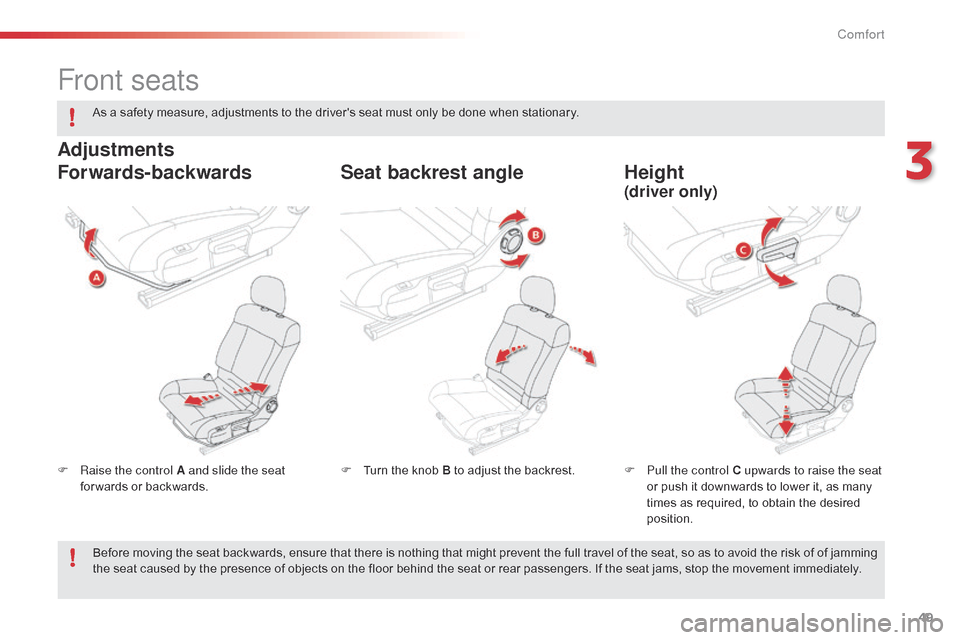
Front seats
F Raise the control A and slide the seat for wards or backwards. F
P ull the control C upwards to raise the seat
or push it downwards to lower it, as many
t
imes as required, to obtain the desired
p
osition.
F
T urn the knob B to adjust the backrest.
Forwards-backwards
Height
Seat backrest angle
Adjustments
(driver only)
As a safety measure, adjustments to the driver's seat must only be done when stationary.
B efore moving the seat backwards, ensure that there is nothing that might prevent the full travel of the seat, so as to avoid the risk of of jamming
t
he seat caused by the presence of objects on the floor behind the seat or rear passengers. If the seat jams, stop the movement immediately.
3
Comfort