Page 189 of 401

187
Fuse N°Rating Functions
F8 20 AMultifunction screen, audio system, navigation and audio
system, instrument panel with clock, alarm control unit, alarm
siren, audio system (after-market), 12 V socket, portable
navigation carrier power supply.
F9 30 AMultifunction screen, audio system, navigation and audio
system, instrument panel with clock, alarm control unit, alarm
siren, audio system (after-market), 12 V socket, portable
navigation carrier power supply, locking.
F10 15 ASteering mounted controls.
F11 15 AIgnition, diagnostic socket, automatic gearbox control unit.
F12 15 ARain / sunshine sensor, trailer relay unit, driving school module.
F13 5 AMain stop switch, engine relay unit, gear lever for electronic
gearbox.
F14 15 AParking sensors control unit, airbag control unit, instrument
panel, digital air conditioning, USB Box, HiFi amplifier,
reversing camera.
F15 30 ALocking.
F16 -
no
t used.
F17 40 ARear screen and door mirrors demisting/defrosting.
SH -Transit and storage shunt.
11
Practical information
Page 200 of 401

198
Towing the vehicle
Access to the tools
The towing eye is installed in the boot under
t h e f l o o r.
To gain access to it:
F
o
pen the boot,
F
r
aise the floor,
F
r
emove the polystyrene storage box,
F
r
emove the towing eye from the holder.
Procedure for having your vehicle towed or for towing another vehicle using a removable towing eye.
General recommendations
observe the legislation in force in your country.
Ensure that the weight of the towing vehicle is higher than that of the towed vehicle.
The driver must remain at the wheel of the towed vehicle and must have a valid driving licence.
When towing a vehicle with all four wheels on the ground, always use an approved towing
arm; rope and straps are prohibited.
The towing vehicle must move off gently.
When towing a vehicle with the engine off, there is no longer any power assistance for
braking or steering.
In the following cases, you must always call on a professional recovery service:
-
v
ehicle broken down on a motor way or fast road,
-
f
our-wheel drive vehicle,
-
w
hen it is not possible to put the gearbox into neutral, unlock the steering, or release
the parking brake,
-
t
owing with only two wheels on the ground,
-
w
here there is no approved towing arm available...
Practical information
Page 201 of 401
199
Towing your vehicle
F on the front bumper, unclip the cover by pressing at the bottom.
F
S
crew the towing eye in fully.
F
I
nstall the towing arm.
F
P
lace the gear lever in neutral (position N
for an electronic or automatic gearbox). F
on t he rear bumper, unclip the cover by
pressing at the bottom.
F
S
crew the towing eye in fully.
F
I
nstall the towing arm.
F
S
witch on the hazard warning lamps on
both vehicles.
F
M
ove off gently and drive for a short
distance only.
Towing another vehicle
Failure to observe this special condition
could result in damage to certain
components (braking, transmission..)
and the absence of braking assistance
the next time the engine is started. F
U
nlock the steering by turning the key one
notch in the ignition switch and release the
parking brake.
F
S
witch on the hazard warning lamps on
both vehicles.
F
M
ove off gently and drive for a short
distance only.
11
Practical information
Page 276 of 401

274
Radio
QUESTIONANSWER SOLUTION
The quality of reception of
the radio station listened
to gradually deteriorates
or the stored stations do
not function (no sound,
87.5
Mhz is displayed...). The vehicle is too far from the transmitter used by the station
listened to or there is no transmitter in the geographical area
through which the vehicle is travelling.
ac
tivate the "R
dS
" function by means of the
short-cut menu to enable the system to check
whether there is a more power ful transmitter in
the geographical area.
The environment (hills, buildings, tunnels, basement car parks...)
block reception, including in R
dS m
ode.This phenomenon is normal and does not
indicate a fault with the audio system.
The aerial is absent or has been damaged (for example when going
through a car wash or into an underground car park). Have the aerial checked by a CITR
oËn
dealer.
I cannot find some radio
stations in the list of
stations received. The station is not received or its name has changed in the list.
Some radio stations send other information in place of their name
(the title of the song for example).
The system interprets this information as the name of the station.
The name of the radio
station changes.
Audio and Telematics
Page 285 of 401

283
C3_en_Chap13c_RD45_ed01-2015
RDS
The external environment
(hills, buildings, tunnels, basement
car parks, ...) may block reception,
including in R
dS m
ode. This is a
normal effect of the way in which radio
waves are transmitted and does not
indicate any failure of the audio system.
Press the MENU button.
Select " Audio functions ".
Press OK.
Select the " FM waveband
preferences " function.
Press OK. Select "
Activate RDS ".
Press OK , R
dS i
s displayed in the
screen.
In " Radio " mode, press OK directly to activate /
deactivate R
dS
mode.
RdS, if displayed, enables you to continue
listening to the same station by automatic
retuning to alternative frequencies.
However, in certain conditions, coverage
of an R
dS s
tation may not be assured
throughout the country as radio stations
do not cover 100 % of the territory. This
explains the loss of reception of a station
that can occur during a journey.
Receiving TA messages
Press the TA button to activate or
deactivate traffic messages.
The TA (Traffic Announcement)
function gives priority to T
a
alert
messages. To operate, this function
needs good reception of a radio station
transmitting this type of message.
When a traffic report is transmitted, the
current audio source (Radio, CD, ...)
is interrupted automatically to play the
T
a
message. n
o
rmal playback of the
audio source resumes at the end of the
transmission of the message.
.
Audio and Telematics
Page 297 of 401

295
C3_en_Chap13c_RD45_ed01-2015
QUESTIONANSWER SOLUTION
The stored stations do not
function (no sound,
87.5 Mhz is displayed...). An incorrect waveband is selected.
Press the
band a
S
T button to return to the
waveband (AM, FM1, FM2, FMAST) on which the
stations are stored.
The traffic announcement
(TA) is displayed. I do
not receive any traffic
information. The radio station is not part of the regional traffic information
network.
Tune to a radio station which broadcasts traffic
information.
The quality of reception of
the radio station listened
to gradually deteriorates
or the stored stations do
not function (no sound,
87.5
Mhz is displayed...). The vehicle is too far from the transmitter used by the station
listened to or there is no transmitter in the geographical area
through which the vehicle is travelling.
ac
tivate the R
dS f
unction to enable the system
to check whether there is a more power ful
transmitter in the geographical area.
The environment (hills, buildings, tunnels, underground car parks...)
block reception, including in R
dS m
ode.This phenomenon is normal and does not
indicate a failure of the audio equipment.
The aerial is absent or has been damaged (for example when going
through an automatic car wash or into an underground car park). Have the aerial checked by a CITR
oËn
dealer.
Sound cut-outs of 1 to
2
seconds in radio mode.
du
ring this brief sound cut-out, the R
d
S searches for another
frequency giving better reception of the station.
de
activate the R
dS f
unction if the phenomenon
is too frequent and always on the same route.
.
Audio and Telematics
Page 300 of 401
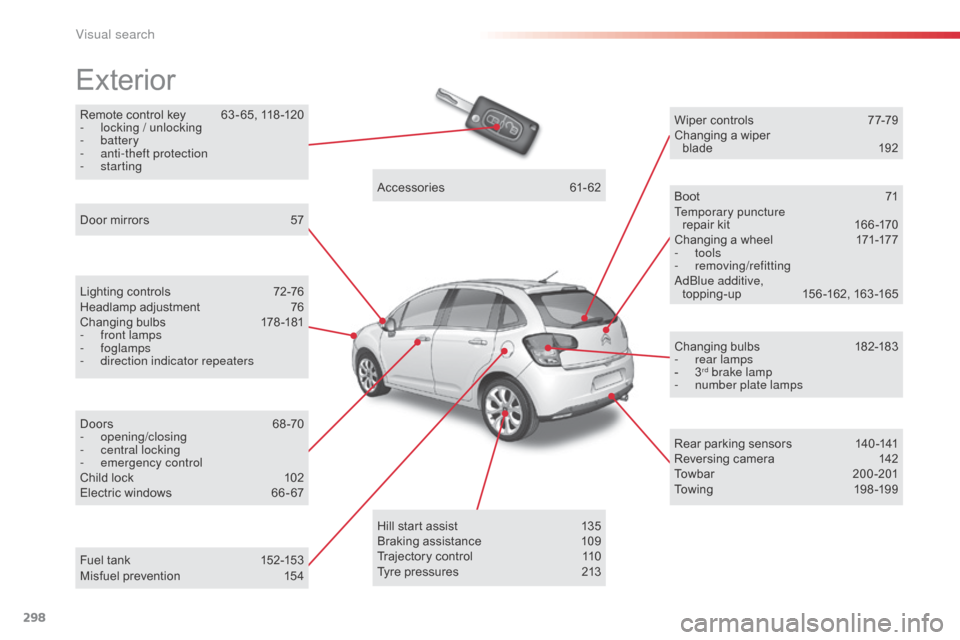
298
C3_en_Chap14_Recherche-visuel-Index-Alpha_ed01-2015
Remote control key 63 - 65, 118 -120
- l ocking / unlocking
-
battery
-
a
nti-theft protection
-
starting
Exterior
Lighting controls 7 2-76
Headlamp adjustment 7 6
Changing bulbs
1
78-181
-
f
ront lamps
-
foglamps
-
d
irection indicator repeaters
Door mirrors
5
7
Doors
6
8 -70
-
opening/closing
-
c
entral locking
-
em
ergency control
Child lock
1
02
Electric windows
6
6 - 67Accessories
6
1-62
Wiper controls
7
7-79
Changing a wiper blade
19
2
Boot
7
1
Temporary puncture repair kit
1
66 -170
Changing a wheel
1
71-177
- tools
-
removing/refittinga
dblu e additive,
topping-up 1 56 -162, 163 -165
Changing bulbs
1
82-183
-
r
ear lamps
-
3rd brake lamp
-
n
umber plate lamps
Rear parking sensors
1
40 -141
Reversing camera
1
42
Towbar
20
0-201
Towing
19
8 -19 9
Hill start assist
1
35
Braking assistance
1
09
Trajectory control
1
10
Tyre pressures
2
13
Fuel tank
1
52-153
Misfuel prevention
1
54
Visual search
Page 302 of 401

300
C3_en_Chap14_Recherche-visuel-Index-Alpha_ed01-2015
Instrument panels 10 -11
Warning lamps 1 2-23
Indicators
2
4-27
Adjustment buttons
2
8 -29
-
t
rip distance recorder /clock
-
l
ighting dimmer/ black panel
Instruments and controls
Lighting controls 7 2-76
Headlamp adjustment 7 6
Stop & Start
1
32-134
Speed limiter
1
36 -137
Cruise control
1
38 -139
Dashboard fuses
1
85 -187
Opening the bonnet
1
44Rear view mirror
5
8
Zenith windscreen blind
8
3
Sun visor
8
4
Wiper controls
7
7-79
Trip computer
3
0 -33
Audio system
2
79 -297
Setting the date/time
3
5, 39
Touch screen tablet
2
17-278
Setting the date/time
4
4
Emergency or assistance call
1
03, 215 -216
Ventilation / Heating
4
5 - 49
Manual air conditioning
4
7- 48
Digital air conditioning
5
0-51
dem
isting - d
e
frosting
(rear screen)
5
2
Interior mood lighting
8
1
Steering wheel adjustment
5
8
Horn
10
4 Scented air freshener
5
3
Manual gearbox
1
21
Electronic gearbox (ETG)
1
22-126
Automatic gearbox
1
27-130
Gear shift indicator
1
31
Parking brake
1
21
Door mirrors
5
7
Electric windows
6
6 - 67 Multifunction screens
3
4-39
Touch screen tablet
4
0 - 44
Hazard warning lamps 1 03
Visual search