Page 155 of 698

When returning the rear seatback to the upright position,
be sure the seatback is latched.
WARNING!
•Be certain that the seatback is securely locked into
position. If the seatback is not securely locked into
position the seat will not provide the proper stabil-
ity for child seats and/or passengers. An improp-
erly latched seat could cause serious injury.
• The rear cargo area of the vehicle (with the rear
seatbacks in the locked-up or folded down posi-
tion) should not be used as a play area by children.
They could be seriously injured in a collision.
Children should be seated and using the proper
restraint system.
DRIVER MEMORY SEAT — IF EQUIPPED
This feature allows the driver to store up to two different
memory profiles, for easy recall through a memory
switch. Each memory profile contains desired position
settings for the driver seat and side mirrors and a set of
desired radio station presets.
The memory switch is located on the driver’s side door
panel. The switch contains 3 buttons, a S (SET) button to
activate the memory save function, the number (1)
memory button and the number (2) memory button. The
memory switch allows the driver to recall either of the
two pre-programmed memory profiles by pressing the
appropriate number button on the switch.
3
UNDERSTANDING THE FEATURES OF YOUR VEHICLE 153
Page 156 of 698

Programming The Memory Feature
To create a new memory profile, perform the following:
NOTE:Saving a new memory profile will erase an
existing profile from memory.
1. Cycle the vehicles ignition to the ON position. 2. Adjust all memory profile settings to desired prefer-
ences (i.e., seat, side mirror and radio station presets).
3. Press and release the SET button on the memory switch, then press the number (1) button within five
seconds. The Electronic Vehicle Information Center
(EVIC) or Driver Information Display (DID), will
display which memory position is being set.
If desired, a second memory profile can be stored into
memory as follows:
1. Cycle the vehicles ignition to the ON position.
2. Adjust all memory profile settings to desired prefer- ences (i.e., seat, side mirror and radio station presets).
3. Press and release the SET button on the memory switch, then press the number (2) button within five
seconds. The EVIC/DID will display which memory
position is being set.
Driver Memory Switch
154 UNDERSTANDING THE FEATURES OF YOUR VEHICLE
Page 171 of 698

Ambient Light Control — If Equipped
Rotate the ambient dimmer control upward or down-
ward to increase or decrease the brightness of the ambi-
ent light located in the overhead console, door handle
lights, under I/P lights, door map pocket lights, and
cubby bin lights.
Dome Light Position
Rotate the instrument panel dimmer control completely
upward to the second detent to turn on the interior lights.
The interior lights will remain on when the instrument
panel dimmer control is in this position.
Interior Light Defeat (OFF)
Rotate the instrument panel dimmer control to the ex-
treme bottom OFF position. The interior lights will
remain off when the doors are open.
Parade Mode (Daytime Brightness Feature)
Rotate the instrument panel dimmer control upward to
the first detent. This feature brightens all text displays
such as the odometer, EVIC/DID, and radio when the
position lights or headlights are on.
Ambient Light/Door Handle Light Dimmer
3
UNDERSTANDING THE FEATURES OF YOUR VEHICLE 169
Page 208 of 698
General Information
This vehicle has systems that operate on radio frequency
that comply with Part 15 of the Federal Communications
Commission (FCC) rules and with Industry Canada
Standards RSS- GEN/210/220/310.
Operation is subject to the following two conditions:
1. The device may not cause harmful interference.
2. The device must accept any interference received,including interference that may cause undesired op-
eration of the device.
Changes or modifications to any of these systems by
other than an authorized service facility could void
authorization to use this equipment.
Normal (Fixed Speed) Electronic Speed Control
Mode
In addition to Adaptive Cruise Control mode, a Normal
(Fixed Speed) Electronic Speed Control mode is available
for cruising at fixed speeds. The Normal (Fixed Speed)
Electronic Speed Control mode is designed to maintain a
set cruising speed without requiring the driver to operate
the accelerator. Electronic Speed Control can only be
operated if the vehicle speed is above 20 mph (32 km/h).
To change between the different control modes, press the
ADAPTIVE CRUISE CONTROL (ACC) ON/OFF button
which turns the ACC and the NORMAL (Fixed Speed)
ELECTRONIC SPEED CONTROL OFF. Pressing of the
NORMAL (Fixed Speed) ELECTRONIC SPEED CON-
TROL ON/OFF button will result in turning ON (chang-
ing to) the Normal (Fixed Speed) Electronic Speed Con-
trol mode.
206 UNDERSTANDING THE FEATURES OF YOUR VEHICLE
Page 229 of 698
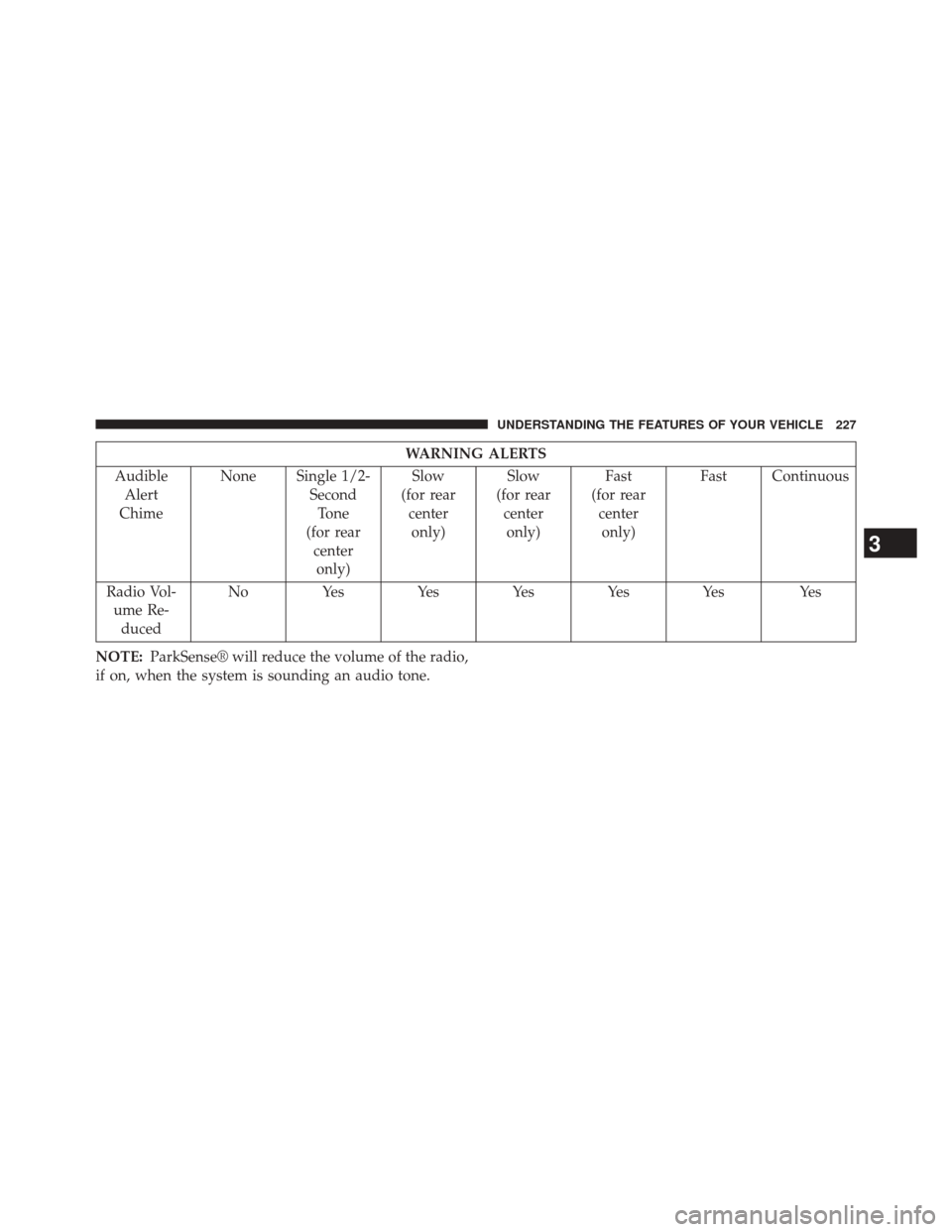
WARNING ALERTS
Audible Alert
Chime None Single 1/2-
SecondTone
(for rear centeronly) Slow
(for rear centeronly) Slow
(for rear centeronly) Fast
(for rear centeronly) Fast Continuous
Radio Vol- ume Re- duced No
Yes Yes Yes Yes Yes Yes
NOTE: ParkSense® will reduce the volume of the radio,
if on, when the system is sounding an audio tone.
3
UNDERSTANDING THE FEATURES OF YOUR VEHICLE 227
Page 232 of 698

ParkSense® System Usage Precautions
NOTE:
•Ensure that the rear bumper is free of snow, ice, mud,
dirt and debris to keep the ParkSense® system oper-
ating properly.
• Jackhammers, large trucks, and other vibrations could
affect the performance of ParkSense®.
• When you turn ParkSense® OFF, the instrument clus-
ter will display “PARKSENSE OFF” Furthermore, once
you turn ParkSense® off, it remains off until you turn
it on again, even if you cycle the ignition key.
• When you move the shift lever to the REVERSE
position and ParkSense® is turned OFF, the EVIC/
DID will display “PARKSENSE OFF” message for as
long as the vehicle is in REVERSE. •
ParkSense®, when on, will reduce the volume of the
radio when it is sounding a tone.
• Clean the ParkSense® sensors regularly, taking care
not to scratch or damage them. The sensors must not
be covered with ice, snow, slush, mud, dirt or debris.
Failure to do so can result in the system not working
properly. The ParkSense® system might not detect an
obstacle behind the fascia/bumper, or it could provide
a false indication that an obstacle is behind the fascia/
bumper.
• Use the ParkSense® switch to turn the ParkSense®
system OFF if objects such as bicycle carriers, trailer
hitches, etc. are placed within 12 in (30 cm) from the
rear fascia/bumper. Failure to do so can result in the
system misinterpreting a close object as a sensor
problem, causing the “PARKSENSE UNAVAILABLE
SERVICE REQUIRED” message to be displayed in the
EVIC/DID.
230 UNDERSTANDING THE FEATURES OF YOUR VEHICLE
Page 242 of 698
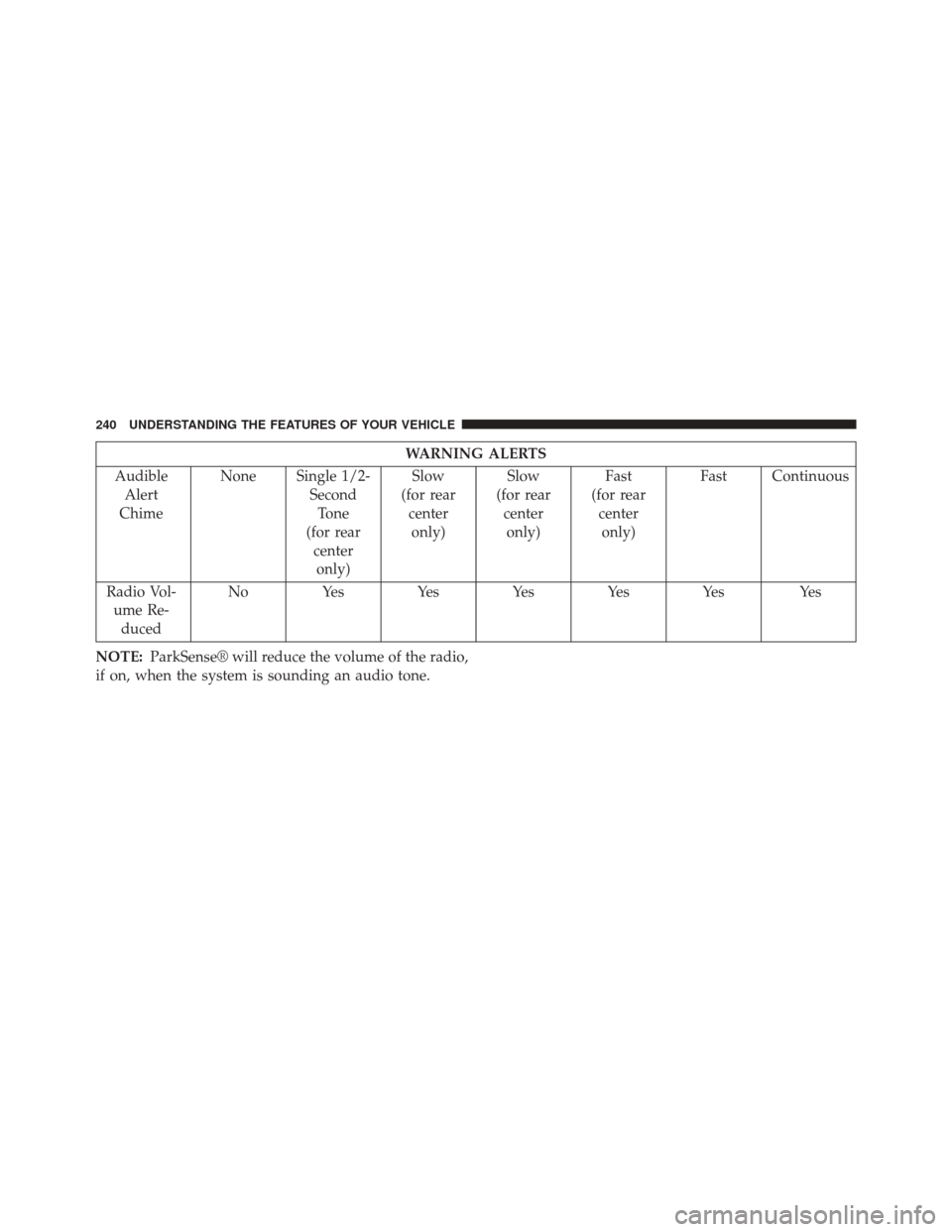
WARNING ALERTS
Audible Alert
Chime None Single 1/2-
SecondTone
(for rear centeronly) Slow
(for rear centeronly) Slow
(for rear centeronly) Fast
(for rear centeronly) Fast Continuous
Radio Vol- ume Re- duced No
Yes Yes Yes Yes Yes Yes
NOTE: ParkSense® will reduce the volume of the radio,
if on, when the system is sounding an audio tone.
240 UNDERSTANDING THE FEATURES OF YOUR VEHICLE
Page 246 of 698
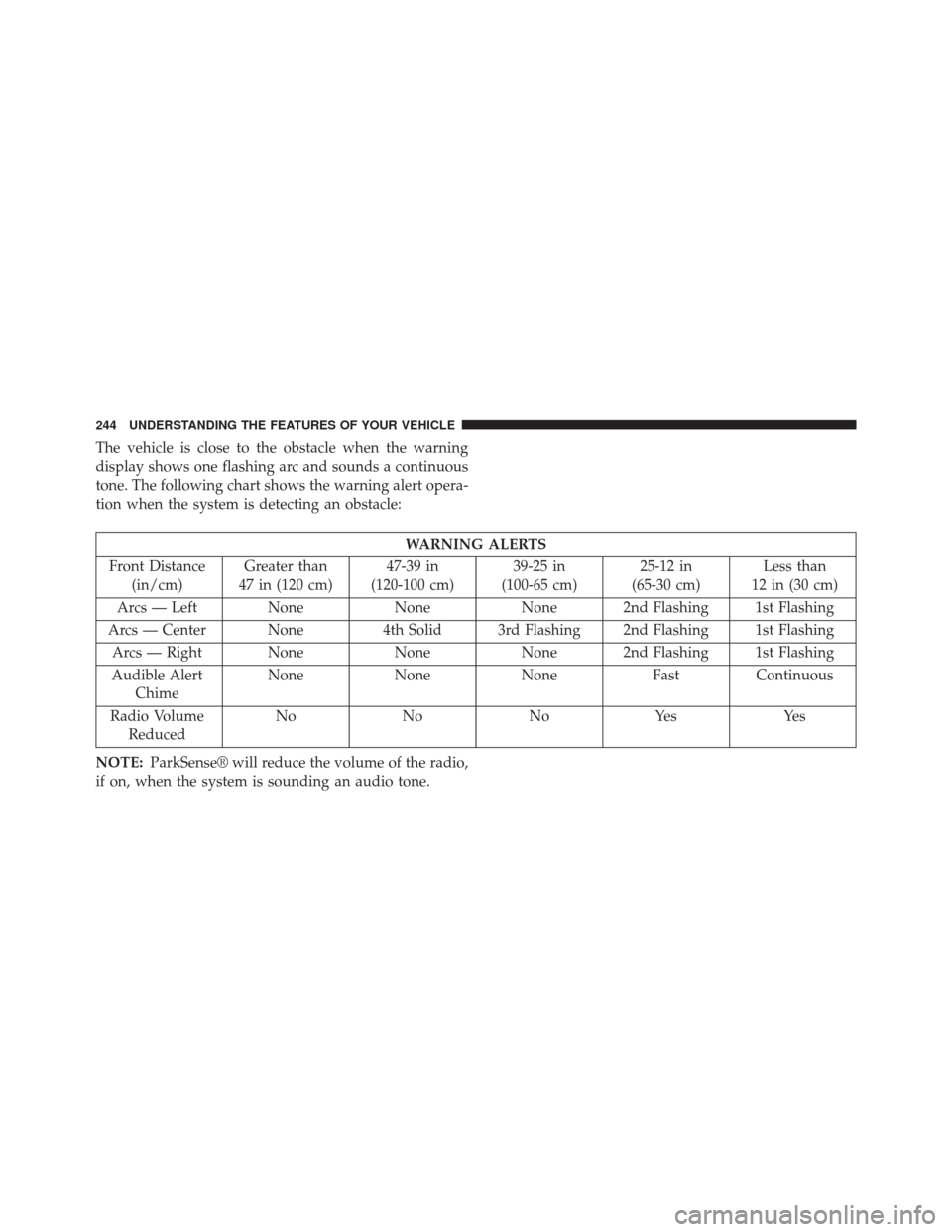
The vehicle is close to the obstacle when the warning
display shows one flashing arc and sounds a continuous
tone. The following chart shows the warning alert opera-
tion when the system is detecting an obstacle:
WARNING ALERTS
Front Distance (in/cm) Greater than
47 in (120 cm) 47-39 in
(120-100 cm) 39-25 in
(100-65 cm) 25-12 in
(65-30 cm) Less than
12 in (30 cm)
Arcs — Left None NoneNone 2nd Flashing 1st Flashing
Arcs — Center None 4th Solid 3rd Flashing 2nd Flashing 1st Flashing
Arcs — Right None NoneNone 2nd Flashing 1st Flashing
Audible Alert Chime None
NoneNone FastContinuous
Radio Volume Reduced No
NoNoYes Yes
NOTE: ParkSense® will reduce the volume of the radio,
if on, when the system is sounding an audio tone.
244 UNDERSTANDING THE FEATURES OF YOUR VEHICLE