2015 CHEVROLET MALIBU light
[x] Cancel search: lightPage 134 of 399
Black plate (27,1)Chevrolet Malibu Owner Manual (GMNA-Localizing-U.S./Canada/Mexico-
7575972) - 2015 - crc - 4/1/14
Instruments and Controls 5-27
Engine Power Messages
ENGINE POWER IS REDUCED
This message displays when the
vehicle's engine power is reduced.
Reduced engine power can affect
the vehicle's ability to accelerate.
If this message is on, but there is no
reduction in performance, proceed
to your destination. The
performance may be reduced the
next time the vehicle is driven. The
vehicle may be driven at a reduced
speed while this message is on, but
maximum acceleration and speed
may be reduced. Anytime this
message stays on, the vehicle
should be taken to your dealer for
service as soon as possible.
Fuel System Messages
FUEL LEVEL LOW
This message displays when the
vehicle is low on fuel. Refuel as
soon as possible.
TIGHTEN GAS CAP
This message displays when the
fuel cap is not on tight. Tighten the
fuel cap.
Key and Lock Messages
NO REMOTE DETECTED
This message displays when the
transmitter battery is weak on
vehicles with Keyless Access. See
“Starting the Vehicle with a Low
Transmitter Battery”underRemote
Keyless Entry (RKE) System
Operation on page 2-3.
REPLACE BATTERY IN
REMOTE KEY
This message displays when the
battery in the Remote Keyless Entry
(RKE) transmitter needs to be
replaced. See “Battery
Replacement” underRemote
Keyless Entry (RKE) System
Operation on page 2-3.
USE TRANSMITTER POCKET
TO START
This message displays when trying
to start the vehicle if an RKE
transmitter is not detected. The
transmitter battery may be weak.
See “Starting the Vehicle with a Low
Transmitter Battery” underRemote
Keyless Entry (RKE) System
Operation on page 2-3.
Lamp Messages
AUTOMATIC LIGHT CONTROL
ON/OFF
This message is displayed when the
automatic light control has been
turned on or off. See Automatic
Headlamp System on page 6-3.
CHECK XXX TURN
SIGNAL LAMP
When one of the turn signals is out,
this message displays to show
which bulb needs to be replaced.
Page 136 of 399
Black plate (29,1)Chevrolet Malibu Owner Manual (GMNA-Localizing-U.S./Canada/Mexico-
7575972) - 2015 - crc - 4/1/14
Instruments and Controls 5-29
message may also activate during
heavy rain or due to road spray. The
vehicle does not need service.
Ride Control System
Messages
SERVICE TRACTION
CONTROL
This message displays when there
is a problem with the Traction
Control System (TCS). When this
message is displayed, the system
will not limit wheel spin. Adjust your
driving accordingly. See your dealer
for service.
SERVICE STABILITRAK
This message displays if there is a
problem with the StabiliTrak system.
If this message appears, try to reset
the system. Stop; turn off the engine
for at least 15 seconds; then start
the engine again. If this message
still comes on, it means there is a
problem. See your dealer for
service. The vehicle is safe to drive;however, you do not have the
benefit of StabiliTrak, so reduce
your speed and drive accordingly.
Security Messages
THEFT ATTEMPTED
This message displays if the vehicle
detects a tamper condition.
Service Vehicle Messages
SERVICE AC SYSTEM
This message displays if there is a
problem with the air conditioning
system. Take the vehicle to your
dealer for service.
SERVICE POWER STEERING
This message displays if there is a
problem with the power steering
system. Take the vehicle to your
dealer for service.
SERVICE VEHICLE SOON
This message displays if there is a
problem with the vehicle. Take the
vehicle to your dealer for service.
Tire Messages
SERVICE TIRE MONITOR
SYSTEM
This message displays if there is a
problem with the Tire Pressure
Monitor System (TPMS). See
Tire
Pressure Monitor Operation on
page 10-51.
TIRE LEARNING ACTIVE
This message displays when the
system is learning new tires. See
Tire Pressure Monitor Operation on
page 10-51.
TIRE PRESSURE LOW ADD
AIR TO TIRE
On vehicles with the Tire Pressure
Monitor System (TPMS), this
message displays when the
pressure in one or more of the
vehicle's tires is low.
The low tire pressure warning light
will also come on. See Tire
Pressure Light on page 5-18.
Page 138 of 399
Black plate (31,1)Chevrolet Malibu Owner Manual (GMNA-Localizing-U.S./Canada/Mexico-
7575972) - 2015 - crc - 4/1/14
Instruments and Controls 5-31
Vehicle
Personalization
Use the audio system controls to
access the personalization menus
for customizing vehicle features.
The following are all possible
personalization features. Depending
on the vehicle, some may not be
available.
Infotainment System Audio
System Controls
Using the Faceplate
TUNE/MENU Knob
.Press to enter, select, or activate
a highlighted menu option.
.Turn to highlight a menu option.
.Press to enable or disable a
system setting.
}BACK
.Press to exit a menu.
.Press to return to a previous
screen.Using the Touch Screen
Press a screen feature to:
.View more feature options.
.Enable or disable the feature.
w:
Press to scroll up.
x:Press to scroll down.
Back: Press to return to the
previous menu.
To access the
personalization menu:
1. Press Config on the Home page
on the infotainment system
display or CONFIG on the
faceplate.
2. Select the desired feature to display a list of available
options.
3. Select the desired feature setting.
Personalization Menus
The following list of menu items may
be available:
.Languages
.Time and Date
.Radio Settings
.Phone Settings
.Navigation Settings
.Display Settings
.Vehicle Settings
Each menu is detailed in the
following information.
Languages
Select Languages, then select from
the available language(s).
Time and Date
Manually set the time and date. See
Clock on page 5-4.
Radio Settings
Select and the following may
display:
.Auto Volume
.Gracenote Options
.XM Channel Art
.Max Startup Volume
Page 140 of 399
Black plate (33,1)Chevrolet Malibu Owner Manual (GMNA-Localizing-U.S./Canada/Mexico-
7575972) - 2015 - crc - 4/1/14
Instruments and Controls 5-33
Navigation Settings
See“Navigation Settings” in
“Configure Menu” in the
infotainment manual.
Display Settings
Press and the following may
display:
.Home Page Menu
.Rear Camera Options
.Display Off
.Map Settings
Home Page Menu
Select and the following may
display:
.Customize
.Sort
.Restore Home Page Defaults
Customize
This feature allows the selection of
what icons will be on the first
Home Page. Select and follow the screen
prompts.
Sort
This feature allows the icons on the
Home Page to be moved.
Select and follow the screen
prompts.
Restore Home Page Defaults
This feature will restore the Home
Page to the factory settings.
Select and follow the screen
prompts.
Rear Camera Options
Select and the following may
display:
.Symbols
Symbols
Select to turn the rear camera
symbols on or off. See Rear Vision
Camera (RVC) on page 9-39. Display Off
Press to turn the display off. The
display will return when any radio
buttons are pressed or the screen is
touched (if equipped).
Map Settings
See
“Map Settings” in“Configure
Menu” in the infotainment manual.
Vehicle Settings
Select and the following may
display:
.Climate and Air Quality
.Comfort and Convenience
.Collision/Detection Systems
.Lighting
.Power Door Locks
.Remote Lock/Unlock/Start
.Return to Factory Settings?
Page 142 of 399
Black plate (35,1)Chevrolet Malibu Owner Manual (GMNA-Localizing-U.S./Canada/Mexico-
7575972) - 2015 - crc - 4/1/14
Instruments and Controls 5-35
Chime Volume
This allows selection of the chime
volume level.
Select Normal or High.
Reverse Tilt Mirror
When on, both the driver and
passenger mirrors will tilt downward
when the vehicle is shifted to
R (Reverse) to improve visibility of
the ground near the rear wheels.
They will return to their previous
driving position when the vehicle is
shifted out of R (Reverse), the
ignition is turned to OFF, or the
vehicle is left in R (Reverse). See
Reverse Tilt Mirrors on page 2-19.
Select On or Off.
Lighting
Select and the following may
display:
.Vehicle Locator Lights
.Exit LightingVehicle Locator Lights
This allows the vehicle locator lights
to be turned on or off. The vehicle
locator lights come on when
unlocking the vehicle with the RKE
transmitter.
Select On or Off.
Exit Lighting
This allows for selecting how long
the exterior lamps stay on when
leaving the vehicle and it is dark
outside.
Select Off, 30 Seconds, 1 Minute,
or 2 Minutes.
Power Door Locks
Select and depending on the radio
the following may display:
.Open Door Anti Lock Out
.Unlocked Door Anti Lock Out
.Auto Door Unlock
.Delayed Door Lock
.Auto Door LockOpen Door Anti Lock Out or
Unlocked Door Anti Lock Out
When on, this feature will keep the
driver door from locking when the
door is open. If Off is selected, the
Delayed Door Lock menu will be
available and the door will lock as
programmed through this menu.
Select to turn On or Off.
Auto Door Unlock
This allows selection of which of the
doors will automatically unlock when
the vehicle is shifted into P (Park).
Select All Doors, Driver Door, or Off.
Delayed Door Lock
When on, this feature will delay the
locking of the doors until
five seconds after the last door is
closed. Three chimes will signal
delayed locking is in use. Press
either the power lock button or
Qon
the RKE transmitter twice to
override the delayed locking feature
and immediately lock all of the
doors.
Page 143 of 399
Black plate (36,1)Chevrolet Malibu Owner Manual (GMNA-Localizing-U.S./Canada/Mexico-
7575972) - 2015 - crc - 4/1/14
5-36 Instruments and Controls
Select to turn On or Off.
Auto Door Lock
This allows selection of which of the
doors will automatically lock when
the vehicle is shifted out of P (Park).
Select All Doors, Driver Door, or Off.
Remote Lock/Unlock/Start
Select and depending on the radio
the following may display:
.Remote Unlock Feedback
.Unlock Feedback (Lights)
.Remote Lock Feedback
.Locking Feedback
.Remote Door Unlock
.Door Unlock Options
.Memory Remote Recall
.Remote Left in Vehicle Reminder
.Relock Remote Door
.Passive Door Unlock
.Passive Door LockRemote Unlock Feedback or
Unlock Feedback (Lights)
When on, the exterior lamps will
flash when unlocking the vehicle
with the RKE transmitter.
Select On or Off. Press TUNE/
MENU to confirm and go back to the
last menu.
Remote Lock Feedback or
Locking Feedback
This allows selection of what type of
feedback is given when locking the
vehicle with the RKE transmitter.
Press TUNE/MENU when Locking
Feedback is highlighted. Turn the
TUNE/MENU knob to select Lights
and Horn, Lights Only, Horn Only,
or Off. Press TUNE/MENU to
confirm and go back to the
last menu.
Remote Door Unlock or Door
Unlock Options
This allows selection of which doors
will unlock when pressingKon the
RKE transmitter. Press TUNE/MENU when Door
Unlock Options is highlighted. Turn
the TUNE/MENU knob to select All
Doors or Driver Door Only. When
set to Driver Door Only, the driver
door will unlock the first time
Kis
pressed and all doors will unlock
when
Kis pressed a second time.
When set to All Doors, all of the
doors will unlock at the first press of
K. Press TUNE/MENU to confirm
and go back to the last menu.
Memory Remote Recall
This allows the Memory Remote
Recall feature to be turned on or off.
When on, this feature will recall the
current driver's last seat and outside
mirror positions upon unlocking the
driver door with the RKE transmitter,
and opening that door. The current
driver is identified when the RKE
transmitter is used to unlock the
driver door. If equipped with Keyless
Access, the recall will occur upon
opening the driver door. See
“Recalling RKE Memory Positions”
under Memory Seats on page 3-6.
Page 144 of 399
Black plate (37,1)Chevrolet Malibu Owner Manual (GMNA-Localizing-U.S./Canada/Mexico-
7575972) - 2015 - crc - 4/1/14
Instruments and Controls 5-37
Press TUNE/MENU when Memory
Remote Recall is highlighted. Turn
the TUNE/MENU knob to select On
or Off. Press TUNE/MENU to
confirm and go back to the
last menu.
Remote Left in Vehicle Reminder
This allows the Remote Left in
Vehicle Reminder feature to be
turned on or off. If on, the horn will
chirp if a remote is left in the
vehicle.
Press TUNE/MENU when Remote
Left in Vehicle Reminder is
highlighted. Turn the TUNE/MENU
knob to select On or Off. Press
TUNE/MENU to confirm and go
back to the last menu.
Relock Remote Door
When on, the doors will
automatically lock after a period of
time if the vehicle is not entered or
exited.
Press TUNE/MENU when Relock
Remote Door is highlighted. Turn
the TUNE/MENU knob to select Onor Off. Press TUNE/MENU to
confirm and go back to the
last menu.
Passive Door Unlock
This allows selection of which doors
are unlocked by pressing the button
on the outside door handle.
Press TUNE/MENU when Passive
Door Unlock is highlighted. Turn the
TUNE/MENU knob to select All
Doors or Driver Door. Press TUNE/
MENU to confirm and go back to the
last menu.
Passive Door Lock
This allows for turning Passive
Locking off, on, or on with feedback.
Press TUNE/MENU when Passive
Door Lock is highlighted. Turn the
TUNE/MENU knob to select Off, On,
or On with Active Horn Chirp. Press
TUNE/MENU to confirm and go
back to the last menu.Return to Factory Settings?
Select Return to Factory Settings?
for the option to return all vehicle
personalization to the default
settings. Turn the TUNE/MENU
knob to select Yes or No. Press
TUNE/MENU to confirm and go
back to the last menu.
Page 145 of 399
Black plate (38,1)Chevrolet Malibu Owner Manual (GMNA-Localizing-U.S./Canada/Mexico-
7575972) - 2015 - crc - 4/1/14
5-38 Instruments and Controls
Universal Remote
System
SeeRadio Frequency Statement on
page 13-12.
Universal Remote System
Programming
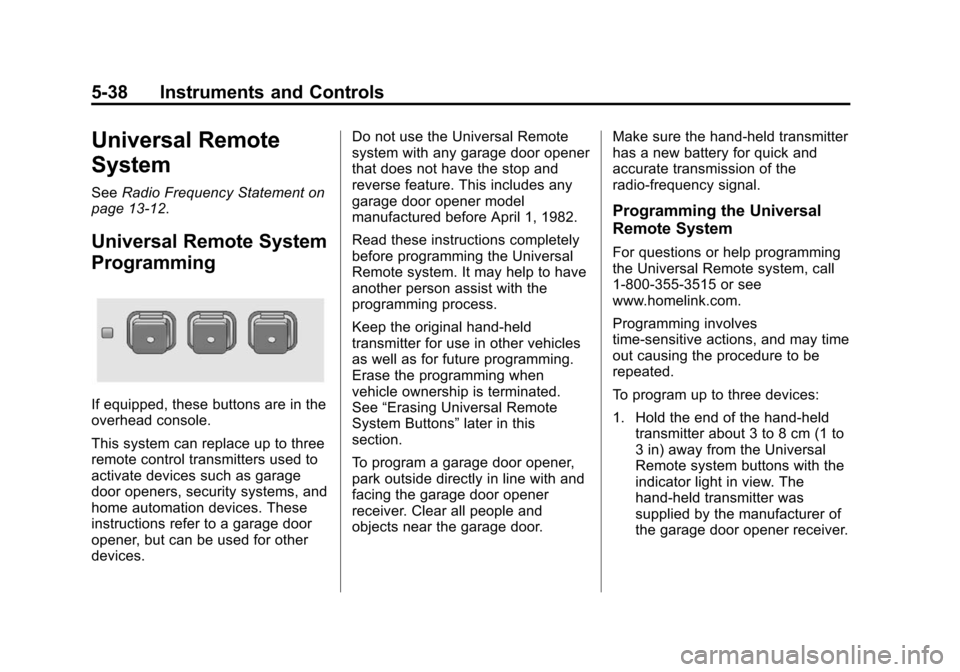
If equipped, these buttons are in the
overhead console.
This system can replace up to three
remote control transmitters used to
activate devices such as garage
door openers, security systems, and
home automation devices. These
instructions refer to a garage door
opener, but can be used for other
devices. Do not use the Universal Remote
system with any garage door opener
that does not have the stop and
reverse feature. This includes any
garage door opener model
manufactured before April 1, 1982.
Read these instructions completely
before programming the Universal
Remote system. It may help to have
another person assist with the
programming process.
Keep the original hand-held
transmitter for use in other vehicles
as well as for future programming.
Erase the programming when
vehicle ownership is terminated.
See
“Erasing Universal Remote
System Buttons” later in this
section.
To program a garage door opener,
park outside directly in line with and
facing the garage door opener
receiver. Clear all people and
objects near the garage door. Make sure the hand-held transmitter
has a new battery for quick and
accurate transmission of the
radio-frequency signal.
Programming the Universal
Remote System
For questions or help programming
the Universal Remote system, call
1-800-355-3515 or see
www.homelink.com.
Programming involves
time-sensitive actions, and may time
out causing the procedure to be
repeated.
To program up to three devices:
1. Hold the end of the hand-held
transmitter about 3 to 8 cm (1 to
3 in) away from the Universal
Remote system buttons with the
indicator light in view. The
hand-held transmitter was
supplied by the manufacturer of
the garage door opener receiver.