2015 CHEVROLET MALIBU mirror
[x] Cancel search: mirrorPage 49 of 399
Black plate (20,1)Chevrolet Malibu Owner Manual (GMNA-Localizing-U.S./Canada/Mexico-
7575972) - 2015 - crc - 4/1/14
2-20 Keys, Doors, and Windows
Automatic Dimming
Rearview Mirror
If equipped, automatic dimming
reduces the glare of headlamps
from behind. The dimming feature
comes on when the vehicle is
started.
Windows
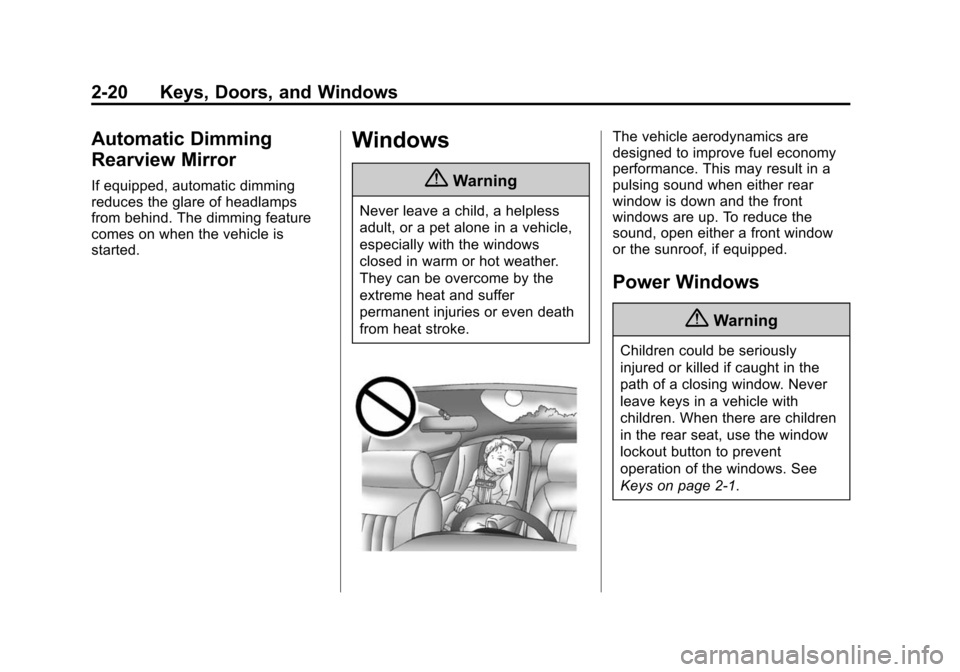
{Warning
Never leave a child, a helpless
adult, or a pet alone in a vehicle,
especially with the windows
closed in warm or hot weather.
They can be overcome by the
extreme heat and suffer
permanent injuries or even death
from heat stroke.
The vehicle aerodynamics are
designed to improve fuel economy
performance. This may result in a
pulsing sound when either rear
window is down and the front
windows are up. To reduce the
sound, open either a front window
or the sunroof, if equipped.
Power Windows
{Warning
Children could be seriously
injured or killed if caught in the
path of a closing window. Never
leave keys in a vehicle with
children. When there are children
in the rear seat, use the window
lockout button to prevent
operation of the windows. See
Keys on page 2-1.
Page 51 of 399
Black plate (22,1)Chevrolet Malibu Owner Manual (GMNA-Localizing-U.S./Canada/Mexico-
7575972) - 2015 - crc - 4/1/14
2-22 Keys, Doors, and Windows
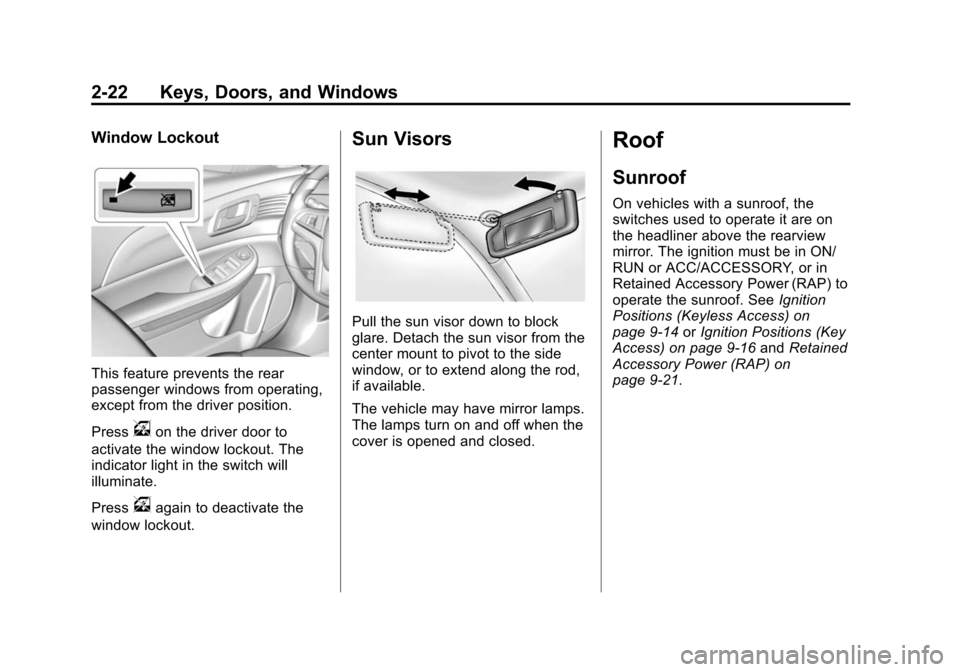
Window Lockout
This feature prevents the rear
passenger windows from operating,
except from the driver position.
Press
von the driver door to
activate the window lockout. The
indicator light in the switch will
illuminate.
Press
vagain to deactivate the
window lockout.
Sun Visors
Pull the sun visor down to block
glare. Detach the sun visor from the
center mount to pivot to the side
window, or to extend along the rod,
if available.
The vehicle may have mirror lamps.
The lamps turn on and off when the
cover is opened and closed.
Roof
Sunroof
On vehicles with a sunroof, the
switches used to operate it are on
the headliner above the rearview
mirror. The ignition must be in ON/
RUN or ACC/ACCESSORY, or in
Retained Accessory Power (RAP) to
operate the sunroof. See Ignition
Positions (Keyless Access) on
page 9-14 orIgnition Positions (Key
Access) on page 9-16 andRetained
Accessory Power (RAP) on
page 9-21.
Page 59 of 399
Black plate (6,1)Chevrolet Malibu Owner Manual (GMNA-Localizing-U.S./Canada/Mexico-
7575972) - 2015 - crc - 4/1/14
3-6 Seats and Restraints
Memory Seats
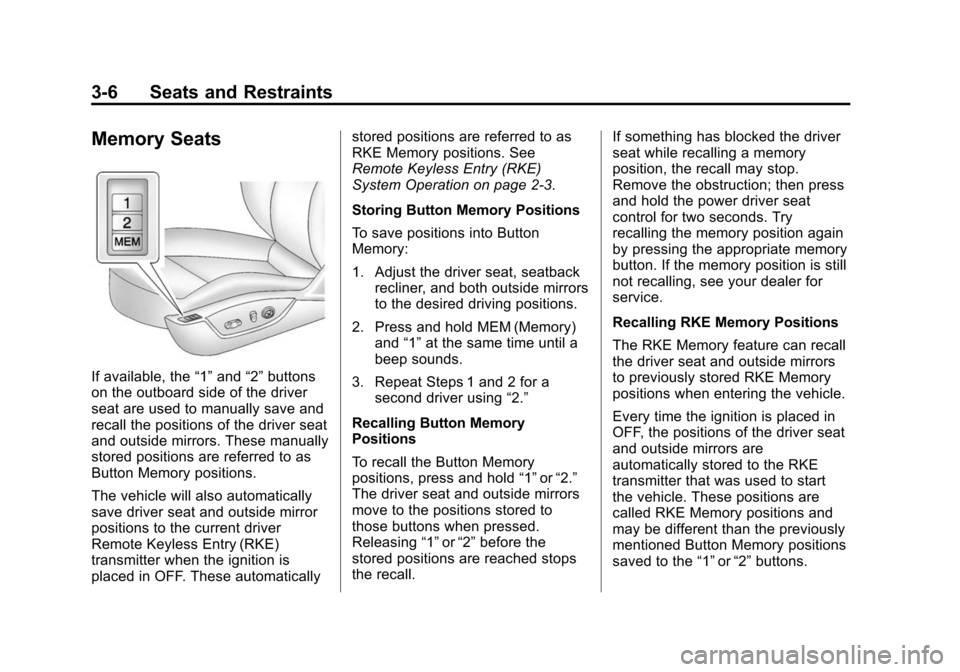
If available, the“1”and “2”buttons
on the outboard side of the driver
seat are used to manually save and
recall the positions of the driver seat
and outside mirrors. These manually
stored positions are referred to as
Button Memory positions.
The vehicle will also automatically
save driver seat and outside mirror
positions to the current driver
Remote Keyless Entry (RKE)
transmitter when the ignition is
placed in OFF. These automatically stored positions are referred to as
RKE Memory positions. See
Remote Keyless Entry (RKE)
System Operation on page 2-3.
Storing Button Memory Positions
To save positions into Button
Memory:
1. Adjust the driver seat, seatback
recliner, and both outside mirrors
to the desired driving positions.
2. Press and hold MEM (Memory) and “1”at the same time until a
beep sounds.
3. Repeat Steps 1 and 2 for a second driver using “2.”
Recalling Button Memory
Positions
To recall the Button Memory
positions, press and hold “1”or“2.”
The driver seat and outside mirrors
move to the positions stored to
those buttons when pressed.
Releasing “1”or“2” before the
stored positions are reached stops
the recall. If something has blocked the driver
seat while recalling a memory
position, the recall may stop.
Remove the obstruction; then press
and hold the power driver seat
control for two seconds. Try
recalling the memory position again
by pressing the appropriate memory
button. If the memory position is still
not recalling, see your dealer for
service.
Recalling RKE Memory Positions
The RKE Memory feature can recall
the driver seat and outside mirrors
to previously stored RKE Memory
positions when entering the vehicle.
Every time the ignition is placed in
OFF, the positions of the driver seat
and outside mirrors are
automatically stored to the RKE
transmitter that was used to start
the vehicle. These positions are
called RKE Memory positions and
may be different than the previously
mentioned Button Memory positions
saved to the
“1”or“2” buttons.
Page 60 of 399
Black plate (7,1)Chevrolet Malibu Owner Manual (GMNA-Localizing-U.S./Canada/Mexico-
7575972) - 2015 - crc - 4/1/14
Seats and Restraints 3-7
To recall RKE Memory positions:
.On vehicles with RKE, pressK
on the RKE transmitter and open
the driver door.
.On vehicles with Keyless
Access, press the lock/unlock
button on the outside driver door
handle and open the door. The
RKE transmitter must be present
for the recall to activate.
.If the driver door is already
open, press
Kon the RKE
transmitter to activate the recall.
The driver seat and outside mirrors
will move to the previously saved
RKE Memory positions.
This feature is turned on or off using
the vehicle personalization menu.
See Vehicle Personalization on
page 5-31.
To stop recall movement, press one
of the memory, power mirror,
or power seat controls. If something has blocked the driver
seat while recalling a memory
position, the recall may stop.
Remove the obstruction; then press
and hold the appropriate manual
control for the memory item that is
not recalling for two seconds. Try
recalling the memory position again
by opening the driver door and
pressing the RKE transmitter
K
button. If the memory position is still
not recalling, see your dealer for
service.
Easy Exit Driver Seat
This feature moves the seat
rearward allowing the driver more
room to exit the vehicle.
To activate, place the ignition in
OFF and open the driver door. If the
driver door is already open, placing
the ignition in OFF will activate the
recall.
This feature is turned on or off using
the vehicle personalization menu.
See
Vehicle Personalization on
page 5-31. To stop recall movement, press one
of the memory or power seat
controls.
If something has blocked the driver
seat while recalling the exit position,
the recall may stop. Remove the
obstruction; then press and hold the
power seat control rearward for
two seconds. Try recalling the exit
position again. If the exit position is
still not recalling, see your dealer for
service.
Heated Front Seats
{Warning
If you cannot feel temperature
change or pain to the skin, the
seat heater may cause burns. To
reduce the risk of burns, people
with such a condition should use
care when using the seat heater,
especially for long periods of
time. Do not place anything on
the seat that insulates against
(Continued)
Page 141 of 399
Black plate (34,1)Chevrolet Malibu Owner Manual (GMNA-Localizing-U.S./Canada/Mexico-
7575972) - 2015 - crc - 4/1/14
5-34 Instruments and Controls
Climate and Air Quality
Select and the following may
display:
.Auto Fan Speed
.Remote Start Heated Seats
.Auto Defog
.Auto Rear Defog
Auto Fan Speed
This allows for selecting the
automatic fan speed. It can be
adjusted to run lower or higher than
normal.
Select High, Medium, or Low.
Remote Start Heated Seats
When turned on, this feature will
turn the heated seats on when using
remote start on cold days.
Select On or Off.
Auto Defog
Only vehicles with dual automatic
climate control will have this option.
This allows for turning the auto
defog on or off. Select On or Off.
Auto Rear Defog
This will allow for turning the auto
rear defog on or off. This feature will
automatically turn on the rear
window defogger when it is cold
outside.
Select On or Off.
Collision Detection Systems
Select and the following may
display:
.Park Assist
.Side Blind Zone Alert (SBZA)
.Rear Cross Traffic Alert
Park Assist
This allows the Park Assist feature
to be turned on or off.
Select On or Off.
See Parking Assist on page 9-36.
Side Blind Zone Alert (SBZA)
This allows the SBZA feature to be
turned on or off. Select On or Off.
See
Side Blind Zone Alert (SBZA)
on page 9-37.
Rear Cross Traffic Alert
This allows the feature to be turned
on or off.
Select Off or On.
See Rear Vision Camera (RVC) on
page 9-39.
Comfort and Convenience
Select and the following may
display:
.Easy Exit Driver Seat
.Chime Volume
.Reverse Tilt Mirror
Easy Exit Driver Seat
This feature moves the seat
rearward allowing the driver more
room to exit the vehicle.
See “Easy Exit Driver Seat” under
Memory Seats on page 3-6.
Select On or Off.
Page 142 of 399
Black plate (35,1)Chevrolet Malibu Owner Manual (GMNA-Localizing-U.S./Canada/Mexico-
7575972) - 2015 - crc - 4/1/14
Instruments and Controls 5-35
Chime Volume
This allows selection of the chime
volume level.
Select Normal or High.
Reverse Tilt Mirror
When on, both the driver and
passenger mirrors will tilt downward
when the vehicle is shifted to
R (Reverse) to improve visibility of
the ground near the rear wheels.
They will return to their previous
driving position when the vehicle is
shifted out of R (Reverse), the
ignition is turned to OFF, or the
vehicle is left in R (Reverse). See
Reverse Tilt Mirrors on page 2-19.
Select On or Off.
Lighting
Select and the following may
display:
.Vehicle Locator Lights
.Exit LightingVehicle Locator Lights
This allows the vehicle locator lights
to be turned on or off. The vehicle
locator lights come on when
unlocking the vehicle with the RKE
transmitter.
Select On or Off.
Exit Lighting
This allows for selecting how long
the exterior lamps stay on when
leaving the vehicle and it is dark
outside.
Select Off, 30 Seconds, 1 Minute,
or 2 Minutes.
Power Door Locks
Select and depending on the radio
the following may display:
.Open Door Anti Lock Out
.Unlocked Door Anti Lock Out
.Auto Door Unlock
.Delayed Door Lock
.Auto Door LockOpen Door Anti Lock Out or
Unlocked Door Anti Lock Out
When on, this feature will keep the
driver door from locking when the
door is open. If Off is selected, the
Delayed Door Lock menu will be
available and the door will lock as
programmed through this menu.
Select to turn On or Off.
Auto Door Unlock
This allows selection of which of the
doors will automatically unlock when
the vehicle is shifted into P (Park).
Select All Doors, Driver Door, or Off.
Delayed Door Lock
When on, this feature will delay the
locking of the doors until
five seconds after the last door is
closed. Three chimes will signal
delayed locking is in use. Press
either the power lock button or
Qon
the RKE transmitter twice to
override the delayed locking feature
and immediately lock all of the
doors.
Page 143 of 399
Black plate (36,1)Chevrolet Malibu Owner Manual (GMNA-Localizing-U.S./Canada/Mexico-
7575972) - 2015 - crc - 4/1/14
5-36 Instruments and Controls
Select to turn On or Off.
Auto Door Lock
This allows selection of which of the
doors will automatically lock when
the vehicle is shifted out of P (Park).
Select All Doors, Driver Door, or Off.
Remote Lock/Unlock/Start
Select and depending on the radio
the following may display:
.Remote Unlock Feedback
.Unlock Feedback (Lights)
.Remote Lock Feedback
.Locking Feedback
.Remote Door Unlock
.Door Unlock Options
.Memory Remote Recall
.Remote Left in Vehicle Reminder
.Relock Remote Door
.Passive Door Unlock
.Passive Door LockRemote Unlock Feedback or
Unlock Feedback (Lights)
When on, the exterior lamps will
flash when unlocking the vehicle
with the RKE transmitter.
Select On or Off. Press TUNE/
MENU to confirm and go back to the
last menu.
Remote Lock Feedback or
Locking Feedback
This allows selection of what type of
feedback is given when locking the
vehicle with the RKE transmitter.
Press TUNE/MENU when Locking
Feedback is highlighted. Turn the
TUNE/MENU knob to select Lights
and Horn, Lights Only, Horn Only,
or Off. Press TUNE/MENU to
confirm and go back to the
last menu.
Remote Door Unlock or Door
Unlock Options
This allows selection of which doors
will unlock when pressingKon the
RKE transmitter. Press TUNE/MENU when Door
Unlock Options is highlighted. Turn
the TUNE/MENU knob to select All
Doors or Driver Door Only. When
set to Driver Door Only, the driver
door will unlock the first time
Kis
pressed and all doors will unlock
when
Kis pressed a second time.
When set to All Doors, all of the
doors will unlock at the first press of
K. Press TUNE/MENU to confirm
and go back to the last menu.
Memory Remote Recall
This allows the Memory Remote
Recall feature to be turned on or off.
When on, this feature will recall the
current driver's last seat and outside
mirror positions upon unlocking the
driver door with the RKE transmitter,
and opening that door. The current
driver is identified when the RKE
transmitter is used to unlock the
driver door. If equipped with Keyless
Access, the recall will occur upon
opening the driver door. See
“Recalling RKE Memory Positions”
under Memory Seats on page 3-6.
Page 190 of 399
Black plate (3,1)Chevrolet Malibu Owner Manual (GMNA-Localizing-U.S./Canada/Mexico-
7575972) - 2015 - crc - 4/1/14
Climate Controls 8-3
higher humidity inside the vehicle
and window fogging before the
engine restarts.
Pressing the
0button during an
auto stop will restart the engine to
prevent window fogging. To reach
comfort levels quickly during an
auto stop, the engine will restart if
the air conditioner is off and AUTO
or
#is selected.
For comfort a/c, press
#again.
The indicator will turn amber.
When the indicator light is on, the
air conditioner runs automatically to
cool the air inside the vehicle or to
dry the air needed to defog the
windshield faster.
h(Recirculation): Press to turn
on recirculation. An indicator light
comes on. Air is recirculated to
quickly cool the inside of the vehicle
or prevent outside air and odors
from entering.
MorL(Heated Seats, If
Equipped): Press to turn the
heated seats on or off. See Heated
Front Seats on page 3-7.
Rear Window Defogger
=(Rear Window Defogger):
Press to turn the rear window
defogger on or off.
The rear window defogger turns off
automatically after about
10 minutes. If turned on again, it
runs for about five minutes before
turning off. At higher speeds, the
rear window defogger may stay on
continuously.
If equipped with heated outside
rearview mirrors, they turn on with
the rear window defogger and help
to clear fog or frost from the surface
of the mirror. See Heated Mirrors on
page 2-19.
{Caution
Using a razor blade or sharp
object on the inside rear window
can damage the antenna or
defogger. Repairs would not be
covered by the vehicle warranty.
Do not stick anything to the rear
window.
Sensors
The solar sensor on top of the
instrument panel near the
windshield monitors the solar heat.
The climate control system uses the
sensor information to adjust the
temperature, fan speed,
recirculation, and air delivery mode
for best comfort.
If the sensor is covered, the
automatic climate control system
may not work properly.