2015 CHEVROLET EQUINOX Shift
[x] Cancel search: ShiftPage 10 of 391

Black plate (3,1)Chevrolet Equinox Owner Manual (GMNA-Localizing-U.S./Canada-
7707483) - 2015 - crc - 9/29/14
In Brief 1-3
1.Air Vents on page 8-6.
2. Turn Signal Lever. See Turn and
Lane-Change Signals on
page 6-3.
Exterior Lamp Controls on
page 6-1.
Fog Lamps on page 6-4 (If
Equipped).
3. Instrument Cluster on page 5-8.
4. Windshield Wiper/Washer on
page 5-3.
Rear Window Wiper/Washer on
page 5-4.
5. Power Door Locks on page 2-7.
6. Instrument Panel Storage on
page 4-1 (If Equipped).
Forward Collision Alert (FCA)
Display (If Equipped). See
Forward Collision Alert (FCA)
System on page 9-37.
Lane Departure Warning (LDW)
Indicator (If Equipped). See
Lane Departure Warning (LDW)
on page 9-43. 7. Touchscreen (If Equipped).
8.
Safety Locks on page 2-9.
9. Infotainment on page 7-1.
10. Hood Release (Out of View). SeeHood on page 10-4.
11. Data Link Connector (DLC) (Out of View). See Malfunction
Indicator Lamp on page 5-13.
12. Cruise Control on page 9-35.
Forward Collision Alert (FCA)
Button (If Equipped). See
Forward Collision Alert (FCA)
System on page 9-37.
Lane Departure Warning
(LDW) Button (If Equipped).
SeeLane Departure Warning
(LDW) on page 9-43.
13. Instrument Panel Illumination
Control on page 6-4.
14. Steering Wheel Adjustment on
page 5-2.
15. Horn on page 5-3.
16. Steering Wheel Controls on
page 5-2. 17.
Ignition Positions on
page 9-19.
18. Climate Control Systems on
page 8-1 (If Equipped).
Automatic Climate Control
System on page 8-3 (If
Equipped).
19. Shift Lever. See Shifting Into
Park on page 9-24.
20. eco Button (If Equipped). See Fuel Economy Mode on
page 9-29.
21. Traction Control/Electronic
Stability Control on page 9-33.
22. Power Outlets on page 5-6.
23. CD Player on page 7-12.
24. Driver Information Center Buttons (If Equipped). See
Driver Information Center (DIC)
on page 5-22.
25. Hazard Warning Flashers on
page 6-3.
Page 23 of 391
Black plate (16,1)Chevrolet Equinox Owner Manual (GMNA-Localizing-U.S./Canada-
7707483) - 2015 - crc - 9/29/14
1-16 In Brief
SeeParking Brake on page 9-31.
Transmission
Electronic Range Select
(ERS) Mode
ERS or manual mode allows for the
selection of the range of gear
positions. Use this mode when
driving downhill or towing a trailer to
limit the top gear and vehicle speed.
To use this feature:
1. Move the shift lever to
M (Manual Mode).
2. Press the plus/minus button on the shift lever to increase or
decrease the gear range
available.
See Manual Mode on page 9-28.
Fuel Economy Mode
Vehicles with a 2.4L engine have a
Fuel Economy Mode. When
engaged, Fuel Economy Mode can
improve the vehicle's fuel economy.
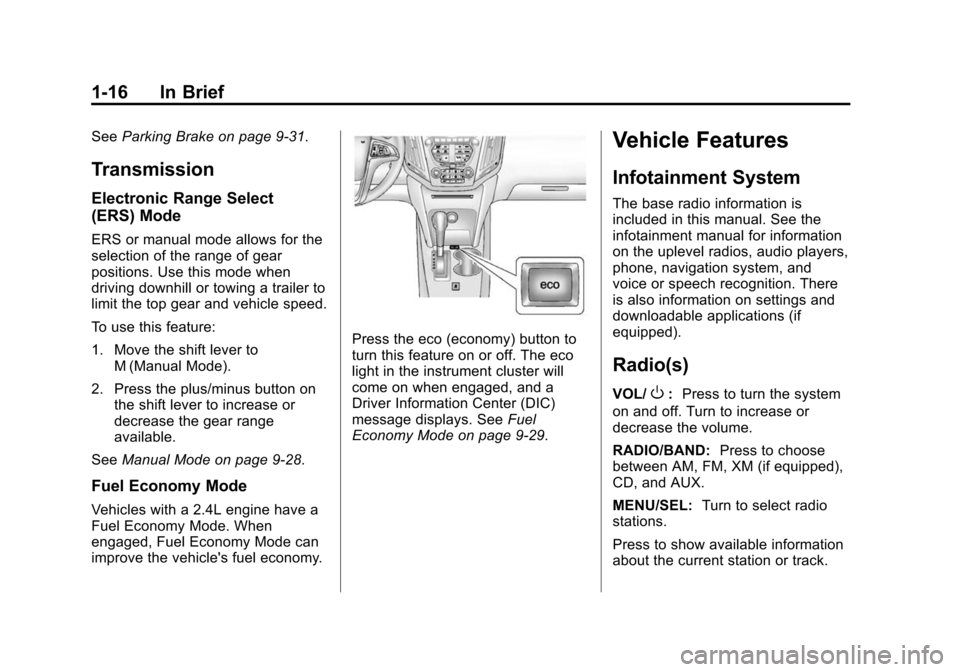
Press the eco (economy) button to
turn this feature on or off. The eco
light in the instrument cluster will
come on when engaged, and a
Driver Information Center (DIC)
message displays. See Fuel
Economy Mode on page 9-29.
Vehicle Features
Infotainment System
The base radio information is
included in this manual. See the
infotainment manual for information
on the uplevel radios, audio players,
phone, navigation system, and
voice or speech recognition. There
is also information on settings and
downloadable applications (if
equipped).
Radio(s)
VOL/O: Press to turn the system
on and off. Turn to increase or
decrease the volume.
RADIO/BAND: Press to choose
between AM, FM, XM (if equipped),
CD, and AUX.
MENU/SEL: Turn to select radio
stations.
Press to show available information
about the current station or track.
Page 27 of 391

Black plate (20,1)Chevrolet Equinox Owner Manual (GMNA-Localizing-U.S./Canada-
7707483) - 2015 - crc - 9/29/14
1-20 In Brief
alert and rapidly beeps. This alert
stays lit if you follow a vehicle much
too closely.
SeeForward Collision Alert (FCA)
System on page 9-37.
Lane Departure
Warning (LDW)
If equipped, LDW may help avoid
unintentional lane departures at
speeds of 56 km/h (35 mph) or
greater. LDW uses a camera sensor
to detect the lane markings. The
LDW light,
@, is green if a lane
marking is detected. If the vehicle
departs the lane, the light will
change to amber and flash. In
addition, beeps will sound.
See Lane Departure Warning (LDW)
on page 9-43.
Rear Vision
Camera (RVC)
If equipped, RVC displays a view of
the area behind the vehicle, on the
infotainment system display, when
the vehicle is shifted into
R (Reverse).
See Rear Vision Camera (RVC) on
page 9-41.
Parking Assist
If equipped, this system uses
sensors on the rear bumper to
assist with parking and avoiding
objects while in R (Reverse).
It operates at speeds less than
8 km/h (5 mph). Rear Parking Assist
(RPA) uses audible beeps to
provide distance and system
information.
Keep the sensors on the vehicle's
rear bumper clean to ensure proper
operation.
See Parking Assist on page 9-39.
Power Outlets
The accessory power outlets can be
used to connect electrical
equipment, such as a cell phone or
MP3 player.
There are four accessory power
outlets: below the CD slot, inside
the center console storage, on the
rear of the center console storage,
and in the rear cargo compartment.
To use the outlets, remove the cover
and close when not in use.
SeePower Outlets on page 5-6.
Universal Remote System
If equipped, these buttons are in the
overhead console. The system can
replace up to three remote control
transmitters used to activate
Page 39 of 391
Black plate (8,1)Chevrolet Equinox Owner Manual (GMNA-Localizing-U.S./Canada-
7707483) - 2015 - crc - 9/29/14
2-8 Keys, Doors, and Windows
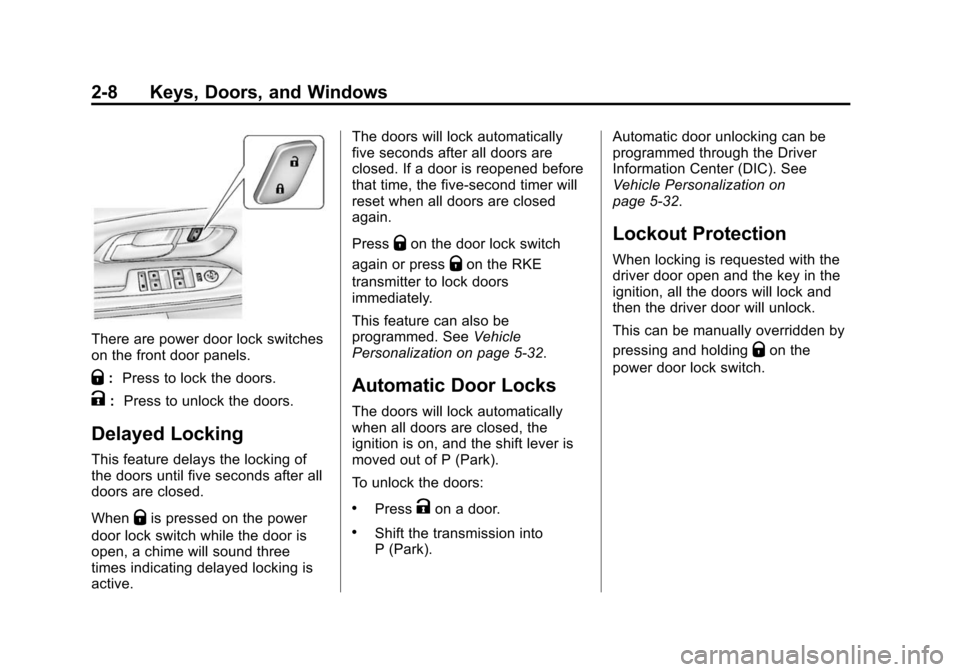
There are power door lock switches
on the front door panels.
Q:Press to lock the doors.
K: Press to unlock the doors.
Delayed Locking
This feature delays the locking of
the doors until five seconds after all
doors are closed.
When
Qis pressed on the power
door lock switch while the door is
open, a chime will sound three
times indicating delayed locking is
active. The doors will lock automatically
five seconds after all doors are
closed. If a door is reopened before
that time, the five-second timer will
reset when all doors are closed
again.
Press
Qon the door lock switch
again or press
Qon the RKE
transmitter to lock doors
immediately.
This feature can also be
programmed. See Vehicle
Personalization on page 5-32.
Automatic Door Locks
The doors will lock automatically
when all doors are closed, the
ignition is on, and the shift lever is
moved out of P (Park).
To unlock the doors:
.PressKon a door.
.Shift the transmission into
P (Park). Automatic door unlocking can be
programmed through the Driver
Information Center (DIC). See
Vehicle Personalization on
page 5-32.
Lockout Protection
When locking is requested with the
driver door open and the key in the
ignition, all the doors will lock and
then the driver door will unlock.
This can be manually overridden by
pressing and holding
Qon the
power door lock switch.
Page 43 of 391
Black plate (12,1)Chevrolet Equinox Owner Manual (GMNA-Localizing-U.S./Canada-
7707483) - 2015 - crc - 9/29/14
2-12 Keys, Doors, and Windows
The power liftgate may be
temporarily disabled under extreme
temperatures or low battery
conditions. If this occurs, the liftgate
can still be operated manually.
If the vehicle is shifted out of
P (Park) while the power function is
in progress, the liftgate power
function will continue to completion.
If the vehicle is shifted out of
P (Park) and accelerated before the
power liftgate latch is closed, the
liftgate may reverse to the open
position. Cargo could fall out of the
vehicle. Always make sure the
power liftgate is closed and latched
before driving away.
If the liftgate is power opened and
the liftgate support struts have lost
pressure, the turn signals flash and
a chime will sound. The liftgate
stays open temporarily, and then
slowly closes. See your dealer for
service before using the liftgate.Obstacle Detection Features
If the liftgate encounters an obstacle
during a power open or close cycle,
a warning chime will sound and the
liftgate will automatically reverse
direction to the full closed or open
position. After removing the
obstruction, the power liftgate
operation can be used again. If the
liftgate encounters multiple
obstacles on the same power cycle,
the power function will deactivate
and a message will display in the
Driver Information Center (DIC).
SeeObject Detection System
Messages on page 5-28. After
removing the obstructions, the
liftgate will resume normal power
operation.
Pinch sensors are located on the
side edges of the liftgate. If an
object is caught between the liftgate
and the vehicle and presses against
this sensor, the liftgate will reverse
direction and open fully. The liftgate
will remain open until it is activated
again or closed manually.
Setting the 3/4 Mode
To change the position the liftgate
stops at when opening:
1. Select MAX or 3/4 mode and open the liftgate.
2. Stop the liftgate movement at the desired height by pressing
any liftgate switch. Manually
adjust the liftgate position if
needed.
3. Press and hold
8on the
liftgate next to the latch until the
turn signals flash and a beep
sounds to indicate that the new
setting is recorded.
When power opened with the 3/4
mode selected, the liftgate stops at
the new set position.
If there is no audible and visual
feedback when setting the
intermediate stop position, the
liftgate height is being set below the
3/4 open height minimum
(approximately 1.5 m or 5 ft). The
Page 47 of 391
Black plate (16,1)Chevrolet Equinox Owner Manual (GMNA-Localizing-U.S./Canada-
7707483) - 2015 - crc - 9/29/14
2-16 Keys, Doors, and Windows
Power Mirrors
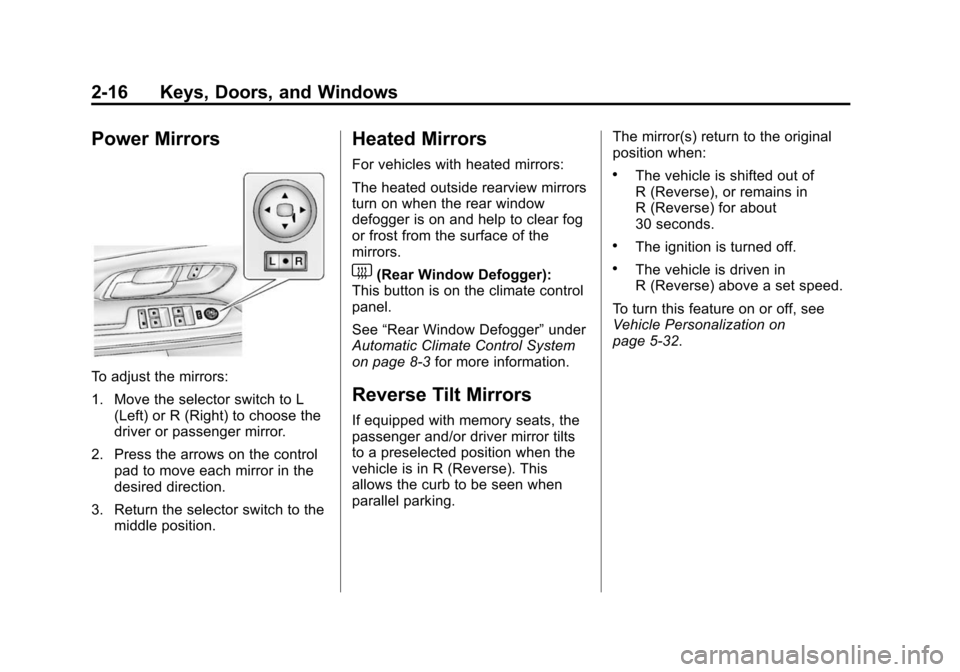
To adjust the mirrors:
1. Move the selector switch to L(Left) or R (Right) to choose the
driver or passenger mirror.
2. Press the arrows on the control pad to move each mirror in the
desired direction.
3. Return the selector switch to the middle position.
Heated Mirrors
For vehicles with heated mirrors:
The heated outside rearview mirrors
turn on when the rear window
defogger is on and help to clear fog
or frost from the surface of the
mirrors.
1(Rear Window Defogger):
This button is on the climate control
panel.
See “Rear Window Defogger” under
Automatic Climate Control System
on page 8-3 for more information.
Reverse Tilt Mirrors
If equipped with memory seats, the
passenger and/or driver mirror tilts
to a preselected position when the
vehicle is in R (Reverse). This
allows the curb to be seen when
parallel parking. The mirror(s) return to the original
position when:
.The vehicle is shifted out of
R (Reverse), or remains in
R (Reverse) for about
30 seconds.
.The ignition is turned off.
.The vehicle is driven in
R (Reverse) above a set speed.
To turn this feature on or off, see
Vehicle Personalization on
page 5-32.
Page 127 of 391
Black plate (20,1)Chevrolet Equinox Owner Manual (GMNA-Localizing-U.S./Canada-
7707483) - 2015 - crc - 9/29/14
5-20 Instruments and Controls
could be low on oil and might have
some other system problem. See
your dealer.
Fuel Economy Light
For vehicles with the Fuel Economy
Mode light, it comes on when the
eco (economy) button near the shift
lever is pressed. For vehicles with a
Driver Information Center (DIC) an
ECO MODE ON message displays.
SeeFuel System Messages on
page 5-28. Press the button again
to turn off the light and exit the fuel
saver mode.
Low Fuel Warning Light
English Shown, Metric Similar
This light comes on for a few
seconds when the ignition is turned
on as a check to indicate it is
working. If it does not come on,
have it fixed.
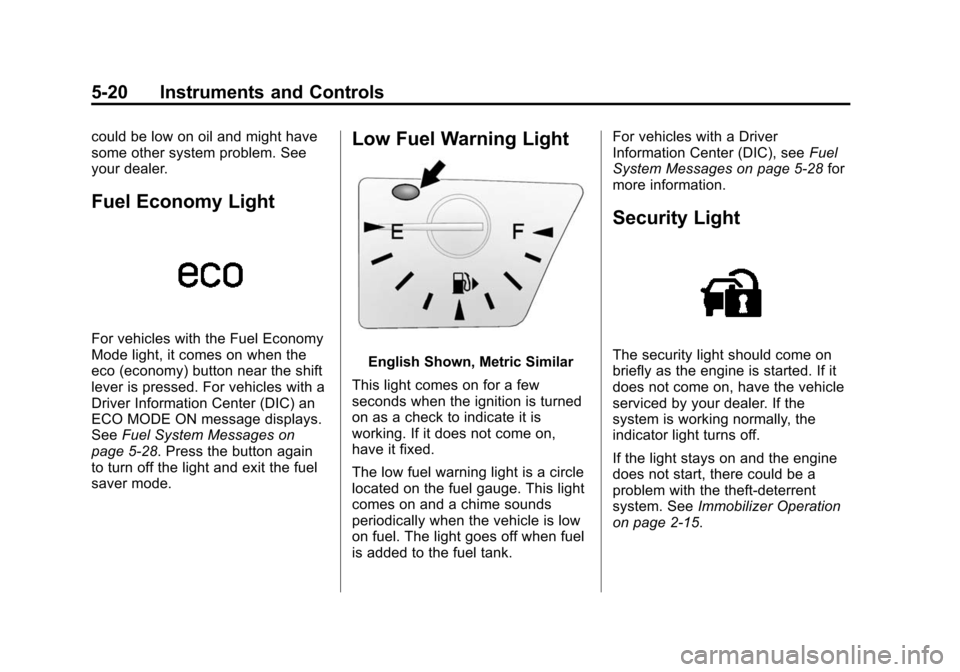
The low fuel warning light is a circle
located on the fuel gauge. This light
comes on and a chime sounds
periodically when the vehicle is low
on fuel. The light goes off when fuel
is added to the fuel tank. For vehicles with a Driver
Information Center (DIC), see
Fuel
System Messages on page 5-28 for
more information.
Security Light
The security light should come on
briefly as the engine is started. If it
does not come on, have the vehicle
serviced by your dealer. If the
system is working normally, the
indicator light turns off.
If the light stays on and the engine
does not start, there could be a
problem with the theft-deterrent
system. See Immobilizer Operation
on page 2-15.
Page 129 of 391
Black plate (22,1)Chevrolet Equinox Owner Manual (GMNA-Localizing-U.S./Canada-
7707483) - 2015 - crc - 9/29/14
5-22 Instruments and Controls
Information Displays
Driver Information
Center (DIC)
The vehicle may have a Driver
Information Center (DIC). It displays
information about the vehicle and
warning messages if there is a
system problem detected. DIC
messages display in the center of
the instrument cluster. SeeVehicle
Messages on page 5-25.
The vehicle may also have features
that can be customized through the
controls on the radio. See Vehicle
Personalization on page 5-32.
DIC Operation and Displays
Use the DIC buttons located in the
center of the instrument panel to
access different displays. The DIC
displays trip, fuel, vehicle system
information, and warning messages.
It also shows the shift lever position,
the odometer, and the direction the
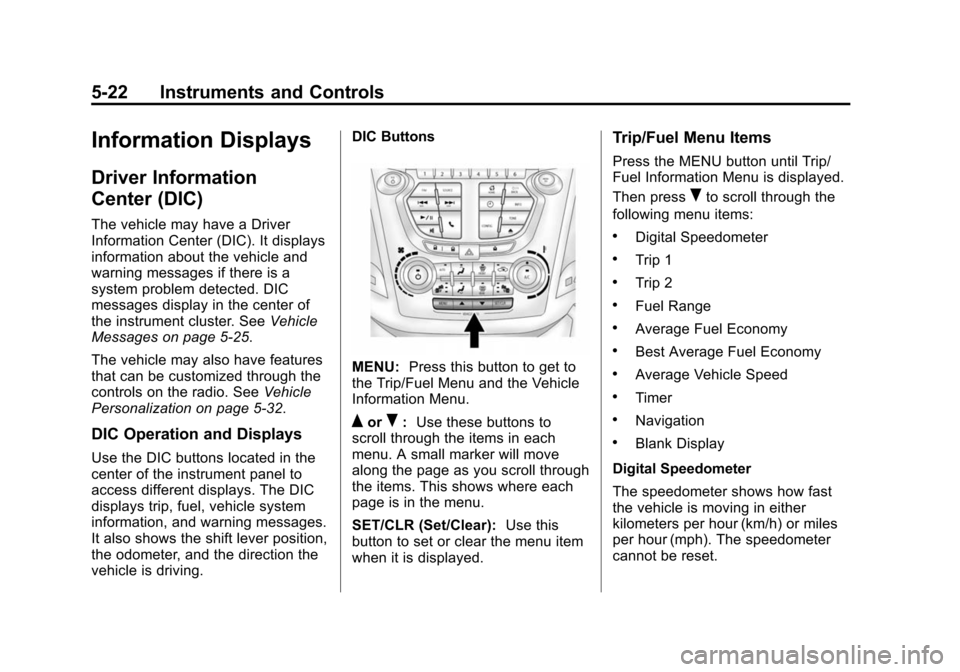
vehicle is driving. DIC Buttons
MENU:
Press this button to get to
the Trip/Fuel Menu and the Vehicle
Information Menu.
QorR: Use these buttons to
scroll through the items in each
menu. A small marker will move
along the page as you scroll through
the items. This shows where each
page is in the menu.
SET/CLR (Set/Clear): Use this
button to set or clear the menu item
when it is displayed.
Trip/Fuel Menu Items
Press the MENU button until Trip/
Fuel Information Menu is displayed.
Then press
Rto scroll through the
following menu items:
.Digital Speedometer
.Trip 1
.Trip 2
.Fuel Range
.Average Fuel Economy
.Best Average Fuel Economy
.Average Vehicle Speed
.Timer
.Navigation
.Blank Display
Digital Speedometer
The speedometer shows how fast
the vehicle is moving in either
kilometers per hour (km/h) or miles
per hour (mph). The speedometer
cannot be reset.