2015 CHEVROLET EQUINOX remote control
[x] Cancel search: remote controlPage 37 of 391
Black plate (6,1)Chevrolet Equinox Owner Manual (GMNA-Localizing-U.S./Canada-
7707483) - 2015 - crc - 9/29/14
2-6 Keys, Doors, and Windows
Starting the Engine Using Remote
Start
To start the engine using the remote
start feature:
1. Press and release
Qon the
RKE transmitter.
2. Immediately press and hold
/
for at least four seconds or until
the turn signal lamps flash. The
turn signal lamps flashing
confirms the request to remote
start the vehicle has been
received.
The parking lamps will turn on
and remain on as long as the
engine is running. The vehicle's
doors will be locked.
3. The key must be inserted and turned to ON/RUN before
driving.
The engine will shut off after
10 minutes unless a time
extension is done or the key is
inserted and turned to ON/RUN. Extending Engine Run Time
For a 10-minute extension, after
30 seconds repeat Steps 1 and 2
while the engine is still running. The
remote start can be extended once.
When the remote start is extended,
the second 10 minutes will start
immediately.
For example, if the engine has been
running for five minutes, and
10 minutes are added, the engine
will run for a total of 15 minutes.
A maximum of two remote starts or
remote start attempts are allowed
between ignition cycles.
The vehicle's ignition switch must
be turned to ON/RUN and then back
to LOCK/OFF using the key, before
the remote start procedure can be
used again.
Shutting the Engine Off After a
Remote Start
To shut off the engine:
.Press/until the parking lamps
turn off.
.Turn on the hazard warning
flashers.
.Insert the key and turn it to ON/
RUN and then back to
LOCK/OFF.
Conditions in Which Remote Start
Will Not Work
The remote vehicle start feature will
not operate if:
.The key is in the ignition.
.The hood or doors are not
closed.
.The hazard warning flashers
are on.
.There is an emission control
system malfunction.
.The engine coolant temperature
is too high.
.The oil pressure is low.
.Two remote vehicle starts have
already been used.
.The vehicle is not in P (Park).
Page 41 of 391
Black plate (10,1)Chevrolet Equinox Owner Manual (GMNA-Localizing-U.S./Canada-
7707483) - 2015 - crc - 9/29/14
2-10 Keys, Doors, and Windows
Warning (Continued)
.Adjust the climate control
system to a setting that
brings in only outside air and
set the fan speed to the
highest setting. See“Climate
Control Systems” in the
Index.
.If the vehicle is equipped with
a power liftgate, disable the
power liftgate function.
See Engine Exhaust on
page 9-26.
{Caution
To avoid damage to the liftgate or
liftgate glass, make sure the area
above and behind the liftgate is
clear before opening it.
Manual Liftgate
To unlock the liftgate, press the
power door lock switch or press
K
on the Remote Keyless Entry (RKE)
transmitter twice within
five seconds. See Remote Keyless
Entry (RKE) System Operation on
page 2-3.
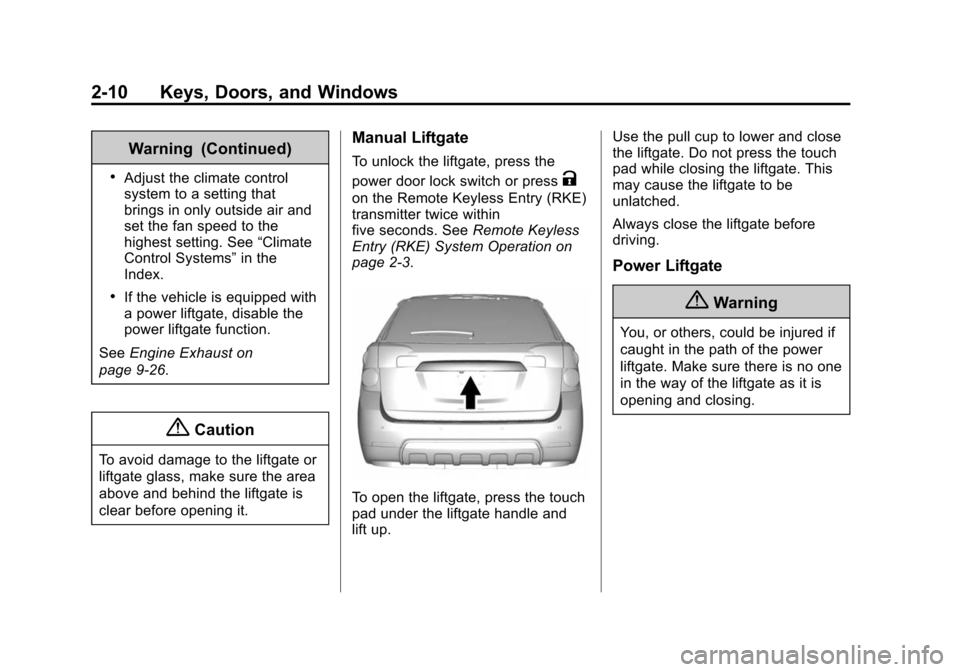
To open the liftgate, press the touch
pad under the liftgate handle and
lift up. Use the pull cup to lower and close
the liftgate. Do not press the touch
pad while closing the liftgate. This
may cause the liftgate to be
unlatched.
Always close the liftgate before
driving.
Power Liftgate
{Warning
You, or others, could be injured if
caught in the path of the power
liftgate. Make sure there is no one
in the way of the liftgate as it is
opening and closing.
Page 57 of 391
Black plate (6,1)Chevrolet Equinox Owner Manual (GMNA-Localizing-U.S./Canada-
7707483) - 2015 - crc - 9/29/14
3-6 Seats and Restraints
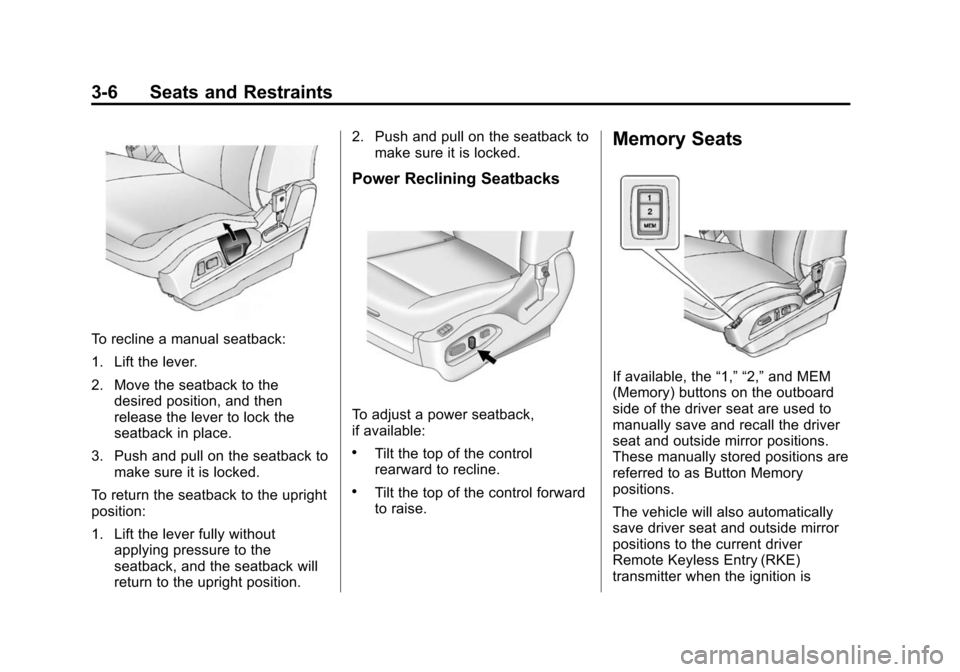
To recline a manual seatback:
1. Lift the lever.
2. Move the seatback to thedesired position, and then
release the lever to lock the
seatback in place.
3. Push and pull on the seatback to make sure it is locked.
To return the seatback to the upright
position:
1. Lift the lever fully without applying pressure to the
seatback, and the seatback will
return to the upright position. 2. Push and pull on the seatback to
make sure it is locked.
Power Reclining Seatbacks
To adjust a power seatback,
if available:
.Tilt the top of the control
rearward to recline.
.Tilt the top of the control forward
to raise.
Memory Seats
If available, the “1,” “2,”and MEM
(Memory) buttons on the outboard
side of the driver seat are used to
manually save and recall the driver
seat and outside mirror positions.
These manually stored positions are
referred to as Button Memory
positions.
The vehicle will also automatically
save driver seat and outside mirror
positions to the current driver
Remote Keyless Entry (RKE)
transmitter when the ignition is
Page 58 of 391

Black plate (7,1)Chevrolet Equinox Owner Manual (GMNA-Localizing-U.S./Canada-
7707483) - 2015 - crc - 9/29/14
Seats and Restraints 3-7
turned off. These automatically
stored positions are referred to as
RKE Memory positions. See
Remote Keyless Entry (RKE)
System Operation on page 2-3.
Storing Button Memory Positions
To save positions into Button
Memory:
1. Adjust the driver seat, seatbackrecliner, and both outside mirrors
to the desired driving positions.
2. Press and hold MEM (Memory) and “1”at the same time until a
beep sounds.
3. Repeat Steps 1 and 2 for a second driver using “2.”
Recalling Button Memory
Positions
To recall the Button Memory
positions, press and hold “1”or“2.”
The driver seat and outside mirrors
move to the positions stored to
those buttons when pressed. Releasing
“1”or“2” before the
stored positions are reached stops
the recall.
If something has blocked the driver
seat while recalling a memory
position, the recall may stop.
Remove the obstruction; then press
and hold the appropriate manual
control for the memory item that is
not recalling for two seconds. Try
recalling the memory position again
by pressing the appropriate memory
button. If the memory position is still
not recalling, see your dealer for
service.
Recalling RKE Memory Positions
(Memory Remote Recall)
The Memory Remote Recall feature
can recall the driver seat and
outside mirrors to previously stored
RKE Memory positions when
entering the vehicle.
Every time the ignition is turned off,
the positions of the driver seat and
outside mirrors are automatically
stored to the RKE transmitter that
was used to start the vehicle. These positions are called RKE Memory
positions and may be different than
the previously mentioned Button
Memory positions saved to the
“1”
or“2” buttons. To recall RKE
Memory positions, unlock the driver
door with the RKE transmitter and
open the driver door. If the driver
door is already open, pressing the
RKE transmitter
Kbutton will also
activate the RKE Memory recall.
The driver seat and outside mirrors
will move to the previously saved
RKE Memory positions.
This feature is turned on or off using
the vehicle personalization menu.
See Vehicle Personalization on
page 5-32.
To stop recall movement, press any
of the memory, power mirror,
or power seat controls.
If something has blocked the driver
seat while recalling a memory
position, the recall may stop.
Remove the obstruction; then press
and hold the appropriate manual
control for the memory item that is
Page 60 of 391
Black plate (9,1)Chevrolet Equinox Owner Manual (GMNA-Localizing-U.S./Canada-
7707483) - 2015 - crc - 9/29/14
Seats and Restraints 3-9
Uplevel Climate Control SystemShown, Base Similar
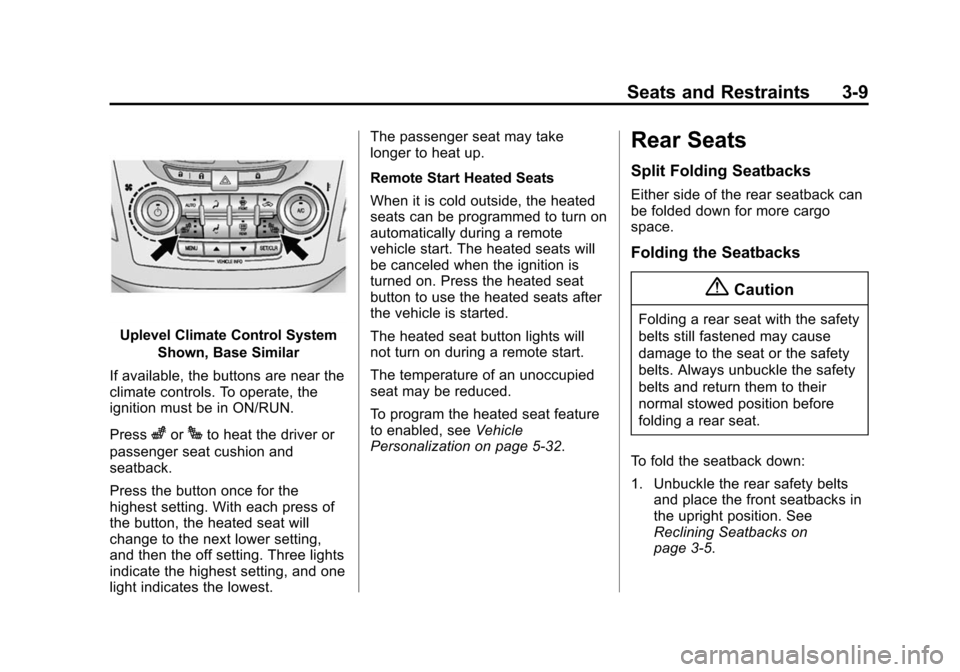
If available, the buttons are near the
climate controls. To operate, the
ignition must be in ON/RUN.
Press
zorJto heat the driver or
passenger seat cushion and
seatback.
Press the button once for the
highest setting. With each press of
the button, the heated seat will
change to the next lower setting,
and then the off setting. Three lights
indicate the highest setting, and one
light indicates the lowest. The passenger seat may take
longer to heat up.
Remote Start Heated Seats
When it is cold outside, the heated
seats can be programmed to turn on
automatically during a remote
vehicle start. The heated seats will
be canceled when the ignition is
turned on. Press the heated seat
button to use the heated seats after
the vehicle is started.
The heated seat button lights will
not turn on during a remote start.
The temperature of an unoccupied
seat may be reduced.
To program the heated seat feature
to enabled, see
Vehicle
Personalization on page 5-32.
Rear Seats
Split Folding Seatbacks
Either side of the rear seatback can
be folded down for more cargo
space.
Folding the Seatbacks
{Caution
Folding a rear seat with the safety
belts still fastened may cause
damage to the seat or the safety
belts. Always unbuckle the safety
belts and return them to their
normal stowed position before
folding a rear seat.
To fold the seatback down:
1. Unbuckle the rear safety belts and place the front seatbacks in
the upright position. See
Reclining Seatbacks on
page 3-5.
Page 109 of 391
Black plate (2,1)Chevrolet Equinox Owner Manual (GMNA-Localizing-U.S./Canada-
7707483) - 2015 - crc - 9/29/14
5-2 Instruments and Controls
Vehicle Personalization
Vehicle Personalization . . . . . . 5-32
Universal Remote System
Universal Remote System . . . 5-38
Universal Remote SystemProgramming . . . . . . . . . . . . . . . 5-38
Universal Remote System Operation . . . . . . . . . . . . . . . . . . 5-41
Controls
Steering Wheel
Adjustment
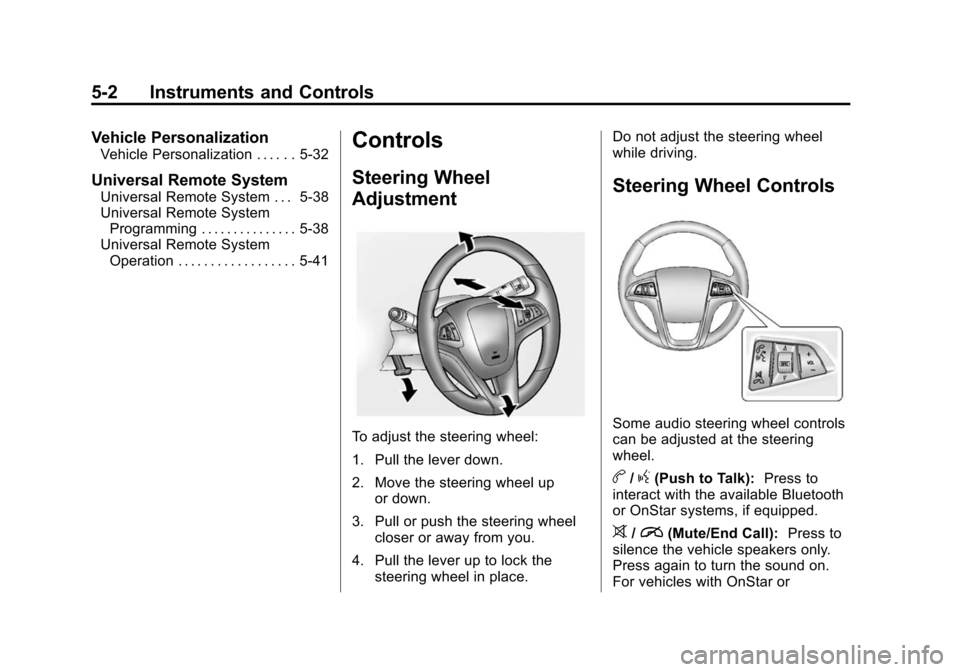
To adjust the steering wheel:
1. Pull the lever down.
2. Move the steering wheel up
or down.
3. Pull or push the steering wheel closer or away from you.
4. Pull the lever up to lock the steering wheel in place. Do not adjust the steering wheel
while driving.
Steering Wheel Controls
Some audio steering wheel controls
can be adjusted at the steering
wheel.
b/g(Push to Talk):
Press to
interact with the available Bluetooth
or OnStar systems, if equipped.
>/i(Mute/End Call): Press to
silence the vehicle speakers only.
Press again to turn the sound on.
For vehicles with OnStar or
Page 135 of 391
Black plate (28,1)Chevrolet Equinox Owner Manual (GMNA-Localizing-U.S./Canada-
7707483) - 2015 - crc - 9/29/14
5-28 Instruments and Controls
Engine Power Messages
ENGINE POWER IS REDUCED
This message displays when the
vehicle's engine power is reduced.
Reduced engine power can affect
the vehicle's ability to accelerate.
If this message is on, but there is no
reduction in performance, proceed
to your destination. The
performance may be reduced the
next time the vehicle is driven. The
vehicle may be driven at a reduced
speed while this message is on, but
maximum acceleration and speed
may be reduced. Anytime this
message stays on, the vehicle
should be taken to your dealer for
service as soon as possible.
Fuel System Messages
ECO MODE ON
On some models, this message
displays when the Fuel Economy
Mode has been turned on bypressing the eco button near the
shift lever. See
Fuel Economy Mode
on page 9-29.
FUEL LEVEL LOW
This message displays when the
vehicle is low on fuel. Refuel as
soon as possible.
TIGHTEN GAS CAP
This message may display when the
fuel cap is not on tight. Tighten the
fuel cap.
Key and Lock Messages
REPLACE BATTERY IN
REMOTE KEY
This message displays when the
battery in the Remote Keyless Entry
(RKE) transmitter needs to be
replaced.
Object Detection System
Messages
FORWARD COLLISION
ALERT OFF
If your vehicle has the Forward
Collision Alert (FCA) system, this
message may display if the FCA
system cannot activate due to a
temporary condition. See Forward
Collision Alert (FCA) System on
page 9-37.
FRONT CAMERA BLOCKED,
CLEAN WINDSHIELD
This message displays when the
Lane Departure Warning (LDW) and
Forward Collision Alert (FCA)
systems are disabled because the
camera view is blocked and cannot
operate properly. It may also
activate during heavy rain or due to
road spray. To clean the system,
clean the outside of the windshield
area in front of the LDW/FCA
camera sensor.
Page 142 of 391
Black plate (35,1)Chevrolet Equinox Owner Manual (GMNA-Localizing-U.S./Canada-
7707483) - 2015 - crc - 9/29/14
Instruments and Controls 5-35
Sort
This feature allows the icons on the
Home Page to be moved.
Select and follow the screen
prompts.
Restore Home Page Defaults
This feature will restore the Home
Page to the factory settings.
Select and follow the screen
prompts.
Rear Camera Options
For more information on Rear
Camera Options, seeRear Vision
Camera (RVC) on page 9-41.
Display Off
Press to turn the display off. The
display will return when any radio
buttons are pressed or the screen is
touched (if equipped).
Map Settings
See “Map Settings” in“Configure
Menu” in the infotainment manual.
Vehicle Settings
Select and the following may
display:
.Climate and Air Quality
.Comfort and Convenience
.Collision Detection Systems
.Lighting
.Power Door Locks
.Remote Lock/Unlock/Start
.Return to Factory Settings?
Climate and Air Quality
Select and the following may
display:
.Auto Fan Speed
.Air Conditioning Mode
.Remote Start Auto Heat Seats
.Auto Defog
.Auto Rear Defog Auto Fan Speed
This selection is available on
vehicles with the Automatic Climate
Control System. Choose from the
following blower speed settings:
Select High, Medium, or Low
Air Conditioning Mode
This will allow you to select whether
or not the air conditioning comes on
automatically the next time the
vehicle is started. On means that
the air conditioning will be on at
start up, regardless of whether it
was on or off the last time the
vehicle was turned off. Off means
the air conditioning will be off at the
next start up, regardless of whether
it was on or off the last time the
vehicle was turned off. Last Setting
means that when the vehicle is
started, the air conditioning will
resume whichever setting it was at
the last time the vehicle was
turned off.
Select On, Off, or Last Setting.