2015 CHEVROLET CRUZE lock
[x] Cancel search: lockPage 137 of 417
Black plate (34,1)Chevrolet Cruze Owner Manual (GMNA-Localizing-U.S./Canada-7707493) -
2015 - crc - 12/2/14
5-34 Instruments and Controls
TIRE LEARNING ACTIVE
This message displays when the
system is learning new tires. See
Tire Pressure Monitor Operation on
page 10-53for more information.
TIRE PRESSURE LOW ADD
AIR TO TIRE
On vehicles with the Tire Pressure
Monitor System (TPMS), this
message displays when the
pressure in one or more of the
vehicle's tires is low.
There is also an icon with the
warning that will indicate the
location of the low tire.
The low tire pressure warning light
will also come on. See Tire
Pressure Light on page 5-19.
If a tire pressure message displays,
inflate the tires until the tire pressure
is equal to the values shown on the
Tire and Loading Information label.
See Tires on page 10-43, Vehicle
Load Limits on page 9-9, and Tire
Pressure on page 10-51. More than one tire pressure
message can be received at a time.
To read the other messages that
may have been sent at the same
time, press the SET/CLR button.
The DIC also shows the tire
pressure values. See
Driver
Information Center (DIC) on
page 5-23.
Transmission Messages
SERVICE TRANSMISSION
This message displays if there is a
problem with the transmission. See
your dealer.
TRANSMISSION HOT —IDLE
ENGINE
This message displays and a chime
sounds if the transmission fluid in
the vehicle gets hot. Driving with the
transmission fluid temperature high
can cause damage to the vehicle.
Stop the vehicle and let it idle to
allow the transmission to cool. This
message clears when the fluid
temperature reaches a safe level.
Vehicle Reminder
Messages
ICE POSSIBLE DRIVE
WITH CARE
This message displays when ice
conditions are possible.
STEERING COLUMN IS
LOCKED
This message displays when the
steering column is locked.
Vehicle Speed Messages
For more information on these
messages, see Diesel Exhaust Fluid
on page 9-27.
XXX KM (MI) UNTIL 105 KM/H
(65 MPH) MAX SPEED
This message will be displayed
along with other messages. These
messages include EXHAUST FLUID
EMPTY REFILL NOW, EXHAUST
FLUID QUALITY POOR, SERVICE
EMISSION SYSTEM, or SERVICE
EXHAUST FLUID SYSTEM. The
Page 139 of 417
Black plate (36,1)Chevrolet Cruze Owner Manual (GMNA-Localizing-U.S./Canada-7707493) -
2015 - crc - 12/2/14
5-36 Instruments and Controls
Vehicle
Personalization
Use the audio system controls to
access the personalization menus
for customizing vehicle features.
The following are all possible
personalization features. Depending
on the vehicle, some may not be
available.
Infotainment System Audio
System Controls
Using the Faceplate
MENU/SELECT Knob
.Press to enter, select, or activate
a highlighted menu option.
.Turn to highlight a menu option.
.Press to enable or disable a
system setting.
/BACK
.Press to exit a menu.
.Press to return to a previous
screen.Using the Touch Screen
Press a screen feature to:
.View more feature options.
.Enable or disable the feature.
w:
Press to scroll up.
x:Press to scroll down.
Back: Press to return to the
previous menu.
To access the
personalization menu:
1. Press Config on the Home page
on the infotainment system
display or CONFIG on the
faceplate.
2. Select the desired feature to display a list of available
options.
3. Select the desired feature setting.
Personalization Menus
The following list of menu items may
be available:
.Languages
.Time and Date
.Radio Settings
.Phone Settings
.Navigation Settings
.Display Settings
.Vehicle Settings
Each menu is detailed in the
following information.
Languages
Select Languages, then select from
the available language(s).
Time and Date
Manually set the time and date. See
Clock on page 5-4.
Radio Settings
Select and depending on the radio
the following may display:
.Auto Volume
.Gracenote Options
.XM Channel Art
.Max Startup Volume
Page 142 of 417
Black plate (39,1)Chevrolet Cruze Owner Manual (GMNA-Localizing-U.S./Canada-7707493) -
2015 - crc - 12/2/14
Instruments and Controls 5-39
Select and follow the screen
prompts.
Restore Home Page Defaults
This feature will restore the Home
Page to the factory settings.
Select and follow the screen
prompts.
Rear Camera Options
For more information on Rear
Camera Options, seeRear Vision
Camera (RVC) on page 9-48.
Display Off
Press to turn the display off. The
display will return when any radio
buttons are pressed or the screen is
touched (if equipped).
Map Settings
See “Map Settings” in“Configure
Menu” in the infotainment manual.
Vehicle Settings
Select and the following may
display:
.Climate and Air Quality
.Comfort and Convenience
.Collision Detection Systems
.Lighting
.Power Door Locks
.Remote Lock/Unlock/Start
.Return to Factory Settings?
Climate and Air Quality
Select and the following may
display:
.Auto Fan Speed
.Remote Start Auto Heat Seats
.Auto Defog
.Auto Rear Defog
Auto Fan Speed
This feature sets the climate control
fan speed to maintain the interior
temperature.
Select High, Medium, or Low. Remote Start Auto Heat Seats
When on, this feature will turn the
heated seats on when using remote
start on cold days.
Select On or Off.
Auto Defog
When turned on and high humidity
is detected, the climate control
system may adjust to outside air
supply and turn on the air
conditioner or the heater. The fan
speed may slightly increase to help
prevent fogging. When high
humidity is no longer detected, the
system will return to its prior
operation.
Select On or Off.
Auto Rear Defog
When on, this feature turns on the
rear defogger at vehicle start when
the interior temperature is cold and
fog is likely. The auto rear defog
function can be disabled by
pressing
1. When off, the feature
can be turned on by pressing
1.
Page 143 of 417
Black plate (40,1)Chevrolet Cruze Owner Manual (GMNA-Localizing-U.S./Canada-7707493) -
2015 - crc - 12/2/14
5-40 Instruments and Controls
See“Rear Window Defogger” under
Climate Control Systems on
page 8-1 orAutomatic Climate
Control System on page 8-3.
Select On or Off.
Comfort and Convenience
Select and the following may
display:
.Chime Volume
Chime Volume
This allows the selection of the
chime volume level.
Select Normal or High.
Collision Detection Systems
Select and the following may
display:
.Park Assist
.Side Blind Zone Alert
.Rear Cross Traffic Alert Park Assist
This allows the Parking Assist
feature to be turned on or off. See
Parking Assist on page 9-45.
Select On or Off.
Side Blind Zone Alert
This allows the Side Blind Zone
Alert feature to be turned on or off.
See
Side Blind Zone Alert (SBZA)
on page 9-47.
Select On or Off.
Rear Cross Traffic Alert
This allows the Rear Cross Traffic
Alert feature to be turned on or off.
Select On or Off. See “Rear Cross
Traffic Alert” inRear Vision Camera
(RVC) on page 9-48.
Lighting
Select and the following may
display:
.Vehicle Locator Lights
.Exit Lighting Vehicle Locator Lights
This allows the vehicle locator lights
to be turned on or off.
Select On or Off.
Exit Lighting
This allows the selection of how
long the exterior lamps stay on
when leaving the vehicle when it is
dark outside.
Select Off, 30 Seconds, 1 Minute,
or 2 Minutes.
Power Door Locks
Select and depending on the radio
the following may display:
.Open Door Anti Lock Out
.Unlocked Door Anti Lock Out
.Auto Door Unlock
.Delayed Door Lock
Page 144 of 417
Black plate (41,1)Chevrolet Cruze Owner Manual (GMNA-Localizing-U.S./Canada-7707493) -
2015 - crc - 12/2/14
Instruments and Controls 5-41
Open Door Anti Lock Out or
Unlocked Door Anti Lock Out
When on, this feature will keep the
driver door from locking until the
door is closed. If this feature is
turned on, the Delayed Door Lock
menu will not be available.
Select to enable or disable.
Auto Door Unlock
This allows selection of which doors
will automatically unlock when the
vehicle is shifted into P (Park) with
an automatic transmission or when
the key is removed from the ignition
with a manual transmission with
keyed ignition or when the vehicle is
turned off with a manual
transmission with pushbutton start.
Select All Doors, Driver Door,
or OFF.
Delayed Door Lock
When on, this feature will delay the
locking of the doors. SeeDelayed
Locking on page 2-12.
Select to enable or disable.Remote Lock/Unlock/Start
Select and depending on the radio
the following may display:
.Remote Unlock Feedback
.Remote Unlock Light Feedback
.Remote Lock Feedback
.Remote Door Unlock
.Passive Door Unlock
.Passive Door Lock
Remote Unlock Feedback or
Remote Unlock Light Feedback
When on, the exterior lamps will
flash when unlocking the vehicle
with the RKE transmitter.
Depending on the radio select Flash
Lights or OFF, or select to enable or
disable.
Remote Lock Feedback
This allows selection of what
feedback is provided when
unlocking the vehicle with the RKE
transmitter. Select Lights and Horn, Lights Only,
Horn Only, or Off.
Remote Door Unlock
This allows selection of which doors
will unlock on the first press of
Kon
the RKE transmitter.
Select Driver Door or All Doors.
If Driver Door is selected, all doors
will unlock on the second press
of
Kwithin five seconds of the prior
press.
Passive Door Unlock
This allows selection of which doors
are unlocked by pressing the button
on the outside door handle.
Select All Doors or Driver Door.
Passive Door Lock
This allows passive locking to be
turned on or off and selection of the
type of feedback.
Select Off, On, or On with Horn
Chirp.
Page 154 of 417
Black plate (3,1)Chevrolet Cruze Owner Manual (GMNA-Localizing-U.S./Canada-7707493) -
2015 - crc - 11/24/14
Infotainment System 7-3
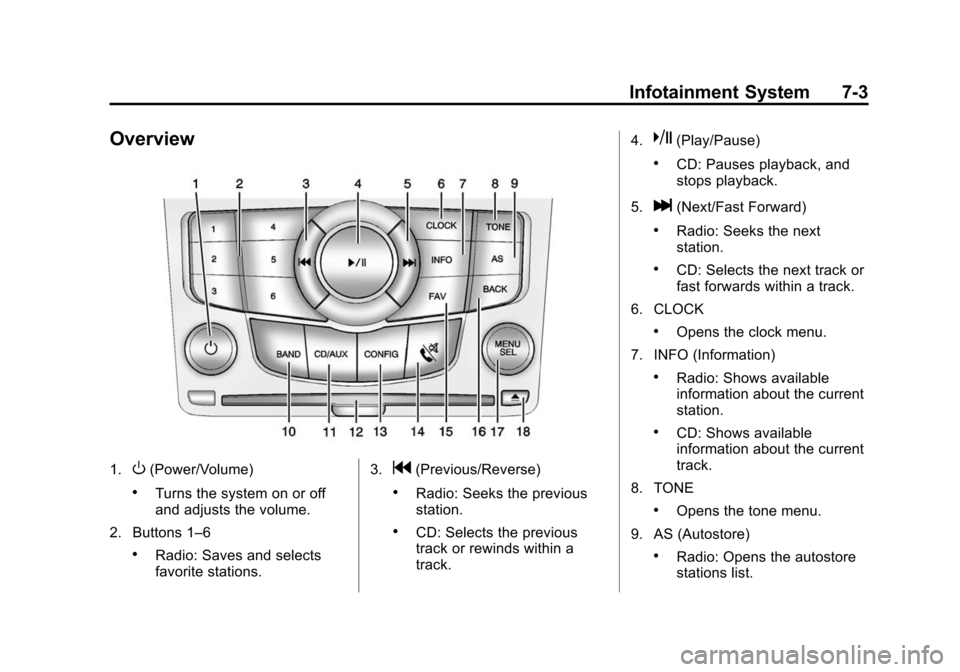
Overview
1.O(Power/Volume)
.Turns the system on or off
and adjusts the volume.
2. Buttons 1–6
.Radio: Saves and selects
favorite stations. 3.
g(Previous/Reverse)
.Radio: Seeks the previous
station.
.CD: Selects the previous
track or rewinds within a
track.4.
k(Play/Pause)
.CD: Pauses playback, and
stops playback.
5.
l(Next/Fast Forward)
.Radio: Seeks the next
station.
.CD: Selects the next track or
fast forwards within a track.
6. CLOCK
.Opens the clock menu.
7. INFO (Information)
.Radio: Shows available
information about the current
station.
.CD: Shows available
information about the current
track.
8. TONE
.Opens the tone menu.
9. AS (Autostore)
.Radio: Opens the autostore
stations list.
Page 180 of 417
Black plate (29,1)Chevrolet Cruze Owner Manual (GMNA-Localizing-U.S./Canada-7707493) -
2015 - crc - 11/24/14
Infotainment System 7-29
Manufactured under license from
Dolby Laboratories. Dolby and the
double-D symbol are trademarks of
Dolby Laboratories.
“Made for iPod and iPhone”means
that an electronic accessory has
been designed to connect
specifically to iPod and has been
certified by the developer to meet
Apple performance standards.
iPod is a trademark of Apple
Computer, Inc., registered in the
U.S. and other countries.
Fees and Taxes —Subscription fee,
taxes, one time activation fee, and
other fees may apply. Subscription
fee is consumer only. All fees and
programming subject to change.
Subscriptions subject to Customer
Agreement available at
www.siriusxm.com. XM
®service
only available in the 48 contiguous
United States and Canada*. *Canada
—Some deterioration of
service may occur in extreme
northern latitudes. This is beyond
the control of SiriusXM
®Satellite
Radio. Explicit Language Notice —
Channels with frequent explicit
language are indicated with an “XL”
preceding the channel name.
Channel blocking is available for
SiriusXM Satellite Radio receivers
by notifying SiriusXM at:
.USA Customers —See
www.siriusxm.com or call
1-866-635-2349.
.Canadian Customers —See
www.xmradio.ca or call
1-877-209-0079.
It is prohibited to copy, decompile,
disassemble, reverse engineer,
hack, manipulate, or otherwise
make available any technology or
software incorporated in receivers
compatible with the SiriusXM
®
Satellite Radio System or that
support the SiriusXM website, the
Online Service or any of its content.
Furthermore, the AMBER voice
Page 185 of 417
Black plate (2,1)Chevrolet Cruze Owner Manual (GMNA-Localizing-U.S./Canada-7707493) -
2015 - crc - 11/24/14
8-2 Climate Controls
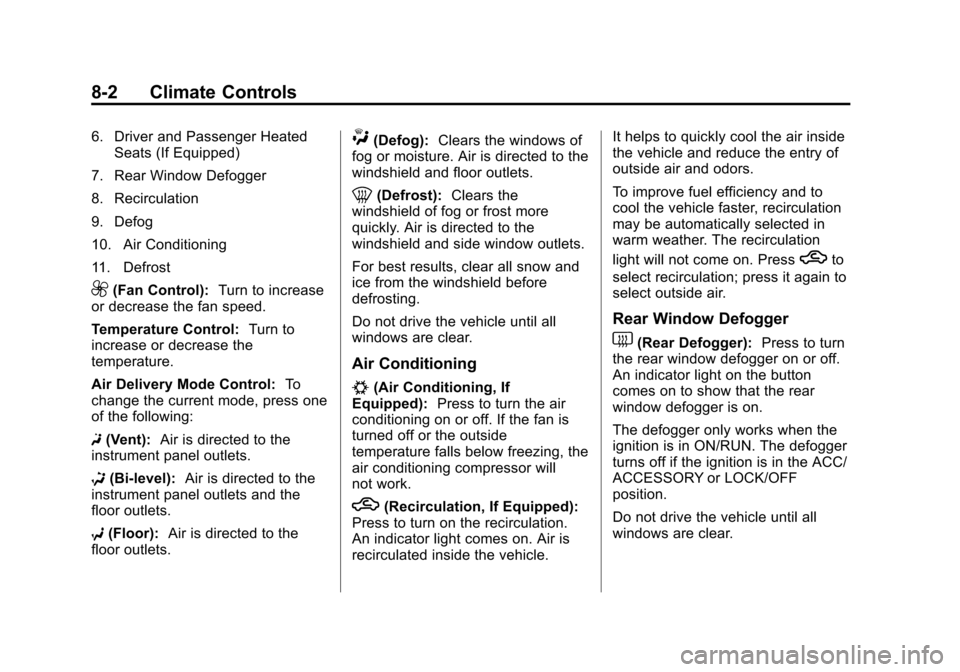
6. Driver and Passenger HeatedSeats (If Equipped)
7. Rear Window Defogger
8. Recirculation
9. Defog
10. Air Conditioning
11. Defrost
9(Fan Control): Turn to increase
or decrease the fan speed.
Temperature Control: Turn to
increase or decrease the
temperature.
Air Delivery Mode Control: To
change the current mode, press one
of the following:
F (Vent): Air is directed to the
instrument panel outlets.
* (Bi-level): Air is directed to the
instrument panel outlets and the
floor outlets.
7 (Floor): Air is directed to the
floor outlets.
W(Defog): Clears the windows of
fog or moisture. Air is directed to the
windshield and floor outlets.
0(Defrost): Clears the
windshield of fog or frost more
quickly. Air is directed to the
windshield and side window outlets.
For best results, clear all snow and
ice from the windshield before
defrosting.
Do not drive the vehicle until all
windows are clear.
Air Conditioning
#(Air Conditioning, If
Equipped): Press to turn the air
conditioning on or off. If the fan is
turned off or the outside
temperature falls below freezing, the
air conditioning compressor will
not work.
h(Recirculation, If Equipped):
Press to turn on the recirculation.
An indicator light comes on. Air is
recirculated inside the vehicle. It helps to quickly cool the air inside
the vehicle and reduce the entry of
outside air and odors.
To improve fuel efficiency and to
cool the vehicle faster, recirculation
may be automatically selected in
warm weather. The recirculation
light will not come on. Press
hto
select recirculation; press it again to
select outside air.
Rear Window Defogger
1(Rear Defogger): Press to turn
the rear window defogger on or off.
An indicator light on the button
comes on to show that the rear
window defogger is on.
The defogger only works when the
ignition is in ON/RUN. The defogger
turns off if the ignition is in the ACC/
ACCESSORY or LOCK/OFF
position.
Do not drive the vehicle until all
windows are clear.