2015 CHEVROLET CRUZE radio
[x] Cancel search: radioPage 143 of 417
Black plate (40,1)Chevrolet Cruze Owner Manual (GMNA-Localizing-U.S./Canada-7707493) -
2015 - crc - 12/2/14
5-40 Instruments and Controls
See“Rear Window Defogger” under
Climate Control Systems on
page 8-1 orAutomatic Climate
Control System on page 8-3.
Select On or Off.
Comfort and Convenience
Select and the following may
display:
.Chime Volume
Chime Volume
This allows the selection of the
chime volume level.
Select Normal or High.
Collision Detection Systems
Select and the following may
display:
.Park Assist
.Side Blind Zone Alert
.Rear Cross Traffic Alert Park Assist
This allows the Parking Assist
feature to be turned on or off. See
Parking Assist on page 9-45.
Select On or Off.
Side Blind Zone Alert
This allows the Side Blind Zone
Alert feature to be turned on or off.
See
Side Blind Zone Alert (SBZA)
on page 9-47.
Select On or Off.
Rear Cross Traffic Alert
This allows the Rear Cross Traffic
Alert feature to be turned on or off.
Select On or Off. See “Rear Cross
Traffic Alert” inRear Vision Camera
(RVC) on page 9-48.
Lighting
Select and the following may
display:
.Vehicle Locator Lights
.Exit Lighting Vehicle Locator Lights
This allows the vehicle locator lights
to be turned on or off.
Select On or Off.
Exit Lighting
This allows the selection of how
long the exterior lamps stay on
when leaving the vehicle when it is
dark outside.
Select Off, 30 Seconds, 1 Minute,
or 2 Minutes.
Power Door Locks
Select and depending on the radio
the following may display:
.Open Door Anti Lock Out
.Unlocked Door Anti Lock Out
.Auto Door Unlock
.Delayed Door Lock
Page 144 of 417
Black plate (41,1)Chevrolet Cruze Owner Manual (GMNA-Localizing-U.S./Canada-7707493) -
2015 - crc - 12/2/14
Instruments and Controls 5-41
Open Door Anti Lock Out or
Unlocked Door Anti Lock Out
When on, this feature will keep the
driver door from locking until the
door is closed. If this feature is
turned on, the Delayed Door Lock
menu will not be available.
Select to enable or disable.
Auto Door Unlock
This allows selection of which doors
will automatically unlock when the
vehicle is shifted into P (Park) with
an automatic transmission or when
the key is removed from the ignition
with a manual transmission with
keyed ignition or when the vehicle is
turned off with a manual
transmission with pushbutton start.
Select All Doors, Driver Door,
or OFF.
Delayed Door Lock
When on, this feature will delay the
locking of the doors. SeeDelayed
Locking on page 2-12.
Select to enable or disable.Remote Lock/Unlock/Start
Select and depending on the radio
the following may display:
.Remote Unlock Feedback
.Remote Unlock Light Feedback
.Remote Lock Feedback
.Remote Door Unlock
.Passive Door Unlock
.Passive Door Lock
Remote Unlock Feedback or
Remote Unlock Light Feedback
When on, the exterior lamps will
flash when unlocking the vehicle
with the RKE transmitter.
Depending on the radio select Flash
Lights or OFF, or select to enable or
disable.
Remote Lock Feedback
This allows selection of what
feedback is provided when
unlocking the vehicle with the RKE
transmitter. Select Lights and Horn, Lights Only,
Horn Only, or Off.
Remote Door Unlock
This allows selection of which doors
will unlock on the first press of
Kon
the RKE transmitter.
Select Driver Door or All Doors.
If Driver Door is selected, all doors
will unlock on the second press
of
Kwithin five seconds of the prior
press.
Passive Door Unlock
This allows selection of which doors
are unlocked by pressing the button
on the outside door handle.
Select All Doors or Driver Door.
Passive Door Lock
This allows passive locking to be
turned on or off and selection of the
type of feedback.
Select Off, On, or On with Horn
Chirp.
Page 152 of 417
Black plate (1,1)Chevrolet Cruze Owner Manual (GMNA-Localizing-U.S./Canada-7707493) -
2015 - crc - 11/24/14
Infotainment System 7-1
Infotainment
System
Introduction
Infotainment . . . . . . . . . . . . . . . . . . . 7-1
Theft-Deterrent Feature . . . . . . . 7-2
Overview . . . . . . . . . . . . . . . . . . . . . . 7-3
Operation . . . . . . . . . . . . . . . . . . . . . 7-4
Radio
AM-FM Radio . . . . . . . . . . . . . . . . . 7-7
Satellite Radio . . . . . . . . . . . . . . . 7-10
Radio Reception . . . . . . . . . . . . . 7-11
Satellite Radio Antenna . . . . . . 7-12
Multi-Band Antenna . . . . . . . . . . 7-12
Audio Players
CD Player . . . . . . . . . . . . . . . . . . . 7-13
Auxiliary Devices . . . . . . . . . . . . 7-15
Phone
Bluetooth (Overview) . . . . . . . . 7-17
Bluetooth (InfotainmentControls) . . . . . . . . . . . . . . . . . . . 7-19
Bluetooth (Voice Recognition) . . . . . . . . . . . . . . . 7-22
Trademarks and License
Agreements
Trademarks and License
Agreements . . . . . . . . . . . . . . . . 7-28
Introduction
Infotainment
Read the following pages to
become familiar with the audio
system's features.
{Warning
Taking your eyes off the road for
extended periods could cause a
crash resulting in injury or death
to you or others. Do not give
extended attention to infotainment
tasks while driving.
This system provides access to
many audio and non-audio listings.
To minimize taking your eyes off the
road while driving, do the following
while the vehicle is parked:
.Become familiar with the
operation and controls of the
audio system.
Page 153 of 417
Black plate (2,1)Chevrolet Cruze Owner Manual (GMNA-Localizing-U.S./Canada-7707493) -
2015 - crc - 11/24/14
7-2 Infotainment System
.Set up the tone, speaker
adjustments, and preset radio
stations.
For more information, see Defensive
Driving on page 9-3.
{Caution
Contact your dealer before adding
any equipment.
Adding audio or communication
equipment could interfere with the
operation of the engine, radio,
or other systems, and could
damage them. Follow federal
rules covering mobile radio and
telephone equipment. The vehicle has Retained
Accessory Power (RAP). With RAP,
the audio system can be played
even after the ignition is turned off.
See
Retained Accessory Power
(RAP) on page 9-23.
The vehicle may have a base radio,
which is included in this manual.
See the infotainment manual for
information on the connective radio
and the navigation system, audio
players, phone, and voice
recognition. There is also
information on settings and
downloadable applications (if
equipped).
Theft-Deterrent Feature
The theft-deterrent feature works by
learning a portion of the Vehicle
Identification Number (VIN) to the
infotainment system. The
infotainment system does not
operate if it is stolen or moved to a
different vehicle.
Page 154 of 417
Black plate (3,1)Chevrolet Cruze Owner Manual (GMNA-Localizing-U.S./Canada-7707493) -
2015 - crc - 11/24/14
Infotainment System 7-3
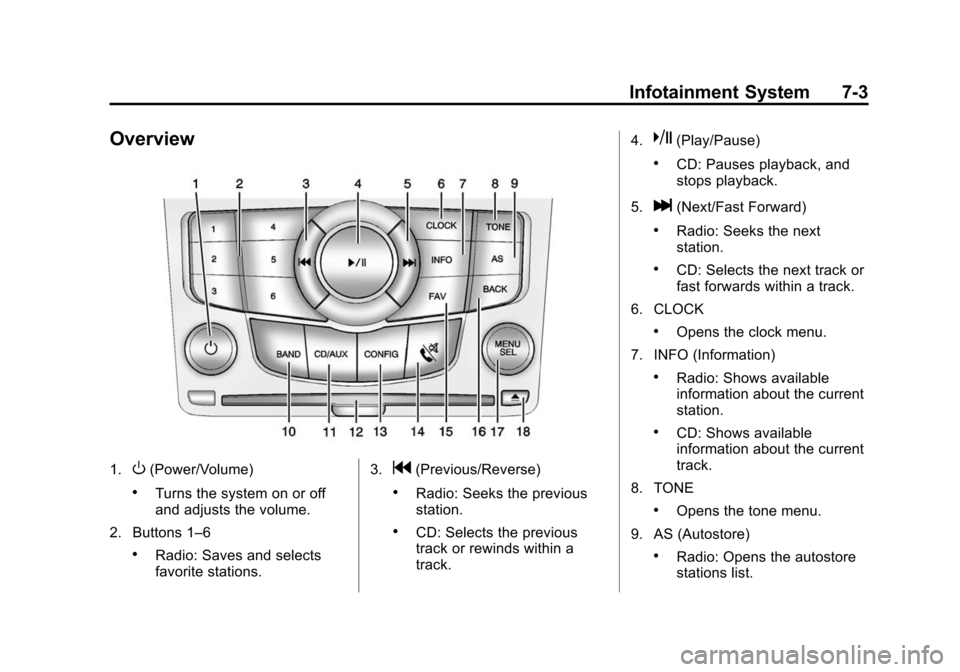
Overview
1.O(Power/Volume)
.Turns the system on or off
and adjusts the volume.
2. Buttons 1–6
.Radio: Saves and selects
favorite stations. 3.
g(Previous/Reverse)
.Radio: Seeks the previous
station.
.CD: Selects the previous
track or rewinds within a
track.4.
k(Play/Pause)
.CD: Pauses playback, and
stops playback.
5.
l(Next/Fast Forward)
.Radio: Seeks the next
station.
.CD: Selects the next track or
fast forwards within a track.
6. CLOCK
.Opens the clock menu.
7. INFO (Information)
.Radio: Shows available
information about the current
station.
.CD: Shows available
information about the current
track.
8. TONE
.Opens the tone menu.
9. AS (Autostore)
.Radio: Opens the autostore
stations list.
Page 155 of 417
Black plate (4,1)Chevrolet Cruze Owner Manual (GMNA-Localizing-U.S./Canada-7707493) -
2015 - crc - 11/24/14
7-4 Infotainment System
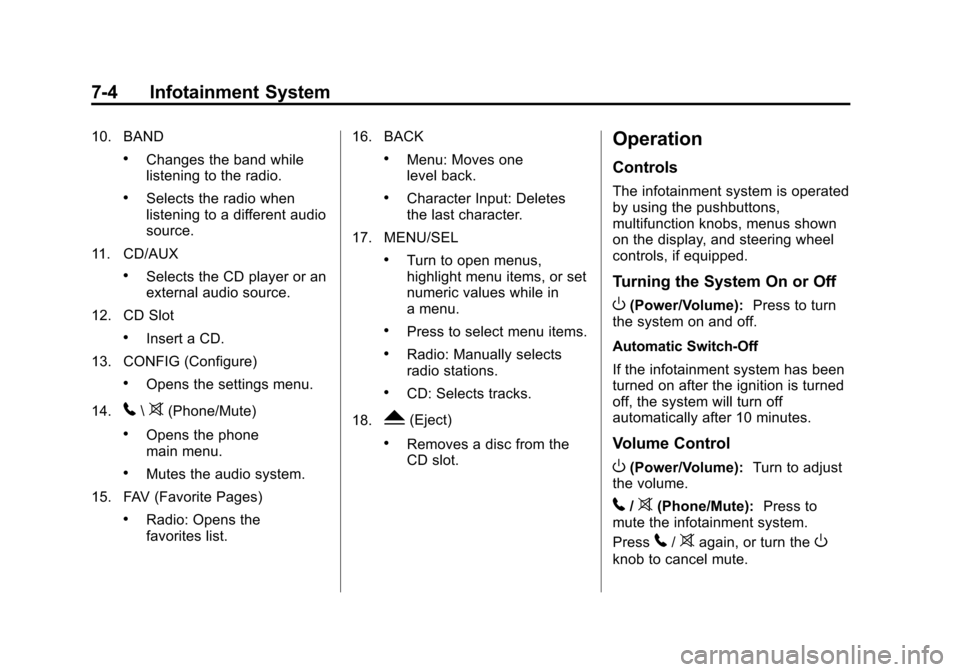
10. BAND
.Changes the band while
listening to the radio.
.Selects the radio when
listening to a different audio
source.
11. CD/AUX
.Selects the CD player or an
external audio source.
12. CD Slot
.Insert a CD.
13. CONFIG (Configure)
.Opens the settings menu.
14.
5\>(Phone/Mute)
.Opens the phone
main menu.
.Mutes the audio system.
15. FAV (Favorite Pages)
.Radio: Opens the
favorites list. 16. BACK
.Menu: Moves one
level back.
.Character Input: Deletes
the last character.
17. MENU/SEL
.Turn to open menus,
highlight menu items, or set
numeric values while in
a menu.
.Press to select menu items.
.Radio: Manually selects
radio stations.
.CD: Selects tracks.
18.
Y(Eject)
.Removes a disc from the
CD slot.
Operation
Controls
The infotainment system is operated
by using the pushbuttons,
multifunction knobs, menus shown
on the display, and steering wheel
controls, if equipped.
Turning the System On or Off
O(Power/Volume): Press to turn
the system on and off.
Automatic Switch-Off
If the infotainment system has been
turned on after the ignition is turned
off, the system will turn off
automatically after 10 minutes.
Volume Control
O(Power/Volume): Turn to adjust
the volume.
5/>(Phone/Mute): Press to
mute the infotainment system.
Press
5/>again, or turn theO
knob to cancel mute.
Page 157 of 417
Black plate (6,1)Chevrolet Cruze Owner Manual (GMNA-Localizing-U.S./Canada-7707493) -
2015 - crc - 11/24/14
7-6 Infotainment System
2. Press the MENU/SEL knob toturn the function on or off.
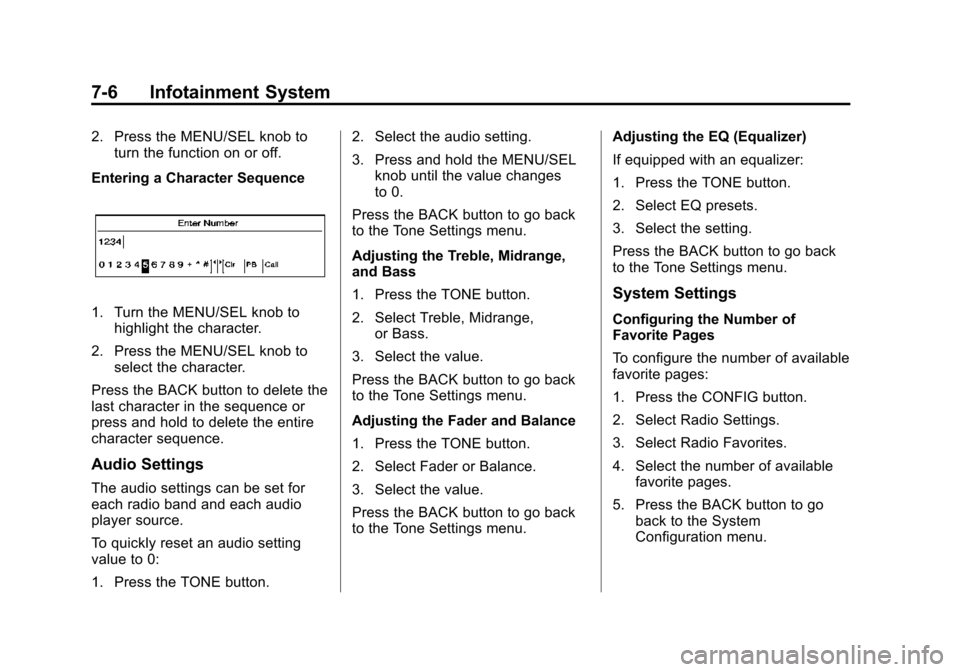
Entering a Character Sequence
1. Turn the MENU/SEL knob to highlight the character.
2. Press the MENU/SEL knob to select the character.
Press the BACK button to delete the
last character in the sequence or
press and hold to delete the entire
character sequence.
Audio Settings
The audio settings can be set for
each radio band and each audio
player source.
To quickly reset an audio setting
value to 0:
1. Press the TONE button. 2. Select the audio setting.
3. Press and hold the MENU/SEL
knob until the value changes
to 0.
Press the BACK button to go back
to the Tone Settings menu.
Adjusting the Treble, Midrange,
and Bass
1. Press the TONE button.
2. Select Treble, Midrange, or Bass.
3. Select the value.
Press the BACK button to go back
to the Tone Settings menu.
Adjusting the Fader and Balance
1. Press the TONE button.
2. Select Fader or Balance.
3. Select the value.
Press the BACK button to go back
to the Tone Settings menu. Adjusting the EQ (Equalizer)
If equipped with an equalizer:
1. Press the TONE button.
2. Select EQ presets.
3. Select the setting.
Press the BACK button to go back
to the Tone Settings menu.
System Settings
Configuring the Number of
Favorite Pages
To configure the number of available
favorite pages:
1. Press the CONFIG button.
2. Select Radio Settings.
3. Select Radio Favorites.
4. Select the number of available
favorite pages.
5. Press the BACK button to go back to the System
Configuration menu.
Page 158 of 417
Black plate (7,1)Chevrolet Cruze Owner Manual (GMNA-Localizing-U.S./Canada-7707493) -
2015 - crc - 11/24/14
Infotainment System 7-7
Auto Volume
The auto volume feature
automatically adjusts the radio
volume to compensate for road and
wind noise as the vehicle speeds up
or slows down, so that the volume
level is consistent.
The level of volume compensation
can be selected, or the auto volume
feature can be turned off.
1. Press the CONFIG button.
2. Select Radio Settings.
3. Select Auto Volume.
4. Select the setting.
5. Press the BACK button to goback to the System
Configuration menu. Maximum Startup Volume
The maximum volume played when
the radio is first turned on can
be set.
1. Press the CONFIG button.
2. Select Radio Settings.
3. Select Maximum Startup
Volume.
4. Select the setting.
5. Press the BACK button to go back to the System
Configuration menu.Radio
AM-FM Radio
Control Buttons
The buttons used to control the
radio are:
BAND: Press to turn the radio on
and choose between AM, FM, and
SiriusXM
®, if equipped.
MENU/SEL: Turn to navigate the
available menus and to search for
stations.
INFO: Press to display additional
information that may be available for
the current song.
gorl: Press to search for
stations.
FAV: Press to open the favorites
list and select the favorites page.
1 to 6: Press to select preset
stations.
AS (Autostore): Press to open the
autostore list.