2015 CHEVROLET COLORADO brake light
[x] Cancel search: brake lightPage 142 of 431

Black plate (27,1)Chevrolet Colorado Owner Manual (GMNA-Localizing-U.S./Canada-
7586788) - 2015 - crc - 2/9/15
Instruments and Controls 5-27
SERVICE BATTERY
CHARGING SYSTEM
On some vehicles, this message
displays if there is a problem with
the battery charging system. Under
certain conditions, the charging
system light may also turn on in the
instrument cluster. SeeCharging
System Light on page 5-14. Driving
with this problem could drain the
battery. Turn off all unnecessary
accessories. Have the electrical
system checked as soon as
possible. See your dealer.
TRANSPORT MODE ON
This message is displayed when the
vehicle is in transport mode. Some
features can be disabled while in
this mode, including Remote
Keyless Entry (RKE), remote start,
and the vehicle alarm system. Take
the vehicle to your dealer for service
to turn transport mode off.
Brake System Messages
BRAKE FLUID LOW
This message is displayed when the
brake fluid level is low; see Brake
Fluid on page 10-22.
HILL START ASSIST ACTIVE
This message is displayed when the
vehicle is stopped on a grade
sufficient to activate HSA. HSA
holds the braking pressure for a
maximum of two seconds to ensure
that there is no rolling, which will
assist the driver to transition
between releasing the brake pedal
and accelerating to drive off while
on the grade. The brakes will
automatically release when the
accelerator pedal is applied within
the two-second window. See Hill
Start Assist (HSA) on page 9-42.
RELEASE PARKING BRAKE
This message is displayed as a
reminder that the parking brake is
on. Release it before you attempt to
drive.
SERVICE BRAKE ASSIST
This message may be displayed
when there is a problem with the
brake boost assist system. When
this message is displayed, the brake
boost assist motor may be heard
operating and you might notice
pulsation in the brake pedal. This is
normal under these conditions. Take
the vehicle to your dealer for
service.
Compass Messages
Dashes may be displayed if the
vehicle temporarily loses
communication with the Global
Positioning System (GPS).
Door Ajar Messages
DOOR OPEN
This message displays and a chime
may sound if a door is not fully
closed. Stop and turn off the
vehicle, check the door for
Page 146 of 431
Black plate (31,1)Chevrolet Colorado Owner Manual (GMNA-Localizing-U.S./Canada-
7586788) - 2015 - crc - 2/9/15
Instruments and Controls 5-31
again. If this message still comes
on, it means there is a problem. You
should see your dealer for service.
The vehicle is safe to drive;
however, you do not have the
benefit of StabiliTrak, so reduce
your speed and drive accordingly.
SERVICE TRACTION
CONTROL
This message displays when there
is a problem with the Traction
Control System (TCS). When this
message displays, the system will
not limit wheel spin. Adjust your
driving accordingly. See your dealer
for service. SeeTraction Control/
Electronic Stability Control on
page 9-42.
STABILITRAK INITIALIZING
This message may come on if the
StabiliTrak system has not fully
initialized because of road
conditions or the incorrect tire size.
When the StabiliTrak system is fully
initialized, the message will turn off. See
Traction Control/Electronic
Stability Control on page 9-42. If this
message continues to be displayed
for multiple ignition cycles and on
different road surfaces, see your
dealer for service.
Airbag System Messages
SERVICE AIRBAG
This message displays if there is a
problem with the airbag system.
Take the vehicle to your dealer for
service.
Safety Belt Messages
SHIFTER LOCKED. BUCKLE
SEATBELT
This message displays if the vehicle
is equipped with the Safety Belt
Assurance System and the driver
and front outboard passenger,
if present, safety belts are not
buckled. The vehicle will not shift
out of P (Park). Buckle the safety
belt(s) to unlock the shift lever. This system may not allow the
vehicle to shift out of P (Park) if an
object - such as a briefcase,
handbag, grocery bag, laptop,
or other electronic device - is on the
front outboard passenger seat.
If this happens, remove the object
from the seat or buckle the
safety belt.
If the driver or front outboard
passenger unbuckles their safety
belt while driving, the safety belt
reminder chime and light(s) will
come on. See
Safety Belt
Reminders on page 5-12.
SHIFTER UNLOCKED. BRAKE
TO SHIFT
This message displays when the
Safety Belt Assurance System times
out and allows the vehicle to be
shifted out of P (Park) after
30 seconds following brake apply.
See “Safety Belts” and“Child
Restraints” in the Index for
information about the importance of
proper restraint use.
Page 221 of 431
Black plate (8,1)Chevrolet Colorado Owner Manual (GMNA-Localizing-U.S./Canada-
7586788) - 2015 - crc - 2/9/15
9-8 Driving and Operating
{Warning
If the vehicle has the two‐speed
automatic transfer case, shifting
the transfer case to N (Neutral)
can cause your vehicle to roll
even if the transmission is in
P (Park). This is because the
N (Neutral) position on the
transfer case overrides the
transmission. You or someone
else could be injured. If leaving
the vehicle, set the parking brake
and shift the transmission to
P (Park). Shift the transfer case to
any position but N (Neutral).
.When driving down a hill, keep
the vehicle headed straight
down. Use a low gear because
the engine will work with the
brakes to slow the vehicle and
help keep the vehicle under
control.
{Warning
Heavy braking when going down
a hill can cause your brakes to
overheat and fade. This could
cause loss of control and you or
others could be injured or killed.
Apply the brakes lightly when
descending a hill and use a low
gear to keep vehicle speed under
control.
If the vehicle stalls on a hill:
1. Apply the brakes to stop the vehicle, and then apply the
parking brake.
2. Shift into P (Park) and then restart the engine.
.If driving uphill when the
vehicle stalls, shift to
R (Reverse), release the
parking brake, and back
straight down.
.Never try to turn the vehicle
around. If the hill is steep
enough to stall the vehicle, it
is steep enough to cause it to
roll over.
.If you cannot make it up the
hill, back straight down
the hill.
.Never back down a hill in
N (Neutral) using only the
brake. The vehicle can roll
backward quickly and you
could lose control.
.If driving downhill when the
vehicle stalls, shift to a lower
gear, release the parking
brake, and drive straight
down the hill.
3. If the vehicle cannot be restarted after stalling, set the parking
brake, shift into P (Park), and
turn the vehicle off.
3.1. Leave the vehicle and seek help.
Page 223 of 431
Black plate (10,1)Chevrolet Colorado Owner Manual (GMNA-Localizing-U.S./Canada-
7586788) - 2015 - crc - 2/9/15
9-10 Driving and Operating
Driving in Water
{Warning
Driving through rushing water can
be dangerous. Deep water can
sweep your vehicle downstream
and you and your passengers
could drown. If it is only shallow
water, it can still wash away the
ground from under your tires.
Traction could be lost, and the
vehicle could roll over. Do not
drive through rushing water.
{Caution
Do not drive through standing
water if it is deep enough to cover
the wheel hubs, axles, or exhaust
pipe. Deep water can damage the
axle and other vehicle parts.
If the standing water is not too deep,
drive slowly through it. At faster
speeds, water splashes and the vehicle can stall. When going
through water, the brakes get wet
and it may take longer to stop. See
“Driving on Wet Roads”
later in this
section.
After Off-Road Driving
Remove any brush or debris that
has collected on the underbody or
chassis, or under the hood. These
accumulations can be a fire hazard.
After operation in mud or sand,
have the brake linings cleaned and
checked. These substances can
cause glazing and uneven braking.
Check the body structure, steering,
suspension, wheels, tires, and
exhaust system for damage and
check the fuel lines and cooling
system for any leakage.
More frequent maintenance service
is required. See the Maintenance
Schedule on page 11-2.
Driving on Wet Roads
Rain and wet roads can reduce
vehicle traction and affect your
ability to stop and accelerate.
Always drive slower in these types
of driving conditions and avoid
driving through large puddles and
deep-standing or flowing water.
{Warning
Wet brakes can cause crashes.
They might not work as well in a
quick stop and could cause
pulling to one side. You could
lose control of the vehicle.
After driving through a large
puddle of water or a car/vehicle
wash, lightly apply the brake
pedal until the brakes work
normally.
Flowing or rushing water creates
strong forces. Driving through
flowing water could cause the
vehicle to be carried away. If this
(Continued)
Page 247 of 431
Black plate (34,1)Chevrolet Colorado Owner Manual (GMNA-Localizing-U.S./Canada-
7586788) - 2015 - crc - 2/9/15
9-34 Driving and Operating
Gear before shifting from D
(Drive) to M (Manual Mode)6th 5th 4th 3rd 2nd 1st
Range after shifting from D
(Drive) to M (Manual Mode) M4 M4 M3 M2 M2 M1
Grade Braking is not available when
Range Selection Mode is active.
See Tow/Haul Mode on page 9-34.
While using Range Selection Mode,
cruise control and the Tow/Haul
Mode can be used.
{Caution
Spinning the tires or holding the
vehicle in one place on a hill
using only the accelerator pedal
may damage the transmission.
The repair will not be covered by
the vehicle warranty. If you are
stuck, do not spin the tires. When
stopping on a hill, use the brakes
to hold the vehicle in place.
Low Traction Mode
Low Traction Mode assists in
vehicle acceleration when road
conditions are slippery, such as with
ice or snow. While the vehicle is at a
stop, select M2 using Range
Selection Mode. This will limit
torque to the wheels and help to
prevent the tires from spinning.
Tow/Haul Mode
If equipped, Tow/Haul Mode adjusts
the transmission shift pattern to
reduce shift cycling. This provides
increased performance, vehicle
control, and transmission cooling
when driving down steep hills or
mountain grades, towing, or hauling
heavy loads.
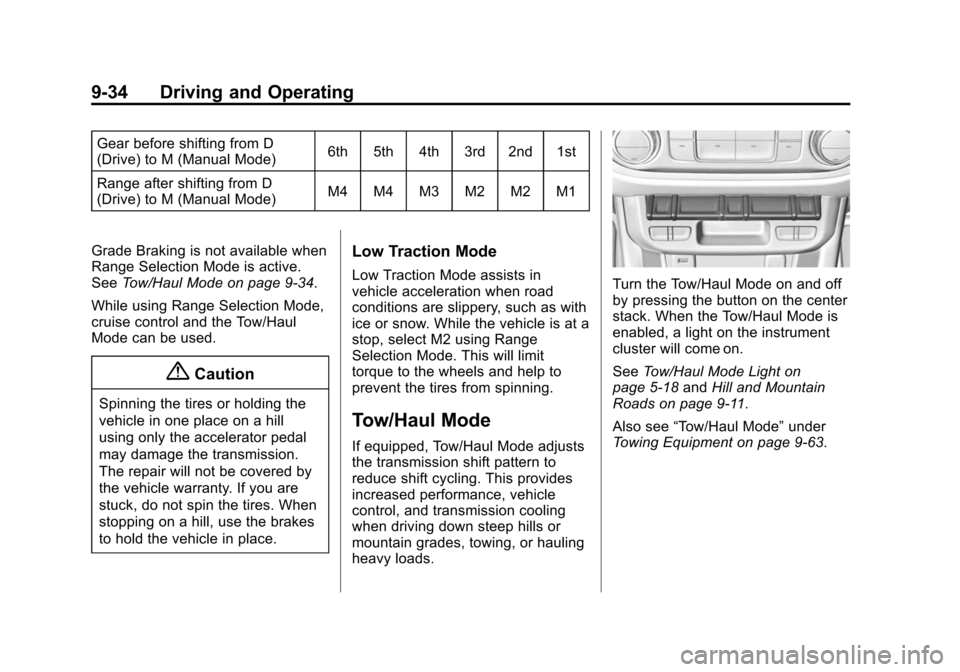
Turn the Tow/Haul Mode on and off
by pressing the button on the center
stack. When the Tow/Haul Mode is
enabled, a light on the instrument
cluster will come on.
See Tow/Haul Mode Light on
page 5-18 andHill and Mountain
Roads on page 9-11.
Also see “Tow/Haul Mode” under
Towing Equipment on page 9-63.
Page 249 of 431
Black plate (36,1)Chevrolet Colorado Owner Manual (GMNA-Localizing-U.S./Canada-
7586788) - 2015 - crc - 2/9/15
9-36 Driving and Operating
{Caution
Shifting to R (Reverse) while the
vehicle is moving forward could
damage the transmission. The
repairs would not be covered by
the vehicle warranty. Shift to
R (Reverse) only after the vehicle
is stopped.
Use R (Reverse), along with the
parking brake, for parking the
vehicle.
Shift Speeds
{Warning
If you skip a gear when
downshifting, you could lose
control of the vehicle. You could
injure yourself or others. Do not
shift down more than one gear at
a time when downshifting.
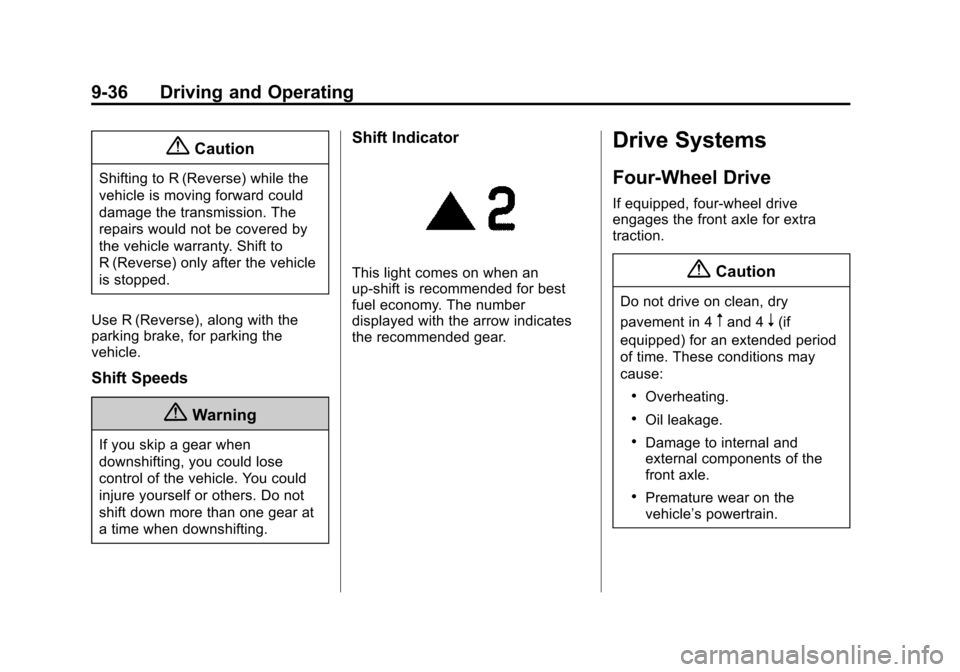
Shift Indicator
This light comes on when an
up-shift is recommended for best
fuel economy. The number
displayed with the arrow indicates
the recommended gear.
Drive Systems
Four-Wheel Drive
If equipped, four-wheel drive
engages the front axle for extra
traction.
{Caution
Do not drive on clean, dry
pavement in 4
mand 4n(if
equipped) for an extended period
of time. These conditions may
cause:
.Overheating.
.Oil leakage.
.Damage to internal and
external components of the
front axle.
.Premature wear on the
vehicle’s powertrain.
Page 250 of 431
Black plate (37,1)Chevrolet Colorado Owner Manual (GMNA-Localizing-U.S./Canada-
7586788) - 2015 - crc - 2/9/15
Driving and Operating 9-37
Driving on clean, dry pavement in
four-wheel drive may:
.Cause a vibration to be felt in
the steering system.
.Cause tires to wear faster.
.Cause additional driveline noise.
{Warning
Shifting the transfer case to
N (Neutral) can cause the vehicle
to roll even if the transmission is
in P (Park). You or someone else
could be seriously injured. Be
sure to set the parking brake
before placing the transfer case in
N (Neutral). SeeParking Brake on
page 9-41.
{Caution
Extended high-speed operation in
4
nmay damage or shorten the
life of the drivetrain. Engagement noise and bump when
shifting between 4
nand 4mor from
N (Neutral), with the engine running,
is normal.
Shifting into 4
nwill turn Traction
Control and StabiliTrak®off. See
Traction Control/Electronic Stability
Control on page 9-42.
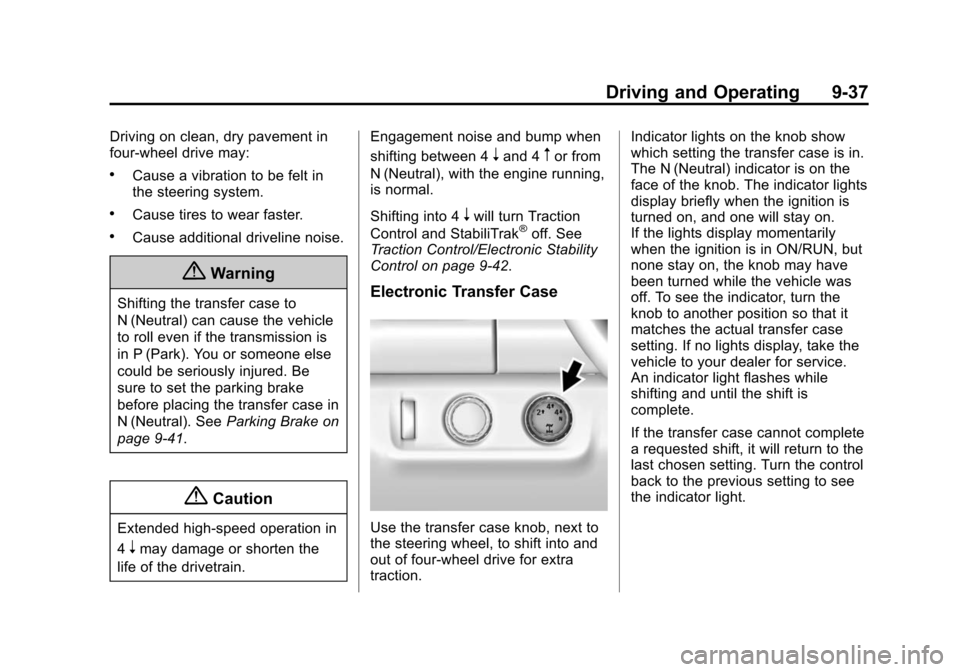
Electronic Transfer Case
Use the transfer case knob, next to
the steering wheel, to shift into and
out of four-wheel drive for extra
traction. Indicator lights on the knob show
which setting the transfer case is in.
The N (Neutral) indicator is on the
face of the knob. The indicator lights
display briefly when the ignition is
turned on, and one will stay on.
If the lights display momentarily
when the ignition is in ON/RUN, but
none stay on, the knob may have
been turned while the vehicle was
off. To see the indicator, turn the
knob to another position so that it
matches the actual transfer case
setting. If no lights display, take the
vehicle to your dealer for service.
An indicator light flashes while
shifting and until the shift is
complete.
If the transfer case cannot complete
a requested shift, it will return to the
last chosen setting. Turn the control
back to the previous setting to see
the indicator light.
Page 252 of 431
Black plate (39,1)Chevrolet Colorado Owner Manual (GMNA-Localizing-U.S./Canada-
7586788) - 2015 - crc - 2/9/15
Driving and Operating 9-39
Shifting Out of 4n
1. To shift out of 4nthe vehicle
must be stopped or moving less
than 5 km/h (3 mph) with the
transmission in N (Neutral) and
the ignition in ON/RUN. It is best
for the vehicle to be moving
1.6 to 3.2 km/h (1 to 2 mph).
2. Turn the knob to 4
mor 2m. Wait
for the 4
mor 2mindicator light to
stop flashing before shifting the
transmission into gear.
If the transmission is in gear and/or
moving more than 5 km/h (3 mph),
the 4
mor 2mindicator light will flash
for 30 seconds, but will not complete
the shift. With the vehicle moving
less than 5 km/h (3 mph), and the
transmission in N (Neutral), attempt
the shift again.
Shifting Into N (Neutral)
To shift:
1. Park the vehicle on a level surface. 2. Set the parking brake and press
and hold the brake pedal. See
Parking Brake on page 9-41.
3. Start the vehicle or turn the ignition to ON/RUN.
4. Shift the transmission to N (Neutral).
5. Shift the transfer case to 2
m.
6. Turn the transfer case knob clockwise to N (Neutral) until it
stops and hold it there until the
N (Neutral) light starts blinking.
This will take at least
10 seconds. Then slowly release
the dial to the 4
nposition. The
N (Neutral) light will come on
when the transfer case shift to
N (Neutral) is complete.
7. With the engine running, verify that the transfer case is in
N (Neutral) by shifting the
transmission to R (Reverse),
then to D (Drive). There should
be no movement of the vehicle
while shifting the transmission. 8. Turn the engine off, and the
ignition to ACC/ACCESSORY.
9. Place the transmission shift lever in P (Park). See
Recreational Vehicle Towing on
page 10-77.
10. Turn the ignition to LOCK/OFF.
Shifting Out of N (Neutral)
To shift:
1. Set the parking brake and apply the brake pedal.
2. Turn the ignition to ON/RUN with the engine off.
3. Shift the transmission to N (Neutral).
4. Turn the transfer case knob to 2
m.
After the transfer case has
shifted out of N (Neutral), the
N (Neutral) light will go out.
5. Release the parking brake.