2015 CADILLAC ELR battery
[x] Cancel search: batteryPage 136 of 407

Black plate (27,1)Cadillac ELR Owner Manual (GMNA-Localizing-U.S./Canada-7695154) -
2015 - CRC - 4/25/14
Instruments and Controls 5-27
the ACC is set and active. See
Adaptive Cruise Control on
page 9-39.
Door Ajar Light
This light comes on, when a door is
open or not securely latched.
Information Displays
Center Stack Display
The center stack screen displays
Charging, Power Flow, and Energy
Information. See the information that
follows.
Climate Control, Infotainment, and
Vehicle Personalization information
also displays in this screen. For
more information on these
systems, see:
.Dual Automatic Climate Control
System on page 8-1.
.The infotainment manual.
.Vehicle Personalization on
page 5-52.
The center stack controls only need
a light touch to operate and work
best with bare hands. The controls
will work with most gloves although
they may take longer to respond.
Use the finger pad rather than the finger tip to minimize response time.
If the controls are not responding,
remove the gloves.
To view the Power Flow, Charging,
and Energy Information, press the
[button on the infotainment
display.
Power Flows
To view the Power Flow screens,
press the
[button on the
infotainment display and then press
the Power Flow button at the bottom
of the touch screen. The Power
Flow screens indicate the current
system operating condition. The
screens show the energy flow
between the engine, electric drive
unit, and high voltage battery. These
components will be highlighted
when they are active.
ProCarManuals.com
Page 137 of 407

Black plate (28,1)Cadillac ELR Owner Manual (GMNA-Localizing-U.S./Canada-7695154) -
2015 - CRC - 4/25/14
5-28 Instruments and Controls
Battery Power - Battery is active
with energy flowing to the wheels.
Battery Power - Vehicle is stationary
in electric mode and no power is
flowing to the wheels.
Engine Power - Engine is active
with energy flowing to the wheels.
Engine Power - Vehicle is stationary
in extended range mode and no
power is flowing to the wheels.
Engine and Battery Power - Both
the engine and battery are active
with energy flowing to the wheels.
Engine and Regen Power Recovery
- Engine is active. Power from the
wheels returns to the battery during
regenerative braking or coasting.
ProCarManuals.com
Page 138 of 407

Black plate (29,1)Cadillac ELR Owner Manual (GMNA-Localizing-U.S./Canada-7695154) -
2015 - CRC - 4/25/14
Instruments and Controls 5-29
Regen Power Recovery - Power
from the wheels returns to the
battery during regenerative braking
or coasting.
Power Off - No power is flowing to
the wheels.
Programmable Charging
Important Information About
Portable Electric Vehicle Charging
.Charging an electric vehicle can
stress a building’s electrical
system more than a typical
household appliance.
.Before you plug in to any
electrical outlet, have a qualified
electrician inspect and verify the
electrical system (electrical
outlet, wiring, junctions, and
protection devices) for
heavy-duty service at a 12 amp
continuous load.
.Electrical outlets may wear out
with normal usage or be
damaged over time, making
them unsuitable for electric
vehicle charging.
.Check the electrical outlet/plug
while charging and discontinue
use if the electrical outlet/plug is
hot, then have the electrical
outlet serviced by a qualified
electrician.
.When outdoors, plug into an
electrical outlet that is
weather-proof while in use.
.Mount the charging cord to
reduce strain on the electrical
outlet/plug.
{Warning
Improper use of portable electric
vehicle charge cords may cause
a fire, electrical shock, or burns,
and may result in damage to
property, serious injury, or death.
.Do not use extension cords,
multi-outlet power strips,
splitters, grounding adaptors,
surge protectors, or similar
devices.
.Do not use an electrical outlet
that is worn or damaged,
or one that will not hold the
plug firmly in place.
.Do not use an electrical outlet
that is not properly grounded.
(Continued)
ProCarManuals.com
Page 139 of 407
Black plate (30,1)Cadillac ELR Owner Manual (GMNA-Localizing-U.S./Canada-7695154) -
2015 - CRC - 4/25/14
5-30 Instruments and Controls
Warning (Continued)
.Do not use an electrical outlet
that is on a circuit with other
electrical loads.
See the charge cord user guide.
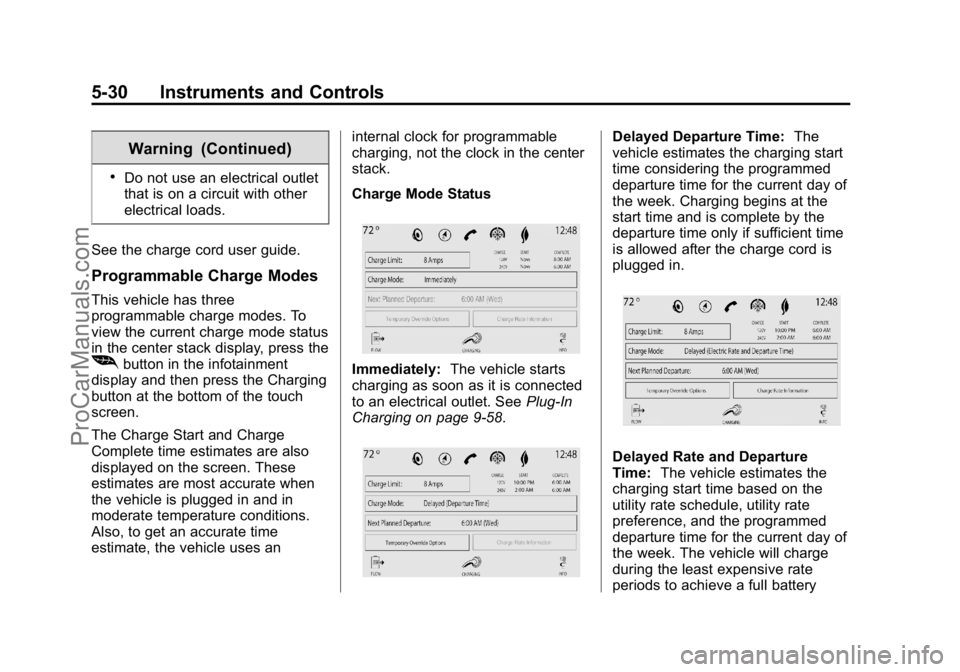
Programmable Charge Modes
This vehicle has three
programmable charge modes. To
view the current charge mode status
in the center stack display, press the
[button in the infotainment
display and then press the Charging
button at the bottom of the touch
screen.
The Charge Start and Charge
Complete time estimates are also
displayed on the screen. These
estimates are most accurate when
the vehicle is plugged in and in
moderate temperature conditions.
Also, to get an accurate time
estimate, the vehicle uses an internal clock for programmable
charging, not the clock in the center
stack.
Charge Mode StatusImmediately:
The vehicle starts
charging as soon as it is connected
to an electrical outlet. See Plug-In
Charging on page 9-58.
Delayed Departure Time: The
vehicle estimates the charging start
time considering the programmed
departure time for the current day of
the week. Charging begins at the
start time and is complete by the
departure time only if sufficient time
is allowed after the charge cord is
plugged in.
Delayed Rate and Departure
Time: The vehicle estimates the
charging start time based on the
utility rate schedule, utility rate
preference, and the programmed
departure time for the current day of
the week. The vehicle will charge
during the least expensive rate
periods to achieve a full battery
ProCarManuals.com
Page 142 of 407

Black plate (33,1)Cadillac ELR Owner Manual (GMNA-Localizing-U.S./Canada-7695154) -
2015 - CRC - 4/25/14
Instruments and Controls 5-33
Press one of the following options to
select the Charge Rate Preference:
.Charge during Peak, Mid-Peak,
and Off-Peak Rates: The vehicle
can charge during any rate
period to satisfy the next
planned departure time.
However, it will select when to
charge to minimize the total cost
of the charge.
.Charge during Mid-Peak and
Off-Peak Rates: The vehicle will
charge during Off-Peak and/or
Mid-Peak rate periods only and
will select when to charge to
minimize the total cost of the
charge.
.Charge during Off-Peak Rates:
The vehicle will only charge
during Off-Peak rate periods.
Charging begins at the start time
and is complete by the departure
time only if sufficient time is allowed
after the charge cord is plugged in.
For example, if the vehicle is
plugged in for only one hour prior to
the departure time, and the battery is completely discharged, the
vehicle will not be fully charged by
the departure time regardless of the
rate selection.
Also, if the selected electric rate
settings result in a very long charge
completion time, the vehicle will
start charging immediately upon
plug-in. For example, if the electric
rate table is set up with all
“Peak”
rates and the rate preference is to
charge during “Off-Peak”rates only,
then the vehicle will start charging
immediately upon plug-in.
Electric Rate Plan Selection
Electric rates, or cost per unit, may
vary based on time, weekday/
weekend, and season. During the
day when the demand for electricity
is high, the rates are usually higher
and called Peak rates. At night
when the demand for electricity is
low, the rates are usually lower and
called Off-Peak rates. In some
areas, a Mid-Peak rate is offered. Contact the utility company to obtain
the rate schedule for your area. The
summer and winter start dates must
be established to use a summer/
winter schedule.
From the Charge Rate Information
screen, press Electric Rate
Schedule button.To edit the Summer/Winter
Schedule:
1. Select Summer/Winter for the
Rate Schedule Type.
2. Press Edit Electric Rate Schedule.
ProCarManuals.com
Page 147 of 407

Black plate (38,1)Cadillac ELR Owner Manual (GMNA-Localizing-U.S./Canada-7695154) -
2015 - CRC - 4/25/14
5-38 Instruments and Controls
Programmable Charging system will
be disabled if the Charge Complete
Time cannot be confidently
estimated. If the Programmable
Charging system is consistently
disabled, see your dealer for details.
Energy Information
To view the Energy Usage and
Energy Efficiency, press the
[
button on the infotainment display
and then press the INFO button at
the bottom of the touch screen.
Energy Usage
The Energy Usage screen displays
information for the total of all drive
cycles since the last time the highvoltage battery was fully charged.
This includes distance traveled in
Electric Mode, distance traveled in
Extended Range Mode, total
distance traveled, electric energy
used from the battery, total fuel
used, and average fuel economy.
There are maximum limits to some
of the values that can be displayed.
When these values are replaced
with dashes, the value limits have
been reached. To reset these
values, the high voltage battery will
need to be fully recharged. The
circle graph also represents
the percentage of distance traveled
using Electric Mode versus
Extended Range Mode. The
Lifetime Fuel Economy is a total
over the life of the vehicle and can
only be reset by the dealer. The
Energy Usage information will also
appear automatically on power off
when Retained Accessory Power is
active. This automatic pop-up can
be disabled through vehicle
personalization. See
“Energy
Summary Pop-up” underVehicle
Personalization on page 5-52.
Driver Information
Center (DIC)
The DIC is displayed in the
instrument cluster. It shows the
status of many vehicle systems.
yorz: Move SEL up or down to
go to the previous or next selection.
SorT: Press to move between
the interactive display zones in the
cluster. Press
Sto go back to the
previous menu.
ProCarManuals.com
Page 150 of 407

Black plate (41,1)Cadillac ELR Owner Manual (GMNA-Localizing-U.S./Canada-7695154) -
2015 - CRC - 4/25/14
Instruments and Controls 5-41
Vehicle Messages
Messages displayed on the DIC
indicate the status of the vehicle or
some action that may be needed to
correct a condition. Multiple
messages may display one after the
other.
The messages that do not require
immediate action can be
acknowledged and cleared by
pressing SEL. The messages that
require immediate action cannot be
cleared until that action is
performed. All messages should be
taken seriously and clearing the
messages does not correct the
problem.
The following are some of the
vehicle messages that may be
displayed depending on the vehicle
content.
Battery and Charging
Messages
BATTERY SAVER ACTIVE
This message displays when the
vehicle has detected that the 12-volt
battery voltage has dropped and
vehicle features are being disabled.
The 12-volt battery saver system
starts reducing certain features
trying to save the charge of the
12-volt battery. Turn off unnecessary
features to allow the battery to
recharge.
BATTERY TOO COLD, PLUG IN
TO WARM
This message displays during
extremely cold temperatures, when
the vehicle will not start until the
high voltage battery is warm
enough.
Plug the vehicle in and make sure
the vehicle is off to allow the
charging system to warm the high
voltage battery, then the vehicle can
be started.
CHARGE CORD CONNECTED
This message displays when the
charge cord is connected to the
vehicle. The vehicle cannot be
shifted out of P (Park) with the
charge cord connected.
CHARGE DOOR OPEN
This message displays when the
charge door is open and the vehicle
is shifted out of P (Park). The
charge door should be kept fully
closed when the vehicle is not
charging.
LOW BATTERY
This message displays when the
12-volt battery voltage is low. See
Battery on page 10-23.
SERVICE BATTERY
CHARGING SYSTEM
This message displays when there
is a fault in the 12-volt battery
charging system. Take the vehicle to
your dealer for service.
ProCarManuals.com
Page 154 of 407
Black plate (45,1)Cadillac ELR Owner Manual (GMNA-Localizing-U.S./Canada-7695154) -
2015 - CRC - 4/25/14
Instruments and Controls 5-45
ENGINE OIL LOW—ADD OIL
On some vehicles, this message
displays when the engine oil level
may be too low. Check the oil level
before filling to the recommended
level. If the oil is not low and this
message remains on, take the
vehicle to your dealer for service.
See Engine Oil on page 10-9.
OIL PRESSURE LOW —STOP
ENGINE
This message displays if low oil
pressure levels occur. Stop the
vehicle as soon as safely possible
and do not operate it until the cause
of the low oil pressure has been
corrected. Check the oil as soon as
possible and have the vehicle
serviced by your dealer.
Fuel System Messages
CLOSE FUEL DOOR
This message displays when the
fuel door is open and the vehicle is
moving.
ENGINE NOT AVAILABLE
ADD FUEL
This message displays when the
engine is not available due to
running out of fuel. The vehicle can
continue to be driven in Electric
Mode until the battery is depleted,
but will have reduced acceleration.
When this message is displayed,
refuel the vehicle. See Out of Fuel/
Engine Unavailable on page 9-24.
FUEL LEVEL LOW
This message displays when the
vehicle is low on fuel. Refuel as
soon as possible.
READY TO REFUEL
This message displays when the
fuel system is depressurized and
the vehicle can be refueled.
TIGHTEN GAS CAP
This message displays when the
fuel cap is not on tight. Tighten the
fuel cap.
WAIT TO REFUEL
This message displays when the
fuel system is pressurized and you
must to wait to refuel the vehicle.
Key and Lock Messages
NO REMOTE DETECTED
This message displays when the
transmitter battery may be weak.
See “Starting the Vehicle with a Low
Transmitter Battery” underRemote
Keyless Entry (RKE) System
Operation on page 2-2.
NO REMOTE KEY WAS
DETECTED PLACE KEY IN
TRANSMITTER POCKET THEN
START YOUR VEHICLE
This message displays when trying
to start the vehicle if an RKE
transmitter is not detected. The
transmitter battery may be weak.
See “Starting the Vehicle with a Low
Transmitter Battery” underRemote
Keyless Entry (RKE) System
Operation on page 2-2.
ProCarManuals.com