2015 BMW Z4 button
[x] Cancel search: buttonPage 53 of 289

Buckling the belt
Make sure you hear the latch plate engage in
the belt buckle.
Unbuckling the belt
1.Hold the belt firmly.2.Press the red button in the belt buckle.3.Guide the belt back into its reel.
Safety belt reminder for driver and
passenger
The indicator lamp lights up and a
signal sounds. In addition, a message
appears on the Control Display.
Check whether the safety belt has
been fastened correctly.
The safety belt reminder is active at speeds
above approx. 5 mph/8 km/h. It can also be ac‐
tivated if objects are placed on the front pas‐
senger seat.
Damage to safety belts In the case of strain caused by accidents or
damage:
Have the safety belts, including the safety belt
tensioners, replaced and have the belt anchors
checked.
Checking and replacing safety belts
Have the work performed only by your
service center; otherwise, it cannot be ensured
that this safety feature will function properly.◀
Seat and mirror memory
General information Two different driver's seat and exterior mirrorpositions can be stored and retrieved for each
remote control.
Settings for the backrest width and lumbar
support are not stored.
Storing
1.Switch on the radio ready state or the igni‐
tion, refer to page 57.2.Adjust the seat and exterior mirrors to the
desired positions.3. Press the button. The LED in the
button lights up.4.Press the desired memory button 1 or 2:
the LED goes out.
If the M button is pressed accidentally:
Press the button again. The LED goes
out.
Retrieving the position Do not retrieve the memory setting while
driving
Do not retrieve the memory setting while driv‐ ing, as an unexpected movement of the seat or
steering wheel could result in an accident.◀
Seite 51AdjustingControls51
Online Edition for Part no. 01 40 2 954 104 - II/15
Page 54 of 289
Comfort function1.Open the driver's door or switch on the
radio ready state, refer to page 57.2.Briefly press the desired memory but‐
ton 1 or 2.
The seat is automatically moved to the stored
position.
The procedure stops when a switch for adjust‐
ing the seat or one of the buttons is pressed.
Safety mode
1.Close the driver's door and switch the igni‐
tion on or off, refer to page 57.2.Press and hold the desired button 1 or 2
until the adjustment procedure is com‐
pleted.
Mirrors
Exterior mirrors
General information The mirror on the passenger side is more
curved than the driver's mirror.
Estimating distances correctly
Objects reflected in the mirror are closer
than they appear. Do not estimate the distance
to the traffic behind you based on what you
see in the mirror, as this will increase your risk
of an accident.◀
The setting for the exterior mirrors is stored for
the remote control currently in use. The stored
position is called up automatically when the
vehicle is unlocked.
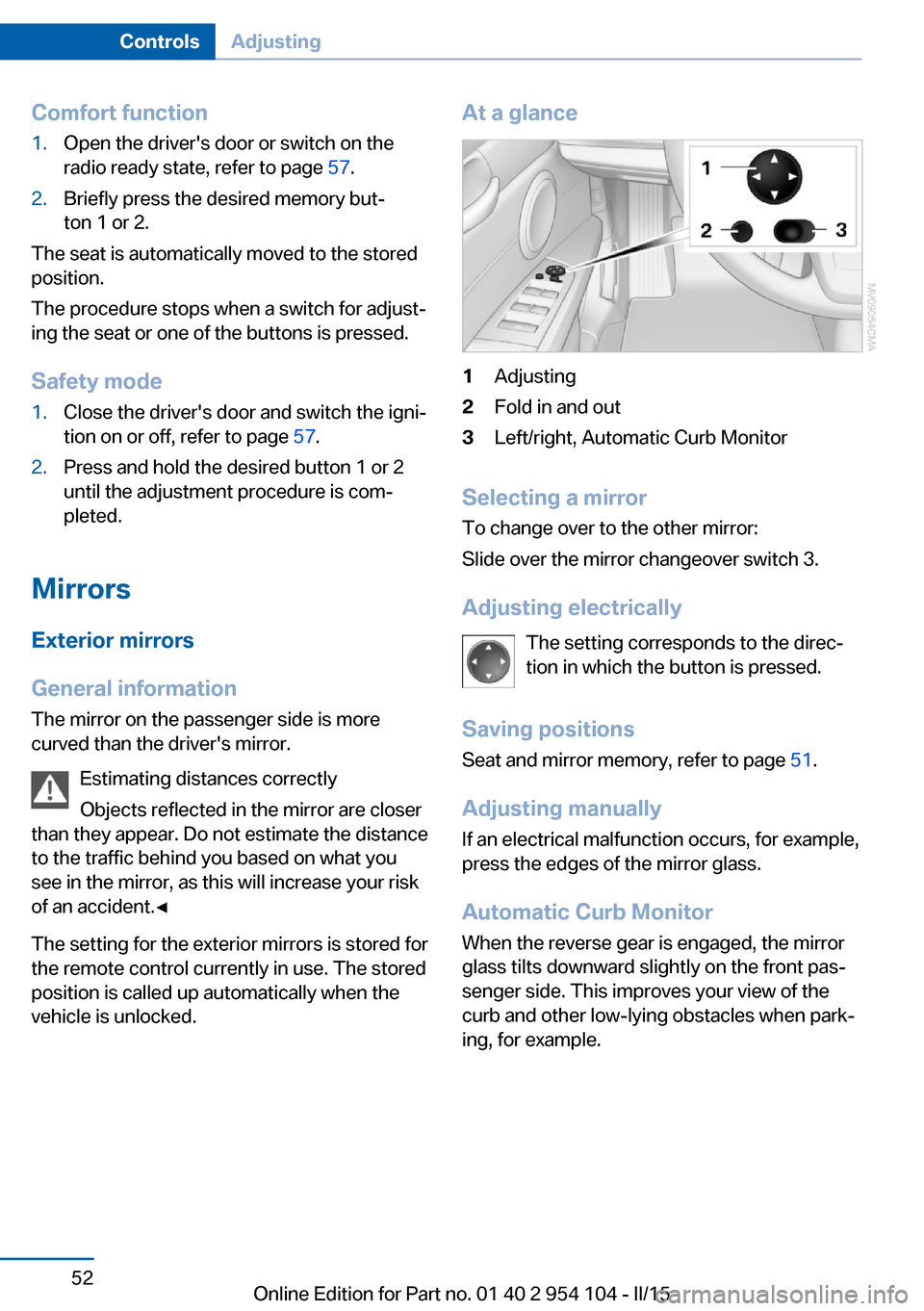
At a glance1Adjusting2Fold in and out3Left/right, Automatic Curb Monitor
Selecting a mirror
To change over to the other mirror:
Slide over the mirror changeover switch 3.
Adjusting electrically The setting corresponds to the direc‐
tion in which the button is pressed.
Saving positions Seat and mirror memory, refer to page 51.
Adjusting manually If an electrical malfunction occurs, for example,
press the edges of the mirror glass.
Automatic Curb Monitor When the reverse gear is engaged, the mirror
glass tilts downward slightly on the front pas‐
senger side. This improves your view of the
curb and other low-lying obstacles when park‐
ing, for example.
Seite 52ControlsAdjusting52
Online Edition for Part no. 01 40 2 954 104 - II/15
Page 55 of 289

Activating1.Slide the mirror changeover switch to the
driver's side mirror position, arrow 1.2.Shift into reverse or engage transmission
position R.
Deactivating
Slide the mirror changeover switch to the pas‐
senger side mirror position, arrow 2.
Fold in and outPress button 2.
Possible up to approx. 15 mph/20 km/h.
For example, this is advantageous
▷In car washes.▷In narrow streets.▷For folding back mirrors that were folded
away manually.
Mirrors that were folded in are folded out auto‐
matically at a speed of approx.
25 mph/40 km/h.
Fold in the mirror in a car wash
Before entering an automatic car wash,
fold in the exterior mirrors by hand or with the
button; otherwise, they could be damaged, de‐
pending on the width of the vehicle.◀
Automatic heating
Both exterior mirrors are heated automatically
while the engine is running or the ignition is
switched on.
Interior rearview mirror
Reducing the blinding effect
Blinding effect from behind when driving at
night: turn the knob.
Interior rearview and exterior mirrors,
automatic dimming feature
The automatic dimming feature of the interior
rearview and exterior mirrors is controlled by
two photo cells in the interior rearview mirror.
One photo cell is in the mirror frame or in the
mirror, see arrow; the other is on the back of
the mirror.
For proper operation:
▷Keep the photocells clean.▷Do not cover the area between the inside
rearview mirror and the windshield.Seite 53AdjustingControls53
Online Edition for Part no. 01 40 2 954 104 - II/15
Page 56 of 289

Steering wheel
General information Do not adjust while driving
Do not adjust the steering wheel while
driving; otherwise, an unexpected movement
could result in an accident.◀
Adjusting1.Fold the lever down.2.Move the steering wheel to the preferred
height and angle to suit your seating posi‐
tion.3.Fold the lever back.
Do not use force to swing the lever back.
Do not use force to swing the lever back
up; otherwise, the mechanism will be dam‐
aged.◀
Steering wheel heating
Switching on/off
Press the button.
▷On: the LED lights up.▷Off: the LED goes out.Seite 54ControlsAdjusting54
Online Edition for Part no. 01 40 2 954 104 - II/15
Page 59 of 289

DrivingVehicle equipment
This chapter describes all series equipment as
well as country-specific and special equipment
offered for this model series. Therefore, it also
describes equipment that may not be found in
your vehicle, for instance due to the selected
special equipment or the country version. This
also applies to safety-related functions and
systems.
When using the features and systems descri‐
bed here, adhere to local regulations.
Ignition lock Insert the remote control into the
ignition lock
Insert the remote control all the way into the
ignition lock.
▷Radio ready state is switched on. Individual
electrical consumers can operate.
Comfort Access
If the car is equipped with Comfort Access, the
remote control only needs to be inserted in the
ignition lock under special circumstances, refer
to page 40.
Removing the remote control from the
ignition lock
Do not forcibly pull the remote control
out of the ignition lock
Do not forcibly pull the remote control out of
the ignition lock as this may cause damage.◀
Before removing the remote control, push it all
the way in to release the locking mechanism.▷The ignition is switched off if it was on.
Sport automatic transmission
When the remote control is removed from the
ignition lock, transmission position P is en‐
gaged automatically. To make it possible for
the vehicle to roll, such as in an automatic car
wash, follow the instructions in Car washes, re‐
fer to page 257.
Start/Stop button
Pressing the Start/Stop button switches the
radio ready state or the ignition on and off.
The engine starts when you press the Start/
Stop button and, if the car has manual trans‐
mission, also depress the clutch, or, if the car
has automatic transmission, also depress the
brake.
Seite 57DrivingControls57
Online Edition for Part no. 01 40 2 954 104 - II/15
Page 60 of 289

Radio ready stateIndividual electrical consumers can operate.
The time and the external temperature are dis‐
played in the instrument cluster.
Radio ready state is switched off automatically:▷When the remote control is removed from
the ignition lock.▷In cars with Comfort Access, by touching
the surface above the door lock, locking,
refer to page 40.
Ignition on
All electrical consumers can operate. The od‐
ometer and trip odometer are displayed in the
instrument cluster.
To save battery power when the engine is off,
switch off the ignition and any unnecessary
electronic systems/power consumers.
Radio ready state and ignition off
All indicator and warning lamps as well as dis‐
plays in the instrument cluster go out.
Sport automatic transmission
In certain situations, transmission position P is
engaged automatically. To make it possible for
the vehicle to roll, such as in an automatic car
wash, follow the instructions in Car washes, re‐
fer to page 257.
Starting the engine Enclosed areas
Do not let the engine run in enclosed
areas; otherwise, breathing of exhaust fumes
may lead to loss of consciousness and death.
The exhaust gases contain carbon monoxide,
an odorless and colorless but highly toxic
gas.◀
Unattended vehicle
Do not leave the car unattended with the
engine running; otherwise, it presents a poten‐
tial source of danger.
Before leaving the car with the engine running,
set the parking brake and place the transmis‐
sion in position P or neutral to prevent the car
from moving.◀
Frequent starting in quick succession
Avoid repeated futile attempts at starting
the car and avoid starting the car frequently in
quick succession. Otherwise, the fuel is not
burned or is inadequately burned, and there is
the danger of overheating and damaging the
catalytic converter.◀
Do not wait for the engine to warm-up while
the vehicle remains stationary. Start driving
right away, but at moderate engine speeds.
Manual transmission
Remote control in the ignition lock or, with
Comfort Access, inside the vehicle, refer to
page 39.
1.Depress the brake pedal.2.Depress the clutch pedal.3.Press the Start/Stop button.
The starter operates automatically for a certain
time, and stops automatically as soon as the
engine has started.
Seite 58ControlsDriving58
Online Edition for Part no. 01 40 2 954 104 - II/15
Page 61 of 289

Sport automatic transmissionRemote control in the ignition lock or, with
Comfort Access, inside the vehicle, refer to
page 39.1.Depress the brake pedal.2.Press the Start/Stop button.
The starter operates automatically for a certain
time, and stops automatically as soon as the
engine has started.
Engine stop Take the remote control with you
Take the remote control with you when
leaving the vehicle so that children, for exam‐
ple, cannot start the engine or release the
parking brake.◀
Set the parking brake and further secure
the vehicle as required
Set the parking brake firmly when parking; oth‐
erwise, the vehicle could roll. On steep upward
and downward inclines, further secure the ve‐
hicle, for example, by turning the steering
wheel in the direction of the curb.◀
Manual transmission
1.With the vehicle at a standstill, press the
Start/Stop button.2.Shift into first gear or reverse.3.Set the parking brake.4.Remove the remote control from the igni‐
tion lock, refer to page 57.
Sport automatic transmission
1.With the vehicle at a standstill, press the
Start/Stop button.2.Set the parking brake.3.Remove the remote control from the igni‐
tion lock, refer to page 57.Automatic Engine Start/Stop
Function
The concept The Automatic Engine Start/Stop Function
helps save fuel and lower emissions. The sys‐
tem automatically switches off the engine dur‐
ing a stop, e.g., in traffic congestion or at traffic
lights. The ignition remains switched on. The
engine starts again automatically when the
clutch is pressed.
Automatic operation
The automatic engine Start/Stop function is
operational after each engine start. It is acti‐
vated whenever you drive forward faster than
3 mph/5 km/h.
Automatic engine stop The engine is switched off automatically dur‐
ing a stop under the following conditions:▷Neutral gear is engaged and the clutch
pedal is not depressed.▷The driver's safety belt is fastened or the
driver's door is closed.
When the engine is switched off, the air vol‐
ume of the air conditioner or automatic climate
control is reduced.
Indicator light in the instrument
cluster
The indicator lamp lights up when the
Auto Start/Stop function is ready to
start the engine automatically.
The indicator lamp lights up if the re‐
quirements for an automatic engine
stop are not fulfilled.
Note The engine is not switched off automatically in
the following situations:
▷External temperature too low.Seite 59DrivingControls59
Online Edition for Part no. 01 40 2 954 104 - II/15
Page 62 of 289

▷High external temperature and operation of
the automatic climate control.▷The interior is not yet heated or cooled as
much as desired.▷The engine is not yet at operating temper‐
ature.▷Sharp steering angle or the steering wheel
is being turned.▷After driving in reverse.▷Fogging of the windows when the auto‐
matic climate control is switched on.▷Vehicle battery charge is very low.▷Hood is unlocked.▷Stop-and-go traffic.
The indicator lamp is lit.
Parking the vehicle during an
automatic engine stop
The vehicle can be parked safely during an au‐
tomatic engine stop, such as when you wish to
leave the vehicle.
1.Press the Start/Stop button. The ignition is
switched off. The Auto Start/Stop function
is deactivated.2.Set the parking brake.
Start the engine as usual using the Start/Stop
button.
Automatic engine start To drive away, the engine starts automatically
as soon as the clutch pedal is depressed.
After the engine starts, accelerate as usual.
Safety mode
The engine does not start by itself after it is
switched off automatically if any of the follow‐
ing conditions are fulfilled:
▷The driver's safety belt is unfastened or
the driver's door is open.▷Hood was unlocked.The indicator lamp lights up. A mes‐
sage appears on the Control Display.
The engine can only be started via
the Start/Stop button.
Note Even if you do not wish to drive away, the stop‐
ped engine still starts automatically in the fol‐
lowing situations:▷The interior has heated up strongly with
the cooling function switched on.▷The steering wheel is turned.▷The vehicle begins to roll.▷Fogging of the windows when the auto‐
matic climate control is switched on.▷Vehicle battery charge is very low.▷The interior has cooled down strongly with
the heating switched on.▷Low braking pressure, such as from de‐
pressing the brake pedal a number of times
consecutively.
Activating/deactivating the system
manually
Press the button.
▷LED on the button lights up: the Auto Start/
Stop function is deactivated.
The engine is started during an automatic
engine stop.
The engine can only be stopped or started
via the Start/Stop button.Seite 60ControlsDriving60
Online Edition for Part no. 01 40 2 954 104 - II/15