2015 BMW M6 COUPE roof
[x] Cancel search: roofPage 196 of 222

pressure in the event of a flat tire is unneces‐
sary.
Which is why no spare tire is available.
The tools for changing wheels are available as
accessories from your service center.
Jacking points for the vehicle jack
The jacking points for the vehicle jack are lo‐
cated at the positions shown.
Vehicle battery Maintenance
The battery is maintenance-free.
The added amount of acid is sufficient for the
service life of the battery.
Further information about the battery can be
obtained from your service center.
Battery replacement Use approved vehicle batteries only
Only use vehicle batteries that have been
approved for your vehicle by the manufacturer;
otherwise, the vehicle could be damaged and
systems or functions may not be fully availa‐
ble.◀
After a battery replacement, have the battery
registered on the vehicle by the service center
to ensure that all comfort features are fully
available and that any Check Control mes‐
sages of these comfort features are no longer
displayed.
Charging the battery
General information
Make sure that the battery is always suffi‐
ciently charged to guarantee that the battery
remains usable for its full service life.
The battery may need to be charged in the fol‐
lowing cases:▷When making frequent short-distance
drives.▷If the vehicle is not used for prolonged pe‐
riods, longer than a month.
Hints
Do not connect charging devices to the
12 volt socket in the vehicle
Do not connect battery chargers to the fac‐
tory-installed 12 volt sockets in the vehicle as
this may damage the vehicle battery due to an
increased power consumption.◀
Starting aid terminals
In the vehicle, only charge the battery via the
starting aid terminals, refer to page 196, in the
engine compartment with the engine off.
Power failure
After a temporary power loss, some equipment
needs to be newly initialized or individual set‐
tings updated, e. g.:
▷Seat, mirror, and steering wheel memory:
store the positions again.▷Time: update.▷Date: update.▷Glass sunroof: initialize the system, refer to
page 47.
Disposing of old batteries
Have old batteries disposed of by your
service center or bring them to a recy‐
cling center.
Seite 192MobilityReplacing components192
Online Edition for Part no. 01 40 2 959 695 - II/15
Page 198 of 222

Breakdown assistanceVehicle features and options
This chapter describes all standard, country-
specific and optional features offered with the
series. It also describes features that are not
necessarily available in your car, e. g., due to
the selected options or country versions. This
also applies to safety-related functions and
systems. The respectively applicable country
provisions must be observed when using the
respective features and systems.
Hazard warning flashers
The button is located in the center console.
Intelligent Emergency
Request
The concept In case of an emergency, an Emergency Re‐
quest can be made through this system.
General information
Only press the SOS button in an emergency.
Hints
Emergency Request not guaranteed
For technical reasons, the Emergency
Request cannot be guaranteed under unfavor‐
able conditions.◀
Overview
SOS button in the roofliner
Requirements
▷The SIM card integrated in the vehicle has
been activated.▷The radio-ready state is switched on.▷The Assist system is functional.
Initiating an Emergency Request
1.Press the cover briefly to open it.2.Press the SOS button until the LED at the
button lights up green.▷The LED lights up green: an Emergency
Request was initiated.
If a cancel prompt appears on the display,
the Emergency Request can be aborted.
If the situation allows, wait in your vehicle
until the voice connection has been estab‐
lished.▷The LED flashes green when a connection
to the BMW Response Center has been
established.Seite 194MobilityBreakdown assistance194
Online Edition for Part no. 01 40 2 959 695 - II/15
Page 204 of 222

CareVehicle features and optionsThis chapter describes all standard, country-
specific and optional features offered with the
series. It also describes features that are not
necessarily available in your car, e. g., due to
the selected options or country versions. This
also applies to safety-related functions and
systems. The respectively applicable country
provisions must be observed when using the
respective features and systems.
Car washes General information
Regularly remove foreign objects such as
leaves in the area below the windshield when
the hood is raised.
Wash your vehicle frequently, particularly in
winter. Intense soiling and road salt can dam‐
age the vehicle.
Hints Steam jets or high-pressure washers
When using steam jets or high-pressure
washers, hold them a sufficient distance away
and use a maximum temperature of
140 ℉/60 ℃.
If the vehicle has a glass sunroof, ensure that a
distance of at least 31.5 inches/80 cm is main‐
tained. Holding them too close or using exces‐
sively high pressures or temperatures can
cause damage or preliminary damage that may
then lead to long-term damage.
Follow the user's manual for the high-pressure
washer.◀Cleaning sensors/camera lenses with
high-pressure washers
When using high-pressure washers, do not
spray the sensors and camera lenses on the
outside of the vehicle for long periods and
maintain a distance of at least 12 in/30 cm.◀
Automatic car washes
Hints Do not use high pressure washing sys‐
tems
With washing systems operating at high pres‐
sures and nozzle positions close to the win‐
dows, drops of water can penetrate.◀
Note the following:▷Give preference to cloth car washes or
those that use soft brushes in order to
avoid paint damage.▷Make sure that the wheels and tires are not
damaged by the transport mechanisms.▷Fold in the exterior mirrors; otherwise, they
may be damaged, depending on the width
of the vehicle.▷Deactivate the rain sensor, refer to
page 70, to avoid unintentional wiper acti‐
vation.▷In some cases, an unintentional alarm can
be triggered by the interior motion sensor
of the alarm system. Follow the instruc‐
tions on avoiding an unintentional alarm,
refer to page 45.
Guide rails in car washes
Avoid car washes with guide rails higher
than 4 in/10 cm; otherwise, the vehicle body
could be damaged.◀
Seite 200MobilityCare200
Online Edition for Part no. 01 40 2 959 695 - II/15
Page 206 of 222

quency and extent of your car care to these
influences.
Aggressive substances such as spilled fuel, oil,
grease or bird droppings, must be removed im‐
mediately to prevent the finish from being al‐
tered or discolored.
Only use respectively approved cleaning and
care products for vehicles with matte finish.
Suitable care products for matte finishes are
available from the service center.
Leather care
Remove dust from the leather often, using a
cloth or vacuum cleaner.
Otherwise, particles of dust and road grime
chafe in pores and folds, and lead to increased
wear and premature degradation of the leather
surface.
To guard against discoloration, such as from
clothing, provide leather care roughly every
two months.
Clean light-colored leather more frequently be‐
cause soiling on such surfaces is substantially
more visible.
Use leather care products; otherwise, dirt and
grease will gradually break down the protective
layer of the leather surface.
Suitable care products are available from the
service center.
Upholstery material care Vacuum regularly with a vacuum cleaner.
If upholstery is very dirty, e.g., with beverage
stains, use a soft sponge or microfiber cloth
with a suitable interior cleaner.
Clean the upholstery down to the seams using
large sweeping motions. Avoid rubbing the
material vigorously.Damage from Velcro® fasteners
Open Velcro® fasteners on pants or
other articles of clothing can damage the seat
covers. Ensure that any Velcro® fasteners are
closed.◀
Caring for special components
Light-alloy wheels
When cleaning the vehicle, use only neutral
wheel cleaners having a pH value from 5 to 9.
Do not use abrasive cleaning agents or steam
jets above 140 ℉/60 ℃. Follow the manufac‐
turer's instructions.
Aggressive, acidic or alkaline cleaning agents
can destroy the protective layer of adjacent
components, such as the brake disk.
Chrome surfaces
Carefully clean components such as the radia‐
tor grille or door handles with an ample supply
of water, possibly with shampoo added, partic‐
ularly when they have been exposed to road
salt.
Rubber components
Aside from water, treat only with rubber
cleansers.
When cleaning rubber seals, do not use any
silicon-containing car care products in order to
avoid damage or noises.
Fine wood partsClean fine wood facing and fine wood compo‐
nents only with a moist rag. Then dry with a
soft cloth.
Plastic components
These include:▷Imitation leather surfaces.▷Roofliner.▷Lamp lenses.▷Instrument cluster cover.Seite 202MobilityCare202
Online Edition for Part no. 01 40 2 959 695 - II/15
Page 207 of 222

▷Matt black spray-coated components.▷Painted parts in the interior.
Clean with a microfiber cloth.
Dampen cloth lightly with water.
Do not soak the roofliner.
No cleansers that contain alcohol or sol‐
vents
Do not use cleansers that contain alcohol or
solvents, such as lacquer thinners, heavy-duty
grease removers, fuel, or such; this could lead
to surface damage.◀
Safety belts
Dirty belt straps impede the reeling action and
thus have a negative impact on safety.
Chemical cleaning
Do not clean chemically; this can destroy
the webbing.◀
Use only a mild soapy solution, with the safety
belts clipped into their buckles.
Do not allow the reels to retract the safety
belts until they are dry.
Carpets and floor mats No objects in the area around the pedals
Keep floor mats, carpets, and any other
objects out of the pedal area; otherwise, the
function of the pedals could be impeded while
driving and create the risk of an accident.
Do not place additional floor mats over existing
mats or other objects.
Only use floor mats that have been approved
for the vehicle and can be properly attached to
floor.
Ensure that the floor mats are securely fas‐
tened again after they were removed for clean‐
ing, e.g.◀
Floor mats can be removed from the car's inte‐
rior for cleaning.
If the floor carpets are very dirty, clean with a
microfiber cloth and water or a textile cleaner.
To prevent matting of the carpet, rub back and
forth in the direction of travel only.
Sensor/camera lenses To clean sensors and camera lenses, use a
cloth moistened with a small amount of glass
detergent.
Displays/monitors Cleaning displays and screens
Do not use any chemical or household
cleaning agents; otherwise, surfaces can be af‐
fected.◀
Keeping out moisture
Keep all fluids and moisture away from
the unit; otherwise, electrical components can
be damaged.◀
Avoid pressure
Avoid pressing too hard when cleaning
and do not use abrasive materials; otherwise,
damage can result.◀
Clean with a clean, antistatic microfiber cloth.
Long-termWhen the vehicle is shut down for longer than
three months, special measures must be
taken. Additional information is available from
the service center.Seite 203CareMobility203
Online Edition for Part no. 01 40 2 959 695 - II/15
Page 210 of 222
Technical dataVehicle features and options
This chapter describes all standard, country-
specific and optional features offered with the
series. It also describes features that are not
necessarily available in your car, e. g., due tothe selected options or country versions. This
also applies to safety-related functions and
systems. The respectively applicable country
provisions must be observed when using the
respective features and systems.
Note
The technical data and specifications in this
Owner's Manual are used as guidance values.
The vehicle-specific data can deviate from this,
for example, due to the selected special equip‐
ment, country version or country-specific
measurement method. Detailed values can befound in the approval documents, on informa‐
tion signs on the vehicle or can be obtained
from the service center.
The information in the vehicle documents al‐
ways has priority.
Dimensions
The dimensions can vary depending on the
model version, equipment or country-specific
measurement method.
The specified heights do not take into account
attached parts, for example, a roof antenna,roof racks or spoiler. The heights can deviate,
for example, due to the selected special equip‐
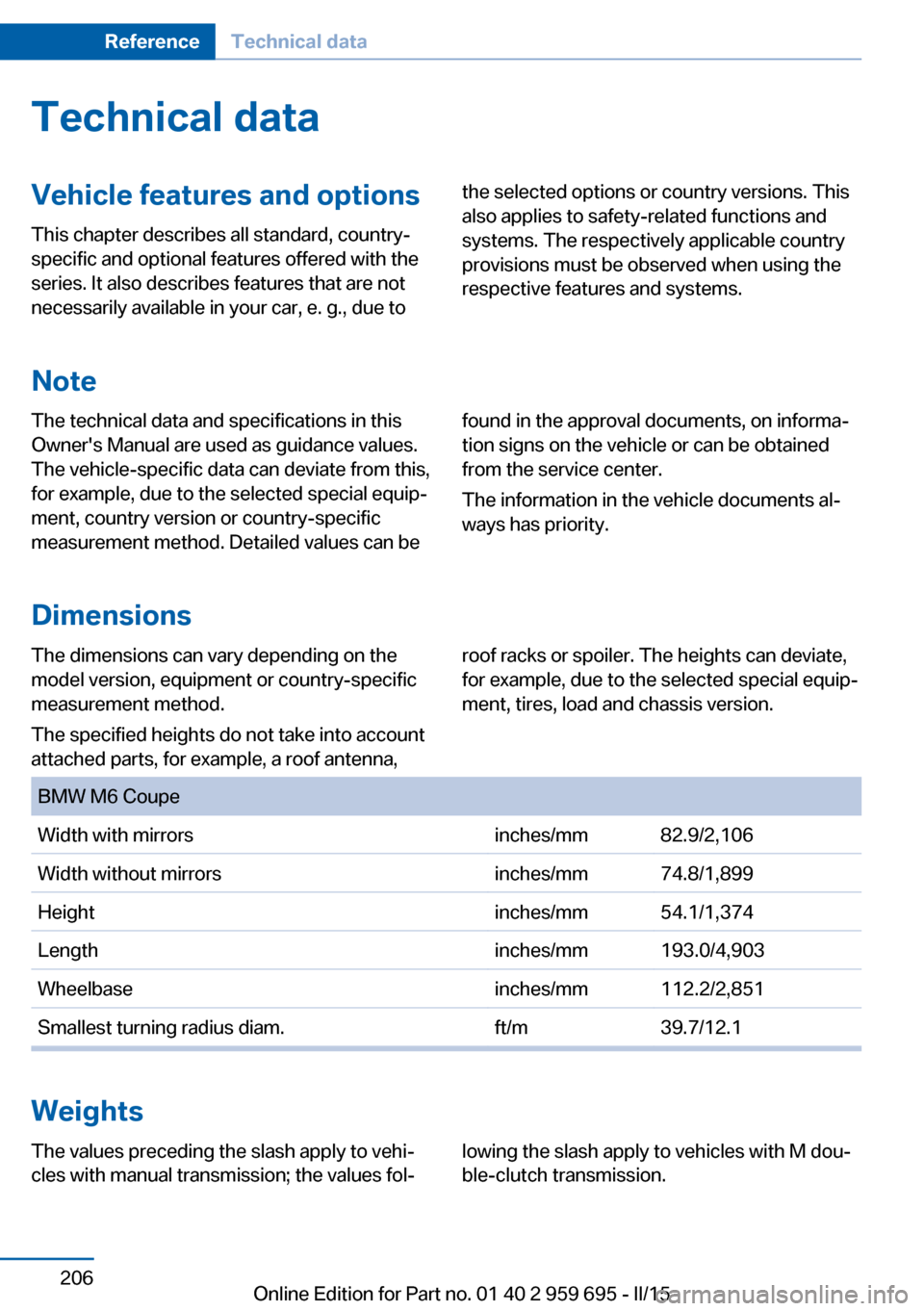
ment, tires, load and chassis version. BMW M6 CoupeWidth with mirrorsinches/mm82.9/2,106Width without mirrorsinches/mm74.8/1,899Heightinches/mm54.1/1,374Lengthinches/mm193.0/4,903Wheelbaseinches/mm112.2/2,851Smallest turning radius diam.ft/m39.7/12.1
Weights
The values preceding the slash apply to vehi‐
cles with manual transmission; the values fol‐lowing the slash apply to vehicles with M dou‐
ble-clutch transmission.Seite 206ReferenceTechnical data206
Online Edition for Part no. 01 40 2 959 695 - II/15
Page 215 of 222

Exhaust system 159
Exterior mirror, automatic dimming feature 57
Exterior mirrors 56
External start 196
External temperature dis‐ play 83
External temperature warn‐ ing 83
Eyes for securing cargo 163
F
Failure message, see Check Control 79
False alarm, refer to Uninten‐ tional alarm 45
Fan, refer to Air flow 140
Filler neck for engine oil 184
Fine wood, care 202
First aid kit 195
Fitting for towing, see Tow fit‐ ting 198
Flat tire, changing wheels 191
Flat Tire Monitor FTM 106
Flat tire, repairing 177
Flat tire, Tire Pressure Moni‐ tor TPM 103
Flat tire, warning lamp 104, 106
Flooding 160
Floor carpet, care 203
Floor mats, care 203
Fold-out position, wiper 71
Foot brake 160
For the roofliner, refer to All around the interior rearview
mirror 17
Front airbags 100
Front center armrest 151
Front-end collision warning with City Braking func‐
tion 108
Front lights 189 front-seat passenger airbags,
automatic deactivation 102
Front-seat passenger airbags, indicator lamp 102
Front seats 49
FTM Flat Tire Monitor 106
Fuel 170
Fuel consumption, refer to Average fuel consump‐
tion 89
Fuel filler flap 168
Fuel gauge 82
Fuel lid 168
Fuel quality 170
Fuel recommendation 170
Fuel, tank capacity 207
Fuse 193
G
Garage door opener, refer to Universal Integrated Remote
Control 144
Gasoline 170
Gear change 74
Gear shift indicator 86
General driving notes 159
Glare shield 146
Glass sunroof, powered with tilt function 46
Glove compartment 150
Gross vehicle weight, ap‐ proved 206
Ground clearance 161
H
Handbrake, refer to Parking brake 67
Hand-held transmitter, alter‐ nating code 145
Hazard warning flashers 194
Head airbags 100
Headlight control, auto‐ matic 96 Headlight courtesy delay fea‐
ture 95
Headlight courtesy delay fea‐ ture via remote control 38
Headlight flasher 69
Headlight glass 190
Headlights 189
Headlights, care 201
Headlight washer system 69
Head restraints 49
Head restraints, front 53
Head-up Display 92
Head-up Display, care 203
Head-up display, M view 93
Head-up display, standard view 93
Heavy cargo, stowing 163
Height, seats 49
Height, vehicle 206
High-beam Assistant 97
High beams 69
High beams/low beams, refer to High-beam Assistant 97
Higher speed range 161
Hills 160
Hill start assistant, refer to Drive-off assistant 122
Hints 6
Holder for beverages 152
Homepage 6
Hood 181
Horn 14
Hotel function, trunk lid 41
Hot exhaust system 159
HUD Head-up Display 92
Hydroplaning 159
I Ice warning, see External temperature warning 83
Icy roads, see External tem‐ perature warning 83
Identification marks, tires 173 Seite 211Everything from A to ZReference211
Online Edition for Part no. 01 40 2 959 695 - II/15
Page 218 of 222

Passenger side mirror, tiltingdownward 56
Pathway lines, rearview cam‐ era 134
PDC Park Distance Con‐ trol 130
Pedestrian detection, see Night Vision 113
Pedestrian warning with city braking function 110
Personal Profile 35
Personal Profile, exporting profiles 36
Pinch protection system, glass sunroof 47
Pinch protection system, win‐ dows 46
Plastic, care 202
Power failure 192
Power sunroof, glass 46
Power windows 45
Pressure, tire air pres‐ sure 172
Pressure warning FTM, tires 106
Preventing Auto Start Stop 66
Profile, refer to Personal Pro‐ file 35
Programmable memory but‐ tons, iDrive 23
Protective function, glass sunroof 47
Protective function, win‐ dows 46
Push-and-turn switch, refer to Controller 18
R Radiator fluid 186
Radio-operated key, refer to Remote control 34
Radio ready state 63 Radio, see user's manual for
Navigation, Entertainment
and Communication
Rain sensor 70
Rear lights 191
Rearview camera 132
Rearview mirror 56
Rear window defroster 141
Recirculated-air mode 141
Recommended fuel grade 170
Recommended tire brands 176
Refueling 168
Remaining range 84
Remote control/key 34
Remote control, malfunc‐ tion 38
Remote control, univer‐ sal 144
Replacement fuse 193
Replacing bulbs, see Lamp replacement 189
Replacing parts 189
Replacing wheels/tires 176
Reporting safety defects 9
RES button, see Cruise con‐ trol 128
Reserve warning, refer to Range 84
Reset, Tire Pressure Monitor TPM 104
Residual heat, automatic cli‐ mate control 142
Retaining straps, securing cargo 163
Retreaded tires 176
Reversing lamp, bulb replace‐ ment 191
Roadside parking lights 96
Roller sunblinds 46
RON recommended fuel grade 170
Rope for tow-starting/ towing 198 Rubber components,
care 202
S
Safe braking 160
Safety 7
Safety belt reminder for driv‐ er's seat and front passen‐
ger seat 53
Safety belts 52
Safety belts, care 203
Safety Package, refer to Ac‐ tive Protection 119
Safety systems, airbags 100
Saving fuel 164
Screen, refer to Control Dis‐ play 18
Screwdriver, see Onboard ve‐ hicle tool kit 189
Screw thread, refer to Screw thread for tow fitting, screw
thread for tow fitting 199
Sealant 177
Seat belts, refer to Safety belts 52
Seat heating, front 51
Seating position for chil‐ dren 59
Seat, mirror, and steering wheel memory 55
Seats 49
Seat ventilation, front 51
Selection list in instrument cluster 88
Selector lever 72
Selector lever position 72
Sensors, care 203
Sequential mode 73
Service and warranty 8
Service requirements, Condi‐ tion Based Service
CBS 187
Service requirements, dis‐ play 85
Services, ConnectedDrive Seite 214ReferenceEverything from A to Z214
Online Edition for Part no. 01 40 2 959 695 - II/15