2015 BMW I8 bulb
[x] Cancel search: bulbPage 83 of 224
If the vehicle is slowed down down to a speed
of approx. 2 mph/3 km/h the parking brake is
set.
Releasing
With drive readiness switched on:
Press the reel while stepping on the
brake pedal or selector lever position P is
set.
The LED and indicator lamp go out.
The parking brake is released.
Automatic release For automatic release, step on the accelerator
pedal.
The LED and indicator lamp go out.
The parking brake is automatically released
when you step on the accelerator:▷Drive readiness switched on.▷Drive mode engaged.▷Driver buckled in and doors closed.
Inadvertent operation of the accelerator
pedal
Make sure that the accelerator pedal is not op‐
erated unintentionally; otherwise, the vehicle is
set in motion and there is a risk of an acci‐
dent.◀
Malfunction In the event of a failure or malfunction of the
parking brake, secure the vehicle against roll‐
ing using a wheel chock, e.g., when leaving it.
After a power failure
Putting the parking brake into
operation
1.Switch on the ignition.2. Press the reel while stepping on the
brake pedal or selector lever position P is
set.
It may take several seconds for the brake to be
put into operation. Any sounds associated with
this are normal.
The indicator lamp in the instrument
cluster goes out as soon as the parking
brake is ready for operation.
Turn signal, high beams,
headlight flasher
Turn signal
Hints Do not adjust the exterior mirrors
Do not adjust the exterior mirror while
driving and when turn signals/hazard warning
flashers are on, or else the additional turn sig‐
nal lights in the exterior mirror are out of posi‐
tion and can't be seen.◀
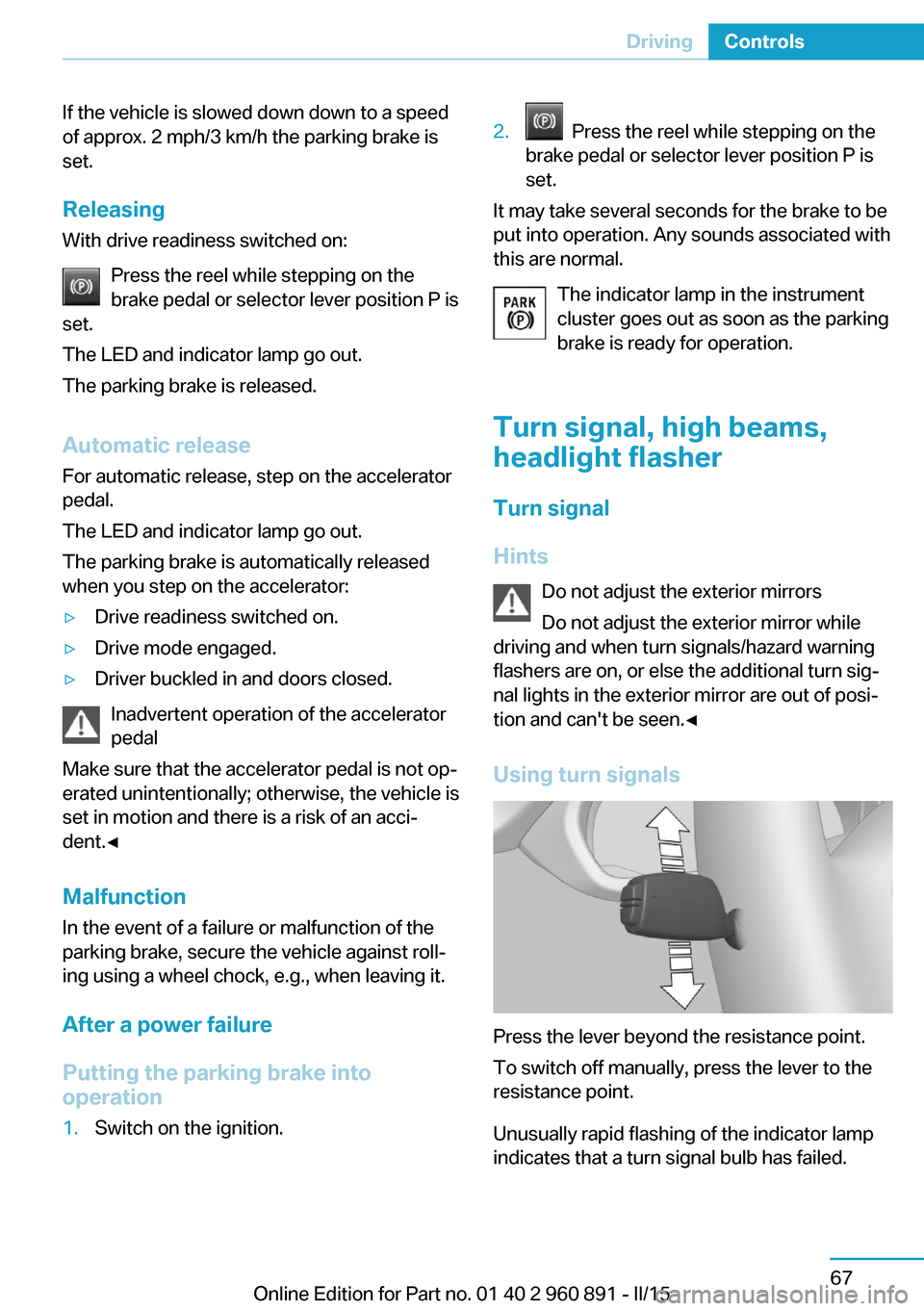
Using turn signals
Press the lever beyond the resistance point.
To switch off manually, press the lever to the
resistance point.
Unusually rapid flashing of the indicator lamp
indicates that a turn signal bulb has failed.
Seite 67DrivingControls67
Online Edition for Part no. 01 40 2 960 891 - II/15
Page 97 of 224

ing the area of the interference, the system
automatically becomes active again.▷TPM could not conclude the reset: perform
the reset of the system again.▷A wheel without TPM electronics is fitted:
have the service center check it if needed.▷Malfunction: have the system checked by
your service center.
For more information, see Tire Pressure Moni‐
tor, refer to page 99.
Steering system Steering system in some cases defec‐
tive.
Have the steering system checked by
the service center.
Engine functions Have the vehicle checked by the serv‐ice center.
For additional information, refer to On-
board Diagnostics socket, refer to page 179.
Acoustic pedestrian protection inactive Acoustic pedestrian protection possi‐
bly defective.
Have the system checked by the serv‐
ice center.
Green lights Turn signal Turn signal on.
Unusually rapid flashing of the indicator
lamp indicates that a turn signal bulb
has failed.
For additional information, refer to Turn signal, refer to page 67.
Parking lights, headlight control
Parking lights or headlights are acti‐
vated.
For additional information, refer to
Parking lights/low beams, headlight control, re‐
fer to page 92.
High-beam Assistant High-beam Assistant is switched on.
High beams are activated and off auto‐
matically as a function of the traffic sit‐
uation.
For additional information, refer to High-beam
Assistant, refer to page 94.
Cruise control The system is switched on. It maintains
the speed that was set using the con‐
trol elements on the steering wheel.
Blue lights
High beams High beams are activated.
For additional information, refer to High
beams, refer to page 68.
General lamps
Check Control At least one Check Control message is
displayed or is stored. The symbol is
shown in the display of the instrument
cluster.
Text messagesText messages in combination with a symbol
in the instrument cluster explain a Check Con‐ trol message and the meaning of the indicator
and warning lights.Seite 81DisplaysControls81
Online Edition for Part no. 01 40 2 960 891 - II/15
Page 196 of 224

Replacing componentsVehicle features and optionsThis chapter describes all standard, country-
specific and optional features offered with the
series. It also describes features that are not
necessarily available in your car, e. g., due to
the selected options or country versions. This
also applies to safety-related functions and
systems. The respectively applicable country
provisions must be observed when using the
respective features and systems.
Wiper blade replacement Hints Do not fold down the wipers without
wiper blades
Do not fold down the wipers if wiper blades
have not been installed; this may damage the
windshield.◀
Replacing the wiper blades1.To change the wiper blades, fold up, refer
to page 70, the wiper arms.2.Fold up the wipers.3.Position the wiper blade in a horizontal po‐
sition.4.Remove the wiper blade toward one side.5.Insert the new wiper blade in reverse order
of removal until it locks in place.6.Fold down the wipers.
Lamp and bulb replacement
General information
All headlights and lights are made using LED
or laser technology. Contact your service cen‐
ter in the event of a malfunction.
Headlight glass
Condensation can form on the inside of the ex‐
ternal lights in cool or humid weather. When
driving with the light switched on, the conden‐
sation evaporates after a short time. The head‐
light glass does not need to be changed.
If the headlights do not dim despite driving
with the light switched on, increasing humidity
forms, e. g. water droplets in the light, have the
service center check this.
Light-emitting diodes (LEDs)
Some items of equipment use light-emitting
diodes installed behind a cover as a light
source.
These light-emitting diodes, which are related
to conventional lasers, are officially designated
as Class 1 light-emitting diodes.
Seite 180MobilityReplacing components180
Online Edition for Part no. 01 40 2 960 891 - II/15
Page 197 of 224

HintsDo not perform any work on the lighting
system
Have any work on the lighting system, includ‐
ing bulb replacement, performed only by a
service center. Due to the high voltage present
in the system, there is a danger of fatal injuries
if work is carried out improperly.◀
Irritation of the retina
Never look directly into the headlights or
their light sources for a lengthy period of time,
otherwise this could irritate your retinas.◀
Do not remove the covers
Do not remove the covers, and never
stare into the unfiltered light for several hours;
otherwise, irritation of the retina could result.◀
Changing wheels
Hints
When sealants are used, an immediate wheel
change when there is a loss of tire inflation
pressure in the event of a flat tire is unneces‐
sary.
Which is why no spare tire is available.
The tools for changing wheels are available as
accessories from your service center.
Jacking points for the vehicle jack
The jacking points for the vehicle jack are lo‐
cated at the positions shown.
Vehicle battery
The vehicle battery has 12 volts. The battery
supplies the onboard electronics with energy.
Information about the high-voltage system, re‐
fer to page 150.
Maintenance
The battery is maintenance-free.
The added amount of acid is sufficient for the
service life of the battery.
Further information about the battery can be
obtained from your service center.
Battery replacement Use approved vehicle batteries only
Only use vehicle batteries that have been
approved for your vehicle by the manufacturer;
otherwise, the vehicle could be damaged and
systems or functions may not be fully availa‐
ble.◀
After a battery replacement, have the battery
registered on the vehicle by the service center
to ensure that all comfort features are fully
available and that any Check Control mes‐
sages of these comfort features are no longer
displayed.
Charge vehicle battery Do not use any charging devices
Do not charge the vehicle battery with an
external charging device; otherwise, there is a
risk of property damage, e. g., to the vehicle's
electronics.◀
Charging a discharged battery, refer to
page 156.
Power failure
After a temporary power loss, some equipment
needs to be newly initialized or individual set‐
tings updated, e. g.:▷Time: update.Seite 181Replacing componentsMobility181
Online Edition for Part no. 01 40 2 960 891 - II/15
Page 215 of 224

Braking, hints 140
Breakdown assistance 183
Break-in 138
Brightness of Control Dis‐ play 90
Bulb replacement 180
Bulbs and lamps 180
Button, Start/Stop 61
Bypassing, refer to Jump- starting 184
C
California Proposition 65 Warning 8
Camera lenses, care 190
Camera, rearview cam‐ era 118
Camera, Side View 122
Camera, Top View 121
Car battery 181
Car care products 188
Care, displays 190
Care, vehicle 188
Cargo 142
Cargo area 132
Cargo cover 132
Car key, refer to Remote con‐ trol 38
Carpet, care 189
Car wash 187
Catalytic converter, refer to Hot exhaust system 140
CBS Condition Based Serv‐ ice 178
Center armrest 134
Center console 16
Central locking system 44
Central screen, refer to Con‐ trol Display 18
Changes, technical, refer to Safety 7
Changing wheels 181
Changing wheels/tires 167
CHARGE, energy recov‐ ery 66 Charging battery, see Vehicle
charging 150
Charging, refer to Charging vehicle 150
Charging, refer to Vehicle charging 150
Charging screen 76
Charging state indicator, high-voltage battery 77
Charging status, see display of the charging status 154
Charging vehicle 150
Charging vehicle, refer to Ve‐ hicle charging 150
Chassis number, see vehicle identification number 10
Check Control 79
Checking the engine oil level electronically 173
Checking the oil level elec‐ tronically 173
Children, seating position 57
Children, transporting safely 57
Child restraint fixing sys‐ tem 57
Child restraint fixing system LATCH 58
Child restraint fixing systems, mounting 57
Child seat, mounting 57
Child seats 57
Chrome parts, care 189
Cleaning displays 190
Climate control 124
Clock 83
Closing/opening via door lock 43
Closing/opening with remote control 41
Combination reel, refer to Turn signals 67
Combination switch, refer to Wiper system 68
Combustion engine, start‐ ing 63 Comfort Access 45
COMFORT program, Dy‐ namic Driving Control 111
Compressor 168
Computer, refer to On-board computer 87
Condensation on win‐ dows 127
Condensation under the vehi‐ cle 141
Condition Based Service CBS 178
Confirmation signal 47
ConnectedDrive 6
ConnectedDrive Services 6
Connecting electrical devi‐ ces 131
Contact with water, high-volt‐ age system 34
Control Display 18
Control Display, settings 89
Controller 18
Control systems, driving sta‐ bility 109
Convenient opening with the remote control 42
Coolant 177
Coolant temperature 83
Cooling function 125
Cooling, maximum 125
Cooling system 177
Corrosion on brake discs 141
Cosmetic mirror 131
Courtesy lamps during un‐ locking 41
Courtesy lamps with the vehi‐ cle locked 42
Cruise control 113
Cruising range 83
Current fuel consumption 87
D
Damage, tires 166
Data, technical 194
Date 83 Seite 199Everything from A to ZReference199
Online Edition for Part no. 01 40 2 960 891 - II/15
Page 218 of 224

Identification number, see ve‐hicle identification num‐
ber 10
iDrive 18
Ignition key, refer to Remote control 38
Increase range 144
Indication of a flat tire 100
Indicator and alarm lamps, see Check Control 79
Indicator lamp, see Check Control 79
Individual air distribution 126
Individual settings, refer to Personal Profile 39
Inflation pressure, tires 163
Info display, refer to On- Board computer 87
Initialize, Tire Pressure Moni‐ tor TPM 100
Instrument cluster 75
Instrument lighting 95
Integrated key 38
Integrated Owner's Manual in the vehicle 29
Intelligent Emergency Re‐ quest 183
Intelligent Safety 102
Intensity, AUTO pro‐ gram 126
Interior equipment 129
Interior lights 95
Interior lights during unlock‐ ing 41
Interior lights with the vehicle locked 42
Interior motion sensor 48
Interior rearview mirror, auto‐ matic dimming feature 55
Interior rearview mirror, man‐ ually dimmable 55
Internet page 6
Interval display, service re‐ quirements 84
Interval mode 69 J
Jacking points for the vehicle jack 181
Joystick, Steptronic Sport transmission 71
Jump-starting 184
Jump starting, refer to Backup charging 156
K Key/remote control 38
Keyless Go, refer to Comfort Access 45
Key Memory, refer to Per‐ sonal Profile 39
Kickdown, Steptronic Sport transmission 71
Knee airbag 97
L
Lamp replacement, see Bulb replacement 180
Language on Control Dis‐ play 90
LATCH child restraint sys‐ tem 58
Launch Control 73
Leather, care 188
LED in the driver's door 41
LEDs, light-emitting di‐ odes 180
Length, vehicle 194
Letters and numbers, enter‐ ing 24
Level 1 Charging 155
Level 1 charging cable 152
Level 2 charging cable 152
Light alloy wheels, care 189
Light-emitting diodes, LEDs 180
Lighting 92
Lights 92
Light switch 92 Load 143
Loading 142
Lock, door 43
Locking/unlocking via door lock 43
Locking/unlocking with re‐ mote control 41
Locking, automatic 47
Locking, settings 46
Locking via tailgate 45
Longer idle phases 190
Long idle times and long-term vehicle storage 190
Long-term vehicle stor‐ age 190
Low beams 92
Low beams, automatic, refer to High-beam Assistant 94
M
Maintaining charging state 64
Maintenance 178
Maintenance require‐ ments 178
Maintenance, service require‐ ments 84
Maintenance system, BMW 178
Make-up mirror 131
Malfunction displays, see Check Control 79
Manual air distribution 126
Manual air flow 126
Manual mode, transmis‐ sion 72
Manual operation, door lock 43
Manual operation, exterior mirrors 54
Manual operation, fuel filler flap 159
Manual operation, Park Dis‐ tance Control PDC 116 Seite 202ReferenceEverything from A to Z202
Online Edition for Part no. 01 40 2 960 891 - II/15
Page 221 of 224

Start function during malfunc‐tion 39
Starting the combustion en‐ gine 63
Stationary climate con‐ trol 127
Status control display, tires 100
Status information, iDrive 22
Status of Owner's Manual 7
Steering wheel, adjusting 56
Steptronic Sport transmis‐ sion 70
Storage compartments 134
Storage compartments, loca‐ tions 134
Storage, tires 168
Storing the vehicle 190
Suitable engine oils 175
Summer tires, tread 166
Sun visor 131
Supplementary text mes‐ sage 82
Surround View 117
Switch for Dynamic Driv‐ ing 111
Switch, refer to Cockpit 14
Symbols 6
Symbols in the status field 22
SYNC program, automatic cli‐ mate control 125
T Tachometer 82
Tailgate closing 45
Tailgate, emergency unlock‐ ing 45
Tailgate opening 44
Tailgate via remote con‐ trol 42
Tail lamps, see Bulb replace‐ ment 180
Tank unlocking, refer to Tank vent 158
Tank vent 158 Technical changes, refer to
Safety 7
Technical data 194
Telephone 6
Temperature, automatic cli‐ mate control 125
Temperature display for ex‐ ternal temperature 83
Temperature, engine oil 83
Text message, supplemen‐ tary 82
Theft alarm system, refer to Alarm system 47
Tilt alarm sensor 48
Time of arrival 88
Tire damage 166
Tire identification marks 164
Tire inflation pressure 163
Tire Pressure Monitor TPM 99
Tires, changing 167
Tire sealant 168
Tires, everything on wheels and tires 163
Tire tread 166
Tone 6
Top View 120
Total range 83
Total vehicle weight 195
Touchpad 21
Tow fitting 185
Towing 185
Tow lug, see Tow fitting 185
Tow-starting 185
TPM Tire Pressure Moni‐ tor 99
Traction control 110
TRACTION, driving dynam‐ ics 110
Transmission lock, electronic unlocking 73
Transmission, see Steptronic Sport transmission 70
Transporting children safely 57
Tread, tires 166 Trip computer 88
Triple turn signal activa‐ tion 68
Trip odometer 83
Turning circle lines, rearview camera 119
Turning radius 194
Turn signals, operation 67
U Unintentional alarm 48
Units of measure 90
Universal remote control 129
Unlock button, Steptronic Sport transmission 71
Unlocking/locking via door lock 43
Unlocking/locking with re‐ mote control 41
Unlocking, settings 46
Updates made after the edito‐ rial deadline 7
Upholstery care 189
USB interface 132
V Vanity mirror 131
Variable light distribution 93
Vehicle battery 181
Vehicle battery, replac‐ ing 181
Vehicle, break-in 138
Vehicle care 188
Vehicle features and op‐ tions 6
Vehicle identification num‐ ber 10
Vehicle jack 181
Vehicle paint 188
Vehicle position, GPS loca‐ tion 90
Vehicle wash 187
Ventilation 127 Seite 205Everything from A to ZReference205
Online Edition for Part no. 01 40 2 960 891 - II/15