2015 BMW I8 battery location
[x] Cancel search: battery locationPage 155 of 224

The driving style is efficient as long as the ac‐
celerator pedal pointer is within the lower
range highlighted in blue during acceleration
and deceleration.
The energy recovery occurs during coasting
and braking and is displayed in the perform‐
ance display by the accelerator pedal indicator.
The accelerator pedal pointer is within the
CHARGE range.
Efficient energy recovery:
▷The accelerator pedal moves to the left
within the blue range of the CHARGE dis‐
play, arrow 1.▷The energy use while driving can be opti‐
mized by efficient acceleration.
Efficient acceleration:
▷The accelerator pedal moves to the right
within the blue range of the eDRIVE dis‐
play, arrow 2.▷Use deceleration during coasting as often
as possible for energy recovery.
Brake according to traffic and circum‐
stances
Brake in accordance with the traffic conditions,
or there is the risk of accident.◀
Using drive modes and assistance
systems
Max eDRIVE
Max eDRIVE, refer to page 64, forces electric
driving. Electric driving is especially efficient
for short distances, low to medium speeds and
in stop-and-go traffic.
SAVE battery
SAVE Battery, refer to page 64, conserves the
electric range for a later point in time. In this
case, the vehicle is driven primarily by the
combustion engine.
ECO PRO ECO PRO, refer to page 145, supports a driv‐
ing style that saves on fuel consumption. For
this purpose, the engine control and comfort
features, e. g. the climate control output, are
adjusted.
Discharge of the high-voltage battery Longer idle periods, refer to page 190, can re‐
duce the charging state of the high-voltage
battery.
Do not allow the vehicle to sit idle for ex‐
tended periods with a low charging state
Before storing the vehicle for an extended pe‐
riod, check the battery charge indicator to en‐
sure that the high-voltage battery is fully
charged. During the idle period, connect the
vehicle to a charging station at a suitable
charging location. If necessary, the high-volt‐
age battery will be charged automatically.
Make sure that the charging process takes
place. Regularly check the charging state.
Don't allow battery charge status to drop too
low - it will damage the battery.◀
General driving notes
Closing the tailgate Drive with the tailgate closed
Only drive with the tailgate closed; other‐
wise, in the event of an accident or braking and
evasive maneuvers, passengers and other traf‐Seite 139Things to remember when drivingDriving tips139
Online Edition for Part no. 01 40 2 960 891 - II/15
Page 167 of 224
Maintaining charging state
Should it be necessary, e.g., to conserve the
electrical range for a later point in time on the
trip, the current charging state of the high-volt‐
age battery can be maintained with Maintain‐
ing charging state, refer to page 64.
Hints Working with electrical current
When working with electrical current, ob‐
serve the safety regulations. Otherwise, with
high voltage or excess current there is a risk to
persons and property, e.g., from electrocution
or fire.◀
Have the charging device checked be‐
fore commissioning
Before the initial charging process, have your
own charging device checked at the charging location by a qualified electrician, that is,
charging port on the vehicle, charging cable,
charging station or household socket and con‐
nected circuits. Otherwise, there is a danger of
damage to the vehicle and overloading of the
supply mains at the charging location.◀
Follow instructions at the charging sta‐
tion
When working with electrical current, follow
the instructions at the charging station. Other‐
wise, there is a risk of an accident.◀
Make sure that the charging device is in
flawless operating condition
Only use the charging device in a flawless con‐
dition. Otherwise, a risk of fire may result, e.g.,
from the device heating up because of, say,
worn contacts or damage.◀
No simultaneous charging and refueling
Do not refuel while a charging cable is
plugged in, and maintain an adequate safety
distance from highly flammable materials. Oth‐
erwise, there is a danger of personal injury andproperty damage from burning fuel vapors,
e.g., if the charging cable is improperly plug‐
ged in or unplugged.◀
Have the charging port cleaned by
trained personnel
If the charging port is dirty, have the car
cleaned only by appropriately trained person‐
nel. Otherwise, there is a danger of injury from
high voltage.◀
Charging cable General information
Use a Level 1 charging cable, Level 2 charging
cable or the permanently installed charging ca‐
ble of a charging station to charge the vehicle.
Different charging cables can be required de‐
pending on the country.
Hints Use approved charging cables only
Use only approved charging cables or
charging stations for charging. Otherwise,
there is a danger of property damage or per‐ sonal injury, e.g., from burning cables. Informa‐
tion about the approved charging cables can
be obtained from the service center.◀
Use the charging cable only for charging
the vehicle, and do not extend it
Use the charging cable only for charging the
vehicle and do not extend it with cables or
adapters. Otherwise, it may not be possible to
complete the charging process or property
damage might occur, e.g., due to a cable fire.◀
Do not use any damaged charging cables
Do not use any damaged charging ca‐
bles. Otherwise, there is a risk of injury from high voltage.◀Seite 151Charging vehicleMobility151
Online Edition for Part no. 01 40 2 960 891 - II/15
Page 171 of 224
4.Set rate begin. Turn the controller until the
desired time is set and press the controller.5.Set rate end. Turn the controller until the
desired time is set and press the controller.
Setting charging via a
Level 1 charging cable
Depending on the electrical mains, the vehicle
must be charged with a different charging cur‐
rent strength, refer to page 150.
1."Settings"2."Charging"3."AC charging power:"
Settings are stored. When you change charg‐
ing locations you also might need to change
the setting for charging.
Set the charge current strength at other
household sockets to "Low".
Stopping charging process The charging operation can be stopped at any
time by removing the charging cable and con‐
tinued at a later time by connecting the charg‐
ing cable in order to use other loads on the
power connection or to prevent simultaneous
high power from multiple loads.
The charging operation is interrupted when the
vehicle is unlocked and automatically resumed
after a brief time or when it is locked.
Continue charging operation If the charging operation is interrupted, e.g.,
through a temporary power failure, the charg‐
ing operation is automatically continued after
the interruption.
Terminating charging process
1.Removing the charging cable from the ve‐
hicle, refer to page 152.2.Stow the charging cable as required.3.Close the charging port flap.4.Lock vehicle if it is unlocked.Displays in the instrument
cluster
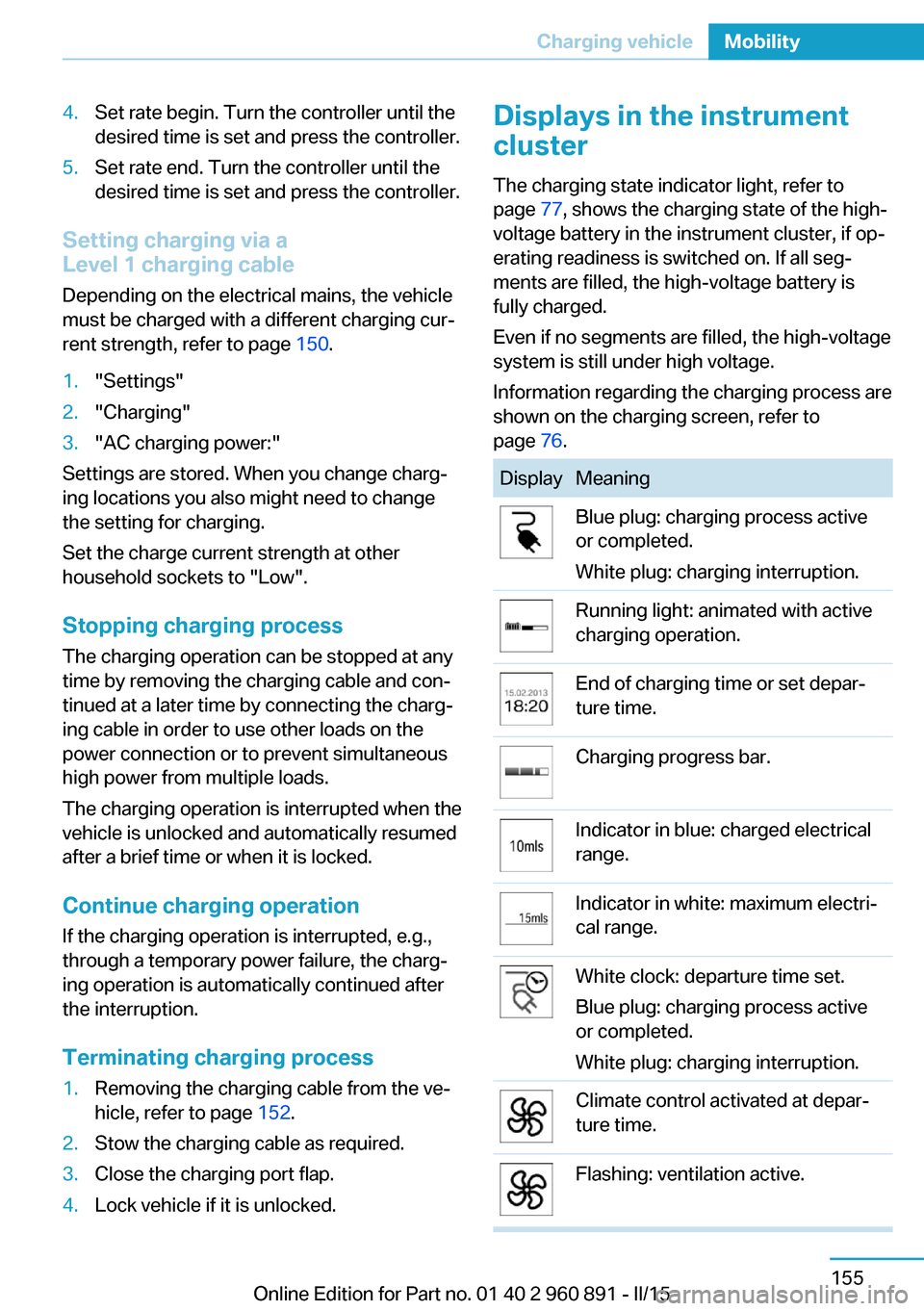
The charging state indicator light, refer to page 77, shows the charging state of the high-
voltage battery in the instrument cluster, if op‐
erating readiness is switched on. If all seg‐
ments are filled, the high-voltage battery is
fully charged.
Even if no segments are filled, the high-voltage
system is still under high voltage.
Information regarding the charging process are
shown on the charging screen, refer to
page 76.DisplayMeaningBlue plug: charging process active
or completed.
White plug: charging interruption.Running light: animated with active
charging operation.End of charging time or set depar‐
ture time.Charging progress bar.Indicator in blue: charged electrical
range.Indicator in white: maximum electri‐
cal range.White clock: departure time set.
Blue plug: charging process active
or completed.
White plug: charging interruption.Climate control activated at depar‐
ture time.Flashing: ventilation active.Seite 155Charging vehicleMobility155
Online Edition for Part no. 01 40 2 960 891 - II/15
Page 198 of 224
▷Date: update.
Disposing of old batteriesHave old batteries disposed of by your
service center or bring them to a recy‐
cling center.
Maintain the battery in an upright position for
transport and storage. Secure the battery so
that it does not tip over during transport.
Fuses Hints Replacing fuses
Never attempt to repair a blown fuse and
do not replace a defective fuse with a substi‐
tute of another color or amperage rating; this
could lead to a circuit overload, ultimately re‐
sulting in a fire in the vehicle.◀
Replacing fuse
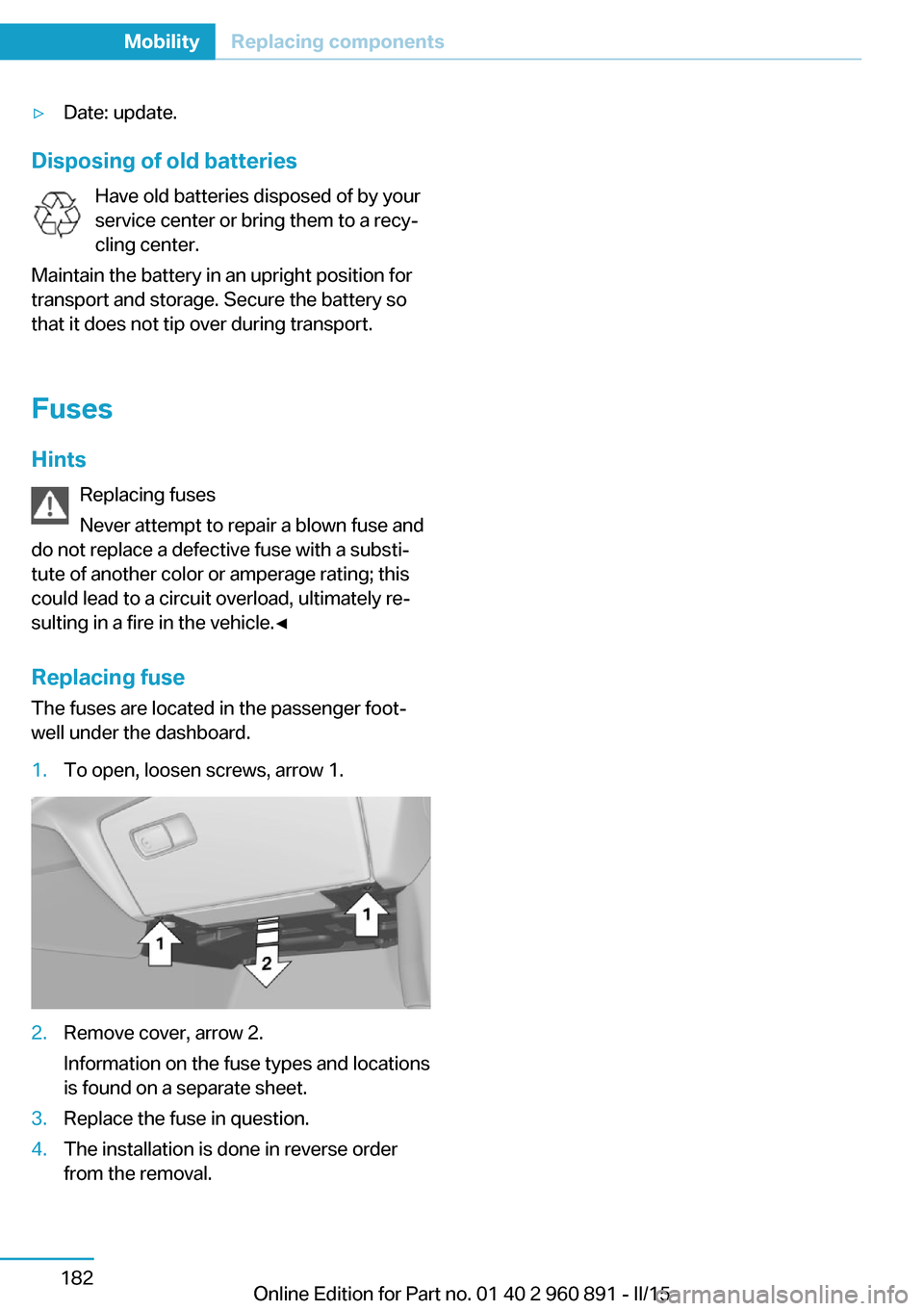
The fuses are located in the passenger foot‐
well under the dashboard.
1.To open, loosen screws, arrow 1.2.Remove cover, arrow 2.
Information on the fuse types and locations
is found on a separate sheet.3.Replace the fuse in question.4.The installation is done in reverse order
from the removal.Seite 182MobilityReplacing components182
Online Edition for Part no. 01 40 2 960 891 - II/15
Page 217 of 224

External temperature warn‐ing 83
F Failure message, see Check Control 79
False alarm, refer to Uninten‐ tional alarm 48
Fan, refer to Air flow 126
Filler neck for engine oil 175
First aid kit 184
Fitting for towing, see Tow fit‐ ting 185
Flat tire, changing wheels 181
Flat tire, Tire Pressure Moni‐ tor TPM 99
Flat tire, warning lamp 100
Flooding 140
Floor carpet, care 189
Floor mats, care 189
Fold-out position, wiper 70
Foot brake 140
Front airbags 96
Front armrest 134
Front beverage holder, front cup holder 135
Front bottle holder, refer to Front cup holder 135
Front can holder, refer to Front cup holder 135
Front cup holder 135
Front-end collision warning with City Braking func‐
tion 103
Front holder for bever‐ ages 135
front-seat passenger airbags, automatic deactivation 98
Front-seat passenger airbags, indicator lamp 98
Fuel 161
Fuel consumption, current 87 Fuel consumption, refer to
Average fuel consump‐
tion 87
Fuel filler flap 158
Fuel gauge 82
Fuel lid 158
Fuel quality 161
Fuel recommendation 161
Fuel, tank capacity 195
Fuse 182
G
Garage door opener, refer to Universal Integrated Remote
Control 129
Gasoline 161
Gear change, Steptronic Sport transmission 71
Gear shift indicator 85
Gearshift, see Steptronic Sport transmission 70
General driving notes 139
Glare shield 131
Glove compartment 134
GPS location, vehicle posi‐ tion 90
Gross vehicle weight, ap‐ proved 195
H
Handbrake, refer to parking brake 66
Hand-held transmitter, alter‐ nating code 130
Hazard warning flashers 183
Head airbags 96
Headlight control, auto‐ matic 93
Headlight courtesy delay fea‐ ture 92
Headlight courtesy delay fea‐ ture, remote control 47
Headlight courtesy delay fea‐ ture via remote control 42 Headlight flasher 68
Headlight glass 180
Headlights, care 188
Head restraints 51
Head restraints, front 54
Head-up Display 90
Head-up Display, care 190
Heavy cargo, stowing 143
Height, vehicle 194
High-beam Assistant 94
High beams 68
High beams/low beams, refer to High-beam Assistant 94
High-voltage battery, charg‐ ing state indicator 77
High-voltage battery, dis‐ charge 139
High-voltage system, auto‐ matic deactivation 34
High-voltage system, contact with water 34
High-voltage system, safety 34
Hills 141
Hill start assistant, refer to Drive-off assistant 112
Hints 6
Homepage 6
Hood 44
Horn 14
Hot exhaust system 140
HUD Head-up Display 90
Hybrid system, adapting to the course of the road 79
Hybrid system, displays 77
Hydroplaning 140
I Ice warning, see External temperature warning 83
Icy roads, see External tem‐ perature warning 83
Identification marks, tires 164 Seite 201Everything from A to ZReference201
Online Edition for Part no. 01 40 2 960 891 - II/15