2015 BMW I8 instrument cluster
[x] Cancel search: instrument clusterPage 162 of 224
The outputs of the seat heater and the Addi‐
tionally heat output to seats and exterior mirror
is reduced.
The mirror heating is made available when out‐
side temperatures are very cold.
ECO PRO potential Shows potential savings with the current set‐
tings in percentages.
Display in the instrument cluster
Efficiency display
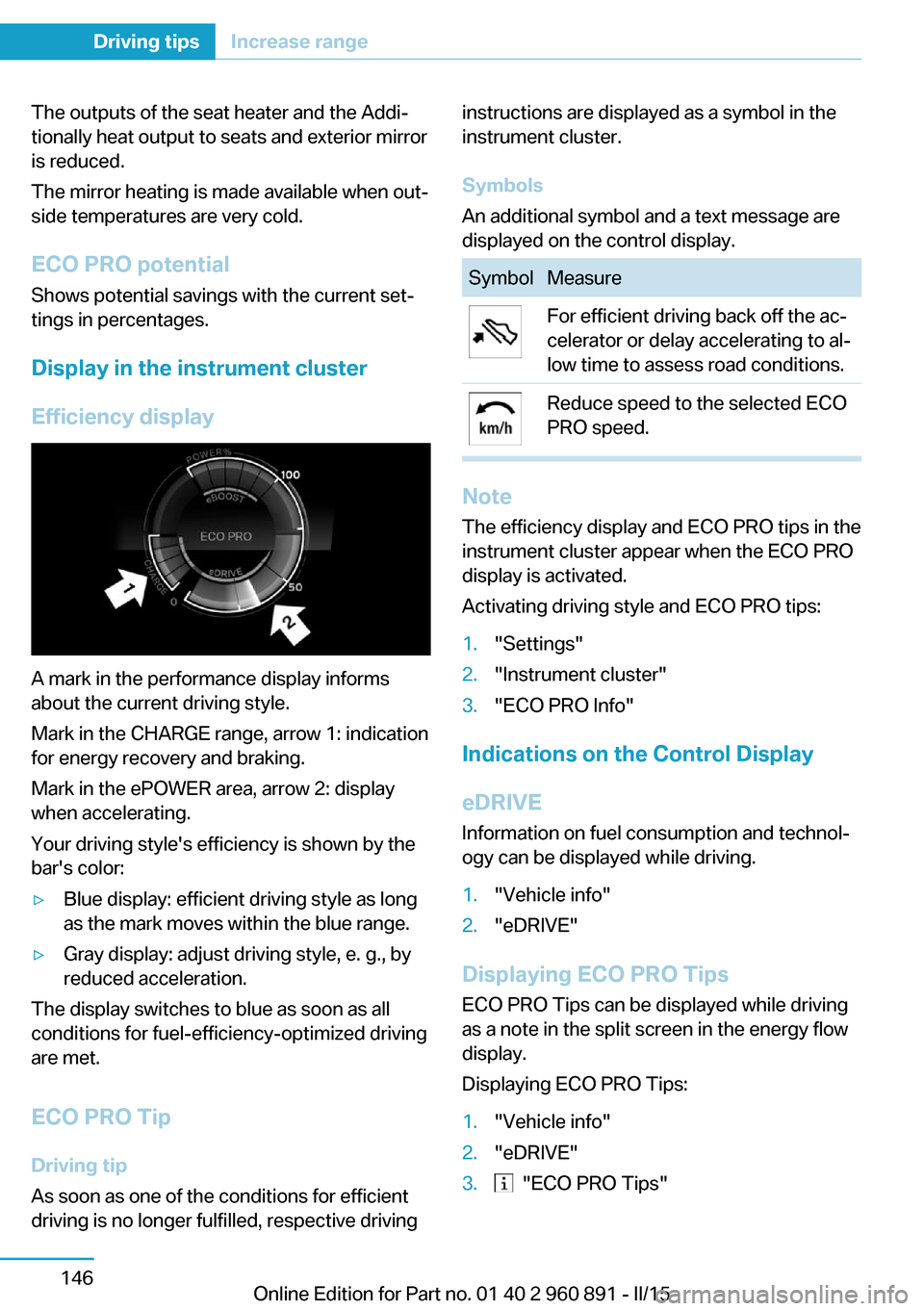
A mark in the performance display informs
about the current driving style.
Mark in the CHARGE range, arrow 1: indication
for energy recovery and braking.
Mark in the ePOWER area, arrow 2: display
when accelerating.
Your driving style's efficiency is shown by the
bar's color:
▷Blue display: efficient driving style as long
as the mark moves within the blue range.▷Gray display: adjust driving style, e. g., by
reduced acceleration.
The display switches to blue as soon as all
conditions for fuel-efficiency-optimized driving
are met.
ECO PRO Tip Driving tip
As soon as one of the conditions for efficient
driving is no longer fulfilled, respective driving
instructions are displayed as a symbol in the
instrument cluster.
Symbols
An additional symbol and a text message are
displayed on the control display.SymbolMeasureFor efficient driving back off the ac‐
celerator or delay accelerating to al‐
low time to assess road conditions.Reduce speed to the selected ECO
PRO speed.
Note
The efficiency display and ECO PRO tips in the
instrument cluster appear when the ECO PRO
display is activated.
Activating driving style and ECO PRO tips:
1."Settings"2."Instrument cluster"3."ECO PRO Info"
Indications on the Control Display
eDRIVE
Information on fuel consumption and technol‐
ogy can be displayed while driving.
1."Vehicle info"2."eDRIVE"
Displaying ECO PRO Tips
ECO PRO Tips can be displayed while driving
as a note in the split screen in the energy flow
display.
Displaying ECO PRO Tips:
1."Vehicle info"2."eDRIVE"3. "ECO PRO Tips"Seite 146Driving tipsIncrease range146
Online Edition for Part no. 01 40 2 960 891 - II/15
Page 170 of 224
4.Connect either a Level 1 or Level 2 charg‐
ing cable to the household socket or the
port on the charging station.5.Open charging port flap.6.Connect charging cable to the vehicle, re‐
fer to page 152.
At high temperatures, initially the high-voltage
battery is cooled. The charging process can be
started with a delay.
Display of the charging status
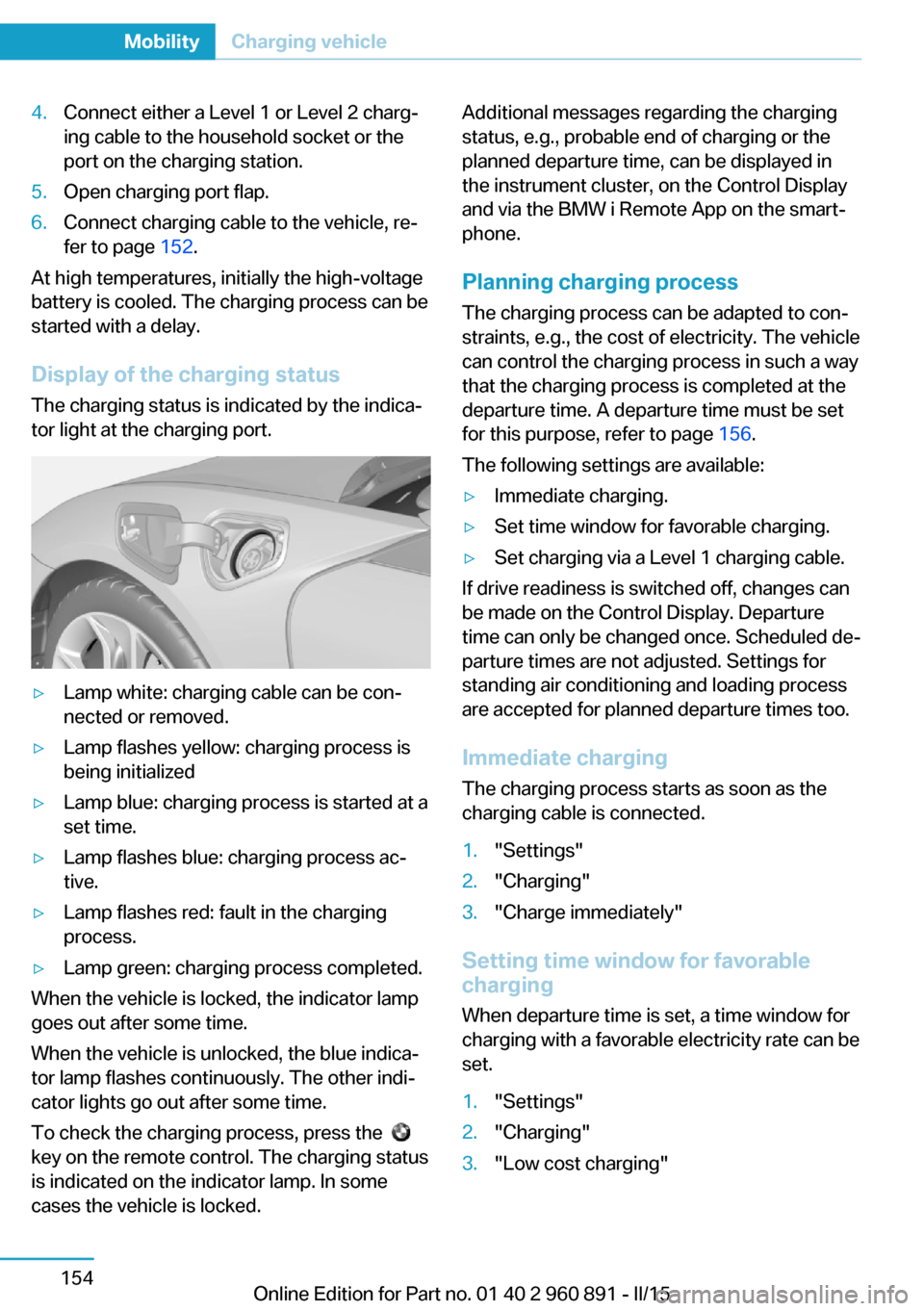
The charging status is indicated by the indica‐
tor light at the charging port.
▷Lamp white: charging cable can be con‐
nected or removed.▷Lamp flashes yellow: charging process is
being initialized▷Lamp blue: charging process is started at a
set time.▷Lamp flashes blue: charging process ac‐
tive.▷Lamp flashes red: fault in the charging
process.▷Lamp green: charging process completed.
When the vehicle is locked, the indicator lamp
goes out after some time.
When the vehicle is unlocked, the blue indica‐
tor lamp flashes continuously. The other indi‐
cator lights go out after some time.
To check the charging process, press the
key on the remote control. The charging status
is indicated on the indicator lamp. In some
cases the vehicle is locked.
Additional messages regarding the charging
status, e.g., probable end of charging or the
planned departure time, can be displayed in
the instrument cluster, on the Control Display
and via the BMW i Remote App on the smart‐
phone.
Planning charging process The charging process can be adapted to con‐
straints, e.g., the cost of electricity. The vehicle
can control the charging process in such a way
that the charging process is completed at the
departure time. A departure time must be set
for this purpose, refer to page 156.
The following settings are available:▷Immediate charging.▷Set time window for favorable charging.▷Set charging via a Level 1 charging cable.
If drive readiness is switched off, changes can
be made on the Control Display. Departure
time can only be changed once. Scheduled de‐
parture times are not adjusted. Settings for
standing air conditioning and loading process
are accepted for planned departure times too.
Immediate chargingThe charging process starts as soon as the
charging cable is connected.
1."Settings"2."Charging"3."Charge immediately"
Setting time window for favorable
charging
When departure time is set, a time window for
charging with a favorable electricity rate can be
set.
1."Settings"2."Charging"3."Low cost charging"Seite 154MobilityCharging vehicle154
Online Edition for Part no. 01 40 2 960 891 - II/15
Page 171 of 224
4.Set rate begin. Turn the controller until the
desired time is set and press the controller.5.Set rate end. Turn the controller until the
desired time is set and press the controller.
Setting charging via a
Level 1 charging cable
Depending on the electrical mains, the vehicle
must be charged with a different charging cur‐
rent strength, refer to page 150.
1."Settings"2."Charging"3."AC charging power:"
Settings are stored. When you change charg‐
ing locations you also might need to change
the setting for charging.
Set the charge current strength at other
household sockets to "Low".
Stopping charging process The charging operation can be stopped at any
time by removing the charging cable and con‐
tinued at a later time by connecting the charg‐
ing cable in order to use other loads on the
power connection or to prevent simultaneous
high power from multiple loads.
The charging operation is interrupted when the
vehicle is unlocked and automatically resumed
after a brief time or when it is locked.
Continue charging operation If the charging operation is interrupted, e.g.,
through a temporary power failure, the charg‐
ing operation is automatically continued after
the interruption.
Terminating charging process
1.Removing the charging cable from the ve‐
hicle, refer to page 152.2.Stow the charging cable as required.3.Close the charging port flap.4.Lock vehicle if it is unlocked.Displays in the instrument
cluster
The charging state indicator light, refer to page 77, shows the charging state of the high-
voltage battery in the instrument cluster, if op‐
erating readiness is switched on. If all seg‐
ments are filled, the high-voltage battery is
fully charged.
Even if no segments are filled, the high-voltage
system is still under high voltage.
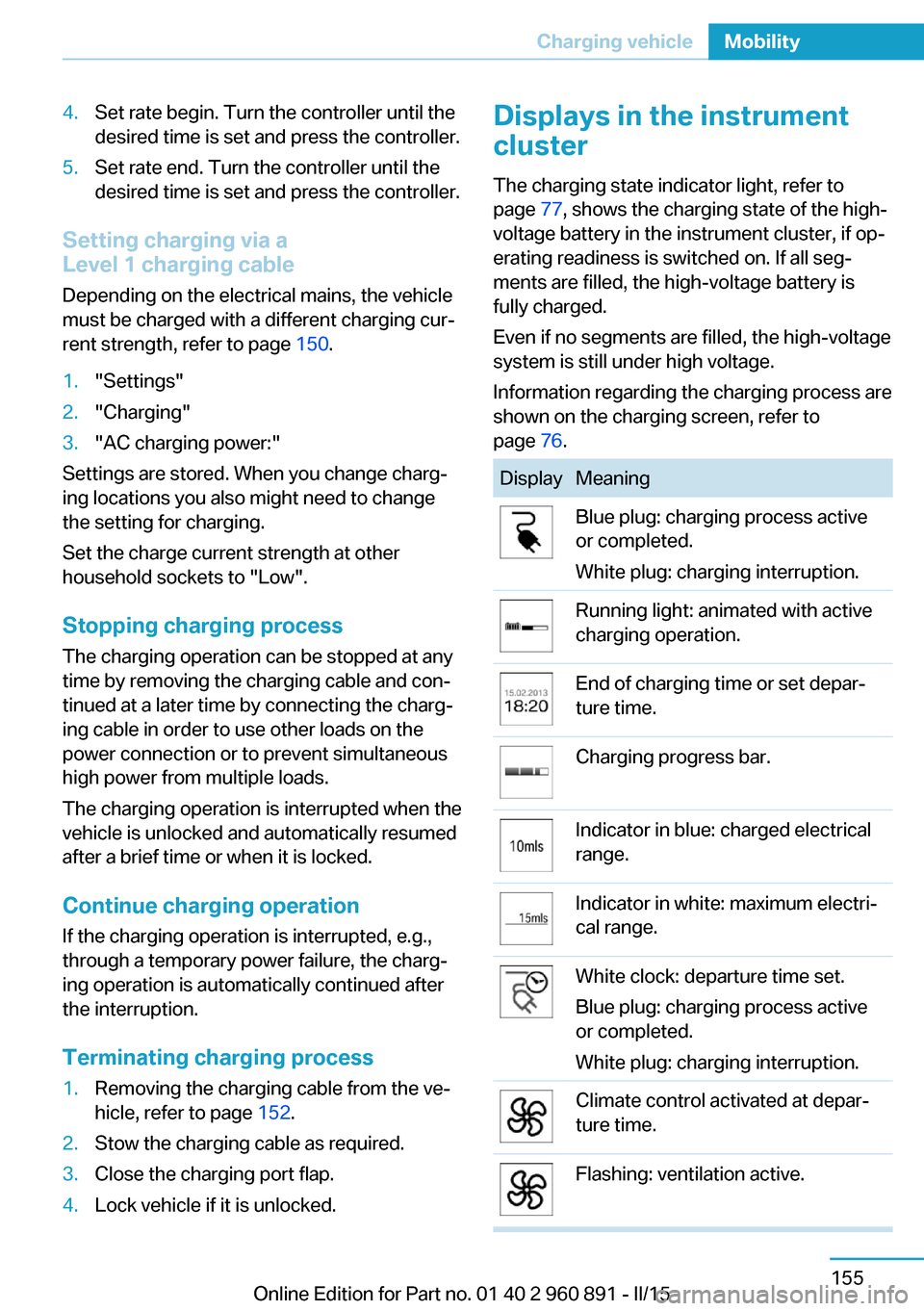
Information regarding the charging process are
shown on the charging screen, refer to
page 76.DisplayMeaningBlue plug: charging process active
or completed.
White plug: charging interruption.Running light: animated with active
charging operation.End of charging time or set depar‐
ture time.Charging progress bar.Indicator in blue: charged electrical
range.Indicator in white: maximum electri‐
cal range.White clock: departure time set.
Blue plug: charging process active
or completed.
White plug: charging interruption.Climate control activated at depar‐
ture time.Flashing: ventilation active.Seite 155Charging vehicleMobility155
Online Edition for Part no. 01 40 2 960 891 - II/15
Page 174 of 224
RefuelingVehicle features and options
This chapter describes all standard, country-
specific and optional features offered with the
series. It also describes features that are not
necessarily available in your car, e. g., due to
the selected options or country versions. This
also applies to safety-related functions and
systems. The respectively applicable country
provisions must be observed when using the
respective features and systems.
Hints Observe the fuel recommendation, refer to
page 161, prior to refueling.
Refuel promptly
Refuel no later than at a range of
30 miles/50 km or engine operation might fail
and damage might occur.◀
To also ensure all engine functions under un‐
favorable conditions, e.g. steep vehicle inclina‐
tions, at least 2.6 US gal/10 liters fuel should
be refueled.
Do not refuel unless the engine is at a
standstill and the selector lever is in posi‐
tion P/N
Do not refuel unless the engine is at a standstill
and the selector lever is in position P/N, other‐
wise the buildup of pressure may cause the
fuel nozzle to shut off prematurely.◀
Tank vent
The concept The vehicle is equipped with a special fuel
tank. It is designed for special requirements
that arise with the hybrid operation of the vehi‐cle, e.g., alternating drive with combustion en‐
gine or electric motor.
General information In the fuel tank, excess pressure can build up
due to gasoline vapors which are dissipated
before the tank lid is opened.
Overview The button is located on the driver's side on
the door armrest.
Tank venting1.Switch off drive readiness.2.
Press button to start the pressure
equalization.
The status of the tank venting is displayed
in the instrument cluster. In rare cases, the
tank venting can last several minutes.
If the tank venting has been completed, a
message is displayed in the instrument
cluster. The tank lid is released for open‐
ing.
3.Open the fuel filler flap.
If the fuel filler flap is not opened within 10
minutes after the fuel filler flap was re‐
leased, the fuel filler flap relocks. Press
button again.
Fuel lid
Opening
Before opening , vent the tank, refer to
page 158.
Seite 158MobilityRefueling158
Online Edition for Part no. 01 40 2 960 891 - II/15
Page 191 of 224

Attaching the covers1.Insert, arrows 1, press down, arrows 2, and
push in, arrow 3 engine compartment
cover. Turn screws clockwise to tighten.2.Insert insulation.3.Insert cargo cover, and turn screws clock‐
wise to tighten.
Adding engine oil
General information
Switch off operating readiness and safely park
the vehicle before engine oil is added.
Hints Adding engine oil
Add oil within the next 125 miles/200 km;
otherwise, this may cause engine damage.◀
Do not add too much engine oil
When too much engine oil is added, im‐
mediately have the vehicle checked, otherwise,
this may cause engine damage.◀
Protect children
Keep oil, grease, etc., out of reach of chil‐
dren and observe the warnings on the contain‐
ers to prevent health risks.◀
Oil filler neck
The oil filler neck is located in the engine com‐
partment. Engine compartment access, refer
to page 174.
Only add engine oil when the message is dis‐
played in the instrument cluster. The quantity
to be added is indicated in the message dis‐
played in the instrument cluster.
Engine oil types to add Hints No oil additives
Oil additives may lead to engine dam‐
age.◀
Viscosity grades for engine oils
When selecting an engine oil, ensure that
the engine oil belongs to one of the viscosity
grades SAE 0W-40, SAE 0W-30, SAE 5W-40,
and SAE 5W-30 or malfunctions or engine
damage may occur.◀
The engine oil quality is critical for the life of
the engine.
Suitable engine oil types You can add engine oils that meet the follow‐
ing oil rating standards:
Gasoline engineBMW Longlife-01.BMW Longlife-01 FE.
Further information regarding the oil specifica‐
tions and viscosities of engine oils can be in‐
quired with the service center.
Seite 175Engine oilMobility175
Online Edition for Part no. 01 40 2 960 891 - II/15
Page 205 of 224
Use leather care products; otherwise, dirt and
grease will gradually break down the protective
layer of the leather surface.
Suitable care products are available from the
service center.
Upholstery material care Vacuum regularly with a vacuum cleaner.
If upholstery is very dirty, e.g., with beverage
stains, use a soft sponge or microfiber cloth
with a suitable interior cleaner.
Clean the upholstery down to the seams using
large sweeping motions. Avoid rubbing the
material vigorously.
Damage from Velcro® fasteners
Open Velcro® fasteners on pants or
other articles of clothing can damage the seat
covers. Ensure that any Velcro® fasteners are
closed.◀
Caring for special components
Light-alloy wheels When cleaning the vehicle, use only neutral
wheel cleaners having a pH value from 5 to 9.
Do not use abrasive cleaning agents or steam
jets above 140 ℉/60 ℃. Follow the manufac‐
turer's instructions.
Aggressive, acidic or alkaline cleaning agents
can destroy the protective layer of adjacent
components, such as the brake disk.
Chrome surfaces Carefully clean components such as the radia‐
tor grille or door handles with an ample supply of water, possibly with shampoo added, partic‐
ularly when they have been exposed to road
salt.
Rubber components Aside from water, treat only with rubber
cleansers.When cleaning rubber seals, do not use any
silicon-containing car care products in order to
avoid damage or noises.
Plastic components
These include:▷Imitation leather surfaces.▷Roofliner.▷Lamp lenses.▷Instrument cluster cover.▷Matt black spray-coated components.▷Painted parts in the interior.▷Carbon parts in the interior.
Clean with a microfiber cloth.
Dampen cloth lightly with water.
Do not soak the roofliner.
No cleansers that contain alcohol or sol‐
vents
Do not use cleansers that contain alcohol or
solvents, such as lacquer thinners, heavy-duty
grease removers, fuel, or such; this could lead
to surface damage.◀
Safety belts
Dirty belt straps impede the reeling action and
thus have a negative impact on safety.
Chemical cleaning
Do not clean chemically; this can destroy
the webbing.◀
Use only a mild soapy solution, with the safety
belts clipped into their buckles.
Do not allow the reels to retract the safety
belts until they are dry.
Carpets and floor mats No objects in the area around the pedals
Keep floor mats, carpets, and any other
objects out of the pedal area; otherwise, the
function of the pedals could be impeded while
driving and create the risk of an accident.
Seite 189CareMobility189
Online Edition for Part no. 01 40 2 960 891 - II/15
Page 218 of 224

Identification number, see ve‐hicle identification num‐
ber 10
iDrive 18
Ignition key, refer to Remote control 38
Increase range 144
Indication of a flat tire 100
Indicator and alarm lamps, see Check Control 79
Indicator lamp, see Check Control 79
Individual air distribution 126
Individual settings, refer to Personal Profile 39
Inflation pressure, tires 163
Info display, refer to On- Board computer 87
Initialize, Tire Pressure Moni‐ tor TPM 100
Instrument cluster 75
Instrument lighting 95
Integrated key 38
Integrated Owner's Manual in the vehicle 29
Intelligent Emergency Re‐ quest 183
Intelligent Safety 102
Intensity, AUTO pro‐ gram 126
Interior equipment 129
Interior lights 95
Interior lights during unlock‐ ing 41
Interior lights with the vehicle locked 42
Interior motion sensor 48
Interior rearview mirror, auto‐ matic dimming feature 55
Interior rearview mirror, man‐ ually dimmable 55
Internet page 6
Interval display, service re‐ quirements 84
Interval mode 69 J
Jacking points for the vehicle jack 181
Joystick, Steptronic Sport transmission 71
Jump-starting 184
Jump starting, refer to Backup charging 156
K Key/remote control 38
Keyless Go, refer to Comfort Access 45
Key Memory, refer to Per‐ sonal Profile 39
Kickdown, Steptronic Sport transmission 71
Knee airbag 97
L
Lamp replacement, see Bulb replacement 180
Language on Control Dis‐ play 90
LATCH child restraint sys‐ tem 58
Launch Control 73
Leather, care 188
LED in the driver's door 41
LEDs, light-emitting di‐ odes 180
Length, vehicle 194
Letters and numbers, enter‐ ing 24
Level 1 Charging 155
Level 1 charging cable 152
Level 2 charging cable 152
Light alloy wheels, care 189
Light-emitting diodes, LEDs 180
Lighting 92
Lights 92
Light switch 92 Load 143
Loading 142
Lock, door 43
Locking/unlocking via door lock 43
Locking/unlocking with re‐ mote control 41
Locking, automatic 47
Locking, settings 46
Locking via tailgate 45
Longer idle phases 190
Long idle times and long-term vehicle storage 190
Long-term vehicle stor‐ age 190
Low beams 92
Low beams, automatic, refer to High-beam Assistant 94
M
Maintaining charging state 64
Maintenance 178
Maintenance require‐ ments 178
Maintenance, service require‐ ments 84
Maintenance system, BMW 178
Make-up mirror 131
Malfunction displays, see Check Control 79
Manual air distribution 126
Manual air flow 126
Manual mode, transmis‐ sion 72
Manual operation, door lock 43
Manual operation, exterior mirrors 54
Manual operation, fuel filler flap 159
Manual operation, Park Dis‐ tance Control PDC 116 Seite 202ReferenceEverything from A to Z202
Online Edition for Part no. 01 40 2 960 891 - II/15
Page 220 of 224

QQuick charging cable, see Level 2 charging cable 152
R Radiator fluid 177
Radio 6
Radio-operated key, refer to Remote control 38
Radio ready state 61
Rain sensor 69
Rear beverage holder, rear cup holder 135
Rear bottle holder, refer to Rear cup holder 135
Rear can holder, refer to Rear Cup holder 135
Rear cup holder 135
Rear holder for bever‐ ages 135
Rearview camera 117
Rearview mirror 54
Rear window defroster 127
Recirculated-air filter 127
Recirculated-air mode 125
Recommended fuel grade 161
Recommended tire brands 167
Refueling 158
Remaining range 83
Remote control/key 38
Remote control, malfunc‐ tion 43
Remote control, univer‐ sal 129
Replacement fuse 182
Replacing wheels/tires 167
Reporting safety defects 10
RES button, see Cruise con‐ trol 113
Reserve warning, refer to Range 83 Reset, Tire Pressure Monitor
TPM 100
Retreaded tires 167
Roadside parking lights 93
RON recommended fuel grade 161
Roofliner 17
Rubber components, care 189
S
Safe braking 140
Safety 7
Safety belt reminder for driv‐ er's seat and front passen‐
ger seat 53
Safety belts 53
Safety belts, care 189
Safety of the high-voltage system 34
Safety systems, airbags 96
SAVE Battery, maintaining charging state 64
Screen, refer to Control Dis‐ play 18
Screw thread, see screw thread for tow fitting, screw
thread for tow fitting 186
Sealant 168
Seat belts, refer to Safety belts 53
Seat heating, front 52
Seating position for chil‐ dren 57
Seats 51
Selection list in instrument cluster 86
Selector lever, Steptronic Sport transmission 71
Sensors, care 190
Service and warranty 8
Service requirements, Condi‐ tion Based Service
CBS 178 Service requirements, dis‐
play 84
Services, ConnectedDrive 6
SET button, see Cruise con‐ trol 113
Settings, locking/unlock‐ ing 46
Settings, mirrors 54
Settings on Control Dis‐ play 89
Shift paddles on the steering wheel 73
Side airbags 96
Side View 122
Signaling, horn 14
Signals when unlocking 47
Silent Start, electric drive readiness 63
Sitting safely 51
Size 194
Smallest turning radius 194
Snow chains 171
Socket 131
Socket, OBD Onboard Diag‐ nostics 179
SOS button 183
Spare fuse 182
Specified engine oil types 175
Speed, average 88
Speed limit detection, on- board computer 88
Speed limiter, display 85
Speed Limit Information 85
Speed warning 88
Split screen 23
Sport program, transmis‐ sion 72
Stability control systems 109
Standard charging cable, see Level 1 charging cable 152
Standard charging, see Level 1 Charging 155
Standing air conditioning, re‐ mote control 47
Start/Stop button 61 Seite 204ReferenceEverything from A to Z204
Online Edition for Part no. 01 40 2 960 891 - II/15