2015 AUDI S4 engine
[x] Cancel search: enginePage 32 of 304

30 Driver in formation d isplay
In o rder to connect the special diagnostic
equipment, push the plug i nto the Data Link
Connector (DLC) . The DLC is located to the
right of the hood release¢
fig. 18.
Your authorized A udi dealer or qualified work
shop can interpret the code and perform the necessary repa ir .
.&_ WARNING
Do not use the diagnostic connector for
personal use. Incorrect usage can cause
ma lfunctions, which can increase the risk
of a coll is ion!
Electronic speed limiter -
Your veh
icle may be factory equipped with
tires that are rated for a maximum speed of 130 mph (210 km/h) . Thi s is m ay be less than
the maxim um speed of your ve hicle. To red uce
the r isk of sudden tire fail ure and loss of con
trol if the vehicle is operated at excessive
speeds, yo ur vehicle has an e lectronic speed
limiter. The electronic speed limiter prevents
your ve hicle from going faster than the tire
speed rat ing. For more information
c::> page
248 .
If the engine control unit rece ives fa ulty vehi
cle roadspeed signa ls, the Ma lfunction Indica
tor Light (MIL)
¢4 will illuminate . If this oc
curs, co ntact the nearest author ized Audi
dealer for assistance .
.&_ WARNING
-
Always observe the pos ted speed limits
a n d adj ust yo ur speed to sui t prevailing
road, traffic and wea ther conditions . Never
drive you r vehicle faster than the maxi
m um speed rating of the tires insta lled .
Page 34 of 304
32 Opening and clo sing
- If the power locking system should ma l
function, you can lock the driver's door us ing the mechanical key
c:> page 3 7.
- If the power locking system should fail,
you can sti ll open the fue l tank flap in an
emergency
c:> page 211.
- You are we ll advised not to keep valua
bles inside an unattended vehicle, visib le
or not. Even a properly locked vehicle
cannot provide the security of a safe.
- If the LED in the upper edge of the driv
er's door panel comes on for abo ut 30
seconds after the vehicle is locked, there i s a ma lfunction in the power locki ng or
the anti-theft warning system. Have the
malfunction corrected by an author ized
A udi dealersh ip or qua lified repai r fac ili
ty.
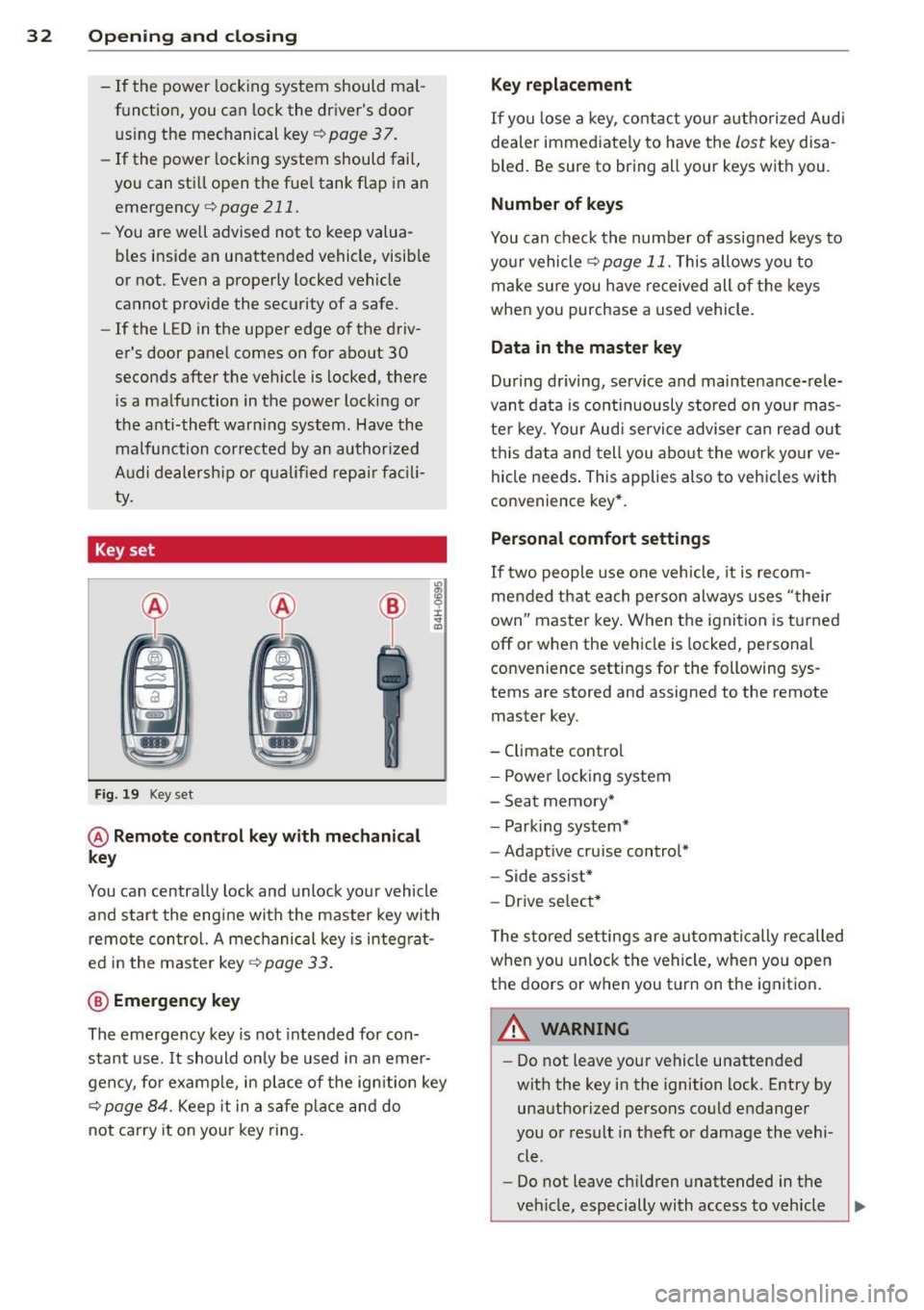
Key set
F ig . 19 Key set
@ Remote cont rol key with mechanical
key
You can centrally lock and unlock your vehicle
and start the engine with the master key with
remo te con trol. A mec hanical key is integ rat
ed i n the master key
c:> page 33 .
@ Emergency key
The emergency key is not intended for con
stant use.
It should on ly be used in an emer
gen cy, fo r example, in place of the ign ition key
cc> page 84. Keep it in a s afe p lace and do
not ca rry it on your key ring .
Key replacement
If you lose a key, contact you r authorized Audi
dealer immed iate ly to have the
Lost key disa
bled. Be sure to bring all your keys with you .
Number of keys
You can check the number of assigned keys to
yo ur vehicle
c:> page 11. This allows you to
make su re you have re ceived all of the keys
when you purchase a used vehicle.
Data in the master key
D uring d riving, s ervice and maintenance-rele
vant data is continuously stored on your mas
te r k ey. Your Aud i service adviser can read out
t hi s data and tell you abo ut the work yo ur
ve
hicle needs . This applies also to vehicles with
convenience key*.
Personal comfort settings
If two people use one veh icle, it i s r ecom
men ded that e ach person alw ays uses "t heir
own" maste r key. When the ignition is tu rne d
off or when the vehicle is locked, personal
convenience setti ngs for the following sys
tems are stored and assigned to the remote
master key.
- Climate contro l
- Powe r lock ing system
- Seat memory *
- Parking system*
- Adapt ive cru ise control*
- Side assist*
- Drive se lect*
T he s to red settings are au toma tically recalled
whe n you unlock the vehicle, when yo u open
t h e doors or w hen you t urn on t he ignitio n.
A WARNING
-Do not leave your vehicle unattended
wit h the key in the ignition lock. Entry by
unaut horized persons co uld endanger
you or result in theft or damage the vehi
cle.
- Do not leave ch ildren unattended in the
veh icle, especially with access to vehicle
Page 35 of 304

keys. Unguarded access to the keys pro
vides children the opportunity to start
the engine and/or activate veh icle sys
tems such as the power windows etc. Un supervised operation of any vehicle sys
tem by ch ildren can result in serious in
jury.
- Do not remove the key from the ignition
lock until the vehicle has come to a com
plete stop. Otherw ise the steering col
umn lock cou ld suddenly engage -caus
ing the risk of an accident.
(D Tips
- The operation of the remote contro l key
can be temporarily disrupted by interfer
ence from transmit ters in the vici nity of
the vehicle working in the same frequen
cy range (e .g . a ce ll phone, radio equip
ment).
- Fo r security reasons, replacement keys
are on ly available from authorized A udi
dealer.
- For Declaration of Compliance to United
States FCC and Industry Canada regula
tions¢
page 286.
Removing the mechanical key
Fi g. 20 Remote master key: removing the mechanical
key
.,. Press the release button@¢ fig. 20.
.,. Pull the mechan ical key @ out of the master
key.
~ Using the mechanical key, you can:
~ co -lock and unlock* the glove compartment on
rl :5: the passenger's side 9 page 67.
rl l/1 rl
Op enin g an d clos ing 33
- lock and unlock the lockable * rear bench
seat and pass-through*
r=;, page 71.
- activate the child safety locks on the rear
doors
r=;, page 41.
- lock and unlock the vehicle manua lly
r=;, page 3 7 if this should not be possible
with the master key.
- use the ignition key emergency release
r=:> page 34.
Check light and battery in the master
key
Fig . 21 Remote master key: removing the battery hold
er
Che ck light in the ma ster ke y
The check light @ r=:> fig. 21 in the master key
provides information about different condi
t ions .
.,. The check light turns on briefly once when a
button is pressed, and during an "inquiry"
by the convenience key system .
.,. If the check light does not come on, the bat
tery is dead and has to be replaced. In addi
tion, when the battery is dead the
!I indi
cator light appears in the instrument cluster
disp lay as well as the message
Plea se
c hange k ey batt ery.
Master key battery replacement
"'Remove the mechan ical key r=;, page 33 .
"' Press the release button @ i=:> fig. 21 on the
battery ho lder and at the same time pull the
bat tery ho lder out o f the maste r key in the
direction of the arrow.
.,. Insta ll the new battery CR 2032 with the
" + " sign facing down .
.,. Push the battery holder carefu lly into the
master key.
Page 36 of 304

34 Openin g and clo sing
• Install the mechanical key.
@, For the sake of the environment
Dispose of dead batteries properly so as
not to po llute the environment .
(D Tips
The replacement battery must be the
same specification as the or iginal.
Emergency unlocking of the ignition key
In the event of malfunctions in the electrical
system, it may happen that you cannot re
move the ignition key.
• Remove the mechanical key¢ page 33.
• Lock the veh icle using the mechan ica l key
¢page 37.
• Have the e lectrical system inspected by an
authorized Audi dealership.
Locking and unlocking the vehicle with
the remote control
F ig. 2 2 Remote master key: function buttons
• Press b utton III to unlock the veh icle
¢ fig . 22.
• Press b utton tfl to lock the vehicle ¢ A in
General description on page
31 .
• Press button ,c:J briefly to unlock the rear
li d.
• Press the button
,c:J for at least o ne second
to open the rear lid .
• Push the red
IPANICI button to a ct ivate the
panic fun ction. The horn sounds and the
t ur n s ignals flash. Push the red
I PANIC I but
ton again to deactivate the panic function . If the vehicle is un
locked and no door, the rea r
lid or the hood is opened within 60 seconds,
the vehicle locks itself again automatica lly.
Th is feature prevents the vehicle from being
accidentally left unlocked over a long period
of time .
It depends on the settings in the radio or
MM!* whether the ent ire vehicle is unlocked
or on ly certain doors¢
page 36.
On vehicles with automatic t ransmission, the
selector lever must be in the P position , other
wise the vehicle cannot be locked.
A WARNING
Read and follow all WARNINGS ¢ .&. in
General description on page
31 .
@ Tips
- In orde r to make sure the locking f unc
tion is work ing, you should a lways keep
your eye on the vehicle to make s ure it is
properly locked.
- Do not use the remote control if you are
inside the car, otherw ise you may unin
tentionally lock the vehicle , and then you
would set off the anti-theft alarm when
you try t o sta rt the engine o r open a
door. In case this h ap pens anyhow, push
t he unlock button@.
- Use the pa nic function o nly if yo u are in
a n eme rgency s ituation.
- Add itiona l remote co ntro l key functions
¢page 42.
Page 40 of 304

38 Openin g and clo sing
& WARNING
Always take the key with you when you
leave the vehicle . The key can disarm the
electronic engine immobilizer and perm it
an unauthor ized person to start the engine
and enable ope rat ion of the vehi cle sys
tems such as powe r window or power sun
roof leading to ser ious personal in jury .
- The vehicle cannot be started if an unau
thorized key is used. The vehi cle may not
star t if another radio device such as a key
for another vehicle o r a tra nsponder is
l ocated on the key ring.
- For De clarat ion of Compli ance to Uni ted
States FCC and Indus try Canada regu la
tions¢
page 286.
Rear lid
Opening/closing rear lid
Fig . 27 Rear lid : hand le
F ig. 2 8 Sedan drive r's door: remote rear lid release •
Opening the rear lid
.,. Press the but ton c:s on the remote cont ro l
master key for at least one second. The rear
l id unlocks and opens slightly. Or .,.
Press the handle on the rear lid
q fig . 2 7. Or
.,. Sedan: Pull the release button
c:s in the
driver's door ¢
fig. 28
Closing the rear lid
.,. Pull the rear lid down at the grip on t he in
side and allow it to drop gent ly to close it
q _&. .
A WARNING
-After closing the rear lid, a lways p ull up
on it to make sure that it is properly
closed. Otherwise it could open suddenly
when the vehicle is moving.
- To help prevent poisono us exhaust gas
from being drawn into t he vehicle, al
ways keep t he rear lid closed wh ile driv
ing. Never transport objects la rger than
those which fit complete ly into the lug
gage a rea, beca use then the rear lid can
no t be f ully closed.
- Never leave your vehicle unattended es
peci ally with the rear lid left open. A
chi ld cou ld craw l into the car through the
luggage compartment and p ull the lid
shut, becoming trapped a nd u nable to
get o ut. To reduce the risk of personal in
jury, never let c hildren play in or around
your veh icle. Always keep the rear lid as
well as the vehicle doors closed when not
in use.
- Always ensure that no one is within
range of the rear lid when it is moving, in
particular close to th e hinges -fingers or
hands can be pi nched.
@ Tips
When the vehicle is locked, the rear lid can
be opened separately by pressing the but
ton
c:s on the master key. When yo u close
the rea r lid again, it locks automatica lly.
Page 68 of 304

66 Seats and st o rage
12-volt socket
Appl ies to vehicles: wit h 12-volt socket
Electrical accessories can be connected to the
12-volt socket.
Fig. 70 allroad Luggage compartment s ide trim: sock·
et
Fig . 71 Center conso le: socket
.,. Open the socket cover~ fig. 71 .
.,. Insert the plug of the e lectrical device into
the socket.
The 12-volt socket can be used for electrical
accessories. The power input must not exceed
120 watts.
There is an additional 12-vo lt socket in the
center console .
Before you purchase any accessories, always
read and fo llow the information in
~ page 285, Additional accessories and parts
replacement .
.&_ WARNING
The socket and the electrica l accessories
connected to it operate only when the igni
tion is switched on. Incorrect usage can
lead to serious injuries or burns. For this
reason, children should never be left unat-
-
tended in the veh icle because this increas
es the risk of in jury.
(D Note
- Never connect equipment that generates
electrical current, such as a solar pane l
or battery charger, to the 12-vo lt socket.
Th is could damage the vehicle's electri
cal system.
- To avoid damaging the socket, only use
plugs that fit properly.
(D Tips
When the engine is off and accessories are
still plugged in and are on, the vehicle bat
tery can still be drained.
Storage
General overview
.&_ WARNING
-
- Always remove objects from the instru-
ment panel. Any items not put away
could slide around ins ide the veh icle
while driving or when accele rat ing or
when applying the brakes or when dr iv
ing arou nd a corne r.
- When you are dr iving make su re that
anyth ing you may have placed in the cen
ter conso le or other sto rage locations
can not fall out i nto the footwe lls. In c ase
of sudden braking you would not be able
to brake, dep ress the clutch o r acce ler
ate.
- Any pieces o f clothing that you have
hung up m ust not interfere with the driv
er's view. The coat hooks are des igned
only for lightweight cloth ing. Never hang
any clothing with hard, pointed or heavy
objects in the pockets on the coat hooks .
During sudden braking or in an accident -
especia lly if the a irbag is d eployed -
these objec ts co uld inju re any passen
gers inside the ve hicl e.
-
Page 80 of 304

78 Warm and cold
Warm and cold Climate controls
Description
The climate control system warms, cools and
adds humidity to the air in the vehicle interior.
It is the most effect ive when the windows and
sunroof are closed . If there is a build-up of
heat inside the vehicle, ventilation can help to
speed up the cooling process.
I n all heating mode functions except
defrost,
the blower on ly switches to a higher speed
once the engine coolant has reached a certain
temperature.
Condensat ion from the cooling system can
drip and form a puddle of water under the ve
hicle. This is normal and does not mean there
is a leak.
Pollutant filter
The pollutant filter removes pollutants s uch
as dust and pollen from the air.
The air pollutants filter must be changed at
the intervals spec ified in you r Warranty
&
Maintenance booklet, so that the air condi
tioner can properly work.
If you drive your vehicle in an area with h igh
a ir po llution, the fi lter may need to be
changed more frequent ly than specified in
your Aud i Wa rranty
& Ma intenance booklet. If
in doubt, ask your authorized Audi Service Ad
visor for advice .
Key coded settings
The climate control settings are automat ically
stored and assigned to the remote control key
that is in use.
A WARNING
Reduced visibility is dangerous and can
cause accidents.
-
- For safe driving it is very important that
all windows be free of ice, snow and con
densation.
- Comp letely familiarize yourself with the
proper use and function of the heating
and ventilation system and especially how to defog and defrost the windows.
- Never use the windshield wiper/washer
system in freez ing weather unt il you
have warmed the windshield first, using
the heating and ventilation system. The
washer solution may freeze on the wind shie ld and reduce visib ility.
(D Note
- If you suspect that the air conditioner
has been damaged, switch the system
off to avoid further damage and have it
inspected by a qualified dealership.
- Repairs to the Audi air conditioner re
quire special technical know ledge and
special tools. Contact an authorized Aud i
dea ler fo r assistance.
@ For the sake of the environment
By reducing the amount of fuel you use,
you also reduce the amount of pollutants
emitted into the air.
(D Tips
-Keep the air intake s lots (in fro nt of the
w indshield) free from ice, snow and de
bris in order to maintain the proper func
tion of the climate control system.
- T he energy management system may
switch the seat heating* or rear window
defroster off temporarily . These systems
are available again as soon as the energy
balance has been restored.
- Air escapes through vents under the rear
window. When placing items of clothing
on the luggage compartment cover, en
sure that the openings are not covered.
Page 82 of 304

80 Warm and cold
switching recirculation mode on when driving
through a tunnel or when sitting in traffic
c:::> &. .
The IAU TO I button or I@ FRON T I butt on
switches recircu lation mode off .
IAUTO I Switching automatic mode on
Automatic mode mainta ins a constant tem
perature inside the vehicle. Air temperature,
airflow and air distribution are controlled au
tomatically.
Adjusting the temperature
Temperatures between 60 °F (+16 °C) and
84 °F ( +28 °C) can be set . Outside of this
range,
LO or HI will appea r in the climate con
trol system disp lay. At both of these settings,
the climate control system runs continuously
at maximum cooling or heating power . There
is no temperature regu lation.
~ Adjusting the airflow
You can adjust the airflow manually to su it
your needs . To have the airflow regulated au
tomatically , press the
!AUTO ! button.
~ Adjusting the air distribution
You can manually select the vents where the
a ir will flow . To have the air d istribution regu
lated automatically, press the
IAUTOI button .
~ Adjusting seat heating*
Pressing the button switches the seat heating
on at the highest sett ing (level 3) . The LEDs
indicate the temperature leve l. To reduce the
temperature, press the button again . To
switch the seat heating off , press the button
repeatedly until the LED turns off .
After 10 minutes , the seat heating automati
cally switches from level 3 to leve l 2.
I@ FR ON T I Switch the defroster on/off
The windshield and s ide windows are defrost
ed or cleared of condensation as quickly as
possible . The max imum amount of air flows
mainly from the vents below the windshield.
Recirculation mode switches off . Th e tempera- tu
re should be set to 72 °F (22 °C) or higher.
The temperature is contro lled automatically.
T he
!AU TO I button switches the defroster off.
lliill REAR ! Switching rear window heater
on/off
T he rear window heate r only operates w hen
the engine is running.
It sw itches off auto
matically after a few minutes, depending on
the outside temperature .
T o p revent the rea r window heater from
switching off automatically , press and hold
the
l lil REA RI button for more than 2 seconds.
T his remains stored until the ignition is
switched off.
Air vents
You can open and close the center and rear air
vents using the thumbwheels. The levers ad
just the direction of the airflow from the
vents.
In veh icles with a 3-zone deluxe automatic cli
mate control system*, you can adjust the air
temperature in the rear by turning the thumb
whee l toward the red side to make it warmer
or toward the b lue side to make it coo ler.
A WARNING
-- Do not use the recirc ulation for extended
periods of time. The windows could fog
up since no fresh a ir can enter the vehi
cle . If the windows fog up, press the air
recirc ulation butto n again immediately
to switch off the air recirculation func
tion o r se lect defrost.
- Individuals with reduced sensitivity to
pa in or temperature could develop burns
when using the seat heating function . To
reduce the risk of injury, these indiv idu
als shou ld not use seat heating.
(D Note
To avoid damage to the heating elements
in the seats, do not kneel on the seats or
place heavy loads on a small area of the
seat.