2015 AUDI S3 SEDAN battery
[x] Cancel search: batteryPage 43 of 282

M N
0 > co ,...., \!) 1.1'1
1.1'1
1.1'1
,....,
@ Switch for the window in the right rear door.
® Safety button* .
Child safety lock
When the safety button®~ fig. 29 is pressed,
the@ symbol in the button lights up. The power
window switches in the rear doors are switched
off.
A WARNING
- When you leave your vehicle - even if only
br iefly -always remove the ignition key. This
applies part icularly when children remain in
the vehicle. Otherwise the children could start the engine or operate e lectr ica l equip
ment (e.g. power windows). The power win
dows are functional until the driver 's door o r
passenger's door has been opened .
- Pay caref ul attent ion when closing the win
dows.
It could cause injury by pinching .
- When locking the veh icle from outs ide, the
vehicle must be unoccupied since the win
dows can no longer be opened in an emer
gency.
-
(D Tips
After turning the ignition off you can st ill
open and close the windows for approximate
ly 10 seconds. The power windows are not
switched off unti l the driver's door or pas
senger's door has been opened.
Convenience opening/closing
With the convenience opening/closing funct ion,
you can centrally and easily open the windows and the panorama sunroof* from the outside.
Con veni enc e op en f eatur e
.. Press the open button Iii on the remote control
key until all windows and the panorama sun
roof* have reached the desired position, or
.. Hold the key in the driver's door lock until all
windows and the panorama sunroof* have
reached the desired position.
Op ening and cl osing
Conven ience clo se feature
.. Ho ld the key in the driver's door lock in the lock
position unti l all windows and the panorama
sunroof* are closed.
Con venienc e closing wi th the convenience
key*
.. Touch the sensor * on one of the front door han
dles and contin ue touching it until all of the
windows and the panorama sunroof* are
closed. Do not place your hand in the door han
dle when doing th is .
Adju sting the con venience opening in the
MMI
.. Select: the I MENU I button >Car> Sys tems*
control button > Vehicle se ttings > Cent ral
loc king > Long-pr ess to open w indo ws
To enable convenience opening of the w indows
and the roof*, the
Front windo ws, Rear win
do ws*
and Roo f* functions must be switched On.
A WARNING
- Never close the w indows or panorama sun
roof* care lessly or in an uncontrolled man
ner, because this increases the risk of injury.
- For secur ity reasons, the w indows can only
be opened with the remote control key at a
maximum distance of approximately 6 feet
(2 meters) from the vehicle.
- Pay attention when using the lock cylinder
to close the w indows and the panorama
sunroof* so that no one is pinched. Closing
stops when the key is moved into the start
ing position.
Correcting power window malfunctions
After disconnecting the vehicle battery, the one touch up and down feature must be activated
again .
.,. Pull the power wi ndow switch until the window
is completely ra ised.
.. Release the switch and pull it again for at least
one second.
4 1
Page 60 of 282
Seats and storag e
-Never connect devices that generate e lectr i
ca l power such as solar panels or a battery
charger to the 12 volt socket . They can dam
age the veh icle electrical system.
- To prevent damage to the socket, only use
the correct type of plugs.
@ Tips
The vehicle battery drains when accessories
are turned on but the e ngine is off .
Storage
Beverage holders
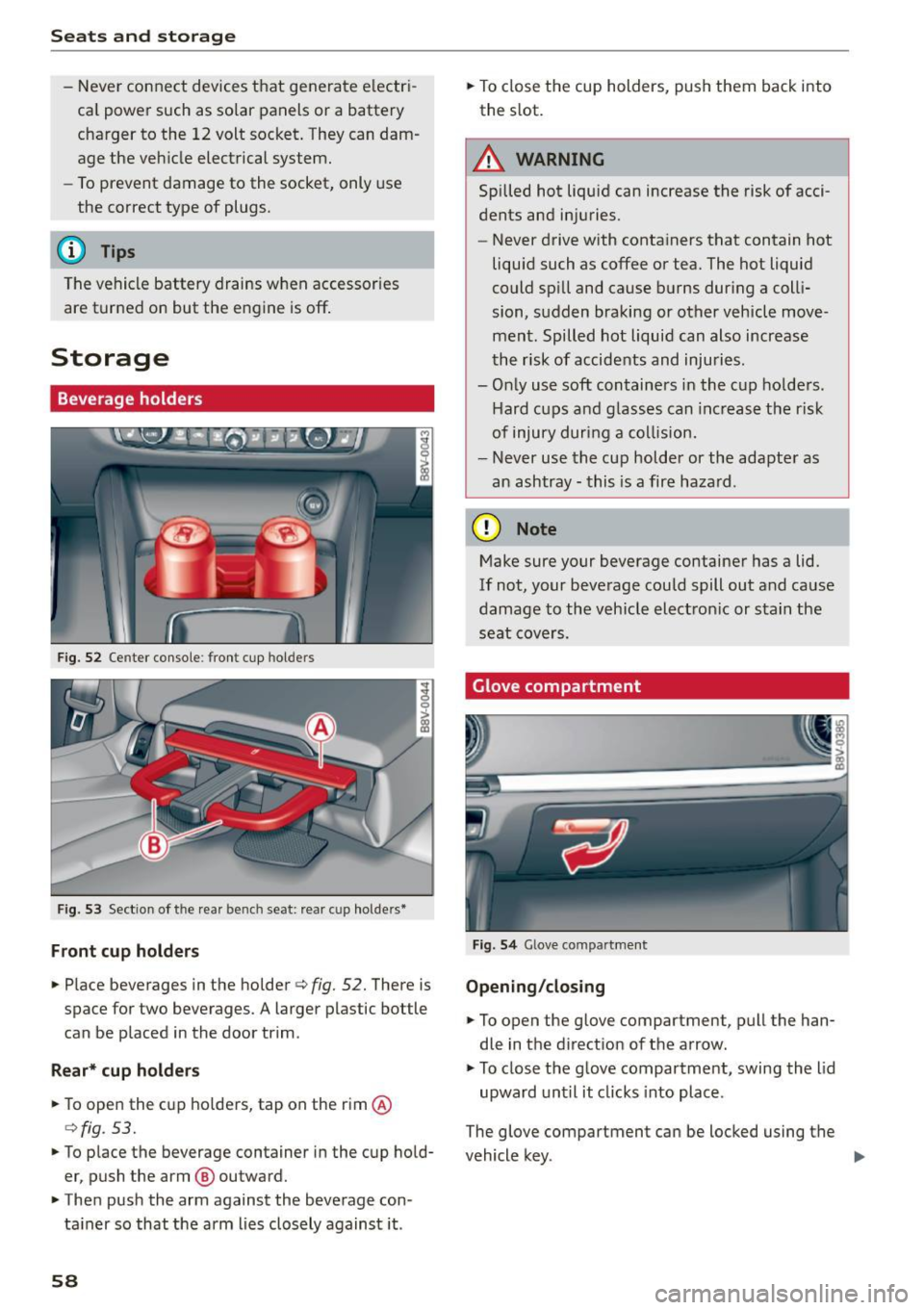
Fig . 52 Ce nter console : front cup hol ders
Fig. 53 Sect io n of the rea r be nch se at: rea r cu p ho lde rs•
F ront cup holder s
.. Place beverages in the holder¢ fig. 52. There is
space for two beverages. A larger plastic bottle
can be p laced in the door trim .
Rear* cup hold ers
.. To open the c up holders, tap on the rim @
¢fig . 53.
.. To place the beverage container in the cup hold
er, push the arm @ outward .
.. Then push the arm against the beverage con
ta iner so that the arm lies closely against it .
58
.. To close t he cup holders, push them back into
the slot.
A WARNING
Spilled hot liquid can increase the risk of acci
dents and injuries.
- Never drive with containers that contain hot
liqu id such as coffee or tea. The hot liquid
could sp ill and cause b urns during a colli
sion, sudden braking or other vehicle move
ment. Spilled hot liquid can also increase
the risk of accidents and injuries .
- Only use soft containers in the c up ho lders.
Hard cups and g lasses can inc rease the risk
of injury during a collision.
- Never use the cup holder or the adapte r as
an ashtray - this is a fire haza rd .
(D Note
Make sure your beverage container has a lid.
If not, your beverage could spill out and cause
damage to the vehicle electron ic or stain the
seat cove rs.
Glove compartment
F ig. 5 4 Glove co mpar tmen t
Opening /cl os ing
.. To open the glove compa rtmen t, pull the han
dle in the d irect ion of the a rrow .
.. To close the glove compartment, swing the lid
upward unt il it clicks into place .
The glove compartment can be locked using the
vehicle key . .,.
Page 70 of 282
Warm and col d
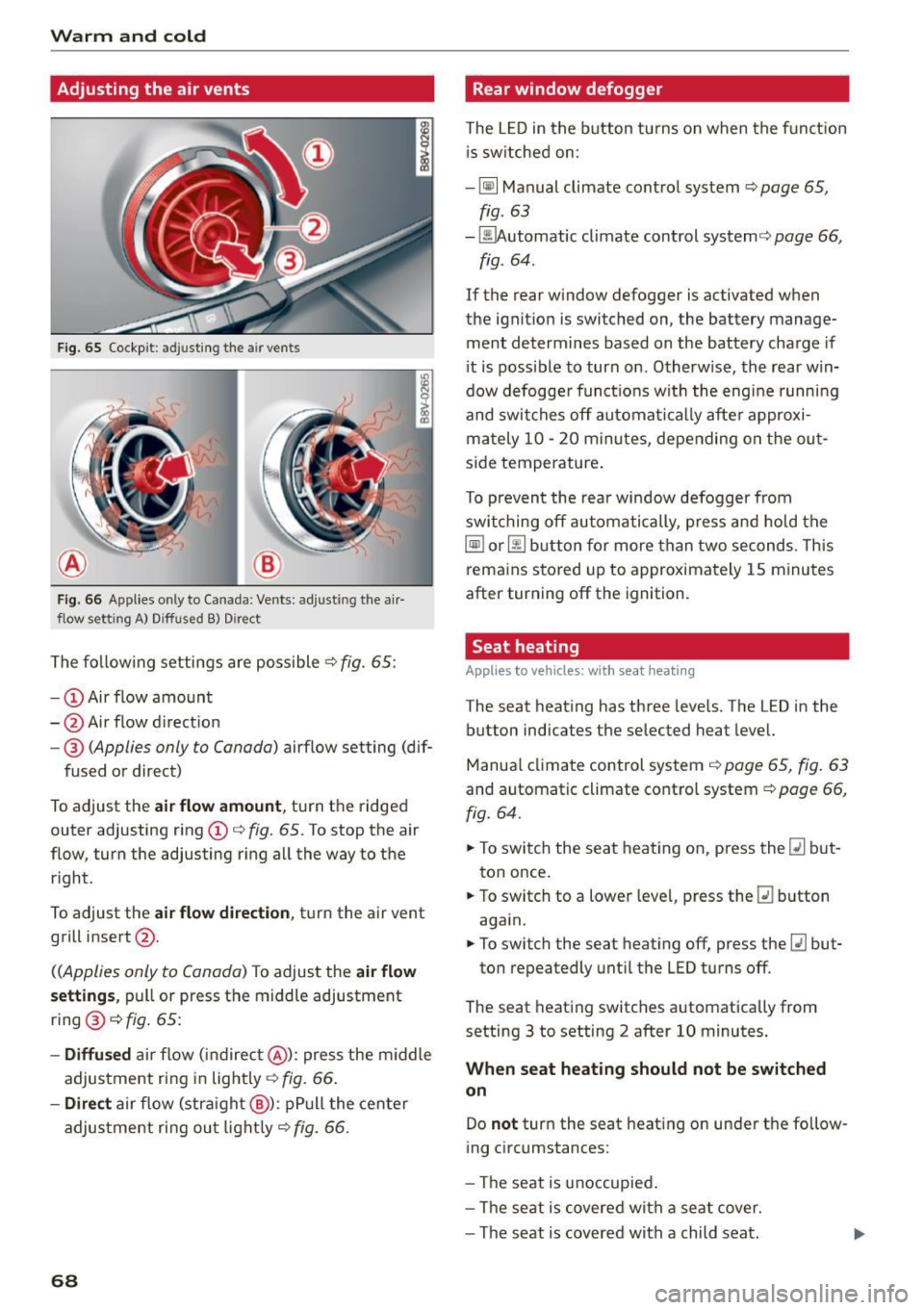
Adjusting the air vents
Fig. 65 Cockp it: adjusting the air vents
®
Fig. 66 Applies on ly to Canada: Ven ts: adjusting the air
flow setting A) Diffused B) Dire ct
The fo llow ing settings are possible .:;> fig. 65:
- CD Air flow amount
- @ Air flow d irection
- @
(Applies only to Canada) airflow setting (dif-
fused or direct)
To adjust the
air flow amount , turn the ridged
outer adjusting ring CD¢
fig. 65. To stop the air
flow, turn the adjusting r ing all the way to the
right .
To adjust the
air flow di rection , tu rn the air vent
grill insert @.
((Applies only to Canada) To adjust the air flow
s etting s,
pull or press the midd le adjustment
ring @¢
fig. 65:
-Diffu sed ai r flow (indirec t@ ): press the m iddle
adjustment ring in lightly¢
fig. 66 .
-Direct air flow (stra ight @): pP ull the center
adjus tment ri ng ou t light ly¢
fig. 66 .
68
Rear window defogger
The L ED in the button tu rns on when the funct ion
i s sw itched on:
- ~ Manual climate contro l system ¢
page 65,
fig. 63
- ~ utomatic climate control system¢ page 66,
fig . 64 .
If the rear window defogger is activated when
the ignit ion is switched on, the battery manage
ment determines based on the battery charge if
i t is possible to turn on . Otherw ise, the rear win
dow defogge r funct ions w ith the eng ine runni ng
and swit ches off automat ically afte r approxi
mately 10 -20 m inu tes, depending o n the ou t
s ide temperature .
To p revent the rear window defogger from
swi tching off automatically, p re ss and hold t he
~ or~ button fo r more than two seconds. Th is
rema ins stored up to approximately 1 5 minutes
after turning off the ignition .
Seat heating
Applies to vehicles: with seat heating
The seat heat ing has three leve ls. The LED in the
button indicates the selected heat level.
Manua l climate control system ¢
page 65, fig. 63
and automatic climate control system ¢ page 66,
fig. 64.
.. To swi tch the seat heat ing on, press the~ but
ton once.
.. To switch to a lowe r leve l, p ress the ~ button
aga in.
.. To switch the seat heating off, press the~ but-
ton repeatedly unti l the LED turns off.
The seat heating switches automatically from
setting 3 to setting 2 after 10 minutes .
When seat heating should not be switched
on
Do not turn the seat heating on under t he fo llow
ing circumstances:
- The seat is unoccupied .
- The se at is covered wit h a seat cover.
- The seat is covered with a child seat.
Page 76 of 282

Driving
& WARNING
-Never allow the engine to run in confined
spaces, because this increases the risk of as
phyxiation.
- Never
remove the ignition key from the igni
tion look while the vehicle is moving . Other
wise the steering lock will engage and you
will not be able to steer the vehicle.
- Please note that the brake booster and pow
er steering only work when the engine is
running . When the engine off, you must use
more force to steer or brake the vehicle. Be
cause the usual steering and braking capa
bility is not available, the risk of accidents or
injuries increases.
- Always take the vehicle key with you when
leaving the vehicle,
even for a short period
of time. This applies particularly when chil
dren remain in the vehicle. Otherwise the
children could start the engine or operate
electrical equipment such as power win
dows .
CT'.) Note
- Avoid high engine speed, full throttle, and
heavy engine load as long as the engine has
not reached operating temperature yet . You
could damage the engine .
- The engine cannot be started by pushing or
towing .
@ For the sake of the environment
Do not let the engine run while parked to
warm up. Begin driving immediately. This re
duces unnecessary emissions.
(D Tips
- If it is difficult to turn the key to position
(D, turn the steering wheel back and forth
slightly to release the steering wheel lock.
- After starting a cold engine, there may be a
brief period of increased noise because the
oil pressure must first build up in the hy
draulic
valve adjusters . This is normal and
not a cause for concern.
- If the battery is disconnected and recon
nected, you have to hold the ignition key in
74
position (D for five seconds for the engine
to start.
- After switching the ignition off, you can only
remove the key when the selector lever is in
the "P" (Park) position. After that, the selec
tor lever is locked.
Stopping the engine with the key
App lies to vehicles : with mechanical ignition loc k
Stopping the engine
.. Bring the vehicle to a full stop .
.. Turn the key to posi tion @.
Releasing the steering lock
Requirement: The selector lever must be in the P
position.
.,. Remove the ignition key in position@
q page 75, fig. 69 q ,&..
.. Turn the steering wheel until you hear the
steering wheel lock.
The locked steering helps prevent vehicle theft.
A WARNING
-
-Never turn off the engine before the vehicle
has come to a complete stop. The full func
tion of the brake booster and the power
steering is not guaranteed. You must use
more force to turn or brake if. Because you
cannot steer and brake as you usually
would, this could lead to accidents and seri
ous injuries.
- Never
remove the ignition key from the igni
tion look while the vehicle is moving . Other
wise, the steering lock could suddenly en
gage and you would not be able to steer the
vehicle.
- Please note that the brake booster and pow
er steering only work when the engine is
running. When the engine off, you must use
more force to steer or brake the vehicle. Be
cause the usual steering and braking capa bility is not available, the risk of accidents or
injuries increases.
- Always take the vehicle key with you when
leaving the vehicle,
even for a short period
of time . This applies particularly when
Page 79 of 282

....,
N
0 > co
rl I.O
"'
"'
"'
rl
more force to turn or brake if necessary. Be
cause you cannot steer and brake as you
usually would, this could lead to crashes
and serious injuries.
- Please note that the brake booster and pow
er steering only work when the engine is
running. When the engine off, you must use
more force to steer or brake the veh icle. Be
cause the usual steering and braking capa
bility is not avai lable, the risk of accidents or
injuries inc reases.
- Always take t he vehi cle key with you when
leaving the vehicle, even for a short period
of time. This applies partic ularly when chil
dren remain in the vehicle . Otherwise the
children could start the engine or operate
electrical equipment such as power win
dows.
- For safety reasons, always park the vehicle
with the selector lever in the P position.
Otherw ise, there is the risk that the veh icle
could roll.
- After the engine has been switched off, the radiator fan can continue to run for up to 10
minutes -even with the ignition switched
off.
It can also switch on again after some
t ime if the coolant temperature rises as the
result of heat bu ildup or if the eng ine com
partment is heated by the s un's rays and the
engine is hot .
(D Note
If the eng ine has been under heavy load for
an extended per iod of t ime, heat bu ilds up in
the eng ine comp artment after the engine is
sw itched off -there is a r isk of damaging the
engine. For this reason, let the engine run for
at idle for approximate ly two minutes before
shutting it off.
Dr iving
Starting the engine if there is a
malfunction
Applies to vehicles: with convenience key
It may not be possible to start the engine under
certain circumstances, for example if the battery
in the vehicle key is drained, if interference is af
fected the key or if there is a system malfunc
tion.
F ig. 70 Steer ing colum n/remote co ntrol key: start ing the
engine if there is a ma lfunction
As long as the message y >l) K ey not r ecognized .
Se e owne rs manual
appears, you can start your
vehicle using the emergency start function .
"' Press the brake pedal
c:::> .&. in Engine with the
button
START ENGINE STOP Starting on
page
76.
"' Press the ~ I s=T~A~R~T~E~N~G~IN~E~s=T~O~P~ I button.
"' Ho ld the master key in the location indicated as
shown in the illustration
y >>) c:::> fig. 70. The en
gine will start .
"' If the engine does not automat ically start,
press the
I START ENGINE STOP I button again.
Drive to an authorized Audi dealer or authorized
Audi Serv ice Facility immediately to have the
malfunction corrected.
@ Tips
You can display the message that appears
during an emergency by pressing the
I S TART ENGINE STOP!* button.
Driver messages
Turn off ignition befor e leavi ng car. Batt ery is
di schar ging
77
Page 80 of 282

Driving
This message appea rs and a warn ing tone sounds
if you open the driver's door when the ignit ion is
sw itched on. Switch the ign ition
off so that the
battery will not discharge.
Pressing st a rt /s to p button a gain will swit ch off
engine!
This message appears whe n you press the
I S TART ENGINE STOP !* button while driv ing
q page 76, Emergency off .
Engine start sy ste m malfunc tion . Pl ea se c on
ta ct Ser vice
The engine automatic start system has a mal
function . Drive to a n author ized Audi dealer or
author ized Audi Serv ice Facility immediately to
have the m alfunction correc ted . T o star t the en
g ine, press and hold the
I S TAR T ENGINE ST OP I
button.
DJ Ke y not r ecogniz ed. See owner 's manual
This message appears if there is no convenience
key inside the ve hicle or if the system does not
recogn ize the key . The convenience key may not
be recogn ized, for example , if it is covered by an
object that
disrupts the s ignal (such as a brief
case), or if the key battery is weak . E lectronic de
vices s uch as cell phones can also interfere w ith
the signa l.
To st ill be able to start or stop the eng ine, refer
to "Correcting a ma lfunction"
q page 77.
Ill Key not in vehicle?
The Ill indicator light turns on and this message
appears if the convenience key was removed from
the vehicle whe n the eng ine was runn ing.
If the
convenience key is no longer in the vehicle , you
cannot switch the ig nition on or start the eng ine
once yo u stop it . In add it io n, you ca nnot lock the
ve hicl e from the o utside.
Pr ess brake pedal
This message appears if you do not press the
brake peda l when starting the engine .
Please engage N or P
This message appea rs when starting or s topping
the engine if the selector leve r is not in the Nor P
position. The engine will not start/stop.
78
Shift to P, otherwi se vehicle can roll awa y.
Door s do n ot l ock
if le ver is not in P
This message appears for safety reasons a long
with a warning tone.
It appears if the selec to r
l ever for the a utomat ic transm iss ion is not in the
P position when switching the ignition
off with
the
I S TART ENGINE STOP I* button . Shift these
l ector lever to the P pos ition . Otherw ise, the vehi
cle co uld roll. You also cannot lock the vehicle us
ing the lock ing sensor o n the doo r hand le or us
i ng the conven ience key .
Electromechanical
parking brake
Operating
The electromechanical parking brake replaces
the hand brake.
Fig. 71 C ente r consol e: pa rk in g b rake
.. Pull the sw itch @¢ fig. 71 to set the pa rking
br ake . The - (USA models)/ . (Can ada
mode ls) indica to r li ghts in the button and in
the inst rument cluste r display turn on .
.. To release the pa rking brake, press the brake or
accelerator pedal wh ile the ignition is sw itched
on and press the button @ at the same time.
The - (USA models)
I. (Canada models)
ind icator lights in the button and in the display
turn off .
Your vehicle is equipped with an e lectromechani
ca l park ing brake. The parking brake is designed
to prevent the vehicle from ro lling un intent ional
l y and replaces the hand brake .
In add ition to the normal functions of a tradition-
al hand brake, the electromechanical parking ..,_
Page 91 of 282
....,
N
0 > co
rl I.O
the malfunction corrected. If the indicator light
and the driver message do not turn off, do not
continue dr iv ing. See an authorized Audi dealer
or authorized Audi Service Facility for assistance .
rm Transmission malfunction: you can continue
driving
Drive to an authorized Aud i dealer or authorized
Aud i Service Facility immediately to have the
malfunction corrected.
rm Transmission malfunction: no reverse gear
(you can continue driving)
Drive to an authorized Aud i dealer or authorized
Audi Service Fac ility immediately to have the
malfunction corrected.
rm Transmission malfunction: You can continue
driving in D until engine off
Drive the vehicle away from moving traffic and
park. See an authorized Audi dealer or authorized
Audi Service Fac ility for assistance.
rm Transmission overheating! Please adapt
driving style
Continue driving moderate ly. When the indicator
light turns off, you can continue driving normally.
rm Transmission: Please press brake pedal and
select gear again
If the transmission malfunctions because the
temperature is too high, a message appears
when the transmission is coo led.
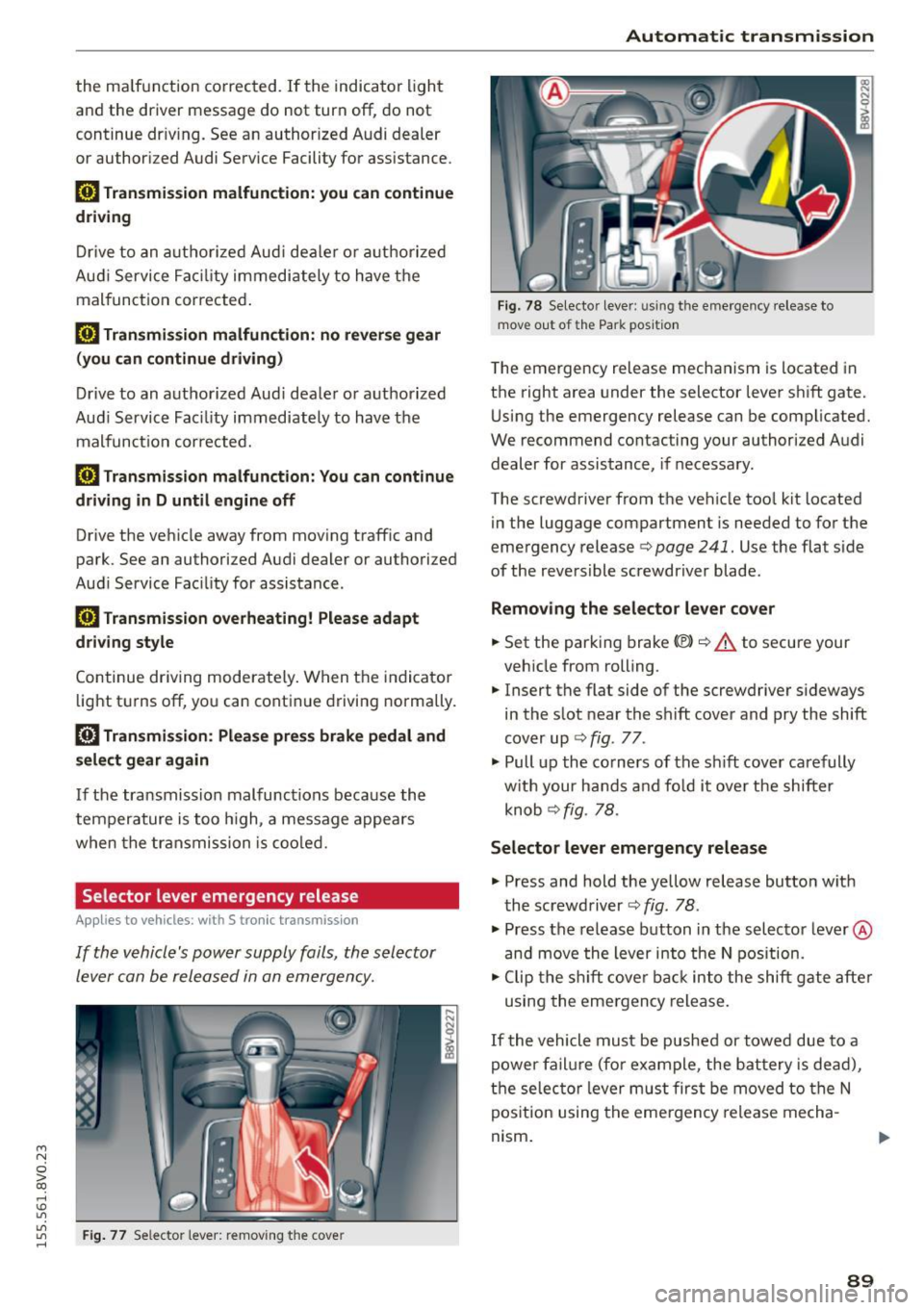
Selector lever emergency re lease
Appl ies to vehicles: with S tronic transm ission
If the vehicle's power supply foils, the selector
lever can be released in an emergency.
"'
"'
"' Fig. 77 Selector lever: removing the cove r rl
Automatic transmission
Fig. 78 Selector lever: u sing the emergency release to
move out of the Park position
The emergency release mechanism is located in
the right area under the selector lever shift gate.
Using the emergency release can be complicated.
We recommend contacting your authorized Audi dealer for assistance, if necessary.
The screwdriver from the vehicle too l kit located
in the luggage compartment is needed to for the
emergency release
c> page 241. Use the flat side
of the reversible screwdriver blade .
Removing the selector lever cover
.. Set the parking brake «Ell c> A to secure your
vehicle from rolling.
.. Insert the flat side of the screwdriver s ideways
in the slot near the shift cover and pry the shift
cover up ¢
fig. 77 .
.. Pull up the co rners of the sh ift cover carefully
with your hands and fo ld it over the shifter
knob ¢
fig. 78.
Selector lever emergency release
.. Press and hold the yellow release button with
the screwdriver ¢
fig. 78.
.. Press the release button in the selector lever ®
and
move the lever into the N position.
.. Clip the shift cover back into the shift gate after
using the emergency release.
If the vehicle must be pushed or towed due to a
power failure (for example, the battery is dead),
the selector lever must first be
moved to the N
position using the emergency release mecha
nism .
89
Page 114 of 282

Assist Driver messages
Appl ies to vehicles: with Audi side assist
If the side assist switches off automatically, a
message appears in the instrument cluster dis
p la y.
@j Audi side assist: currently unavailable.
No sensor vision
The radar sensors' vision is affected. Do not cover
the area in front of the sensors with bike wheels,
stickers, dirt or other objects. Clean the area in
front of the sensors, if necessary
r:!> page 110,
fig. 98.
@j Audi side assist: currently unavailable
Side assist cannot be switched on temporarily be
cause there is a ma lfunction (for examp le, the
battery charge level may be too low).
@j Audi side assist: System fault!
The system cannot guarantee that it will detect
veh icles correctly and it is switched off. The sen
sors have been displaced or are faulty. Have the
system checked by an authorized Audi dealer or
authorized Audi Service Facility soon.
Audi drive select (drive
settings)
Introduction
Applies to vehicles: with Audi drive select
Audi drive select makes it possible to experience
different types of vehicle settings in one vehicle.
The driver can select from three
Comfort, Auto
and Dynamic modes using the ~.7l.'i button in the
center console or the MMI to switch between a
sporty and a comfortable driving mode, for ex
ample . In the
individual* mode, the settings can
be adjusted to your personal preferences . This
makes it possib le to combine settings such as a
sporty engine tun ing with light steering .
.,&. WARNING
Using Audi drive select incorrect ly can lead to
collisions, other accidents and serious inju
ries.
112
· Description
Applies to vehicles: with Audi drive se lect
The vehicle setup in each mode depends on the
vehicle's features. However , the eng ine and steer
ing are always affected.
Engine and automatic transmission
Depending on the mode, the engine and auto
matic transmission* respond more qu ickly or in a
more balanced manner to accelerator peda l
movements .
Adaptive dampers (Audi magnetic ride)*
The adaptive dampers use sensors to record in
format ion regarding steer ing movements, brak
ing and acce lerat ion operations by the driver,
road surface, dr iv ing speed, and load. With Audi
drive select you can adjust the adaptive dampers
sporty (dynamic), comfortable (comfort) or bal
anced (auto).
Steering
T he steer ing adapts in terms of steer ing ass is
tance. There a re diffe rent modes
Q page 113.
Indirect steering that moves easily as in comfort
mode is especia lly suited to long drives on a high
way. The dynamic mode provides sporty, direct
steering .
For vehicles with progressive steering* the steer
ing performance is more agi le .
Cornering light*
The cornering light adjusts when driv ing on
curves at speeds between 6 mph (10 km/h) and
68 mph (110 km/h). The pivoting action and the
lig hting are also adapted to the mode.
Adaptive cruise control*
The behavior when accelerating can be adjusted
from comfortable to sporty, depending on the
Audi drive select mode. Adaptive cruise control
also responds to the driving behavior of the vehi
cle ahead in a more conservative or sporty man
ner.