2015 AUDI S3 brake
[x] Cancel search: brakePage 119 of 310

M N
0 > co ,...., \!) ..,.,
M ..,., ,....,
Selector lever emergency release
"'Press and hold the yellow release button
with the screwdr iver
¢ fig. 102.
"' Press the release button in the selector lever
@ and move the lever into the N position.
"' Clip the shift cover back into the shift gate
after using the emergency release.
If the ve hicle must be pushed or towed due to
a power failure (for example, the battery is
dead), the selector lever must f irst be moved
to the N position using the emergency release
mechanism.
A WARNING
Only move the selector lever out of the P
position when the parking brake is set. If
that does not work, secure the vehicle with
the brake pedal. Otherwise, the vehicle
could start to move unintentiona lly when
the selector lever is moved out of the P po
sition .
Automatic transmission 11 7
•
Page 132 of 310

130 Driving saf ety
Th ere fo re, wh enever th e vehicle i s
mo ving :
-never stand up in the vehicle
- never stand on the seats
- never knee l on the seats
- never ride with the seatback reclined
- never lie down on the rear seat
- never lean up aga inst the instrument panel
- never sit on the edge of the seat
- never sit sideways
- never lean out the w indow
- never put your feet out the window
- never put your feet on the instrument panel
- never rest your feet on the seat cushion o r
back of the seat
- never ride in the footwell
- never ride in the cargo area
A WARNING
Improper seat ing positions increase the
r isk of serious personal injury and death
whenever a veh icle is being used .
- Always make sure that all vehicle occu pants stay in a proper seating pos it ion
and are properly restra ined whenever the
vehicle is be ing used.
Driver and passenger
side footwell
Important safety instructions
App lies to vehicles: with knee a irbags
A WARNING
Always make s ure that the knee airbag can
inflate without interference. Objects be
tween yourse lf and the airbag can inc rease
the risk of in jury in an acc ident by interfer
ing w ith the way the a irbag deploys or by
being pushed into you as the airbag de
ploys.
- No persons (ch ildren) or animals should
ride in the footwell in front of the pas
senger seat. If the airbag deploys, this
can result in se rious or fata l injuries.
- No objects of any kind should be carried in the footwe ll area in front of the driv- er's or passenger's seat
. Bulky objects
(shopping bags, for example) can ham
per or prevent proper deployment of the
ai rbag. Small objects can be thrown
through the vehicle if the airbag deploys
and i njure you or your passenge rs .
Pedal area
Pedals
The pedals must always be free to move and
must never be interfered with by a floor mat
or any other object.
Make su re that a ll peda ls move free ly without
i nterference and that no thing preven ts them
from return ing to their or ig inal positions .
Only use f loor mats that leave the pedal a rea
free and can be secu red with floor mat fasten
ers.
If a brake c ircu it fa ils, inc reased brake pedal
t ravel is required to bring the vehicle to a full
stop.
A WARNING
P edals that cannot move free ly can ca use
l oss of vehicle contro l and increase the risk
of serious injury.
- Never p lace any objects in the driver's
footwell. An object co uld get into the
pedal area and interfere with pedal func
tion. In case of sudden braking or an ac
cident, you wou ld not be able to brake or
accelerate!
-Always make sure that nothing can fall
or move into the driver's footwell.
Floor mats on the driver side
Always use floor mats that can be securely attached to the floor mat fasteners and do
not interfere with the free movement of the
pedals.
.,. Make sure that the floor mats are properly
secured and cannot move and interfere with
the pedals
¢ A . ..,_
Page 133 of 310

....,
N
0 > co
rl I.O
"' ....,
"' rl
Use only floor mats that leave the pedal area
u nobstructed and that are firmly secured so
that they cannot sli p out of position. You can
obtain suitable floor mats from your author
ized Audi Dealer .
F loor mat fasteners are installed in your Audi.
Fl oor mats used in your vehicle must be a t
tached to these fasteners. Properly securing
the floor mats will p revent them from slid ing
into positions that could interfere with the
pedals or impair safe operation of your vehicle
in other ways .
A WARNING
Pedals that cannot move freely can resu lt
in a loss of veh icle control and increase the
risk of serious personal injury .
- Always make sure that floor mats are
properly secured.
- Never place or install floor mats or other
floor coverings in the veh icle that cannot
be properly secured in place to prevent
them from slipping and interfering w ith
the pedals or the ability to control t he
vehicle .
- Never place o r insta ll floor mats or other
floo r coverings on top of already insta l
led floor mats. Additional floor mats and
other coverings wi ll reduce the size of
the pedal area and interfere with the
peda ls.
-Always proper ly reinstall and secure f loor
mats that have been taken out for clean
ing.
- Always make sure that objects cannot
fall into the driver footwe ll wh ile the ve
hicle is moving. Objects can become
trapped under the brake pedal and accel
erator pedal caus ing a loss of veh icle
control.
Dri ving sa fety 13 1
Stowing luggage
Loading the luggage compartment
AIL luggage and other objects must be prop
erly stowed and secured in the luggage com
partment.
Fig . 116 Safe load pos it ion ing: pla ce heavy ob jects as
low and as far fo rward as poss ible .
Loose items in the luggage compartment can
shift suddenly, changing vehicle handling
characteristics . Loose items can a lso increase
the risk of serious persona l injury in a sudden
vehicle maneuver or in a col lis ion.
.. Distribute the load evenly in the luggage
compa rtment .
.. Always place and properly secure heavy
items in the luggage compartment as far
forward as possible .
.. Secure luggage using the tie -downs p rov id
ed
~ page 64.
.. Make sure that the rear seatback is securely
latched in place.
A WARNING
Improperly stored luggage or other items
can fly through the veh icle causing serious
personal injury in the event of hard brak
ing or an accident . To help reduce the risk
of ser ious personal injury:
- Always put objects, for example, luggage
or other heavy items in the luggage com
pa rtment.
- Always secure objects in the luggage
compa rtment using the t ie-down hoo ks
a nd sui tab le strap s.
Page 191 of 310

M N
0 > co ,...., \!) 1.1'1
M 1.1'1 ,....,
Smart Technology
Information about
data recorded by
vehicle control
modules
Your vehicle is not equipped with a crash data
recorder. This device is installed by some vehi
cle manufacturers to record data about crash
es so that it can be analy zed later . Crash data
recorders are also called "Event Data Record
ers ( EDR)" .
In some legal jurisdictions, it is not permitted
to access or download data recorded by pre
installed crash data recorders in order to eval
uate a crash without clear consent of the vehi
cle owner .
Your vehicle is not equipped with a crash data recorder. However it does contain a variety of
electronic control modules for various vehicle
systems such as engine function, exhaust
treatment or airbags and safety belts .
These electronic control modules record vehi cle data during normal driving for diagnosis
and repair purposes . The recording capability
of the electronic control modules is limited to
data only- no sound is recorded.
If the control
module detects a system ma lfunction or other
change in status, a very limited amount of da
ta is recorded for an extremely small period of
time . Data that is recorded in such a case may
include vehicle speed, d riving direction, the
load on the brakes and head restraints and
performance in the event of an acciden t or
other change in status . The stored data can
only be read or downloaded with special devi
ces.
Electronic stabilization
control (ESC)
Description
The Electronic Stabilization Control (ESC) con
tr ibutes to driver safety. It reduces the risk of
slipp ing and improves driving stability. ESC
Smart Technolog y 189
detects critical situations such as the vehicle
oversteering and understeering or the wheels
are spinning . The vehicle is stabilized by ap
plying the brakes or reducing engine torque.
Once the ESC is activated, the indicator light
m blinks in the instrument cluster .
The following systems are integrated in the
ESC:
Anti-lock braking system (ABS )
ABS prevents the whee ls from locking when
braking. The vehicle can still be steered even
during hard braking. Apply steady pressure to
the brake pedal. Do not pump the pedal. A
pulsing in the brake peda l indicates that the
system is acting to stabilize the vehicle.
Brake assi st sys tem
The brake assist system can decrease braking
distance. It increases braking power when the
driver presses the brake pedal quickly in emer
gency situations. You must press and hold the brake pedal until the dangerous situation is
over . In vehicles with adaptive cruise control*,
the brake assist system is more sensit ive if the
distance detected to the vehicle ahead is too
small.
Anti-slip regulation (ASR)
ASR reduces engine power when the drive
wheels begin spinning and adapts the force to
the road conditions . This makes it easier to
start , accelerate and dr ive up inclines .
Electronic differential lock (EDL)
The EDL brakes wheels that are spinning and
transfers the drive power to the other drive
wheel or wheels if the vehicle is equ ipped with
all wheel drive*). This function is not available
at higher speeds .
In extreme cases, EDL automatically switches
off to keep the brake on the braked wheel
from overheating . The vehicle is still working
correctly. EDL will switch on aga in automat i
cally when cond itions have returned to nor-
mal. .,..
•
•
•
Page 192 of 310

190 Smart Technology
Steering r ecommendat ion
The ESC helps to stabilize the vehi cle by
changing the steering torque.
Select ive wh eel torqu e co ntrol
Select ive wheel torque control is used when
driving on curves . The front wheel on the in
side of the curve or both wheels on the inside
of the curve are braked selective ly as needed.
Th is a llows more precise driv ing in c urves.
Automatic post -collision braking system
The "Automatic post-collision braking system"
can he lp to reduce the risk of sliding and of
other coll is ions after an acc ident. If the airbag
control mod ule detects a collision above acer
tain vehicle speed, the vehicle is braked by the
ESC.
The vehicle does not brake automatically if:
- the driver presses the accelerator pedal , or
- the braking fo rce genera ted by the pressed
brake pedal is greater than the braking force
that would be initiated by the system, or
- the ESC, the brake system or the vehicle
electrical system are not functioning .
A WARNING ,.
- The ESC and its integrated systems can
not overcome the lim its posed by natural
physical laws. This is especia lly impor
tant on s lippery or wet roads. If the sys-
Switching on /off
terns begin acting to stabilize your vehi
cle, you should immediately a lter your
speed to match the road and traffic con
ditions . Do not let the increased safety
provided tempt you into taking r isks .
This could increase your risk of a co lli
sion .
- Please note the r isk of a coll is ion increas
es when driving fast, especially through
curves and o n slippe ry or wet roads, and
when dr iv ing too close to objects ahead.
The ESC and i ts integrated systems can
not a lways p revent collisions -there is
still a risk of accidents!
- Press the acce lerator pedal caref ully
when acce lerating on even, slippery sur
faces such as ice and snow. The drive wheels can spin even when these control
systems are installed and this can affect
driving stability and increase the risk of a
coll is io n.
(D Tips
- ABS and ASR only function correctly
when all four wheels are equ ipped w ith
identical t ires . Different t ire sizes can
lead to a reduction in engine power.
- You may hear noises when the systems
descr ibed are working .
- If the
DJ or [IJ indicator light appears,
there may be a malfunction¢
page 22.
E SC turns on automatically when you start the engine .
Fig. 1 50 Upper c ente r conso le : ESC but to n
The ESC is designed to funct ion in levels . De
pending on the level that is selected, the sta
bilization funct io n of the ESC is lim ited or
swit ched off . The amoun t of stabilization con
tro l will differ depending on t he level.
In the follow ing unusual situations it may
make sense to switch the ESC sport mode on
to allow the wheels to sp in:
- Rocking the vehicle to free it when it is stuck
- Driving in deep snow or on loose ground
ll>
Page 193 of 310
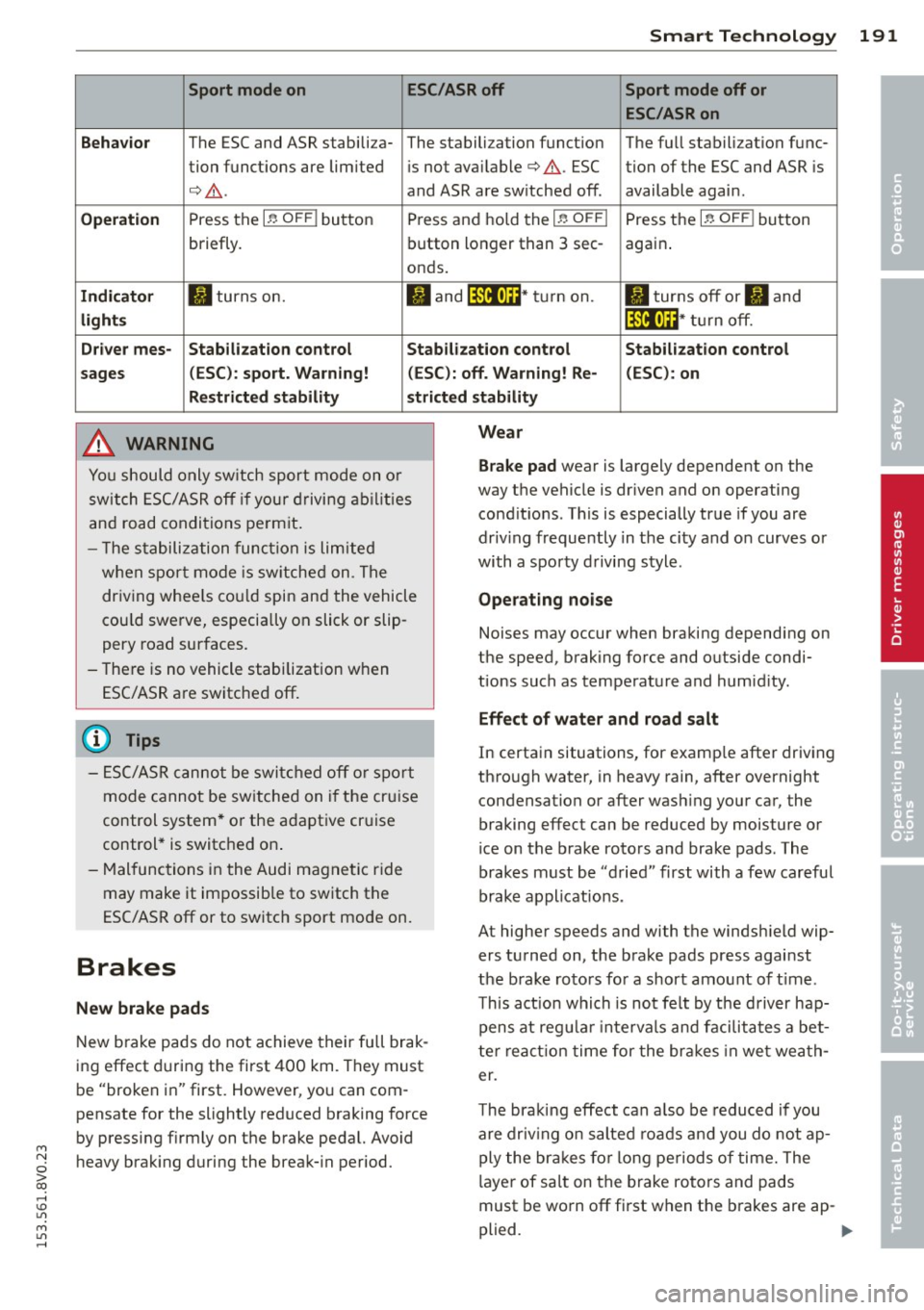
M N
0 > co ,...., \!) ..,.,
M ..,., ,....,
Smart Technology 191
Sport mode on ESC/ASR off Sport mode off or
ESC /ASR on
Behavior
The ESC and ASR stabili za- The sta lbili zation funct ion The fu ll stabili zation f unc-
tion func tions are lim ited is not available¢ .&,.. ESC tion of the ESC and ASR is
¢ .&,. .
and ASR are switched off . available again .
Operation P ress the I~ OFF I button Press and ho ld the I~ OFFI Press the I~ OFF I button
briefly. b
utton lo nger than 3 sec-
again.
onds.
Indi cator II turns on. II and jf'illt)H * tu rn on. II tur ns off or II and
light s jf 'ilftli~ * tur n off.
Driv er mes -Stab ilization control Stab ilization control Stabilization control
sages (ESC ): sport. Warning! (ESC ): off. Warning! Re- (ESC) : on
Restricted stability st ricted stability
_& WARNING
Yo u should o nly sw itch spor t mode on o r
switch ESC/ASR o ff if your driving abilities
and road condi tions pe rm it .
- T he s tabili zation func tion is limited
when sp ort mode is sw itche d on . T he
dr iving w hee ls co uld spin and the vehicle
cou ld swerve, especia lly on slick or slip
pery road surfaces.
- The re is no vehicle stabilization when
ESC/ASR a re switc hed off.
@ Tips
-
- ES C/ASR canno t be swi tched off or spor t
mode cannot be sw itche d on i f the cr uise
control system * or the a daptive cr uise
control * is switc hed on .
- Malfunc tions in the Audi mag net ic r ide
may make it impossib le to sw itch the
ESC/ASR off or to switch sport mode on.
Brakes
New brake pads
New b ra ke pads do not achieve their full brak
i n g effect d uring the first
4 00 km. They must
be "broken in" first. However, yo u can com
pensate for the slightly reduced braking force
by pressing firmly on the brake pedal. Avoid
heavy brak ing duri ng the break- in period.
Wear
Brake pad
wear is largely dependent on the
way the vehicle is driven and on operating
cond it ions . This is especially true if you are
driv ing frequently in the city and on curves or
with a sporty d riving style .
Operating noise
Noises may occur when bra king depending on
the speed, brak ing force and outs ide condi
tions such as temperature and humid ity.
Effect of water and road salt
In certa in situations, for examp le after driv ing
th ro ugh water, in heavy rain, after overnight
condensation or after was hing your car, the
braking effect can be reduced by mois ture or
ice on the brake rotors and brake pads . The
brakes must be "d ried" first with
a few car eful
brake applications .
At higher speeds and with the windsh ield wip
ers turned on, the brake pads press against
the b rake ro to rs fo r a shor t amo unt of t ime .
T h is act ion whi ch is not felt by the driver hap
pens at reg ular intervals and facilita tes a bet
t e r r ea ct ion time for the br ake s in we t wea th
er.
T he bra king effect can a lso be reduced if you
are driv ing o n salted roa ds an d you do not ap
ply the br akes fo r long peri ods of time. The
l aye r of sa lt on the brake rotors and pads
must be wo rn off first when the b rakes are ap -
plied. .,.
•
•
•
Page 194 of 310

192 Smart T echnol ogy
Corro sion
Leaving the vehicle parked for long periods o f
time, low mi leage and avoiding heavy braking
can contribute to corrosion on the brake ro
tors and di rty brake pads.
I f you usually avoid heavy brak ing or if there is
corrosion present, occasiona l heavy braking at
high speeds is recommended to clean the
brake rotors and pads¢,& .
Brake system malfunction
if you notice that the brake pedal t ravel has
suddenly gotten larger, then a brake circuit
may have failed. Drive to your authorized Audi
dealer or qualified repair facility immediately
to hav e the problem corrected . On the way
there, drive with reduced speed and keep in
mind that a long braking distance and in
creased pressure on the brake pedal will be
necessary .
Lo w brake fluid level
When the brake fluid level is low, ma lfunc
tions in the brake system may occur. The
brake fluid level is electronically mon itored.
B rake bo ost er
The brake booster amplifies the pressure you
apply to the brake pedal. It only works when
the engine is running.
A WARNING ,~ ·
- You should only perform braking maneu
vers to clean the brakes when the road
condit ions perm it. Never put others on
the road at risk -never forget the risk of
acc idents!
- On steep slopes, reduce the speed and
select a lower gea r or lowe r selector lev
er position. Drive as litt le as poss ible
w hil e pressing the bra ke peda l and avoid
putt ing you r left foot on the brake pedal
whi le driving . This could cause the brakes
to overheat and impair the efficiency of
the brakes .
- Do not let the brakes "grind" by always
keeping yo ur foot on the brake peda l. This can cause the brakes to overheat
in-
,
crease wear and increase braking dis
tance unnecessarily.
- Certain weather and operating condi
tions such as driving through water, driv
ing in heavy rain or driving after washing
your veh icle can impa ir the effectiveness
of the brakes . In the winter, ice may
bu ild up on the bra ke pads, rotors and
d rums. Che ck these components by b rak
ing caref ully. App lyi ng the br akes care
fu lly several times dries the brakes and
removes ice bui ld-up .
- The eff ic iency of the brakes can also be
impaired by driving for long stretches on roads covered with salt without using the
brakes. Yo u can remove salt deposits
from the brake rotors and pads by care
fully applying the brakes several times.
- If the front spoiler is damaged or you in
stall another spoiler, make sure the front
wheel brakes are ventilated properly.
Otherwise , the brake system could over
heat, wh ic h red uces their effectiveness .
- Failure of a brake circuit impa irs braking
performance, wh ic h increases bra king
d istance . Avoid driving the vehicle and
have it towed it to the nearest author
i z ed A udi dealer or au thorized Aud i Serv
ice Facility .
- Do not let your ve hicle roll w it h the en
g ine switched off unde r any circumstan
ces .
- If the b rake booste r is no t working, you
will have to press much harder on the b rake peda l to compensate for the lack
of the booster.
(D Note
- N ever le t the bra kes "rub" by pressing
t he pedal ligh tly when braking is not
really necessary . This causes the brakes
to overheat and increases braking dis
tance and causes wear .
- Before dr iv ing on a long stretch with
steep s lopes, reduce your speed and shift
to the next lower gear This makes use of
the engine brak ing effect and relieves .,.
Page 195 of 310

M N
0 > co ,...., \!) 1.1'1
M 1.1'1 ,....,
the brakes. If you need to brake addit ion
ally, bra ke in intervals and not continu
ously.
(D Tips
- If the brake boos ter is not wor king, you
must p ress the brake pedal with much
more force t hen no rma l.
- If yo u retrof it your vehicle with a front
s po ile r, wheel covers or similar items,
make sure that the air f low to the front
whee ls is not interrupted. Otherwise the
brake system can become too hot.
Electromechanical
steering
The elec tromechanical steering suppor ts the
driver's s teering movements .
Powe r stee ring adapts electronically based o n
the veh icle speed.
The vehicle still has full stee ring fu nctionality
if the powe r steering fails o r whe n the eng ine
i s stopped (towi ng). To s teer, yo u must app ly
m uc h mo re fo rce than usual.
Indicator lights and messages
• Do not drive vehicle: steering defective
If th is in dicator lig ht tu rns on and stays on
and this message appears, the power steering may have fa iled.
Do
not co ntin u e dr iving . See an autho rize d
Aud i dea ler o r autho rized Aud i Service Fac ility
for assistance.
• Do not drive vehicle: steering defective
There is a malf unct io n in the electro nic steer
in g lo ck. You canno t turn the ign ition on.
Do
not tow your vehicle beca use it ca nnot be
steered. See an autho rized Aud i dea le r or au
thor ized Audi Se rv ice Facility for ass istance.
Ei:-Y Steering malfunction : you can continue
driving
I f the indicator light turns on, the steering
wheel may be more difficult to move or more
Smart Technolog y 193
sensit ive tha n usua l. The stee ring wheel may
also be at a n angle when dr iv ing stra ight .
D rive slowly to you r auth ori zed Audi de aler o r
qualifie d wo rkshop to have the ma lf u ncti on
correc ted.
II Steering lock : sy stem fault! Pl ease con
tact Service
T he re is a malfunction in the elec tronic steer
ing lock .
D rive to an author ized Audi dealer or author
ized Audi Serv ice Facility immediately to have
the malfunc tion corrected.
A WARNING
Have the sys tem ma lf u nction co rrec ted as
soon as po ssible by an aut horiz ed Aud i
d e aler or au thoriz e d Au di Service Fa cili ty,
a s this incr eases the r is k of an acciden t.
(D Tips
If th e . or l~ij indi cator ligh t only s tays
o n for a short t ime , you may con tinue dr iv
i ng.
ALL wheel drive
(quattro)
App lies to vehicles: wi th all wheel drive
In all wheel drive, all four wheels are pow
ered.
General information
In all whee l dr ive, the dr iv ing power is divi ded
between all fo ur whee ls. Thi s happens auto
matically depending on yo ur driv ing behavior
as well as the current road conditions. Refer
to
¢ page 189, Electronic stabilization con
trol (ESC) .
The all wheel drive concept is designed for
high eng ine power. Your veh icle is except ion
a lly powerfu l and has excellent driving charac
te ristics both under normal driv ing cond itions
and on snow a nd ice. Always read and follow
safety precaut ions¢ .&.. ..,.
•
•
•