2015 AUDI RS7 SPORTBACK ESP
[x] Cancel search: ESPPage 96 of 302

94 Audi side assist
Side assist functions at speeds above approxi
mately 19 mph (30 km/h).
(D Vehicles that are approaching
I n certain cases, a vehicle will be classified as
cr itica l for a lane change even if it is still
somewhat far away . The faster a vehicle ap
proaches, the sooner the display in the exteri
or mirror will turn on.
@ Vehicles traveling with you
Vehicles traveling with you are indicated in the
exterior m irror if they are classified as critica l
for a lane change. All vehicles detected by
side assist are indicated by the time they en
ter your "blind spot", at the latest.
@ Vehicles left behind
If you slowly pass a vehicle that side assist has
detected (the difference in speed between the
vehicle and your vehicle is less than 9 mph or
15 km/h), the disp lay in the exterior mirror
turns on as soon as the vehicle enters your blind spot.
The display will not turn on if you quickly pass
a vehicle that side assist has detected (the dif
ference in speed between the vehicle and your
vehicle is greater than 9 mph or 15 km/h).
Functional limitations
The radar sensors are designed to detect the
left and right adjacent lanes when the road
lanes are the normal width. In certain situa
tions, the display in the exterior mirror may
turn on even though there is no vehicle locat
ed in the area that is critical for a lane change.
For example:
- if the lanes are narrow or if your are driving
on the edge of your lane. If this is the case,
the system may have detected the vehicle in
another lane that is
not adjacent to your
current lane.
- if you are driving through a curve. Side assist
may react to a veh icle that is one lane over
from the adjacent lane.
- if side assist reacts to other objects (such as
high or displaced guard ra ils). -
In poor weather conditions . The side assist
functions are limited.
Do not cover the rada r senso rs
~ fig. 106 with
stickers, deposits, bicycle wheels or other ob
jects, because this will affect the funct ion . For
information on cleaning, refer to
~ page 201.
A WARNING
-
- Always pay attention to traffic and to the
area around your vehicle. Side assist can
not replace a driver's attention. The driv
er alone is always responsible for lane
changes and similar dr iving maneuvers .
- Improper reliance on the side assist sys
tem can cause coll is ions and serious per
sonal injury:
- Never rely on ly on side assist when
changing lanes.
- Always check rear view mirrors to make
sure that it is safe to change lanes.
- Side assist cannot detect all vehicles un
der all conditions -danger of accident!
- Please note that side assist indicates
there are approaching vehicles, or
vehicles in your blind spot, only after
your vehicle has reached a driving speed
of at least 19 mph (30 km/h).
- In certain sit uations, the system may not
function or its function may be limited.
For example:
- if vehicles are approaching or being left
behind very quickly. The disp lay may
not turn on in time.
- in poor weather conditions such as
heavy rain, snow o r heavy mist.
- on very wide lanes, in tight curves or if
there is a rise in the road surface.
Vehicles in the adjacent lane may not
be detected because they are outside
of the sensor range .
([) Note
The sensors can be displaced by impacts or
damage to the bumper, wheel housing and
u nderbody. This can affect the system. .,..
Page 98 of 302

96 Audi drive select
Audi drive select Driving settings
Introduction
Audi drive select makes it possible to experi
ence different types of vehicle settings in one
vehicle. The driver can select three
Comfort ,
Auto and Dynamic modes in the MMI to
switch between a sporty and a comfortable
driving mode.
You can also adjust the setting according to
your preferences in the
Individual mode . For
example, you can combine settings such as a
sporty engine tuning with comfortable steer
ing.
A WARNING
Improper use of the Audi drive select can
cause collisions, other accidents and seri
ous personal injury.
Description
The following systems are affected by drive
select:
Engine and transmission
Depending on the mode, the engine and the
transmission respond quicker or in a more bal
anced manner to accelerator pedal move
ments. In the sporty dynamic mode, the
transmission shifts at higher RPMs.
Air suspension*
The adaptive air suspension/adaptive air sus pension sport*
(Air suspension in the MMI) is
an electronically controlled air suspension and
damping system. They are adjusted depend
ing on the selected driving mode, the driver's
steering, braking and acceleration input and
the road surface, vehicle speed and load. A
sporty setting is generally used in vehicles
with adaptive air suspension sport*.
The vehicle clearance varies depending on the
selected mode and the speed . The
highway setting is activated automatically
when you drive above 75 mph (120 km/h) for
more than
30 seconds in the Auto or Dynamic
mode. The ground clearance is increased auto
matically if the speed drops below
44 mph
(70 km/h) for more than 120 seconds .
Steering
The steering adapts in terms of steering effort
and steering ratios. Indirect steering that
moves easily, like the steering in comfort
mode, is best suited to long drives on a high
way. In contrast, dynamic mode provides sporty, direct steering .
The following applies to vehicles with dynamic
steering* : the steering ratio changes based on
vehicle speed in order to maintain optimum
steering effort for the driver at all times . This
sets the steering to be less sensitive at higher
speeds in order to provide improved vehicle
control. At reduced speeds, however, steering
is more direct in order to keep the steering ef
fort as minimal as possible when the driver is
maneuvering the vehicle. At low and average
speeds, dynamic steering additionally pro
vides more responsive steering performance.
Adaptive dampers*
The adaptive dampers* use sensors to record
information regarding steering movements,
braking and acceleration operations by the
driver, road surface, driving speed, and load.
This makes it possible to adapt damping to
the driving situation virtually in real time.
Drive select also makes it possible to satisfy
the desire for sporty suspension (Dynamic)
and comfortable suspension (Comfort) with
out giving up balanced tuning (Auto) .
Sport differential*
As a component of the all wheel drive system
(quattro)
c::;; page 193, the Sport differential*
distributes the driving power to the rear axle
depending on the situation. The distribution
of power varies depending on the selected
mode, from balanced (comfort) to agile (dy
namic). The goal is a high level of agility and
Ill-
Page 99 of 302

"' N
a:: I.J "". rl I.O
"' rl
"' rl
ability to accelerate on curves. The vehicle is
very responsive to steering.
Curve light*
The curve light adapts to driv ing on curves.
The pivot ing action and the light ing are also
adapted to the mode.
Ad apti ve crui se contr ol*
The behavior when accelerat ing can be ad just
ed from comfortable to sporty, depending on
the dr ive se lect mode . Adaptive cruise control
also responds to the driving behav ior of the
veh icle ahead in a more conservative or sporty
manner .
Engine sound
The sound of the engine is adapted to these
l ected mode and ranges from subtle to sporty.
(D Note
-Make sure there is enough clearance
above and below the vehicle when park
i ng. The height of the vehicle can change
once it is parked d ue to temperature
fluctuations, changes to the load condi
tions and changes to the driving modes,
which can affect clearance.
- When transporting the vehicle on a car
carrier, train, ship or by other means, on
l y tie the veh icle down at the running
surface of the tires, which is the outer
circumference. Securing the vehicle at
the axle components, suspension struts
or tow ing eyes is not perm itted because
the p ressure in the air suspension struts
can change d uring transport. The vehicle
may not be se cured s uff ic ient ly if this
happens.
(D Tips
- In some models, the maxim um vehicle
speed can only be reached in the
Auto
and D ynamic modes.
- Se lecting the
Dynami c mode results in
spor ty sh ifting character istics. The S
gear position engages automatically .
Audi drive sele ct 97
- In ve hicles that have dynamic steering*,
operating noise is heard when starting or
stopping the engine. This does not indi
cate a problem.
Selecting the driving mode
You can choose between Comfort, Auto, Dy
namic and Individual.
Fig. 108 M MI: Dr ive select
.,. To select the mode, select the following in
the
MMI: I CARI function button> Comfort ,
Auto , Dynamic or Individu al.
You can change the driving mode when the ve
hicle is stationary or while driving. If traffic
permits, after changing modes, br iefly take
your foot off the accele rator pedal so that the
recently selected mode is a lso activated for
the engine.
Comfo rt -prov ides a comfort-oriented veh icle
setup and is suited for long drives on h igh
ways.
Auto -provides an overall comfortable yet dy
nam ic dr iving feel and is suited for every day
use .
Dynam ic -gives the driver a sporty driving
feel and is suited to a sporty driving style.
Indi vidual -~page 98.
&_ WARNING
Pay attention to traffic when operating
Audi drive select to prevent potential risk
of an accident.
-
Page 102 of 302
100 Night visi on assis tant
Pedestrian warning
Applies to vehicles: with night vision assistant
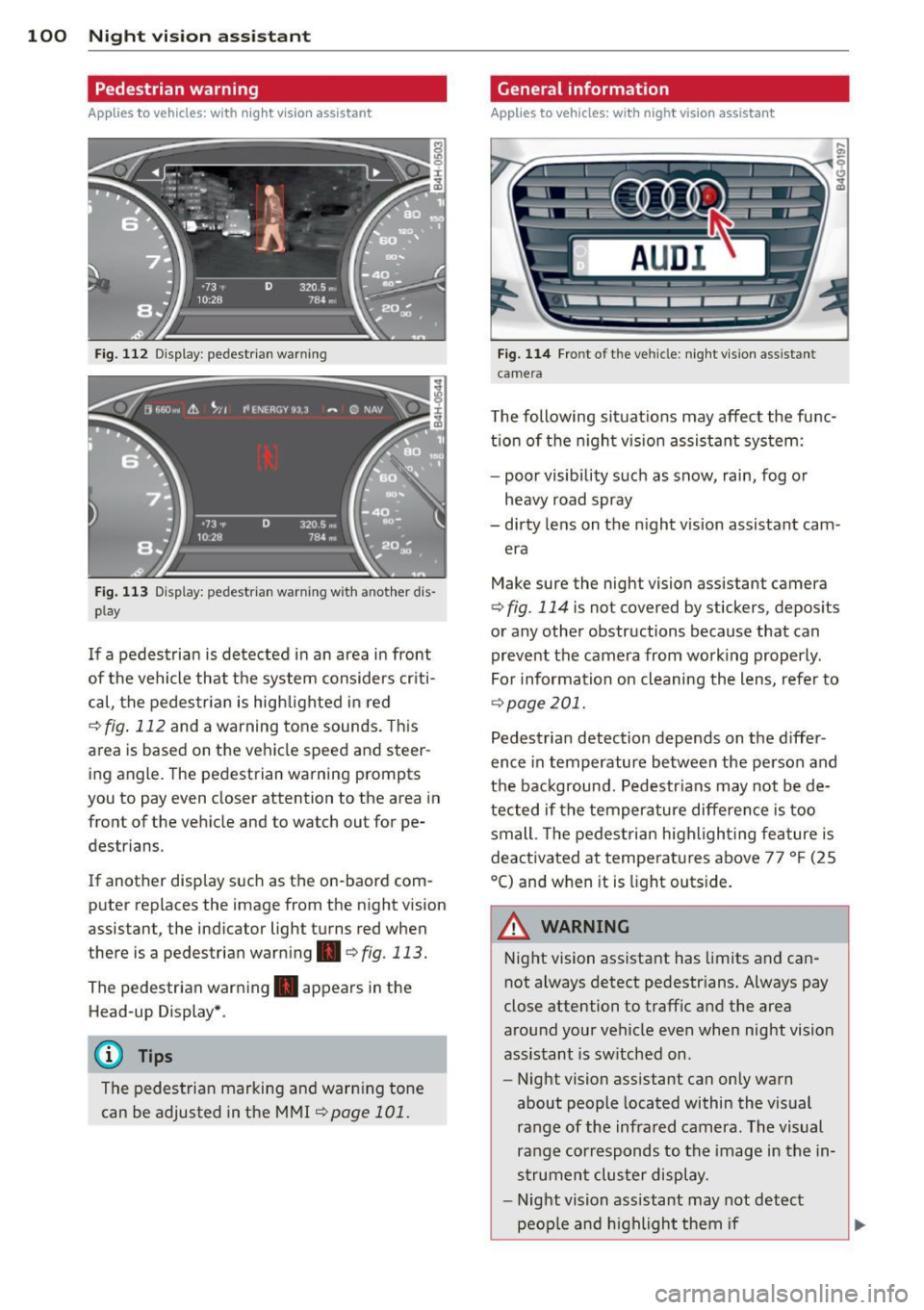
Fig. 112 Display : pedestrian warning
Fig . 113 D is p lay: pedestrian warning w ith a nother dis
p lay
I f a pedestrian is detected in an area in front
of the vehicle that the system considers criti
cal, the pedestrian is high lighted in red
Q fig . 112 and a warning tone sounds. This
area is based on the vehicle speed and steer
ing angle. The pedestrian warning prompts
you to pay even closer attention to the area in
front of the vehicle and to watch out for pe
destrians.
If another display s uch as the on-baord com
puter replaces the image from the n ight vision
assistant, the indicator light turns red when
there is a pedestrian warning .
qfig . 113.
The pedestrian warning . appears in the
Head-up Display *.
(D Tips
The pedestrian marking and warning tone
can be adjusted in the MMI
!:!) page 101.
General information
Applies to vehicles: with night vision assistant
Fig. 114 Fro nt of th e ve hicle: night v ision assistant
camera
T he following situat ions may affect the func
t ion of the n ight vision assistant system:
- poor visibility such as snow, rain, fog or
heavy road spray
- dirty lens on the n ight vis ion assistant cam -
era
Make sure the night vision assistant camera
q fig . 114 is not covered by stickers, deposits
or any other obstructions because that can
prevent the camera from working properly.
For information on cleaning the lens, refer to
Q page 201.
Pedestrian detection depends on the d iffer
ence in temperature between the person and
the background. Pedestr ians may not be de
tected if the temperature diffe rence is too
small . Th e pedestrian highl ighting feature is
deactivated at tempe ratures above 77 ° F (25
°C) and when it is light outs ide.
A WARNING
Night vision assistant has limits and can
not always detect pedestr ians. Always pay
close attention to traffic and the area
around your vehicle even when night vision
assistant is sw itched on .
- Night vision assistant can only warn
about people located within the visual
range of the infrared camera. The visual
range corresponds to the image in the in
strument cluster display .
- Night vision assistant may not detect
-
peop le and highlight them if .,.
Page 111 of 302
M N
0:: <.J "SI: ...... \!) 1.1"1
...... 1.1"1 ......
Parking systems
General information
Applies to vehicles: with parking system plus/rear view
camera/peripheral cameras
Depending on your vehicle's equipment, vari
ous parking aids w ill help you when parking
and maneuvering.
The
pa rking syste m plus assists you when
parking by audibly and visually indicating ob
jects detected
in front of and behind the vehi
cle
¢ page 110.
The rea r view c amera shows the area behind
the vehicle in the Infotainment disp lay . This
display assists you when you are cross or par
allel parking
¢ page 111 . In addit ion, you are
assisted by the functions from the parking
system plus¢
page 110.
The periph era l ca mera s assist you with park
i ng and maneuvering. You are aided by var ious
cameras depending on the vehicle equipment l eve l¢
page 114. In addition, you are assist
e d by the func tion s from th e parking sy stem
plus ¢page 110.
A WARNING
- Always look for traff ic and check the area
around your vehicle by looking at it di
rectly as well. The parking system cannot
replace the driver's attent ion. The dr iver
is always responsible for safety during
park ing and for all other maneuvers .
- Please note that some surfaces, such as
clothing, are not detected by the system.
- Sensors and cameras have blind spots in
wh ich peop le and objects cannot be de
tected. Be especially cautious of children and animals.
- T he sensors can be displaced by impacts
or damage to the radiator grille, bumper ,
wheel housing and the underbody. The parking systems may become impaired
as a result. Have your authorized Audi
dealer or qualified workshop check their
function.
Par king system s 109
-Make sure the sensors are not covered by
stickers, deposits or any other obstruc
tions as it may impair the sensor func
tion . For information on cleaning, refer
to ¢
page 201 .
(D Note
- Some objects are not detected by the
system under certain c ircumstances :
- Objects such as ba rrie r chains, trailer
draw bars, vertical po les or fences
- Objects above the sensors such as wall
extensions
- Objects w ith specific surfaces or st ruc
tures such as chain link fences or pow
der snow.
- If you continue driving closer to a low-ly
ing object, it may disappea r from the
sensor range. Note that you w ill no lon
ger be warned about this obstacle.
@ Tips
- T he system may provide a warning even
tho ugh there are no obstacles in the cov
erage area in some situations, such as:
- certain road surfaces or for long grass.
- externa l ultrasonic sources e.g. from
clean ing vehicles.
- heavy rain, snow or thick vehicle ex
ha ust.
- We recommend that you practice park
ing in a traff ic-free location or park ing
lot to become familiar w ith the system.
When doing this, there should be good light and weather cond itions .
- You can change the vo lume and pitch of
the s ignals as well as the display
¢ page 119 .
-What appears in the infotainment dis
play is somewhat time-delayed .
Page 117 of 302

"' N
a:: I.J "". rl I.O
"' rl
"' rl
_& WARNING
-Always read and follow the app licab le
wa rnings ¢.&.
in General information on
page
109 .
-If the posit ion or the instal lation angle
of a camera was changed, after a colli
sion fo r example , do not continue to use
the system for safety reasons. Have it
checked by your authorized Audi dealer
ship.
- Keep in m ind that the image in the dis
play is dis torted if the ex ter ior mir ror
housing has been man ually adjusted.
- Use the
rear mode and the corner view
( re ar)
mode on ly when the luggage com
partment lid is fully closed. Otherwise
the image in the display will be distort
ed.
- The vehicle surroundings are shown us
ing the camera images . The vehicle im
age is shown by the system . Objects and
obstacles above the camera are not dis
played .
- Camera lenses en large and distort the
field of v is ion. The object s appear both
altered and inaccurate on the screen.
(D Note
- Always read and fo llow the applicable
warnings
¢ @ in General information on
page
109 .
- The Infota inment display shows the di
rection in wh ic h the rear of the vehicle is
traveling based on the steering wheel
angle . The front of the veh icle front
swings o ut more than the rear of t he
ve
hicle . Ma intain plenty of distance so that
you r outside mi rror or a corner of you r
vehicle does no t coll ide wi th any obsta
cles.
@ Tips
I f the 8/~/c:;::::s symbol appears in the
disp lay and the respect ive dis play a rea is
grayed out , then the powe r exter io r mir
rors were fo lded in or the driver 's door/
P arking systems 115
front passenger's door/ luggage compart
ment lid was opened.
Switching on or off
Applies to veh icles: w ith parking system plus with periph·
era! cameras
Fi g. 135 Ce nter con sole: P>•t button
F ig . 1 36 In fota in m ent: se lect in g th e mode
Switching on
... Shift into reverse, or
... Pre ss th e
p,, ;A button in th e center console
¢
fig . 135 . A sho rt confi rmat ion tone
sounds and the L ED in the bu tton turns on .
Selecting the mode
.,. Turn the control knob to the symbol for the
desired mode @through
®¢fig . 136.
Switching off
.,. Dr ive fo rward faster than 6 mph (10 k m/ h),
or
... Press the
P"IA button, or
... Switch the ignition off .
You may sele ct from the following modes:
@ -Top view*
¢ page 116
@ -Corner view (front)* ¢ page 116
©-Front* ¢ page 116
Page 121 of 302

M N
0:: <.J 'SI: ,...., \!) 1.1'1 ,...., 1.1'1 ,....,
Setting the mode
Applies to vehicles: with parking system with peripheral
cameras
.,. Select : I CARI function button > (Car)* sys
tems
control button > Driver assist > Park
ing aid
> Change to front /rear > Auto or
Manual.
Auto -
This view behind the vehicle (Rear
mode) is displayed automatically when you
shift into reverse. This view in front of the ve
hicle
( Front mode) is d isp layed automatically
when yo u sh ift i nto the forward gea rs.
Manual -This view beh ind the vehicle ( Rear
mode) is a lways d isp layed when you turn on
the system .
Adjusting the display
and the warning tones
Appl ies to vehicles: with parking system plus/r ear view
camera/peripheral cameras
The display and warning tones can be adjust
ed in the Infotainment.
.,. Select : I C ARI function button > (Car)* sys
tems
control button > Driver assist > Park
ing aid.
Display
On * -
optical d isplay is shown for the parking
system plus, rear view camera image is shown
for parking system plus with rear view cam
e ra* .
Off -when the park ing system is sw itched on,
only audible signa ls are given .
Warning tones
Front volume -
Volume for the front area
Rear volume -Volume for the rear area
Front frequency -Frequency for the front area
Rear frequency -Frequency for the rear area
Music volume while parking -When the park
ing system is turned on , the volume of the au
dio/video source is lowered.
Parking systems 119
The newly adjusted va lue is briefly heard from
the signal generator.
(0 Tips
- Th e warn ing tones can also be adjusted
directly from the visua l display o r the
camera image. Simply press the
Settings
control button.
- Changed settings are activated when the
parking system is switched on again.
- The settings are automatica lly stored
and assigned to the remote contro l key
that is in use.
Error messages
Applies to vehicles: with parking system plus/ rear view
camera/periphera l cameras
T he re is an er ror in the system if the LED in
the
p, q! button is blinking and you hear a con
tinuous alarm for a few seconds after switch
ing on the parking system or when the park
ing system is already activated . If the error is
not corrected before you switch off the igni
tion, the LED in the P, #~ button will blink the
next t ime you switch on the parking system by
shifting into reverse.
Parking system plus
If a sensor is faulty, the~ symbol will appear
in front of/behind the vehicle in the Infotain
ment display . If a rear sensor is faulty, only
obstacles that are in areas @ and @ are
shown
~ page 110, fig . 123. If a front sensor
is fau lty, on ly obstacles that are in areas ©
and @are shown.
Peripheral cameras*
There is also a system error if:
- the
'C&l " symbol appears in the display and
the corresponding display area is shown in
blue. The camera is not work ing in this area.
- all segments aro und the vehicles are red or
if no segments are displayed.
Drive to your authorized Audi dealer or au
thorized repair facility immediately to have
the malfunction corrected .
Page 122 of 302

120 Driving Saf ely
Driving Safely
General notes
Safe driving habits
Please remember -safety first!
This chapter contains important information,
tips, instructions and warnings that you need
to read and observe for your own safety, the
safety of your passengers and others . We have
summarized here what you need to know
about safety belts, a irbags, ch ild restra ints as
well as child safety. Your safety is for us
priori
ty number 1.
Always observe the info rmat ion
and warn ings in th is sect ion -fo r yo ur own
safety as well as that of your passengers .
The information in this se ction app lies to all
model ve rsions of your veh icle . Some of the
feat ures described in this sec tions may be
standard equipment on some models, or may
be optional equipment on others . If you are
not sure, ask your authorized Audi dealer.
A WARNING
- Always make sure that you follow the in
struct ions and heed the WARNINGS in
this Manual. It is in your interest and in
the inte rest of you r passengers.
- Always keep the complete Owner's Liter
ature in your Audi when you lend or sell
your vehicle so that this important info r
mation will always be ava ilable to the
dr iver and passengers.
- Always keep the Owner's literature handy
so that you can find i t eas ily if you have
ques tions.
Safety equipment
The safety features are part of the occupant
restraint system and work together to help
redu ce the risk of injury in a wide variety of
accident situations.
Your safety and the safety of your passenge rs
should not be left to chance. Advances in
technology have made a varie ty o f fea tures
avai la bl e to he lp re duce the risk of injury in an accident
. The following is a list of just a few of
the safety features in your Audi:
- sophis tic ated s afety be lts fo r drive r and a ll
passenger sea ting pos it ions,
- safety belt prete nsioners ,
- safety belt force lim iters fo r the front seats,
- safety belt he ight adjustment systems for
the front seats ,
- front airbags,
- knee airbags for the front seats *
- side airbags in the front seats a nd outer rear
seats*,
- side curtain airbags ,
- specia l LATCH anchorages for child re-
straints,
- hea d restr aints for each sea ting pos ition,
- ad justab le s teer ing colum n.
These ind iv idual safety features, can work to
ge ther as a system to help protect you and
you r passengers in a wide range of accidents .
T hese features canno t wo rk as a system if
they are not always cor re ct ly adjusted and co r
rect ly used.
Safety i s everybody' s respon sibility!
Important things to do before driving
Safety is everybody 's job! Vehicle and occu
pant safety always depends on the informed and careful driver .
For your safety and the safety of your passen
gers,
befor e driv ing always:
.. Make s ure that all lights and signals are op
erating correctly.
.. Make sure that the t ire pressure is correct .
.. Make s ure t hat all windows are clean and af
ford good vis ibility to the outs ide .
.. Sec ure all luggage a nd other items caref ully
q page 64, q page 61 .
.. Ma ke s ure t hat nothing can interfe re wi th
the peda ls .
.. Adjust front seat, head restraint and mirrors
correctly for your height.
.. Instruct passengers to adjust the head re-
straints according to the ir height . .,..