2015 AUDI R8 SPYDER mirror
[x] Cancel search: mirrorPage 83 of 232
..... N
r-N "': ..... \!) 1.1'1
N 1.1'1 .....
area roughly corresponds to the area in¢ fig. 91
and (D ~ fig . 92. Orientation lines and colored
surfaces are projected in the area shown, which
can help you with parking and maneuvering. Ob
jec ts that are located in an area that is not cap
tured by the camera@¢
fig. 92 and that are
closer to the bumper will not appea r on the navi
gation system display .
We recommend that you practice park ing with
the rearview camera in a traffic -free location o r
parking lot to become familiar w ith the system,
the orientation lines, a nd their funct ion . There
should be suff icient light and good weather con
d itions w hen do ing so.
In the nav igat io n system display, objects or
vehicles appear closer or fu rther away if:
Objects or vehicles appear closer or farther away in the navigation system if :
- you are driving in reverse gear from a level sur
face onto an incl ine, or a downward slope,
- you are driving in reverse gear toward protrud-
ing objects .
The accuracy o f the orientation lines and blue
surfaces diminishes if:
- the rearv iew came ra does not p rovide a reliab le
image, for example, in poor visibility cond itions
or if the lens is d irty,
- the image on the screen is not visible due to
s u n g lare and reflect ion.
Caring for th e rearvi ew cam era len s
The rearview camera is located in the center of
the vehicle above the rear license p late bracket.
In order for the rearview camera to function
p roperly, the camera lens must be kept clean and
free of snow and ice .
- Dampen the lens with a househo ld alcoho l
based glass cleane r, and clea n the lens with a
dry cloth .
- Remove snow with a hand brush and ice pref
erably with a de- ic ing spray ¢(j) .
A WARNING
- T he pa rking system cannot rep lace the d riv
er' s a ttention . The d rive r alone is responsi-
P a rk ing system
ble for parking and simi lar d riving maneu
vers.
- Sensors have blind spots in whic h objects
cannot be detected. Pay spec ia l attention to
small children and an imals beca use the sen
sors cannot always detect them.
- Always keep your eyes on the vehicle 's sur
round ings, using the rearview mirror as
well.
- Do not allow yourself to be distracted from
traffic by the rearview camera pictures in
the navigation system display .
-If the position and the installation angle of
the camera has changed, for example, after
a rear end collision, do not continue to use
the system fo r safety reasons . Have it
checked by a n author ized Audi dealer or oth
er q ua lif ied wor kshop .
(!) Note
-Low obstacles a lready s ignaled by a war ning
can disappea r from the system 's detection
range as they a re approached and w ill not
cont in ue to be s ignaled . Objec ts such as
barrie r cha ins, trailer draw ba rs, narrow
painted vertical poles o r fences may not be
detected by the system, pos ing risk of dam
age .
- Never use warm or hot wate r to remove
snow or ice from the rearv iew camera lens
because the lens could crack .
- Never use products that a re abrasive when
cleaning the lens .
81
Page 85 of 232

.... N
l'
N "1: .... I.O
"' N
"' ....
Reverse parking
Applies to vehicles: with parking system advanced
Parking mode 1 can be used when parking in a
garage or into a parking space .
Fig. 95 Navigation system display : Aiming at a p arkin g
spot
Fig. 96 Naviga tion sy ste m display: Al ig ni ng t he ve hicle
"'Switch the navigation system and the display of
the navigation system on.
"'Select the reverse gear.
"'Turn the steering wheel until the orange orien
tation lines(!) appear in the parking spot
c> fig. 95. Use the markings @to help you esti
mate the distance from an obstacle. Each mark
ing represents 3
ft. (1 m). The blue area repre
sents an extension of the vehicle's outline by
approximately 16
ft. (5 m) to the rear .
"'While driving in reverse gear, adjust the steer
ing wheel angle to fit the parking spot with the
aid of the orange orientation lines
c> 0 . ®
marks the rear bumper. Stop the vehicle once
the red orientation line@ touches an object
¢&, .
_& WARNING
-The rearview camera does not show the en
tire area behind the vehicle
c> page 80,
Parking system
fig. 92. Watch out especially for small chil
dren and animals. The rear view camera can
not always detect them, posing risk of an
accident!
- Please note that objects not touching the
ground can appear to be farther away than
they really are (for example, the bumper of
a vehicle or the rear of a truck). In this case,
you should not use the orientation lines to
help with parking, which poses danger of an
accident!
(D Note
In the navigation system display, the direction
of travel of the vehicle rear is represented de pending on the steering wheel angle. The ve
hicle front swings out more than the vehicle
rear. Maintain plenty of distance so that your
outside mirror or a corner of your vehicle does
not collide with any obstacles. This can dam
age to your vehicle.
83
Page 87 of 232

.... N
l'
N "1: .... I.O
"' N
"' ....
outside mirror or a corner of your veh icle does
not collide with any obstacles . This can dam
age to your veh icle .
@ Tips
The left or right orientation lines and surfaces
w ill be displayed , depending on the turn sig
na l being used .
Adjusting the warning tones
Applies to vehicles: with pa rking system advanced
Fig . 9 9 Nav igatio n system d isp lay: adjusting th e park ing
system
Requi rement: The parking system must be
switched on.
• Press the Settings control button .
-Front volume -front sensor volume
-Front frequency -front sensor frequency
- Rear volume -rear sensor volume
-Rear frequen cy -rear sensor frequency
The newly adjusted value is briefly heard from
the signa l gene rator.
0) Tips
Changed settings are activated when parking
system is switched on aga in .
Error messages
Applies to vehicles: with park ing system advanced
There is an e rror in the system if the L ED on the
~ switch is blinking and you he ar a co nti nu ous
ala rm for a few seconds a fter sw itch ing on the
pa rking system or when the park ing system is al
ready activated . Have your authorized A udi dealer
correct the e rror.
Par king system
(D Tips
If an error has occ urre d before the ignition is
turned off, the LED in the ~ switch wi ll blink
the next time the ignition is switc hed on, re
verse gear selected, and t he acoustic pa rking
system is act ivated .
85
Page 88 of 232

Driving Sa fel y
Driving Safely
General notes
Safe driving habits
Please remember -safety first!
This chapter contains important information,
tips, instructions and warnings that you need to
read and observe for your own safety, the safety
of your passengers and others. We have summar
ized here what you need to know about safety
be lts, airbags, chi ld restraints as well as child
safety. Your safety is for us
priority number 1 . Al
ways observe the informat ion and warn ings in
t his section - for your own safety as well as for
that of your passengers.
The information i n this section applies to all
model ve rsions of your vehicle . Some of the fea
t ures des cribed in this sect ion may be standard
equipment on some models, or may be optional
eq uipment on others . If you are not sure, ask
your author ized Audi dealer.
A WARNING
-Make certain that you fo llow the instruc
t ions and heed the WARNINGS in this Man
ual. It is in your interest and in the interest
of your passengers .
- Always keep the complete owner's literature
in your Audi when you lend or se ll you r vehi
cle so that this important information will
always be ava ilable to the driver and passen
gers.
- Always keep the owner's literature handy so
that you can find it easily if you have ques
ti ons.
Safety equipment
The safety features are part of the occupant re
straint system and work together to help reduce
the risk of injury in a wide variety of occident si t
uations.
Your safety and the safety of yo ur passengers
should not be left to chance. Advances in tec h
nology have made a var iety of f eatures av ailable
to help re duce the r isk of inj ury in an accident.
86
The following is a listing o f just a few o f the safe
ty features in yo ur Audi:
- sophis tica ted s afety be lts for drive r and a ll pas-
senger sea ting pos itions,
- safety belt p rete nsio ners,
- front airbags,
- knee airbags,
- side airbags in the seats
- adjustab le head restraints,
- adjustab le steering column .
These ind iv idual safety featu res can wor k togeth
er as a sys tem to he lp pro tect you a nd your pas
sengers in a wide range of accidents . These fea
tures cannot work as a system if th ey are not al
ways proper ly adjusted and prope rly used!
Safety i s everyb ody' s re sponsibilit y!
Important things to do before driving
Safety is everybody's job! Vehicle and occupant
safety always depends on the informed and care
ful driver.
Fo r you r safety and the safety of your passen
gers,
before driving always:
.,. Make sure that all lights and signals are operat
ing correctly .
.,. Make sure that the tire pressu re is co rrect.
.,. Ma ke s ure that all w indows are clean and affo rd
good visibility to the outs ide.
.,. Secure a ll luggage and o ther items caref ully
r=;,page 59 .
.,. Make s ure that nothing can interfere with the
pedals.
.,. Adjust front seat, head restraint and mirrors
correctly for your height.
.,. Instruct passengers to adjust the head re
straints according to the ir height .
.,. Make su re to use the r ight child restraint cor
rec tly to p rotect ch ild ren
r=;, page 122, Child
Safety.
.,. Sit p roperly in your seat and ma ke su re that
your passengers do the same
c::> page 56, Gen
eral recommendations.
.,. Fasten your safety belt and wear it properly. A l
so instruct your passengers to fasten their safe
ty belts proper ly
c::> page 95 .
Page 148 of 232

Vehicle care and cleaning
A WARNING
-Only wash the vehicle when the ignition is
off and follow the instructions from the car
wash operator to reduce the risk of acci
dents.
- To reduce the risk of cuts, protect yourself
from sharp metal components when wash ing the underbody or the inside of the wheel
housings.
- After washing the vehicle, the braking effect
may be delayed due to moisture on the
brake rotors or ice in the winter. The bra kes
must be dried first with a few caref ul brake
applications .
@ Note
-If you wash the ve hicle in an au tomatic car
wash, you must retract the extend able rear
spoi ler * if necessary, and fold the exterior
mirrors in to reduce the risk of damage .
Power folding exterior mirrors* must only
be fo lded in and out using the power folding
funct ion.
- To prevent paint damage, do not wash the
vehicle in direct sunlight.
- To red uce the risk of damage, do not wash
the power top with a pressure washer. -
To reduce the risk of damage, do not wash
decorative decals * with a pressure washer.
- T o reduce the risk of damage to the surface,
do not use insect remov ing sponges, kitchen
sponges or similar items.
- Matte finish painted vehicle components:
- To reduce the risk of damage to the sur-
face, do not use polish ing agents or hard
wax.
- Never use car wash cycles that apply pro
tective wax. It can destroy the matte fin ish effect .
- Do not place any stickers or magnet ic
signs on vehicle parts painted w ith matte
finish paint. The pa int could be damaged
when the stickers o r magnets are re
moved.
- Do not wash the vehicle using cleaning
products that contain alcohol when the en
gine is hot. This increases the risk of dam
age to plastic components, such as cracking.
@ For the sake of the environment
Only wash the vehicle in facilities spec ial ly de
signed for that purpose. This w ill reduce the
risk of dirty water contaminated with oil from
entering the sewer system .
Cleaning and care information
When cleaning and caring for individual vehicle
components, refer to the following table . The in
formation contained there is simp ly recommen
dations. For questions or for components that are not listed, refer to an authorized Audi dealer
or a qualified workshop. A
lso fo llow the informa
tion found in
¢ .&. .
Cleaning exterior
Component Situation Solution
Wiper blades
Dirty ¢ page 53, Cleaning windshield wiper blades
Headlights/ Dirty Soft sponge with a mild soap solutiona>
tail lights
Sensors
/
Dirty Sensors: soft cloth with a solvent-free cleaning product
camera lenses Camera lenses: soft cloth w ith an alcoho l-free clean ing sol-
ution
Snow/ice Hand brush/solvent-free de-icing spray
Wheels Road salt Water
Brake dust Acid-free special cleaning solution
146
...
Page 151 of 232

..... N
r-N "': ..... \!) 1.1'1
N 1.1'1 .....
-Never use gasoline, stain remover, ben
zene, paint thinner or other solvents to re
move.
-Windows
- Remove snow and ice on windows and ex-
terior mirrors with a plastic scraper. To avoid scratches, move the scraper only in
one direction and not back and forth.
- Never remove snow or ice from windows
and mirrors using warm or hot water be
cause this could cause cracks to form.
- To avoid damage to the rear window de
fogger, do not apply any stickers on the
heating wires on the inside of the window.
-Decorative parts/trim
- Never use chrome care or cleaning prod-
ucts.
-Paint
-To reduce the risk of scratches, the vehicle
must be free of dirt and dust before pol
ishing or waxing.
- To prevent paint damage, do not polish or
wax the vehicle in direct sunlight.
- To reduce the risk of paint damage, do not
polish away rust film.
- Remove cosmetics and sunblock immedi
atedly. Otherwise, the paint could be dam
aged.
-Trim
- To reduce the risk of damage, do not treat
the trim around the panorama sunroof
with paint polish.
- Decorative decals
-To reduce the risk of damage, do not use
any rough powder or abrasive cleaning
products.
- To reduce the risk of damage, do not pol
ish decorative parts that have a matte fin
ish.
- Displays
-To avoid scratches, do not use dry cleaning
methods on displays.
- Controls
- Make sure that no fluids enter the con-
trols, because this could cause damage.
- Safety belts
Vehicle care and cleaning
- Do not remove the safety belts to clean
them.
- Never clean safety belts or their compo
nents chemically or with corrosive fluids
or solvents and never allow sharp objects
to come into contact with the safety belts .
This could cause damage to the belt web bing .
- If there is damage to the webbing, the
connections, the retractors or the buckles,
have them replaced by an authorized Audi
dealer or a qualified workshop.
- Textiles/Vinyl/ Alcantara
- Never treat Vinyl/Alcantara with leather
care products, solvents, floor polish, shoe
polish, stain remover or similar products.
- To avoid damage , have stubborn stains re
moved by an authorized Audi dealer or a
qualified workshop.
- Never use steam cleaners, brushes, hard
sponges, etc. when cleaning.
- Do not turn on the seat heating* to dry
the seat.
- Objects with sharp edges such as zippers,
rivets on clothing or belts can cause dam
age to the surface.
- Open hook and loop fasteners, for exam
ple on clothing, can damage seat covers.
Make sure hook and loop fasteners are
closed.
- Natural leather
- Never treat leather with solvents, floor
polish, shoe polish, stain remover or simi
lar products .
- Objects with sharp edges such as zippers,
rivets on clothing or belts can cause dam
age to the surface .
- Never use steam cleaners, brushes, hard
sponges, etc. when cleaning .
- Do not turn on the seat heating* to dry
the seat.
- To help prevent the leather from fading,
do not leave the vehicle in direct sunlight
for long periods of time. If leaving the ve
hicle parked for long periods of time, you
should cover the leather to protect it from
direct sunlight . .,.
149
Page 213 of 232
..... N
r-N "': ..... \!) 1.1'1
N 1.1'1 .....
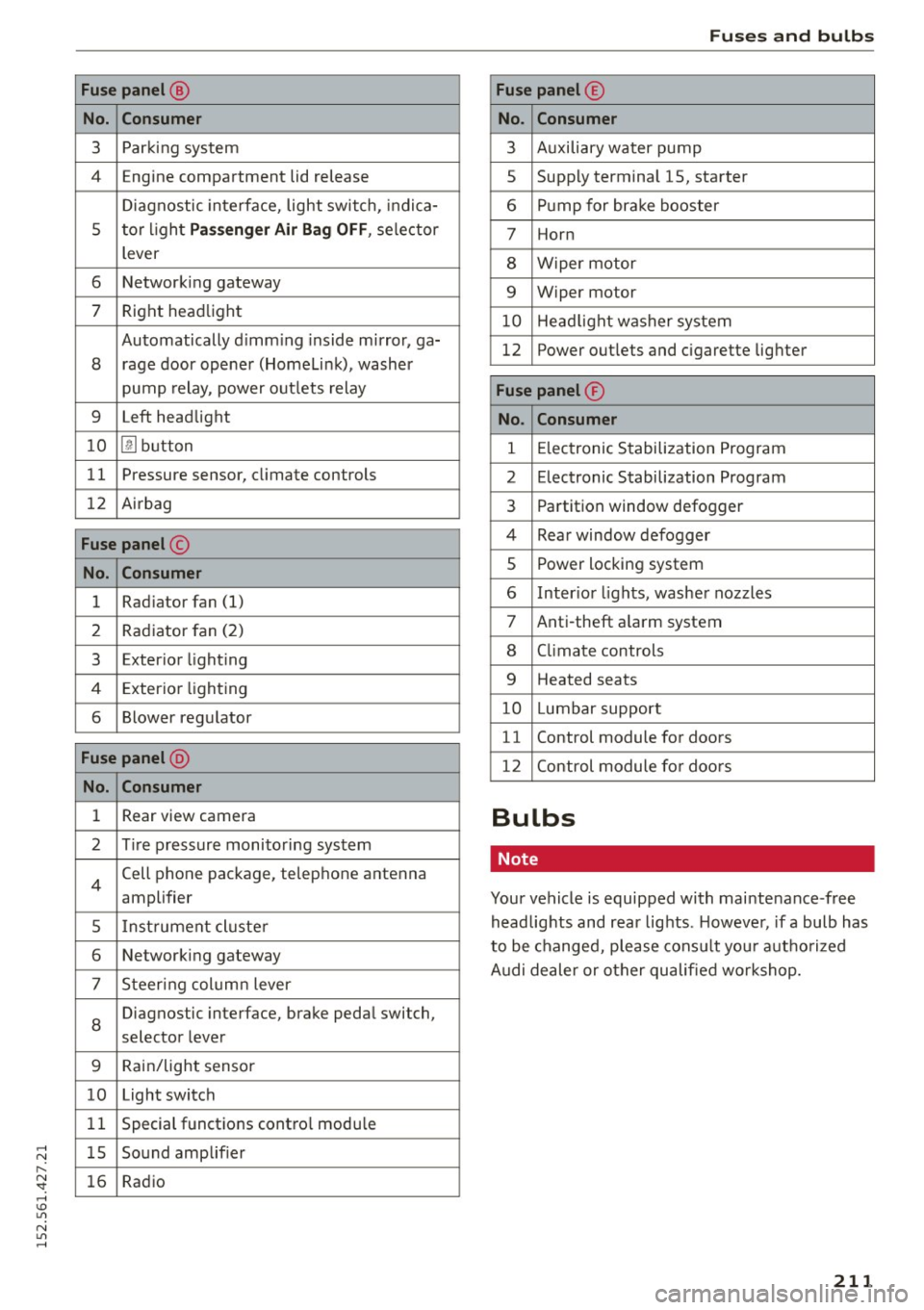
Fuse panel @
No. Con sume r
3 Parking system
4 Engine compartment lid release
Diagnostic interface, light switch, indica-
5 tor l ight
P asse nger A ir Bag OFF , selector
lever
6 Networking gateway
7 Right headlight
Automatically d imm ing inside mirror, ga-
8 rage door opener (Homelink), washer
pump relay, power outlets relay
9 Left headlight
1 0
[!] button
11 Pressure sensor,
climate controls
12 Airbag
Fuse panel @
No. Consumer
1 Radiator
fan (1)
2 Rad
iator fan (2)
3 Exterior lighting
4 Exterior lighting
6 Blower regulator
Fuse pan el @
No. Con sumer
1 Rear view camera
2 Tire pressure monitoring system
4
Cell phone package, telephone antenna
amplifier
5 Instrument cluste r
6 Networking gateway
7 Steering column lever
8
Diagnostic
interface, brake pedal switch,
selector lever
9 Rain/light sensor
10 Light switch
1 1 Special functions contro
l modu le
1 5 Sound amplifier
16 Radio
Fu ses a nd bulb s
Fuse panel @
No . Con sumer
3 Auxiliary water pump
5 Supply terminal
15, starter
6 Pump for brake booster
7 Horn
8 Wiper motor
9 Wiper motor
10 Head light washer system
12 Power
outlets and cigarette lighter
Fuse panel ®
No . Con sumer
1 E lectronic Stabilization Program
2 Electronic Stabilization Program
3 Partition window defogger
4 Rear window defogger
5 Power locking system
6 Inter ior lights, washer nozzles
7 Anti-theft a larm system
8 Climate controls
9 Heated seats
10 Lumbar support
11 Control
module for doors
12 Control module fo r doors
Bulbs
Note
Your vehicle is equipped with maintenance -free
headlights and rear lights . Howeve r, if a bulb has
to be changed, please consult your autho rized
Audi dealer or other qualified workshop.
21 1
Page 215 of 232

Gross Axle We ight Rating
The G ross Axle Weight Rating is the maximum
l oad that can be applied at each axle of the vehi
cle ~.& .
Vehicle capacity weight
The vehicle capac ity we ight (max. load) is listed
e ither on the driver's side B-pillar or inside the
f u el filler flap.
& WARNING
-The actual Gross Axle Weight Rating at the
front and rear ax les should not exceed the
permissible weights, and their combination
must not exceed the Gross Vehicle Weight
Rating.
Dimensions
Length
Width (across mirrors)
He ight (unloaded) al
Technical Data
- Exceeding permissible weight ratings can
result in veh icle damage, acc idents and per
sonal injury.
(D Note
-The vehicle capacity weight figures apply
when the load is distributed evenly in the
vehicle (passenger and luggage). When
transport ing a heavy load in the luggage
compartment, carry the load as near to the
rear axle as possible so that the vehicle 's
handling is not impaired .
- Do not exceed the maximum permissible
axle loads or the maximum gross veh icle
we ight. Always remember that the vehicle 's
handling will be affected by the extra load.
Th erefore, adjust your speed accordingly.
- Always observe local regulations .
in (mm) 174.6 (4435)
in (mm) 80.0 (2029)
in (mm) 49 (1252)
al The heigh t of th e ve hicle depe nds on th e tir es and the s usp en sion .
When driving up steep ramps, on rough roads,
over curbs, etc. i t is important to remember that
some parts of your vehicle, such as spoilers or ex -
Capacities
Fuel tank: total capacity
Windsh ield and headlight* washer fluid conta iner haust system components, may be close to the
ground. Be careful not to damage them.
gal (liters) approx. 21.1 (80.0)
quarts (liters) approx. 4 .2 (4 .0)
213