2015 AUDI Q7 by hand
[x] Cancel search: by handPage 11 of 350

(!) Memory buttons (driver's seat)
@ Door handle
@ Power locking switch .... .. .. .
© Side assist button .......... .
® Adjuster control for outside m ir-
rors .... ... ............... .
@ Air outlets ................ .
(J) Light switch ........... .... .
@ Turn signal and high beam . .. .
® Multifunction steering wheel
with:
- Horn
- Driver's airbag ............ .
- Audio/video, telephone, navi-
gation and vo ice recognition
buttons
- Shift paddles ......... .. .. .
- Button for steering wheel heating ............. .... .
@ Instrument cluster ...... .. .. .
@ Switches for:
- Windshield wiper/washer . .. .
- Trip computer ........ .. .. .
@ Ignition lock ........... .... .
@ Buttons for:
- Parking system
- Resetting the trip odometer ..
- !CHECK lbutton ... ' ... .... .
- Instrument lighting ....... .
'3 Adjustable steer ing wheel, de
pending on equipment:
- mechanical .......... .... .
- electrical ............ .... .
@ Control lever for:
76
44
131
70
99
60
63
186
142
104
10
66
24
107
146
12
12
13
105
105
- Cru ise control ........... .. 113
- Adaptive cruise control . . . . . 115
@ Data Link Connector for On
Board Diagnostics (OBD II) . . . . 27
@ Pedal for operating parking
brake .. .. ............. .... . 111
@ Engin e hood release . . . . . . . . . . 256
~ @ Handle for releasing parking
0 ;;f_ brake. ..... .... .... ... .. .. . 111
; @ Switch for unlock ing the trunk
~ lid . . . . . . . . . . . . . . . . . . . . . . . . 45 ,....,
Instruments and controls 9
@ Power window switches ...... .
@ MMI Display (see separate man
ual)
@ Buttons/Indicator light for:
- PASS ENG ER AIR BAG OFF
- Emergency flashers ........ .
- Electronic Stabilization Con-
trol (ESC) ...... . ......... .
@ Buttons for:
- Switching MMI display on/off
- Valet key function ......... .
- Unlocking glove compartment
@ Glove compartment ......... .
@ Front passenger's airbag ..... .
@ Audi multimed ia (see separate
manua l)
@ Climate controls . .. .. .. ..... .
@) Sh ift lever for automatic trans -
mission ....... .. .......... .
@ 12-volt outlets ... . .. .. ..... .
@ MMI control console (see sepa
rate manual)
@ Storage compartment
@ IS TART I- / IS T OPI button
(D Tips
51
63
223
41
91
91
186
95
139
90
109
Some of the equipment or features shown
in the general illustration may be standard
equipment on yo ur vehicle or may be op
tional equipment depend ing on your mod
el. Always ask your authorized Audi dealer
i f you have a question about your vehicle .
Page 25 of 350

M
"' 0 ..J
"". rl I.O
"' rl
"' rl
Defective light bulb warning
The defective light bulb warning tells you
when a vehicle light bulb has become defec
tive.
Fig . 14 D isplay : defective lig ht bu lb warn ing
The defective light bu lb warning monitors the
function of the light bulbs . If th is symbol
S:!I
illuminates, a brake light, a turn signal (front
or rear), a headlight, the backup light, a fog
light or a rear fog light has failed.
A WARNING
- light bu lbs are pressurized and could ex
plode while they are being changed caus
ing serious personal injury.
- Work w ith due care when handling the
high-voltage section of gas discharge
(xenon) lights. Fa ilure to do so could re
sult in dea th o r se rious injury.
(D Tips
Have the bulb replaced or the connection
repa ired by you r autho rized Aud i Service
department.
Dri ver inform ation di spl ay 23
Service interval display
The service interval display reminds you when
your next service is due .
Fig . 1 5 Display: Serv ice interva l d isplay
T he schedule for the nex t oi l change or inspec
tion is ca lculated automatica lly and disp layed
accordingly. The disp lay works in two stages:
Service reminder
30 days before t he nex t se rvice is due, a serv
i ce reminde r appea rs in the display whe n you
turn on the ignition
~fig. 15.
After about 5 seconds the display switches
back to norma l. The distance and time re
mai ning are updated each time the ignit ion is
turned on unt il t he da te d ue for se rv ice is
reached.
Service due
When the due date fo r se rvice is reached, the
mes sage
Se rv ice due! appears in the instr u
ment cluster immed iate ly after yo u tur n on
the ignit ion. Addit iona lly, a warning tone
sounds. After about 5 seconds the disp lay
switches back to normal.
Calling up the service schedules
If or when an oil change o r inspection is due,
can be shown in the MMI display by selecting
the service in terval d isplay in the car menu .
Se lect
I CAR I funct io n button > Sy stem s* con
trol button
> S ervice inte rval display or I CAR !
function button > Car sy stem s* contro l but -
ton
> Servicing & chec ks > Service in te rv als . ..,_
Page 43 of 350

M
"' 0 _,
-
"' rl
Valet key function
The valet key function prevents unauthorized
persons from opening the glove compart
ment.
Fig. 31 Center conso le: button for va let key funct ion
Activating and deactivating the function
.,. Inse rt the master key into the ignition lock
and switch on the ignition .
.,. Press the
!VALET I button c:> fig. 31 to acti
vate
I deactivate the function as desired .
The indicator light in the button i lluminates
when the function is active.
.,. Remove the master key from the ignition
lock .
.,. Hand over only the valet key
c:> page 38,
fig . 27 to the person who will take charge of
the vehicle.
When the function is switched on, the buttons for opening the rear lid and glove compart
ment have no function. The vehicle can be
d riven and locked and unloc ked w ith the mas
ter key.
(j) Tips
Be sure to activate the funct ion befo re
handing over the valet key to someone
else . The va let key only fits the lock in the
driver's door and the ignition lock.
Power locking system
General description
The power locking system locks or unlocks all
doors and the rear lid simultaneously.
The power locking system in your vehicle in
corporates the fo llowing functions:
Opening and closing 41
- Central locking function
- Select ive un lock feature
c:> page 44
- Remote control feature
c:> page 38
- Convenience key*
c:> page 49
- Anti-theft alarm system
c:> page 50
All the doors and the rear lid are locked by the
central locking system when you lock the vehi
cle. You can set whether generally only the
driver 's door or all doors and the rear lid
should be unlocked when you open the vehicle
in the MMI menu
Central locking to suit your
individual desires
c:> page 44.
Unlocking the vehicle
You can unlock the vehicle from outside either
by using the remote control
or by inserting
and turning the key in the driver's door lock .
When you
unlock your vehicle :
- The anti-theft alarm system is deactivated
briefly .
- The vehicle interior lights illuminate for ap
proximately 30 seconds .
- All turn signal lights will flash twice when
the car is unlocked .
- After un locking the vehicle, you have 60 sec
onds to open a door or the rear lid. After 60
seconds, the vehicle automatically locks and
the anti-theft alarm system activates aga in .
The rear lid can be locked or unlocked either
by using the remote control
or by inserting
and turning the key in the driver's door lock.
Unlocking the vehicle with the remote control
will only unlock the rear lid, to open it, the lid
handle needs to be pressed .
Locking the vehicle
You can lock the vehicle from outside either by
using the remote control
or by inserting and
turning the key in the drivers 's door lock .
When you
lock the veh icle:
- All doors and the rear lid are locked.
- All turn signal lights will flash once when
the car is locked.
- The ant i-theft alarm system is activated.
The horn of the anti-theft alarm system wi ll
sound and the anti-theft alarm system ..,.
Page 44 of 350

42 Openin g and clo sing
readiness light, located in the upper part of
the driver's door panel, will start to blink.
- T he vehicle interior lights turn off.
Unlocking and l ocking with Conven ience
k ey*
On vehicles which a re equipped w ith the C o n
ve nience k ey*
authorization system, the
doors are unlocked without a key by means of
a proximity sensor in the door handle. The
doors are simi larly locked without a key using
the locking button. Each door has a proximity
sensor and a locking button .
Automatic l ock ing
The automatic locking feature locks all the ve
hicle doors and the rear lid when you drive
faster than 9 mph (15 km/h). This function can be turned on and off in the MMI
C entr al
lo cking
Menu c:> page 44.
You can un lock the vehicle from the inside by :
- removing the key from the ign it ion sw itch
(the vehicle will automat ica lly unlock itself)
or
- pressing the unlock part of the power lock
switch @or
- pull ing the door handle (twice to open the
rear doors).
Unintent ionall y locking yourself out
In the following cases there safeguards to
prevent you locking your remote master key in
the vehicle :
- The veh icle does not lock with the power
locking sw itch
c:> page 44 if the driver's
door is open.
- On vehicles with Convenience key* , if the
most recently used master key is in the lug
gage compartment, the rear lid is automati
cal ly unloc ked aga in after it is closed.
Do not lock your vehicle with the
r e mot e m as
t e r k ey or Convenienc e key*
until all doors
and the rea r lid are closed. In t his way you
avoid locking yourse lf out accidenta lly.
A WARNING
- When you lock your vehicle from outside,
nobody- espec ially children -should re
main inside the vehicle . Remember,
when you lock the vehicle from the out
side the windows cannot be opened from
the inside.
- When you leave the veh icle, always re
move the ignition key and take it with
you . This will prevent passengers (chil
dren, for example) from accidentally be
ing locked in the vehicle should they acci
dentally press the power locking switch
in the front doors.
- Do not leave children inside the vehicle
unsupervised. In an emergency it would
be imposs ible to open the doors from
the outside without the key.
(D Tips
- In the event of a crash with airbag de
ployment all locked doors will be auto
matically unlocked to give access to the
vehicle occupants from the outside.
- If the power locking system sho uld mal
function, you can lock each door individ
ually using the vehicle key
c:> page 45 .
-If the power locking system shou ld fa il,
you can still open the fuel tank flap in an
emergency
c:> page 2 52 .
-You are well advised not to keep va lua
bles inside an unattended vehicle, v is ible
or not. Even a properly locked vehicle
cannot p rov ide the secur ity of a safe .
Page 46 of 350

44 Opening and clo sing
& WARNING
Read and follow all WARNINGS c> .&. in
General description on page 42.
Settings in the MMI
The driver can determine the functions for
power locking in the MMI.
• Se lect: ICAR ! function button > Sy stem s*
control button > Central locking . Or
• Se lect : ICAR !funct io n button>
Ca r systems*
control button > Vehicle sett ings > (Cent ral
locking )*.
Passenger 's door *, Left rea r door *, Right re ar
door *, Trunk lid /tailgate *
-You can specify
which doors should unlock when you unlock
the vehicle .
- If you se lect
On and then press the [@) but
ton on the remote control key, the corre
sponding door w ill unlock .
- If you select
Off and then press the[@] but
ton on the remote control key, the corre
sponding door will not unlock. If you press
the
Im button twice, all doors and the lug
gage compartment will unlock . When lock
ing the vehicle, all of the doors and t he lug
gage compar tme nt lock a utoma tica lly.
Unlock doors * -You can spec ify if all doors o r
only the d river's doo r shou ld un lock wh en un
l oc king t he ve hicle.
- If you select All and press the
l@J button on
the remote control key, a ll of the doors and
the luggag e compartment will un lock .
- If you select
Driver and then press the Im
button on the remote control key, only the
dr ive r's door w ill unlock. If you press the
l@J
button twice, all doors and the luggage
compar tment will u nlock. When lo cking the
vehicle, a ll of the doors and the luggage
compartment lock a utomatically. In vehicles
with a convenience key*, only t he door
whose hand le you pu ll w ill unlock.
Auto l ocking /Lo ck when d riv in g -If you se
lect
On , the doors and the luggage compart
ment will lock automatically .
(D Tips
The central locking settings are stored in
the remote control key .
Locking and unlocking the vehicle from
inside
The vehicle can be locked or unlocked from
the inside using the power locking switches .
Fig. 34 Front doors: power lock ing switc h
Fig. 35 Rear doors : powe r locking switch
• Press the button@ to unlock the veh icle.
• Press the b utton @to loc k the veh icle
c> ,&. .
You w ill find a power locking switch in eac h
doo r. You can
lock and unlock the vehicle us
i ng the switches in the drive r's or passenger's
doo r
c> fig. 3 4. You can o nly lock the vehicle
u sing the switches in the rear doors
<=>fig . 35.
If you lock the veh icle using the power locking
switch, p lease note the following:
- Yo u cannot open the doors or the rear lid
from the
outside ( in cr eased se curity, for ex
ample when you are stopped at a red light).
- The diodes in the powe r locking switches il-
lum inate when all the doors and the rear lid
are closed and locked .
Page 47 of 350
M
"' 0 _,
"". rl I.O
"' rl
"' rl
-Front doors: you can un lock and open the
doors from the inside by pulling on the door
handle.
- Rear doors: pu ll the door handle
once to re
lease the lock. Pull the hand le
again to open
the doo r.
- If the driver's door is opened (after you have
locked the vehicle from the inside using the
power locking switch), the door will remain
unlocked to prevent you from locking your
self out of your vehicle . After you close the
door, you have to lock the driver 's door
again .
- If you have a crash and the airbag is act ivat
ed, the doors automatically unlock.
A WARNING
- If you use the powe r locking switch with
the doors closed, remember that all the
vehicle doors will lock.
- Locked doors make it more difficult for
emergency workers to get into the vehi
cle, which puts lives at risk. Do not leave
anyone behind in the vehicle, especially
children.
Emergency locking
If the central locking system fails (power sup
ply), each door has to be locked separately.
Fig. 36 Em ergency lockin g o f the front passe nger's
doo r
i:i N
-..:,
~
An emergency locking mechanism is integrat
ed in the edge of the passenger's door and in
the rear doors (only visible when the doo r is
open) .
~ Open the door.
Opening and closing 45
~ Pull the protective cover out of the hole
qfig. 36.
~ Insert the key into the inner s lot and turn it
to the right (right-s ide doors) or the left
(left-s ide door) as far as it can go.
After yo u close the door, you will no longer be
able to open it from the outside.
T he door can be opened from the inside by
pulling once respectively twice (rear doors) on
the door handle . If the chi ld safety lock is en
gaged in one of the rear doors, the door has to
be opened from the outside after pulling on
the handle once from the inside.
Rear lid
Opening and closing rear lid
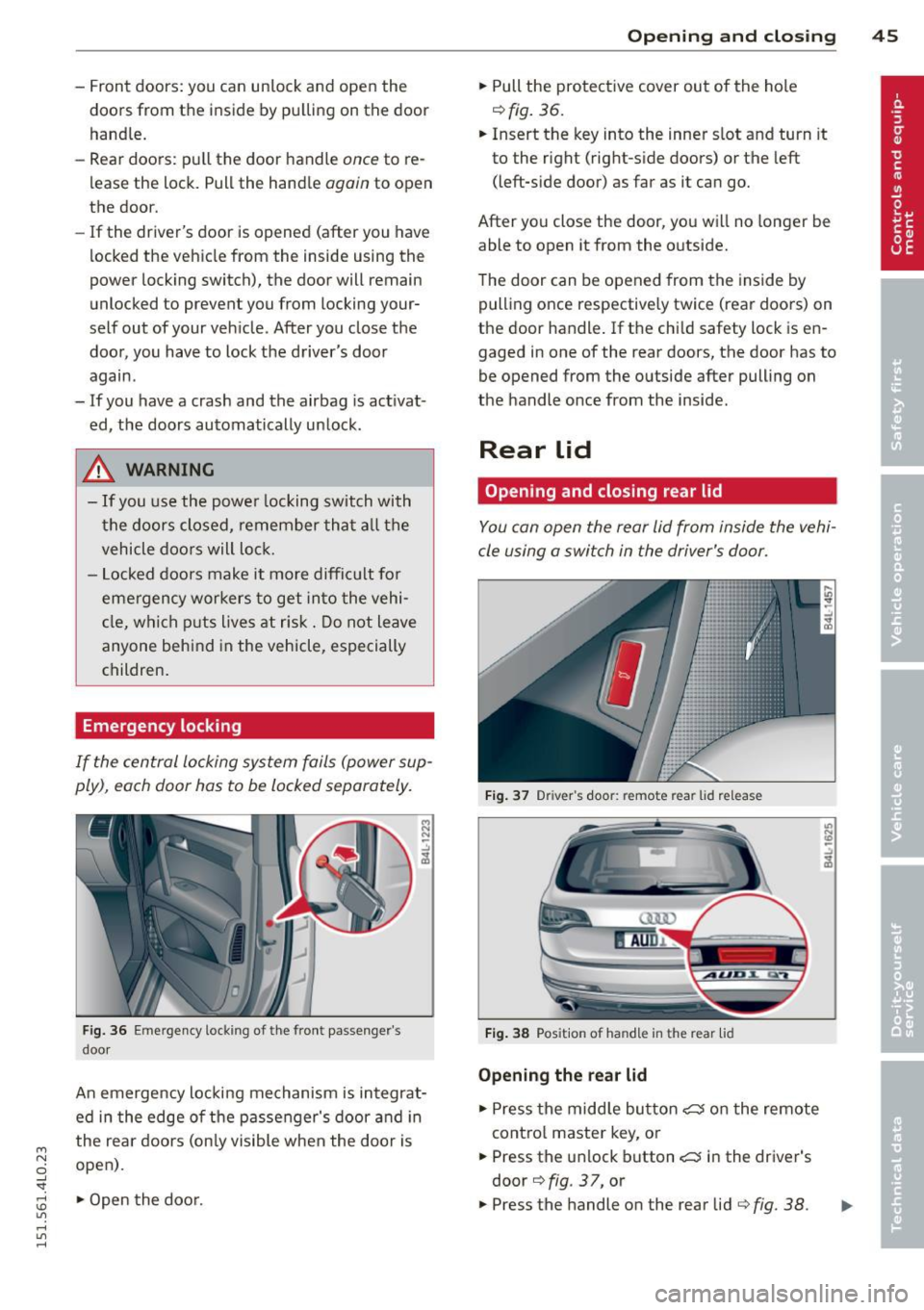
You can open the rear lid from inside the vehi
cle using a switch in the driver's door.
Fig. 37 Driver 's doo r: remote rear lid release
Fig. 38 Posit io n of ha ndle in t he re ar lid
Opening the rear lid
~ Press the middle button c:, on the remote
cont rol master key, or
~ Press the unlock button c:, in the driver's
door
q fig . 37, or
~ Press the handle on the rear lid qfig. 38.
U) N
"' -..:,
i3
Page 48 of 350

46 Opening and clo sing
• The rear lid un locks automatically and opens
slightly .
• Lift the rear lid.
Clos ing th e re ar lid
• Pull the rear lid dow n and a llow it to drop
gently. The lid is then closed automat ica lly
Q A .
A WARNING
-After closing the rear lid, always pull up
on it to make sure that it is properly
closed. Otherw ise it could open suddenly
when the vehicle is moving.
- To help prevent po isonous exhaust gas
from being drawn into the vehicle , al
ways keep the rear lid closed while dr iv
ing. Never transport objects larger than
those which fit completely into the lug
gage area, because then the rear lid can
not be fully closed.
- Never leave you r vehicle unattended es
peci ally wi th the re ar lid left open. A
child could c rawl into the ca r through the
l u ggage compartment and pull the lid
shut, becom ing trapped and unab le to
get out. To reduce the risk of persona l in
jury, never let children play in or around
yo ur vehicle . Always keep the rear lid as
well as the vehicle doors closed when not
in use.
- Always ensure that no one is w ith in
range of the rear lid when it is mov ing, in
part icula r close to the h inges -fingers o r
hands can be pinched.
@ Tips
- If the rear lid is open or not properly
closed w hen the ign ition is turned on,
the door and rea r lid war ning
Q page 22
appears in the ins trument clus ter dis
play.
- Should you not be able to open the rear
li d as described, make sure the valet key
function is not activa ted
~ page 41.
Automatic rear lid/trunk lid operation
Applies to vehicles: with automatic rear lid/trunk lid oper
ation
The trunk lid can be opened and closed auto
matically.
Fig. 39 Drive r's door: Unlock ing t he rea r lid
Fi g. 40 Locking sw itc h in th e rear lid
Opening rear lid
• Press the middle button cs on the remote
key for at least one second, or
• Press the unlock button
c::; in the driver's
door~
fig. 39, o r
• Press the handle on the rear lid
~ page 45,
fig. 38.
• The opening process is stopped immediate
ly if the middle button cs on the remote
key is pressed again for at least one second
or the unlock button
cs in the driver's door
is pressed again or the hand le in the rear lid
is pressed again.
• Middle button in the remote key and unlock
button in the driver's door:
The open ing
process is cont inued by pressing on e of the
buttons aga in .
• Handle in the rear lid: the rear lid is closed
ag ain by p ress ing the handle again
Q A . ..,.
Page 49 of 350

M N
0 ...J
'SI: ,...., \!) 1.1"1 ,...., 1.1"1 ,....,
Clos ing re ar lid /trunk lid
"' Press the close button in the open rear lid
~ fig. 40. The trun k lid moves to the closed
posit ion by itself and soft close locks it auto
matically ~&_ .
"' The closing process
is stopp ed immediately
if the close button in the rear lid is pressed
again.
"' By push ing the button again, the rear lid is
opened again .
Setting the rear lid o pen po sition
"' Bring the rear lid into the desired open posi
t ion. The posit ion can only be stored when
the lid is above a certain height .
"' Press and hold the
~fig . 40 button for at
least four seconds to store the desired open
pos ition.
"'T o set a h igher open position , wait at lea st
five seconds and then carefu lly press the
rear lid upward.
"' Press and ho ld the ~
fig. 40 button again for
at least four seconds and this will store the
new open position.
A WARNING
- Never close the rear lid inattentively or
without checking fi rst . Although the
closing force of the rear lid is lim ited,
yo u can st ill ser iously injure yourself or
others.
- Always ensure that no one is w ith in
range of the rear lid when it is mov ing, in
part icu lar close to the h inges and the up
per and lowe r edges -fingers or hands
can be p inched.
- T o help p reven t po isonous exha ust gas
from being d rawn into the vehicle, al
ways keep the rear lid closed while driv ing. Never transport objects larger than
those which fit completely into the lug
gage area, because then the rear lid can
not be fully closed .
- Never leave your vehicle unattended es
pecially with the rear lid left open. A
child could crawl into the car through the
luggage compartment and pull the lid
-
Opening and clo sin g 47
shut, becoming trapped and unable to
get out. To reduce the risk of personal in
jury, never let ch ildren play in or around
your veh icle . Always keep the rear lid as
well as the vehicle doors closed when not in use .
- If there is a l uggage rack or b icycle rack
mounted on the rear lid, it may not be
ab le to open completely o r an opened
rea r lid may close by itself because of the
ad ded weight. So the open rear lid mus t
be supported or the weigh t must be re
moved from the luggage rac k first .
(D Tips
- If the rear lid is open o r not properly
locked when the ign ition is turned on ,
t he door and rear lid warning ~
page 22
appears in the instrument cluster dis
play.
- The automatic rear lid opening/clos ing
process can be stopped by ho ld ing the
rear lid w ith your hand. The lid can then
be further opened/closed by hand.
- If there is a mechan ica l problem wit h the
automatic rear lid
opening process or
there is an obstruction, the process is
stopped immediately .
- If there is a mechan ica l problem with
au
tomatic closing for the rear lid or there
is an obstruction, it ope ns again slightly
r ight away. Check to see why the rear lid
cou ld not be closed before attempting to
close it again .
- If the rear lid on a locked vehicle is un
locked with the midd le button
c:5 on the
remote key, the rear lid i s automat ically
locked agai n immed iate ly afte r closing.
T his is indicated by the turn signals
blinking .
- T he followin g applies to vehicles equ ip
ped with the Convenience key* feature: i f
the remote control key is left in the lug
gage compartment, luggage compart
ment w ill automatically unlock itself a f
ter you lock the vehicle. Th is prevents
you from unintentionally lock ing you r
key in the luggage compartment. ...,