2015 AUDI Q3 ESP
[x] Cancel search: ESPPage 8 of 258

6 About this Owner's Manual
This owner's manua l contains important infor
mation, tips, suggestions, and warnings for
the use of your veh icle.
Make sure that this owner's manua l is always
located in the vehicle. This is especia lly impor
tant if you allow other people to drive the ve
h icle, or if you sell it.
This owner's manua l descr ibes the
equipment
range
specified for this mode l at the editoria l
deadline date. Some of the equipment descri
bed here will on ly be available at a later date,
or only in specific markets.
Some sections in this owner's manua l do not
apply to a ll vehicles . In that case, the
range of
applicability
is g iven at the beginn ing of the
section, e.g., "Applies to vehicles: with adap
tive light". In addition, optional or vehicle
specif ic equ ipment is indicated by an asterisk
"*"
Illustrations may be different from those in
your vehicle, and are intended to be viewed as
a basic guide .
You will find a
table of contents at the begin
n ing of this book, which disp lays all topics de
scr ibed in this manual in order of appearance.
You will find an alphabetical
index at the end
of this book .
All
directions , such as "left", "right", "front",
''back", are relative to the direct ion of travel.
* Optional or vehicle-specific equipment
.,.. This section continues on the next page.
~ .&. Cross-reference to a "WARNING!" with
in a sect ion. For ind ication w ith a page num
ber, the corresponding "WARNING!" can be
found outside of the section .
A WARNING
Text with this symbol contains important
information on safety and how to reduce
the risk of personal injury or death.
(D Note
Text with this symbo l draws your attention
to potentia l sources of damage to your ve
hicle.
@) For the sake of the environment
Text with this symbo l contains information
abo ut the environment and how you can
help protect it.
{!) Tips
Text with this symbo l contains specia l tips
and other information about gett ing the
most out of your vehicle and its features.
Page 15 of 258
M N
M N
0 ::i co ,...., \!) 1.1'1 ,...., 1.1'1 ,....,
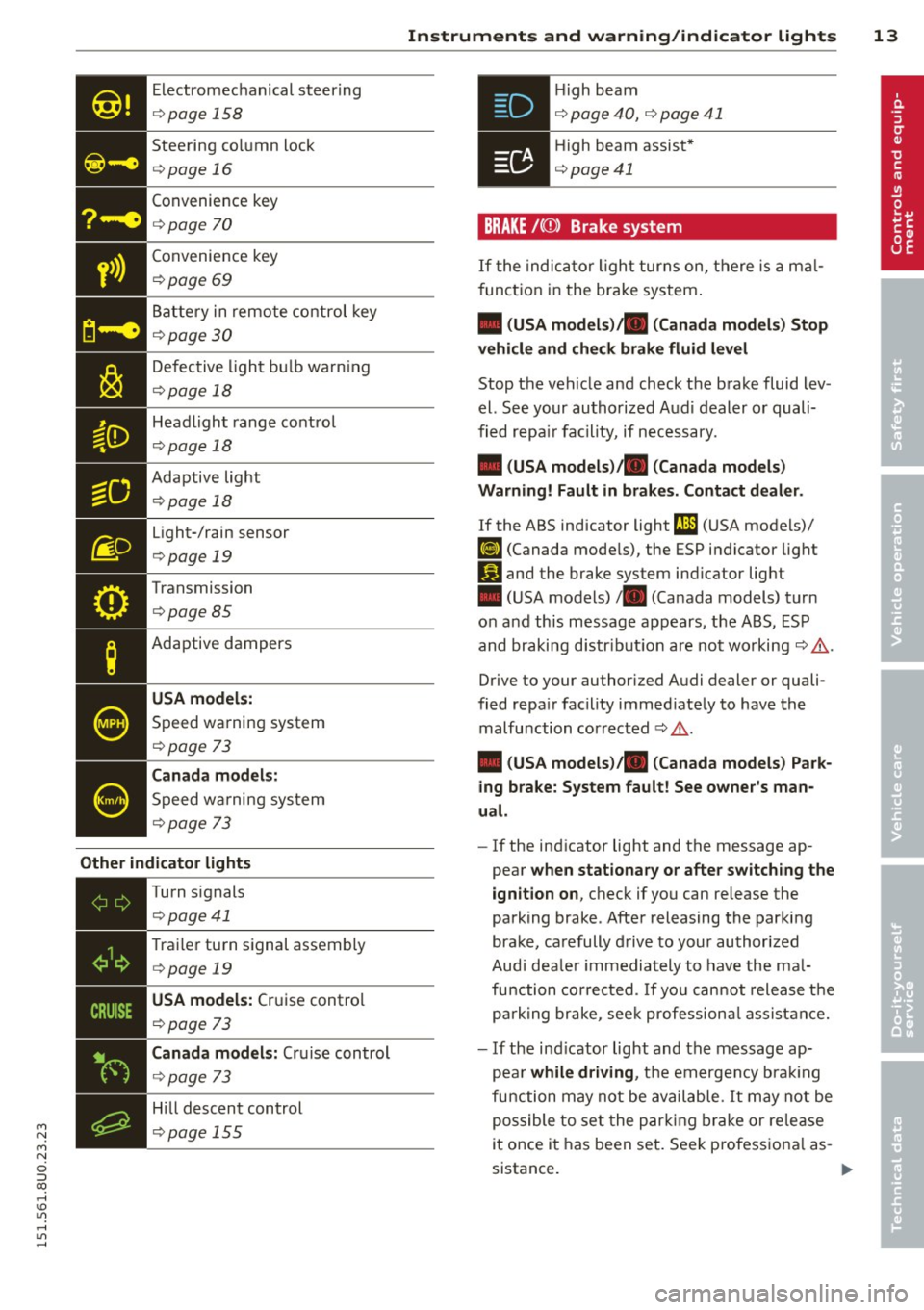
Electromechanical steering
¢page 158
Steering column lock
¢page 16
Convenience key
¢page 70
• Convenience
key ¢page 69
Battery in remote control key
¢ page 30
Defective light bulb warn ing
¢ page 18
Headlight range control
¢page 18
- Adaptive light
- ¢page18
Light-/rain sensor
¢ page 19
Transmission
¢page 85
Adaptive dampers
USA models:
Speed warning system
¢page 73
Canada models:
Speed wa rning system
¢page 73
Other indicator lights
•iii
Turn
signals
¢ page41
• T
rai ler turn signal assembly ¢ page 19
• USA models:
Cruise control
¢
page 73
Canada models: Cruise control
¢page 73
Hill descent control
¢page 155
Instruments and warning/indicator lights 13
.Hi gh beam
• ¢ page 40, ¢ page 41
• High beam assist*
¢page41
BRAKE /((D ) Brake system
If the indicator light turns on, there is a mal
function in the brake system.
• (USA models)/ . (Canada models) Stop
vehicle and check brake fluid level
Stop the veh icle and check the brake fluid lev
el. See your authorized Aud i dealer or quali
fied repa ir facility, if necessary.
• (USA models)/ . (Canada models)
Warning! Fault in brakes. Contact dealer .
If the ABS indicator light t1l1 (USA models)/
fiJ (Canada models), the ESP indicator light
Iii and the brake system ind icator light
• (USA models)/ . (Canada models) turn
on and this message appears, t he ABS, ESP
and braking distr ibution are not working¢&.
Drive to your authorized Audi dealer or quali
fied repa ir facility immed iately to have the
malfunction corrected ¢ & .
• (USA models)/ . (Canada models) Park
ing brake: System fault! See owner's man
ual.
- If the indicator light and the message ap
pear
when stationary or after switching the
ignition on,
check if you can release the
park ing brake . After releasing the parking
brake, carefully drive to your author ized
Audi dea le r im mediately to have the mal
function corrected. If you can not release the
park ing brake , seek professional assistance.
- If the ind icator light and the message ap
pea r
while driving , the emergency brak ing
function may not be available. It may not be
possible to set the parking brake or release
it once it has been set. Seek pro fessiona l as-
sistance. .,.
Page 16 of 258
![AUDI Q3 2015 Owners Manual 14 Instrum ent s and w arn ing /indic ato r light s
(USA models): If the warning light . and the
warning light
ll] appear together, immedi
ately contact your authorized Audi deale](/manual-img/6/57629/w960_57629-15.png "AUDI Q3 2015 Owners Manual 14 Instrum ent s and w arn ing /indic ato r light s
(USA models): If the warning light . and the
warning light
ll] appear together, immedi
ately contact your authorized Audi deale")
14 Instrum ent s and w arn ing /indic ato r light s
(USA models): If the warning light . and the
warning light
ll] appear together, immedi
ately contact your authorized Audi dealer or
qua lified workshop to have all brake pads in
spected
¢ page 17.
When the light comes on, an audib le warning
signal is also given .
.&_ WARNING
- Always observe the warnings in
¢ page 179, before opening the hood
and checking the brake fluid.
- Driv ing with low brake fluid is a safety
hazard. Stop the car and get professional
assistance.
- If the . (USA models) . (Canada
models) brake system indicator light
turns on together with the ABS and ESC
indicator lights, the ABS/ESC regu lating
function may have failed. Functions that
stabilize the vehicle are no longer availa
ble. Th is could cause the vehicle to
swerve and increase the risk of sliding .
Drive carefully to the nearest a uthorized
Audi dealer or other qualified workshop
and have the malfunction corrected.
- If the brake warning/indicator light does
not go out after a few seconds and the
park ing brake is released, or lights up
wh ile you are driving, the fluid level in
the brake fluid reservoir is too low .
If you
believe that it is safe to do so, proceed
immediately at low speed to the nearest
authori zed Audi dealer o r qualified wo rk
shop and have the bra ke system inspect
ed.
- Always keep in m ind that after several
brake applicat ions, yo u will need greater
pressure on the brake peda l to stop your
vehicle. Do not re ly on strained brakes to
respond with maxim um stopping power
in critical situations. You must allow for
increased brak ing distances. The extra
distance used up by fad ing brakes could
lead to an acc ident.
PARK !<®> Electromechanical parking brake
The warning/indicator light monitors the
electromechanical parking brake .
If the indicator light. (USA models) •
(Canada models) turns on, the parking brake
was set.
• (USA model s)/. (Canada models ) Press
brake pedal to release parking b ra ke.
To re lease the park ing brake, press the brake
peda l and press the button(®) at the same
t ime or start driving with starting assist
¢ page 71, Starting from rest.
Ill Pa rking br ake : S ys tem f ault! See owne r's
manual.
If the I.II ind ic a tor light tu rns o n and this
message appears, there is a parking b rake
malfunction. Drive to your authorized A udi
dealer or qualified workshop immediately to
have the malfunct ion corrected.
@ Tips
More informat ion on the parking brake
¢page 70 .
-L Engine cooling system
A malfunction in the engine cooling system
must be repaired as soon as possible.
• Turn off engine and ch eck coolant level
T he coolant level is too low .
Do not continue dr iving and turn
off the en
gine. Check the coo lant level
¢ page 186.
-If the coo lant level is too low, add coo lant
¢ page 186. Only continue driving if the in
dicator light turns off.
- If the coo lant level is correct, then the ma l
function may be ca used by fa ilure of the
coolant fan. Do not continue driving. See
your authorized Audi dealer or qualified re pa ir fac ility .
• Coolant temperature! Let engine run
w ith vehicle stationar y.
Page 17 of 258

M N
M N
0 ::i co ,...., \!) 1.1'1 ,...., 1.1'1 ,....,
Instrument s and warnin g/indic ator ligh ts 15
If the indicator light turns on and the mes
sage appears , let the engine run at idle for a
few minutes to cool down .
A WARNING
-If your veh icle should break down for
mechanical or other reasons, park at a
safe distance from moving traffic, turn
off the engine and turn on the hazard
warning lights¢
page 43, Emergency
flashers.
-
- Never open the hood if you see or hea r
steam o r coolant escap ing from the en
gine compartment - you risk being s cald
ed . Wa it until you can no longe r see or
hear s team or coo lant escaping .
- T he e ngine compartment of any veh icle
is a dangerous a rea. Before you perform
any work in the engine compartment,
tu rn of the engine and allow it to cool.
Follow the warning stickers¢
page 179.
(D Note
Do not contin ue driving if the . symbo l
illuminates. There is a ma lf u nct ion in the
engine cooling system -you co uld damage
your eng ine.
requires immediate service or repair . Driving
with a low-oil -pressure indication is likely to
inflict severe damage to the engine.
• Turn off engine! Oil pressu re i s too low.
Tu rn off the eng ine and do no t continue dr iv
ing . Chec k the engine oil leve l¢
page 184.
- If the engine oil level is too low, add engine
o il ¢
page 184 . Only continue dr iv ing if the
indica tor l igh t turns off.
- If the engine oil leve l is correct and the indi
c ator lig ht st ill turns on, tur n the eng ine off
and do not contin ue d riving. See yo ur a u
tho rized Aud i dea le r or q uali fied repa ir fa
c ili ty.
(D Tips
- The engine oil pressure symbol. is
not an indicator for a low engine o il lev
el. Do not rely on it . Instead, check the
o il level in yo ur engine at regular inter
vals, preferably each time you refuel ,
and alway s before going on a long trip .
- The yellow oil lev el warn ing indication
l!I requires oil refill or workshop serv
ice without delay . Do not wait until th e
red oil pressure warning. start s to
fla sh before you respond to the low oil
level warning
m. By then, your engine
may alread y have suffered serious dam
age.
D Battery
The .warn ing/ indicator light i llum inates
when you switch on the ignition and must go
out after the eng ine has started.
• Alternator fault : Battery is not being
charged.
If the indicator light turns on and the mes
sage appears, there is a malfunction in the generator or vehicle electrical system .
Drive to your authori zed A udi dealer or quali
fied wor kshop immed iate ly . Because the ve hi
cle battery is discharging, turn off all unnec
essary e lectrical equipment such as the radio.
Seek professiona l assistance if the battery
charge level is too low.
(•) low battery cha rge: B atter y will be
charged while driving .
If the indica to r ligh t turns on and the mes
sage appears, there may be limited sta rting
ability .
If this message turns off afte r a little while,
the battery c ha rged enough while drivi ng.
If the message does not turn off, have you r
autho rized Aud i dea le r or qualified wor kshop
cor re ct t he malfu nction.
Page 22 of 258

20 Driver in formation d ispl ay
Driver information
display
Overview
The driver information display inside the in
strument cluster provides you, the driver ,
with much useful information.
Fi g. 4 Dis play on vehicle s w it h dri ve r in fo rma tion sys
tem * and mult ifunc tion steering w hee l*
:ii N 9 ::> a, a,
Depending on the vehicle equ ipment, the driv
er informat ion system can be operated us ing
the cont rols on the w indshield wipe r lever*
¢
page 21 or on the m ultifunction steering
wheel *¢
page 21 .
If your vehicle is equ ipped with a mult ifunc
tion stee ring wheel, t he informat io n @ is
shown in d isplay tab s@ . The tabs appear as
soon as you opera te one of the controls on the
multif unction steering wheel* .
Th e inst rument cluster display shows the fol
l ow ing:
® T im e and date ¢ page23
Digital speedometer
Tr ip compu ter ¢
page 22
Effic iency program ¢ page 24
Simplified view*
Indicator lights and drive r me ssages
¢page 11
Warning when a door, the hood or the
rea r lid is not closed¢
page 23
Service inte rval display ¢ page 25
Cruise control ¢ page 73
Parking system* ¢page 87
Audio*
Telephone*
Navigation *
© Odometer/trip odometer ¢ page 23
® Outs ide temperature , Gearshift selec-
tor pos itions*, Indicator light for high
beam assist *
Auto Check Control
Some f unctions and vehicle components are
scanned for their operating status when yo u
switch the igni tion on and whi le you a re driv
i ng . Malfunctions or required service proce
dur es are s ignaled audib ly and ind icated by
red and yellow illuminated symbols and re
minders in the d isp lay.
8, WARNING -
- Never rely exclusively o n the o utside
t empera ture display to de termine i f a
road surface is icy or not. Keep in m ind
that road surfaces, espec ia lly bridges
and overpasses, co uld be ice
covered and
slippery
even at an outside tempe rature
above 41 °F ( +S 0
() .
-Always remember, even if the "snow
f lake" symbol (ice warning) does not ap
pear in the d isp lay, black ice cou ld be on
the road .
- Always reduce your speed a nd drive with
specia l care in cold weathe r cond itions
when the chance of encounter ing icy
road surfa ces inc reases .
Page 24 of 258

22 Driver information display
Resetting values to zero
.,. Se lect Computer or Efficiency program
from the Vehicle functions menu.
.,. Se lect a value in the desired trip computer
or the efficiency program.
.,. To reset the figures in the selected memory
to zero, press the thumbwheel @for one
second.
Assigning a function to the steering wheel
button
.,. Se lect : I MENU I button > Systems or Car Sys
tems
> Vehicle settings > Steering wheel
button .
Calling up warning/indicator lamps and
driver messages again
.,. Select the display tab marked 0 .
The tab marked D is only visible if one or
more warning/indicator lamps or driver mes
sages are disp layed. Other tabs are only visi
b le if the corresponding system is switched
on .
Trip computer
Fig. 8 Tri p computer d isp lay: Memo ry leve l 1
Operation by windshield wiper lever*
.,. Press the I RESET I button @¢ page 21,
fig. 5 repeatedly unti l the trip computer ap
pears on the display .
.,. To show more information, press button@.
Operation by multifunction steering
wheel*
.,. Call up the vehicle functions and select
Computer from the menu ¢ page 21.
.,. To show more information, scroll the
thumbwheel @9page21,
fig. 6 .
T he number
D or fl in the top corner of the
trip computer display shows which t rip com
puter is currently being displayed .
T rip computer
D ¢ fig. 8 is a s ingle journey
memory. It processes the information on a
jo urney from the time the ignition is switched
on until it is switched off. If the journey is re
sumed within two hours after the ignit ion is
switched off, the new figures are automatical
ly included in the calculation .
Unlike the single journey memory, the total
journey memory (trip computer
fl ) is not
erased automatically. In this way, you can de
termine the period for which you wish the trip computer to supply dr iv ing information.
You can call up the following information se quentially on trip computer
D or fl:
- Date
- Fue l range
- Dr iving t ime (h)
-Average fuel consumption
- Average speed
- Distance covered
- Current fuel consumption
(D Tips
-All va lues stored in the memory are
erased if the vehicle battery is discon
nected.
- Th e measurement units may be different
on vehicles for some markets.
- For information on the efficiency pro
gram, refer to ¢
page 24 .
Page 27 of 258

M N M N
0 ::i co
rl I.O
"' rl
"' rl
Fuel economy messages
App lies to vehicles: with trip computer w it h eff ic iency
p rogram
Fig . 14 Display: fuel economy message
Fue l economy messages are disp layed when
fuel consumption is increased by certain con
ditions. If you follow these fuel economy mes
sages, you can reduce your vehicle's consump
tion of fuel. The messages appear automati
cally and are only displayed in the effic iency
program. The fuel economy messages turn off
automatically after a certain period of time.
• To turn a fuel economy message off immedi
ately, press any of the controls on the wind
shield wiper lever*/multifunction steering
whee l* .
(D} Tips
- Once you have turned a fuel economy
message off, it will only appear again af
ter you t urn the ignition on aga in.
- The fuel economy messages are not dis
played in every instance, but rather in in
te rva ls over a period of time.
Dri ver inform ation di spl ay 25
Service interval display
The service interval display reminds you when
your next service is due.
Fig. 15 Display: Service interval display (example)
The schedule for the next o il change or inspec
t ion is ca lculated automatica lly and disp layed
accord ingly. The d isp lay works in two stages:
-Serv ice rem inder: After a spec ified number
of miles, a message appears in the instru
ment cluster display when switching the ig
nition on
¢fig. 15. The rema ining dis tance
or time is displayed br iefly.
- Se rvi ce due : When the due date for serv ice
is reached, the message
Se rvic e due! ap
pears in the instrument cluster immediate ly
after you turn on the ignition .
Calling up the service schedules
If or when an oil change or inspection is due,
can be shown in the rad io or MMI* disp lay by
selecting the service i nte rva l display in the car
menu . Selec t!CAR ! fuction button>
Sy ste m s
or C ar s ystem s > Ser vicing & check s > Service
intervals.
Resetting the service interval displa y
Your author ized Audi dealer will reset the cor
respondi ng service schedule after pe rforming
the appropr iate service on your veh icle. You
also have the possibi lity to reset the oil
change schedule after having performed an
oil change according to Audi specifications.
Se lect !CARI function button>
Sy stem s or Ca r
sy ste ms
> Servicing & checks > Service int er-
val s
> Reset oil cha nge int erval. ""
Page 31 of 258

M N M N
0 ::i co
rl I.O
"' rl
"' rl
-Do not leave children inside the vehicle
unsupervised. In an emergency it would
be impossible to open the doors from
the outside without the key.
(D Tips
- In the event of a crash with airbag de
ployment all locked doors will be auto
matically unlocked to give access to the
vehicle occupants from the outside .
- If the power lock ing system should mal
function, you can lock the driver's door
using the ign it ion key¢
page 33.
-If the power lock ing system should fail,
you can still open the fuel tank flap in an
emergency
c:> page 178.
- You are well advised not to keep valua
bles inside an unattended vehicle, visible
or not . Even a properly locked vehicle
cannot provide the security of a safe.
- If the LED in the upper edge of the driv
er's door panel comes on for about 30
seconds after the vehicle is locked, there
i s a ma lfunction in the power locking or
the anti-theft warning system. Have the
malfunction corrected by an authorized
Audi dealership or qualified repair facili
ty.
Key set
Fig. 17 Key set
The key set contains two remote control keys
or convenience keys*. To fold the key out or in,
press the release button¢
fig. 17 -arrow-.
Opening and closing 29
@ Remote control key or convenience
key*
The convenience key is a vehicle remote con
trol key with special functions
c> page 31,
Locking and unlocking with convenience key
and c> page 68, Starting the engine.
With the remote contro l key, you can lock and
unlock the vehicle centrally and start the en
gine.
Key replacement
If you lose a key, contact your authorized Audi
dealer immediate ly to have the
lost key disa
bled. Be sure to bring all your keys with you.
Number of keys
You can check how many keys are initialised
for yo ur vehicle on the instrument cluster dis
play. It is displayed wh ile you are setting the
time
c:> page 23. For example, 1/2 means that
one of two keys have been initialised for the.
This allows you to make sure you have re
ce ived all of the keys when you purchase a
u sed vehicle.
A WARNING
--
-Do not leave your vehicle unattended
with the key in the ignition lock. Entry by
unauthorized persons could endanger
you o r result in theft or damage the vehi
cle.
- Do not leave children unattended in the
veh icle, especially with access to vehicle
keys . Unguarded access to the keys pro
vides children the opportunity to start
the engine and/or activate vehicle sys
tems such as the power windows etc. Un
supervised operation of any vehicle sys
tem by children can result in serious in
jury .
- Do not remove the key from the ign ition
lock until the vehicle has come to a com
plete stop. Otherwise the steering col
umn lock could suddenly engage -caus
ing the risk of an accident.