2015 AUDI A8 washer
[x] Cancel search: washerPage 4 of 312

2 Table of contents Vehicle literature .. .. .. .. .. ... .
5
About this Owner's Manual . . . 6
Controls and equipment .. ... .
Ins truments and controls .. . .
General illustration ......... .. ... .
Instruments and warning /
indicator lights ........ .. .. .. . .
Instruments ............ ... .. ... .
Warning/indicator lights .......... .
Driver information display .. .. .. ... .
On-Board Diagnostic system (OBD) . . .
Opening and closing .. .. .... . .
Keys .. ...... ........... .. .. ... .
Power locking system ..... .. .. .. . .
Luggage compartment lid .. .. .. .. . .
Child safety lock . .......... ... .. . .
Power windows . .......... ... .. . .
Valet park ing . ........... .. .. ... .
Sliding/tilting sun roof ... .. .. .. .. . .
Panoramic sunroof ........ .. .. ... .
Clear vision .. ........ .. .. .. .. . .
Lights . .. .. ............. .. .. .. . .
I nterior lights .............. .. ... .
V1s1on ..... ... .... ......... .... .
Wiper and washer system ... ... .. . .
Mirrors ................. .. .. ... .
Digital compass .......... .... ... .
Seats and storage ....... .. .. . .
General recommendations ..... .. . .
Front seats ... ........... .... ... .
Rear seats .. ... .... ...... .. .. .. . .
H ead restraints .............. .. . .
Seat memory . ... ..... ... .. .. .. . .
Full-length center console .... .. ... .
L uggage compartment .. .. .. .. ... .
Pass-through with ski sack ........ .
Roof rack ....... ......... ... ... .
12-vo lt sockets ........ ... .. .. ... . 8
8
8
1 0
10
11
23
29
3 1
31
33
37
4 1
41
42
43
44
4 6
46
so
51
53
55
56
58
58
59
61
65
66
68 70
71
72
74
Storage . . . . . . . . . . . . . . . . . . . . . . . . . 74
Cooler . . . . . . . . . . . . . . . . . . . . . . . . . . 76
Warm and cold .......... ..... .
Climate controls . ............. ... . 78
78
On the road . . . . . . . . . . . . . . . . . . . 8 2
Steering . . . . . . . . . . . . . . . . . . . . . . . . 82
Starting and stopping the engine . . . . 83
E lectromechanical parking brake . . . . 85
Start-Stop-System . . . . . . . . . . . . . . . . 87
Speed warning system . . . . . . . . . . . . . 90
Cruise control . . . . . . . . . . . . . . . . . . . . 90
Audi adaptive cruise control
and braking guard . . . . . . . . . . . .
92
Introduction . . . . . . . . . . . . . . . . . . . . . 92
Genera l information . . . . . . . . . . . . . . 92
Audi adaptive cruise control . . . . . . . . 94
Audi braking gua rd . . . . . . . . . . . . . . . 98
Messages . . . . . . . . . . . . . . . . . . . . . . . 99
Audi active lane assist . . . . . . . . 101
Active lane assist . . . . . . . . . . . . . . . . . 101
Audi side assist . . . . . . . . . . . . . . . 10 4
Lane Change Assistant. . . . . . . . . . . . . 104
Audi drive select . . . . . . . . . . . . . . 108
Driving settings . . . . . . . . . . . . . . . . . . 108
Raising/lowering the vehicle..... .. . 110
Driver messages . . . . . . . . . . . . . . . . . . 110
Night vision a ssistant ........ . 111
Night vision assistant with pedestrian
and wild animal detection . . . . . . . . . . 111
Automatic Transmission . . . . . . 114
tiptronic (8-speed transmission) . . . . . 114
Parking systems . . . . . . . . . . . . . . 120
General information . . . . . . . . . . . . . . 120
Parking system plus with rear view
camera . . . . . . . . . . . . . . . . . . . . . . . . . 121
Peripheral cameras . . . . . . . . . . . . . . . 124
Adjusting the d isplay and the warning
tones. . . . . . . . . . . . . . . . . . . . . . . . . . . 130
Page 5 of 312
,....,
N ,....,
N
0 J:
'SI: ,...., \!) 1.1'1 ,...., 1.1'1 ,....,
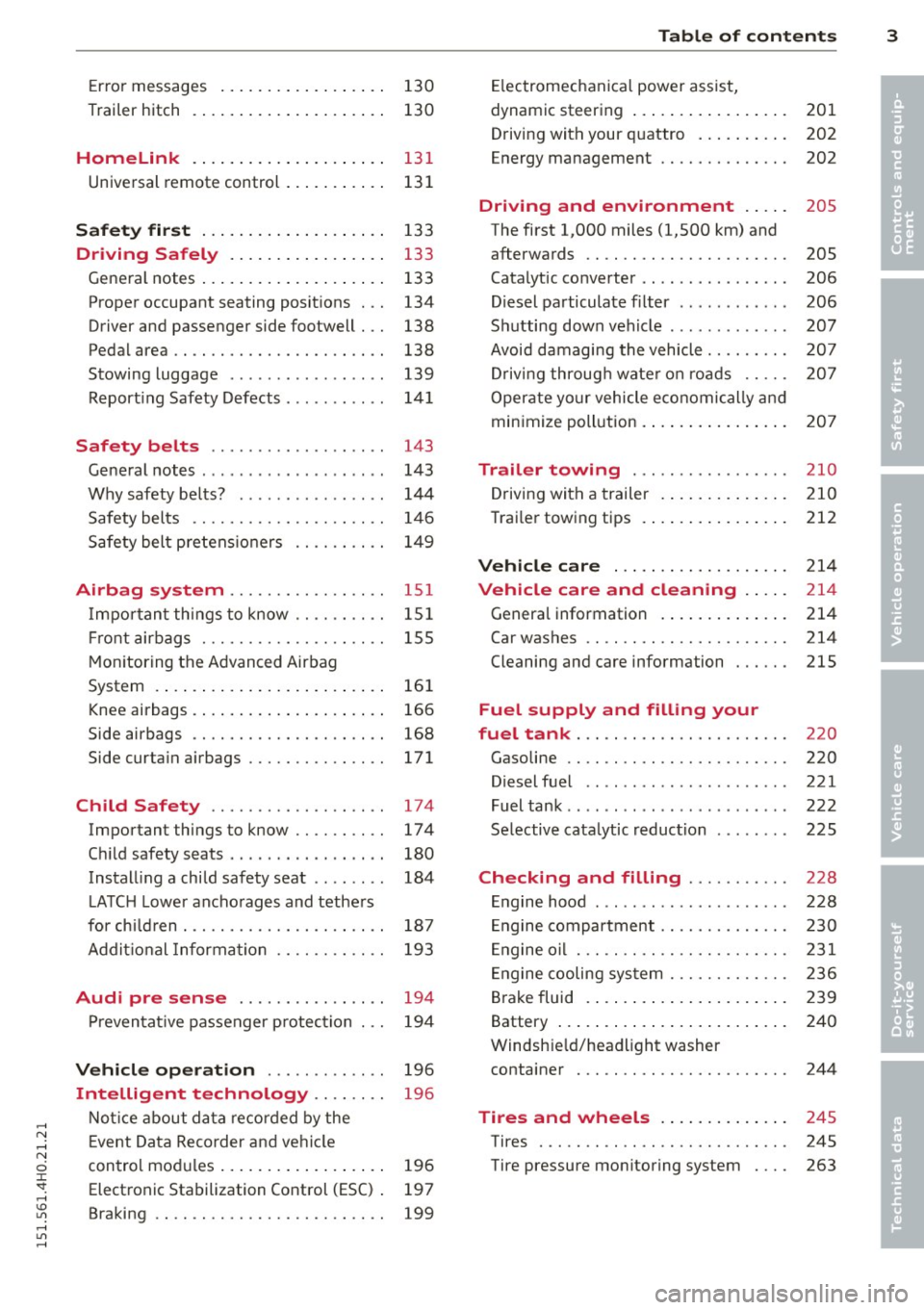
Error messages . . . . . . . . . . . . . . . . . . 130
Trailer hitch . . . . . . . . . . . . . . . . . . . . . 130
Homelink 131
Universal remote control . . . . . . . . . . . 131
Safety fir st . . . . . . . . . . . . . . . . . . . . 133
Dri ving Safely . . . . . . . . . . . . . . . . . 133
Gene ral notes . . . . . . . . . . . . . . . . . . . . 133
Proper occupant seating posit ions . . . 134
Driver and passenger side footwell . . . 138
Pedal area . . . . . . . . . . . . . . . . . . . . . . . 138
Stowing luggage . . . . . . . . . . . . . . . . . 139
Report ing Safety Defects . . . . . . . . . . . 141
Safety belts . . . . . . . . . . . . . . . . . . . 143
Ge neral notes . . . . . . . . . . . . . . . . . . . . 143
Why safety be lts? . . . . . . . . . . . . . . . . 14 4
Safety belts . . . . . . . . . . . . . . . . . . . . . 1 46
Safety bel t pre tens io ners . . . . . . . . . . 1 49
Airbag system ........... .. .. . .
Impo rtant th ings to know .. .. .. .. . .
Fr ont airbags . ........... .. .. .. . .
M on itoring the Advanced Airbag
System .... .. .. ... . .... ... .. .. . .
Knee airbags . .. .. ..... ... .. .. .. . .
Side airbags .. ........... .. .. .. . .
Side curta in a irbags ....... .... .. . .
Child Safety ............... .. . .
Important things to know .. .. .. .. . .
C hi ld safety seats ... ...... .... .. . .
Install ing a child safety seat .. .. .. . .
L ATC H Lower ancho rages and tethe rs
for ch ild ren . ............. .... .. . .
Addit ional Information
Audi pre sense ..... ... .. .. .. . .
P reven tat ive passenger p rotection
Vehicle operat ion ..... .. .. .. . .
Intelligent technology .. .. .. . .
Not ice about da ta re cor ded by the
E vent Data Recorder and veh icle 151
1
51
1 55
16 1
166
168
171
174
174
180
184
187
193
194
194
196
196
control mod ules . . . . . . . . . . . . . . . . . . 196
Electronic Stabilization Control (ESC) . 197
Braking . . . . . . . . . . . . . . . . . . . . . . . . . 199
Table of contents 3
El ectromechanical power assist,
dynamic steering . . . . . . . . . . . . . . . . . 201
Driv ing with your q uattro . . . . . . . . . . 202
Energy management ............. . 202
Driving and environment . . . . . 205
The first 1,000 miles (1,500 km) and
afterwards . . . . . . . . . . . . . . . . . . . . . . 205
Catalytic co nverter . . . . . . . . . . . . . . . . 206
Diesel particulate filter . . . . . . . . . . . . 206
Sh utting down vehicle . . . . . . . . . . . . . 207
Avoid damaging the vehicle . . . . . . . . . 20 7
Drivi ng throug h wate r on roads . . . . . 20 7
Oper ate yo ur vehicle economically an d
min imize poll ution . . . . . . . . . . . . . . . . 207
Trailer towing . . . . . . . . . . . . . . . . . 210
Drivi ng with a trailer . . . . . . . . . . . . . . 210
Trai ler towing tips . .. .. .. .. .. .. .. . 212
Vehicle care . . . . . . . . . . . . . . . . . . . 214
Vehicle care and cleaning . . . . . 214
Genera l information . . . . . . . . . . . . . . 214
Car washes . . . . . . . . . . . . . . . . . . . . . . 214
Cleaning and care information . . . . . . 215
Fuel supply and filling your
fuel tank . . . . . . . . . . . . . . . . . . . . . . .
220
Gasoline . . . . . . . . . . . . . . . . . . . . . . . . 220
Diesel fue l . . . . . . . . . . . . . . . . . . . . . . 221
Fuel tank . . . . . . . . . . . . . . . . . . . . . . . . 222
Se lective cata lytic reduction . . . . . . . . 225
Checking and filling . . . . . . . . . . . 228
Engine hood . . . . . . . . . . . . . . . . . . . . . 228
En gine compartment . . . . . . . . . . . . . . 230
E ngine o il . . . . . . . . . . . . . . . . . . . . . . . 231
E ngine cooling sys tem . . . . . . . . . . . . . 236
B ra ke fluid . . . . . . . . . . . . . . . . . . . . . . 239
Battery . . . . . . . . . . . . . . . . . . . . . . . . . 240
Windsh ie ld/headlight washer
conta iner . . . . . . . . . . . . . . . . . . . . . . . 244
Tires and wheels . . . . . . . . . . . . . . 245
Tires . . . . . . . . . . . . . . . . . . . . . . . . . . . 245
Tire pressure monitor ing system . . . . 263
•
•
Page 11 of 312

,....,
N ,....,
N
0 J:
'SI: ,...., \!) 1.1'1 ,...., 1.1'1 ,....,
(!) Door handle
@
®
©
®
®
Audi side assist d isplay
Power locking sw itches
Audi side assist button . ... .. .
A ir vents with thumbwheel
Control leve r for :
- Turn signal and high beam
- High beam assist .... ... .. .
- Audi active lane assist ... .. .
(J) Mul tif unction steering wheel
with :
- Horn
- Driver's airbag ....... .. .. .
- Drive r information system but-
tons . ................ ... .
- Audio/video, telephone, navi
gation and vo ice recognition
buttons
- Shift paddles and
lil butto n
for manual shifting ....... .
@ Instrument cluster .. ... .. .. .
® W indshield washer sys tem
lever .. .................. . .
@ H ead-up Display ....... .. .. .
@ Buttons for:
- Start-Stop-System
-MMI display
- Electronic Stab iliza tion Con-
trol (ESC) ............ ... .
- Eme rgency flashers ... .. .. .
@ Starting the eng ine if the re is a
malfunction .... ..... .. .... .
@ Knee airbag . ....... ... .. .. .
@ Buttons for :
- Stee ring wheel adjustment ..
- Stee ring wheel heat ing .. .. .
@ Leverfor:
- Cru ise cont rol system
- Adaptive cruise control .. .. .
@ Bu tton for switch ing the Head
up Disp lay on/off, adj usting the
height . ... ... ..... ... .. .. .
@ Instrument illum in ation . .. .. .
@ Eng ine hood re lease .... .. .. .
104
36
104
48
49
10 1
15 5
23
117
10
53
28
87
199
47
85
166
82
81
90
92
28
51
228
In strument s and control s 9
@) Data Link Connector for On
Board Diagnostics (OBD II)
@ Light sw itch ... .. . .. ... ... . .
@ B uttons for :
- All-weather lights
- Night v ision assistant .... .. .
- Rear fog lights .. .. .. ..... .
@ Power exterior m irror adjust-
ment .. .. .. .. .. . ... ...... .
@ Rear lid switch . .. . ... ...... .
@ Power w indows . .. .. ... .... .
@ Memory function buttons .... .
@) MMI display
@ Indicator lights/buttons for
- PASSENG ER AIR BAG OFF
- Parking system ........... .
- Rear w indow power sun shade
@ G love compar tment .. ...... .
@ Front passenger's airbag .... .
@ Valet pa rking feature ....... .
@ Analog clock .. .. . ... ...... .
@
@
Climate controls
MMI controls
@ Se lector lever (a utomat ic trans-
mission) .. .. .. .... .... .... .
@ Center console w ith cupholder
@ E lectromechanical parking
brake . ... .... .. . .. .. ..... .
@ I START ENGIN E STOPI button
Q) Tips
29
46
46
111
46
55
37
41
66
162
120
52
75
155
42
27
79
1 14
74
85
83
- Some of the equipment or features shown in the genera l illustration may be
standard equ ipment on your vehicle or
may be opt ional equ ipment depending
on your mod el. Always ask your author
ized Aud i dea le r i f you have a quest ion
abou t your vehi cle.
- Ope rat ion of the Multi Med ia Interface
(MMI) is described in a separa te manua l.
Page 15 of 312
,....,
N ,....,
N
0 J:
'SI: ,...., \!) 1.1'1 ,...., 1.1'1 ,....,
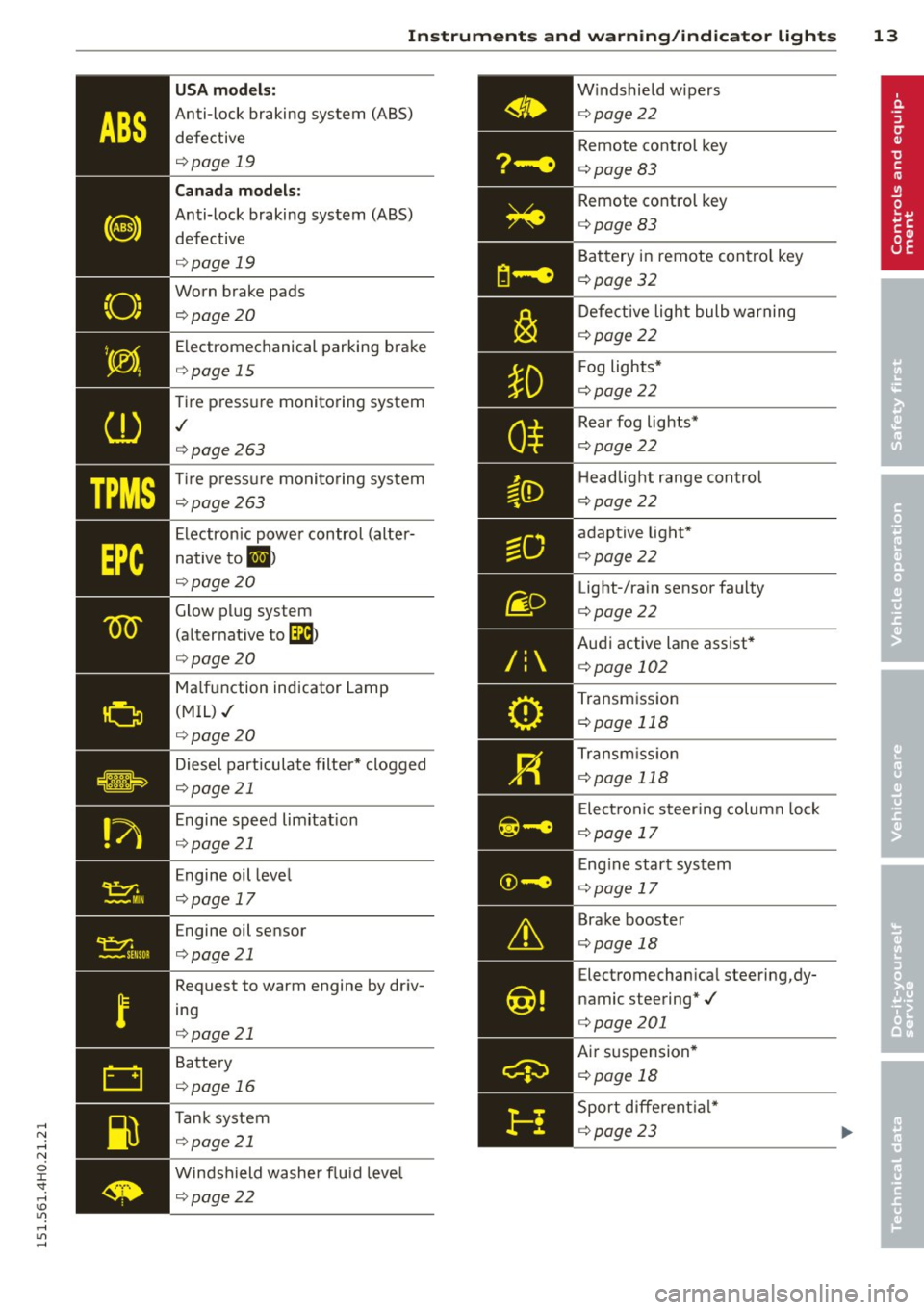
ABS
(8)
"O~ I I ~ I.
Instruments and warning/indicator lights 13
USA models:
Anti-lock braking system (ABS) defective
q page 19
Canada models:
Anti-lock braking system (ABS)
defective
q page 19
Worn brake pads ¢page 20
Electromechanical parking brake
¢ page 15
Tir e pressure monitoring system
./
¢page 263
Tir e pressure monitoring system
qpage 263
Electronic power control (alter
native to
1,1 )
qpage 20
Glow plug system
(alternat ive to
[lla}
¢ page 20
Ma lfunction indicator Lamp
(MIL)./
¢ page 20
Diesel particulate filter* clogged
q page 21
Engine speed limitation
q page 21
Engine oil leve l
¢ page 17
Engine oil sensor
¢ page 21
Request to warm engine by driv
ing
¢ page 21
Battery
q page 16
Ta nk system
q page 21
Windshield washer flu id leve l
q page 22 W
indshield wipers
¢ page22
Remote control key
¢ page83
Remote control key
¢ page83
Battery in remote contro l key
¢ page 32
Defective light bulb warning
¢ page22
F og lights*
¢ page22
Rear fog lights*
¢ page 22
H eadlight range control
¢ page22
adaptive light*
¢ page22
Light-/rain sensor faulty
¢page22
Audi active lane assist*
¢ page 102
Transmission
¢ page 118
Transmission
¢ page 118
E lect ronic steer ing column lock
¢ page 17
Engine start system
¢ page 17
Brake booster
¢ page 18
Electromechanical steering,dy
namic steering*./
¢ page201
Air suspension *
¢ page 18
Sport different ial*
¢ page23
Page 24 of 312

22 Instruments and warning/indicator lights
If the indicator light t urns on and th is mes
sage ap pears, the re is a ma lfunction in the
tan k system.
D rive to yo ur aut hori zed Au di dealer i mmedi
ate ly to have the mal func tion cor rected .
If th e sym bol illum inates, add w indshield
washer fluid to the was her system/ headlight
washer system* ~
page 244 .
6 Windshield wipers
m Windshield wiper defective
There is a mal func tion with the w indshield
wipers.
D rive to yo ur authorized Aud i dea le r i mmedi
a te ly to h ave the mal fu ncti on cor re ct ed .
~ /}D /0$ Defective light bulb warning
J:J-I f the ind icator light tu rns on, a bulb has
failed. The message indicates the location of
the bulb .
Im-if a fog lamp* h as f ailed , the indic ator
lig ht tu rns on to indica te the location on t he
ve hicl e.
IJ -if a rear fog lam p has fai led , the indic ator
li g ht tu rn s o n to in dicat e the locat ion on t he
ve hicl e.
Vehicle lights: malfunction
If the message appea rs, there is a malfunc
tion in the headlights or light switch .
Drive to yo ur authorized Aud i dea ler immedi
ately to have t he malfunction corrected.
A WARNING
- light bu lbs are pressurized and co uld ex
plode while they a re being changed caus
ing ser ious p erso na l in ju ry.
- Work w it h due care when handling the
hig h-voltage section of gas discha rge (
x enon) lights . Failure to do so cou ld re
sult in death o r serious injury .
(D Tips
Have the b ulb replaced or the conne ct io n
r epaire d by your authorized A udi Se rvice
department.
~0 Headlight range control
1\1 Headlight range control: defective!
If the symbol illuminates, the headlig ht ran ge
control is no lo nger work ing pro per ly . Have
the system checked and repaired at yo ur A udi
dealer.
§0 Adaptive Light
Applies to vehicles: with Adaptive light
FJl Audi adaptive light: system fault
If the indicator light turns on and this mes
sage appears, there is a malfunct ion in the
adaptive light system. The headlights still
funct ion .
Go to an authorized dealersh ip to have the
headlights o r the co ntrol un it for the Adaptive
Light repa ired.
@:> Light/rain sensor
£1 Automatic headlights /automatic wipers :
system fault
If the indicator light turns on and this mes
sage appears , the light/ rain senso r is not
f unct ion ing corr ect ly .
For sa fety reasons the low beams are t urned
o n permanently wit h the sw itch in
AUTO .
However, you can continue to turn the lights
on and off us ing the light switch . Yo u can st ill
co ntrol all func tions that a re independent of
t h e ra in sensor th roug h the w indshi eld wipe r
l ever .
Co ntact your aut horized Aud i dea ler as soon
as possible to have the problem co rrec ted .
Page 42 of 312

40 Opening and closing
the remote control key is left in the lug
gage compartment, luggage compart
ment will automatically unlock itself af
ter you lock the vehicle. This prevents
you from unintentionally locking your key in the luggage compartment.
- When the vehicle is locked, the luggage
compartment lid can be unlocked sepa rately by pressing the button<=:> on the
master key . When the luggage compart
ment lid is closed again, it locks auto
matically.
- If the vehicle battery charge drops be
low a certain level, you can still open or
close the luggage compartment lid man ually, however, you will need to apply
more force to close it.
Luggage compartment with movement
activated opening
Applies to vehicles: with conven ience key and sensor-con
trolled luggage compart ment lid
Fig. 31 Rear of ve hicle: foot move men t
Requirements : You must be carrying your ve
hicle key with you . You must be standing at
the center behind the luggage compartment
lid. The distance to the rear of the vehicle
must be at least 8 inches (20 cm). The igni
tion must be switched off. Make sure you have
firm footing.
.. Swing your foot forth and back below the
bumper ~
fig. 31. Do not touch the bumper.
Once the system recognizes the movement,
the luggage compartment lid will open .
The luggage compartment lid will only open if
you make the movement as described. Th is
prevents the luggage compartment lid from
opening due to simila r movements such as when you walk between the rear of the vehicle
and your garage door.
General information
In some situations, the function is limited or
temporarily unavailable. This may happen if:
- the luggage compartment lid was just
closed .
- you park close to a hedge and the branches move back and forth under the vehicle for a
long period of time.
-you clean your vehicle, for example with a
pressure washer or in a car wash.
- there is heavy rain .
- the bumper is very dirty, for example after
driving on salted roads.
- there is interference to the radio signal from
the vehicle key, such as from cell phones or remote controls .
Luggage compartment lid emergency
, release
If the central locking system fails, the lug
gage compartment lid can be opened at the
lock cylinder.
(111)
A UC, ,.
Fig. 32 Lu gga ge compart men t lid: mec ha nic al key in
the lock cylinder
.. Remove the mechanical key~ page 32.
.. Insert the key in the lock cylinder aspic
tured .
.. Turn the key approximately 45° to the right
~ fig. 32. The luggage compartment lid
opens.
In this position the key cannot be pulled out
of the lock cylinder.
Page 55 of 312

Wiper and washer system
Switching the windshield wipers on
Fig. Sl W indshield wiper leve r
Move the windshield wiper lever to the corre
spond ing pos ition:
@ -Windshie ld w ipers
off
(D -Rain sensor mode. The w indshie ld w ipers
switch on once the vehicle speed exceeds ap
proximately 2 mph (4 km/h) and it is raining.
The higher the rain sensor sensitivity is set
(switch @to the right), the earlier the w ind
shield wipers react to moisture on the wind
shie ld. You can deact ivate rain sensor mode in
the MMI, which w ill then activate intermittent
mode. Select:
ICARI function button > Car sys
t e m s
control button > Dri ver ass is t > Ra in
s en sor
> Off . In intermittent mode, you can
adjust the interval time using the switch @.
@ -Slow wiping
@-Fast wiping
©-Single wipe. If you hold the lever in this
position longer, the wipers switch from slow
wiping to fast wip ing .
® -Clean the windshield . The wipers wipe
one time after several seconds of driving to
remove water drop lets. You can switch this
function
off by moving the lever to position ®
within 10 seconds after the afterw ipe . The af
terw ipe f unction is react ivated the next time
you switch the ig nition on.
Cleaning the headlights . The headlight wash
er system* only functions when the headlights
are on. If you move the lever to position ®,
Clear vi sion 5 3
the headlights and the night vision system
camera* are washed in intervals.
A WARNING
-The rain sensor is only designed to assist
and support the driver.
It remains entire
ly the driver's responsibility to monitor
outs ide weather cond itions and to man
ually activate the wipers as soon as rain
or drizzle reduces visibility through the
windshie ld.
- The windsh ield must not be treated w ith
wate r-repellent mate rials. They can in
crease glare unde r poo r vis ibility condi
tions such a s wetness, d arkness, or w hen
the sun is low on the hori zon. In addi
tion, they can cause the w indshield wip
ers to chatter.
- Properly f unctioning windshield wiper
blades are req uired for a clear v iew and
safe driving
¢ page 54, Replacing
windshield wiper blades.
(D Note
- In the case of frost, check whether the
windshield wiper blades are frozen to
the windshield. Switching on the wind
shield wipers can damage the wiper
blades!
- Prior to us ing a car wash, the w indshield
w iper system must be sw itched off ( lever
in posit ion @). T his he lps to prevent un
intentional switching on and damage to
the windsh ield wiper system.
- Do not use the wipers to clear a frosted
w indow. Us ing the wipers as a conve n
ient ice scrape r will destroy the wiper
blades.
(D Tips
- The windshield wipers are sw itched off
when the ign it ion is off . Activate the
w indshield wipe rs after the ignition is
switched back o n by movi ng the w ind
shield wiper lever to any positi on.
- Worn or d irty wi ndshield wipe r blades
result in streaking. This ca n affec t the
Page 56 of 312

54 Clear vis ion
rain se nsor f unction . Check yo ur
winds hield wiper b lades regularly.
- The washer fluid nozzles of the wind
sh ield washer system are heated at low
temperatures when the ignition is on .
- When stopping temporarily, e .g . at a
traffic light, the set speed of the wind
s h ield wipers is automatically red uced by
one speed.
Cleaning w indshield wiper blades
Clean the w indshield wiper blades when they
begin to leave streaks . Use a soft cloth and
g lass cleaner to clean the windsh ield wiper
b lades.
.. Place the windshield wiper arms in the serv
ice position . Refer to ¢
page 54.
.. Lift the w iper arm away from the front win
dow.
_& WARNING
Dirty w indshie ld w iper blades can impa ir
your view. Thi5 can lead to acc ident5 .
Replacing windshield wiper blades
Fig. 52 Removi ng w inds hield w ipe r blades
Wiper ser vice position / Blade
replacem ent position
-
.. Switch the ign ition off and move the w ind
shield wipe r leve r to posi tion @ ¢
page 53,
fig. 51. The windshield wipe rs move into the
service position.
.. To bring the wipe rs back into the original
position, switch the ignition on and press
the windshie ld wiper lever. You can also t
urn the se rv ice position on or off
in the MMI:
.. Switch the windshie ld wipers
off (position
@ ¢page 53, fig. 51) .
.. Select: !CARI function button> Car systems
contro l butto n > Serv icing & checks > Wip er
serv ice position
> On.
R emo ving the wipe r blade
.. Lift the windshield wiper arm up from the
w indshield.
.. Press the locking knob
(D ¢ fig. 52 on the
w iper blade. Hold the wiper blade firmly .
.. Remove the wipe r blade in the d irection of
the arrow .
Attaching the wipe r blade
.. Insta ll the new wiper blade in the reta iner
on the wiper arm @unt il you hear it click in
to place on the w iper arm .
.. Place the w iper arm back on the windshield .
.. Tu rn the se rvice position
off.
_& WARNING
-
F or your s afety, you shou ld rep lace the
wiper b lades once or twice a yea r. See your
a uthorized Audi dea ler fo r replacement
b lades .
(D Note
- The windsh ie ld wiper b lades m ust only
be folded away when in the service posi
tion! Otherwise, yo u ris k damaging the
paint on the hood or the windshie ld w ip
er motor.
- Yo u should not move your vehicle or
press the windshie ld wiper lever when
the wiper arms are folded away from the
windshield. The windsh ield wipers wou ld
move back into their or iginal position
and co uld damage the hood and wind
shield.
- To help prevent damage to the w iper sys
tem, always loosen blades w hich are fro
zen to the windshield before operating
w ipers. .,.