2015 AUDI A8 instrument cluster
[x] Cancel search: instrument clusterPage 91 of 312

The@j indicator light appears in the informa
tion line in the instrument cluster display
<:!)fig. 92 .
Engine automatically restarts
The stop phase is interrupted in the following
situations, for examp le. The engi ne restarts
without any action by the driver.
- Th e interior temperature varies from the
temperatu re selected in the A/C system.
- The windshield is being defrosted
r::!) page 81 .
-The brake pedal is pressed several times in a
row.
- The battery charge level becomes too low.
- High power consumption .
Switching the ignition off automatically
To prevent the battery from draining, the igni
tion will switch off
automatically when all of
the following conditions have been met:
- The vehicle has al ready been driven.
- The eng ine has been turned off by the Start-
Stop-System*.
- The driver's door is opened.
- The driver's seat belt is removed .
- The brake pedal is not pressed down.
- The vehicle is stationary .
In this case, the activated low beam will be re
placed by the side marker lights. The side
marker lights will switch off after approxi
mately 30 minutes or when you lock the vehi
cle .
If the Start-Stop System has
not turned off
the engine or if you have switched the Start
Stop system off manually, the ignition w ill
not
be automatically switched off and the engine
will cont inue to run
r::!) .&. .
A WARNING
Never allow the engine to run in confined
spaces - danger of asphyxiation.
(D Tips
If you shift into the D, N or S positions af
ter shift ing into reverse, the veh icle must
On the road 89
be driven faster than 6 mph (10 km/h) in
order for the engine to switch off again.
Switching the Start-Stop-System on/off
manually
App lies to vehicles: wit h Start -Stop -System
If you do not wish to use the system, you can
switch it off manually.
Fig. 93 Center console: Start -Stop -System button
.,. To switch the Sta rt-Stop-System off/on
manually, p ress the
ICA.> ••I button. The L ED in
the button turns on when the system is
sw itched off.
(D Tips
If you switch the system off during a stop
phase, the engine will start again auto
ma tically .
Messages in the instrument cluster
display
Applies to vehicles: wit h Start-Stop-Syste m
Start-Stop system deactivated: Please re
start engine manually
This message appears when specific condi
tions are not met during a stop phase and the
Start-Stop-System will
not be able to restart
the engine. If the Dor R selector lever posi
tions were engaged, P will be selected auto
matically . The engine must be started with
the
I START ENGINE ST OP ! button.
Start-Stop system: System fault! Function
unavailable
There is a malfunction in the Start-Stop-Sys
tem. Drive the vehicle to an authorized repair .,.
Page 92 of 312

90 On the road
facility for servicing as soon as possib le to
correct the malfunction.
Speed warning system
Introduction
The speed warning system helps you to stay
under a specified maximum speed.
The speed warning system warns you if you
are exceeding the maximum speed that you
have set . You will hear a warn ing tone when
your speed exceeds the stored value by ap proximately 3 mph (3 km/h). An indicator
light. (USA models) . (Canada models) in
the instrument cluster display also turns on at
the same time. The indicator light./.
turns off when the speed decreases below the
stored maximum speed.
Sett ing a threshold is recommended if you
wo uld like to be reminded when you reach a
certain maximum speed . Situations where you
may want to do so include driving in a country
with a general speed limit or if there is a
specif ied maximum speed for winter tires.
@ Tips
Even though your vehicle is equipped with
a speed warning system, you should still
watch the speedometer to make sure you
are not driving faster than the speed lim it.
Setting the threshold
You can set, change and delete the threshold
in the MMI.
.. Se lect : ICAR lfunction button> Car systems
control button > Driver assist > Speed warn
ing.
You can set any threshold between 20 mph
(30 km/h) and 150 mph (240 km/h). Settings
can each be adjusted in increments of S mph
(10 km/h).
Cruise control
Switching on
The cruise control system makes it possible to
drive at a constant speed starting at 20 mph (30kmlh) .
0
•
~
0
Fig. 94 Control leve r with set b utton
Fig. 95 Display: Se lected speed
.. Pull the lever to position (D c::> fig. 94 to
sw itch the system on.
.. Drive at the speed you wish to set.
.. Press button @ to set that speed.
T he stored speed and the indicator light
II (US models) ;El (Canadian mode ls) ap
pear in the instrument cluster display
c::> fig. 95 . The display may vary, depending on
the type of display in your veh icle .
T his information is also shown briefly in the
Head-up Display*.
Th e speed is kept constant via an engine out
put adjustment or active brake intervent ion.
WARNING
-Always pay attention to traffic even when
the cruise control is switched on. You are
a.lways respons ible for your speed and
Ill-
Page 96 of 312

94 Audi adaptive cruise control and braking guard
@ is located in front of that vehicle, the sys
tem will not react to the stationary vehicl e.
Audi adaptive cruise
control
Description
Applies to vehicles: with Audi adaptive cruise control
Fig. 99 Detectio n range
What can adaptive cruise control do?
The adaptive cruise control system uses video,
radar and ultrasou nd . Moving vehicles ahead
can be recognized up to about 650 feet (200 m) away.
On open roads w ith no traffic, adaptive cruise
control works like a regular cruise control sys
tem . The stored speed is maintained . When
approaching a moving vehicle detected up
ahead, the adaptive cruise control system au
tomatically s lows down to match that vehi
cle's speed and then maintains the distance
that the driver previous ly stored. As soon as
the system does not detect a vehicle up
ahead, adaptive cruise control accelerates
back up to the stored speed.
In stop-and-go traffic, adapt ive cru ise control
can brake until the vehicle stops and acceler
ate again under certain conditions and if this
is possible within the system's limits and ca
pabilities ¢
page 96. Adaptive cru ise control
will not make an emergency stop .
Which functions can be controlled?
When you switch adaptive cruise contro l on,
you can set the current speed as the "control
speed" ¢
page 94, Swi tching on and off.
When driving, you can stop cruise control
¢
poge 96 or change the speed ¢ page 95
at any time.
You can also set the distance to the object
ahead and set the adaptive cruise control driv
ing program ¢
page 96.
Switching on and off
Applies to vehicles: with Audi adaptive cruise control
Fig. 100 Selector lever: swi tc hin g on/off
Fig. 101 Instrument cl uste r: adapt ive c ruise contro l
You can set any speed between 20 mph and
95 mp h (30 and 150 km/h).
Ind icator lamps and messages in the instru
ment cluster d isplay inform you about the cur
rent system status and settings.
An additional indicator appears in the Head
up D isp lay* .
Switching adaptive cruise control on
.,. Pull the lever toward you into position (D
¢ fig. 100 . ACC standby appears in the in
strument cluster display .
Setting the speed and activating
regulation
.,. To set the current speed, press the ISETI but
ton ¢
fig. 100 . The set speed is shown in the 1111-
Page 104 of 312

102 Audi active lane assist
Activating and deactivating
Applies to vehicles: with active lane assist
-
I
Fig. 107 Turn signal lever: Act ive lan e ass ist button
Fig. 108 Windshield: Active lane assist camera viewin g
win dow
~ Press the ¢ fig. 10 7 button to activate or
deactivate the system . The indicator light
• or. in the instrument cluster will illu
minate or go out.
Instrument cluster indicator light
• Ready: The indicator light shows that the
system is ready to use . The system can now
warn you if you are about to cross a known
lane marker line .
• Not ready: The ind icator light shows that
the system is turned on but unable to send a
warning . This can be due to the following :
- There is no lane marker line .
- The relevant lane marker lines are not de-
tected (for example, markings in a construc
tion zone or because they are obstructed by
snow, dirt, water or backlight ing).
- The vehicle 's speed is below the speed need
ed to activate it, which is about 40 mph (65
km/h) .
- The lane is narrower than about 8 ft . (2 .5 m)
or wider than 15 ft (4 .5 m).
- The curve is too sharp . - The driver's hands are not on the steering
wheel.
(D Tips
Make sure the camera's field of view
¢
fig. 108 is not obstructed by stickers,
deposits or anything else. For information
on cleaning, refer to
¢ page 214 .
Active lane assist display in the
instrument cluster
Applies to vehicles: wit h active lane assist
Fig. 109 D isp lay : Act iv e lane ass ist is swi tc h ed on a nd
is wa rnin g
Fig. 110 Instrumen t cl uster: Active lane as sis t is
s witch ed o n but not re ad y to provid e wa rnin gs
You can call up the active lane assist display
using the buttons in the multifunction steer
ing wheel ¢
pag e 23.
When active lane assist is switched on, the
system indicates which lines are detected by
displaying solid lines on the left and/or right
side of your vehicle :
ll>
Page 105 of 312

,....,
N ,....,
N
0 J:
'SI: ,...., \!) 1.1'1 ,...., 1.1'1 ,....,
White Active l ane assist is sw itched on
line(s) and ready to p rov ide warnings
on the side that is ind icated
¢ fig. 109 .
Red line Act ive lane assist is warning you
(left or that you are about to leave your
right) lane
¢ fig . 109. In addition, the
steeri ng wheel vibrates s light ly.
Gray Act ive l ane assist is switched on
line(s) but is not ready to provide warn-
ings
¢ fig . 110.
Mes sages in the instrument clu ster
display
When the active lane ass ist turns off automat
ically, the i nstrument cluster ind icator goes
out and one of the fo llow ing messages ap
pears on the display :
Audi active lane a ssist : Curr ently un availa
bl e. No camera view
This message appears if the camera is no lon
ger funct ional after the system has cont inous
ly failed to detect the lane markings . This
could happen if :
- The camera field of view¢
page 102,
fig. 108 is dirty or covered in ice. Clean the
area on the w indshield .
- The camera field of view is fogged over. Wait
until the fog has cleared before switching
active lane assist on .
- The system has been unable to detect the
lanes for an extended period of time due to
road cond it ions . Switch active lane ass ist
back on when the lines are more visible .
Audi active lane a ssist : Currently un available
A temporary ma lf u nction is preventing lane
assist from operating. Try sw itching active
lane assist on again later.
Audi acti ve lane a ssist : S ys tem fault!
Drive to you r autho rized Aud i dea le r soon to
h ave the ma lfunction co rrec ted.
Audi active lane a ssis t: Pl ea se take over
s te ering
Audi acti ve lane a ssis t 103
This message appears if yo u do not s teer the
vehicle yourself . If this is the case, active lane
ass ist does not switch off, b ut it does sw itch
to the "not ready" stat us. The system can help
you keep the vehicle in the lane. However it is
your own responsibility to steer and control
t h e ve hicle .
Setting the steering wheel vibration
Applies to veh icles: w ith active la n e assist
11> Select: !CAR ! function button> (Car )* sys
tem s
control button > Driver a ssis t > Aud i
a ctive lan e as sis t.
You can switch the vibrat ing warn ing in t he
stee ring wheel
o n or off .
(D Tips
Your setting is a utomat ically stored and
assigned to the remote control key being
used.
Page 109 of 312

.... N .... N
0 J:
'SI: .... \!) 1.1"1
.... 1.1"1 ....
@ Tips
-Side assist is not active whi le you are
making the adjustment.
- Your settings are automatica lly stored
and assigned to the remote control key
being used.
Driver messages
Applies to vehicles: with side assist
If side ass ist switches off by itself, the LED in
the button turns off and a message will ap
pear in the instrument cluster d isplay:
Audi side assist: Currently unavailable . No
sensor vision
The radar sensors' vision is affected. Do not
cover the area in front of the sensors with bike
wheels, stickers, dirt or other objects. Clean
the area in front of the sensors, if necessary
c>page 105, fig . 114.
Audi side assist: Currently unavailable
Side assist cannot be swi tched on temporarily
because there is a malfunction (for example,
the battery charge leve l may be too low) .
Audi side assist: System fault!
The system cannot guarantee that it will de
tect vehicles correctly and it is switched off .
The senso rs have been displaced or are faulty.
Ha ve the sys tem checked by an authorized
Aud i dealer o r autho rized Aud i Service Fac ilit y
soon.
Audi side assist: Unavailable when towing.
Side assist sw itches off automatically when a
factory- installed trailer hitch is connected to
the electrical connector on the trailer. There is
no guarantee the system will switc h off when
using a retrofitted trailer hitch. Do not use
side assist when towing a trailer .
Audi side assist 107
Page 113 of 312

Night vision assistant
Night vision assistant
with pedestrian and
wild animal detection
Description
App lies to vehicles: with night visio n assistant
Night vision assistant with pedestrian and
wild animal detection assists you in darkness
by using an infrared camera to monitor the
area in front of your vehicle, within the lim its
of the system.
It can display objects up to ap
proximately 1000 feet (300 meters) away.
The heat image detected by the camera is
shown in the instrument cluster display.
Warm areas appear lighter and cold areas ap pear darker.
Pedestrian and wild animal detection
Applies to vehicles: with nig ht visio n assistant
Fig . 117 Display: yellow pedestrian marking
Fig. 118 Display: symbol when infrared image is not
visible
Within the limits of the system, night vision
assistant can detect pedestrians and wild ani
mals that are within the detection range be
tween approximately 32 feet (10 meters) and
295 feet (90 meters) in front of the vehicle .
Night vision assistant 111
When it is dark outside and the headlights are
switched on, detected pedestrians and wild
animals are marked in ye llow
¢ fig. 117with
in the limits of the system
¢page 112. Wild
animal detection is not active in built-up
areas. The system only detects large wild ani
mals such as deer .
(!) Tips
-If another display such as navigation re
places the image from the night vis ion
assistant, the~,, symbol appears in the
tab
¢fig. 118. You can call up night vi
sion assistant using the buttons on the
mu ltifunc tion steering wheel
r::;, page 24.
Pedestrian and wild animal warning
App lies to vehicles: wi th night vision assistan t
Fig. 119 Instrument cluste r: @ pedest rian warning,
@ wild animal warning
Fig. 120 Instrument cluster : @ pedestr ian warning/
® wild animal warning when the night vision assistant
im age is not selected in th e instrument cluster display
Instrument cluster display/Head-up
Display*
If pedestrians or wild animals are detected in
an area in front of your vehicle that is consid
ered critical, the system will attempt to draw
your attention to this by:
111>--
Page 114 of 312
112 Night visi on assis tant
-Mark ing pedestrians or wi ld an imals in red
in the instrument cluster and turning on the
. or. symbo l¢ fig.119.
-Sounding a warning tone .
The area regarded as cr it ical depends on the
vehicle speed and steering angle . Pedestrian
and wild anima l warning a ims to increase you r
attention.
I f the n ight vision assistant image is replaced
by another d isplay such as the t rip computer,
the red indicator lamp . or.
c::;, fig . 120
will turn on when there is a pedestrian or wild
animal warning .
I f the Head-up Display* is swi tched on and the
night vision assistant disp lay content is acti
vated, the display . or. appears in the
Head-up Display *.
General information
A ppl ies to vehicles : w ith nigh t visio n ass istant
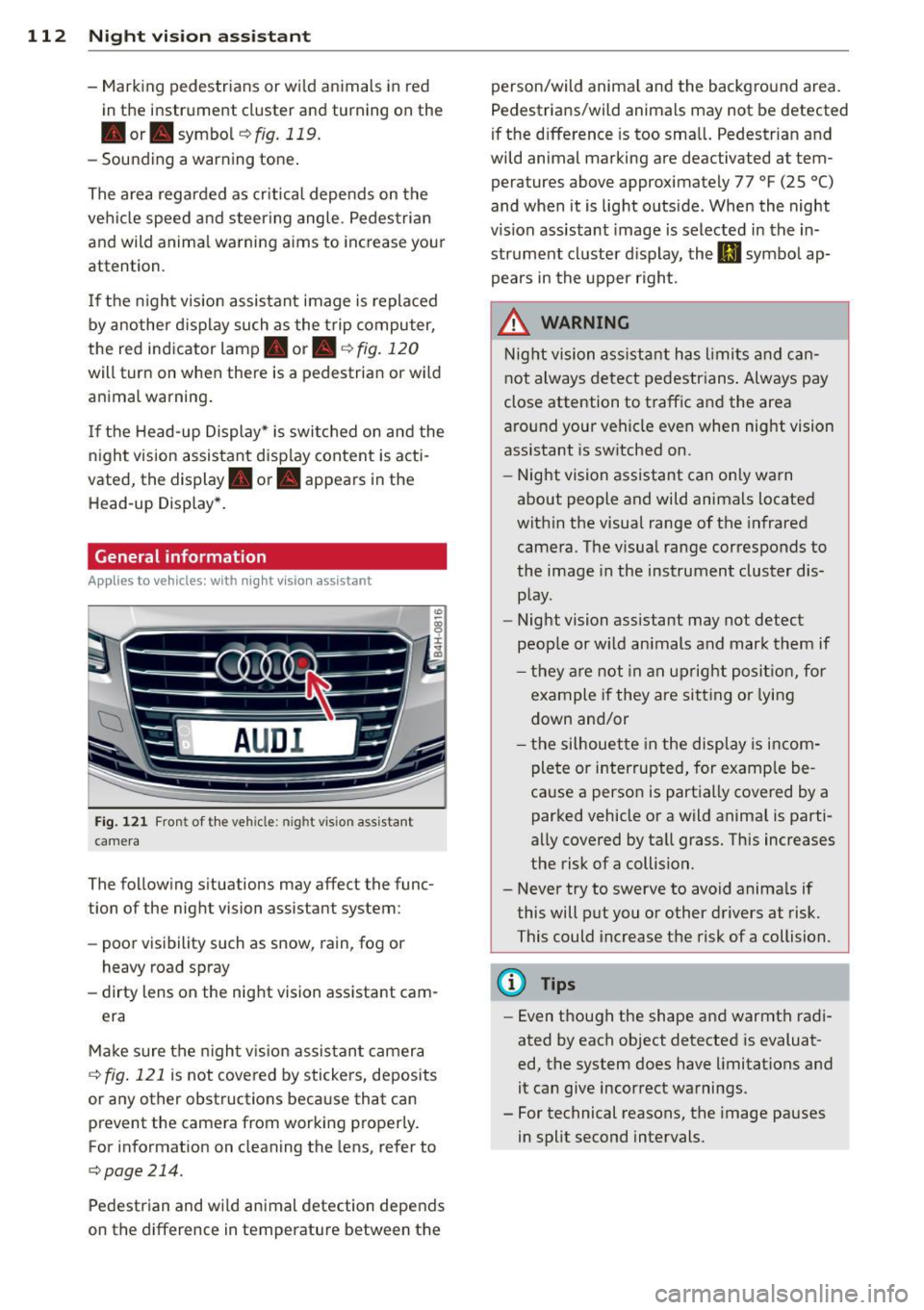
F ig . 12 1 Fron t of the vehicle: night v ision a ssistant
camera
The follow ing s ituations may affect the func
tion of the night vision assistant system:
- poor visibility such as snow , rain, fog or
heavy road spray
- dirty lens on the night vision assistant cam -
era
Make sure the night v is ion assistan t camera
c::;, fig . 121 is not covered by stickers, deposits
or any other obstructions beca use that can
prevent the camera from working properly.
For information on cleaning the lens, refer to
c::;,page214.
Pedestrian and wild animal detection depends
on the difference in temperature between the person/wild anima
l and the backg round area.
Pedestrians/w ild an imals may not be detected
if the d ifference is too sma ll. Pedestrian and
wild animal marking are deactivated at tem
peratures above approximately 77 °F
(25 °()
and when it is light outside. When the night
v ision assistant image is selected in the in
strument cluster d isplay, the
II symbo l ap·
pears in the upper right.
_&. WARNING
Night vision ass ista nt has limits and ca n
not always detect pedestr ians . Always pay
close attention to t raffic and the area
a round your veh icle even when nig ht vision
assistant is switched on.
- Night vision assistant can only warn
about people and wild animals located
w ith in the visual range of the infrared
camera. The visua l range corresponds to
the image in the instrument cluster dis·
p lay.
- Night vision assistant may not detect
people or w ild an imals and mark them if
- they a re not in an up right po siti on, for
example if they are si tting or lying
down and/or
- the silhouette in the disp lay is incom
plete or interrupted, for examp le be
cause a perso n is partially covered by a
parked vehicle or a wild anima l is parti·
a lly covered by tall grass. This increases
the risk of a collision.
- Never try to swerve to avoid anima ls if
this will put you or other drivers at risk.
This could increase t he risk of a collision.
(D Tips
- Even though the shape and warmth radi·
ated by each object detected is evaluat·
ed, the system does have limitations and
it can give incorrect warnings .
- For technical reasons, the image pauses
in split second intervals.
-