2015 AUDI A4 emergency
[x] Cancel search: emergencyPage 5 of 304

"" N
0 ::.,: co ,...., \!) 1.1'1 ,...., 1.1'1 ,....,
Safety belts . . . . . . . . . . . . . . . . . . . . . 139
Safety belt pretensioners . . . . . . . . . . 142
Airbag system . . . . . . . . . . . . . . . . . 144
Important things to know . . . . . . . . . . 144
Front airbags . . . . . . . . . . . . . . . . . . . . 148
Monitoring the Advanced Airbag
System . . . . . . . . . . . . . . . . . . . . . . . . . 154
Side airbags . . . . . . . . . . . . . . . . . . . . . 159
Side curtain airbags . . . . . . . . . . . . . . . 162
Child Safety . . . . . . . . . . . . . . . . . . . 165
Important things to know . . . . . . . . . . 165
Child safety seats ............ .. ... 171
Installing a child safety seat .. .. .. .. 175
L ATCH Lower anchorages and tether
for child ren. ............. .. .. .. .. 179
Additional Information
183
Vehicle operation . . . . . . . . . . . . . 184
Intelligent technology . . . . . . . . 184
Notice about data recorded by the
Event Data Recorder and vehicle
control modules . . . . . . . . . . . . . . . . . . 184
Electronic Stabili zation Control (ESC) . 185
Braking . . . . . . . . . . . . . . . . . . . . . . . . . 188
Electro -mechanical power assist,
dynamic steering . . . . . . . . . . . . . . . . . 190
Driving with your quattro . . . . . . . . . . 190
Energy management . . . . . . . . . . . . . . 191
Driving and environment . . . . . 193
The first 1,000 miles (1,500 km) and
afterwards . . . . . . . . . . . . . . . . . . . . . . 193
Avoid damaging the vehicle. . . . . . . . . 193
Driving through water on roads . . . . . 193
Catalytic converter . . . . . . . . . . . . . . . . 194
Shutting down vehicle . . . . . . . . . . . . . 195
Operate your vehicle economically and minimize pollution . . . . . . . . . . . . . . . . 195
allroad: Driving offroad . . . . . . . . . . . . 197
Trailer towing . . . . . . . . . . . . . . . . . 199
Driving with a trailer . . . . . . . . . . . . . . 199
Trailer towing tips . . . . . . . . . . . . . . . . 201
Table of contents 3
Vehicle care . . . . . . . . . . . . . . . . . . .
202
Vehicle care and cleaning . . . . . 202
General information . . . . . . . . . . . . . . 202
Car washes . . . . . . . . . . . . . . . . . . . . . . 202
Cleaning and care information . . . . . . 203
Fuel supply and filling your
fuel tank . . . . . . . . . . . . . . . . . . . . . . .
207
Gasoline . . . . . . . . . . . . . . . . . . . . . . . . 207
Fuel tank . . . . . . . . . . . . . . . . . . . . . . . . 209
Checking and filling . . . . . . . . . . . 212
Engine hood . . . . . . . . . . . . . . . . . . . . . 212
Engine compartment ... ......... .. 214
Engine oil . . . . . . . . . . . . . . . . . . . . . . . 214
Engine cooling system . . . . . . . . . . . . . 218
Brake fluid . . . . . . . . . . . . . . . . . . . . . . 221
Battery ... .. .... .. ............. .
222
Windshield/headlight* washer container . . . . . . . . . . . . . . . . . . . . . . . 225
Tires and wheels . . . . . . . . . . . . . . 227
Tires . . . . . . . . . . . . . . . . . . . . . . . . . . . 227
Tire pressure monitoring system 257
Do-it-yourself service . . . . . . . . . 260
What do I do now? . . . . . . . . . . . . 260
Vehicle tool kit . . . . . . . . . . . . . . . . . . . 260
Space-saving spare tire (compact
spare tire) . . . . . . . . . . . . . . . . . . . . . . . 260
Inflatable spare tire . . . . . . . . . . . . . . . 261
Inflating inflatable spare tire . . . . . . . 262
Changing a wheel. . . . . . . . . . . . . . . . . 263
Fuses and bulbs . . . . . . . . . . . . . . . 269
Fuses..... .... .... .............. 269
Bulbs. . . . . . . . . . . . . . . . . . . . . . . . . . . 272
Emergency situations ... ... .. . 274
General... .... .................. 274
Starting by pushing or towing . . . . . . . 274
Starting with jumper cables . . . . . . . . 274
Use of jumper cables . . . . . . . . . . . . . . 275
Emergency towing with commercial
tow truck . . . . . . . . . . . . . . . . . . . . . . . 276
Lifting vehicle . . . . . . . . . . . . . . . . . . . . 278
•
•
Page 11 of 304

'"" N
0 ::.,: co ,...., \!) ..,.,
,...., ..,., ,....,
CD
@
®
©
®
®
(j)
Door handle
Memory buttons (dr iver's seat)
Power locking sw itch
Button for side ass ist
A ir outlets
L ight switch
Control lever for :
- T urn signal and high beam
@ Multifunction steering wheel
with:
- Horn
- Driver's airbag
- Audio/video, telephone, navi-
gation and vo ice recognition
buttons
- Rocker switches for tiptron ic
opera tion ........... .... .
® ISET I button ...... ..... .... .
@ Instrument cluster .. ... .. .. .
@ Reset button for trip odometer
@ Sw itches for:
- Windsh ield wiper/washer
- Trip computer ..... ... .. .. .
@ Ignition lock ............. . .
(8) Adjustable s teer ing column
@ Control lever for :
- Cruise contro l ......... ... .
- adaptive cruise contro l .... . .
@ Ins trumen t lighting .... .. .. .
@ Release lever for the engine
hood .. .. .. .. ........... .. .
@ Data L ink Connector for On
B oard Diag nostics (OBD II) . .. .
@ Sw itch for unlock ing the trunk
lid .. .. .. ................. .
@ Adjuster control fo r outside m ir
r ors
@ Power window switches ... .. .
@ Rad io-Display1l or MMI-Display
64
35
1 11
49
so
148
98
11
10
12
55
24
82
82
9 1
101
52
212
29
38
5 2
42
l) T he image in t he d is pl ay will app ear e it h er in mu lt iple
c o lor s or in a singl e co lor , de pen din g o n th e vehicl e
e q ui pment. T he m ulti co lo r im age w ill b e used i n this
O w ner's M anual becau se bo th mu lt i co lo r and si ng le
c o lor ver sio ns are almos t ide ntic al.
In strument s and control s 9
Depend ing on options:
- Rad io system
- CD changer
Emergency flasher
G love compartment (lockab le)
Front passenger's airbag .....
Depend ing o n op tions, sw itches
f or:
- drive select .. .. .......... .
- Electronic Stabilization Con-
trol . ... .. .. .. . .. ... .... .
- Rear window sun shade .. .. .
@ Deluxe automat ic cl imate con-
trol ...... .. .... .......... .
@) Depending on options, selecto r
lever or shift lever for :
- Manual transmission ...... .
- Automatic transmission .... .
@ Asht ray with ciga rette lighter
@ Depend ing on options:
- MMI contro l console or
- drive select .. .... ........ .
- Electronic Stabilizat ion Con- 51
67
148
115
185
55
78
93
93
65
115
trol button . . . . . . . . . . . . . . . 185
- Power switch for rear window sun shade . . . . . . . . . . . . . . . . 55
@ I STA RT ENGI NE STOPI button 85
@) Electromec hanical pa rking
brake . . . . . . . . . . . . . . . . . . . . . 87
(D Tips
-Some of the equipment o r fea tures
show n in the gener al illustration m ay be
standard equ ipment on your vehicle or
may be optional eq uipment depending
on your model. Always as k your author
ized Aud i dea ler if you have a quest ion
about your ve hicle.
- Operat ion of the Multi Med ia Interface
(MMI) is described in a separate manua l.
Page 15 of 304

"" N
0 ::.,: co ,...., \!) 1.1'1 ,...., 1.1'1 ,....,
Instrument s and warnin g/indic ator ligh ts 13
misfiring and fuel could enter into the ex
haust system . The catalytic converter
could then overheat and be damaged .
Warning/indicator
lights
Description
The indicator lights in the instrument cluster
blink or turn on. They indicate functions or
m alfunctions
c::> .&. .
Messages may appear with some indicator
lights. A warning signal will sound at the
same time . The messages disappear again af
ter a short t ime. To display a message again,
press the
I S ET I bu tton c::> page 11 . If several
malfunction s occur, each of the indicator/
warn ing lamps will be d isplayed in succession
for about two seconds at a time.
Some ind icators ligh ts in the display can turn
on in several colors.
A WARNING
- Failure to heed warning lights and other
important vehicle info rmation may result
in serious personal injury o r vehicle dam
age.
- Whenever sta lled or s topped for repa ir,
move the vehicle a safe dis tance off the
road, stop the engine, and turn on the
emergency flasher
c::> page 51.
- T he engine compartment of any motor
vehicle is a poten tially hazardous a rea.
Before you check anything in the engine
compartment, stop the engine and let it
cool down. Always exercise extreme ca u
t ion when working under the hood
c::> page 212.
Overview
Some ind icator lights turn on briefly to check
the function of that system when you switch
the ignition on . T hese systems are marked
with a./ in t he followi ng tab les. If one of
these ind icator lights does no t turn on, there
is a malfunction in that system.
R ed indicator lights
-------------
U S A models:
Brake system ./
c::> page 15
Canada model s:
Brake system ./
c::>page 15
USA m odel s:
Electromechanical par king b rake
c::> page 16
Canada models :
Electromechanical parking brake
c::> page 16
Safety belts
c::> page 16
Electrome chanical stee ring ./
c::> page 190
Batte ry
c::> page 16
Eng ine oil pressure
c::> page 17
E ngine oil level
c::> page 17
Engine cool ing system
c::> page 17
Steering column lock
c::> page 18
Ignition lock
c::> page 18
USA model s:
Speed warning system
c::> page 89
Canada model s:
Speed warning system
c::> page 89
Adaptive cru ise control./
c::> page 104
Y ellow indic ator light s
-------------
Electro nic Stabilization Control
(ESC) ./
c::> page 18 ..,.
Page 17 of 304

Instruments and warning/indicator lights 15
Other indicator lights
-------------
Turn signals
¢page 22
USA models: Cru ise control
¢ page 91
Canada models: Cruise control
¢ page 91
Adaptive cruise control*
¢page 104
Adaptive cruise control*
¢page 104
High beam
¢page 50
BRAKE/( ([)) Brake system
The light illuminates when the ignition is
switched on.
It goes out after the eng ine has
been started. This ind icates that the brake
warn ing light is func tioning properly.
If the brake warning light does not light up
when the engine is cranking, there may be a
malfunction in the electrical system. In this
case, contact your authorized Audi dealer.
If the brake system warning/ind icator light
turns on, there is a brake system malfunction.
1111 (USA models) tlll (Canada models)
Stop vehicle and check brake fluid level
If the indicator light turns on and the mes
sage appears, proceed as follows:
~ Pull off the road.
~ Stop the vehicle .
~ Turnoff the engine.
~ Check the brake fluid level¢ page 221.
~ Contact your nearest authorized repair fa-
c ili ty if necessary .
Warning! Fault in brake system . Contact
dealer
If the ABS indicator light fl1 (USA models)/
ii] (Canada models), the ESC indicator light
G1 and the brake system indicator light
1111 (USA mode ls)/ . (Canada models) turn
on and the message appears, the ABS, ESC
and braking distribution are not working~& .
Carefully drive to your authorized Audi dealer
immediately to have the malfunction correct
ed ~& .
1111 (USA models )/. (Canada models)
Parking brake system fault! See owner's
manual
- I f the ind icator light and the message ap
pear
when stationary or after switching the
ignition on,
check if you can re lease the
parking brake. After releasing the parking
brake, carefully drive to your authorized
Audi dea ler immediately to have the ma l
function corrected. If you cannot release the
parking brake, seek professional assistance.
- If the indicator light and the message ap
pear
while driving , the emergency brak ing
function may not be available. It may not be possible to set the parking brake or release
it once it has been set . Seek profess ional as
sistance .
(USA models): If the warning light
1111 and
the warn ing light
EiJ appear together, imme
diately contact your authorized Audi dealer or
qualified workshop to have all brake pads in
spected
~ page 20.
When the light comes on, an aud ible warning
s ignal is also given .
A WARNING
-Always observe the warn ings in
¢
page 212, before opening the hood
and checking the brake flu id.
- Driving with low brake fluid is a safety
hazard. Stop the car and get professiona l
assistance.
- If the
1111 (USA models) tlll (Canada
models) brake system indicator light
turns on together with the ABS and ESC
indicator lights, the ABS/ESC regulating
function may have failed. Functions that
stabilize the vehicle a re no longer avai la-
ble. This could cause the vehicle to .,.
Page 19 of 304

"" N
0 ::.,: co ,...., \!) 1.1'1 ,...., 1.1'1 ,....,
Instruments and warning/indicator lights 17
If the indicator light turns on and the mes
sage appears, there may be limited starting
abi lity.
If th is message turns
off after a litt le while,
the battery charged enough whi le driving.
If the message does not turn
off, have your
authorized Audi dealer or qua lified workshop
correct the malfunction.
~ Engine oil pressure
The red engine oil pressure warning symbol
requires immediate service or repair. Driving
with a Low-oil-pressure indication is Likely to
inflict severe damage to the engine .
• Turn off engine! Oil pressure too low
If the indicator light turns on and the mes
sage appears, the oil pressure is too low.
.,. Pull
off the road.
.,. Stop the vehicle .
.,. Turn
off the engine .
.,. Check the engine oil level ¢ page 216 .
.,. If the engine oil level is too low, add engine
oil ¢
page 216 . Make sure that the oil pres
sure warn ing symbol. appears no longer
in the disp lay before you start driving again.
.,. If the engine oil level is correct and the indi
cator light st ill turns on, turn the engine
off
and do not continue driving. Seek professio
nal assistance.
(l) Tips
- The engine oil pressure symbol. is
not an indicator for a low engine oil lev
el. Do not rely on it. Instead, check the
oil level in your engine at regular inter
vals, preferably each time you refuel,
and always before going on a long trip.
- The yellow oil level warning indication
II requires oil refill or workshop serv·
ice without delay. Do not wait until the
red oil pressure warning. starts to
flash before you respond to the low oil
level warning
l!I. By then , your engine
may already have suffered serious dam
age.
~ Engine oil level
• WARNING: Please add oil immediately
If the indicator light and the message appear,
add engine oil immediately¢
page 214.
II Add oil, max XXXX l. You may cont. driv .
When the symbol l!I and driver message ap
pear, add the amount of oil appearing in the
display at the next opportunity ¢
page 214.
-L Engine cooling system
A malfunction in the engine cooling system
must be repaired as soon as possible.
• Turn off engine and check coolant level
If the indicator light turns on and the mes
sage appears, the coolant temperature is too
high or the coolan t leve l is too low .
.,. Pull
off the road .
.,. Stop the vehicle .
.,. Tu rn
off the engine .
... Check coolant level¢
page 218 .
.,. Add coolant if necessary¢ page 219.
.,. Continue driving on ly after the engine cool
ant warning/indicator light goes out .
.,. Contact your authorized Audi dealer for as-
sistance if necessary.
If the engine coo lant level is correct, then the
radiator fan may be the cause of the malfunc
tion.
• Coolant temperature! Let engine run
with vehicle stationary
If the indicator light turns on and the mes
sage appears, let the engine run at id le for a
f ew m inutes to coo l down .
_& WARNING
-If your vehicle should break down for
mechanical or other reasons, park at a
safe distance from moving traffic, turn
off the eng ine and turn on the hazard
warn ing lights
¢page 51, Emergency
flashers.
-
Page 33 of 304

'"" N
0 ::.,: co ,...., \!) 1.1'1 ,...., 1.1'1 ,....,
Opening and closing
Power locking system
General description
The power locking system locks or unlocks all
doors and the rear lid simultaneously.
You can lock and unlock the vehicle centrally.
You have the following choices:
- Remote master key~
page 34,
-Door handles with convenience key*
O?page 35,
-Lock cylinder at the dr iver's door
r=> page 3 7, or
- Power lo cking switc h inside
<:!>page 35.
Automatic locking
The automat ic locking feature locks all the ve
hi cle doors and the rear lid when you drive
faster than 9 mph (15 km/h).
The car is un locked again once the ignition key
is removed . In addition, the veh icle can be un
locked if the opening fu nction in the power
lock ing system sw itch or at one of the door
l eve rs is actuated. The Au to Lo ck function can
be turned o n and off in the rad io or
MMI*
r=> page 36 .
Additionally, in the event of a c rash with air
bag deployment the doors are automatically
u nl ocked to a llow access to the veh icle.
Selective unlocking
When you lock the vehicle, the power locking
system w ill lock the doors and the rear lid.
W hen unlocking, you ca n set in the rad io or
M MI* whethe r
only the dr iver's door or t he
enti re ve hicle should be unlocked
r=> page 3 6.
Anti -theft alarm warning system
If the a nti-theft alarm warning system de
tects a brea k-in into t he vehicle, acoust ic and
visua l wa rning sig na ls are triggered.
The an ti-theft warn ing system is act ivated au
tomatically when you lock the vehicle .
It is de
activated when u nlocking using the remote
Opening and clo sin g 31
key, w ith the mechan ica l key, and when you
switch on the ignition.
T he al arm a lso t urns off w hen t he a la rm cy cl e
has expired.
Turn signals
When you u nlock the ve hicle, the turn signals
flash twice, when yo u lock it once. If they do
not flash, one of the doo rs, the luggage com
partment lid or the hood is not lo cked or the
ignition is s till sw itched on.
Unint entionally locking yourself out
In the follow ing cases there safeg uards to
prevent you lock ing you r remote master key in
t h e ve hicl e:
- The vehicle does not loc k w ith the power
lock ing switc h
r=> page 35 if the drive r's
door is open.
- On veh icles with convenience key*, if the
most recently used master key is in the lug
gage compartment, the rear lid is a utomat i
cally u nlocked again after it is closed.
Do not lock your veh icle w ith the remote mas
te r key o r convenience key* unt il all doors a nd
the rear lid a re closed. In this way you avoid
l ocking yo urse lf o ut accidentally.
_&. WARNING
-
-When you leave the veh icle, alw ays re
move the ignition key an d take it with
you. This wi ll prevent passengers (chil
dren, for example) from acc identally be
ing locked in the vehicle should they acci
dentally press the power locking switch in the front doors.
- Do not leave ch ildren inside the vehicle
unsuperv ised. In an emergency it would
be imposs ible to open the doors from
the o utside w itho ut the key.
(D Tips
- In the event of a crash with airbag de
ployment all locked doors will be auto
matically unlocked to give access to the
v ehicle occupants from the outside.
Page 34 of 304
32 Opening and clo sing
- If the power locking system should ma l
function, you can lock the driver's door us ing the mechanical key
c:> page 3 7.
- If the power locking system should fail,
you can sti ll open the fue l tank flap in an
emergency
c:> page 211.
- You are we ll advised not to keep valua
bles inside an unattended vehicle, visib le
or not. Even a properly locked vehicle
cannot provide the security of a safe.
- If the LED in the upper edge of the driv
er's door panel comes on for abo ut 30
seconds after the vehicle is locked, there i s a ma lfunction in the power locki ng or
the anti-theft warning system. Have the
malfunction corrected by an author ized
A udi dealersh ip or qua lified repai r fac ili
ty.
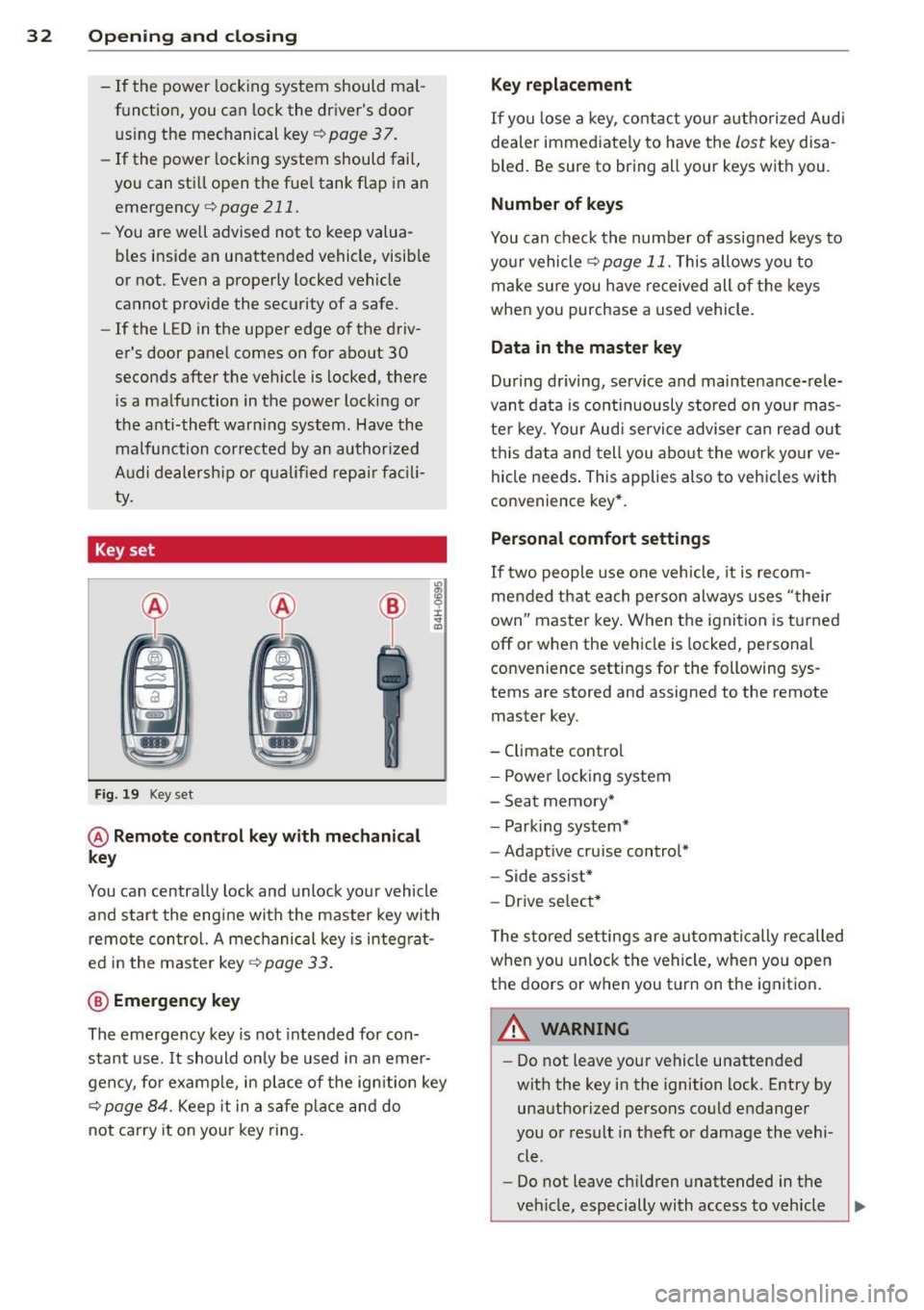
Key set
F ig . 19 Key set
@ Remote cont rol key with mechanical
key
You can centrally lock and unlock your vehicle
and start the engine with the master key with
remo te con trol. A mec hanical key is integ rat
ed i n the master key
c:> page 33 .
@ Emergency key
The emergency key is not intended for con
stant use.
It should on ly be used in an emer
gen cy, fo r example, in place of the ign ition key
cc> page 84. Keep it in a s afe p lace and do
not ca rry it on your key ring .
Key replacement
If you lose a key, contact you r authorized Audi
dealer immed iate ly to have the
Lost key disa
bled. Be sure to bring all your keys with you .
Number of keys
You can check the number of assigned keys to
yo ur vehicle
c:> page 11. This allows you to
make su re you have re ceived all of the keys
when you purchase a used vehicle.
Data in the master key
D uring d riving, s ervice and maintenance-rele
vant data is continuously stored on your mas
te r k ey. Your Aud i service adviser can read out
t hi s data and tell you abo ut the work yo ur
ve
hicle needs . This applies also to vehicles with
convenience key*.
Personal comfort settings
If two people use one veh icle, it i s r ecom
men ded that e ach person alw ays uses "t heir
own" maste r key. When the ignition is tu rne d
off or when the vehicle is locked, personal
convenience setti ngs for the following sys
tems are stored and assigned to the remote
master key.
- Climate contro l
- Powe r lock ing system
- Seat memory *
- Parking system*
- Adapt ive cru ise control*
- Side assist*
- Drive se lect*
T he s to red settings are au toma tically recalled
whe n you unlock the vehicle, when yo u open
t h e doors or w hen you t urn on t he ignitio n.
A WARNING
-Do not leave your vehicle unattended
wit h the key in the ignition lock. Entry by
unaut horized persons co uld endanger
you or result in theft or damage the vehi
cle.
- Do not leave ch ildren unattended in the
veh icle, especially with access to vehicle
Page 35 of 304

keys. Unguarded access to the keys pro
vides children the opportunity to start
the engine and/or activate veh icle sys
tems such as the power windows etc. Un supervised operation of any vehicle sys
tem by ch ildren can result in serious in
jury.
- Do not remove the key from the ignition
lock until the vehicle has come to a com
plete stop. Otherw ise the steering col
umn lock cou ld suddenly engage -caus
ing the risk of an accident.
(D Tips
- The operation of the remote contro l key
can be temporarily disrupted by interfer
ence from transmit ters in the vici nity of
the vehicle working in the same frequen
cy range (e .g . a ce ll phone, radio equip
ment).
- Fo r security reasons, replacement keys
are on ly available from authorized A udi
dealer.
- For Declaration of Compliance to United
States FCC and Industry Canada regula
tions¢
page 286.
Removing the mechanical key
Fi g. 20 Remote master key: removing the mechanical
key
.,. Press the release button@¢ fig. 20.
.,. Pull the mechan ical key @ out of the master
key.
~ Using the mechanical key, you can:
~ co -lock and unlock* the glove compartment on
rl :5: the passenger's side 9 page 67.
rl l/1 rl
Op enin g an d clos ing 33
- lock and unlock the lockable * rear bench
seat and pass-through*
r=;, page 71.
- activate the child safety locks on the rear
doors
r=;, page 41.
- lock and unlock the vehicle manua lly
r=;, page 3 7 if this should not be possible
with the master key.
- use the ignition key emergency release
r=:> page 34.
Check light and battery in the master
key
Fig . 21 Remote master key: removing the battery hold
er
Che ck light in the ma ster ke y
The check light @ r=:> fig. 21 in the master key
provides information about different condi
t ions .
.,. The check light turns on briefly once when a
button is pressed, and during an "inquiry"
by the convenience key system .
.,. If the check light does not come on, the bat
tery is dead and has to be replaced. In addi
tion, when the battery is dead the
!I indi
cator light appears in the instrument cluster
disp lay as well as the message
Plea se
c hange k ey batt ery.
Master key battery replacement
"'Remove the mechan ical key r=;, page 33 .
"' Press the release button @ i=:> fig. 21 on the
battery ho lder and at the same time pull the
bat tery ho lder out o f the maste r key in the
direction of the arrow.
.,. Insta ll the new battery CR 2032 with the
" + " sign facing down .
.,. Push the battery holder carefu lly into the
master key.