2015 Acura TLX warning
[x] Cancel search: warningPage 199 of 545

uuInterior Lights/Interior Convenience Items uInterior Convenience Items
198Controls
If the power mode is in ON: The HI setting
heats the seats warmer than the LO setting.
There is no heater in the rear center seating
position.
Press the seat heater button:
Once - The HI setting (three indicators on)
Twice - The MID setting (two indicators on)
Three times - The LO setting
Four times - The OFF setting (no indicators on)
When a comfortable temperature is reached
while using the seat heaters in HI, select MID
or LO to keep the seat warm.
To open the sunglasses holder, push and
release the indent. To close, push it again until
it latches.
You can store eyeglasses and other small
items in this holder.
■
Rear Seat Heaters
*
1Rear Seat Heaters
*
Do not use the seat heaters even in LO when the
engine is off. Under such conditions, the battery may
be weakened, making the engine difficult to start.
3
WARNING
Heat induced burns are possible when
using seat heaters.
Persons with a diminished ability to sense
temperature (e.g., persons with diabetes,
lower-limb nerve damage, or paralysis) or
with sensitive skin should not use seat
heaters.
■
Sunglasses Holder
1Sunglasses Holder
Keep the holder closed while driving except when
accessing stored items.
Push
* Not available on all models
Page 262 of 545

261
uuCustomized Features u
Continued
Features
“Trip A” Reset Timing“Trip B” Reset Timing
Language Selection
Adjust Outside Temp. Display
Forward Collision Warning Distance
*
ACC Forward Vehicle Detect Beep
*
Turn by Turn Display
*
Default
Door Unlock Mode
Keyless Access Light Flash
Interior Light Dimming TimeHeadlight Auto Off TimerAuto Light Sensitivity
Vehicle
Settings
Meter SetupDriver Assist
System
SetupKeyless Access
SetupLighting Setup
Keyless Access Beep
Lane Keeping Assist Suspend Beep
*
Blind Spot Info
*
Auto Seatbelt Tension
*
Driving
Position Setup
Road Departure Mitigation Setting
*
ACC Display Speed Unit
*
Remote Start System On/Off
*
Memory Position Link
Keyless Access Beep Volume
Auto Engine Idle Stop Guidance Screens
*
* Not available on all models
Page 268 of 545
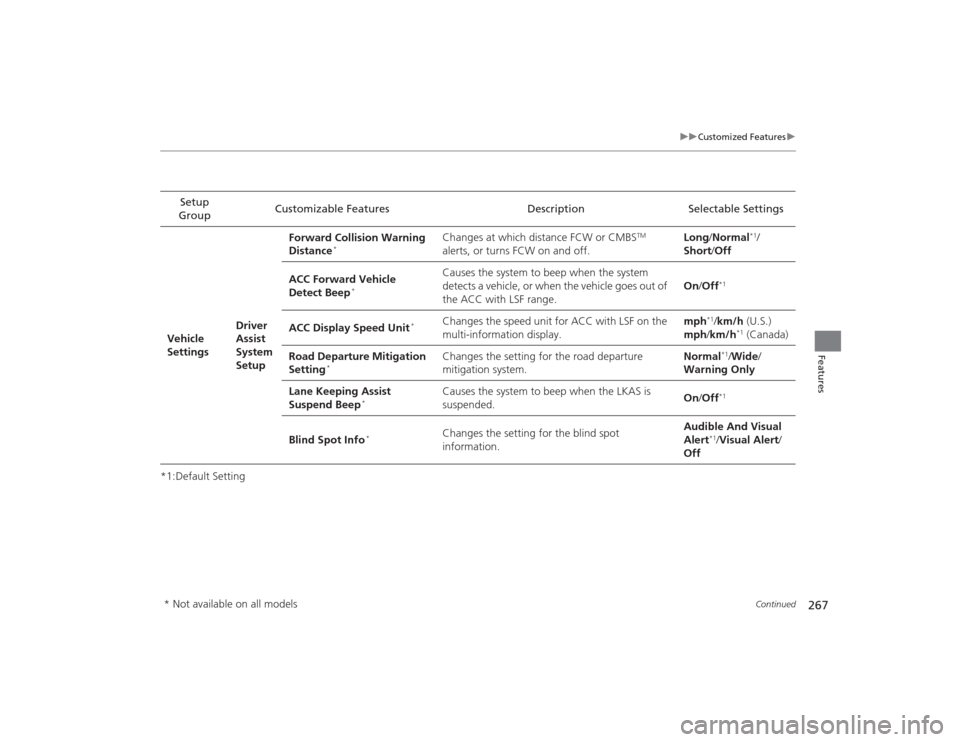
267
uuCustomized Features u
Continued
Features
*1:Default SettingSetup
Group Customizable Features Description Selectable Settings
Vehicle
Settings Driver
Assist
System
SetupForward Collision Warning
Distance
*
Changes at which distance FCW or CMBS
TM
alerts, or turns FCW on and off. Long
/Normal
*1/
Short/ Off
ACC Forward Vehicle
Detect Beep
*
Causes the system to beep when the system
detects a vehicle, or when the vehicle goes out of
the ACC with LSF range. On
/Off
*1
ACC Display Speed Unit
*
Changes the speed unit for ACC with LSF on the
multi-information display. mph
*1/
km/h (U.S.)
mph /km/h
*1 (Canada)
Road Departure Mitigation
Setting
*
Changes the setting for the road departure
mitigation system. Normal
*1/
Wide /
Warning Only
Lane Keeping Assist
Suspend Beep
*
Causes the system to beep when the LKAS is
suspended. On
/Off
*1
Blind Spot Info
*
Changes the setting for the blind spot
information. Audible And Visual
Alert
*1/
Visual Alert /
Off
* Not available on all models
Page 316 of 545

315
Driving
This chapter discusses driving, refueling, and information on items such as accessories.
Before Driving................................... 316
Towing a Trailer ................................ 321
When Driving
Starting the Engine .......................... 322
Precautions While Driving................. 329
Automatic Transmission
*................. 330
Dual Clutch Transmission*............... 330
Shifting ............................................ 331
Shifting ............................................ 338
Auto Idle Stop
*................................ 342
Integrated Dynamics System (IDS)..... 346
Models with electronic gear selectorModels with shift lever
Cruise Control
*............................... 348
Front Sensor Camera
*..................... 351
Adaptive Cruise Control (ACC) with Low Speed Follow (LSF)
*....................... 352
Forward Collision Warning (FCW) with Pedestrian Detection*.................... 365
Lane Departure Warning (LDW)
*..... 371
Road Departure Mitigation (RDM) System
*... 375
Lane Keeping Assist System (LKAS)
*.. 380
Vehicle Stability Assist (VSA
®), aka Electronic
Stability Control (ESC), System ............... 386
Agile Handling Assist System............ 388
Precision All Wheel Steer System
*.... 388
Blind Spot Information (BSI) System
*.... 389
Super Handling-All Wheel Drive
TM (SH-
AWD® )
*......................................... 391
Tire Pressure Monitoring System (TPMS) ... 392Tire Pressure Monitoring System (TPMS) -
Required Federal Explanation ......... 394
Braking .............................................. 396
Parking Your Vehicle ........................ 411
Multi-View Rear Camera .................. 419
Refueling ........................................... 420
Fuel Economy .................................... 422
Accessories and Modifications ........ 423
* Not available on all models
Page 320 of 545

319
uuBefore Driving uMaximum Load Limit
Continued
Driving
Maximum Load LimitThe maximum load for your vehicle is 850 lbs (385 kg).
See Tire and Loading Information label attached to the driver’s doorjamb.
This figure includes the total weight of all occupants, cargo, and
accessories, and the tongue lo ad if you are towing a trailer.
Steps for Determining Correct Load Limit -
(1) Locate the statement “The combined weight of occupants and
cargo should never exceed XXX kg or XXX lbs.” on your
vehicle’s placard.
(2) Determine the combined weight of the driver and passengers
that will be riding in your vehicle.
(3) Subtract the combined weight of the driver and passengers
from XXX kg or XXX lbs.
(4) The resulting figure equals th e available amount of cargo and
luggage load capacity. For example, if the “XXX” amount
equals 1,400 lbs. an d there will be five 150 lb. passengers in
your vehicle, the amount of available cargo and luggage load
capacity is 650 lbs.
(1,400 - 750 (5 x 150) = 650 lbs.)
1 Maximum Load Limit
Gross Vehicle Weight Rating (GVWR):
The maximum allowable weight of the vehicle, all
occupants, all accessories and all cargo.
2 Specifications P. 520, 522
Gross Axle Weight Rating (GAWR):
The maximum allowable weight of the vehicle axle. 2 Specifications P. 520, 522
3
WARNING
Overloading or improper loading
can affect handling and stability
and cause a crash in which you
can be hurt or killed.
Follow all load limits and other
loading guidelines in this manual.
Label Example
Page 326 of 545

Continued
325
uuWhen Driving uStarting the Engine
Driving
You can remotely start the engine using the two-way keyless access remote from
extended distances.■To start the engine
The engine runs for up to 10 minutes without you starting the vehicle.
To extend the run time for another 10 minutes during the first run, press the
button, then press and hold the button. u The amber LED blinks, then the green LED comes back on if a 10-minute
extension request was transmitted successfully.
After pressing the (lock) button, wait for the green LED to blink. This indicates that
the all the doors and the trunk are locked. ■
Remote Engine Start with Vehicle Feedback
*
1 Remote Engine Start with Vehicle Feedback
*
WARNING:
Carbon monoxide gas is toxic and can
rapidly accumulate in closed or even partly enclosed
areas. Breathing it can cause unconsciousness and
even kill you. Never use the remote engine starter
with the vehicle parked in a garage or other areas
with limited ventilation.
If there are buildings and obstacles between your
vehicle and the remote, the range will be reduced.
This distance may vary by external electrical
interference.
The engine may not start by the remote engine start
if:
•You have disabled a remote engine start setting
using the multi-information display.•The power mode is not in VEHICLE OFF (LOCK).•The gear is in a position other than
( P.
•The hood is open, or any door or the trunk is
unlocked.•You have already used the remote twice to start
the engine.•Another registered keyless access remote is in the
vehicle.•There is any antenna failure.•Door is unlocked with the built-in key.
With the doors locked, Press the button,
then press and hold the button.
Amber LED: Blinks when any button is pressed.
Continues to blink
during a vehicle
self check until the
engine starts. Go within the range,
and try again.
Green LED: Comes on while
the engine is running. Red LED: Blinks when the
remote is out of the keyless
access system range.
* Not available on all models
Page 332 of 545

331
uuWhen Driving uShifting
Continued
Driving
ShiftingChange the gear position in accordance with your driving needs.■Shift button positions■
(P
(park) button
Park your vehicle in a safe place with the
power mode in ON, then apply the brakes and
press the
(P
button to put the transmission in
Park.
The indicators on the sides of the
(P
button
come on.
Models with electronic gear selector
1 Shifting
To prevent malfunction and unintended
engagement:•Do not spill any liquids on or around shift buttons.•Do not place or drop any objects on or around shift
buttons.•Do not let passengers or children operate the shift
buttons.
The beeper sounds when you depress the accelerator
pedal with the gear position in
( N.
Change the gear position to
( D or
(R with the brake
pedal depressed.
When shifting gears in extremely low temperatures
(−22°F/−30°C), there may be a short delay before the
shift is indicated in the display. Always confirm you
are in the correct gear before driving.
3
WARNING
The vehicle can roll away if left unattended
without confirming that Park is engaged.
Always keep your foot on the brake pedal
until you have confirmed that
( P is shown
on the gear position Indicator.
Park
Used when parking or starting the engine
Reverse
Used when reversing
Neutral
Used when idling
Drive
Used for:●Normal driving (gears change between 1st
and 9th automatically)●Temporarily driving in the sequential
mode●Driving in the sequential mode (when
driving in Sport+ mode)
( P Button
Page 349 of 545

348
uuWhen Driving uCruise Control
*
Driving
Cruise Control
*
Maintains a constant vehicle speed without having to keep your foot on the
accelerator. Use cruise control on freeways or open roads where you can travel at a
constant speed with little acceleration or deceleration.
1Cruise Control
*
It may not be possible to maintain a constant speed
when driving uphill or downhill.
When not using cruise control:
Turn off cruise control by pressing the CRUISE
*/
MAIN
* button.
While in the Econ mode, it may take relatively more
time to accelerate to maintain the set speed.
3
WARNING
Improper use of the cruise control can lead
to a crash.
Use the cruise control only when traveling
on open highways in good weather.
When to use■Gear position for cruise control:
In ( D Always keep sufficient distance
between you and the vehicle in
front of you.
■Vehicle speed for cruise control:
Desired speed in a range above
roughly 25 mph (40 km/h) ~
How to use
CRUISE MAIN
is on in the
instrument panel.Cruise control is ready to use.
■Press the CRUISE
*/MAIN
*
button on the steering
wheel.
Models without
full color displayModels with full
color display
* Not available on all models