Page 227 of 353

226
uuWhen Driving uShifting
Driving
Shifting
Fully depress the clutch pedal to operate the shift lever and change gears, then
slowly release the pedal.
Depress the clutch pedal, and pause for a few seconds before shifting into
(R, or
shift into one of the forward gears for a moment. This stop s the gears so they do not
“grind.”
■Shift Lever Operation
Manual transmission models
1 Shifting
NOTICE
Do not shift to (R before the vehicle comes to a
complete stop.
Shifting to
( R before stopping can damage the
transmission.
NOTICE
Before downshifting, make su re the engine will not
go into the tachometer's red zone. Should this occur,
it can severely da mage your engine.
There is a metallic part on the shift lever. If you leave
the vehicle parked outside for a long time on a hot
day, be careful before movi ng the shift lever. Because
of heat, the shift lever may be extremely hot. If the
outside temperature is low, the shift lever may feel
cold.
15 ACURA ILX-31TX66200.book 226 ページ 2014年3月27日 木曜日 午前10時34分
Page 243 of 353
242
Driving
Multi-View Rear Camera
About Your Multi-View Rear Camera
See the Navigation System Manual.
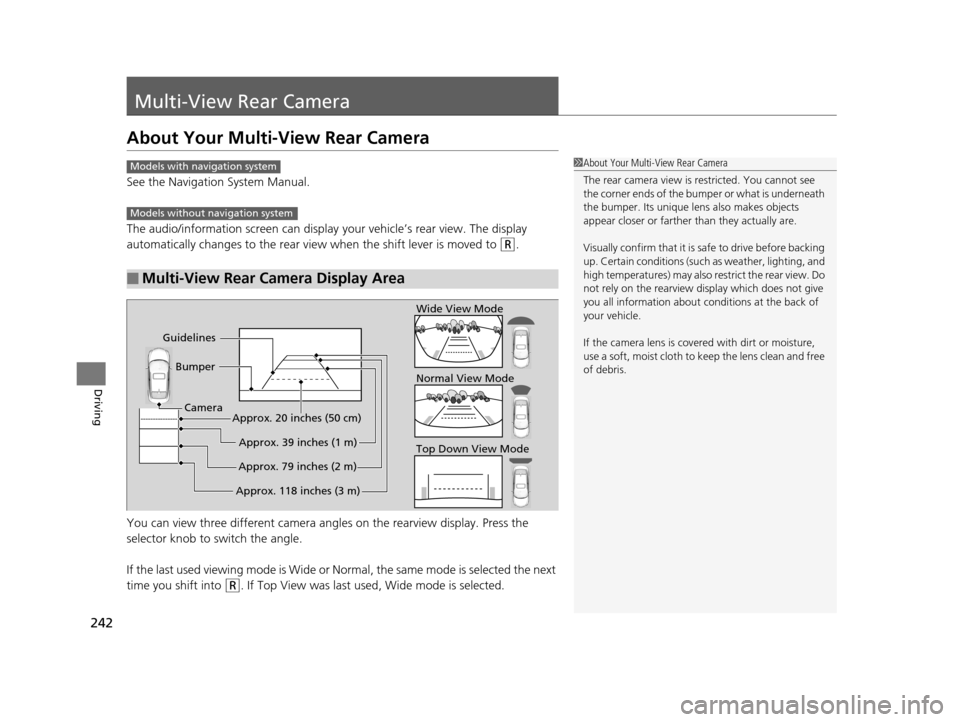
The audio/information screen can display your vehicle’s rear view. The display
automatically changes to the rear view when the shift lever is moved to
(R.
You can view three different camera angl es on the rearview display. Press the
selector knob to switch the angle.
If the last used viewing mode is Wide or Normal, the same mode is selected the next
time you shift into
(R. If Top View was last used , Wide mode is selected.
■Multi-View Rear Camera Display Area
1About Your Multi-View Rear Camera
The rear camera view is restricted. You cannot see
the corner ends of the bum per or what is underneath
the bumper. Its unique le ns also makes objects
appear closer or farther than they actually are.
Visually confirm that it is safe to drive before backing
up. Certain conditions (such as weather, lighting, and
high temperatures) may also re strict the rear view. Do
not rely on the rearview display which does not give
you all information about conditions at the back of
your vehicle.
If the camera lens is cove red with dirt or moisture,
use a soft, moist cloth to keep the lens clean and free
of debris.Models with navigation system
Models without navigation system
Top Down View Mode Normal View Mode Wide View Mode
Guidelines Bumper
Camera
Approx. 118 inches (3 m)Approx. 79 inches (2 m)Approx. 39 inches (1 m)
Approx. 20 inches (50 cm)
15 ACURA ILX-31TX66200.book 242 ページ 2014年3月27日 木曜日 午前10時34分
Page 252 of 353
251
Maintenance
Maintenance MinderTM
If the engine oil life is less than 15%, you will see the Maintenance Minder messages
appear on the multi-information display ev ery time you set the power mode to ON.
The messages notify you when to change th e engine oil, or when to bring your
vehicle to a dealer for indicated maintenance services.
15 ACURA ILX-31TX66200.book 251 ページ 2014年3月27日 木曜日 午前10時34分
Page 269 of 353

268
uuMaintenance Under the Hood uEngine Coolant
Maintenance
Engine Coolant
This coolant is premixed with 50% antifreeze and 50% water. Do not add any
straight antifreeze or water.
We recommend you check the engine coolant level every time you refuel. Check the
reserve tank first. If it is completely empty, also check the coolant level in the
radiator. Add the engine coolant accordingly.
1.Check the amount of coolant in the reserve
tank.
2. If the coolant level is below the MIN mark,
add the specified coolant until it reaches
the MAX mark.
3. Inspect the cooling system for leaks.
Specified coolant: Acura Long Life Antifreeze/Coolant Type 2
■Reserve Tank
1Engine Coolant
NOTICE
If temperatures consistent ly below -22°F (-30°C) are
expected, the coolant mixture should be changed to
a higher concentration. Cons ult a dealer for more
information.
If Acura antifreeze/coolant is not available, you may
use another major brand non- silicate coolant as a
temporary replacement. Check that it is a high quality
coolant recommended for aluminum engines.
Continued use of any non-Acur a coolant can result in
corrosion, causing the coo ling system to malfunction
or fail. Have the cooling system flushed and refilled
with Acura antifreeze/cool ant as soon as possible.
Do not add rust inhibitors or other additives to your
vehicle's coolant system. They may not be compatible
with the coolant or with the engine components.
Reserve
Tank
MAX
MIN
15 ACURA ILX-31TX66200.book 268 ページ 2014年3月27日 木曜日 午前10時34分
Page 314 of 353

313
uuEngine Does Not Start uEmergency Engine Stop
Handling the Unexpected
Emergency Engine Stop
The ENGINE START/STOP button may be used to stop the engine due to an
emergency situation even while driving. If you must stop the engine, do either of the
following operations:
• Press and hold the ENGINE START/STOP button for about three seconds.
• Firmly press the ENGINE START/STOP button three times.
The steering wheel will not lock. However, because turning off the engine disables
the power assist the engine provides to the steering and braking systems, it will
require significantly more physical effort an d time to steer and slow the vehicle. Use
both feet on the brake pedal to slow down the vehicle and stop immediately in a
safe place. With manual transmission models you can also downshift the
transmission to utilize engine braking.
The power mode is in ACCESSORY when the engine is stopped.
To change the mode to VEHICLE OFF, move the shift lever to
(P after the vehicle
comes to a complete stop. Then press the ENGINE START/STOP button twice
without depressing the brake pedal.
The power mode changes to VEHICLE OFF.
1 Emergency Engine Stop
Do not press the button while driving unless it is
absolutely necessary for th e engine to be switched
off.
Automatic transmission models
Manual transmission models
15 ACURA ILX-31TX66200.book 313 ページ 2014年3月27日 木曜日 午前10時34分
Page:
< prev 1-8 9-16 17-24
