2015.5 VAUXHALL MOVANO_B park assist
[x] Cancel search: park assistPage 13 of 215

In brief11
1Fixed air vents .................... 107
2 Headlight range
adjustment ........................... 90
Ultrasonic parking assist .....130
Traction control system ......124
Electronic stability program 125
3 Side air vents .....................106
4 Light switch .......................... 89
Turn and lane-change
signals .................................. 91
High beam and low beam,
headlight flash ......................90
Sidelights .............................. 89
Automatic light control .......... 89
Exit lighting ........................... 95
Front fog lights .....................92
Rear fog light ........................ 92
5 Instruments .......................... 74
Transmission display ............77
Driver Information Centre ...... 846 Horn ..................................... 70
Driver airbag ........................ 50
7 Remote control on
steering wheel .......................69
Cruise control .....................126
8 Windscreen wiper,
windscreen washer system ..70
Trip computer ........................ 86
9 Coin tray ............................... 61
10 Power outlet ......................... 72
11 Centre air vents .................. 106
12 Storage compartment ...........61
13 Front passenger airbag .........50
Storage compartment ..........61
14 Glovebox .............................. 62
15 Cupholders ........................... 62
16 Climate control system ......... 96
17 Cigarette lighter .................... 73
Power outlet ......................... 7218Gear lever, Manual
transmission ........................ 117
Manual transmission
automated ........................... 118
19 Cruise control and speed
limiter ................................. 126
Manual transmission
automated,
Winter and Laden modes ....120
Idle speed control ...............111
Stop-start system ................111
20 Ignition switch with
steering wheel lock ............110
21 Steering column controls .....70
22 Steering wheel adjustment ..69
23 Bonnet release lever ..........140
24 Auxiliary heater ...................102
25 Storage compartment ..........61
Fuse box ............................ 157
Page 29 of 215

Keys, doors and windows27
The indicator illuminates during
operation of the power side step. If it
remains illuminated with the door closed, the step has not retracted. In
this event, manually retract the power
side step by pulling the declutching
mechanism located behind the step.
Seek the assistance of a workshop.
Rear doors
To open the right-hand rear door, pull
the outside handle.
The door is opened from inside the
vehicle by pulling the interior handle.The left-hand rear door is released
using the lever.
9 Warning
The rear lights may be obscured if
the rear doors are open and the
vehicle is parked on the roadside.
Make other road users aware of the vehicle, by using a warning
triangle or other equipment
specified in the road traffic
regulations.
The doors are retained in the 90º
position by locking stays.
To open the doors to 180º or further,
release locking stays from the
catches on the door frames and swing doors open to the desired position.
Page 78 of 215

76Instruments and controls
Control indicator W illuminates if the
temperature is too high 3 80,
3 82.Caution
If engine coolant temperature is
too high, stop vehicle, switch off
engine. Danger to engine. Check
coolant level.
For physical reasons, the coolant
temperature gauge shows the coolant temperature only if the coolant level is adequate.
Engine oil level monitor
The engine oil level monitor is correct
only if the vehicle is parked on a level
surface with a cold engine.
If the engine oil level is correct when
the ignition is switched on OIL LEVEL
CORRECT appears briefly in the
Driver Information Centre.
If the engine oil is above the minimum level, press the trip computer button
on the end of the wiper lever within
30 seconds of switching on the
ignition. The message OIL LEVEL is
displayed in combination with the squares that correspond to the oil
level.
As the oil level diminishes, the
squares in the display are replaced
with dashes.▢▢▢▢▢▢=Maximum level▢▢▢- - -=Intermediate level- - - - - -=Minimum level
If the minimum engine oil level is
reached TOP-UP OIL LEVEL is
displayed in combination with control
indicator A after the ignition is
switched on for 30 seconds. Check
and top up engine oil 3 140.
To exit the oil level monitor display,
press either trip computer button.
Trip computer 3 86.
Service display
When the ignition is switched on, the
remaining distance before the next
service is due may be shown briefly in the Driver Information Centre. Based
on driving conditions, the interval at
which a service will be indicated can
vary considerably.
When the remaining distance before
the next service is less than
1800 miles or 2 months, SERVICE
IN appears in the Driver Information
Centre.
When the distance reaches 0 miles or
the service date is due, control
indicators o and A illuminate in the
instrument cluster and SERVICE
DUE appears in the Driver
Information Centre.
The vehicle needs a service. Seek the assistance of a workshop.
Resetting the service display After a service, the service displaymust be reset: if available, select the
distance before service display in the
Driver Information Centre, then press and hold button on end of wiper lever
for approx. 10 seconds until the
distance before service is displayed
continuously.
Trip computer 3 86.
Driver Information Centre 3 84.
Page 83 of 215

Instruments and controls81
If C illuminates (possibly in
combination with W and/or R), stop
vehicle and switch off engine as soon
as possible.9 Warning
Have the cause of the fault
remedied immediately by a
workshop.
Depending on the type of fault, a
warning message may also appear in the Driver Information Centre 3 84.
Brake system R illuminates red.
Illuminates briefly when the ignition is
switched on.
Control indicator R remains
illuminated after the ignition is
switched on if the parking brake is
applied 3 122.
When the parking brake is released,
R illuminates (possibly in
combination with C) if the brake fluid
level is too low 3 144.
9
Warning
Stop. Do not continue your
journey. Consult a workshop.
Brake system 3 121.
Antilock brake system
(ABS) u illuminates yellow.
Illuminates briefly when the ignition is
switched on. The system is ready for
operation when u extinguishes.
If control indicators u and A
illuminate with the messages CHECK
ABS and CHECK ESP in the Driver
Information Centre 3 84, there is a
fault in the ABS. The brake system
remains operational but without ABS
regulation.
If control indicators u, A , R and
C illuminate, the ABS and ESP are
deactivated and the message
BRAKING FAULT is displayed. Seek
the assistance of a workshop.
Antilock brake system 3 121.
Upshift
k or j illuminates yellow.
Illuminates when gearshifting is
recommended for fuel saving
reasons.
ECO mode 3 108.
Electronic Stability
Program
b flashes or illuminates yellow.
Illuminates for a few seconds when
the ignition is switched on.
Flashing during driving The system is actively engaged.
Engine output may be reduced and the vehicle may be braked
automatically to a small degree
3 125.
Illuminates during driving The system is unavailable.
May illuminate together with control
indicator A 3 80. A corresponding
message also appears in the Driver
Information Centre 3 84.
Page 88 of 215

86Instruments and controls
Warning messagesINJECTION FAULTENGINE OVERHEATINGGEARBOX OVERHEATING
Warning chimesWhen starting the engine or
whilst driving
Only one warning chime will sound at
a time.
The warning chime regarding
unfastened seat belts has priority
over any other warning chime.
■ If seat belt is not fastened 3 45.
■ If a certain speed is exceeded with the parking brake applied 3 122.
■ If the parking assist detects an object 3 130.
■ If the vehicle has manual transmission automated and the
clutch temperature is too high
3 118.
■ If the vehicle speed briefly exceeds
a set limit 3 74.
■ During closing of the power sliding door 3 24.
■ If the sliding door is open and the parking brake is released 3 24.
■ During activation and deactivation of alarm monitoring of vehicle
inclination 3 28.
When the vehicle is parked and/ or the driver's door is opened ■ When the key is in the ignition switch.
■ With exterior lights on.
■ If the vehicle has manual transmission automated 3 118; the
parking brake has not been
applied, neutral is not selected or
the foot brake has not been
depressed. A corresponding
message may also appear in the
Driver Information Centre 3 84.
■ If the engine is in an Autostop but not switched off. Stop-start system
3 111.Trip computer
The trip computer provides
information on driving data, which is
continually recorded and evaluated
electronically.
Depending on vehicle, the following
functions can be selected by pressing button repeatedly on end of wiper
lever:
■ Fuel used
■ Average consumption
■ Instantaneous consumption
■ Range
Page 111 of 215

Driving and operating109
systems function during an Autostop,
but there will be a controlled reduction
in power steering assist and vehicle
speed is reduced.
Stop-start system 3 111.
Pedals
To ensure the pedal travel is
uninhibited, there must be no mats in the area of the pedals.
Steering If power steering assist is lost
because the engine stops or due to a system malfunction, the vehicle can
be steered but may require increased
effort.Caution
Vehicles equipped with hydraulic
power steering:
If the steering wheel is turned until it reaches the end of its travel, and
is held in that position for more
than 15 seconds, damage may
occur to the power steering
system and there may be loss of
power steering assist.Starting and operating
New vehicle running-in Do not brake unnecessarily hard for
the first few journeys and after new
disc brake pads have been fitted.
During the first drive, smoke may
occur because of wax and oil
evaporating off the exhaust system.
Park the vehicle in the open for a
while after the first drive and avoid
inhaling the fumes.
During the running-in period fuel and
engine oil consumption may be
higher and the cleaning process of the diesel particle filter may take
place more often. Autostop may be inhibited to allow for charging the
vehicle battery.
Stop-start system 3 111.
Diesel particle filter 3 116.
Page 124 of 215
122Driving and operating
ABS starts to regulate brake pressureas soon as a wheel shows a tendency to lock. The vehicle remains
steerable, even during hard braking.
ABS control is made apparent
through a pulse in the brake pedal
and the noise of the regulation
process.
For optimum braking, keep the brake
pedal fully depressed throughout the
braking process, despite the fact that
the pedal is pulsating. Do not reduce
the pressure on the pedal.
Control indicator u 3 81.
Fault
If control indicators u and A
illuminate with the messages CHECK
ABS and CHECK ESP in the Driver
Information Centre, there is a fault in
the ABS. The brake system remains
operational but without ABS
regulation.9 Warning
If there is a fault in the ABS, the
wheels may be liable to lock due
to braking that is heavier than
normal. The advantages of ABS are no longer available. During
hard braking, the vehicle can no longer be steered and may
swerve.
If control indicators u, A , R and
C illuminate, the ABS and ESP are
deactivated and the message
BRAKING FAULT is shown in the
Driver Information Centre. Seek the
assistance of a workshop.
Have the cause of the fault remedied
by a workshop.
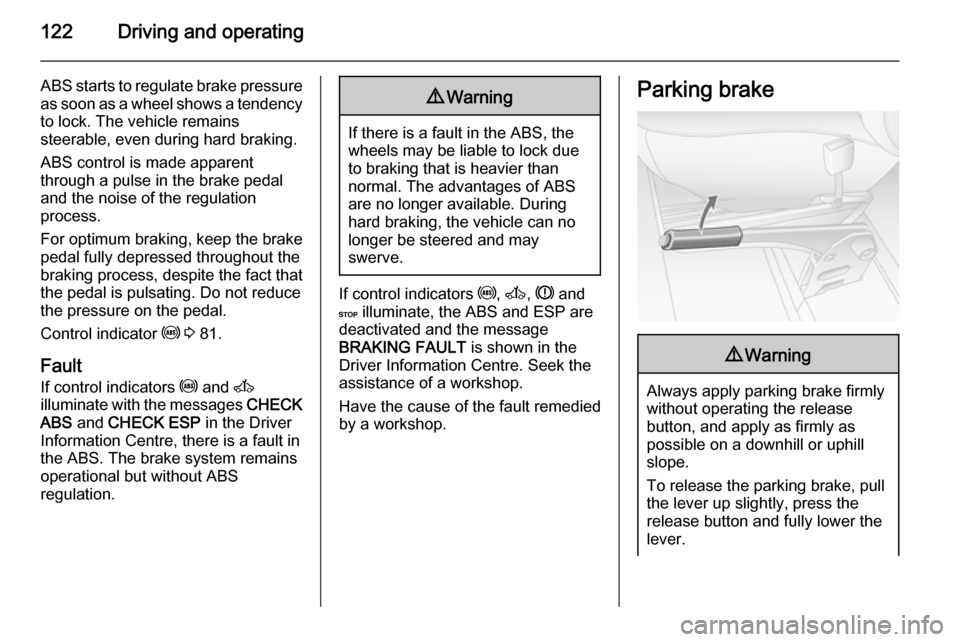
Parking brake9 Warning
Always apply parking brake firmly
without operating the release
button, and apply as firmly as
possible on a downhill or uphill
slope.
To release the parking brake, pull
the lever up slightly, press the
release button and fully lower the
lever.
Page 125 of 215
Driving and operating123To reduce the operating forces of
the parking brake, depress the
foot brake at the same time.
Control indicator R 3 81.
Parking 3 114.
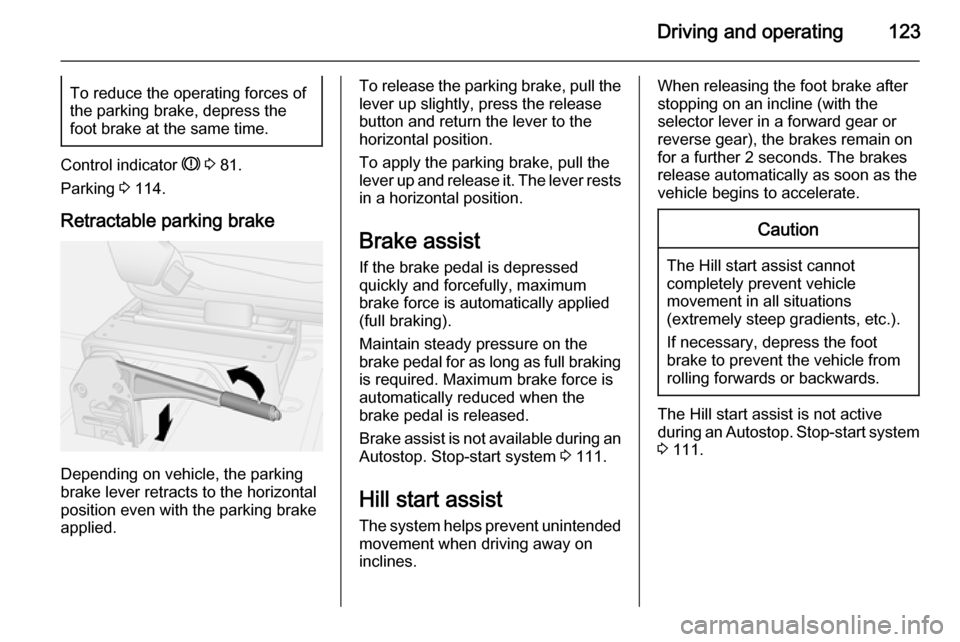
Retractable parking brake
Depending on vehicle, the parking
brake lever retracts to the horizontal
position even with the parking brake
applied.
To release the parking brake, pull the
lever up slightly, press the release
button and return the lever to the
horizontal position.
To apply the parking brake, pull the
lever up and release it. The lever rests
in a horizontal position.
Brake assist
If the brake pedal is depressed
quickly and forcefully, maximum
brake force is automatically applied
(full braking).
Maintain steady pressure on the
brake pedal for as long as full braking
is required. Maximum brake force is
automatically reduced when the
brake pedal is released.
Brake assist is not available during an
Autostop. Stop-start system 3 111.
Hill start assist The system helps prevent unintendedmovement when driving away on
inclines.When releasing the foot brake after
stopping on an incline (with the
selector lever in a forward gear or
reverse gear), the brakes remain on
for a further 2 seconds. The brakes
release automatically as soon as the
vehicle begins to accelerate.Caution
The Hill start assist cannot
completely prevent vehicle
movement in all situations
(extremely steep gradients, etc.).
If necessary, depress the foot
brake to prevent the vehicle from
rolling forwards or backwards.
The Hill start assist is not active
during an Autostop. Stop-start system
3 111.