2015.5 Peugeot 308 key
[x] Cancel search: keyPage 315 of 396
313
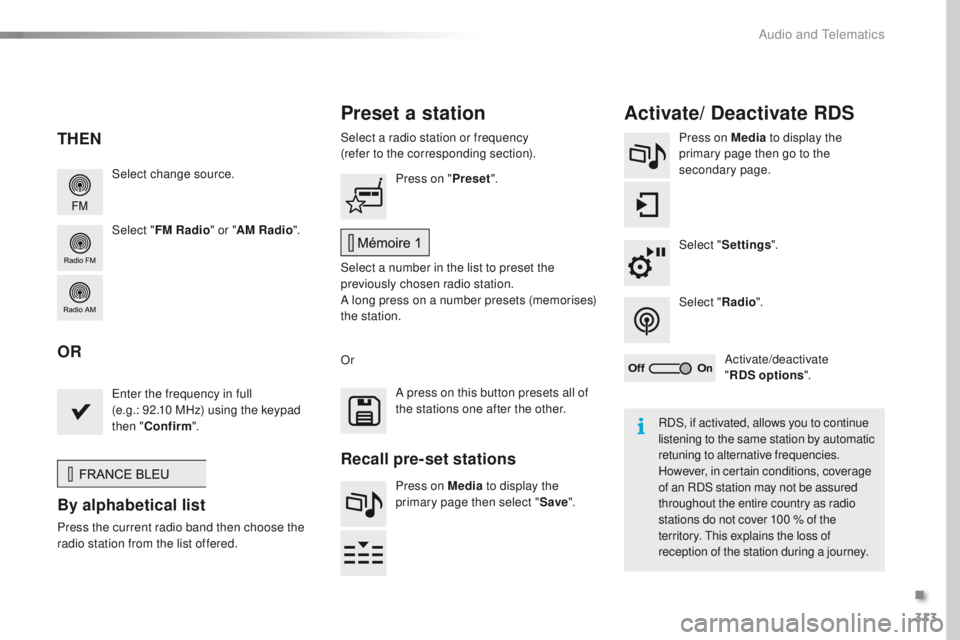
Select change source.
Select "FM Radio " or "AM Radio ".Select a radio station or frequency
(refer to the corresponding section).
Press on Media
to display the
primary page then go to the
secondary page.
Select " Settings ".
Select " Radio".
Activate/deactivate
" RDS options ".
Press on "
Preset".
Select a number in the list to preset the
previously chosen radio station.
A long press on a number presets (memorises)
the station.
en
ter the frequency in full
(e.g.: 92.10 MHz) using the keypad
then " Confirm ".
By alphabetical list
Press the current radio band then choose the
r adio station from the list offered. Or
Press on Media to display the
primary page then select " Save".
Preset a station Activate/ Deactivate RDS
THEN
OR
A press on this button presets all of
the stations one after the other.
Recall pre-set stations
RDS, if activated, allows you to continue
listening to the same station by automatic
retuning to alternative frequencies.
However, in certain conditions, coverage
of an RDS station may not be assured
throughout the entire country as radio
stations do not cover 100
% of the
territory.
t
h
is explains the loss of
reception of the station during a journey.
.
Audio and telematics
Page 347 of 396
345
PeugeOt Connect Apps
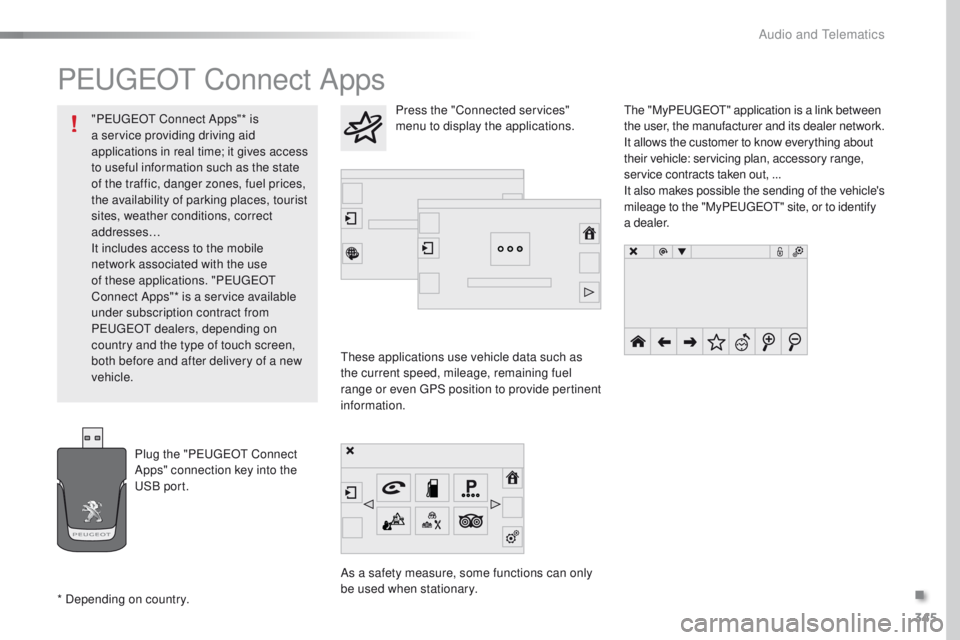
these applications use vehicle data such as
the current speed, mileage, remaining fuel
range or even
g
P
S position to provide pertinent
information.
As a safety measure, some functions can only
be used when stationary.
th
e "My
Peuge
O
t
" application is a link between
the user, the manufacturer and its dealer network.
It allows the customer to know everything about
their vehicle: servicing plan, accessory range,
service contracts taken out, ...
It also makes possible the sending of the vehicle's
mileage to the "My Peuge
O
t
" site, or to identify
a dealer.
Press the "Connected services"
menu to display the applications.
Plug the "P
e
uge
Ot
Connect
Apps" connection key into the
uS
B port.
* Depending on country. "P
e
uge
Ot
Connect Apps"* is
a service providing driving aid
applications in real time; it gives access
to useful information such as the state
of the traffic, danger zones, fuel prices,
the availability of parking places, tourist
sites, weather conditions, correct
addresses…
It includes access to the mobile
network associated with the use
of these applications. "P
e
uge
Ot
Connect Apps"* is a service available
under subscription contract from
P
e
uge
Ot d
ealers, depending on
country and the type of touch screen,
both before and after delivery of a new
vehicle.
.
Audio and telematics
Page 354 of 396
352
Managing paired
telephones
this function allows the connection or
disconnection of a peripheral device as
well as the deletion of a pairing.using the telephone is not
recommended while driving.
Park the vehicle.
Make the call using the steering
mounted controls.
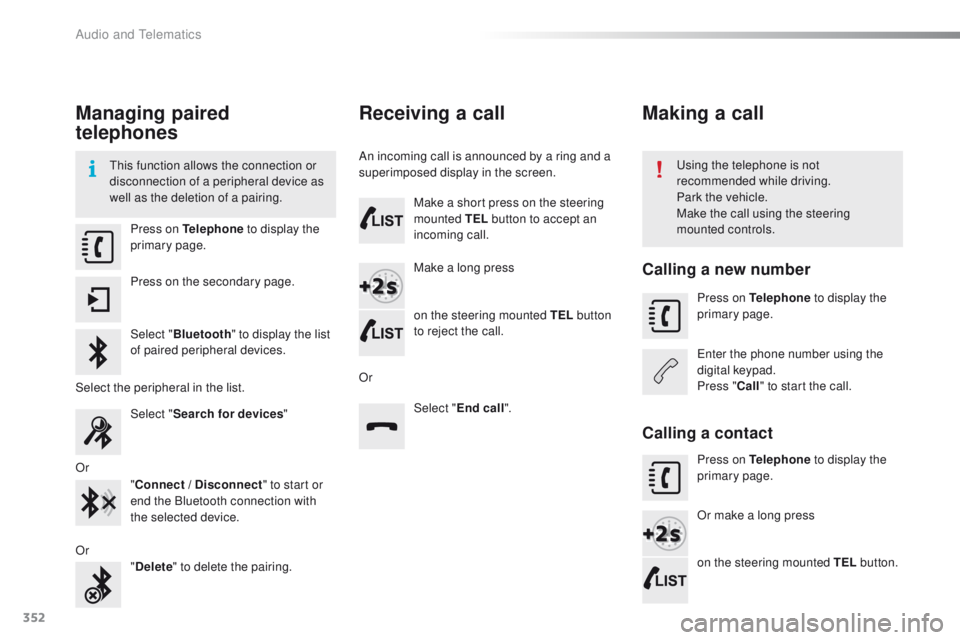
Press on Telephone
to display the
primary page.
Press on the secondary page.
Select " Bluetooth " to display the list
of paired peripheral devices.
Select the peripheral in the list. Select "Search for devices "
Or "Connect / Disconnect " to start or
end the Bluetooth connection with
the selected device.
Or "Delete " to delete the pairing.
Receiving a call
An incoming call is announced by a ring and a
superimposed display in the screen.
Make a short press on the steering
mounted TEL button to accept an
incoming call.
Make a long press
on the steering mounted TEL button
to reject the call.
Or Select "End call".
Making a call
Calling a new number
Press on Telephone to display the
primary page.
en
ter the phone number using the
digital keypad.
Press " Call" to start the call.
Calling a contact
Press on Telephone to display the
primary page.
Or make a long press
on the steering mounted TEL button.
Audio and Telematics
Page 375 of 396
373
use only uS B memory sticks formatted FAt3 2
(File Allocation ta ble).
It is recommended that you use
genuine Apple
® uSB cables for correct
operation.
*
I
n certain cases, play of the audio files must
be initiated from the keypad.
** If the telephone supports the function.
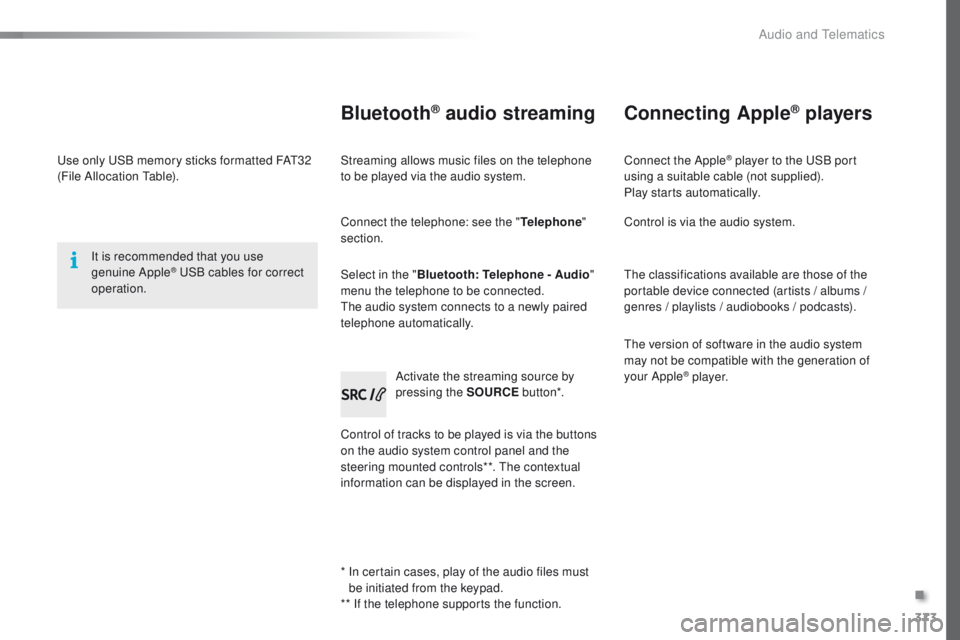
Bluetooth® audio streaming
Streaming allows music files on the telephone
to be played via the audio system.
Connect the telephone: see the " Telephone"
section.
Select in the " Bluetooth: Telephone - Audio "
menu the telephone to be connected.
th
e audio system connects to a newly paired
telephone automatically.
Control of tracks to be played is via the buttons
on the audio system control panel and the
steering mounted controls**.
t
h
e contextual
information can be displayed in the screen. Activate the streaming source by
pressing the SOURCE
but to n*.
Connecting Apple® players
Connect the Apple® player to the uSB port
using a suitable cable (not supplied).
Play starts automatically.
Control is via the audio system.
th
e classifications available are those of the
portable device connected (artists / albums /
genres / playlists / audiobooks / podcasts).
th
e version of software in the audio system
may not be compatible with the generation of
your Apple
® p l aye r.
.
Audio and telematics
Page 376 of 396
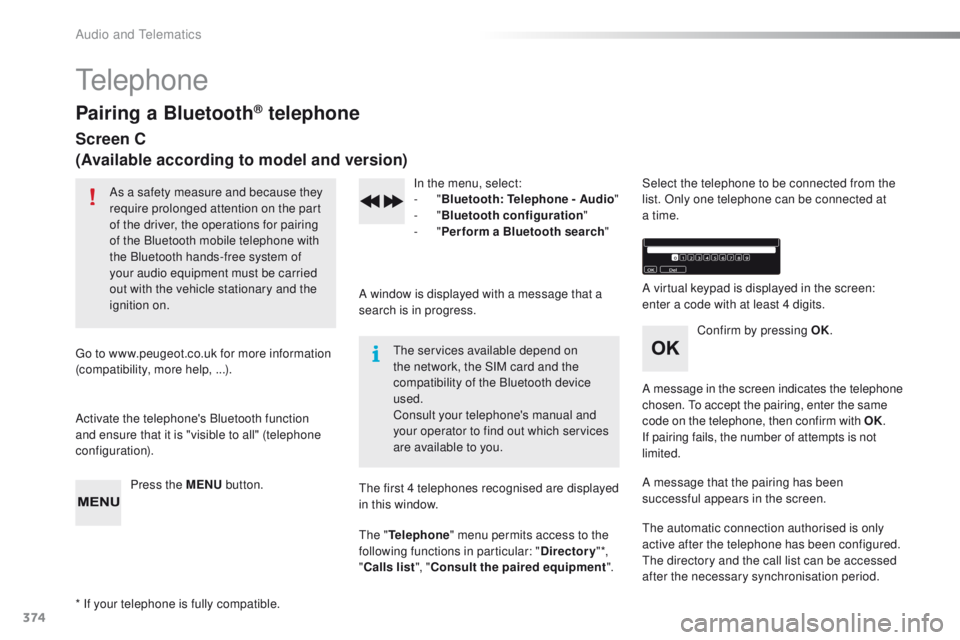
374
telephone
Pairing a Bluetooth® telephone
Screen C
(Available according to model and version)
As a safety measure and because they
require prolonged attention on the part
of the driver, the operations for pairing
of the Bluetooth mobile telephone with
the Bluetooth hands-free system of
your audio equipment must be carried
out with the vehicle stationary and the
ignition on.
go
to www.peugeot.co.uk for more information
(compatibility, more help, ...).
Activate the telephone's Bluetooth function
and ensure that it is "visible to all" (telephone
configuration).
Press the MENU button. In the menu, select:
-
"Bluetooth : Telephone - Audio "
-
"Bluetooth configuration "
-
"Perform a Bluetooth search "
A window is displayed with a message that a
search is in progress.
the
services available depend on
the network, the SIM card and the
compatibility of the Bluetooth device
used.
Consult your telephone's manual and
your operator to find out which services
are available to you.
* If your telephone is fully compatible.
th
e first 4 telephones recognised are displayed
in this window.
th
e "Telephone " menu permits access to the
following functions in particular: " Directory" *,
" Calls list ", "Consult the paired equipment ".Select the telephone to be connected from the
list. Only one telephone can be connected at
a time.
A virtual keypad is displayed in the screen:
enter a code with at least 4 digits.
Confirm by pressing OK.
A message in the screen indicates the telephone
chosen.
t
o
accept the pairing, enter the same
code on the telephone, then confirm with OK.
If pairing fails, the number of attempts is not
limited.
A message that the pairing has been
successful appears in the screen.
th
e automatic connection authorised is only
active after the telephone has been configured.
th
e directory and the call list can be accessed
after the necessary synchronisation period.
Audio and telematics
Page 377 of 396
375
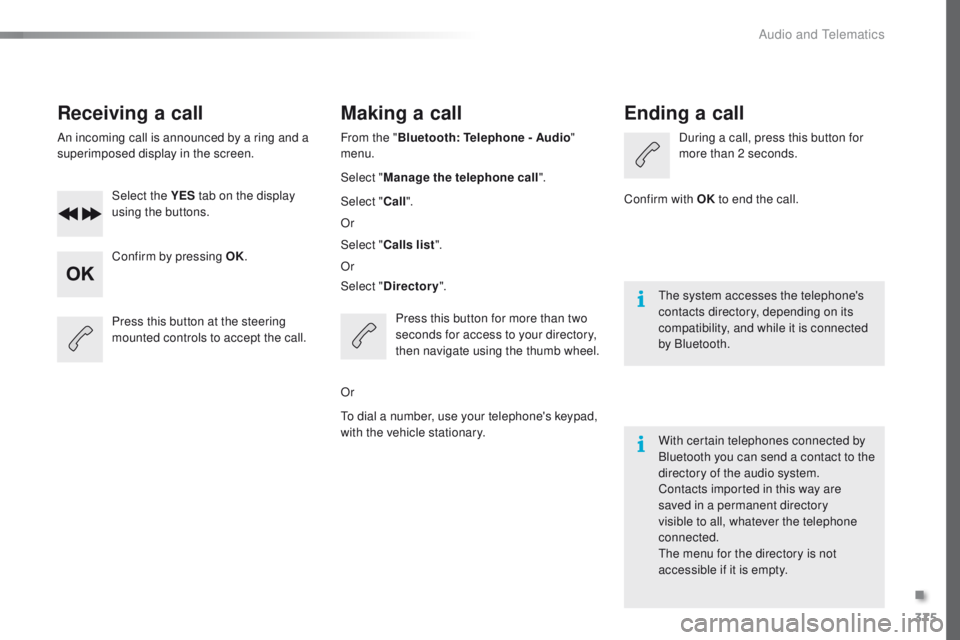
Receiving a call
An incoming call is announced by a ring and a
superimposed display in the screen.Select the YES tab on the display
using the buttons.
Confirm by pressing OK.
Press this button at the steering
mounted controls to accept the call.
Making a call
From the " Bluetooth : Telephone - Audio "
menu.
Select " Manage the telephone call".
Select " Call".
Or
Select " Calls list ".
Or
Select " Directory ".
Press this button for more than two
seconds for access to your directory,
then navigate using the thumb wheel.
Or
to d
ial a number, use your telephone's keypad,
with the vehicle stationary.
Ending a call
During a call, press this button for
more than 2 seconds.
Confirm with OK to end the call.
th
e system accesses the telephone's
contacts directory, depending on its
compatibility, and while it is connected
by Bluetooth.
With certain telephones connected by
Bluetooth you can send a contact to the
directory of the audio system.
Contacts imported in this way are
saved in a permanent directory
visible to all, whatever the telephone
connected.
th
e menu for the directory is not
accessible if it is empty.
.
Audio and Telematics
Page 387 of 396
385
Hazard warning lamps ..........................11 9 , 2 4 3
Hazard warning lamps, automatic operation
.................................... 11 9
Headlamp adjustment
...................................114
Headlamps, automatic illumination
.................................. 1 0 9 , 112 , 113
Headlamps, dipped beam
............108, 256, 258
Headlamps, halogen
............................256, 258
Headlamps, main beam
....... 1
08, 256, 258, 260
Headlamp wash
............................................ 11 6
Head restraints, front
...................................... 75
Head restraints, rear
.................................78, 79
Heating
......................................... 90, 92, 94, 96
Hill start assist
............................................... 16
2Jack
........
.......................................................250
Identification, vehicle
....................................
29
5
Ignition on ........................................ 9 9, 150, 152
Immobiliser, electronic
......................
51, 63, 154
I n d i c a t o r, coolant temperature
.....................................
28
Indicator, engine oil level ................................
31
Indicator lamps, operation
.........................
13 -17
Indicators, direction
......................................
111
Inflating tyres
..........................................
10, 295
Inflating tyres and accessories (using the kit)
..............................
................
249
Instrument panel
...............................
..............
12
Intelligent t
ra
ction Control
............................
12
1
Interactive help
........................................
41, 3 41
Inter-vehicle time
........................................... 18
7
ISOFIX seats .................................................
141
IS OFIX m ountings................................. 13 9, 14 0Key
............................................................
48-63
Keyless e
n
try
and Starting
......................
56 -58, 63, 151, 154
Key with remote control ..............
49, 51, 57, 154
Kit, hands-free
......................................
3 5 0 , 374
Kit, temporary puncture repair
..........
86, 87, 244
I
H
J
K
Labels, identification ..................................... 29 5
LeD s - light-emitting diodes .........256, 261, 263
Level, AdBlue
® additive ................................. 235
Level, brake fluid ........................................... 2
31
Level, Diesel additive
............................ 232, 233
Level, engine coolant
.............................. 28, 231
Level, engine oil
...............................
.......31, 2 29
Level, headlamp wash
........................... 117, 2 3 1
Levels and checks
................ 227-229, 231, 232
Level, screenwash fluid
......................... 117, 2 3 1
Light-emitting diodes - L
eD
s
........256, 261, 263
Lighting
................
.......................................... 108
Lighting dimmer
..............................
................33
Lighting, guide-me home
........................ 51, 113
Lighting, interior
.................................... 104, 105
Lighting, mood
.............................................. 105
Lighting, welcome
......................................... 113
Loading
................................................... 10, 223
Load reduction mode
.................................... 219
Locating your vehicle
................................ 51
, 5 5
Locking
............................................................ 63
L
gear lever, manual gearbox .........................163ge
ar shift indicator ....................................... 16 4
glo
ve box, refrigerated
...................................80
gu
ide-me-home
............................................ 113
.
Alphabetical index
Page 389 of 396
387
Storage wells ............................................ 86, 87
Storing driving positions .................................74
Stowing rings
............................................ 86, 87
Switching off the engine
............................... 14
8
Synchronising the remote control
..................................................... 5
3, 62
T
table of weights .................................... 28 1, 288tab
les of engines .................278, 280, 284, 287
ta
bles of fuses .............................................. 266
ta
nk, AdBlue
® additive ......................... 2 35 -242t
a n k , f u e l
....................................................... 213
te
chnical data
....................................... 278-295
te
lephone
............................................. 3 5 0 , 374
te
mperature, coolant
...................................... 28
thr
ee flashes
(direction indicators)
................................... 111
tim
e (setting)
..............................
..............4 4 - 47
tM
C (
tr
affic info)
.......................................... 3
32
to
o l s
...................................................... 244, 250
to
pping-up the AdBlue
® additive ......... 2 39 -242to
p tether
...................................................... 13 9
to
tal distance recorder
................................... 32
to
uch screen ........................35, 37- 44, 173, 211
tou
ch screen (Menus)
................. 299, 304, 305
to
w b a r
................................................... 1 4 7, 2 1 8
to
wed loads
.......................................... 281, 288
to
wing another vehicle
................................. 2
75
to
wing eye
...................................................... 86
Reinitialisation of the under-inflation
detection system
.........................................
210
Reinitialising the remote control
............... 5
3, 62
Reminder, key in ignition
...............................
150
Reminder, lighting on
....................................
111
Remote control
.......................................... 48
-63
Removing a wheel
........................................
252
Removing the mat
...........................................
81
Replacing bulbs
....................................
256-265
Replacing fuses
..............................
......
2 6 6 -271
Replacing the air filter
...................................
233
Replacing the oil filter
................................... 23
3
Replacing the passenger compartment filter
.............................................................
233
Reservoir, headlamp wash
...........................
231
Reservoir, screenwash
................................. 2
31
Resetting the service indicator
.......................
30
Resetting the trip recorder
..............................
32
Reversing camera
.........................................
200
Reversing lamp
..................................... 26
1, 263
Risk areas (update)
.......................................
331
Roof bars
....................................................... 2
23
Running out of fuel (Diesel)
..........................
2
77 Screen menu
........................
306, 308, 310, 320,
322, 326, 334, 346, 348
Screen, multifunction (with audio system)
........................
45, 46, 366
Screen, multifunction (without audio system)
..................................
47
Screenwash
..................................................
11 6
Screenwash, rear
..........................................
11 6
SCR (Selective Catalytic Reduction)
............
235
Seat belts
....................................... 12
3 -125, 13 6
Seats, front
...............................
..................
7 2 -74
Seats, heated
..................................................
75
Seats, rear
.................................................
7 7, 7 8
Serial number, vehicle
.................................. 29
5
Service indicator
.............................................
28
Service (warning lamp)
................................... 19
S
ervicing
...............................
..........................
10
Settings, equipment
........................................
41
Settings (Menus)
...........................................
334
Settings, system
............................................
342
Sidelamps
.............
108, 256, 257, 259 -261, 263
Side repeater
..............................
..................
260
Ski flap
..............................
..............................
85
Snow chains
.......................................... 2
09, 216
Socket, 12 V accessory
......................
8
0, 83, 87
Socket, audio
............................
80, 83, 316, 371
Speed limiter
.........................................
173 , 174
Spotlamps, side
....................................
114 , 2 6 0
Stability control (
e
SC).............................
17, 1 2 0
Starting the engine
.......................................
148
Station, radio ......................................... 3
12, 3 6 6
Stay, bonnet
.................................................. 226
Steering mounted controls, audio
.................................................. 303, 365
Steering wheel, adjustment
............................ 71
Stop & Start
........................ 16, 24, 36, 101, 170,
171, 213, 226, 233, 272
Stop (warning lamp)
........................................ 18
St
orage
.......................................... 80, 82, 85 - 87S
Safety, children ......................12 5, 127, 13 0 -14 5
Screen, cold climate ..................................... 217
Screen, colour
...................................... 304, 305
Screen, instrument panel
..........................12, 3 4
.
Alphabetical index