Page 351 of 396
349
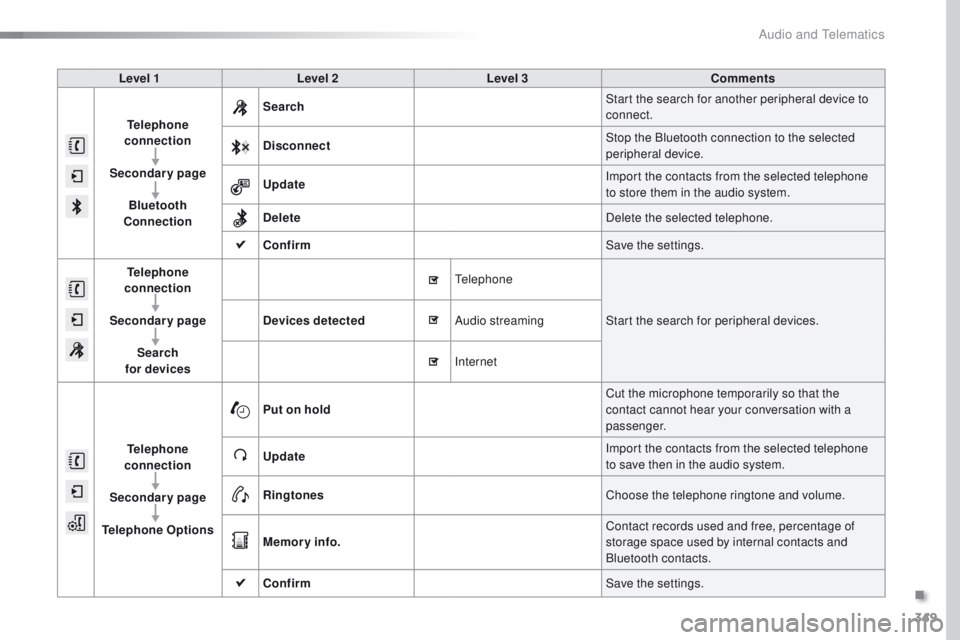
Level 1Level 2 Level 3 Comments
Telephone
connection
Secondary page Bluetooth
Connection Search
Start the search for another peripheral device to
connect.
Disconnect Stop the Bluetooth connection to the selected
peripheral device.
Update Import the contacts from the selected telephone
to store them in the audio system.
Delete Delete the selected telephone.
Confirm Save the settings.
Telephone
conn ection
Secondary page Search
for devices Devices detected
te
lephoneStart the search for peripheral devices.
Audio streaming
Internet
Telephone
connection
Secondary page
Telephone Options Put on hold
Cut the microphone temporarily so that the
contact cannot hear your conversation with a
passenger.
Update Import the contacts from the selected telephone
to save then in the audio system.
Ringtones Choose the telephone ringtone and volume.
Memory info. Contact records used and free, percentage of
storage space used by internal contacts and
Bluetooth contacts.
Confirm Save the settings.
.
Audio and Telematics
Page 352 of 396
350
Pairing a Bluetooth®
telephone
For reasons of safety and because they
require prolonged attention on the part
of the driver, the operations for pairing
the Bluetooth mobile telephone to the
hands-free system of the audio system
must be carried out with the vehicle
stationary .
Procedure (short) from the
telephone
In the Bluetooth menu of your device, select the
system name in the list of devices detected.
en
ter a code of at least 4 figures in the device
and confirm.
en
ter this same code in the system,
select " OK" and confirm.
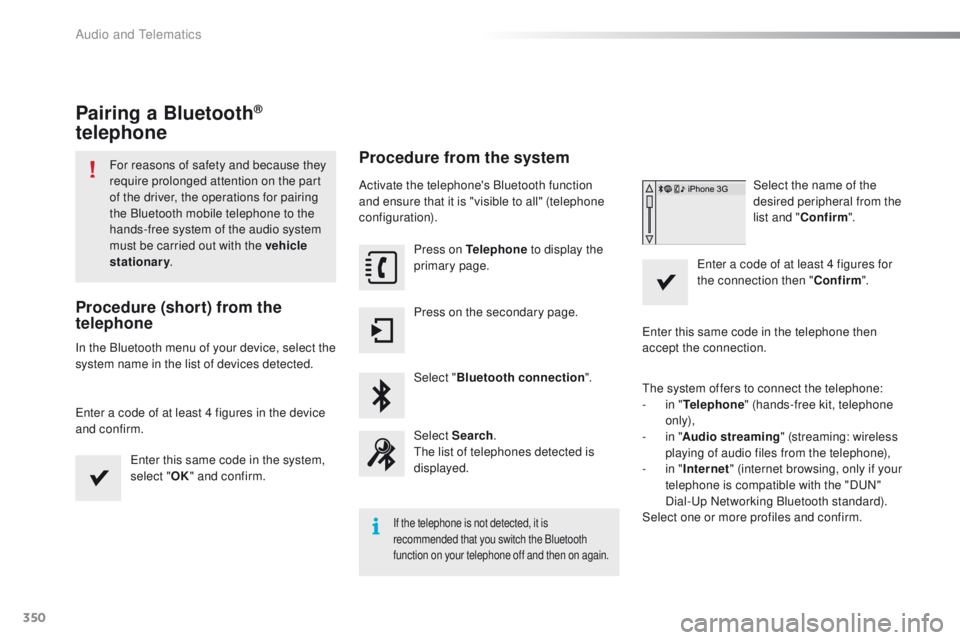
Procedure from the system
Activate the telephone's Bluetooth function
and ensure that it is "visible to all" (telephone
configuration).
Press on Telephone to display the
primary page.
Press on the secondary page.
Select " Bluetooth connection ".
Select Search .
th
e list of telephones detected is
displayed.
If the telephone is not detected, it is
recommended that you switch the Bluetooth
function on your telephone off and then on again.
Select the name of the
desired peripheral from the
list and " Confirm ".
en
ter a code of at least 4 figures for
the connection then " Confirm".
en
ter this same code in the telephone then
accept the connection.
th
e system offers to connect the telephone:
-
i
n " Telephone " (hands-free kit, telephone
only),
-
i
n " Audio streaming " (streaming: wireless
playing of audio files from the telephone),
-
i
n " Internet " (internet browsing, only if your
telephone is compatible with the "D
uN
"
Dial-
up
Networking Bluetooth standard).
Select one or more profiles and confirm.
Audio and Telematics
Page 353 of 396
351
the services available depend on
the network, the SIM card and the
compatibility of the Bluetooth telephone
used. Check the telephone manual and
with your network provider for details of
the services available to you.
th
e ability of the system to connect
with only one profile depends on the
telephone.
t
h
e three profiles may all
connect by default.
Visit www.peugeot.co.uk for more information
(compatibility, additional help,
...).
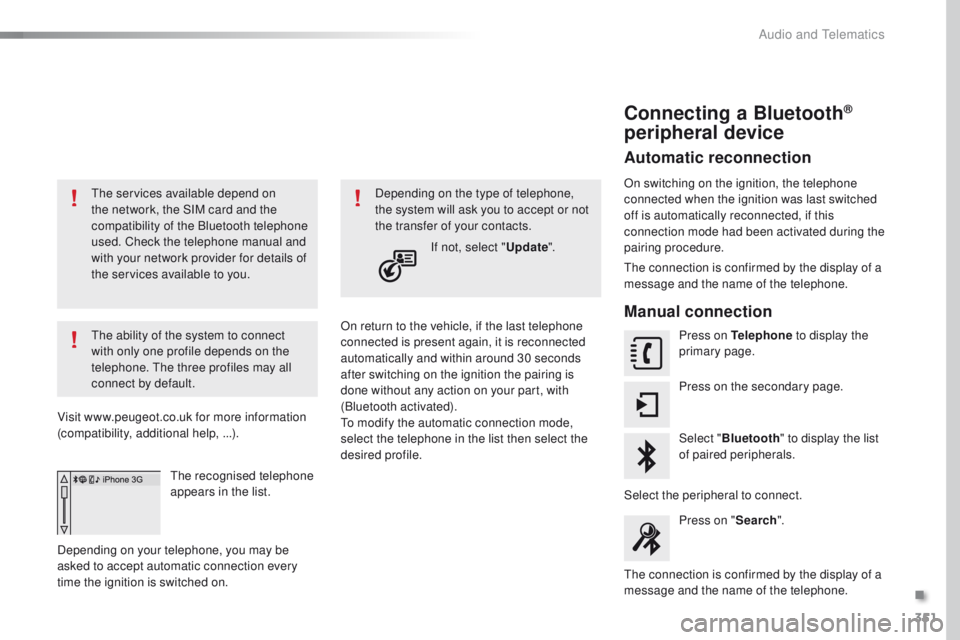
the
recognised telephone
appears in the list.
Depending on your telephone, you may be
asked to accept automatic connection every
time the ignition is switched on. On return to the vehicle, if the last telephone
connected is present again, it is reconnected
automatically and within around 30 seconds
after switching on the ignition the pairing is
done without any action on your part, with
(Bluetooth activated).
to m
odify the automatic connection mode,
select the telephone in the list then select the
desired profile. Depending on the type of telephone,
the system will ask you to accept or not
the transfer of your contacts.
If not, select " Update".
Connecting a Bluetooth®
peripheral device
Automatic reconnection
On switching on the ignition, the telephone
connected when the ignition was last switched
off is automatically reconnected, if this
connection mode had been activated during the
pairing procedure.
th
e connection is confirmed by the display of a
message and the name of the telephone.
Manual connection
Press on Telephone to display the
primary page.
Press on the secondary page.
Select " Bluetooth " to display the list
of paired peripherals.
Select the peripheral to connect. Press on " Search".
th
e connection is confirmed by the display of a
message and the name of the telephone.
.
Audio and telematics
Page 354 of 396
352
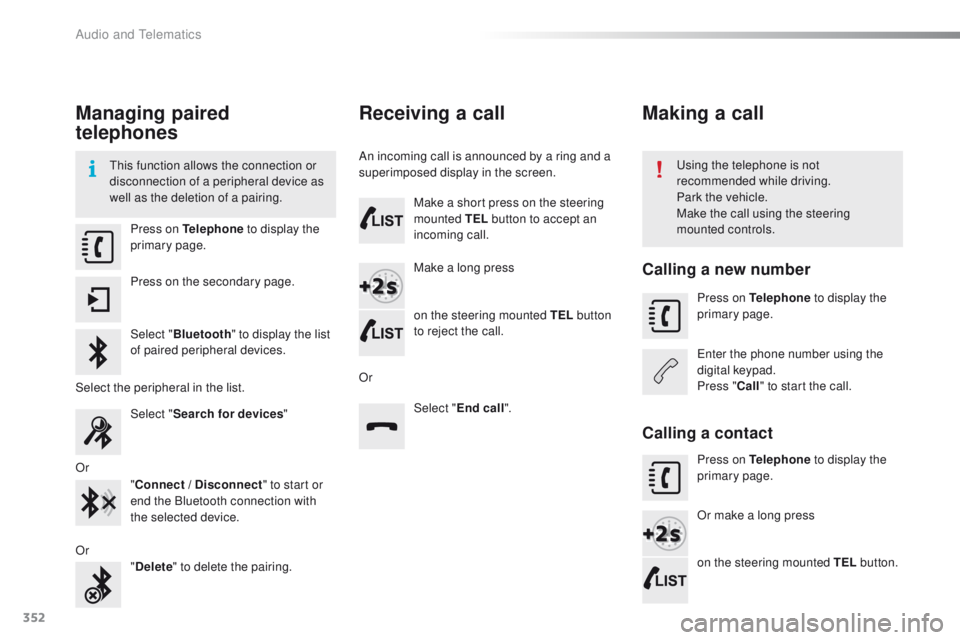
Managing paired
telephones
this function allows the connection or
disconnection of a peripheral device as
well as the deletion of a pairing.using the telephone is not
recommended while driving.
Park the vehicle.
Make the call using the steering
mounted controls.
Press on Telephone
to display the
primary page.
Press on the secondary page.
Select " Bluetooth " to display the list
of paired peripheral devices.
Select the peripheral in the list. Select "Search for devices "
Or "Connect / Disconnect " to start or
end the Bluetooth connection with
the selected device.
Or "Delete " to delete the pairing.
Receiving a call
An incoming call is announced by a ring and a
superimposed display in the screen.
Make a short press on the steering
mounted TEL button to accept an
incoming call.
Make a long press
on the steering mounted TEL button
to reject the call.
Or Select "End call".
Making a call
Calling a new number
Press on Telephone to display the
primary page.
en
ter the phone number using the
digital keypad.
Press " Call" to start the call.
Calling a contact
Press on Telephone to display the
primary page.
Or make a long press
on the steering mounted TEL button.
Audio and Telematics
Page 355 of 396
353
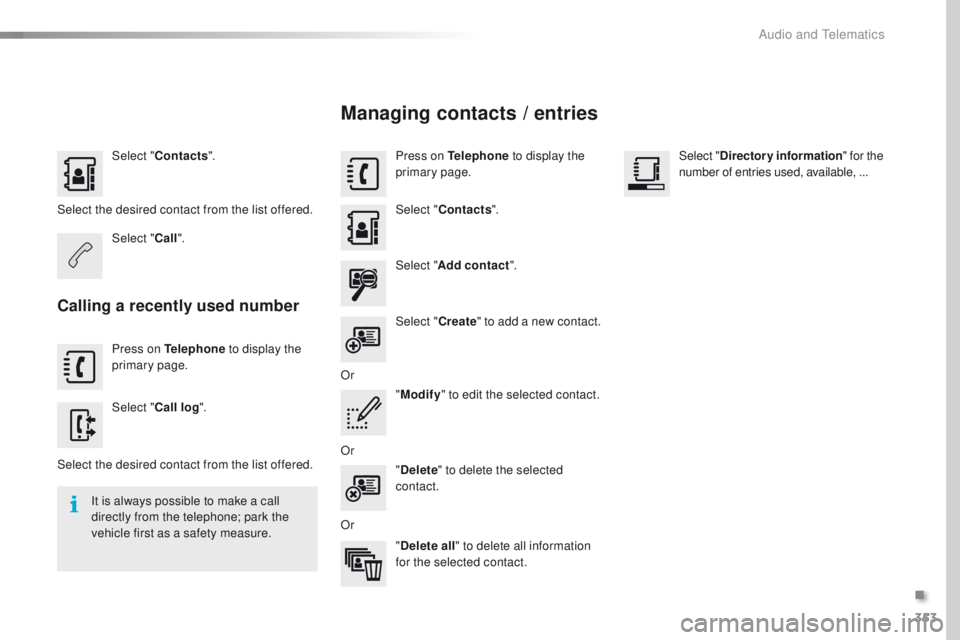
Select "Contacts ".
Select the desired contact from the list offered. Select "Call".
Calling a recently used number
Press on Telephone to display the
primary page.
Select " Call log ".
Select the desired contact from the list offered. It is always possible to make a call
directly from the telephone; park the
vehicle first as a safety measure.
Managing contacts / entries
Press on Telephone to display the
primary page.
Select " Contacts ".
Select " Add contact ".
Select " Create" to add a new contact.
Or "Modify " to edit the selected contact.
Or "Delete " to delete the selected
contact.
Or "Delete all " to delete all information
for the selected contact. Select "
Directory information " for the
number of entries used, available, ...
.
Audio and telematics
Page 359 of 396
357
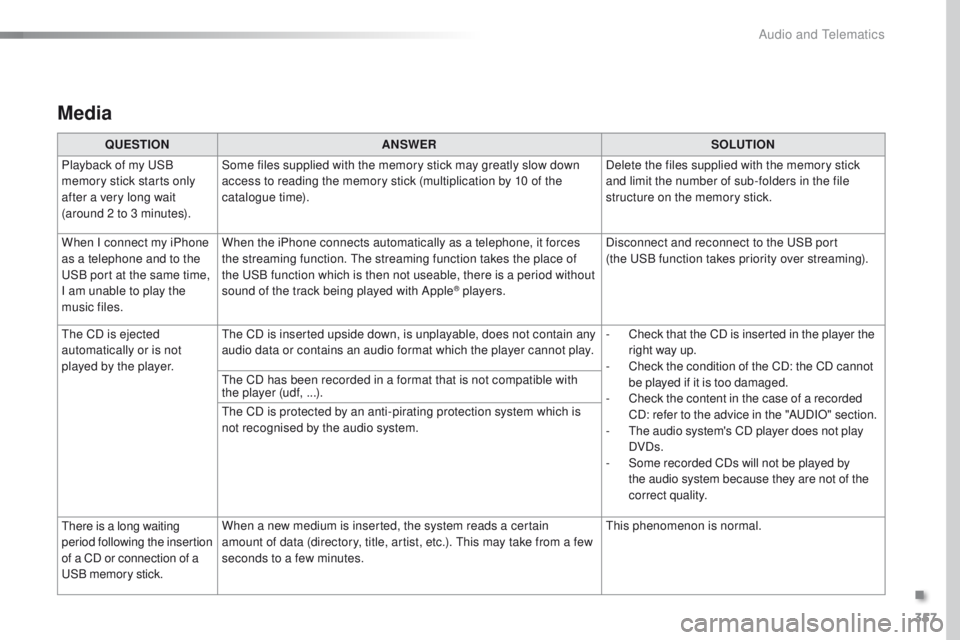
Media
QUESTIONANSWER SOLUTION
Playback of my u
S
B
memory stick starts only
after a very long wait
(around 2 to 3 minutes). Some files supplied with the memory stick may greatly slow down
access to reading the memory stick (multiplication by 10 of the
catalogue time).
Delete the files supplied with the memory stick
and limit the number of sub-folders in the file
structure on the memory stick.
When I connect my iPhone
as a telephone and to the
uS
B port at the same time,
I am unable to play the
music files. When the iPhone connects automatically as a telephone, it forces
the streaming function.
t
h
e streaming function takes the place of
the
u
S
B function which is then not useable, there is a period without
sound of the track being played with Apple
® players. Disconnect and reconnect to the u
S
B port
(the u
S
B function takes priority over streaming).
th
e CD is ejected
automatically or is not
played by the player.
th
e CD is inserted upside down, is unplayable, does not contain any
audio data or contains an audio format which the player cannot play. -
C
heck that the CD is inserted in the player the
right way up.
-
C
heck the condition of the CD: the CD cannot
be played if it is too damaged.
-
C
heck the content in the case of a recorded
CD: refer to the advice in the "A
uD
IO" section.
-
t
h
e audio system's CD player does not play
DVDs.
-
S
ome recorded CDs will not be played by
the audio system because they are not of the
correct quality.
th
e CD has been recorded in a format that is not compatible with
the player (udf,
...).
th
e CD is protected by an anti-pirating protection system which is
not recognised by the audio system.
ther
e is a long waiting
period following the insertion
of a CD or connection of a
uS
B memory stick. When a new medium is inserted, the system reads a certain
amount of data (directory, title, artist, etc.).
t
h
is may take from a few
seconds to a few minutes.
th
is phenomenon is normal.
.
Audio and Telematics
Page 363 of 396
361
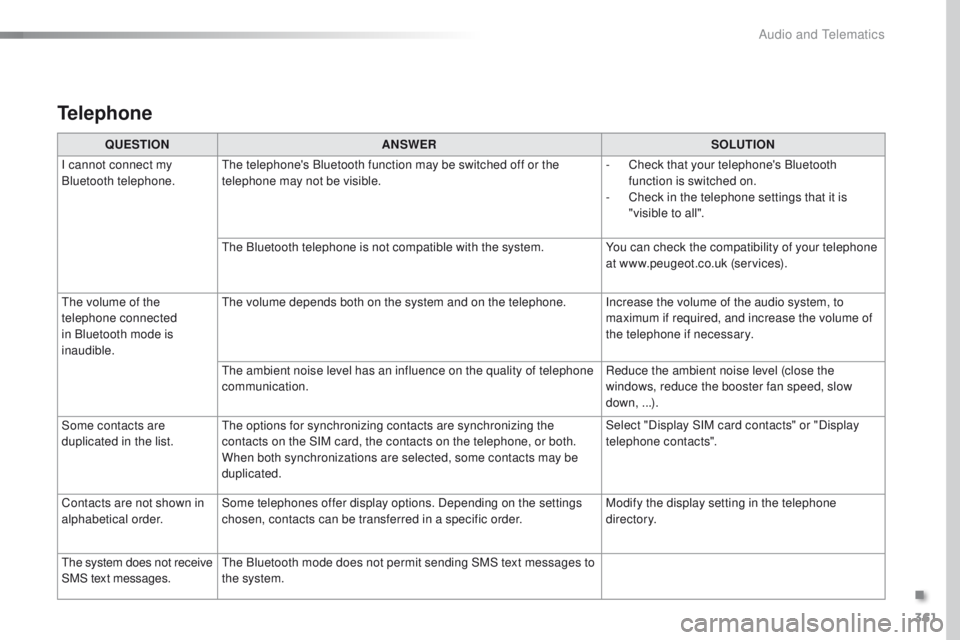
Telephone
QUESTIONANSWER SOLUTION
I cannot connect my
Bluetooth telephone.
th
e telephone's Bluetooth function may be switched off or the
telephone may not be visible. -
C
heck that your telephone's Bluetooth
function is switched on.
-
C
heck in the telephone settings that it is
"visible to all".
th
e Bluetooth telephone is not compatible with the system. You can check the compatibility of your telephone
at www.peugeot.co.uk (services).
th
e volume of the
telephone connected
in Bluetooth mode is
inaudible.
th
e volume depends both on the system and on the telephone. Increase the volume of the audio system, to maximum if required, and increase the volume of
the telephone if necessary.
th
e ambient noise level has an influence on the quality of telephone
communication. Reduce the ambient noise level (close the
windows, reduce the booster fan speed, slow
down,
...).
Some contacts are
duplicated in the list.
th
e options for synchronizing contacts are synchronizing the
contacts on the SIM card, the contacts on the telephone, or both.
When both synchronizations are selected, some contacts may be
duplicated. Select "Display SIM card contacts" or "Display
telephone contacts".
Contacts are not shown in
alphabetical order. Some telephones offer display options. Depending on the settings
chosen, contacts can be transferred in a specific order. Modify the display setting in the telephone
di r e c to r y.
th
e system does not receive
SMS text messages.
th
e Bluetooth mode does not permit sending SMS text messages to
the system.
.
Audio and Telematics
Page 365 of 396
363
PeugeOt Connect Sound (RD5)
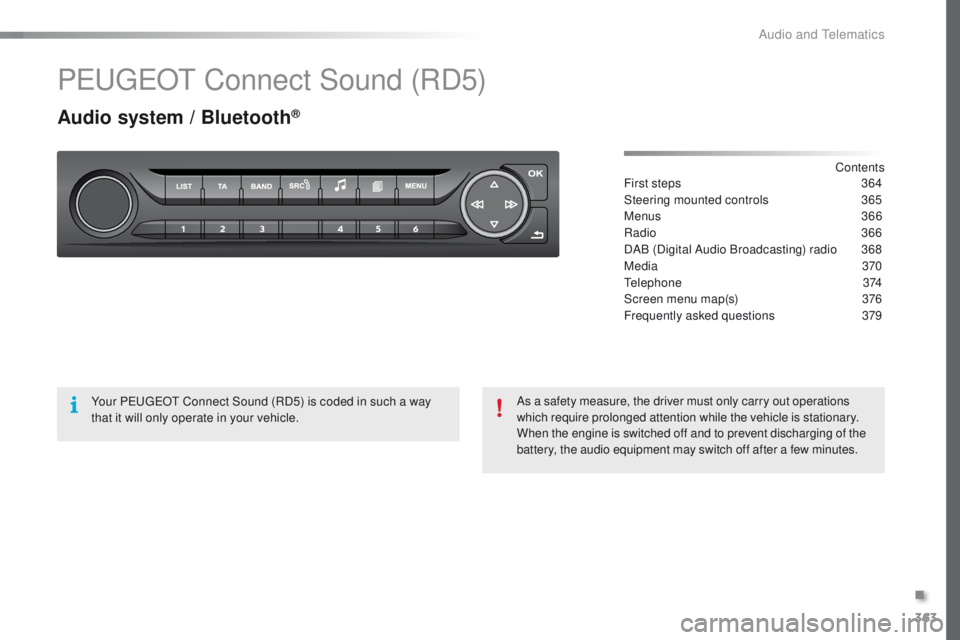
Audio system / Bluetooth®
Contents
First steps
3 64
Steering mounted controls
3
65
Menus
366
Radio
3
66
DAB (Digital Audio Broadcasting) radio
3
68
Media
370
te
lephone
374
Screen menu map(s)
3
76
Frequently asked questions
3
79
Your P
e
uge
Ot
Connect Sound (RD5) is coded in such a way
that it will only operate in your vehicle. As a safety measure, the driver must only carry out operations
which require prolonged attention while the vehicle is stationary.
When the engine is switched off and to prevent discharging of the
battery, the audio equipment may switch off after a few minutes.
.
Audio and telematics