2014 VOLVO XC90 airbag
[x] Cancel search: airbagPage 42 of 308

01 Safety
Child safety 01
40
seat of any vehicle with a front passenger side airbag.
• Drive safely!
Child restraint registration and recalls
Registering a child restraintChild restraints could be recalled for safety reasons. You must register your childrestraint to be reached in a recall. To stayinformed about child safety seat recalls, besure to fill out and return the registration cardthat comes with new child restraints. Child restraint recall information is readily available in both the U.S. and Canada. Forrecall information in the U.S., call the U.S.Government's Auto Safety Hotline at1-800-424-9393 or go to http://www-odi.nhtsa.dot.gov/cars/problems/recalls/register/childseat/index.cfm. In Canada, visitTransport Canada's Child Safety website athttp://www.tc.gc.ca/roadsafety/childsafety/menu.htm.
Page 43 of 308

01 Safety
Child restraint systems01
41
Child restraints
G026491
Infant seat
There are three main types of child restraint systems: infant seats, convertible seats, andbooster cushions. They are classified accord-ing to the child's age and size. The following section provides general infor-
mation on securing a child restraint using a
three-point seat belt. Refer to page 49 and page 51 for information on securing a childrestraint using ISOFIX/LATCH lower anchorsand/or top tether anchorages.
G026503
Convertible seat
WARNING
A child seat should never be used in the front passenger seat of any vehicle with afront passenger airbag – not even if thePASSENGER AIRBAG OFF symbol near
the rear-view mirror is illuminated (on vehi-cles equipped with Occupant Weight Sen-sor). If the severity of an accident were tocause the airbag to inflate, this could leadto serious injury or death to a child seatedin this position.
G026489
Booster cushion
WARNING
Always refer to the child restraint manufac- turer's instructions for detailed informationon securing the restraint.
Page 45 of 308

01 Safety
Infant seats01
43
Securing an infant seat with a seat belt
G026417
Do not place the infant seat in the front passeng- er's seat
NOTE
Refer to page 49 and page 51 for infor- mation on securing a child restraint usingISOFIX/LATCH lower anchors and/or toptether anchorages.
G026493
Positioning the seat belt through the infant seat
WARNING
•An infant seat must be in the rear-facing position only.
• The infant seat should not be positionedbehind the driver's seat unless there isadequate space for safe installation.
1. Place the infant seat in the rear seat of
the vehicle.
2. Attach the seat belt to the infant seat according to the manufacturer's instruc- tions.
G026492
Fasten the seat belt
WARNING
A child seat should never be used in the front passenger seat of any vehicle with afront passenger airbag – not even if the"Passenger airbag off " symbol near the
rear-view mirror is illuminated (on vehiclesequipped with Occupant Weight Sensor). Ifthe severity of an accident were to causethe airbag to inflate, this could lead to seri-ous injury or death to a child seated in thisposition.
Page 49 of 308

01 Safety
Convertible seats01
47
WARNING
A child seat should never be used in the front passenger seat of any vehicle with afront passenger airbag – not even if thePASSENGER AIRBAG OFF symbol near
the rear-view mirror is illuminated (on vehi-cles equipped with Occupant Weight Sen-sor). If the severity of an accident were tocause the airbag to inflate, this could leadto serious injury or death to a child seatedin this position.
Page 62 of 308

02 Instruments and controls
Instrument panel
02
60
Seat belt reminderThis symbol lights up to indicate that the driver has not fastenedhis/her seat belt.
Supplemental Restraint System (SRS)If this light comes on while the vehicle is being driven, or remainson for longer than approximately10 seconds after the vehicle hasbeen started, the SRS system's
diagnostic functions have detected a fault ina seat belt lock or pretensioner, a front air-bag, side impact airbag, and/or an inflatablecurtain. Have the system(s) inspected by atrained and qualified Volvo service technicianas soon as possible.
BRAKE – Brake failure warning lightIf the light comes on while driving or braking, stop immediately, open the hood and checkthe brake fluid level in the reservoir. seepage 225.
Canadian models are equippedwith this warning light.
If the BRAKE and ABS warning lights come on at the same time, this could indicate afault in the brake system.
• Stop the vehicle in a suitable place and switch off the engine.
• Restart the engine.
• If both warning lights go off, no furtheraction is required.
• If both lights are still on after the enginehas been restarted, switch off the engineagain and check the brake fluid level (seepage 225 for the location of the brakefluid reservoir).
If the brake fluid level is above the MIN mark,
drive carefully to a trained and qualified Volvo service technician and have the brake systeminspected.
WARNING
If the fluid level is below the MIN mark in
the reservoir or if a Brake failure –
Service urgent message is displayed in
the text window: DO NOT DRIVE. Have
the vehicle towed to a trained and qualified Volvo service technician and have thebrake system inspected.
PARK BRAKE Parking brake appliedThis light will be on when the parking brake (hand brake) is applied. The parking brakepedal is located on the left side of the driver'sfootwell, see page 80 for more information.
Canadian models are equippedwith this symbol.
Oil pressure warning light 2If the light comes on while driv- ing, stop the vehicle and thenstop the engine immediatelyand check the engine oil level, see page 62. If the light stays
on after restart, have the vehicle towed to the nearest trained and qualified Volvo servicetechnician. After hard driving, the light maycome on occasionally when the engine isidling. This is normal, provided it goes offwhen the engine speed is increased.
Generator warning lightIf the light comes on while the engine is running, have the charg-ing system checked.
2 On certain engines, the symbol for low oil pressure is not used. Instead, a text warning is provided in the information display, see page 62.
Page 118 of 308
04 Interior
Storage compartments
04
116
G027018
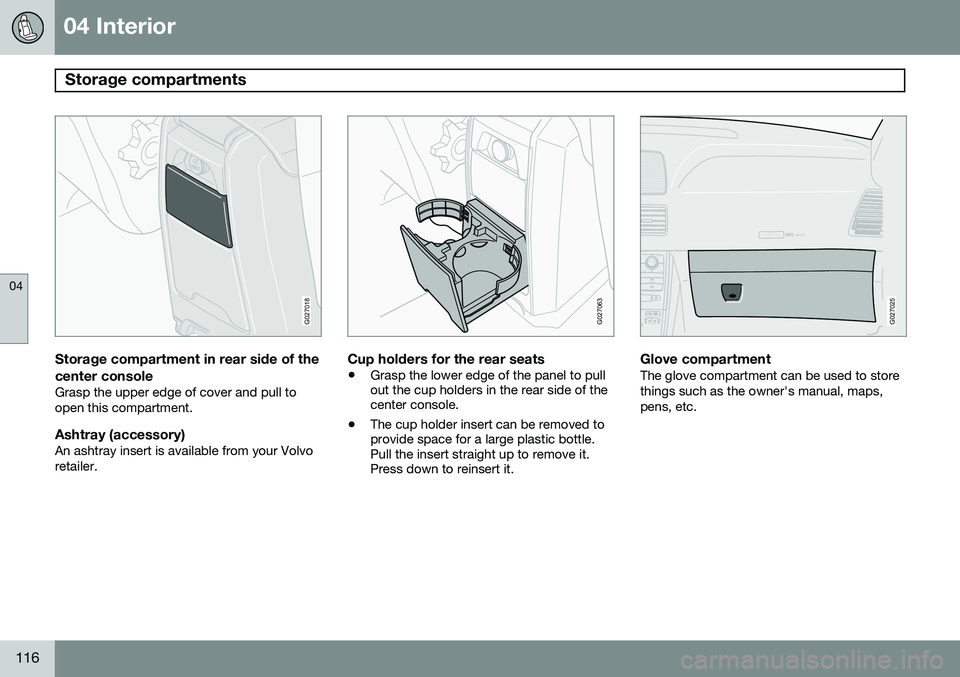
Storage compartment in rear side of the
center console
Grasp the upper edge of cover and pull to open this compartment.
Ashtray (accessory)An ashtray insert is available from your Volvoretailer.
G027063
Cup holders for the rear seats
• Grasp the lower edge of the panel to pull out the cup holders in the rear side of thecenter console.
• The cup holder insert can be removed toprovide space for a large plastic bottle.Pull the insert straight up to remove it.Press down to reinsert it.
ATTENTIONPakjdskdl ioiuip kjöpp opoodidåuswi
CSOUND
MENU
80
ENTERLSEEEXITMY KEYRTO
AIRBAG
G027025
Glove compartmentThe glove compartment can be used to store things such as the owner's manual, maps,pens, etc.
Page 130 of 308

05 Locks and alarm
Remote keys and key blades
05
128
press the button again (within 10 seconds) to unlock all doors, and the tailgate.
Tailgate unlock
Press this button to unlock the tailgate (with- out unlocking the other doors). This functionwill not open the tailgate.
Panic function
For more information on this function, see page 133.
Approach lighting
Press this button when approaching the vehi- cle at night to light up the interior courtesylight, parking lights, license plate lights andthe lights in the door mirrors.
Lock
Press once to lock all doors, and the tailgate.
Fold key blade in/out
Press to extend the key blade. This button must also be pressed when the key blade isfolded back into the slot in the side of theremote key unit.
NOTE
• If an airbag deploys, your vehicle's SRS control module will attempt toautomatically unlock all doors.
• The key blade may also be used tolock and unlock the doors, and to acti-vate and deactivate the alarm system.
• To avoid leaving your keys in the vehi-cle, make a habit of always locking thevehicle with the remote key.
• If the key blade section of the remoteis not fully folded out when starting thevehicle, the immobilizer function maymake it impossible to start the engine.
• The vehicle can be locked even if adoor is open. When the door(s) areclosed, they will be locked. Please beaware that the keys could be locked inthe car when this is done.
Automatic re-lockingIf the doors are unlocked, the locks will auto- matically reengage (re-lock) and the alarm willrearm after 2 minutes unless a door or thetailgate has been opened. This helps preventthe car from inadvertently being left unlocked. FCC ID: LQNP2T-APU This device complies with part 15 of the FCC rules. Operation is subject to the following conditions: (1) This device may not causeharmful interference, and (2) this device mustaccept any interference received, includinginterference that may cause undesired opera-tion. Canadian 2306104388 Model 504 2927 by Donnelly Operation is subject to the following condi- tions: (1) this device may not cause interfer-ence, and (2) this device must accept anyinterference, including interference that maycause undesired operation of the device. Canadian 2306104388A Model 509 977 by Connaught Electronics Operation is subject to the following condi- tions: (1) this device may not cause interfer-ence, and (2) this device must accept anyinterference, including interference that maycause undesired operation of the device.
Page 132 of 308

05 Locks and alarm
Locking and unlocking
05
130
G029646
Locking and unlocking the vehicle from
the inside
The switch on the driver's door armrest can be used to lock or unlock all doors and thetailgate, and to set the alarm. Each door can also be locked with the lock button on the respective door and opened bypulling the door handle on the door.
Alternative locking when parkingThe central locking button on the driver's door can also be used to lock the vehiclewhen you leave it. To do so:
1. Open the door. 2. Press the lock section of the button.
3. Close the door. This will lock the vehicle
completely and arm the alarm.
NOTE
Please be aware that locking the vehicle in this way makes it possible to lock theremote key in the passenger compartment.To help avoid this, lock the vehicle fromthe outside by pressing the lock button onthe remote key. If the vehicle is locked using the central locking button, be sure that the remote keyis in your possession before closing thedoor.
Automatic lockingThe function locks the doors automatically when the vehicle's speed exceeds approxi-mately 5 mph (7 km/h). The doors will thenremain locked until a door in opened from theinside or if all of the doors are unlocked fromthe control panel in the driver's door. This function can be activated/deactivated from the control panel in the driver's door.
Activating/deactivating automatic
locking
1. Turn the ignition key to position I or II. 2. Press the
READ button on the left-side
steering wheel lever to erase any mes- sages that may be displayed in the infor-mation display.
3. Depress the central locking button on the control panel until a new message aboutthe locking status is displayed.
The message
AUTOLOCK ON (the doors will
be locked when the vehicle begins to move) or
AUTOLOCK OFF will be displayed.
ATTENTIONPakjdskdl ioiuip kjöpp opoodidåuswi
CSOUND
MENU
80
ENTERLSEEEXITMY KEYRTO
AIRBAG
G027025
Locking the glove compartmentThe glove compartment can be locked with the master key.