2014 VOLVO XC90 ignition
[x] Cancel search: ignitionPage 71 of 308

02 Instruments and controls
Lighting panel
02
69
Parking lights
The front and rear parking lights can be turned on even when the ignition is switchedoff.
–Turn switch (1) to position .
The license plate lights also illuminate when the parking lights are switched on.
Rear fog light
The single rear fog light is located in the driv- er's side of the vehicle. The rear fog light will only function in combi- nation with the high/low beam headlights.
1. Turn the ignition key to position II.
2. Press button (3) to turn on the rear fog light.
An indicator light in the button illuminates when the rear fog light is on.
NOTE
The rear fog light is considerably brighter than the normal tail lights and should beused only when conditions such as fog,rain, snow, smoke or dust reduce visibilityfor other vehicles to less than 500 ft.(150 meters).
Instrument panel lighting
The instrument panel lighting illuminates when the ignition key is in position II and the light switch (1) is in either position
or
.
–Move the thumb wheel (4) up to increase brightness or down to decrease bright-ness.
Unlocking the fuel filler door
Press button (5) when the vehicle is at a standstill to unlock the fuel filler door. Pleasenote that the fuel filler door will remainunlocked until the vehicle begins to move for-ward. An audible click will be heard when thefuel filler door relocks.
NOTE
If the fuel filler door does not unlock after the button has been pressed, drive thevehicle at a speed of at least 5 mph(8 km/h), stop the vehicle, and press thebutton again.
For information on unlocking the fuel filler door manually, see page 70.
Page 73 of 308

02 Instruments and controls
Left-side steering wheel lever
02
71
Lever positions
G026954
Turn signals, lane change position
Turn signals, position for normal turns
High beam flash
Toggle between high and low beams, Home Safe lighting
Turn signals
When turningMove the lever as far up or down as possible (to position 2) to start the turn signals. Theturn signals will be cancelled automatically bythe movement of the steering wheel, or thelever can be returned to its initial position byhand.
When changing lanesThe driver can automatically flash the turnsignals 3 times by:• Moving the turn signal lever up or down to position (1) and releasing it.
• Moving the lever up or down to position(2) and immediately back to its originalposition.
NOTE
• This automatic flashing sequence can be interrupted by immediately movingthe lever in the opposite direction.
• If the turn signal indicator flashesfaster than normal, check for aburned-out turn signal bulb.
High/low beam headlights
Continuous high beams1. Turn the ignition key to position
II.
2. With the light switch in position
,
(see page 67) pull the turn signal lever toward the steering wheel to togglebetween high and low beams.
High beam flash1. Turn the ignition key to position II.
2. Pull the turn signal lever to position (3). The high beams will remain on until thelever is released.
Home safe lightingWhen leaving your vehicle at night, home safelighting can illuminate the area in front of thevehicle.
1. Remove the key from the ignition switch.
2. Pull the turn signal lever as far as possibletoward the steering wheel and release it.
3. Exit the vehicle and lock the doors.The headlights and parking lights will illumi- nate and remain on for 30 1
, 60 or 90 seconds.
The time interval can be changed by a trained and qualified Volvo service technician.
1 Factory setting
Page 75 of 308

02 Instruments and controls
Right-side steering wheel lever
02
* Option/accessory, for more information, see Introduction.73
Tailgate wiper/washer
G027127
Intermittent wiping: Press the upper
section of the switch
Neutral position: The wiper is
switched off
Normal (continuous) wiping: Press the
lower section of the switch
Move the lever forward to start the tailgate washer. After washing the rear window, thewiper will make several additional sweeps.
Tailgate wiper and reverse gearIf the front wipers are on and the transmissionis put into reverse gear, the tailgate wiper will go into intermittent wiping function 1
.
If the tailgate wiper is already in normal wip- ing function, the normal wiping function willcontinue.
Rain sensor*
The rain sensor automatically regulates wiper speed according to the amount of water onthe windshield. The sensitivity of the sensor can be adjusted
by twisting ring (1) up (the wipers will sweep the windshield more frequently) or down (thewipers will sweep the windshield less fre-quently).
Activating the rain sensor:1. Turn the ignition key to at least position I
and put the windshield wiper lever inposition 0.
2. Press button (2), see page 72. > A light in the button will light up to indi-cate that the rain sensor is active.
Deactivating the rain sensor:
• Press button (2), see page 72. or •
Move the windshield wiper lever
down to
another position. Moving the lever up will not deactivate the rain sensor. Doing sowill cause the wipers to sweep the wind-shield until the lever is released, at whichtime the wipers return to rain sensormode.
The rain sensor is also deactivated when the key is removed from the ignition.
CAUTION
The rain sensor should be deactivated when washing the vehicle in an automaticcar wash, etc. If the rain sensor function isleft on, the wipers will start inadvertently inthe car wash and could be damaged.
1 Consult your Volvo retailer if you would like to have this function deactivated.
Page 82 of 308

02 Instruments and controls
12-volt sockets
02
80* Option/accessory, for more information, see Introduction.
These 12 volt sockets can be used to plug in certain accessories such as cellular tele-phones, etc. The ignition key must be in at least position I
for the sockets in the front seat and the optional socket at the rear of the center con-sole to function. The maximum current consumption is 10A (120W) if only one of the 12-volt sockets inthe passenger compartment is in use. If boththe front and rear sockets are used at thesame time, the maximum current consump-tion per socket is 7.5A (90W). 12-volt socket in the cargo compartment Fold down the lid to use the socket. This socket can be used even if the ignition isswitched off.NOTE
• If the 12-volt sockets are used while the engine is not running, there is arisk that the vehicle's battery will bedischarged.
• If the ignition is switched off and adevice drawing more than 0.1 A isconnected to a socket, a battery warn-ing will be displayed in the text win-dow.
• The covers should be kept on whenthe auxiliary sockets are not in use.
G028425
12-volt socket at the rear of the center console*
Ashtrays/cigarette lighterThe auxiliary socket can also be used to power a cigarette lighter. Accessory cigarettelighters and ashtrays can be purchased fromyour Volvo retailer.
12-volt socket in the cargo compartment
Page 84 of 308

02 Instruments and controls
Power windows
02
82
Power windows
The power windows are controlled by buttons in the arm rests. The ignition switch must be ON1
(ignition key in position I, II or the engine
running) for the electrically operated windows to function. To lower: Press down the front edge of the button to the first detent ("stop"). To raise: Lightly pull up the front edge of the button to the first detent ("stop").
Auto up/down function (front doors
only):
Either front door window can be opened orclosed automatically. Auto down: Press the front part of the button
as far down as possible and release it imme- diately. To stop the window at any time, pullthe button up. Auto up: Pull the front part of the button up
as far as possible and release it immediately. To stop the window at any time, press thebutton down.
G029571
Power window controls
Front windows
Rear windows
NOTE
If a window is obstructed during auto-up, it will automatically reverse direction andreturn to its starting position. If a window isrepeatedly obstructed during auto-upoperation, an overload protection circuitbreaker will temporarily halt window func-tion. The window will return to normalfunction after a brief cool-down period.
WARNING
Always remove the ignition key when the vehicle is unattended. Make sure that the windows are com- pletely unobstructed before they are oper-ated. Never leave children unattended in the vehicle.
NOTE
To reduce buffeting wind noise if the rear windows are opened, also open the frontwindows slightly.
G029572
1 The power windows will also function after the ignition has been switched off as long as neither of the front doors has been opened.
Page 86 of 308

02 Instruments and controls
Mirrors
02
84* Option/accessory, for more information, see Introduction.
Rearview mirror
G026660
To reduce glare from the headlights of follow- ing vehicles, use the control to switchbetween the normal and night-driving posi-tions.
Normal position
Night position, reduces glare from follow- ing headlights
Autodim function*The autodim function reacts to headlightsfrom following traffic and automaticallyreduces glare.
NOTE
This function is automatically switched off when the gear selector is placed in theReverse position.
Rearview mirror with compass*
G026965
The upper left-hand corner of the rearview mirror has an integrated display that showsthe compass direction toward which the caris pointing. Eight different directions can be displayed:
N, NE, E, SE, S, SW, W and NW.
The display shows your car's orientation with respect to true north. If the compass is activated, it will be dis-played automatically when the ignition is inpostilion II or when the engine is running. Thecompass can be switched off or on by press-ing the inset button on the rear side of themirror (see the inset illustration). This can bedone with straightened paperclip or similarobject. The button is recessed approximately1 in. (2.5 cm) in the mirror.
G026409
Magnetic zonesThe earth is divided into 15 magnetic zones. The compass is initially set for the zone towhich the car was delivered, and shouldalways be adjusted if the car is driven to anew magnetic zone. To do so:
Page 87 of 308
02 Instruments and controls
Mirrors
02
85
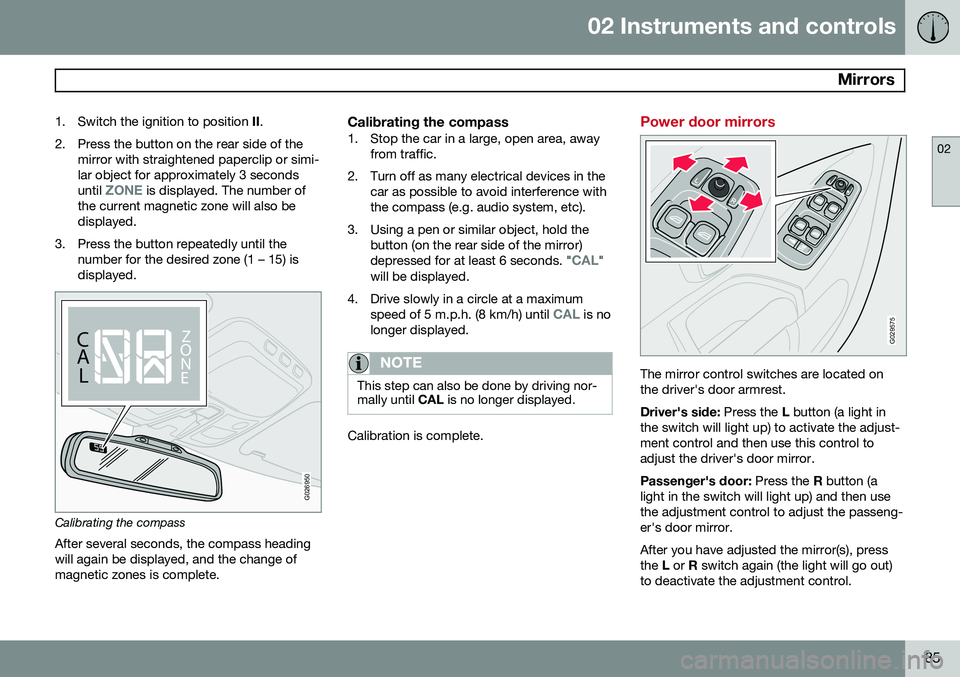
1. Switch the ignition to position
II.
2. Press the button on the rear side of the mirror with straightened paperclip or simi- lar object for approximately 3 seconds until
ZONE is displayed. The number of
the current magnetic zone will also be displayed.
3. Press the button repeatedly until the number for the desired zone (1 – 15) isdisplayed.
CALZ
O NE
C A
LZ
O
N
E
G026950
Calibrating the compass
After several seconds, the compass heading will again be displayed, and the change ofmagnetic zones is complete.
Calibrating the compass1. Stop the car in a large, open area, away from traffic.
2. Turn off as many electrical devices in the car as possible to avoid interference withthe compass (e.g. audio system, etc).
3. Using a pen or similar object, hold the button (on the rear side of the mirror) depressed for at least 6 seconds. "
CAL"
will be displayed.
4. Drive slowly in a circle at a maximum speed of 5 m.p.h. (8 km/h) until
CAL is no
longer displayed.
NOTE
This step can also be done by driving nor- mally until CAL is no longer displayed.
Calibration is complete.
Power door mirrors
G029575
The mirror control switches are located on the driver's door armrest. Driver's side: Press the L button (a light in
the switch will light up) to activate the adjust- ment control and then use this control toadjust the driver's door mirror. Passenger's door: Press the R button (a
light in the switch will light up) and then use the adjustment control to adjust the passeng-er's door mirror. After you have adjusted the mirror(s), press the L or R switch again (the light will go out)
to deactivate the adjustment control.
Page 89 of 308

02 Instruments and controls
Power moonroof
02
87
Power moonroof
G007503
To operate the moonroof, turn the ignition key to position I or II, or start the engine. The
moonroof can be operated in two ways:
Tilt position
Sliding moonroof
G027010
Tilt positionOpen: With the moonroof closed, push up the
rear edge of the switch (position 5 in the illus- tration in the center column). Close: Pull down and hold the rear edge of
the switch (position 6 in the illustration in the center column) until the moonroof has closedcompletely.
Sliding moonroofManual open: Pull the switch rearward to
position 3 and hold it until the moonroof hasopened to the position of your choice. Auto open:
Pull the switch as far back as
possible (position 4) and release it to auto-matically slide open the moonroof to the "comfort" 1
position. Pull the switch rearward
again to open the moonroof completely. Manual close: Push the switch to position 2
and hold it until the moonroof has closed completely or to the position of your choice. Auto close: Push the switch forward as far as
possible (position 1) and release it to auto- matically close the moonroof.
CAUTION
• Remove ice and snow before opening the moonroof.
• Do not operate the moonroof if it isfrozen closed.
• Never place heavy objects on themoonroof.
1
A position where the moonroof is not quite fully open, which helps alleviate "rumbling" wind noise.