2014 VOLVO V60 lock
[x] Cancel search: lockPage 134 of 442

04 Climate control
04
132* Option/accessory, for more information, see Introduction.
Engine block heater and passenger compartment heater* - messages
Symbols and display messages regarding the engine block and passenger compartment
heater (p. 129) differ depending on whetherthe combined instrument panel (p. 59) is ana-logue or digital.
When the heater has been activatedthe heat symbol illuminates in theinformation display.
When one of the timers has been activated, the symbol for activated timer illuminates inthe display at the same time as the set time isshown next to the symbol.Symbol for activated timer in ana-logue combined instrument panel.Symbol for activated timer in digital combined instrument panel.
The table shows symbols and display texts that appear.
SymbolDisplaySpecification
The heater is switched on and running.
Fuel operated heater stopped Battery saving modeThe heater has been stopped by the car's electronics in order to facilitate starting the engine.
ProCarManuals.co’
Page 142 of 442

05 Loading and storage
05
140* Option/accessory, for more information, see Introduction.
Glovebox
The glovebox is located on the passenger side.
The owner's manual and maps can be kept in here for example. There are also holders forpens on the inside of the lid. The gloveboxcan be locked (p. 167)* using the key blade(p. 155).
Related information
• Storage spaces (p. 137)
Inlay mats*
Inlay mats collect e.g. rubbish and slush. Volvo supplies specially manufactured inlaymats.
WARNING
Before setting off check that the inlaid mat in the driver area is firmly affixed andsecured in the bosses in order to avoidgetting caught adjacent to and under thepedals.
Related information
•Cleaning the interior (p. 381)
Vanity mirror
The vanity mirror is located on the rear of the sun visor.
Vanity mirror with lighting.
The light illuminates automatically when the cover is lifted.
Related information
• Lamp replacement - vanity mirror lighting (p. 358)
ProCarManuals.co’
Page 143 of 442

05 Loading and storage
05
* Option/accessory, for more information, see Introduction.141
Tunnel console - 12 V-sockets
The electrical sockets (12 V) are located next to the cup holder 1
and rear of the tunnel con-
sole.
12 V socket in tunnel console, front seat.
12 V socket in tunnel console, rear seat. The electrical socket can be used for various accessories designed for 12 V, e.g. displayscreens, music players and mobile phones.For the socket to supply current, the remotecontrol key must be in at least key position
I
(p. 70).
WARNING
Always leave the plug in the socket when the socket is not in use.
NOTE
Optional equipment and accessories - e.g. display screens, music players and mobilephones - which are connected to one ofthe passenger compartment's 12V electri-cal sockets, could be activated by the cli-mate control system, even when theremote control key has been removed orwhen the car is locked, for example, whenthe parking heater is activated at a presettime. For this reason remove the plugs from the electrical sockets for optional equipmentor accessories when not in use becausethe battery could be drained in the event ofsuch an occurrence!
IMPORTANT
Max. socket is 10 A (120 W) if one socket is used at a time. If both sockets in thetunnel console are used simultaneously,7.5 A (90 W) per socket is applicable. If the compressor for emergency puncture repair is connected to one of the two sock-ets, no other current consumer must beconnected to the other one.
NOTE
The compressor for emergency puncture repair (p. 333) has been tested andapproved by Volvo.
Related information
• Tunnel console - cigarette lighter and ashtray* (p. 139)
• 12 V electrical socket - cargo area* (p.144)
1
If ashtray and cigarette lighter are specified then there is no cup holder and adjacent 12 V socket.
ProCarManuals.co’
Page 144 of 442

05 Loading and storage
05
142* Option/accessory, for more information, see Introduction.
Loading
Payload depends on the car's kerb weight. Payload depends on the car's kerb weight. The total of the weight of the passengers andall accessories reduces the car's payload bya corresponding weight. For more detailedinformation on weights, see Weights (p. 390).
The tailgate is opened via a buttonon the lighting panel or the remotecontrol key, see Locking/unlocking -
tailgate (p. 167).
WARNING
The car’s driving properties change depending on the weight and positioningof the load.
To bear in mind when loading
• Position the load firmly against the rear seat's backrest.
Note that objects must not prevent the func- tion of the WHIPS system for the front seats ifany of the rear seat's backrests is foldeddown, seeWHIPS - seating position (p. 35).
• Centre the load.
• Heavy objects should be placed as low as possible. Avoid placing heavy loads onlowered backrests.
• Cover sharp edges with something soft toavoid damaging the upholstery. •
Secure all loads to the load retaining eye-lets with straps or web lashings.
WARNING
A loose object weighing 20 kg can, in a frontal collision at a speed of 50 km/h,carry the impact of an item weighing1000 kg.
WARNING
The protection provided by the inflatable curtain in the headlining may be compro-mised or eliminated by high loads.
• Never load cargo above the backrest.
WARNING
Always secure the load. During heavy braking the load may otherwise shift, caus-ing injury to the car's occupants. Cover sharp edges and sharp corners with something soft. Switch off the engine and apply the park- ing brake when loading/unloading longitems. Otherwise you may accidentallyknock the gear lever or gear selector withthe load into a drive position - and the carcould then move off.
Related information
•
Load retaining eyelets (p. 143)
• Safety net* (p. 145) •
Loading - long load (p. 143)
• Roof load (p. 143)
ProCarManuals.co’
Page 147 of 442

05 Loading and storage
05
}}
* Option/accessory, for more information, see Introduction.145
Safety net*
A safety net prevents loads from being thrown forward in the passenger compartment in theevent of sudden braking.
Storage space, safety net cassettes.
A rollable safety net comprising two cassettes has a storage space under the cargo areafloor hatch.
Securing the net cassettesA rollable safety net comprising two cassetteshas a storage space under the cargo areafloor hatch.
The two-part safety net cassette is secured on the rear of the backrest. The narrowestcassette is secured on the left-hand side (seen from the tailgate).
1. Fold the rear seat's backrest forward, see Seats, rear (p. 74).
2. Align the cassette's anchor rails in front of the backrest attachment lugs
.
3. Slide the cassette into the attachment lugs
.
4. Fold back and lock the backrests.
• Removing the cassette takes place in reverse order.
Using the safety net
Pull the net up from the cassettes. The net is self-locking after about 1 minute if the rearseat's backrests are raised.
Pull up the right-hand section of the net using its strap.
Insert the rod in the mounting on the right-hand side and then press it forward– the rod locks in with a click.
Pull out the rod's telescope section and click it in on the other side.
Pull up the left-hand safety net and hook it into the rod.
• Folding up takes place in reverse order.
The net can also be used when the rearseat's backrests are folded forward.
ProCarManuals.co’
Page 149 of 442

05 Loading and storage
05
* Option/accessory, for more information, see Introduction.147
desired, the safety grille can be dismantled and removed from the car. For information about the tools required and methods for fitting/removal, see the installa- tion instructions
3
that were included with the
initial purchase. For safety reasons, the safety grille must always be correctly fastened and securedwhen being refitted.
Related information
• Safety net* (p. 145)
• Loading (p. 142)
• Load retaining eyelets (p. 143)
Cargo cover
Pull the cargo cover over the load and hook it into the recesses at the cargo area's rearposts.
IMPORTANT
The protective grille cannot be folded up or down when the cargo cover is fitted.
Attaching the cargo coverMove one end piece of the cover into the recess on the side panel.
Move the other end piece into the corres- ponding recess.
Press both sides in. A "click" should be audible and the red marking should dis-appear.
> Check that both end pieces are
locked.
Removing the cargo cover1. Press in one end piece button and lift it out.
2. Carefully angle the cover up/out and the other end piece loosens automatically.
Lowering the cargo cover's rear sealing disc
In its rolled-in position, the cargo cover's rear sealing disc protrudes horizontally into thecargo area when it is fitted.
–Pull the sealing disc back gently, free from its support shelves, and lower.
Related information
• Loading (p. 142)
• Loading - long load (p. 143)
3
Installation instructions no. 30756681.
ProCarManuals.co’
Page 151 of 442

06 Locks and alarm
06
* Option/accessory, for more information, see Introduction.149
Remote control key with key blade
The remote control key is used to start the car and for locking and unlocking. It contains adetachable key blade (p. 155) made of metal.The visible section is available in two versionsso that it is possible to distinguish betweenthe remote control keys. The car is supplied with 2 remote control keys or PCCs* (Personal Car Communicator). Additional remote control keys can be ordered - up to 6 can be programmed andused for the same car.
WARNING
If there are children in the car: Remember to switch off the supply to the power windows and sunroof by removingthe remote control key if the driver leavesthe car.
Remote control key with PCC (p. 153) has increased functionality compared with theremote control key, see PCC* - unique func-tions (p. 153).
Related information
• Remote control key - functions (p. 151)
Remote control key - losing
If you lose a remote control key then a new one can be ordered at a workshop - anauthorised Volvo workshop is recommended. The remaining remote control keys must be taken to the Volvo workshop. The code of themissing remote control key must be erasedfrom the system as a theft prevention meas-ure. The current number of keys registered tothe car can be checked in the menu systemMY CAR
. For a description of the menu sys-
tem, see MY CAR (p. 103).
Related information
• Remote control key - functions (p. 151)
Key memory*
The key memory in the remote control key (p. 149) means that certain settings in the car canbe individually adapted for different people. The key memory function is available in com- bination with power seat and power rearviewand door mirrors. Settings for door mirrors,driver's seat and steering force can be savedin the key memory.
Key memory – door mirrors and driver's
seat
The settings are automatically connected toeach respective remote control key, see Keymemory* in remote control key (p. 74) andAdjustable steering force* (p. 257). Afterlocking with the remote control key the set-ting of the combined instrument panel'stheme is also saved in the key, see MY CAR(p. 103). The function can be activated/deactivated in the menu system MY CAR. For a description
of the menu system, see MY CAR (p. 103). For cars with the Keyless drive function, see Keyless drive* (p. 159).
ProCarManuals.co’
Page 152 of 442
06 Locks and alarm
06
150* Option/accessory, for more information, see Introduction.
Indication locking/unlocking - adjusting
When the car is locked or unlocked using the remote control key (p. 149) the direction indi-cators confirm that locking/unlocking wascorrectly performed.
• Locking - one flash and the door mirrors are folded 1
in.
• Unlocking - two flashes and the door mir-rors are folded 1
out.
After locking the indication is only given if all locks are activated once the doors have beenclosed.
Selecting the functionDifferent options for indicating locking/unlocking with light can be set in the car'smenu system MY CAR. For a description of
the menu system, see MY CAR (p. 103).
Related information
• Keyless drive* (p. 159)
• Lock indicator (p. 150)
• Alarm indicator (p. 172)
Lock indicator
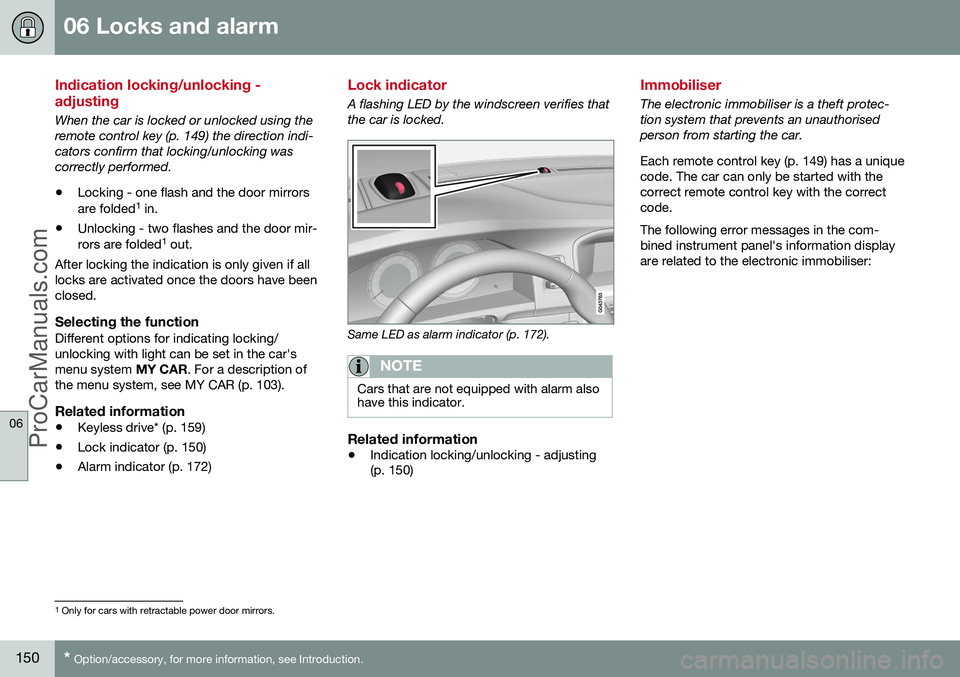
A flashing LED by the windscreen verifies that the car is locked.
Same LED as alarm indicator (p. 172).
NOTE
Cars that are not equipped with alarm also have this indicator.
Related information
•Indication locking/unlocking - adjusting (p. 150)
Immobiliser
The electronic immobiliser is a theft protec- tion system that prevents an unauthorisedperson from starting the car. Each remote control key (p. 149) has a unique code. The car can only be started with thecorrect remote control key with the correctcode. The following error messages in the com- bined instrument panel's information displayare related to the electronic immobiliser:
1
Only for cars with retractable power door mirrors.
ProCarManuals.co’