2014 VOLVO V60 brake sensor
[x] Cancel search: brake sensorPage 220 of 442

||
07 Driver support
07
218* Option/accessory, for more information, see Introduction.
Maintenance
Camera and radar sensor 18
.
For the sensors to work correctly, they must be kept clear of dirt, ice and snow, and becleaned regularly with water and car sham-poo.
NOTE
Dirt, ice and snow covering the sensors will reduce their function and may preventmeasurement.
Related information
• Collision warning system* (p. 212)
• Collision warning system* - function (p. 213)
• Collision warning system* - detection ofpedestrians (p. 216) •
Collision warning system* - cyclist detec-tion (p. 214)
• Collision warning system* - general limita-tions (p. 218)
• Collision warning system* - camera sen-sor limitations (p. 220)
• Collision warning system* - symbols andmessages (p. 222)
Collision warning system* - general limitations
"Collision Warning with Auto Brake and Cyclist and Pedestrian Detection" is an aid toassist the driver when there is a risk of collid-ing with a pedestrian, bicycle or vehicle infront that are stationary or moving in the samedirection. The function has certain limitations - for example, it is not active until approx. 4 km/h.. The collision warning system's visual warning signal (see (1) in the illustration (p. 213)) maybe difficult to notice in the event of strongsunlight, reflections, when sunglasses arebeing worn or if the driver is not lookingstraight ahead. The warning sound shouldtherefore always be activated. On slippery road surfaces the braking dis- tance is extended, which may reduce thecapacity to avoid a collision. In such situa-tions the ABS and DSTC systems will providebest possible braking force with maintainedstability.
18
NOTE: The illustration is schematic - details may vary depending on car model.
ProCarManuals.co’
Page 221 of 442

07 Driver support
07
}}
* Option/accessory, for more information, see Introduction.219
NOTE
The visual warning signal can be temporar- ily disengaged in the event of high passen-ger compartment temperature caused bystrong sunlight for example. If this occursthen the warning sound is activated even ifit is deactivated in the menu system.
• Warnings may not appear if the dis- tance to the vehicle in front is small orif steering wheel and pedal move-ments are large, e.g. a very active driv-ing style.
WARNING
Warnings and brake interventions could be implemented late or not at all if the trafficsituation or external influences mean thatthe radar or camera sensor cannot detecta pedestrian, a vehicle or a cyclist in frontcorrectly. The sensor system has a limited range for pedestrians and cyclists 19
- the system
can provide effective warnings and brake interventions for them at vehicle speeds upto 50 km/h. For stationary or slow-movingvehicles, warnings and brake interventionsare effective at vehicle speeds up to70 km/h. Warnings for stationary or slow-moving vehicles could be disengaged due to dark-ness or poor visibility. Warnings and brake interventions for pedestrians and cyclists are deactivated atvehicle speeds exceeding 80 km/h.
The collision warning system uses the same radar sensors as the Adaptive cruise control(p. 188). Read more about radar sensor limi-tations (p. 197). If warnings are perceived as being too fre- quent or disturbing then the warning distancecan be reduced (p. 217). This would lead tothe system warning at a later stage, whichreduces the total number of warnings. Collision Warning with Auto Brake is tempo-rarily deactivated with reverse gear engaged. Collision Warning with Auto Brake is not acti- vated at low speeds - under 4 km/h, which iswhy the system does not intervene in situa-tions where the car is approaching a vehiclein front very slowly, e.g. when parking. In situations where the driver demonstrates active, aware driving behaviour, a collisionwarning may be postponed slightly in order tokeep unnecessary warnings to a minimum. When Auto Brake has prevented a collision with a stationary object the car remains sta-tionary for a maximum of 1.5 seconds. If thecar is braked for a vehicle in front that is mov-ing, then speed is reduced to the same speedas that maintained by the vehicle in front. On a car with manual gearbox the engine stops when Auto Brake has stopped the car,unless the driver manages to depress theclutch pedal beforehand.
Related information
•
Collision warning system* (p. 212)
• Collision warning system* - function (p. 213)
• Collision warning system* - detection ofpedestrians (p. 216)
• Collision warning system* - cyclist detec-tion (p. 214)
19
For cyclists, the warning and full brake intervention may come very late or simultaneously.
ProCarManuals.co’
Page 222 of 442

07 Driver support
07
220* Option/accessory, for more information, see Introduction.
• Collision warning system* - operation (p. 217)
• Collision warning system* - camera sen-sor limitations (p. 220)
• Collision warning system* - symbols andmessages (p. 222)Collision warning system* - camera sensor limitations
"Collision Warning with Auto Brake and Cyclist and Pedestrian Detection" is an aid toassist the driver when there is a risk of collid-ing with a pedestrian, bicycle or vehicle infront that are stationary or moving in the samedirection.
The function uses the car's camera sensor,
which has certain limitations. The car’s camera sensor is also used - as well as by Collision Warning with Auto Brake- by the functions:
• Automatic main/dipped beam dim- ming (p. 82)
• Road sign information (p. 179)
• Driver Alert Control - DAC (p. 224)
• Lane Keeping Aid (p. 229)
NOTE
Keep the windscreen surface in front of the camera sensor free from ice, snow, mistand dirt. Do not stick or attach anything to the windscreen in front of the camera sensoras this may reduce effectiveness or causeone or more of the systems dependent onthe camera to stop working.
The camera sensors have limitations similar to the human eye, i.e. they "see" worse in darkness, heavy snowfall or rain and in thickfog for example. Under such conditions thefunctions of camera-dependent systemscould be significantly reduced or temporarilydisengaged. Strong oncoming light, reflections in the car- riageway, snow or ice on the road surface,dirty road surfaces or unclear lane markingscould also significantly reduce camera sensorfunction when it is used to scan the carriage-way and detect pedestrians and other vehi-cles. The field of vision of the camera sensor is lim- ited, which is why pedestrians, cyclists andvehicles cannot be detected in some situa-tions, or they are detected later than anticipa-ted. During very high temperatures the camera is temporarily switched off for about 15 minutesafter the engine is started in order to protectcamera functionality.
Fault tracing and actionIf the display shows the messageWindscreen Sensors blocked then this
means that the camera sensor is blocked and cannot detect pedestrians, cyclists, vehiclesor road markings in front of the car. At the same time, this means that - besides Collision Warning with Auto Brake - the Auto-matic main/dipped beam dimming, Road SignInformation, Driver Alert Control and Lane
ProCarManuals.co’
Page 224 of 442

07 Driver support
07
222* Option/accessory, for more information, see Introduction.
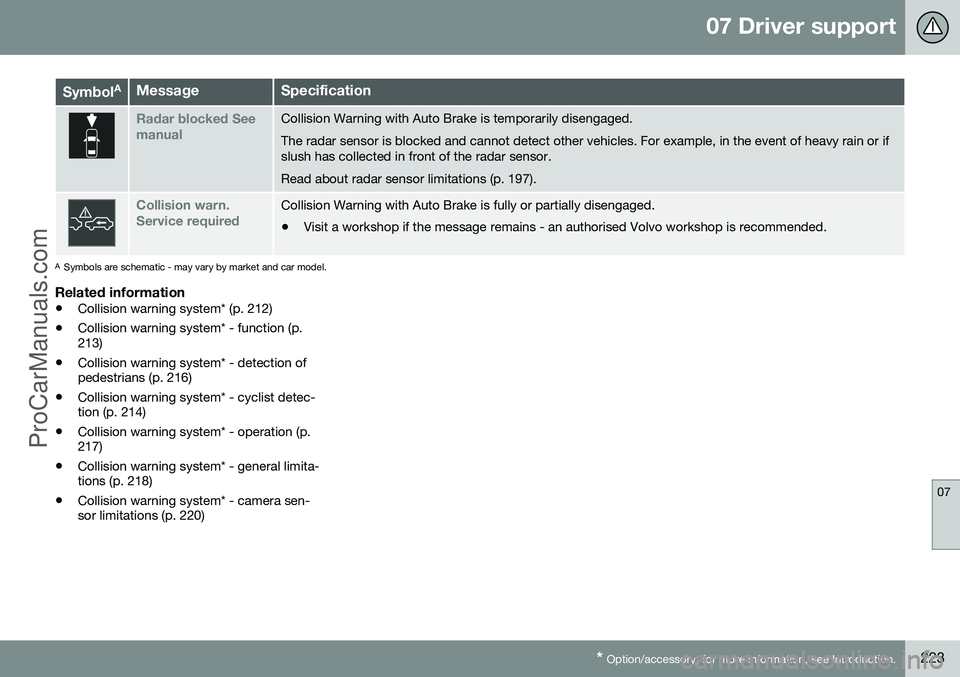
Collision warning system* - symbols and messages
"Collision Warning with Auto Brake and Cyclist and Pedestrian Detection" is an aid to assist the driver when there is a risk of collid-ing with a pedestrian, bicycle or vehicle infront that are stationary or moving in the samedirection.
Symbol
AMessageSpecification
Collis'n warning OFFCollision warning system switched off. Shown when the engine is started.The message clears after about 5 seconds or after one press of the
OK button.
Collision warn. UnavailableThe collision warning system cannot be activated. Shown when the driver attempts to activate the function.The message clears after about 5 seconds or after one press of the OK button.
Auto braking was activatedAuto Brake has been active. The message clears after one press of the OK button.
Windscreen Sen- sors blockedThe camera sensor is temporarily disengaged. Shown in the event of snow, ice or dirt on the windscreen for example.
• Clean the windscreen surface in front of the camera sensor.
Read about camera sensor limitations (p. 220).
ProCarManuals.co’
Page 225 of 442
07 Driver support
07
* Option/accessory, for more information, see Introduction.223
Symbol AMessageSpecification
Radar blocked See manualCollision Warning with Auto Brake is temporarily disengaged. The radar sensor is blocked and cannot detect other vehicles. For example, in the event of heavy rain or if slush has collected in front of the radar sensor. Read about radar sensor limitations (p. 197).
Collision warn. Service requiredCollision Warning with Auto Brake is fully or partially disengaged.
• Visit a workshop if the message remains - an authorised Volvo workshop is recommended.
A
Symbols are schematic - may vary by market and car model.
Related information
• Collision warning system* (p. 212)
• Collision warning system* - function (p. 213)
• Collision warning system* - detection ofpedestrians (p. 216)
• Collision warning system* - cyclist detec-tion (p. 214)
• Collision warning system* - operation (p.217)
• Collision warning system* - general limita-tions (p. 218)
• Collision warning system* - camera sen-sor limitations (p. 220)
ProCarManuals.co’
Page 233 of 442

07 Driver support
07
* Option/accessory, for more information, see Introduction.231
Related information
• Lane Departure Warning (LDW)* (p. 229)
• Lane Departure Warning (LDW) - limita- tions (p. 231)
• Lane Departure Warning (LDW) - function(p. 230)
• Lane Departure Warning (LDW) - symbolsand messages (p. 232)
Lane Departure Warning (LDW) - limitations
The Lane Keeping Aid camera sensor is restricted in a similar way to the human eye. For more information, read about camera sensor limitations (p. 220).
NOTE
There are some situations where LDW does not give any warning, such as:
• Direction indicators are switched on
• The driver has his/her foot on the brake pedal 20
• In the event of rapid depression of theaccelerator pedal 20
• In the event of rapid steering wheelmovements 20
• If turning is so sharp that the car rolls.
Related information
•
Lane Departure Warning (LDW)* (p. 229)
• Lane Departure Warning (LDW) - function (p. 230)
• Lane Departure Warning (LDW) - opera-tion (p. 230)
• Lane Departure Warning (LDW) - symbolsand messages (p. 232)
20
When "Increased sensitivity" is selected a warning is still given, see Lane Departure Warning (LDW) - function (p. 230).
ProCarManuals.co’
Page 244 of 442

||
07 Driver support
07
242* Option/accessory, for more information, see Introduction.
NOTE
When reversing with e.g. a trailer or bike carrier on the towbar - without Volvo genu-ine trailer wiring - parking assistance mayneed to be switched off manually in orderthat the sensors do not react to them.
Related information
• Park Assist* (p. 240)
• Park assist syst* - cleaning the sensors (p. 243)
• Park assist syst* - function (p. 240)
• Park assist syst* - forward (p. 242)
• Park assist syst* - fault indication (p. 243)
• Park assist camera (p. 244)
Park assist syst* - forward
Parking assistance is used as an aid to park- ing. An acoustic signal as well as symbols onthe centre console's display screen indicatethe distance to the detected obstacle. The parking assistance system is automati- cally activated when the engine is started -the switch's On/Off lamp is illuminated. Ifparking assistance is switched off with thebutton, the lamp goes out.
The distance covered in front of the car is about 0.8 metres. The acoustic signal forobstacles in front comes from one of the frontloudspeakers. Front park assist is active up to approx. 10 km/h. The lamp in the button isilluminated in order to indicate that the sys-tem is activated. When the speed is below10 km/h the system is reactivated.
NOTE
Front parking assistance is deactivated when the parking brake is applied or
P
mode is selected in a car with an auto-matic gearbox.
IMPORTANT
When auxiliary lamps are fitted: Remember that these must not obscure the sensors -the auxiliary lamps may then be perceivedas an obstacle.
Related information
• Park Assist* (p. 240)
• Park assist syst* - cleaning the sensors (p. 243)
• Park assist syst* - function (p. 240)
• Park assist syst* - fault indication (p. 243)
• Park assist syst* - backward (p. 241)
• Park assist camera (p. 244)
ProCarManuals.co’
Page 245 of 442

07 Driver support
07
* Option/accessory, for more information, see Introduction.243
Park assist syst* - fault indication
Parking assistance is used as an aid to park- ing. An acoustic signal as well as symbols onthe centre console's display screen indicatethe distance to the detected obstacle.
If the combined instrument panel'sinformation symbol illuminates withconstant glow and the text message
Park assist syst Service required is shown
then parking assistance is disengaged.
IMPORTANT
In certain conditions the parking assis- tance system may produce incorrect warn-ing signals that are caused by externalsound sources that emit the same ultra-sonic frequencies that the system workswith. Examples of such sources include horns, wet tyres on asphalt, pneumatic brakesand exhaust noises from motorcycles etc.
Related information
• Park Assist* (p. 240)
• Park assist syst* - cleaning the sensors (p. 243)
• Park assist syst* - function (p. 240)
• Park assist syst* - forward (p. 242)
• Park assist syst* - backward (p. 241)
• Park assist camera (p. 244)
Park assist syst* - cleaning the sensors
Parking assistance is used as an aid to park- ing. An acoustic signal as well as symbols onthe centre console's display screen indicatethe distance to the detected obstacle. The sensors must be cleaned regularly to ensure that they work properly. Clean themwith water and car shampoo.
Sensor location, front.
Sensor location, rear.
NOTE
Dirt, ice and snow covering the sensors may cause incorrect warning signals.
Related information
•Park Assist* (p. 240)
• Park assist syst* - function (p. 240)
• Park assist syst* - forward (p. 242)
• Park assist syst* - fault indication (p. 243)
• Park assist syst* - backward (p. 241)
• Park assist camera (p. 244)
ProCarManuals.co’