2014 VOLVO V60 engine
[x] Cancel search: enginePage 268 of 442
08 Starting and driving
08
266* Option/accessory, for more information, see Introduction.
Remote start (ERS)*
Remote start (ERS – Engine Remote Start) means that the car's engine can be startedremotely using the remote control key or thePCC key. This is so that the passenger com-partment can be warmed up/cooled downbefore departure. The climate control system and audio system start with the same settings that were in usewhen the car was parked. An ERS-started engine is activated for a maximum of 15 minutes, then it is switchedoff. After two ERS-activations the enginemust be started in the normal way beforeERS can be re-used. The optional ERS function is available on most cars with automatic gearbox.
NOTE
The service life of the remote control key's battery is affected by the ERS function. Inthe event of frequent use of ERS the bat-tery should therefore be changed once peryear, see Remote control key/PCC -replacing the battery (p. 158).
NOTE
Follow local/national rules/regulations on idling.
WARNING
To remote-start the engine, the following criteria must be met:
• The car must be supervised.
• There must be no people or animals inside the car.
• The car must not be parked in aclosed, unventilated area - the exhaustgases may seriously injure humansand animals.
Related information
•
Remote start (ERS) - operation (p. 266)
• Remote start (ERS) - symbols and mes- sages (p. 268)
Remote start (ERS) - operation
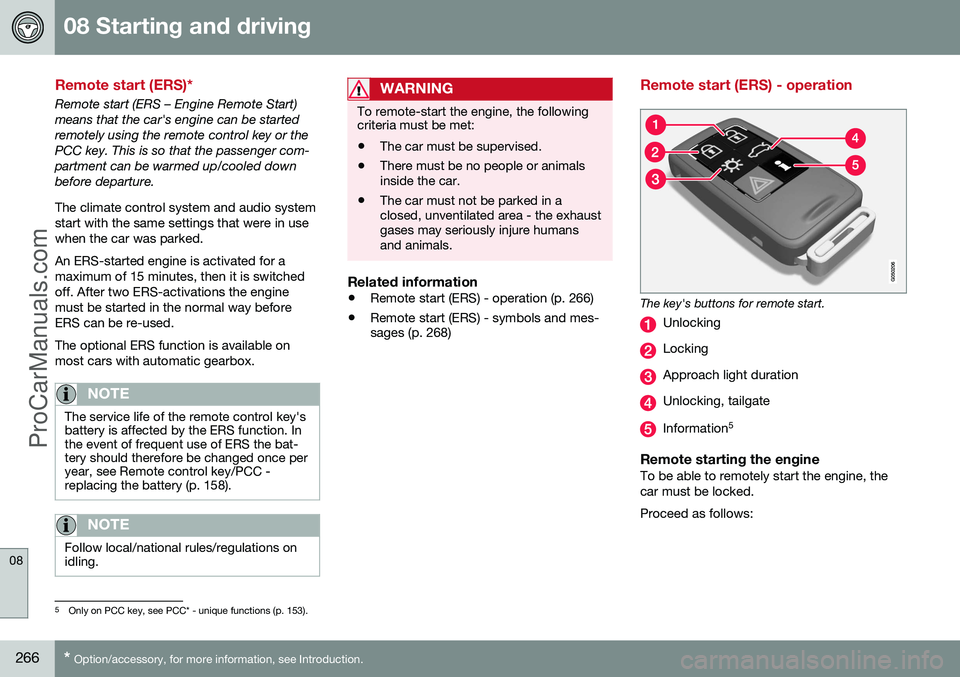
The key's buttons for remote start.
Unlocking
Locking
Approach light duration
Unlocking, tailgate
Information 5
Remote starting the engineTo be able to remotely start the engine, the car must be locked. Proceed as follows:
5
Only on PCC key, see PCC* - unique functions (p. 153).
ProCarManuals.co’
Page 269 of 442

08 Starting and driving
08
* Option/accessory, for more information, see Introduction.267
1. Briefly press on the key's button (2).
2. Follow this immediately afterwards with a
long press - at least 2 seconds - on button (3).
If the conditions for ERS are fulfilled then the following takes place:
1. The direction indicators flash quickly sev- eral times.
2. The engine starts.
3. The direction indicators illuminate with a constant glow for 3 seconds to verify that the engine has started.
NOTE
After remote starting, the car continues to be locked but with deactivated movementdetector*.
With PCC 6
keyThe light indication for Approach lighting 7
flashes several times when
the button is pressed and then goes to constant glow if all criteria for
ERS have been fulfilled. However, this doesnot mean that ERS has started the engine. To check whether ERS has started the engine, the user can press the button (5) - ifthe engine has started, there is a light indica-tion by the buttons (2) and (3).
Active functionsThe following functions are activated with a remote started engine: • Ventilation system
• Audio/video system
• Approach light duration.
Deactivated functionsThe following functions are deactivated with a remote started engine: • Headlamps
• Position lamps
• Number plate lighting
• Windscreen wiper.
ERS is interruptedThe following steps switch off an ERS-started engine: • The remote control key's button (1), (2) or (4) is depressed
• The car is unlocked
• A door is opened
• Accelerator pedal or brake pedal isdepressed
• The gear selector is moved out of
P posi-
tion
• There is approx.10 litres left in the fueltank •
Active ERS time exceeds 15 minutes.
When an ERS-started engine is switched off, the direction indicators illuminate with a con-stant glow for 3 seconds.
Related information
• Remote start (ERS)* (p. 266)
• Remote start (ERS) - symbols and mes- sages (p. 268)
6
For more information on the PCC key, see PCC* - unique functions (p. 153).7
For more information on Approach lighting, see Remote control key - functions (p. 151) and Approach light duration (p. 89).
ProCarManuals.co’
Page 270 of 442

08 Starting and driving
08
268* Option/accessory, for more information, see Introduction.
Remote start (ERS) - symbols and messages
In situations where the ERS function fails or is interrupted, a symbol is shown in the com-bined instrument panel, supplemented by anexplanatory text message.
ERS function unavailable
MessageSpecification
No remote start Max 2startsERS unavailable because a maximum of 2 ERSactivations in successionare allowed.
No remote start low fuellevelERS unavailable because fuel level too low.
No remote start gear notin PERS unavailable because gear selector is not in P
position.
No remote start driver incarERS unavailable because someone is in the pas-senger compartment.
No remote start low bat-teryERS unavailable due to low battery voltage.Charge the battery bystarting the engine.
MessageSpecification
No remote start enginewarningERS unavailable due to warning message fromengine. Contact a work- shop A
.
No remote start enginecoolantERS unavailable due to error message from cool-ing system, see Coolant -level (p. 349).
No remote start dooropenERS unavailable because a door/tailgate was notclosed.
No remote start car notlockedERS unavailable because the car was not locked.
A An authorised Volvo workshop is recommended.
Interrupted ERS function
MessageSpecification
Remote start off low fuellevelERS interrupted because fuel level toolow.
Remote start off gear not inPERS interrupted because gear selector isnot in P position.
MessageSpecification
Remote start off driver incarERS interrupted because someone is inthe passenger compart-ment.
Remote start off enginewarningERS interrupted due to error message fromengine. Contact a work- shop A
.
Remote start off low batteryERS interrupted because battery voltagetoo low.
Remote start off enginecoolantERS interrupted due to error message fromcooling system.
A An authorised Volvo workshop is recommended.
Related information
• Remote start (ERS)* (p. 266)
• Remote start (ERS) - operation (p. 266)
ProCarManuals.co’
Page 271 of 442

08 Starting and driving
08
}}
* Option/accessory, for more information, see Introduction.269
Starting the engine – Flexifuel
Flexifuel engines can be driven on 95 octane unleaded petrol and bioethanol E85. Theengine is started in the same way as in a pet-rol-driven car.
Engine block heater*
Electrical input to the engine block heater.
Cars intended for E85 have an electric engine block heater. Starting and driving with a pre-heated engine means significantly reducedemissions and reduced fuel consumption. Forthis reason you should aim to use the engineblock heater throughout the winter months. • In outside temperatures between +5 °C and -10 °C, the electric engineblock heater should be activated for atleast 1 hour.
• In outside temperatures between-10 °C and -20 °C, the electric engine block heater should be activated for atleast 2 hours.
• In outside temperatures lower than-20 °C, the electric engine block heatershould be activated for at least 3 hours.
WARNING
The engine block heater is powered by high voltage. Fault tracing and repair of anelectric engine block heater and its electri-cal connections must only be carried outby a workshop - an authorised Volvo work-shop is recommended.
NOTE
Points to remember for carrying reserve fuel:
• In the event of stalling due to an empty fuel tank, bioethanol E85 from areserve fuel can may make the enginedifficult to start in extreme cold. This isavoided by filling the reserve fuel canwith 95 octane petrol.
For more information on Flexifuel's bioethanol E85 fuel, see Fuel - bioethanol E85 (p. 304).
In the event of starting difficultiesIf the engine does not start at the first startattempt: •
Make further attempts to start with the START/STOP ENGINE
button.
• Check that the engine block heater hasbeen activated and, where appropriate,activate it for the time specified above.
IMPORTANT
If the engine does not start despite repea- ted start attempts, you are recommendedto contact an authorised Volvo workshop.
Fuel adaptationFlexifuel engines can be driven on both 95 octane unleaded petrol and bioethanol E85.Both fuels are filled in the common fuel tankso that any variations of mixing ratiosbetween these two fuels is possible. If the fuel tank is filled with petrol after the car has been driven on bioethanol E85 (or viceversa) then the engine may run slightlyunevenly for a time. For this reason it isimportant to allow the engine to accustomitself (adapt) to the new fuel mixture. Adaptation takes place automatically when the car is driven for a short period at an evenspeed.
ProCarManuals.co’
Page 272 of 442

||
08 Starting and driving
08
270
IMPORTANT
After the fuel mixture in the tank has been changed an adaptation should be made bydriving at an even speed for about 15minutes.
If the battery has been discharged or discon- nected then a slightly longer period of drivingis required for the adaptation as the memoryfor the electronics has been cleared.
Related information
•Jump starting with battery (p. 270)
• Starting the engine (p. 264)
Jump starting with battery
If the starter battery (p. 361) is discharged then the car can be started with current fromanother battery.
When jump starting the car, the following steps are recommended to avoid short cir-cuits or other damage:
1. Insert the remote control key in key posi-
tion 0 (p. 70).
2. Check that the donor battery has a volt- age of 12 V.
3. If the donor battery is installed in another car - switch off the donor car's engine and make sure that the two cars do nottouch each other. 4. Connect one of the red jump lead's
clamps to the donor battery's positiveterminal (1).
IMPORTANT
Connect the start cable carefully to avoid short circuits with other components in theengine compartment.
5. Open the clips on the front cover of thebattery in your car and remove the cover, see Starter battery - replacement (p.363).
6. Connect the red jump lead's other clamp onto the car's positive terminal (2).
7. Connect one of the black jump lead's clamps to the donor battery's negativeterminal (3).
8. Connect the other clamp to a grounding point, e.g. right-hand engine mounting atthe top, the outer screw head (4).
9. Check that the jump lead clamps are affixed securely so that there are nosparks during the starting procedure.
10. Start the engine of the "donor car" and allow it to run a few minutes at a speedslightly higher than idleapprox. 1500 rpm.
ProCarManuals.co’
Page 273 of 442

08 Starting and driving
08
* Option/accessory, for more information, see Introduction.271
11. Start the engine in the car with the dis-
charged battery.
IMPORTANT
Do not touch the crocodile clips during the start procedure. There is a risk of sparksforming.
12. Remove the jump leads in reverse order -first the black and then the red.
> Make sure that none of the black jumplead's clamps comes into contact with the battery's positive terminal or theclamp connected to the red jump lead!
WARNING
• The battery can generate oxyhydrogen gas, which is highly explosive. A sparkcan be formed if a jump lead is con-nected incorrectly, and this can beenough for the battery to explode.
• The battery contains sulphuric acid,which can cause serious burns.
• If sulphuric acid comes into contactwith eyes, skin or clothing, flush withlarge quantities of water. If acidsplashes into the eyes - seek medicalattention immediately.
Related information
•
Starting the engine (p. 264)
Gearboxes
There are two main types of gearbox. Manual gearbox and automatic gearbox.
• Manual gearbox (p. 271)
• Automatic gearbox - Geartronic (p. 273) and Powershift (p. 276)
IMPORTANT
To prevent damage to any drive system components, the working temperature ofthe gearbox is checked. If there is a risk ofoverheating, a warning symbol is illumi-nated in the combined instrument panel inconjunction with a text message beingshown. Follow the recommendation givenin the text message.
Related information
•Automatic gearbox -- Geartronic* (p. 273)
Manual gearbox
The function of the gearbox is to change the gear ratio depending on speed and powerrequirements.
Gearshift pattern 6-speed gearbox.
The 6-speed box is available in two versions - reverse gear position differs between them.Look at the actual gearshift pattern imprintedon the gear lever. • Depress the clutch pedal fully during each gear change.
• Take your foot off the clutch pedalbetween gear changes.
WARNING
Always apply the parking brake when parking on a slope - leaving the car in gearis not sufficient to hold the car in all situa-tions.
ProCarManuals.co’
Page 274 of 442
||
08 Starting and driving
08
272* Option/accessory, for more information, see Introduction.
Reverse gear inhibitorThe reverse gear inhibitor hinders the possi- bility of mistakenly attempting to engagereverse gear during normal forward travel.
• Follow the gearing pattern printed on the gear lever and start from neutral position,N
before moving it to R position.
• Engage reverse gear only when the car isstationary.
NOTE
With the upper variant of the shifting pat- tern for 6-speed gearbox (see previousillustration) -
first press down the gear
lever in the N position in order to engage
reverse gear.
Related information
• Gearboxes (p. 271)
• Transmission fluid - grade and volume (p. 399)
Gear shift indicator*
The gear shift indicator notifies the driver when it is appropriate to engage the nexthigher or lower gear. An essential detail inconnection with environmental driving is todrive in the right gear and to change gear inplenty of time.
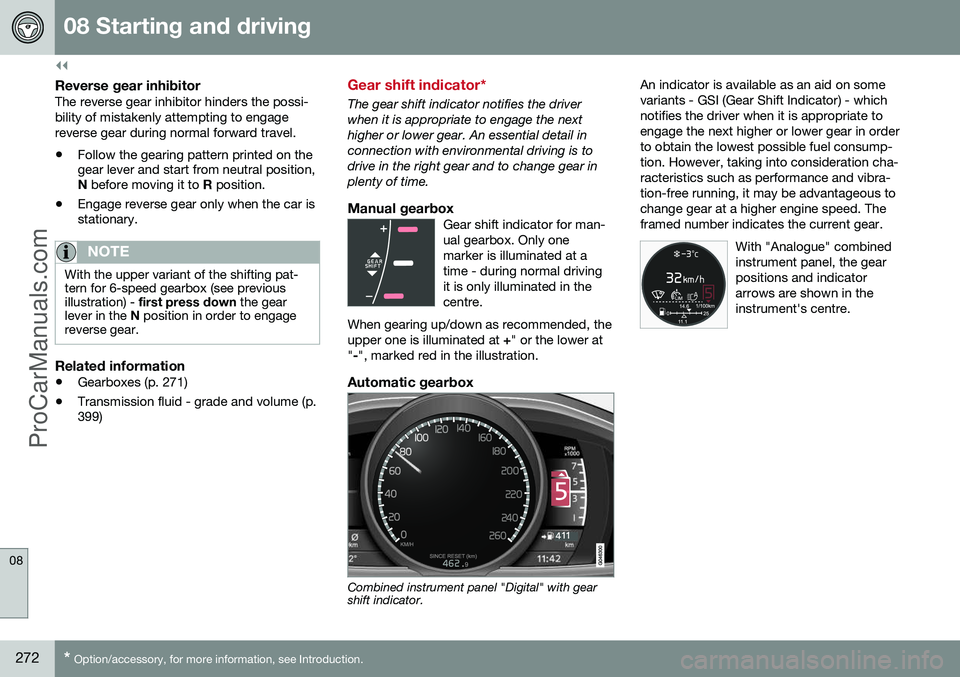
Manual gearboxGear shift indicator for man-ual gearbox. Only onemarker is illuminated at atime - during normal drivingit is only illuminated in thecentre.
When gearing up/down as recommended, theupper one is illuminated at +" or the lower at
" -", marked red in the illustration.
Automatic gearbox
Combined instrument panel "Digital" with gear shift indicator. An indicator is available as an aid on some variants - GSI (Gear Shift Indicator) - whichnotifies the driver when it is appropriate toengage the next higher or lower gear in orderto obtain the lowest possible fuel consump-tion. However, taking into consideration cha-racteristics such as performance and vibra- tion-free running, it may be advantageous tochange gear at a higher engine speed. Theframed number indicates the current gear.
With "Analogue" combinedinstrument panel, the gearpositions and indicatorarrows are shown in theinstrument's centre.
ProCarManuals.co’
Page 275 of 442

08 Starting and driving
08
}}
* Option/accessory, for more information, see Introduction.273
Automatic gearbox -- Geartronic*
The Geartronic gearbox has two different gear modes - Automatic and Manual.
D : Automatic gear positions. +/–: Manual gear
positions. S8
: Sport mode*.
Combined instrument panel (p. 59) shows the position of the gear selector using the follow- ing indications:
P, R, N, D, S*, 1, 2, 3 etc.
Gear positionsAutomatic gear positions are indicated on the right of thecombined instrument panel.(Only one marker is illumi-nated at a time - the oneshowing the current gearselector position.)
Symbol " S" for Sport mode is ORANGE when
the mode is active.
Parking position - PSelect position P when starting the engine or
when the car is parked.
• In order to be able to move the gear selector from
P-position, the brake pedal
must first be depressed firmly.
The gearbox is mechanically blocked when the P position is engaged. Also apply the
parking brake (p. 293), as a precaution.
NOTE
The gear selector must be in P position to
allow the car to be locked and alarmed.
IMPORTANT
The car must be stationary when posi- tion P is selected.
WARNING
Always apply the parking brake when parking on a slope - the automatic trans-mission's P position is not sufficient to
hold the car in all situation.
Reverse position - RThe car must be stationary when R position is
selected.
Neutral position - NNo gear is engaged and the engine can be started. Apply the parking brake if the car isstationary with the gear selector in N position.
Drive position - DD is the normal driving position. Shifting up
and down takes place automatically based onthe level of acceleration and speed. The carmust be stationary when the gear selector ismoved to D position from R position.
Geartronic – Manual gear positions (+S-)
The driver can also change gear manually using the Geartronic automatic gearbox. Thecar engine-brakes when the accelerator pedalis released.
The manual gear position is reachedby moving the lever to the side fromposition D to the end position at
" +S- ". The combined instrument
panel's symbol " +S-" changes colour from
WHITE to ORANGE and the digits
1, 2, 3 etc.
are displayed in a box, corresponding to the gear that has just been selected.
• Move the lever forwards towards "
+"
(plus) to change up a gear and release the lever, which returns to its rest positionbetween + and –.
or
8 The "Sport mode" function is not available in a V60 Plug-in Hybrid - only "+" and "-".
ProCarManuals.co’