2014 VOLKSWAGEN JETTA HYBRID key
[x] Cancel search: keyPage 179 of 372
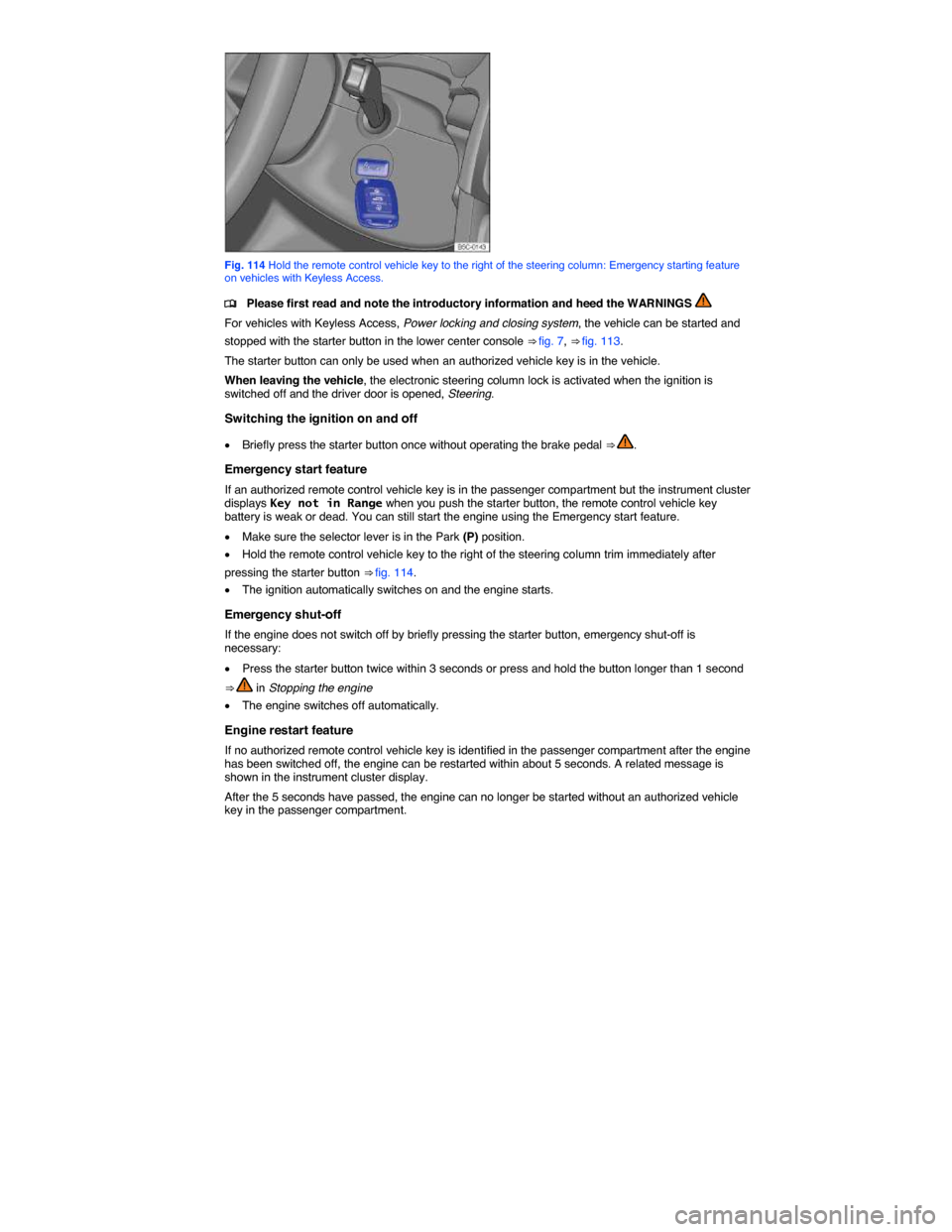
Fig. 114 Hold the remote control vehicle key to the right of the steering column: Emergency starting feature on vehicles with Keyless Access.
Page 180 of 372

WARNING
Unintended vehicle movement can cause serious personal injury.
x Do not depress the brake or clutch pedals when switching on the ignition, as the engine could otherwise start immediately.
WARNING
Improper use of vehicle keys can result in serious personal injury.
x Always take the key with you when you leave the vehicle. Children or unauthorized persons may use it to lock the vehicle, start the engine, and operate vehicle systems such as the power windows, leading to serious personal injury.
x Never leave children, disabled persons, or anyone who cannot help themselves in the vehicle. The doors can be locked using the remote control vehicle key. This could result in people being trapped in the vehicle in an emergency. For example, depending on the time of year, people trapped in the vehicle can be exposed to very high or very low temperatures.
x Heat buildup in the passenger and luggage compartment of a parked vehicle can result in temperatures in the vehicle that are much higher than the outside temperatures, particularly in summer. Temperatures can quickly reach levels that can cause unconsciousness and death, particularly to small children.
If the ignition is switched on or the engine is running and the driver door is opened, a chime sounds. The chime is also a reminder to switch off the engine and turn off the ignition before leaving and locking the vehicle from the outside.
Starting the engine
Page 182 of 372

Please perform these steps only in the order listed.
Step Vehicles without Keyless AccessVehicles with Keyless Access
6. Removing the vehicle key from the ignition switches off electrical equipment and activates the steering column lock.
Opening the doors switches off electrical equipment and activates the steering column lock.
WARNING
Never stop the engine before the vehicle has come to a complete stop. You can lose control of the vehicle, crash, and be seriously injured.
x The airbags and safety belt pretensioners will not work when the ignition is switched off.
x The brake booster does not work when both the combustion engine and electric motor are switched off. More brake pedal pressure will be needed to stop the vehicle.
x The power steering system does not work when both the combustion engine and electric motor are switched off, and you will need more force to steer the vehicle.
x When the key is removed from the ignition switch, the steering will lock and you will not be able to steer the vehicle.
NOTICE
If the vehicle has been driven hard for a long time, the engine could overheat when it is stopped. To reduce the risk of engine damage, let the engine idle in Neutral for about 2 minutes before you switch off the ignition.
If the ignition is switched on or the engine is running and the driver door is opened, a chime sounds. The chime is also a reminder to switch off the engine and turn off the ignition before leaving and locking the vehicle from the outside.
On vehicles with automatic transmissions, the vehicle key can only be removed from the ignition when the transmission is in Park (P).
After the engine has been switched off, the radiator fan in the engine compartment may keep running for several minutes, or may start running after the vehicle has been parked for a while, even if the ignition is switched off and the vehicle key has been removed. The radiator fan shuts off automatically when the engine has cooled down enough.
Electronic immobilizer
Page 183 of 372

The engine can therefore only be started with an authorized and correctly coded genuine Volkswagen vehicle key. Coded vehicle keys are available from authorized Volkswagen dealers, authorized Volkswagen Service Facilities, and from certain independent repair facilities and locksmiths who are qualified to make these vehicle keys, Vehicle key set.
If an unauthorized vehicle key is used, Immobilizer active! appears in the instrument cluster display. The vehicle cannot be operated with this key.
A Declaration of Compliance with the United States FCC and Industry Canada regulations is on, Declaration of Compliance, Telecommunications and Electronic Systems.
Using genuine Volkswagen keys helps minimize the risk of malfunctions.
Page 195 of 372

To help make it more difficult to steal your vehicle, you should always make sure the steering column is locked before leaving the vehicle.
Electronic steering column lock
Vehicles with Keyless Access: The steering column is locked if the driver door is opened with the ignition switched off. The vehicle must be standing still and the transmission must be in Park (P) on an automatic transmission vehicle.
If the driver door is opened before the ignition is switched off, the electronic steering column lock is activated only after the vehicle has been locked with the vehicle key or via the sensor in the door handle.
Mechanical steering column lock
Vehicles without Keyless Access: The steering column is locked if the vehicle is stationary and the vehicle key is removed from the ignition switch.
Engaging the steering column lock Disengaging the steering column lock
Parking the vehicle Turn the steering wheel slightly to take pressure off the steering column lock.
Remove the vehicle key. Insert the vehicle key into the ignition switch.
Turn the steering wheel slightly until you hear the steering column lock engage.
Hold the steering wheel in this position and turn the ignition switch.
Power steering
Power steering automatically adjusts to driving speed, steering torque, and the steering angle of the wheels. Power steering works only when the engine is running.
If power steering is reduced or lost completely, it will be much harder to steer and control the vehicle.
Counter-steering assistance
Counter-steering assistance is part of Electronic Stability Control (ESC). This feature makes it easier for the driver to control the vehicle in difficult situations. For example, if you have to brake hard on a surface that provides uneven traction, the vehicle could pull to the right or left. ESC detects this
situation and helps the driver counter-steer with additional steering power ⇒ .
WARNING
The counter-steering assistance in ESC can do no more than help the driver steer in difficult situations. The driver must still control the vehicle. The vehicle does not steer by itself with this feature!
NOTICE
If the ignition is off, the steering column lock will engage and the vehicle cannot be steered. For this reason, you must leave the ignition on when going through an automatic car wash, for example, so that the wheels will still steer.
Page 197 of 372

WARNING
Parking improperly can cause serious personal injury.
x Never remove the key from the ignition switch while the vehicle is moving or rolling to a stop. The steering wheel will lock and you will not be able to steer or control the vehicle.
x Never park the vehicle where the hot exhaust system or catalytic converter could ignite flammable materials, such as brush, leaves, dry grass, spilled fuel, etc.
x Always apply the parking brake when parking your vehicle.
x Improper use of the parking brake can seriously injure you and your passengers.
x Never use the parking brake to slow down the vehicle when it is moving, except in an emergency. The stopping distance is much longer because only the rear wheels are braked. Always use the foot brake to stop the vehicle.
x Never activate the throttle manually from the engine compartment when the engine is running and the automatic transmission is in gear. The vehicle will start to move as soon as the engine speed increases even if the parking brake is on.
x Never leave children or anyone who cannot help themselves behind in the vehicle. They could release the parking brake and move the gear selector lever or gear shift, which could cause the vehicle to start moving. This can lead to a crash and serious personal injuries.
x Always take the key with you when you leave the vehicle. The engine can be started and vehicle systems such as the power windows can be operated, leading to serious personal injury.
x Never leave children, disabled persons, or anyone who cannot help themselves in the vehicle. The doors can be locked with the remote control vehicle key, trapping passengers in the vehicle in an emergency. For example, depending on the time of year, people trapped in the vehicle can be exposed to very high or very low temperatures.
x Heat buildup in the passenger and luggage compartment of a parked vehicle can result in temperatures in the vehicle that are much higher than the outside temperatures, particularly in summer. Temperatures can quickly reach levels that can cause unconsciousness and death, particularly to small children.
NOTICE
x Always be careful when you park in areas with parking barriers or high curbs. These vary in height and could damage your bumper and related parts if the front of your vehicle hits a barrier or curb that is too high while you are getting into or out of a parking spot. To help prevent damage, stop before the tires of your vehicle touch a parking barrier or curb.
x Always be careful when you enter a driveway or drive up or down steep ramps or over curbs or other obstacles. Parts of the vehicle close to the ground may be damaged (such as bumper covers, spoilers, and parts of the engine, suspension, and exhaust systems).
Warning and indicator lights
Page 213 of 372

DANGER
The vehicle's high-voltage electrical system and high-voltage battery are dangerous and can cause burns, other serious personal injuries, electrocution, and death.
x Always assume that high-voltage battery and parts of the high-voltage system are fully charged and energized.
x Never touch or let jewelry or other metal objects contact high-voltage cables or the high-voltage battery and battery poles, especially if the cables, battery, and battery poles have been damaged in any way.
x Never do any work yourself on the high-voltage electrical system, the orange-colored high-voltage wiring, or on the high-voltage battery.
x Never open, service, repair, or disconnect any part of the hybrid electrical system.
x Never damage the orange-colored high-voltage cables. Never remove them and never disconnect them from the high-voltage electrical system.
x Never open or remove the orange-colored cover on the high-voltage battery.
x Always have work on the hybrid electrical system and systems that could be indirectly affected by it done by qualified, trained technicians who have the know-how, experience, documentation, and tools to do the work safely.
x All work on the high-voltage electrical system and the high-voltage battery must be done in compliance with Volkswagen standards and guidelines.
x Vehicle keys must be safely stored a safe distance from vehicle so that the ignition cannot be switched on and energize the electrical system.
x Gases vented or released from the high-voltage battery vapors are potentially poisonous and can burn.
x Physical damage to the vehicle or the high-voltage battery can result in immediate or delayed release of poisonous gases that can also cause a fire.
x Always avoid contact with leaking fluids and gases escaping from the battery, particularly one that has been damaged.
x Always tell emergency responders that the vehicle has a high-voltage battery.
WARNING
Driver distraction causes accidents and serious personal injury. Using the instrument cluster or accessing Infotainment System menus while driving can take your attention off the road and cause accidents.
x To help reduce the risk of accidents and injuries, never change settings in the instrument cluster display or use Infotainment System functions unless the vehicle is standing still.
Page 226 of 372

x Switch on the ignition.
x Switch on the Infotainment system, if necessary.
x Press the CAR Infotainment button.
x Tap a function key on the screen to view the information described below.
Function key Function
Driv. data Since Start Display of average fuel consumption, average speed, route, travel time, and range from the time the ignition was switched on until the time it was switched off.
Long-term Display of average fuel consumption, average speed, route, travel time, and range.
Hybrid Energy flow Shows the energy flow between the engine, high-voltage battery, and driving wheels
Zero Emission Displays the emission-free driving time as a bar graph. Each bar represents 1 minute of driving. The height of the bar indicates the proportion of emission-free driving in %.
A full bar, or 100% ⇒ fig. 129 (1), is a 1 minute interval of emission-free hybrid driving or sailing. No bar, or 0% (2), is a 1 minute interval driving only with the combustion engine. The display shows the emissions for a maximum of 30 minutes. Tapping Reset resets all values on this graph to zero.
You can always go back to the previously active menu by pressing the