Page 75 of 173

Instruments and controls73Engine oil pressureI illuminates red.
Illuminates when the ignition is
switched on and goes out shortly after
the engine starts.
Illuminates when the engine isrunningCaution
Engine lubrication may be
interrupted. This may result in
damage to the engine and/or
locking of the drive wheels.
1. Depress clutch.
2. Select neutral gear, set selector lever to N.
3. Move out of the flow of traffic as quickly as possible without
impeding other vehicles.
4. Switch off ignition.
9 Warning
When the engine is off,
considerably more force is needed
to brake and steer.
Do not remove key until vehicle is stationary, otherwise the steeringwheel lock could engage
unexpectedly.
Check oil level before seeking
assistance of a workshop 3 117.
Low fuel
Y illuminates yellow.
Illuminates when level in fuel tank is
too low; refuel immediately 3 110
Catalytic converter 3 96.
Bleeding the diesel fuel system
3 123.
Exterior light
9 illuminates green.
Illuminated when the exterior lights
are on 3 79.
High beam
P illuminates blue.
Illuminated when high beam is on and during headlight flash 3 80.
Fog light > illuminates green.
Illuminated when the front fog lights
are on 3 81.
Rear fog light
r illuminates yellow.
Illuminated when the rear fog light is
on 3 82.
Cruise control
m , U illuminates green.
m illuminates green when a certain
speed is stored.
U illuminates green when the system
is on.
Speed limiter
U illuminates yellow.
Page 77 of 173

Instruments and controls75Vehicle messages
Messages are shown in the Driver
Information Centre, in combination
with illumination of control indicator
A or C in the instrument cluster.
Information messagesInformation messagesBATTERY MODE: ECONOMYESP OFFAUTO LIGHTS DEACTIVATEDOIL LEVEL CORRECT
Fault messages Will be displayed in combination with
control indicator A. Drive with
caution and seek the assistance of a
workshop.
To remove fault message, press the
button on the end of the wiper lever.
After a few seconds the message
may disappear automatically and A
remains illuminated. The fault will
then be stored in the on board
system.Fault messagesCHECK ESPCHECK FUEL FILTERCHECK GEARBOXCHECK AUTO LIGHTS
Warning messages
These appear with control indicator
C . Stop engine immediately and
seek the assistance of a workshop.
Warning messagesINJECTION FAULTENGINE OVERHEATINGGEARBOX OVERHEATINGWarning chimes
When starting the engine or
whilst driving: ■ During operation of the turn and lane-change signals.
■ If seat belt is not fastened.
■ If the parking assist detects an object.
■ If the vehicle has manual transmission automated and the
clutch temperature is too high.
■ In vehicles with manual transmission automated; when a
door is open while neutral is not
selected. A corresponding
message appears in the Driver
Information Centre.
■ If the vehicle speed briefly exceeds
a set limit.
Page 78 of 173

76Instruments and controls
When the vehicle is parked and/or the driver's door is opened: ■ When the key has been left in the ignition.
■ With exterior lights on.
■ If the vehicle has manual transmission automated; neutral is
not selected or the foot brake has
not been depressed.
Engine oil level
If the minimum engine oil level is
reached, the message OIL is
displayed in the Driver Information
Centre for 30 seconds after the
ignition is switched on. Check oil level 3 117.
The oil level message will only be reset if the ignition has been switched
off for more than 2 minutes.
To gain a more accurate indication of the oil level, press the button on the
end of the wiper lever within
30 seconds of switching on the
ignition. Engine oil level monitor
3 67.Trip computer
The trip computer provides
information on driving data, which is
continually recorded and evaluated electronically.
Depending on vehicle, the following
functions can be selected by pressing the button repeatedly on the end of
the wiper lever:
■ Fuel used
■ Average consumption
■ Instantaneous consumption
■ Range
Page 81 of 173
Lighting79LightingExterior lighting............................ 79
Interior lighting ............................. 82
Lighting features ..........................83Exterior lighting
Light switch
Turn light switch:
7=Off0=Sidelights9P=Headlights
High beam control indicator P 3 73.
Low beam control indicator 9 3 73.
Automatic light control
When the automatic light control
function is activated and the engine is running, the system switches
between daytime running lights and headlights depending on the lighting
conditions.
To activate: 1. Switch on the ignition.
2. Turn light switch to 0 and return
to 7.
Page 82 of 173
80Lighting
3. Repeat step 2 within approx.5 seconds.
4. A double acoustic signal sounds for confirmation.
Repeat the operation to deactivate.
For reasons of safety, it is advisable
to have the automatic light control
function activated.
Daytime running lights Daytime running lights increase
visibility of the vehicle during daylight.
The lights operate automatically
when the ignition is switched on.
Automatic headlight activation
During poor lighting conditions the
headlights are switched on.High beam
To change between low and high
beam, pull lever until a click is felt.
Headlight flash To activate the headlight flash, pull
lever.
Headlight range
adjustment
Manual headlight range
adjustment
Adapt the headlight range to suit the
vehicle load to prevent dazzling of
oncoming traffic.
Turn knurled wheel to required position:
0=No load4=Loaded up to permissible
maximum weight
Page 83 of 173

Lighting81Headlights when driving
abroad
The asymmetrical headlight beam
extends visibility at the edge of the
road at the passenger side.
However, when driving in countries
where traffic drives on the opposite
side of the road, adjust the headlights to prevent dazzling of oncoming
traffic.
Have the headlights adjusted by a
workshop.
Hazard warning flashersOperated with the ¨ button.
Turn and lane-change
signalsLever up=right turn signalLever down=left turn signal
When the steering wheel is turned
back, the lever automatically returns
to its original position and the
indicator is deactivated. This will not
happen when making a minor
steering manoeuvre such as lane
changing.
When lane changing, move lever part
way to first stop. When released,
lever will spring back.
If the lever is moved past the first stop, the indicator is switched on
constantly. Switch the indicator off
manually by moving the lever to its
original position.
Front fog lights
Turn inner switch to position >.
Front fog lights will only operate when
the ignition and headlights are
switched on.
Page 84 of 173

82LightingRear fog lightsTurn inner switch to position >r.
Rear fog light comes on in
conjunction with front fog lights and
will only operate when the ignition and headlights are switched on.
Reversing lightsThe reversing lights come on when
the ignition is on and reverse gear is
selected.
Misted light covers
The inside of the light covers may mist up briefly in poor, wet and cold
weather conditions, in heavy rain or
after washing. The mist disappears
quickly by itself; to help, switch on the headlights.Interior lighting
Interior lights
Depending on vehicle, the interior
lights may be operated with a switch
or by tilting the lens to one of
3 positions, i.e.:
■ On
■ Courtesy lights
■ Off
With the switch or lens in its central position, the light functions as a
courtesy light and illuminates when
the front doors are opened.
When the front doors are closed, the
courtesy light extinguishes after
approx. 20 seconds or immediately
after the ignition is switched on.
Load compartment lighting Load compartment lighting can be setto illuminate when the side and rear
doors are opened, or switched on
constantly.
Page 85 of 173
Lighting83
Operated by tilting the lens to one of3 positions, i.e.:
■ On
■ Controlled by the function of the front interior light
■ Off
When the front interior light is
functioning as a courtesy light, move
the lens of the load compartment light
to its central position; the load
compartment light functions as a
courtesy light and also illuminates
when the side or rear doors are
opened.
When the doors are closed, the
courtesy light extinguishes after
approx. 20 seconds or immediately
after the ignition is switched on.
Reading lights
A separate spotlight for the front passenger side may be located
alongside the front interior light.
Operated with the switch.Lighting features
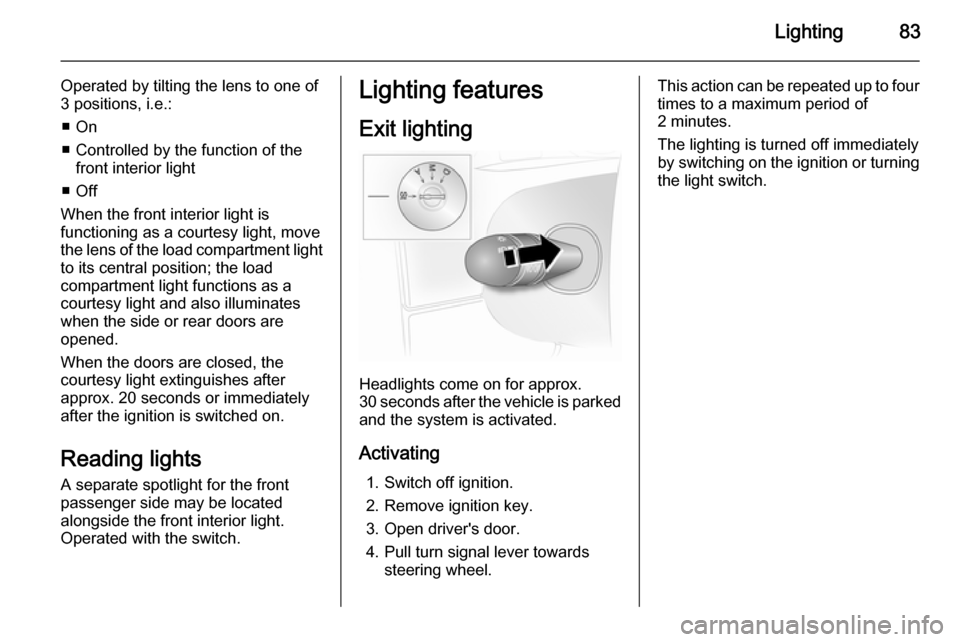
Exit lighting
Headlights come on for approx.
30 seconds after the vehicle is parked and the system is activated.
Activating 1. Switch off ignition.
2. Remove ignition key.
3. Open driver's door.
4. Pull turn signal lever towards steering wheel.
This action can be repeated up to four
times to a maximum period of
2 minutes.
The lighting is turned off immediately
by switching on the ignition or turning the light switch.

