Page 322 of 560
322 3-2. Using the audio system
VERSO-S_EE
MP3 and WMA playback
• When a device containing MP3 or WMA files is connected, all files in
the USB memory are checked. Once the file check is finished, the first
MP3 or WMA file is played. To make the file check finish more quickly,
we recommend that you do not include any files other than MP3 or
WMA files or create any unnecessary folders.
• When the USB memory is connected and the audio source is changed
to USB memory mode, the USB memory will start playing the first file in
the first folder. If the same device is removed and reinserted (and the
contents have not been changed), the USB memory will resume play
from the same point in which it was last used.
Extensions
If the file extensions .mp3 and .wma are used for files other than MP3 and
WMA files, they will be skipped (not played).
Playback
• To play MP3 files with steady sound quality, we recommend a fixed bit
rate of at least 128 kbps and a sampling frequency of 44.1 kHz.
• There is a wide variety of freeware and other encoding software for
MP3 and WMA files on the market, and depending on the status of the
encoding and the file format, poor sound quality or noise at the start of
playback may result. In some cases, playback may not be possible at
all.
• Microsoft, Windows, and Windows Media are registered trademarks of
Microsoft Corporation in the U.S.A. and other countries.
CAUTION
Caution while driving
Do not connect USB memory or operate the controls.
Page 323 of 560
323 3-2. Using the audio system
3
Interior features
VERSO-S_EE
NOTICE
If the auxiliary box lid cannot be fully closed
Depending on the size and shape of the USB memory that is connected to
the system, the auxiliary box lid may not close fully. In this case, do not forc-
ibly close the lid as this may damage the USB memory or the terminal, etc.
To prevent damage to USB memory
Do not leave USB memory in the vehicle. The temperature inside the vehi-
cle may become high, resulting in damage to the player.
Do not push down on or apply unnecessary pressure to the USB memory
while it is connected as this may damage the USB memory or its terminal.
Do not insert foreign objects into the port as this may damage the USB
memory or its terminal.
Page 327 of 560
327
3-2. Using the audio system
3
Interior features
VERSO-S_EE
Using the steering wheel audio switches
Turning on the power
Press when the audio system is turned off.
Changing the audio source
Press when the audio system is turned on. The audio source
changes as follows each time is pressed.
AMFMCD modeiPod or USB memory mode*
AUX*AM
*: If equipped
: If equipped
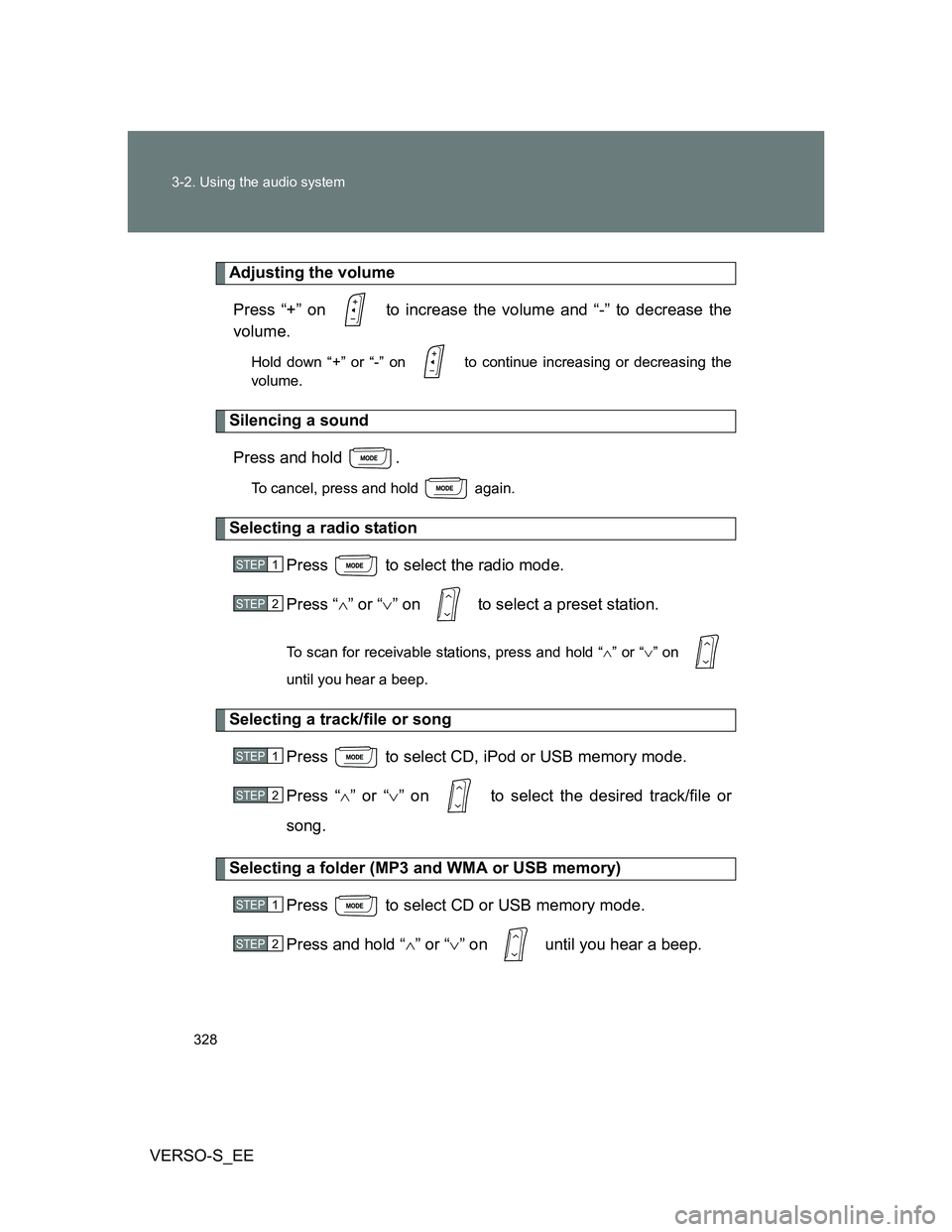
Some audio features can be controlled using the switches on the
steering wheel.
Operation may differ depending on the type of audio system or navi-
gation system. For details, refer to the manual provided with the
audio system or navigation system.
Vo l u m e
Radio mode: Select radio
stations
CD mode: Select tracks and
files (MP3 and WMA)
iPod mode: Selects a song
USB memory mode:
Selects a file and folder
Power on, select audio
source
Page 328 of 560
328 3-2. Using the audio system
VERSO-S_EE
Adjusting the volume
Press “+” on to increase the volume and “-” to decrease the
volume.
Hold down “+” or “-” on to continue increasing or decreasing the
volume.
Silencing a sound
Press and hold .
To cancel, press and hold again.
Selecting a radio station
Press to select the radio mode.
Press “” or “” on to select a preset station.
To scan for receivable stations, press and hold “” or “” on
until you hear a beep.
Selecting a track/file or song
Press to select CD, iPod or USB memory mode.
Press “” or “” on to select the desired track/file or
song.
Selecting a folder (MP3 and WMA or USB memory)
Press to select CD or USB memory mode.
Press and hold “” or “” on until you hear a beep.
STEP1
STEP2
STEP1
STEP2
STEP1
STEP2
Page 543 of 560
543
VERSO-S_EE
Alphabetical index
Alphabetical index
A/C..................................... 274, 280
ABS ........................................... 249
Air conditioning filter .............. 399
Air conditioning system
Air conditioning filter.............. 399
Automatic air conditioning
system ................................ 280
Manual air conditioning
system ................................ 274
Airbags
Airbag manual on-off
system ................................ 135
Airbag operating
conditions ........................... 126
Airbag precautions for
your child ............................ 130
Airbag warning light .............. 446
Curtain shield airbag
operating conditions ........... 126
Curtain shield airbag
precautions ......................... 130
General airbag precautions... 130
Locations of airbags .............. 124
Modification and disposal of
airbags ................................ 134
Proper driving posture... 122, 130
Side airbag operating
conditions ........................... 126
Side airbag precautions ........ 130
SRS airbags .......................... 124Antenna .................................... 365
Anti-lock brake system ........... 249
Armrest ..................................... 347
Assist grips .............................. 351
Audio input............................... 326
Audio system
Antenna ................................ 295
Audio input ............................ 326
AUX port ............................... 326
CD player .............................. 296
iPod....................................... 308
MP3/WMA disc ..................... 301
Optimal use........................... 324
Portable music player ........... 326
Radio .................................... 292
Steering wheel audio
switch ................................. 327
Type ...................................... 290
USB memory ........................ 316
Automatic air conditioning
system .................................... 280
Automatic light control
system .................................... 222
AUX port ................................... 326
Auxiliary box .................... 334, 355A