2014 TOYOTA VENZA radio
[x] Cancel search: radioPage 3 of 15

34
- INTRODUCTION
STOPPLEASE READ
WHAT IS ENTUNE
® APP SUITE?
The available Entune
App Suite system is a collection of popular mobile
applications and data services integrated with select 2014 Toyota
vehicles. Entune App Suite is subscription free.
Once the phone is connected to the vehicle using Bluetooth
® wireless
technology, Entune's App Suite features are operated using the
vehicle's controls or, for some services, by voice recognition. Entune
App Suite includes mobile apps for Bing
™, iHeartRadio, MovieTickets.
com, OpenTable
®, Pandora®, Facebook Places and Yelp. Data services
include Fuel, Sports, Stocks, Traffic and Weather
.
See www.toyota.com/entune for availability of apps and services.
In order to access Entune App Suite applications from your vehicle’s
touch screen, an Entune App Suite capable phone is required and
you must use a computer to register for Entune App Suite. Visit
www.toyota.com/entune to learn all about Entune App Suite features
and use the link to register. After you register, use your cell phone to
download the Entune App Suite from the appropriate app store.
For additional information on Entune App Suite and to check phone
compatibility, visit www.toyota.com/connect or call the Toyota
Customer Experience Center at 1-800-331-4331.
ENTUNE APP SUITE
*
An Entune App Suite capable phone is required to use the additional
features. Check phone compatibility by one of the following methods:
•Visit: www.toyota.com/connect
•Call the Toyota Customer Experience
Center at 1-800-331-4331
Note: You do not need an Entune App Suite capable phone to use
Bluetooth
® hands-free, Bluetooth audio or the navigation system.
To connect a Bluetooth Phone, refer to page 3. PHONE COMPATIBILITY
*Be sure to obey traffic regulations and maintain awareness of road and traffic
conditions. Select Entune App Suite use a large amount of data and you are responsible
for all data charges. Apps and services vary by phone and carrier. Not all apps and data
services are available at all times and all locations. Apps identified by "™" or "®" are
trademarks or registered trademarks of their respective companies and ca\
nnot be used
without permission. See toyota.com/entune for the latest information regarding apps
and services.
- INTRODUCTION
Page 11 of 15

1920
ADDITIONAL NAVIGATION FEATURES
Once the address has been inputted, select the desired
route preference(s) for the trip. By selecting
the system will display time, toll roads, ferry and freeway
information. SYSTEM TIME
ROUTE PREFERENCES
PRESS SET UP ICON
>
Adjust the Time Zone and Daylight Saving Time option.
SELECT NAVIGATION APP >
Select what information to display with the map. Some
selections are available during route guidance mode only.
3 ROUTES
SCREEN CONFIGURATIONS One of three routes may be chosen for the trip:
Quick- is the easiest route, usually the fastest
Short- is the most direct based upon driven mileage
Alternate- is the second fastest route
ADDITIONAL NAVIGATION FEATURES
LANGUAGE
PRESS SET UP ICON
>
Select Language Preference: English, French or Spanish. PRESS SET UP ICON
>
Adjust the Voice Guidance volume level.
BEEP SETTING
VOICE VOLUME
AUTO CHANGE TO HOME SCREEN
PRESS SET UP ICON
> >
Once the screen transition is unchecked (off), the audio
screen will remain without reverting to the map display. PRESS SET UP ICON
>
Check the Beep box on or off.
SEARCH AREA
Prior to inputting the desired address select the State/
Province by pressing . The system
is only capable of searching for an address within one
state or province at a time.
AUDIO LIVE PAUSE AND TAG
The Audio App features a pause function that will record
up to 20 minutes of live radio for playback later. The
feature will record a song from live radio for
purchase from a paired mobile device later.
NOTE: When the vehicle is turned off or the radio station
is changed, any saved audio content will be lost.
OPERATION OF EMERGENCY SCREEN
PRESS >
Touch the desired emergency category. If the vehicle is in
motion, only nearby police stations, dealers, hospitals or
fire stations are shown.
Page 12 of 15

2122
The Traffic App integrates with your
navigation system to display continuously
updated traffic information for over 100
markets. Just begin by pressing the APPS
button and electing
.
NAVTRAFFIC
To see local traffic events, touch and you will see a list of events at your location. Touch to see events along your current route
TRAFFIC INCIDENT WARNINGPress the Set Up icon
on the
faceplate followed by .step1
AUTOMATICALLY AVOID TRAFFIC
step2
Select the Avoid Traffic option to
swith from Manual to Automatic and
press
. The system will
automatically select another route
when moderate or heavy traffic is
detected during route guidance.
NAVTRAFFIC
Press the Set Up icon on the
faceplate followed by .step1step2
Select the Traffic Incident Warning
option to receive voice notification of
traffic events within 20 miles along the
current route. Press
.
TRAFFIC EVENT LIST
Predictive Traffic Map is a feature that displays traffic conditions for the current time based on historical\
trends at the
location. To see a predictive traffic map, touch
. The Predictive Traffic Map can be set to
predict traffic conditions 15, 30 and 45 minutes from the current time. PREDICTIVE TRAFFIC MAP
My Traffis Routes lets you store favorite and previously traveled routes to check traffic conditions. To see traffic
routes, touch
.
MY TRAFFIC ROUTES
Always drive safely, obey traffic laws & focus on the road while driving. Availability and accuracy of the information provided by
HD services is dependent upon many factors. Services not available in every city or roadway. Use common sense when relying on
information provided. HD Radio(tm) Technology manufactured under license from iBiquity Digital Corporation U.S. and Foreign Patents.
HD Radio(tm) and the HD, HD Radio, and "Arc" logos are proprietary trademarks of iBiquity Digital Corp.
Page 13 of 15
2324
WEATHERENTUNE APP SUITE FEATURES
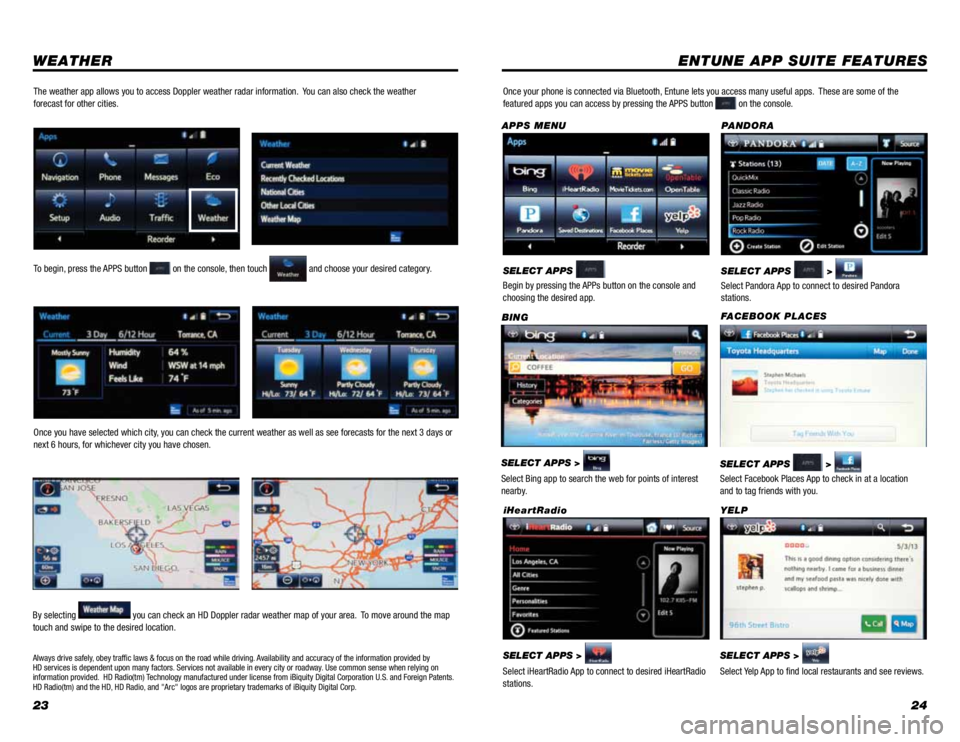
SELECT APPS >
Select Bing app to search the web for points of interest
nearby. BING
SELECT APPS >
Select Pandora App to connect to desired Pandora
stations. PANDORA
SELECT APPS >
Select iHeartRadio App to connect to desired iHeartRadio
stations. iHeartRadioSELECT APPS >
Select Yelp App to find local restaurants and see reviews. YELP
Once your phone is connected via Bluetooth, Entune lets you access many useful apps.
These are some of the
featured apps you can access by pressing the APPS button on the console.
SELECT APPS
Begin by pressing the APPs button on the console and
choosing the desired app.
APPS MENU
FACEBOOK PLACES
SELECT APPS
>
Select Facebook Places App to check in at a location
and to tag friends with you.
To begin, press the APPS button on the console, then touch and choose your desired category.
Once you have selected which city, you can check the current weather as well as see forecasts for the next 3 days or
next 6 hours, for whichever city you have chosen.
By selecting
you can check an HD Doppler radar weather map of your area. To move around the map
touch and swipe to the desired location.
The weather app allows you to access Doppler weather radar information. You can also check the weather
forecast for other cities.
Always drive safely, obey traffic laws & focus on the road while driving. Availability and accuracy of the information provided by
HD services is dependent upon many factors. Services not available in every city or roadway. Use common sense when relying on
information provided. HD Radio(tm) Technology manufactured under license from iBiquity Digital Corporation U.S. and Foreign Patents.
HD Radio(tm) and the HD, HD Radio, and "Arc" logos are proprietary trademarks of iBiquity Digital Corp.