Page 435 of 576
4357-3. Do-it-yourself maintenance
7
Maintenance and care
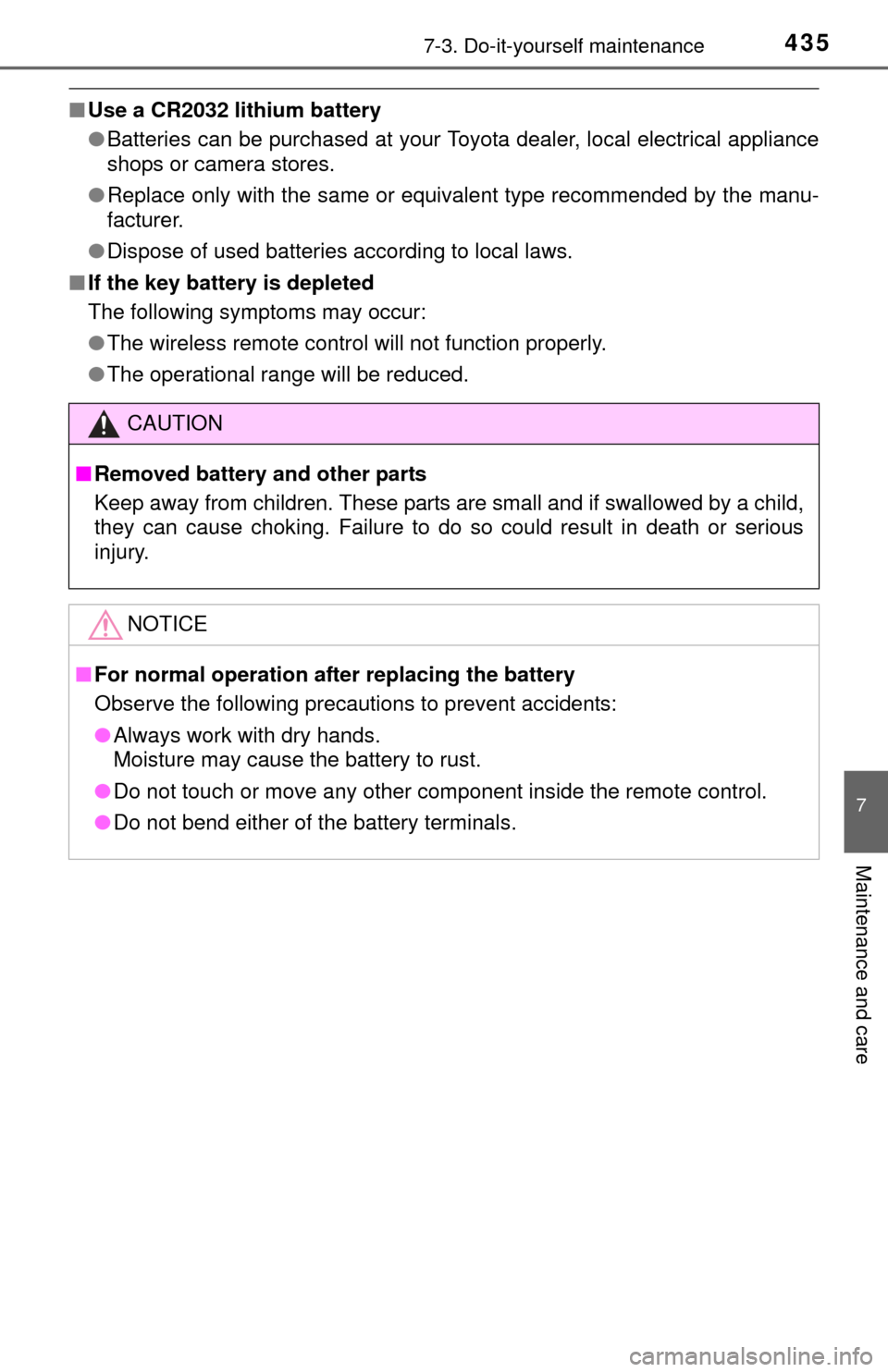
■Use a CR2032 lithium battery
●Batteries can be purchased at your Toyota dealer, local electrical appliance
shops or camera stores.
● Replace only with the same or equivalent type recommended by the manu-
facturer.
● Dispose of used batteries according to local laws.
■ If the key battery is depleted
The following symptoms may occur:
●The wireless remote control will not function properly.
● The operational range will be reduced.
CAUTION
■Removed battery and other parts
Keep away from children. These parts are small and if swallowed by a child,
they can cause choking. Failure to do so could result in death or serious
injury.
NOTICE
■For normal operation after replacing the battery
Observe the following precautions to prevent accidents:
● Always work with dry hands.
Moisture may cause the battery to rust.
● Do not touch or move any other component inside the remote control.
● Do not bend either of the battery terminals.
Page 457 of 576
457
8
When trouble arises
8-1. Essential information
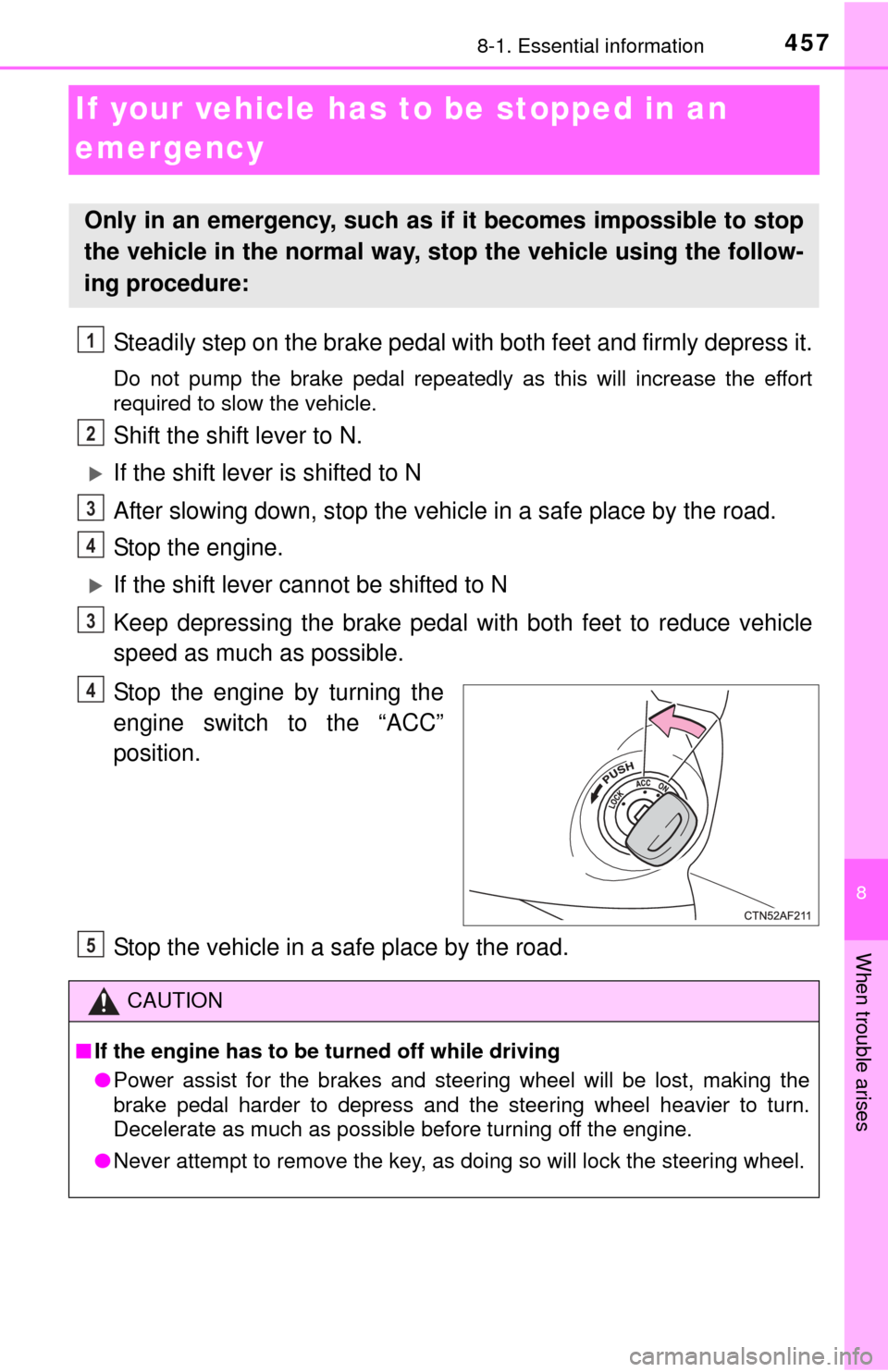
If your vehicle has to be stopped in an
emergency
Steadily step on the brake pedal wi th both feet and firmly depress it.
Do not pump the brake pedal repeatedly as this will increase the effort
required to slow the vehicle.
Shift the shift lever to N.
If the shift lever is shifted to N
After slowing down, stop the vehicle in a safe place by the road.
Stop the engine.
If the shift lever cannot be shifted to N
Keep depressing the brake pedal with both feet to reduce vehicle
speed as much as possible.
Stop the engine by turning the
engine switch to the “ACC”
position.
Stop the vehicle in a safe place by the road.
Only in an emergency, such as if it becomes impossible to stop
the vehicle in the normal way, st op the vehicle using the follow-
ing procedure:
1
2
3
4
3
4
CAUTION
■ If the engine has to be turned off while driving
● Power assist for the brakes and steering wheel will be lost, making the
brake pedal harder to depress and the steering wheel heavier to turn.
Decelerate as much as possible before turning off the engine.
● Never attempt to remove the key, as doing so will lock the steering wheel.
5
Page 461 of 576
4618-2. Steps to take in an emergency
8
When trouble arises
NOTICE
■To prevent causing serious damage to the transmission and transfer
(4WD models) when towing using a wheel-lift type truck
2WD models: Never tow this vehicle from the front with the rear wheels on
the ground.
4WD models: Never tow this vehicle with any of the wheels in contact with
the ground.
■ To prevent damage to the vehicle when towing using a wheel-lift type
truck
● Do not tow the vehicle from the rear when the engine switch is in the
“LOCK” position or the key is removed. The steering lock mechanism is
not strong enough to hold the front wheels straight.
● When raising the vehicle from the rear, ensure adequate ground clearance
for towing at the opposite end of the raised vehicle. Without adequate
clearance, the vehicle could be damaged while being towed from the rear.
■ To prevent body damage when towing with a sling-type truck
Do not tow with a sling-type truck, either from the front or rear.
■ To prevent causing serious damage to the transmission and transfer in
emergency towing (4WD models)
Never tow a vehicle from the rear with four wheels on the ground. This may
cause serious damage to the transmission and transfer.
■ Emergency towing eyelet precautions
● Before emergency towing, check that the eyelet is not broken or damaged
and that the installation bolts are not loose.
● Fasten the towing cable or chain securely to the eyelet.
● Do not jerk the eyelet. Apply steady and even force.
● To avoid damaging the eyelet, do not pull from the side or at a vertical
angle. Always pull straight ahead.
Page 494 of 576

4948-2. Steps to take in an emergency
Connect a positive jumper cable clamp to the positive (+) battery
terminal on your vehicle.
Connect the clamp on the other end of the positive cable to the
positive (+) battery terminal on the second vehicle.
Connect a negative cable clamp to the negative (-) battery termi-
nal on the second vehicle.
Connect the clamp at the other end of the negative cable to a
solid, stationary, unpainted metallic point away from the battery
and any moving parts, as shown in the illustration.
Start the engine of the second vehicle. Increase the engine speed
slightly and maintain at that le vel for approximately 5 minutes to
recharge the batter y of your vehicle.
Maintain the engine speed of t he second vehicle and start the
engine of your vehicle.
Once the vehicle’s engine has started, remove the jumper cables in
the exact reverse order from which they were connected.
Once the engine starts, have the vehicle inspected at your Toyota
dealer as soon as possible.
■ Starting the engine when the battery is discharged
The engine cannot be started by push-starting.
■ To prevent battery discharge
●Turn off the headlights and the audio system while the engine is off.
● Turn off any unnecessary electrical components when the vehicle is running
at a low speed for an extended period, such as in heavy traffic.
■ When the battery is removed or discharged
●The moon roof must be initialized. ( P. 144)
● Flex-fuel vehicles: The information recorded in the computer will be cleared,
which may cause the engine to run roughly and reduce driving performance
for a while when the engine is first started. In this case, wait until the engine
runs normally.
If the vehicle is running on E85, the engine may stall.
In this case, restart the engine, repeatedly if necessary.
● Vehicles with alarm: Make sure that the key is not inside the vehicle when
recharging or replacing the battery. The key may be locked in the vehicle if
the alarm is activated. (P. 81)
1
2
3
4
3
4
5
Page 531 of 576
5319-2. Customization
9
Vehicle specifications
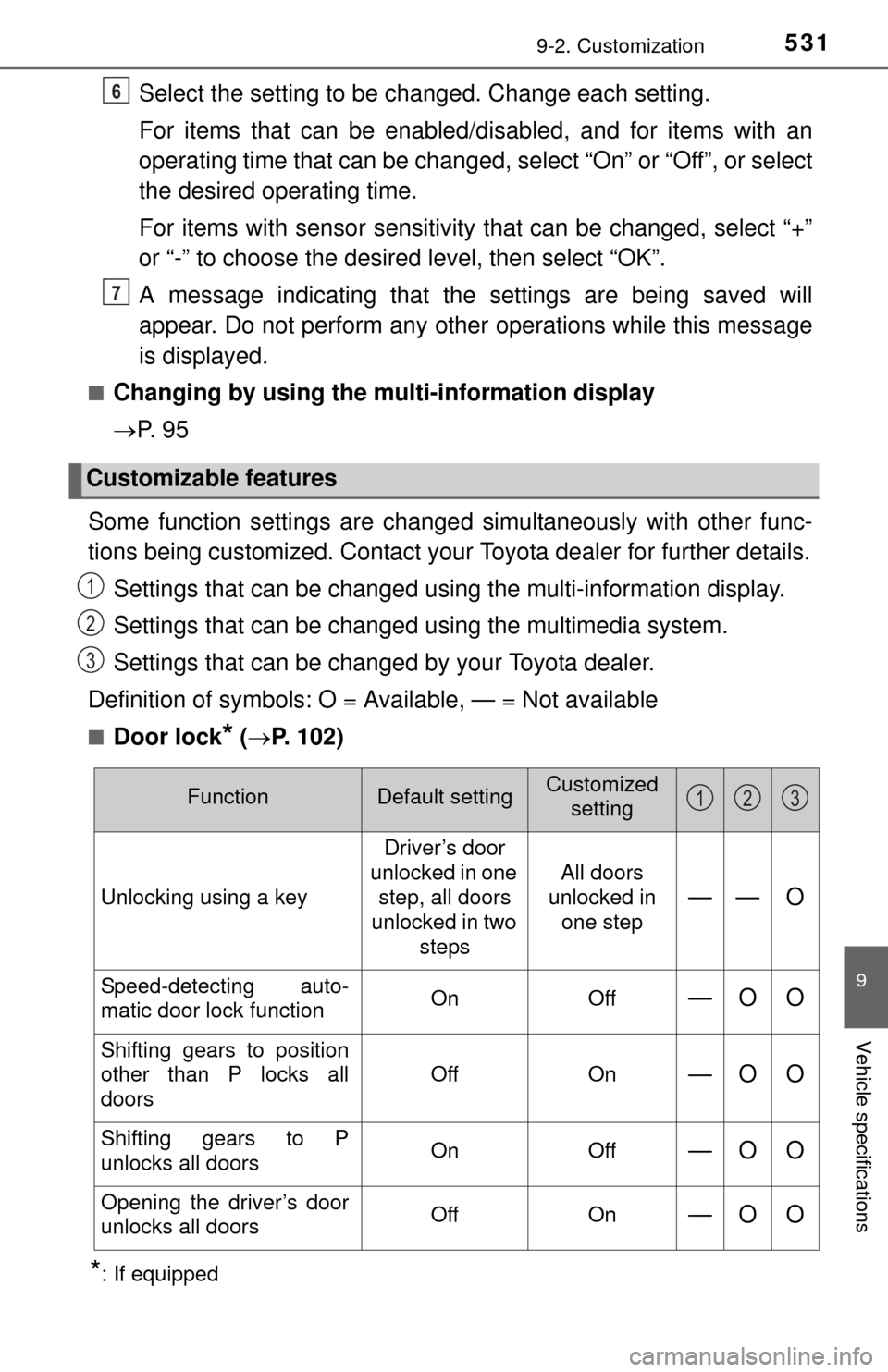
Select the setting to be changed. Change each setting.
For items that can be enabled/disabled, and for items with an
operating time that can be changed, select “On” or “Off”, or select
the desired operating time.
For items with sensor sensitivity that can be changed, select “+”
or “-” to choose the desired level, then select “OK”.
A message indicating that the settings are being saved will
appear. Do not perform any other operations while this message
is displayed.
■Changing by using the mu lti-information display
P. 9 5
Some function settings are change d simultaneously with other func-
tions being customized. Contact your Toyota dealer for further details.
Settings that can be changed using the multi-information display.
Settings that can be changed using the multimedia system.
Settings that can be changed by your Toyota dealer.
Definition of symbols: O = Available, — = Not available
■Door lock* ( P. 102)
*: If equipped
Customizable features
6
7
1
2
3
FunctionDefault settingCustomized
setting
Unlocking using a key Driver’s door
unlocked in one step, all doors
unlocked in two steps All doors
unlocked in
one step—— O
Speed-detecting auto-
matic door lock function On Off—O O
Shifting gears to position
other than P locks all
doors Off On
—O O
Shifting gears to P
unlocks all doors
On Off—O O
Opening the driver’s door
unlocks all doors Off On—O O
123
Page 532 of 576
5329-2. Customization
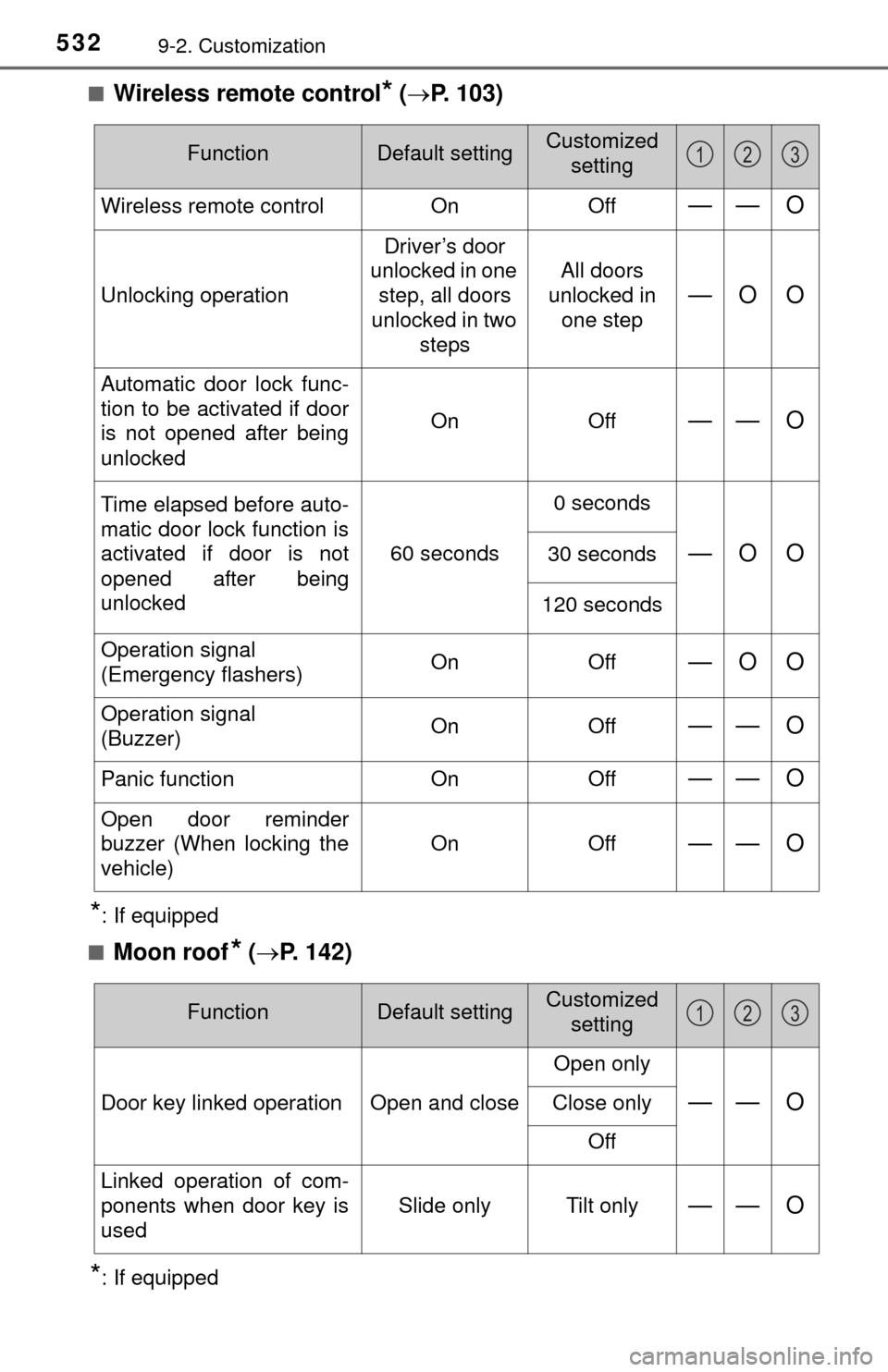
■Wireless remote control* ( P. 103)
*: If equipped
■
Moon roof* ( P. 142)
*: If equipped
FunctionDefault settingCustomized
setting
Wireless remote control OnOff—— O
Unlocking operation Driver’s door
unlocked in one step, all doors
unlocked in two steps All doors
unlocked in
one step—O O
Automatic door lock func-
tion to be activated if door
is not opened after being
unlocked On Off
—— O
Time elapsed before auto-
matic door lock function is
activated if door is not
opened after being
unlocked60 seconds0 seconds
—O O30 seconds
120 seconds
Operation signal
(Emergency flashers) On Off
—O O
Operation signal
(Buzzer)On Off—— O
Panic function
OnOff—— O
Open door reminder
buzzer (When locking the
vehicle) On Off
—— O
123
FunctionDefault settingCustomized
setting
Door key linked operation Open and close Open only—— OClose only
Off
Linked operation of com-
ponents when door key is
used Slide only Tilt only
—— O
123
Page 558 of 576
558What to do if... (Troubleshooting)
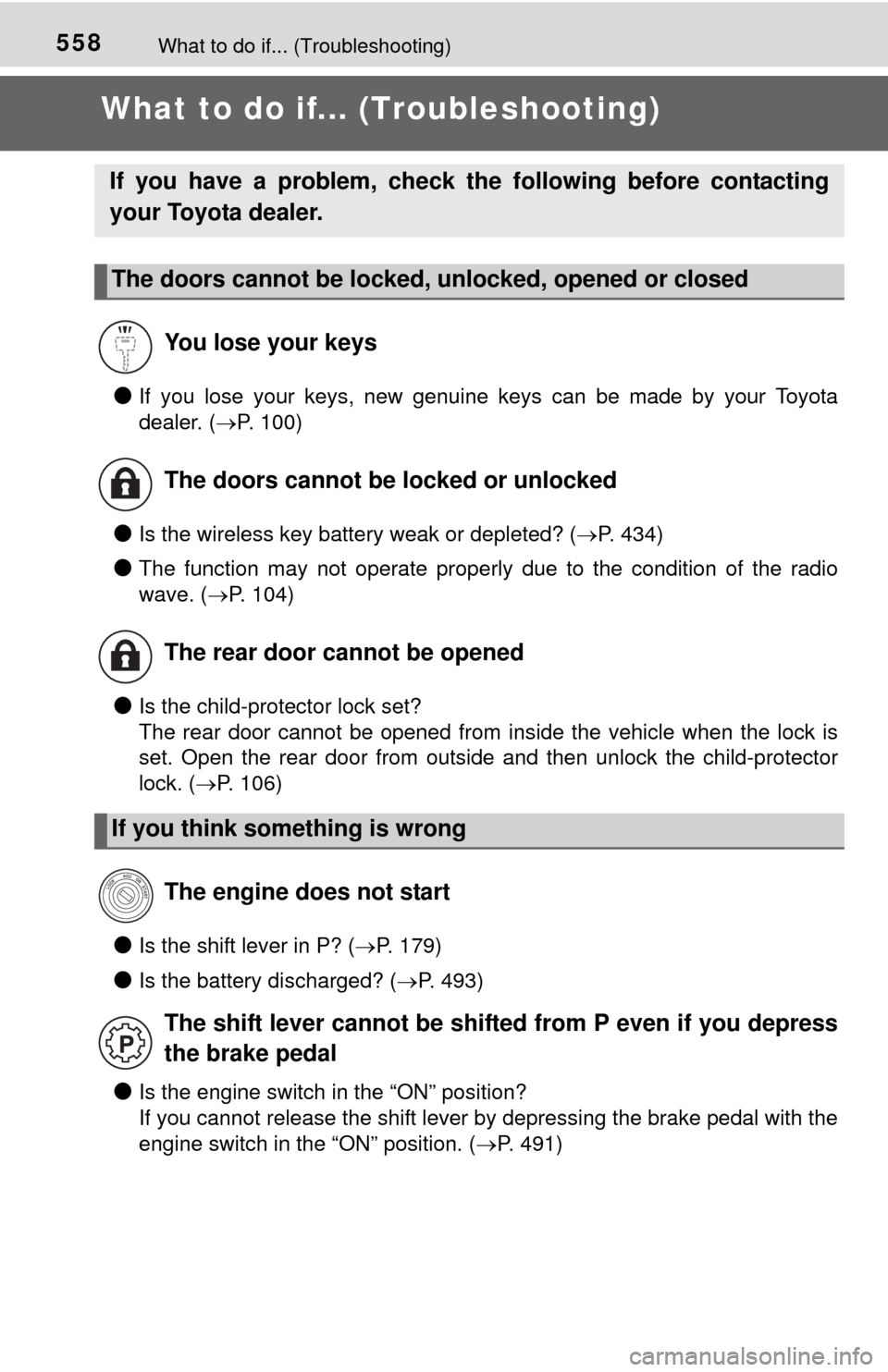
What to do if... (Troubleshooting)
●If you lose your keys, new genuine keys can be made by your Toyota
dealer. (P. 100)
●Is the wireless key battery weak or depleted? ( P. 434)
●The function may not operate properly due to the condition of the radio
wave. (P. 104)
●Is the child-protector lock set?
The rear door cannot be opened from inside the vehicle when the lock is
set. Open the rear door from outside and then unlock the child-protector
lock. (P. 106)
●Is the shift lever in P? ( P. 179)
●Is the battery discharged? ( P. 493)
●Is the engine switch in the “ON” position?
If you cannot release the shift lever by depressing the brake pedal with the
engine switch in the “ON” position. ( P. 491)
If you have a problem, check th e following before contacting
your Toyota dealer.
The doors cannot be locked, unlocked, opened or closed
You lose your keys
The doors cannot be locked or unlocked
The rear door cannot be opened
If you think something is wrong The engine does not start
The shift lever cannot be shifted from P even if you depress
the brake pedal
Page 559 of 576
559What to do if... (Troubleshooting)
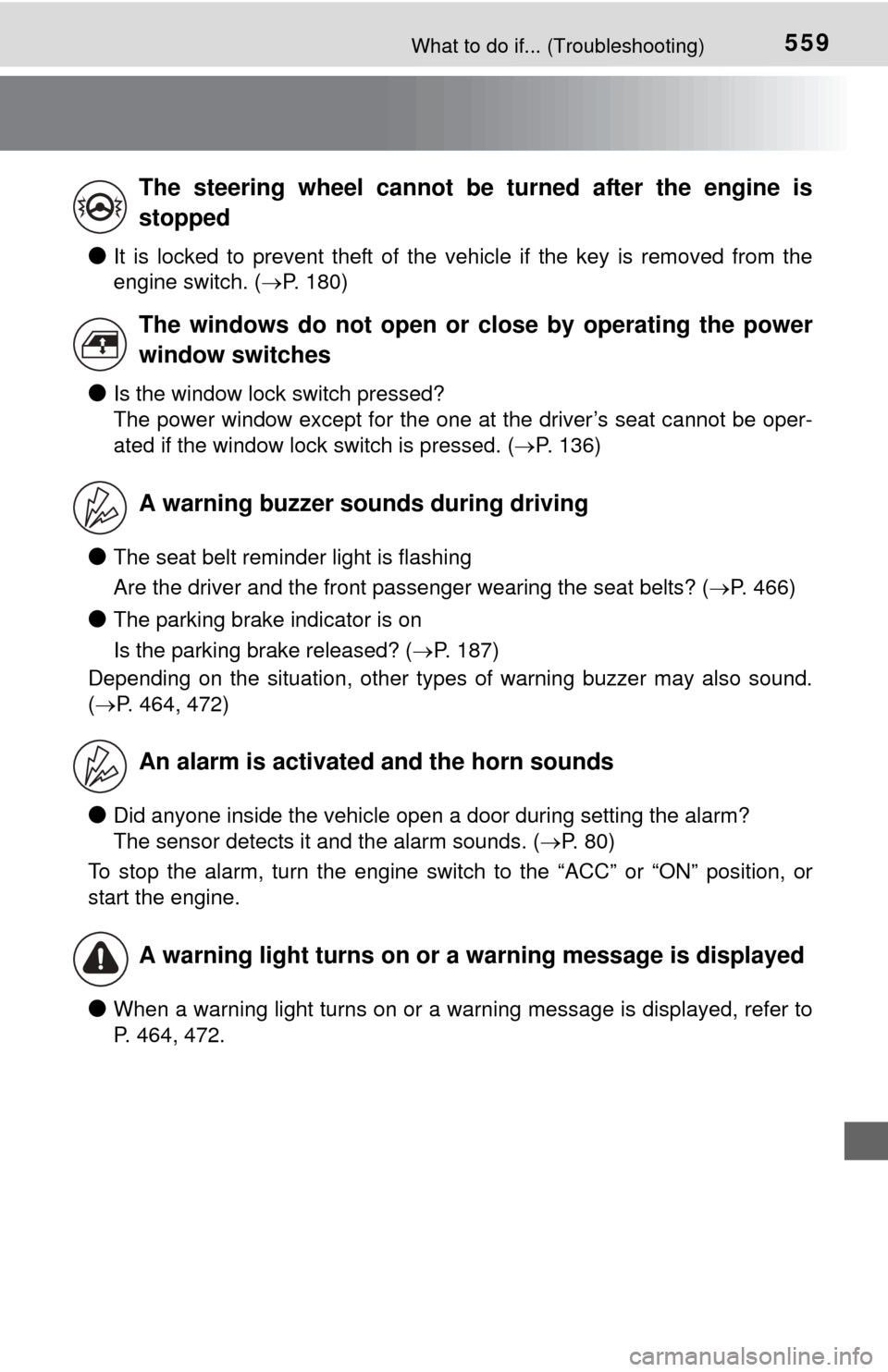
●It is locked to prevent theft of the vehicle if the key is removed from the
engine switch. (P. 180)
●Is the window lock switch pressed?
The power window except for the one at the driver’s seat cannot be oper-
ated if the window lock switch is pressed. ( P. 136)
●The seat belt reminder light is flashing
Are the driver and the front passenger wearing the seat belts? ( P. 466)
●The parking brake indicator is on
Is the parking brake released? (P. 187)
Depending on the situation, other types of warning buzzer may also sound.
( P. 464, 472)
●Did anyone inside the vehicle open a door during setting the alarm?
The sensor detects it and the alarm sounds. ( P. 80)
To stop the alarm, turn the engine switch to the “ACC” or “ON” position, or
start the engine.
●When a warning light turns on or a warning message is displayed, refer to
P. 464, 472.
The steering wheel cannot be turned after the engine is
stopped
The windows do not open or close by operating the power
window switches
A warning buzzer sounds during driving
An alarm is activated and the horn sounds
A warning light turns on or a warning message is displayed