Page 6 of 872

TABLE OF CONTENTSIndex
6
SIENNA_OM_OM45483U_(U)
4-1. Maintenance and careCleaning and protecting the vehicle exterior ........... 648
Cleaning and protecting the vehicle interior ............ 653
4-2. Maintenance Maintenance requirements .................... 657
General maintenance ......... 660
Emission inspection and maintenance (I/M)
programs .......................... 664
4-3. Do-it-yourself maintenance Do-it-yourself service precautions ...................... 665
Hood................................... 669
Positioning a floor jack ....... 671
Engine compartment .......... 673
Tires ................................... 688
Tire inflation pressure......... 699
Wheels ............................... 703
Air conditioning filter ........... 706
Wireless remote control/ electronic key battery ....... 708
Checking and replacing fuses ................................ 711
Light bulbs .......................... 724 5-1. Essential information
Emergency flashers ............ 736
If your vehicle needs to be towed ....................... 737
If you think something is wrong ............................ 741
Fuel pump shut off system .............................. 742
5-2. Steps to take in an emergency If a warning light turns on or a warning buzzer
sounds... .......................... 743
If a warning message is displayed .......................... 758
If you have a flat tire (vehicles with
run-flat tires) ..................... 759
If you have a flat tire (vehicles with
standard tires) .................. 761
If the engine will not start ............................ 776
If the shift lever cannot be shifted from P .............. 778
If you lose your keys ........... 780
If the electronic key does not operate properly ......... 781
If the battery is discharged ........................ 784
If your vehicle overheats..... 790
If the vehicle becomes stuck ................................. 793
If your vehicle has to be stopped in an
emergency........................ 795
4Maintenance and care5When trouble arises
Page 384 of 872

384 2-5. Driving information
SIENNA_OM_OM45483U_(U)●
Reversing with a trailer attached is difficult and requires practice.
Grip the bottom of the steering wheel and move your hand to the
left to move the trailer to the left. Move your hand to the right to
move the trailer to the right. (This is generally opposite to reversing
without a trailer attached.) Avoid sharp or prolonged turning. Have
someone guide you when reversing to reduce the risk of an acci-
dent.
● As stopping distance is increased when towing a trailer, vehicle-to-
vehicle distance should be increased. For each 10 mph (16 km/h) of
speed, allow at least one vehicle and trailer length.
● Avoid sudden braking as you may skid, resulting in the trailer jack-
knifing and a loss of vehicle control. This is especially true on wet
or slippery surfaces.
● Avoid jerky starts or sudden acceleration.
● Avoid jerky steering and sharp turns, and slow down before mak-
ing a turn.
● Note that when making a turn, th e trailer wheels will be closer than
the vehicle wheels to the inside of the turn. Compensate by making
a wider than normal turning radius.
● Slow down before making a turn, in crosswinds, on wet or slippery
surfaces, etc.
Increasing vehicle speed c an destabilize the trailer.
Page 390 of 872

390 2-5. Driving information
SIENNA_OM_OM45483U_(U)
CAUTION
■Trailer towing precautions
To tow a trailer safely, use extreme care and drive the vehicle in accordance
with the trailer’s characteristics and operating conditions. Failure to do so
could cause an accident resulting in death or serious injury. Vehicle stability
and braking performance are affected by trailer stability, brake setting and
performance, and the hitch. Your vehicle will handle differently when towing
a trailer.
■ To avoid accident or injury
●Do not exceed the TWR, unbraked TWR, GCWR, GVWR or GAWR.
● If the gross trailer weight is over 2000 lb. (907 kg), a sway control device
with sufficient capacity is required.
● Adjust the tongue weight within the appropriate range. Place heavier loads
as close to the trailer axle as possible.
● Do not exceed 65 mph (104 km/h), the posted towing speed limit or the
speed limit for your trailer as set forth in your trailer owner’s manual,
whichever is lowest. Slow down sufficiently before making a turn, in cross-
winds, on wet or slippery surface, etc. to help avoid an accident. If you
experience a vehicle-trailer instability from reducing a certain speed, slow
down and make sure you keep your vehicle speed under the speed of
which you experience the instability.
● Do not make jerky, abrupt or sharp turns.
● Do not apply the brakes suddenly as you may skid, resulting in jackknifing
and loss of vehicle control. This is especially true on wet or slippery sur-
faces.
● Do not exceed the trailer hitch assembly weight, gross vehicle weight,
gross axle weight and trailer tongue weight capacities.
Page 504 of 872
504
SIENNA_OM_OM45483U_(U)
3-4. Using the rear audio system
Rear seat entertainment system features
: If equipped
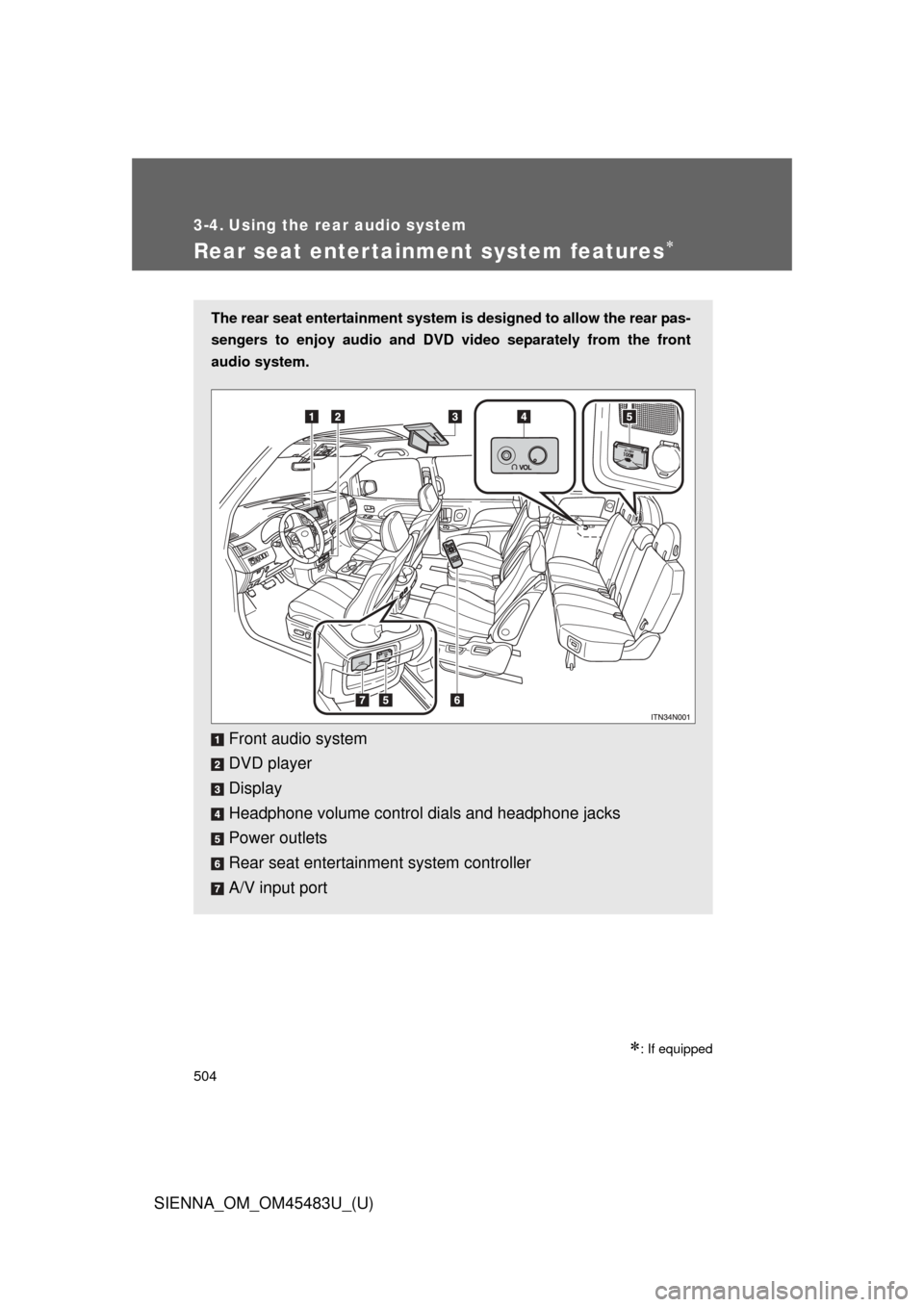
The rear seat entertainment system is designed to allow the rear pas-
sengers to enjoy audio and DVD video separately from the front
audio system.
Front audio system
DVD player
Display
Headphone volume control dials and headphone jacks
Power outlets
Rear seat entertainment system controller
A/V input port
Page 510 of 872
510 3-4. Using the rear audio system
SIENNA_OM_OM45483U_(U)
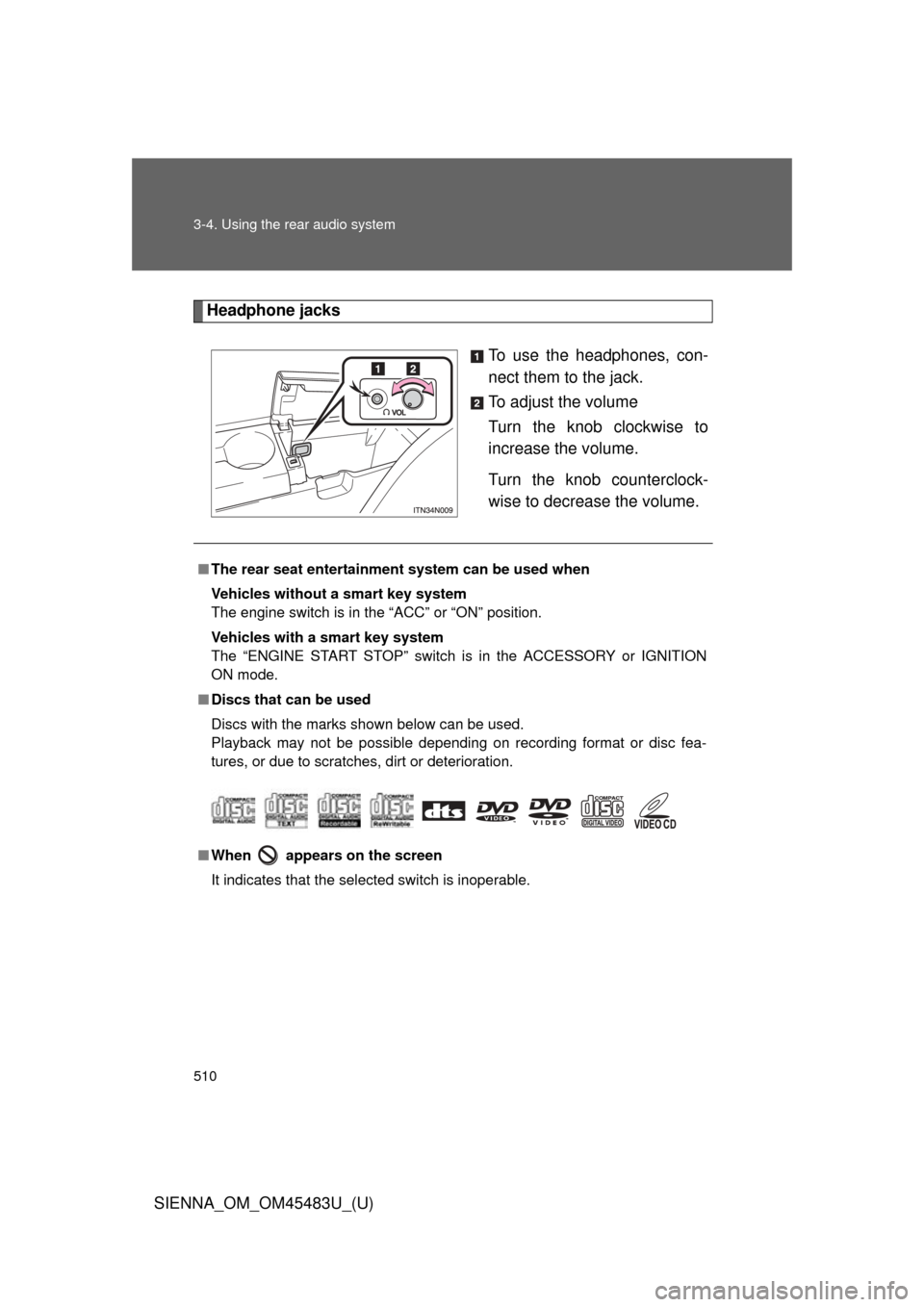
Headphone jacksTo use the headphones, con-
nect them to the jack.
To adjust the volume
Turn the knob clockwise to
increase the volume.
Turn the knob counterclock-
wise to decrease the volume.
■The rear seat entertainmen t system can be used when
Vehicles without a smart key system
The engine switch is in the “ACC” or “ON” position.
Vehicles with a smart key system
The “ENGINE START STOP” switch is in the ACCESSORY or IGNITION
ON mode.
■ Discs that can be used
Discs with the marks shown below can be used.
Playback may not be possible depending on recording format or disc fea-
tures, or due to scratches, dirt or deterioration.
■ When appears on the screen
It indicates that the selected switch is inoperable.
Page 513 of 872

513
3-4. Using the rear audio system
3
Interior features
SIENNA_OM_OM45483U_(U)
■
When using AA batteries
Batteries can be purchased at your Toyota dealer, electric appliance shops,
or camera stores.
Replace only with the same or equivalent type recommended by a Toyota
dealer.
Dispose of used batteries according to the local laws.
■ Headphones
With some headphones generally available on the market, it may be difficult
to receive signals properly. Toyota recommends the use of Toyota genuine
wireless headphones.
Please contact your Toyota dealer for further details.
■ Vo l u m e
●Adjust the volume when you connect the headphones to the jack. Loud
volume from headphones may cause hearing loss or damage.
● Conversational speech on some DVDs is recorded at a low volume to
emphasize the impact of sound effects. If you adjust the volume assum-
ing that the conversations represent the maximum volume level that the
DVD will play, you may be startled by louder sound effects or when you
change to a different audio source. Be sure to adjust the volume with this
in mind.
Page 647 of 872
Maintenance and care4
647
SIENNA_OM_OM45483U_(U)
4-1. Maintenance and careCleaning and protecting the vehicle exterior ......... 648
Cleaning and protecting the vehicle interior .......... 653
4-2. Maintenance Maintenance requirements .................. 657
General maintenance....... 660
Emission inspection and maintenance (I/M)
programs........................ 664
4-3. Do-it-yourself maintenance Do-it-yourself service precautions .................... 665
Hood ................................ 669
Positioning a floor jack ..... 671
Engine compartment ........ 673
Tires ................................. 688
Tire inflation pressure ...... 699
Wheels ............................. 703
Air conditioning filter......... 706
Wireless remote control/ electronic key battery ..... 708
Checking and replacing fuses .............................. 711
Light bulbs........................ 724
Page 671 of 872
671
4-3. Do-it-yourself maintenance
4
Maintenance and care
SIENNA_OM_OM45483U_(U)
Positioning a floor jack
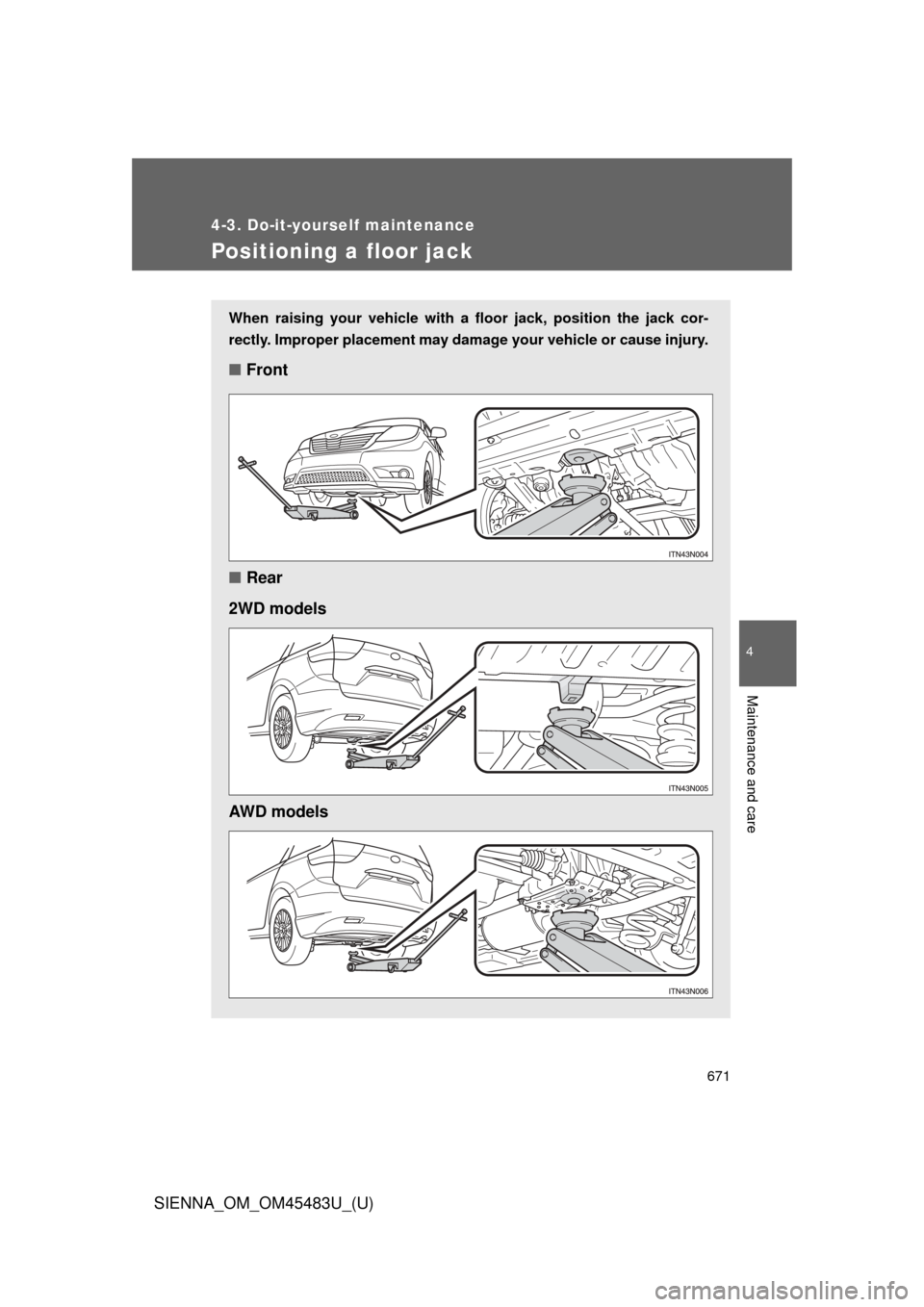
When raising your vehicle with a floor jack, position the jack cor-
rectly. Improper placement may damage your vehicle or cause injury.
■Front
■ Rear
2WD models
AWD models