Page 323 of 872
323
2-4. Using other
driving systems
2
When driving
SIENNA_OM_OM45483U_(U)
■Sensor detection information
●Certain vehicle conditions and the surrounding environment may affect
the ability of the sensor to correctly detect obstacles. Particular instances
where this may occur are listed below.
• There is dirt, snow or ice on the sensor.
• The sensor is frozen.
• The sensor is covered in any way.
• The vehicle is leaning considerably to one side.
• On an extremely bumpy road, on an incline, on gravel, or on grass
• The vicinity of the vehicle is noisy due to vehicle horns, motorcycle
engines, air brakes of large vehicles, or other loud noises producing
ultrasonic waves.
• There is another vehicle equipped with parking assist sensors in the vicinity.
• A sensor is coated with a sheet of spray or heavy rain.
• The vehicle is equipped with a fender pole or radio antenna.
• A bumper or sensor receives a strong impact.
• The vehicle is approaching a tall or right-angled curb.
• In harsh sunlight or intense cold weather
In addition to the examples above, there are instances in which, because of
their shapes, signs and other objects may be judged by the sensor to be
closer than they are.
● The shape of the obstacle may prevent the sensor from detecting it. Pay
particular attention to the following obstacles:
• Wires, fences, ropes etc.
• Cotton, snow and other materials that absorb sound waves
• Sharply-angled objects
• Low obstacles
• Tall obstacles with upper sections projecting outwards in the direction
of your vehicle
Page 324 of 872
324 2-4. Using other driving systems
SIENNA_OM_OM45483U_(U)
■If the display flashes and a message is displayed
P. 758
■ Certification (Canada only)
This ISM device complies with Canadian ICES-001.
■ When there is a malfunction
In the following cases, have the vehicle inspected by your Toyota dealer.
●If the bumper is damaged.
● If the intuitive parking assist indicator light remains on without a beep
sounds.
CAUTION
■Caution when using the Intu itive parking assist-sensor
Observe the following precautions.
Failure to do so may result in the vehicle being unable to be driven safely
and possibly cause an accident.
● Do not use the sensor at speeds in excess of 6 mph (10 km/h).
● Do not attach any accessories within the sensor range.
NOTICE
■Notes when washing the vehicle
Do not apply intensive bursts of water or steam to the sensor area.
Doing so may result in the sensor malfunctioning.
Page 340 of 872
340
2-4. Using other driving systems
SIENNA_OM_OM45483U_(U)
PCS (Pre-Collision System)
: If equipped
When the radar sensor detects possibility of a frontal collision, the
pre-collision system such as t he brakes and seat belts are auto-
matically engaged to lessen impact as well as vehicle damage.
■ Pre-collision seat belts (front seat belts only)
If the pre-collision s ensor detects that a co llision is unavoidable,
the pre-collision system will retract the seat belt before the colli-
sion occurs. The same will happen if the driver makes an emer-
gency braking or loses co ntrol of the vehicle. (P. 132)
However, when the VSC system is disabled, the system will not
operate in the event of skidding.
■ Pre-collision brake assist
When there is a high possibility of a frontal collision, the system
applies greater braking force in relation to how strongly the
brake pedal is depressed.
■ Pre-collision braking
When there is a high possibility of a frontal collision, the system
warns the driver using a warning light and buzzer. If the system
determines that a collision is un avoidable, the brakes are auto-
matically applied to reduce th e collision speed. Pre-collision
braking can be disabled usi ng the pre-collision braking off
switch.
Page 341 of 872
341
2-4. Using other
driving systems
2
When driving
SIENNA_OM_OM45483U_(U)
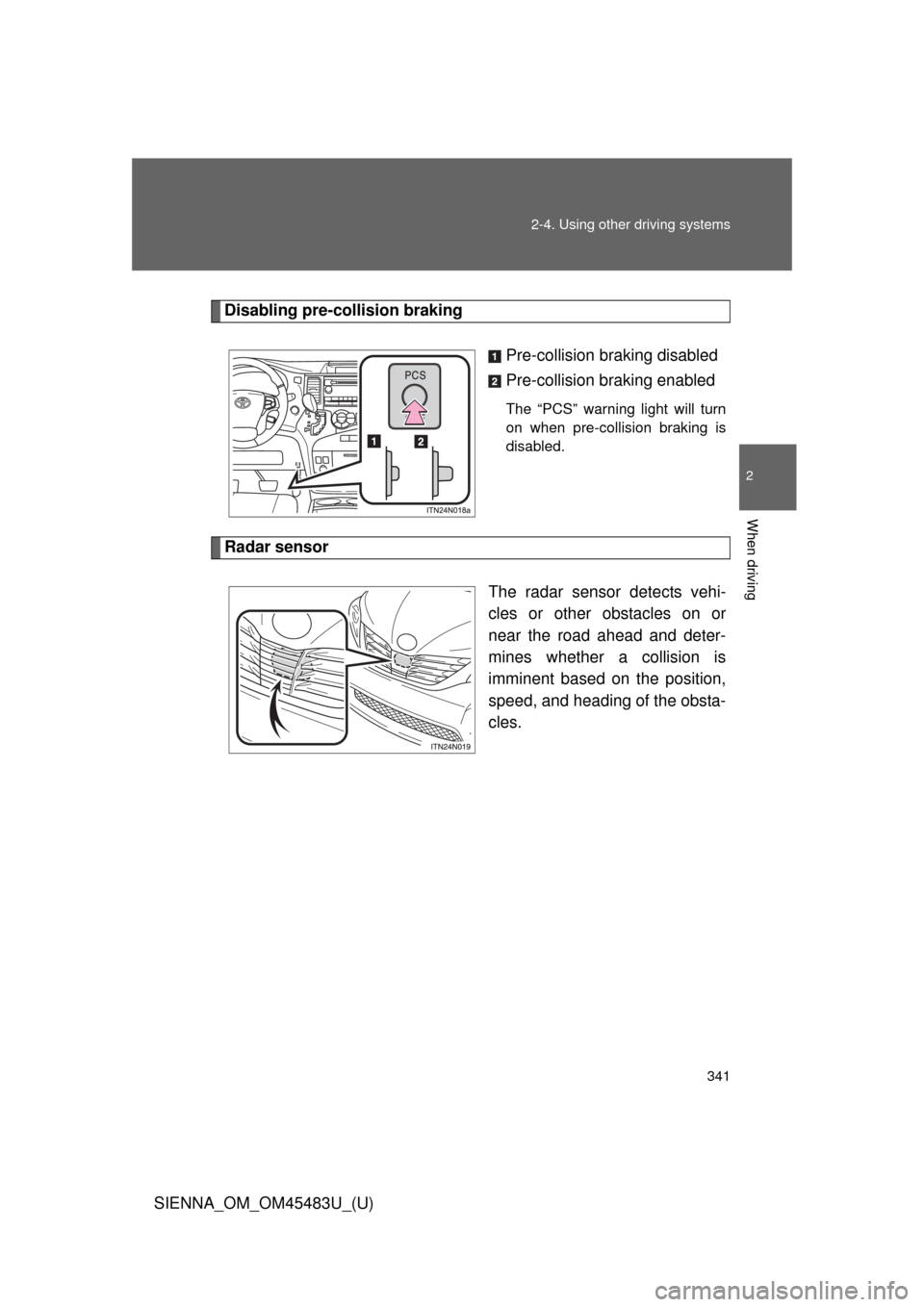
Disabling pre-collision braking
Pre-collision braking disabled
Pre-collision braking enabled
The “PCS” warning light will turn
on when pre-collision braking is
disabled.
Radar sensorThe radar sensor detects vehi-
cles or other obstacles on or
near the road ahead and deter-
mines whether a collision is
imminent based on the position,
speed, and heading of the obsta-
cles.
Page 343 of 872
343
2-4. Using other
driving systems
2
When driving
SIENNA_OM_OM45483U_(U)
■Conditions that may trigger the system even if there is no possibility of
a collision
● When there is an object by the roadside at the entrance to a curve
● When passing an oncoming vehicle on a curve
● When driving over a narrow iron bridge
● When there is a metal object on the road surface
● When driving on an uneven road surface
● When passing an oncoming vehicle on a left-turn
● When your vehicle rapidly closes on the vehicle in front
● When a grade separation/interchange, sign, billboard, or other structure
appears to be directly in the vehicle’s line of travel
● When climbing a steep hill or going down a downhill slope causes an
overhead billboard or other metallic structure to appear directly in the
vehicle’s line of travel
● When there are excessive changes in the vehicle height (when it tilts for-
wards or backwards)
● When passing through an electronic toll collection gate (only in countries
with electronic toll collection)
● When the axis of the radar is out of adjustment
● When passing through the overpass
When the system is activated in the situations described above, there is also
a possibility that the seat belts will retract quickly and the brakes will be
applied with a force greater than normal. When the seat belt is locked in the
retracted position, stop the vehicle in a safe place, release the seat belt and
refasten it.
■ Obstacles not detected
The sensor cannot detect plastic obstacles such as traffic cones. There may
also be occasions when the radar sensor cannot detect pedestrians, ani-
mals, bicycles, motorcycles, trees, or snowdrifts.
Page 344 of 872
344 2-4. Using other driving systems
SIENNA_OM_OM45483U_(U)
■Situations in which the pre-collis ion system does not function properly
The system may not function effectively in situations such as the following:
● On roads with sharp bends or uneven surfaces
● If a vehicle suddenly moves in front of your vehicle, such as at an inter-
section
● If a vehicle suddenly cuts in front of your vehicle, such as when overtak-
ing
● In inclement weather such as heavy rain, fog, snow or sand storms
● When your vehicle is skidding such as the VSC system off
● When an extreme change in vehicle height occurs
● When the axis of the radar is out of adjustment
■ Automatic cancelation of the pre-collision system
When a malfunction occurs due to sensor contamination, etc. that results in
the sensors being unable to detect obstacles, the pre-collision system will be
automatically disabled. In this case, the system will not activate even if there
is a collision possibility.
■ When there is a malfunction in the system
Warning lights and warning messages will turn on or flash. ( P. 743)
Page 347 of 872
347
2-4. Using other
driving systems
2
When driving
SIENNA_OM_OM45483U_(U)
CAUTION
■When the sensor may not be corr ectly detecting the vehicle ahead
Apply the brakes as necessary in any of the following situations.
● When water or snow thrown up by the surrounding vehicles hinders the
functioning of the sensor
● When your vehicle is pointing upwards (caused by a heavy load in the lug-
gage compartment etc.)
● Vehicles that cut in suddenly
● Vehicles with small rear ends (trailers with no load on board etc.)
● Motorcycles traveling in the same lane
■ Handling the radar sensor
Observe the following to ensure the pre-collision system can function effec-
tively:
●Keep the sensor and front grille clean at all times.
Clean the sensor and front grille with a soft cloth so you do not mark or
damage them.
● Do not subject the sensor or surrounding area to a strong impact.
If the sensor moves even slightly off position, the system may become
inaccurate or malfunction. If the sensor or surrounding area is subject to a
strong impact, always have the area inspected and adjusted by your Toy-
ota dealer.
● Do not disassemble the sensor.
● Do not attach accessories or stickers to the sensor, grille or surrounding
area.
● Do not modify or paint the sensor and grille cover.
Page 348 of 872
348
2-4. Using other driving systems
SIENNA_OM_OM45483U_(U)
BSM (Blind Spot Monitor)
: If equipped
The Blind Spot Monitor is a system that has 2 functions;
●The Blind Spot Monitor function
Assists the driver in making the decision when changing lanes
● The Rear Cross Traffic Alert function
Assists the driver when backing up
These functions use same sensors.