Page 486 of 872
486
SIENNA_OM_OM45483U_(U)
3-3. Using the Bluetooth® audio system
Bluetooth® audio system
: If equipped
The Bluetooth® audio system enables you to enjoy music played on
a portable digital audio player (portable player) from the vehicle
speakers via wireless communication.
This audio system supports Bluetooth
®, a wireless data system
capable of playing portable audio music without cables. If your por-
table player does not support Bluetooth
®, the Bluetooth® audio sys-
tem will not function.
Vehicles with a navigation system
Owners of models equipped with a navigation system should
refer to the “NAVIGATION SYSTEM OWNER’S MANUAL”.
Vehicles without a navigation system
TitlePage
Using the Bluetooth® audio systemP. 490
Operating a Bluetooth® enabled portable playerP. 496
Setting up a Bluetooth® enabled portable playerP. 498
Bluetooth® audio system setupP. 503
Page 505 of 872
505
3-4. Using the rear audio system
3
Interior features
SIENNA_OM_OM45483U_(U)
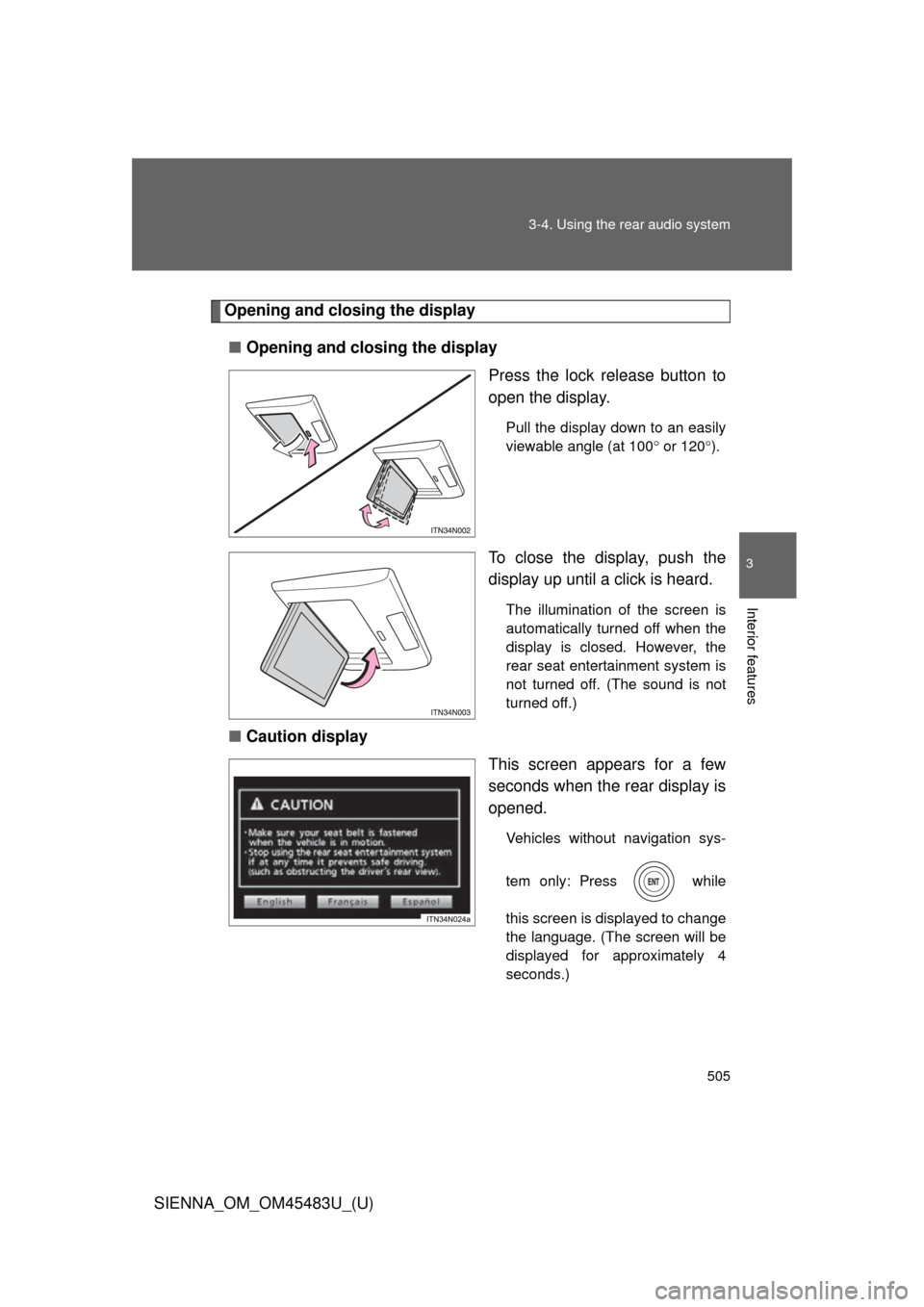
Opening and closing the display
■ Opening and closing the display
Press the lock release button to
open the display.
Pull the display down to an easily
viewable angle (at 100 or 120 ).
To close the display, push the
display up until a click is heard.
The illumination of the screen is
automatically turned off when the
display is closed. However, the
rear seat entertainment system is
not turned off. (The sound is not
turned off.)
■ Caution display
This screen appears for a few
seconds when the rear display is
opened.
Vehicles without navigation sys-
tem only: Press while
this screen is displayed to change
the language. (The screen will be
displayed for approximately 4
seconds.)
Page 508 of 872
508 3-4. Using the rear audio system
SIENNA_OM_OM45483U_(U)
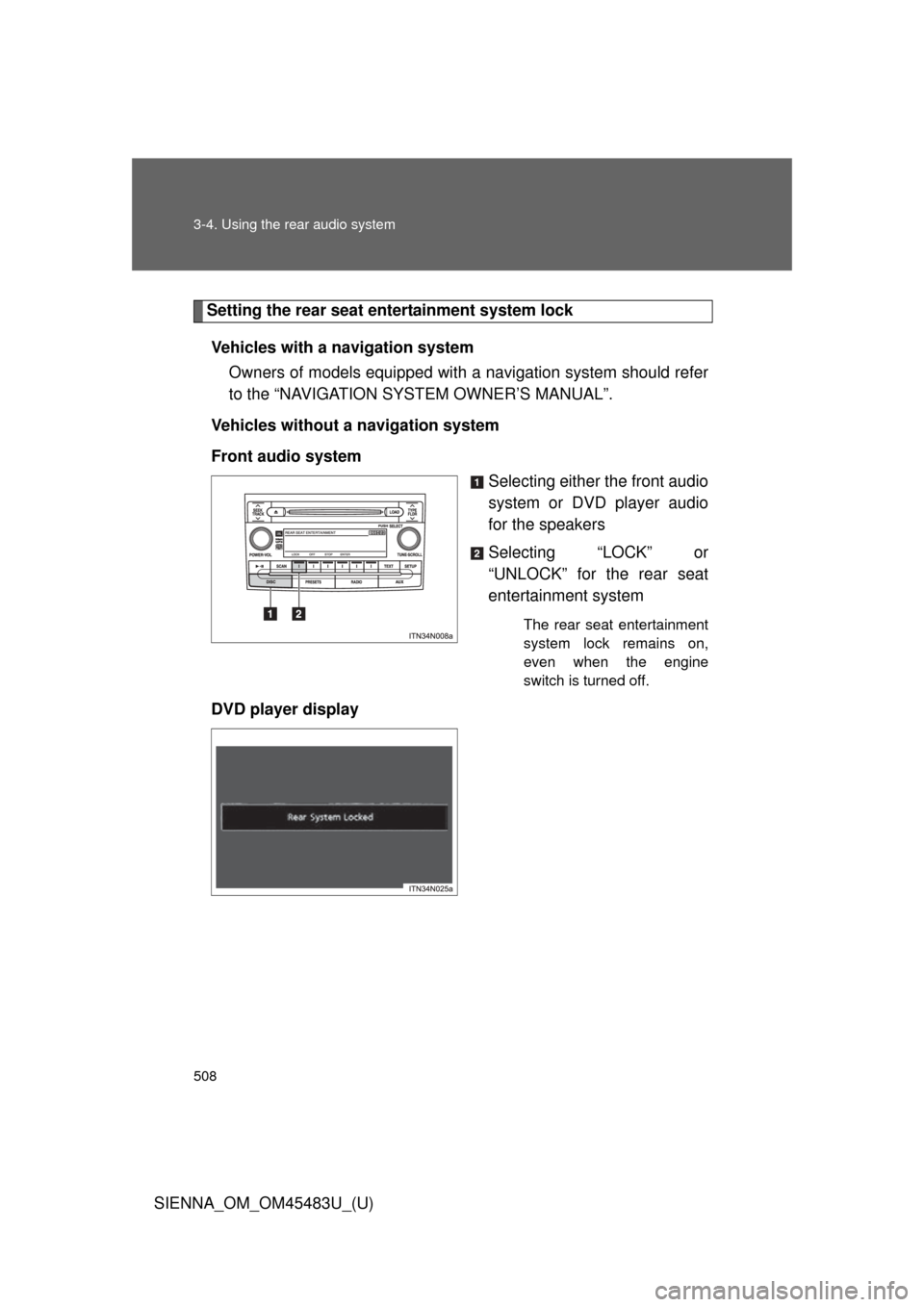
Setting the rear seat entertainment system lockVehicles with a navigation system Owners of models equipped with a navigation system should refer
to the “NAVIGATION SYSTEM OWNER’S MANUAL”.
Vehicles without a navigation system
Front audio system Selecting either the front audio
system or DVD player audio
for the speakers
Selecting “LOCK” or
“UNLOCK” for the rear seat
entertainment system
The rear seat entertainment
system lock remains on,
even when the engine
switch is turned off.
DVD player display
Page 545 of 872
545
3
Interior features
SIENNA_OM_OM45483U_(U)
3-5. Using the hands-free phone system (for cellular phone)
Hands-free phone system (for cellular phone) features
: If equipped
The hands-free system is a function th at allows you to use your cel-
lular phone without touching it.
This system supports Bluetooth
®, which allows you to make or
receive calls without using cables to connect a cellular phone to the
system, and without operati ng the cellular phone.
With navigation system
Owners of models equipped with a navigation system should refer
to the “NAVIGATION SYSTEM OWNER’S MANUAL”.
Without navigation system
■ Hands-free system quick guide
Setting a cellular phone. ( P. 550)
Adding an entry to the phonebook (Up to 20 names can be
stored). ( P. 574)
Dialing by inputting a name. ( P. 560)
STEP1
STEP2
STEP3
Page 719 of 872
719
4-3. Do-it-yourself maintenance
4
Maintenance and care
SIENNA_OM_OM45483U_(U)
■
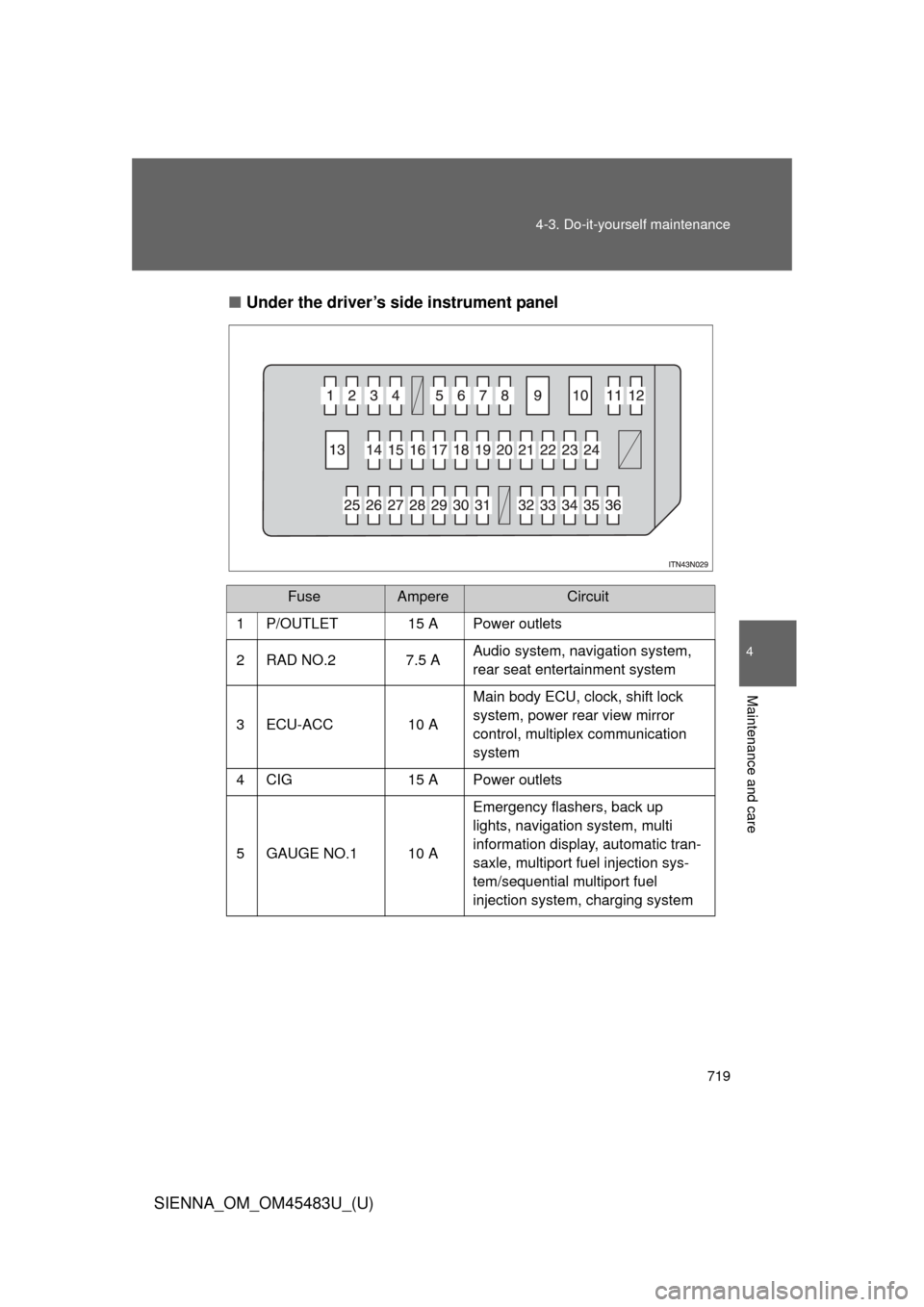
Under the driver’s side instrument panel
FuseAmpereCircuit
1P/OUTLET15 APower outlets
2 RAD NO.2 7.5 A Audio system, navigation system,
rear seat entertainment system
3 ECU-ACC 10 A Main body ECU, clock, shift lock
system, power rear view mirror
control, multiplex communication
system
4 CIG 15 A Power outlets
5 GAUGE NO.1 10 A Emergency flashers, back up
lights, navigation system, multi
information display, automatic tran-
saxle, multiport fuel injection sys-
tem/sequential multiport fuel
injection system, charging system
Page 720 of 872

720 4-3. Do-it-yourself maintenance
SIENNA_OM_OM45483U_(U)
FuseAmpereCircuit
6 ECU-IG NO.1 10 A Multiplex communication system,
stop lights, navigation system,
vehicle stability control system,
Active Torque Control 4WD, intui-
tive parking assist, auto anti-glare
inside rear view mirror, pre-collision
seat belt, outside rear view mirror,
seat heater, TPMS, yaw rate & G
sensor, steering angle sensor,
AUTO ACCESS SEAT, main body
ECU, Blind Spot Monitor
7 P/W RL 20 A Rear power windows (left-side)
8 D/L 15 A Power door lock system
9 P/SEAT FR 30 A Power front seat (right-side)
10 S/ROOF 30 A Moon roof 11 P/W RR 20 A Rear power windows (right-side)
12 P/W FR 20 A Front power windows (right-side)
13 P/SEAT FL 30 A Power front seat (left-side), driving
position memory system
14 STOP 10 A Stop lights, ABS, vehicle stability
control system, rear combination
light, high mounted stop light, auto-
matic transaxle, shift lock system,
multiplex communication system,
power third seat switch, multiport
fuel injection system/sequential
multiport fuel injection system,
trailer lights (stop lights)
15 P/W FL 20 A Front power windows (left-side)
Page 721 of 872
721
4-3. Do-it-yourself maintenance
4
Maintenance and care
SIENNA_OM_OM45483U_(U)
FuseAmpereCircuit
16 PSD LH 25 A Power sliding door (left-side)
17 4WD 7.5 A Active Torque Control 4WD
18 AM1 10 A Starting system
19 GAUGE NO.2 7.5 A Gauges and meters, multi informa-
tion display
20 IG2 7.5 AAutomatic transaxle, multiport fuel
injection system/sequential multi-
port fuel injection system, SRS air-
bag system, front passenger
occupant classification system,
steering lock system, smart key
system, starting system, fuel pump
21 PANEL 10 AAir conditioning system, navigation
system, front passenger’s seat belt
reminder light, audio system, steer-
ing switch, intuitive parking assist
switch, personal/interior light main
switch, shift lever light, headlight
leveling switch, power door lock
main switch, clock, power quarter
window switch, seat heater switch,
emergency flashers, rear window
defogger switch, vehicle stability
control off switch, console box light,
power slide switch light
Page 771 of 872
5
When trouble arises
771
5-2. Steps to take in an emergency
SIENNA_OM_OM45483U_(U)
CAUTION
■When using the compact spare tire
●Remember that the compact spare
tire provided is specifically
designed for use with your vehicle. Do not use your compact spare tire
on another vehicle.
●Do not use more than one compact spare tire simultaneously.
●Replace the compact spare tire with a standard tire as soon as possi-
ble.
●Avoid sudden acceleration, deceleration and braking, as well as sharp
cornering.
■When storing the compact spare tire
Be careful not to catch fingers or other body parts between the compact
spare tire and the body of the vehicle.
■When the compact spare tire is attached
The vehicle speed may not be correctly detected, and the following sys-
tems may not operate correctly:
●ABS & Brake assist
●Enhanced VSC
●TRAC
●Dynamic radar cruise control (if equipped)
●Cruise control (if equipped)
●PCS (if equipped)
●Navigation system (if equipped)
Also, not only can the following sys tem not be utilized fully, but it may
even negatively affect the drive-train components:
●AWD system (if equipped)