2014 TOYOTA RAV4 ABS
[x] Cancel search: ABSPage 76 of 732

761-2. Theft deterrent system
RAV4_OM_OM42A04U_(U)
Engine immobilizer system
Vehicles without a smart key
system
The indicator light flashes after
the key has been removed from
the engine switch to indicate that
the system is operating.
The indicator light stops flashing
after the registered key has been
inserted into the engine switch to
indicate that the system has been
canceled.
Vehicles with a smart key system
The indicator light flashes after the engine switch has been turned off
to indicate that the system is operating.
The indicator light stops flashing after the engine switch has been
turned to ACCESSORY or IGNITION ON mode to indicate that the
system has been canceled.
■ System maintenance
The vehicle has a maintenance-free type engine immobilizer system.
■ Conditions that may cause the system to malfunction
●If the grip portion of the key is in contact with a metallic object
● If the key is in close proximity to or touching a key to the security system
(key with a built-in transponder chip) of another vehicle
The vehicle’s keys have built-in transponder chips that prevent
the engine from starting if a key has not been previously regis-
tered in the vehicle’s on-board computer.
Never leave the keys inside the vehicle when you leave the vehi-
cle.
This system is designed to help prevent vehicle theft but does
not guarantee absolute security against all vehicle thefts.
Page 81 of 732
RAV4_OM_OM42A04U_(U)
812. Instrument cluster
2
Instrument cluster
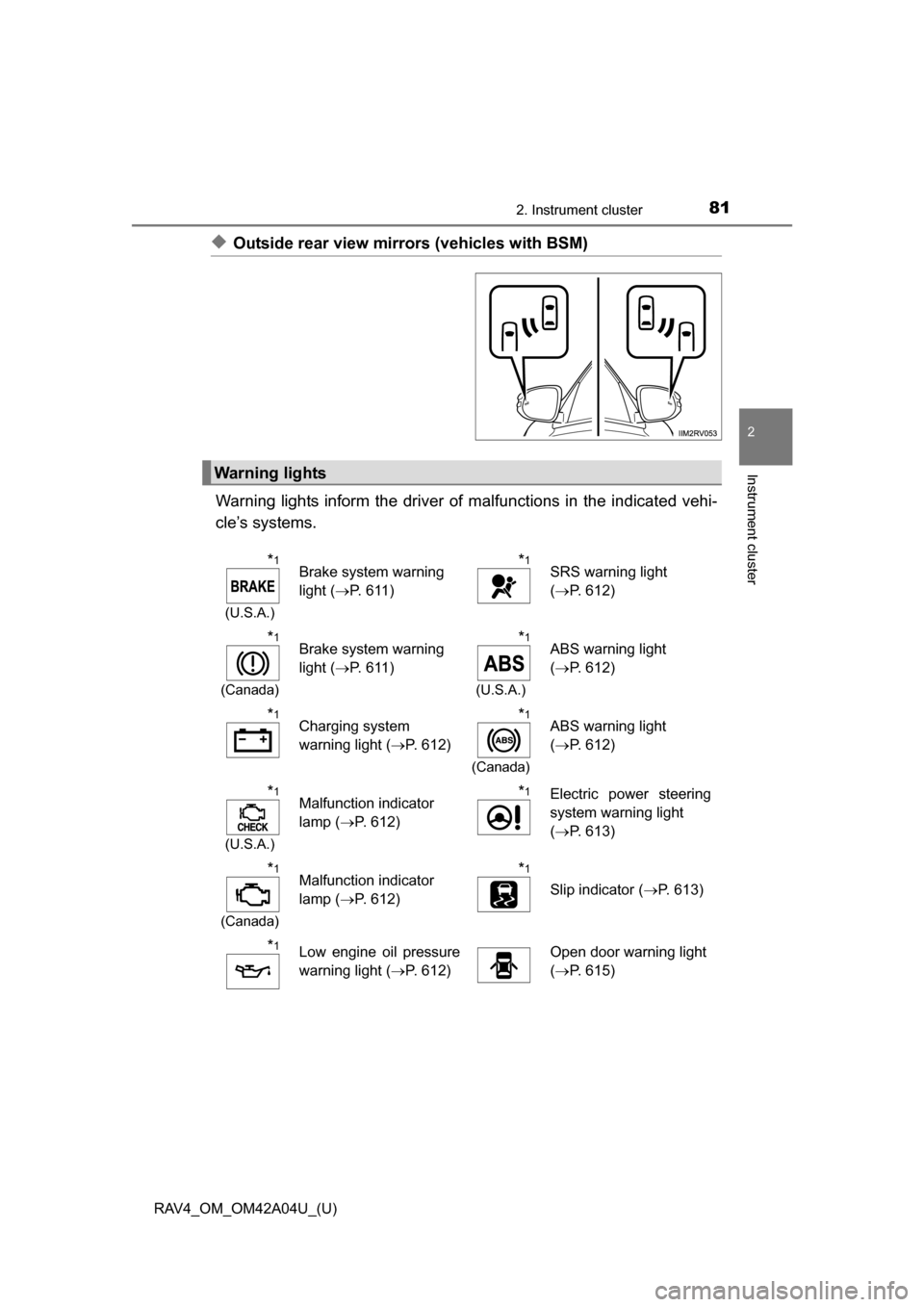
◆Outside rear view mirrors (vehicles with BSM)
Warning lights inform the driver of malfunctions in the indicated vehi-
cle’s systems.
Warning lights
*1
(U.S.A.)
Brake system warning
light ( P. 611)*1SRS warning light
(P. 612)
*1
(Canada)
Brake system warning
light ( P. 611)*1
(U.S.A.)
ABS warning light
(P. 612)
*1Charging system
warning light ( P. 612)*1
(Canada)
ABS warning light
(P. 612)
*1
(U.S.A.)
Malfunction indicator
lamp ( P. 612)*1Electric power steering
system warning light
(P. 613)
*1
(Canada)
Malfunction indicator
lamp ( P. 612)*1
Slip indicator ( P. 613)
*1Low engine oil pressure
warning light (P. 612)Open door warning light
(P. 615)
Page 84 of 732

84
RAV4_OM_OM42A04U_(U)
2. Instrument cluster
*1: These lights turn on when the engine switch is turned to the “ON” position(vehicles without a smart key system) or IGNITION ON mode (vehicles with
a smart key system), to indicate that a system check is being performed.
They will turn off after the engine is started, or after a few seconds. There
may be a malfunction in a system if the lights do not come on, or turn off.
Have the vehicle inspected by your Toyota dealer.
*2: The light flashes to indicate that the system is operating.
*3: In order to confirm operation, the BS M outside rear view mirror indicators
illuminate in the following situations:
• When the engine switch is turned to the “ON” position (vehicles without a smart key system) or IGNITION ON mode (vehicles with a smart key sys-
tem) while the BSM main switch is set to ON.
• When the BSM main switch is set to ON while the engine switch is in the “ON” position (vehicles without a smart key system) or IGNITION ON
mode (vehicles with a smart key system).
If the system is functioning correctly, the BSM outside rear view mirror indi-
cators will turn off after a few seconds.
If the BSM outside rear view mirror indicators do not illuminate or do not
turn off, there may be a malfunction with the system. If this occurs, have the
vehicle inspected by your Toyota dealer.
CAUTION
■ If a safety system warning light does not come on
Should a safety system light such as the ABS and SRS warning light not
come on when you start the engine, this could mean that these systems are
not available to help protect you in an accident, which could result in death
or serious injury. Have the vehicle inspected by your Toyota dealer immedi-
ately if this occurs.
NOTICE
■To prevent damage to the engine and its components
The engine may be overheating if the high engine coolant temperature
warning light flashes or turns on. In this case, immediately stop the vehicle
in a safe place, and check the engine after it has cooled completely.
(P. 653)
Page 190 of 732
![TOYOTA RAV4 2014 XA40 / 4.G Owners Manual 190
RAV4_OM_OM42A04U_(U)
4-1. Before driving
●Due to the added load of the trailer, your vehicle’s engine may over-
heat on hot days (at temperatures over 85 F [30C]) when driving
up a long](/manual-img/14/6705/w960_6705-189.png "TOYOTA RAV4 2014 XA40 / 4.G Owners Manual 190
RAV4_OM_OM42A04U_(U)
4-1. Before driving
●Due to the added load of the trailer, your vehicle’s engine may over-
heat on hot days (at temperatures over 85 F [30C]) when driving
up a long")
190
RAV4_OM_OM42A04U_(U)
4-1. Before driving
●Due to the added load of the trailer, your vehicle’s engine may over-
heat on hot days (at temperatures over 85 F [30C]) when driving
up a long or steep grade. If t he engine coolant temperature gauge
indicates overheating, immediately turn off the air conditioning (if in
use), pull your vehicle off the road and stop in a safe spot.
( P. 653)
● Always place wheel blocks under both the vehicle’s and the trailer’s
wheels when parking. Apply the pa rking brake firmly, and put the
transmission in P. Avoid parking on a slope, but if unavoidable, do
so only after performing the following:
Apply the brakes and keep them applied.
Have someone place wheel blocks under both the vehicle’s and
trailer’s wheels.
When the wheel blocks are in pl ace, release the brakes slowly
until the blocks absorb the load.
Apply the parking brake firmly.
Shift into P and turn off the engine.
● When restarting after parking on a slope:
With the transmission in P, start the engine. Be sure to keep the
brake pedal pressed.
Shift into a forward gear. If reversing, shift into R.
Release the parking brake and brake pedal, and slowly pull or
back away from the wheel blocks. Stop and apply the brakes.
Have someone retrieve the blocks.
1
2
3
4
5
1
2
3
4
Page 257 of 732

RAV4_OM_OM42A04U_(U)
2574-5. Using the driving support systems
4
Driving
●The shape of the obstacle may prevent a sensor from detecting it. Pay par-
ticular attention to the following obstacles:
• Wires, fences, ropes, etc.
• Cotton, snow and other materials that absorb sound waves
• Sharply-angled objects
• Low obstacles
• Tall obstacles with upper sections projecting outwards in the direction of
your vehicle
● The following situations may occur during use:
• Depending on the shape of the obstacle and other factors, the detection
distance may shorten, or detection may be impossible.
• Obstacles may not be detected if they are too close to the sensor.
• There will be a short delay between obstacle detection and indicator. Even at slow speeds, there is a possibility that the obstacle will come
within the sensor’s detection areas before the indicator comes on and the
warning beep sounds.
• Thin posts or objects lower than the sensor may not be detected for colli- sion when approached, even if they have been detected once.
• It might be difficult to hear beeps due to the volume of audio system or air flow noise of air conditioning system.
■ When the system malfunctions
●The indicator for the malfunctioning sensor turns on and the vehicle indica-
tor turns off while the buzzer sounds for approximately 7 seconds.
If the corner and center indicators turn on and remain on after that, first
check the status of the sensor. If the indicators stay on even though there is
no mud, ice or snow on the sensor, the sensor may be malfunctioning. Have
the vehicle inspected by your Toyota dealer.
● The indicator for the malfunctioning sensor flashes and the vehicle indicator
turns off while the buzzer sounds for approximately 7 seconds.
If the corner and center indicators flash after that, the sensor may be mal-
functioning. Have the vehicle inspected by your Toyota dealer.
■ Certification (Canada only)
This ISM device complies with Canadian ICES-001.
Page 270 of 732

270
RAV4_OM_OM42A04U_(U)
4-5. Using the driving support systems
All-wheel drive lock switch (AWD models)
Press the switch.
The torque of the engine is distrib-
uted to the rear wheels to the max-
imum extent possible in
accordance with driving conditions.
Pressing the switch again cancels
all-wheel drive lock mode and
returns the Dynamic Torque Con-
trol AWD system to normal mode.
( P. 272)
■All-wheel drive lock mode can be operated when
Vehicles without a smart key system
The engine switch is in the “ON” position.
Vehicles with a smart key system
The engine switch is in IGNITION ON mode.
■ All-wheel drive lock mode
●All-wheel drive lock mode is canceled when the brakes are applied to
ensure the ABS and VSC systems operate effectively.
● All-wheel drive lock mode is cancel ed when the vehicle speed exceeds 25
mph (40 km/h).
All-wheel drive lock mode can be used when a large amount of
drive power needs to be applied to all the wheels, such as when
the vehicle gets stuck in mud and you need to free it.
Page 271 of 732
271
RAV4_OM_OM42A04U_(U)
4-5. Using the driving support systems
4
Driving
Driving assist systems
◆ABS (Anti-lock Brake System)
Helps to prevent wheel lock when the brakes are applied suddenly,
or if the brakes are applied while driving on a slippery road surface
◆Brake assist
Generates an increased level of braking force after the brake pedal
is depressed when the system detects a panic stop situation
◆VSC (Vehicle Stability Control)
Helps the driver to control skidding when swerving suddenly or
turning on slippery road surfaces
◆TRAC (Traction Control)
Helps to maintain drive power and prevent the drive wheels from
spinning when starting the vehicle or accelerating on slippery roads
To help enhance driving safety and performance, the following
systems operate automatically in response to various driving
situations. Be aware, however, that these systems are supple-
mentary and should not be relied upon too heavily when operat-
ing the vehicle.
Page 274 of 732

274
RAV4_OM_OM42A04U_(U)
4-5. Using the driving support systems
■Turning off both TRAC/VSC systems
To turn the TRAC/VSC systems off, press and hold for more than 3 sec-
onds while the vehicle is stopped.
2WD models:
The VSC OFF indicator light will come on.
AWD models:
The “TRAC OFF” and VSC OFF in dicator lights will come on.
Press again to turn the systems back on.
■ When the “AUTO LSD” indicator light flashes even if the VSC OFF
switch has not been pressed (2WD models)
TRAC and AUTO LSD cannot be operated. Contact your Toyota dealer.
■ When the “TRAC OFF” indicator light comes on even if the VSC OFF
switch has not been pressed (AWD models)
TRAC cannot be operated. Contact your Toyota dealer.
■ Sounds and vibrations caused by the ABS, brake assist, VSC and TRAC
systems
● A sound may be heard from the engine compartment when the brake pedal
is depressed repeatedly, when the engine is started or just after the vehicle
begins to move. This sound does not indicate that a malfunction has
occurred in any of these systems.
● Any of the following conditions may occur when the above systems are
operating. None of these indicates that a malfunction has occurred.
• Vibrations may be felt through the vehicle body and steering.
• A motor sound may be heard after the vehicle comes to a stop.
• The brake pedal may pulsate slightly after the ABS is activated.
• The brake pedal may move down slightly after the ABS is activated.
■ EPS operation sound
When the steering wheel is operated, a motor sound (whirring sound) may be
heard. This does not indicate a malfunction.
■ Automatic reactivation of TRAC and VSC systems
After turning the TRAC and VSC systems off, the systems will be automati-
cally re-enabled in the following situations:
● When the engine switch is turned to the “LOCK” position (vehicles without a
smart key system) or off (vehicles with a smart key system).
● If only the TRAC system is turned off, the TRAC will turn on when vehicle
speed increases
If both the TRAC and VSC systems are turned off, automatic re-enabling will
not occur when vehicle speed increases.